driver TOYOTA PRIUS 2023 User Guide
[x] Cancel search | Manufacturer: TOYOTA, Model Year: 2023, Model line: PRIUS, Model: TOYOTA PRIUS 2023Pages: 770, PDF Size: 122.55 MB
Page 94 of 770
921-5. Theft deterrent system
PRIUS_OM_OM47F32E_(EE)
Double locking system
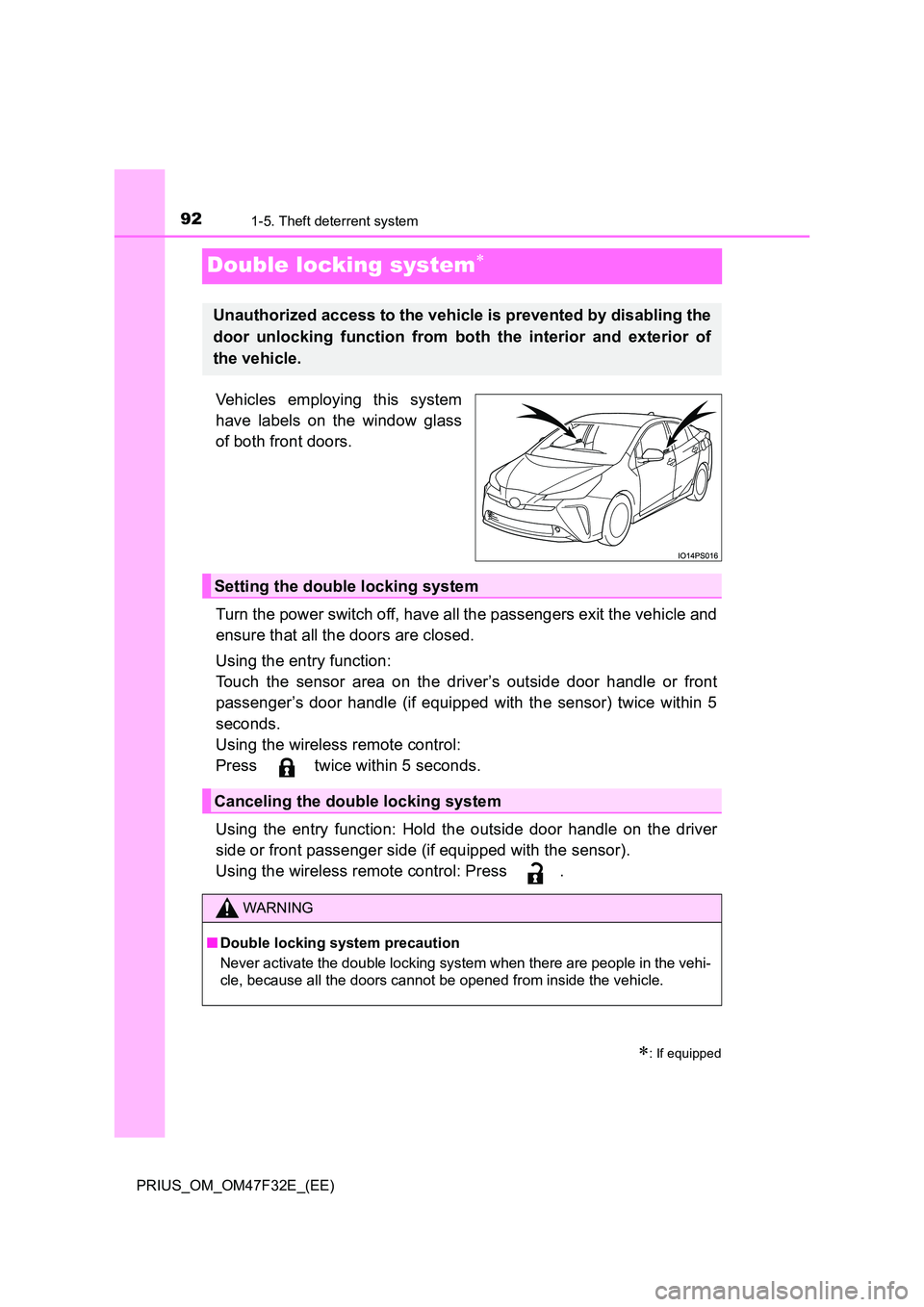
Vehicles employing this system
have labels on the window glass
of both front doors.
Turn the power switch off, have all the passengers exit the vehicle and
ensure that all the doors are closed.
Using the entry function:
Touch the sensor area on the driver’s outside door handle or front
passenger’s door handle (if equipped with the sensor) twice within 5
seconds.
Using the wireless remote control:
Press twice within 5 seconds.
Using the entry function: Hold the outside door handle on the driver
side or front passenger side (if equipped with the sensor).
Using the wireless remote control: Press .
: If equipped
Unauthorized access to the vehicle is prevented by disabling the
door unlocking function from both the interior and exterior of
the vehicle.
Setting the double locking system
Canceling the double locking system
WARNING
■ Double locking system precaution
Never activate the double locking system when there are people in the vehi-
cle, because all the doors cannot be opened from inside the vehicle.
Page 100 of 770
981-5. Theft deterrent system
PRIUS_OM_OM47F32E_(EE)
● The vehicle is inside an automatic or high-pressure car wash.
● The vehicle experiences impacts, such as hail, lightning strikes, and other
kinds of repeated impacts or vibrations.
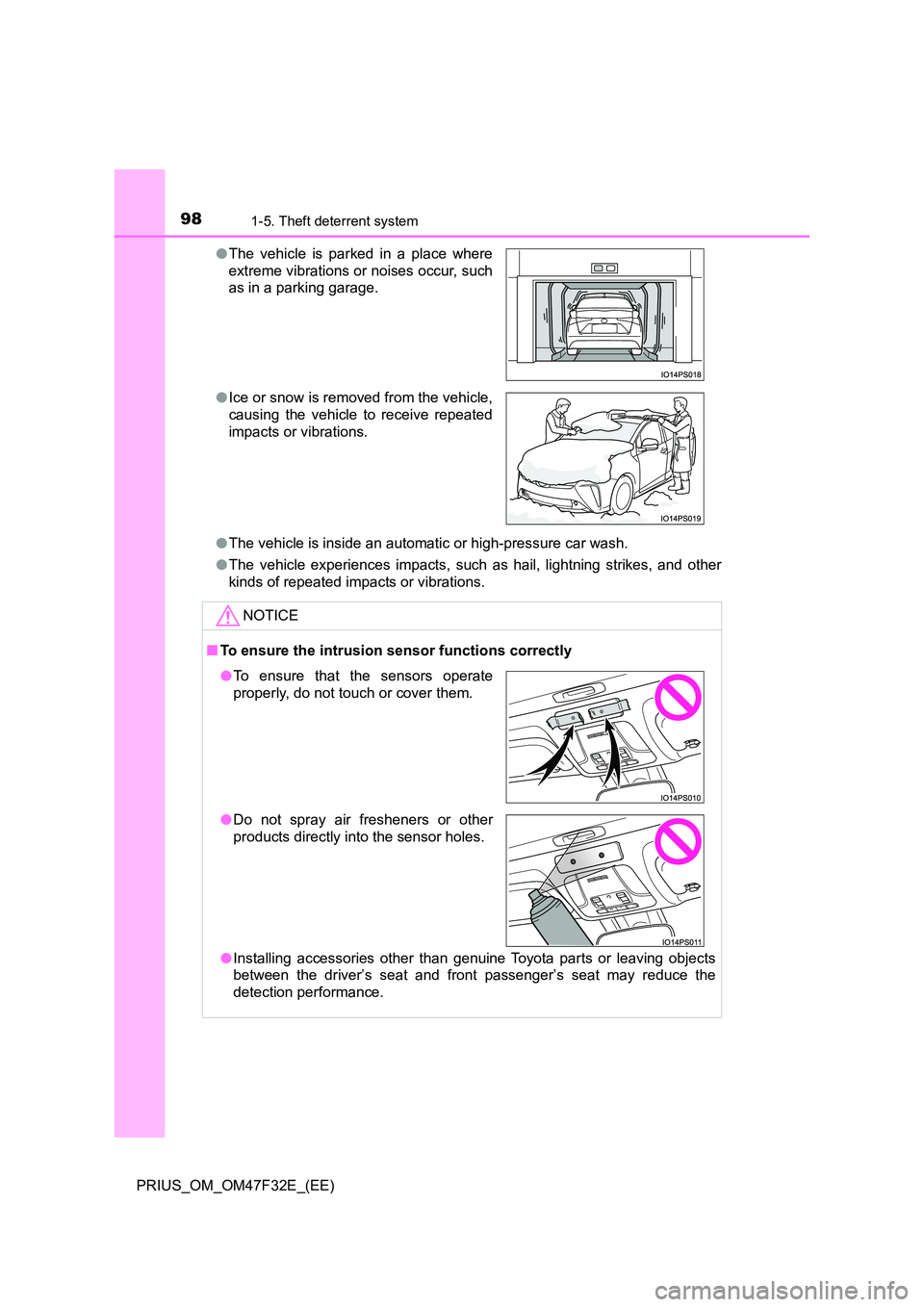
● The vehicle is parked in a place where
extreme vibrations or noises occur, such
as in a parking garage.
● Ice or snow is removed from the vehicle,
causing the vehicle to receive repeated
impacts or vibrations.
NOTICE
■ To ensure the intrusion sensor functions correctly
● Installing accessories other than genuine Toyota parts or leaving objects
between the driver’s seat and front passenger’s seat may reduce the
detection performance.
● To ensure that the sensors operate
properly, do not touch or cover them.
● Do not spray air fresheners or other
products directly into the sensor holes.
Page 112 of 770
1102. Instrument cluster
PRIUS_OM_OM47F32E_(EE)
War ning lights and indicators
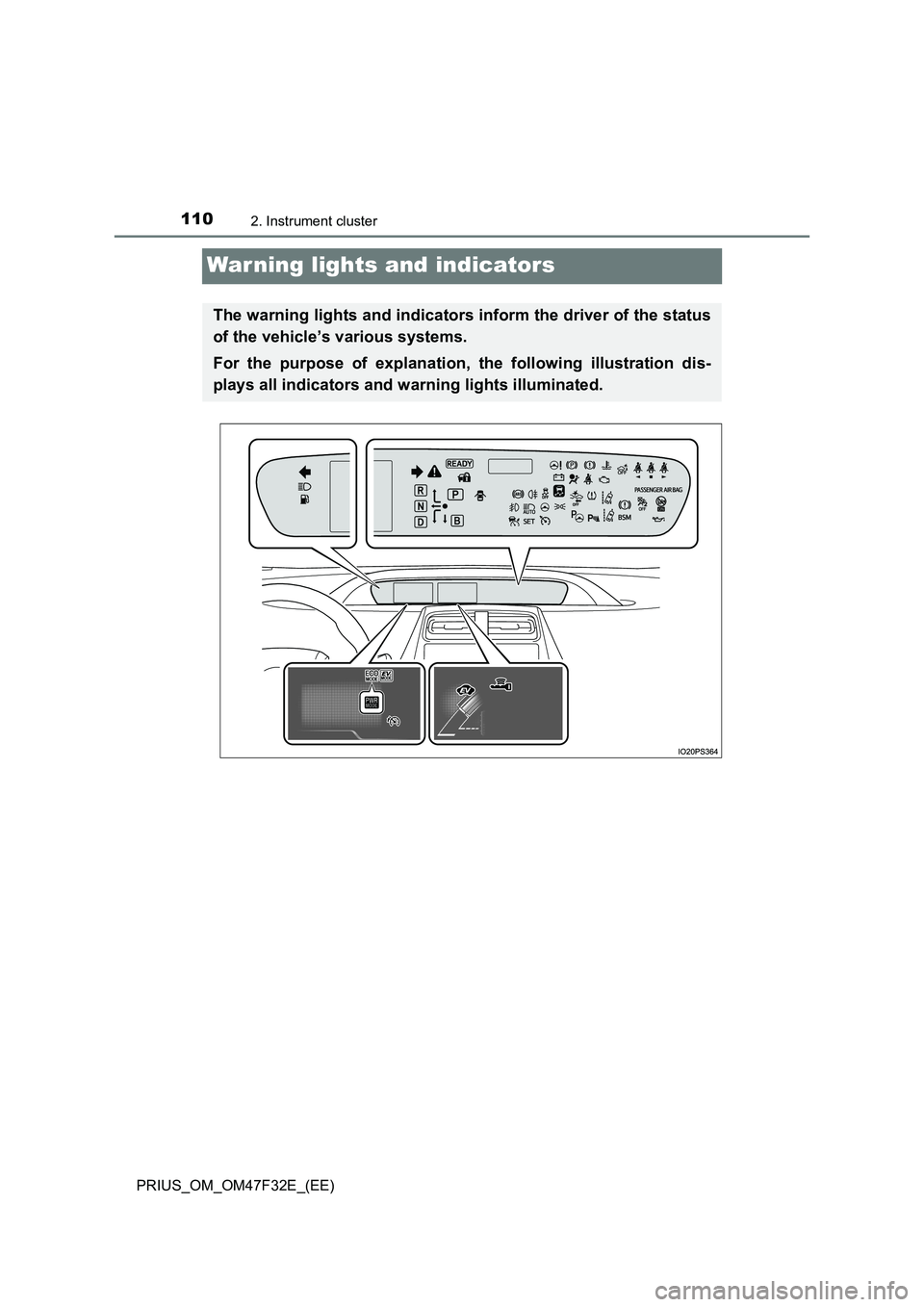
The warning lights and indicators inform the driver of the status
of the vehicle’s various systems.
For the purpose of explanation, the following illustration dis-
plays all indicators and warning lights illuminated.
Page 113 of 770
1112. Instrument cluster
2
Instrument cluster
PRIUS_OM_OM47F32E_(EE)
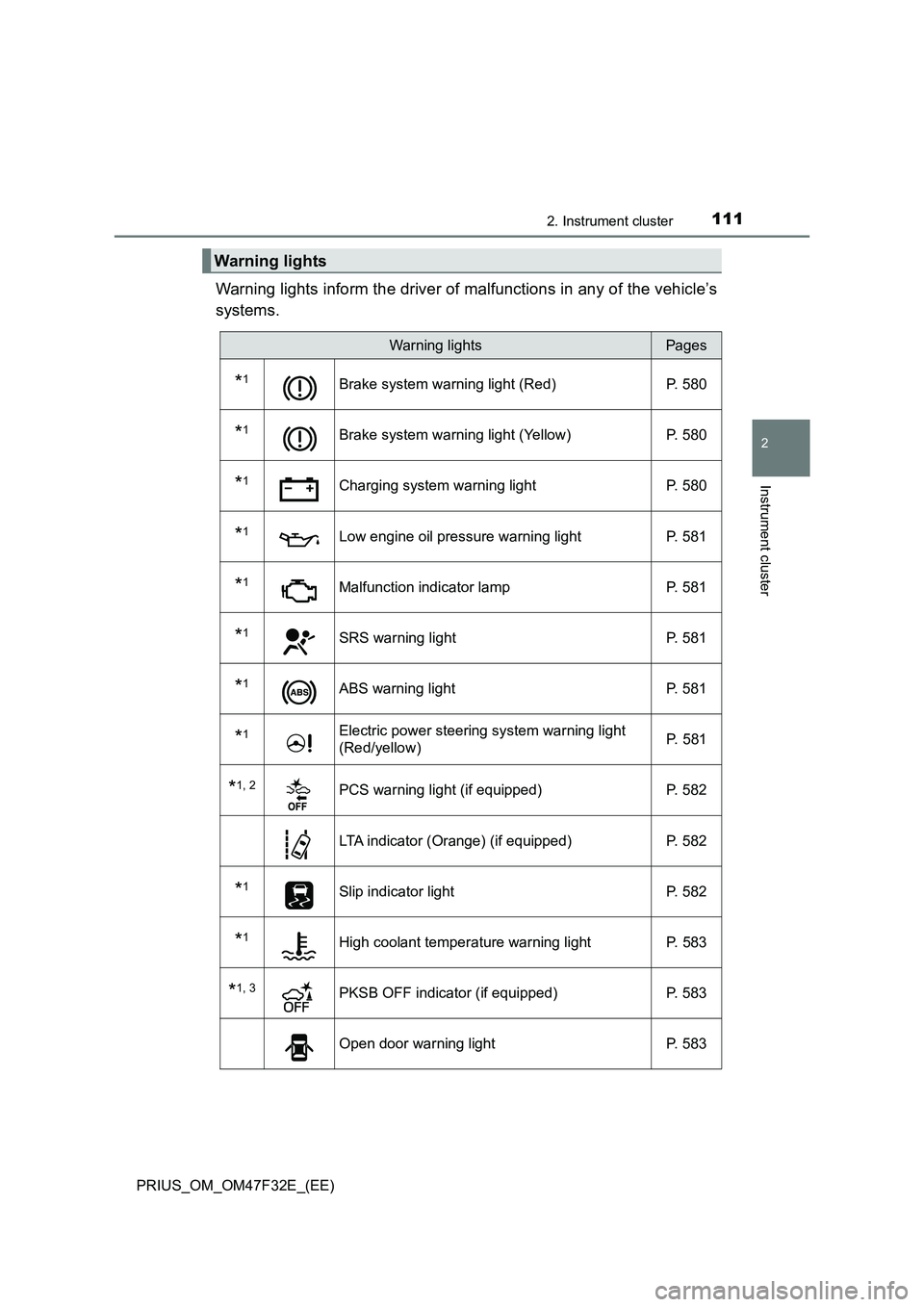
Warning lights inform the driver of malfunctions in any of the vehicle’s
systems.
Warning lights
Warning lightsPages
*1Brake system warning light (Red) P. 580
*1Brake system warning light (Yellow) P. 580
*1Charging system warning light P. 580
*1Low engine oil pressure warning light P. 581
*1Malfunction indicator lamp P. 581
*1SRS warning light P. 581
*1ABS warning light P. 581
*1Electric power steering system warning light
(Red/yellow) P. 581
*1, 2PCS warning light (if equipped) P. 582
LTA indicator (Orange) (if equipped) P. 582
*1Slip indicator light P. 582
*1High coolant temperature warning light P. 583
*1, 3PKSB OFF indicator (if equipped) P. 583
Open door warning light P. 583
Page 114 of 770
1122. Instrument cluster
PRIUS_OM_OM47F32E_(EE)
*1: These lights turn on when the power switch is turned to ON mode to indi-
cate that a system check is being performed. They will turn off after the
hybrid system is on, or after a few seconds. There may be a malfunction in
a system if a light does not come on, or turn off. Have the vehicle
inspected by any authorized Toyota retailer or Toyota authorized repairer,
or any reliable repairer.
*2: The light flashes or illuminates to indicate a malfunction.
*3: The light flashes to indicate a malfunction.
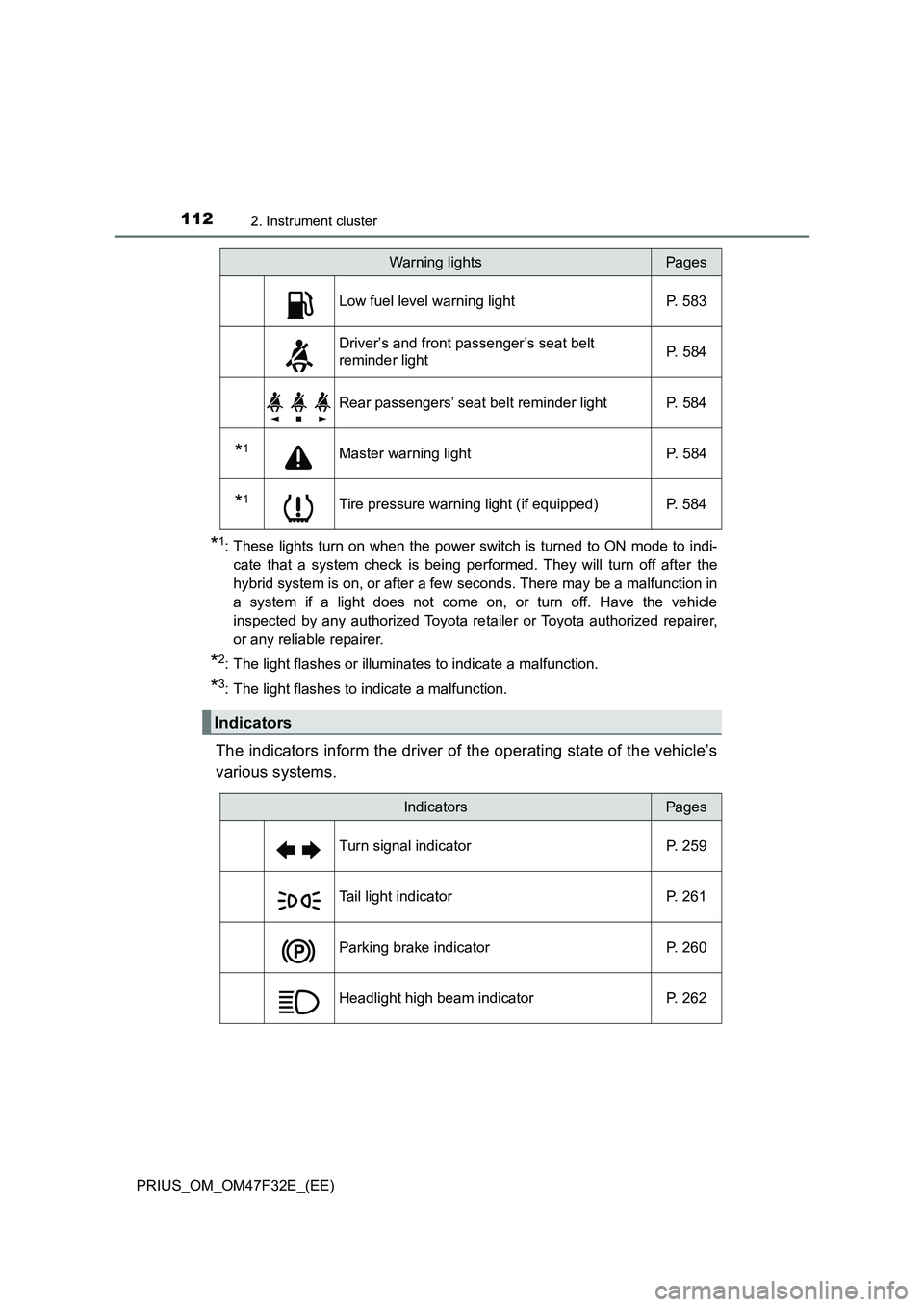
The indicators inform the driver of the operating state of the vehicle’s
various systems.
Low fuel level warning light P. 583
Driver’s and front passenger’s seat belt
reminder lightP. 584
Rear passengers’ seat belt reminder light P. 584
*1Master warning light P. 584
*1Tire pressure warning light (if equipped) P. 584
Indicators
Warning lightsPages
IndicatorsPages
Turn signal indicator P. 259
Tail light indicator P. 261
Parking brake indicator P. 260
Headlight high beam indicator P. 262
Page 151 of 770
1492. Instrument cluster
2
Instrument cluster
PRIUS_OM_OM47F32E_(EE)
*1: “LO” is displayed if the temperature is adjusted to the lowest setting, and
“HI” is displayed if the temperature is adjusted to the highest setting.
*2: The selectable modes differ depending on whether a passenger is present.
(P. 461)
■
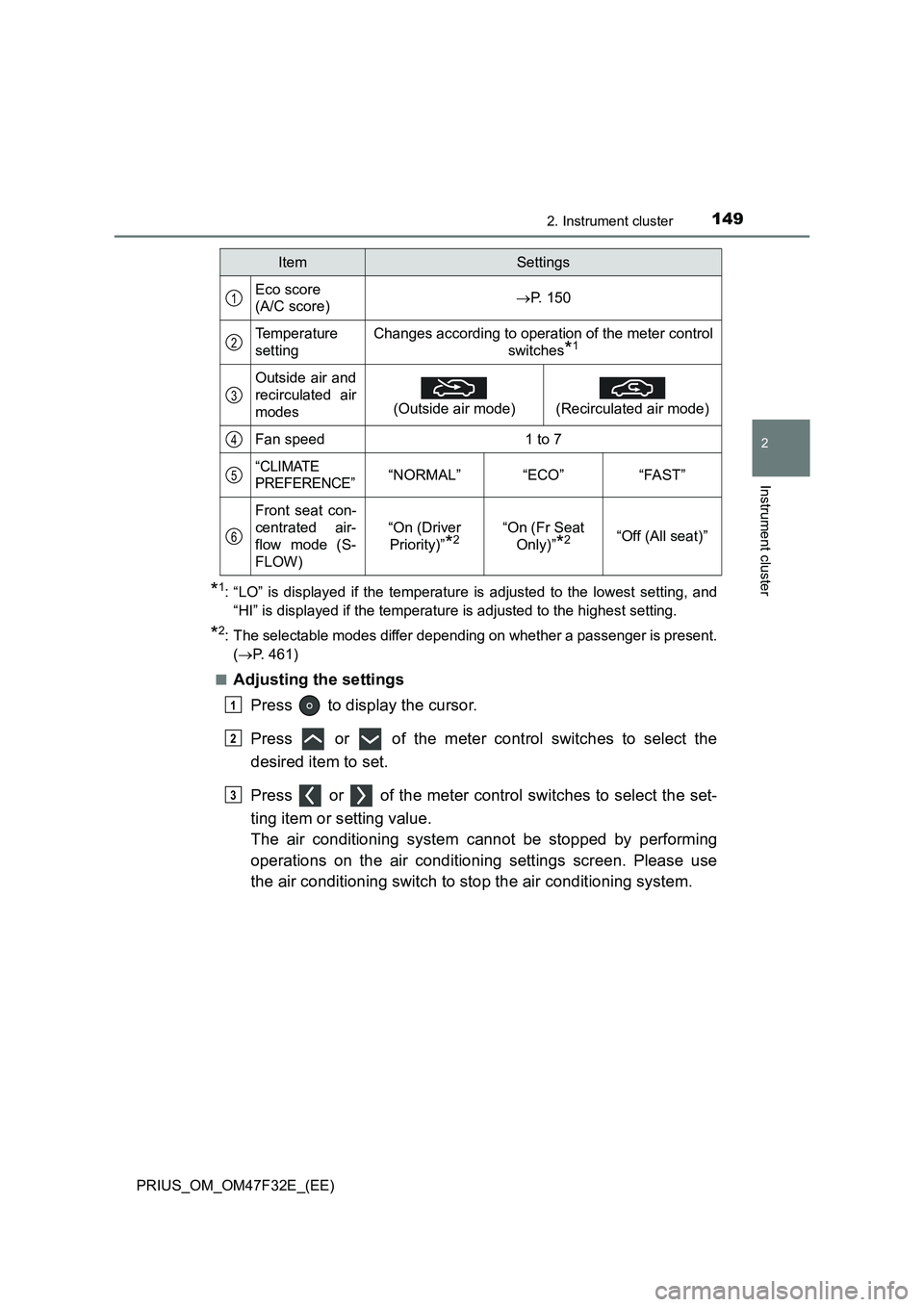
Adjusting the settings
Press to display the cursor.
Press or of the meter control switches to select the
desired item to set.
Press or of the meter control switches to select the set-
ting item or setting value.
The air conditioning system cannot be stopped by performing
operations on the air conditioning settings screen. Please use
the air conditioning switch to stop the air conditioning system.
ItemSettings
Eco score
(A/C score)P. 150
Temperature
settingChanges according to operation of the meter control
switches
*1
Outside air and
recirculated air
modes
(Outside air mode)
(Recirculated air mode)
Fan speed1 to 7
“CLIMATE
PREFERENCE”“NORMAL”“ECO”“FAST”
Front seat con-
centrated air-
flow mode (S-
FLOW)
“On (Driver
Priority)”
*2“On (Fr Seat
Only)”
*2“Off (All seat)”
1
2
3
4
5
6
1
2
3
Page 162 of 770
1602. Instrument cluster
PRIUS_OM_OM47F32E_(EE)
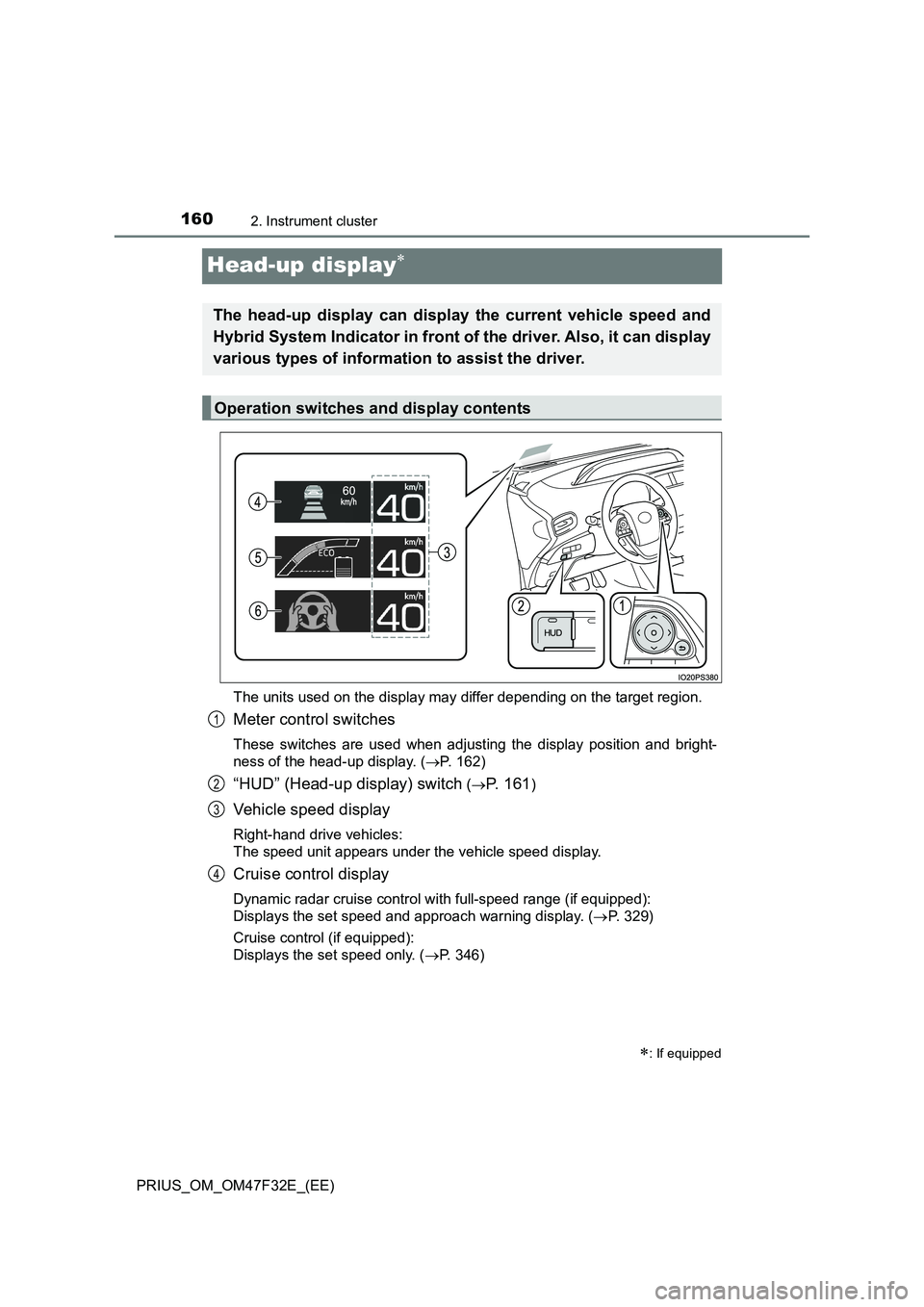
Head-up display
The units used on the display may differ depending on the target region.
Meter control switches
These switches are used when adjusting the display position and bright-
ness of the head-up display. (P. 162)
“HUD” (Head-up display) switch (P. 161)
Vehicle speed display
Right-hand drive vehicles:
The speed unit appears under the vehicle speed display.
Cruise control display
Dynamic radar cruise control with full-speed range (if equipped):
Displays the set speed and approach warning display. (P. 329)
Cruise control (if equipped):
Displays the set speed only. (P. 346)
: If equipped
The head-up display can display the current vehicle speed and
Hybrid System Indicator in front of the driver. Also, it can display
various types of information to assist the driver.
Operation switches and display contents
1
2
3
4
Page 165 of 770
1632. Instrument cluster
2
Instrument cluster
PRIUS_OM_OM47F32E_(EE)■
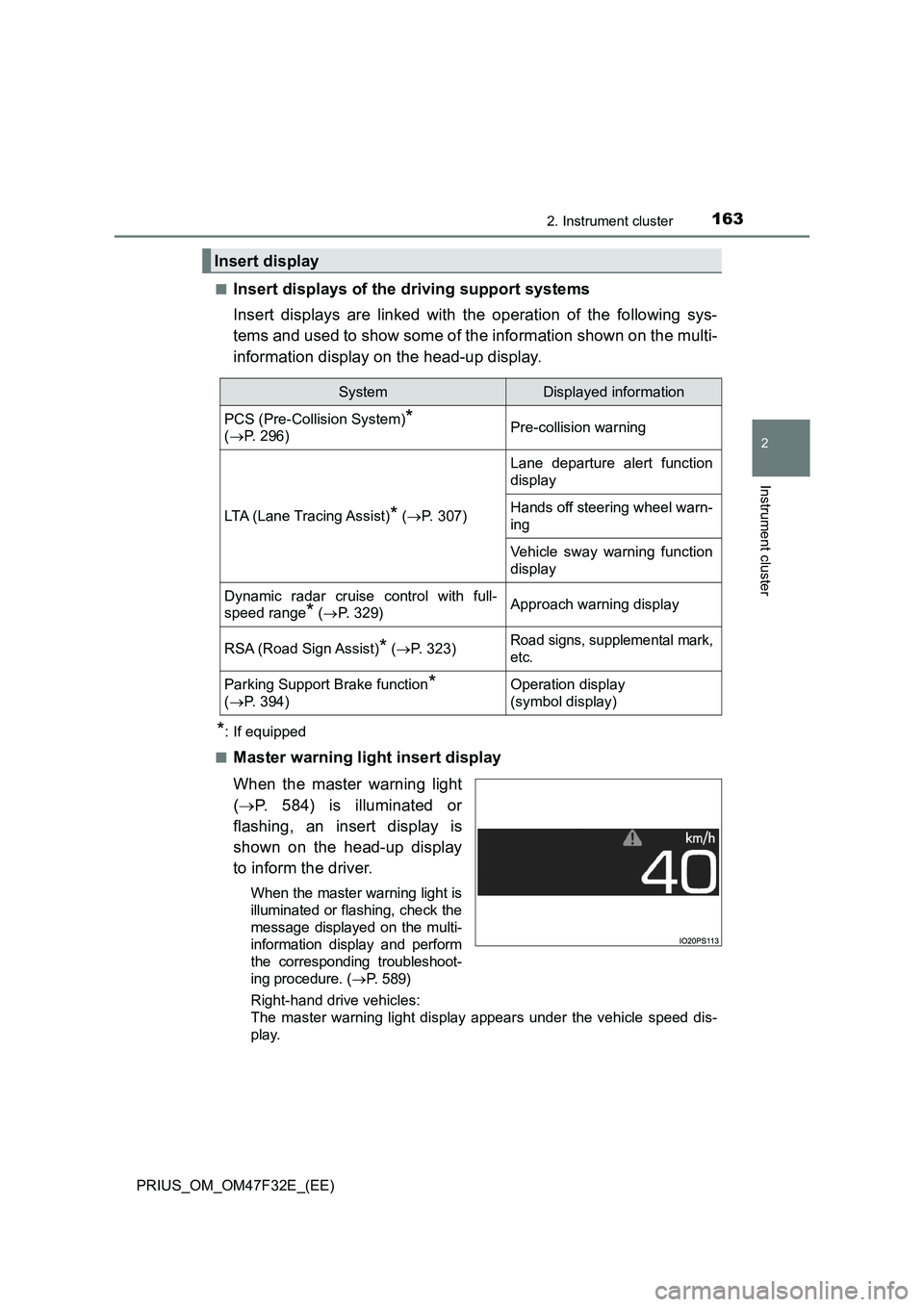
Insert displays of the driving support systems
Insert displays are linked with the operation of the following sys-
tems and used to show some of the information shown on the multi-
information display on the head-up display.
*: If equipped
■
Master warning light insert display
When the master warning light
(P. 584) is illuminated or
flashing, an insert display is
shown on the head-up display
to inform the driver.
When the master warning light is
illuminated or flashing, check the
message displayed on the multi-
information display and perform
the corresponding troubleshoot-
ing procedure. (P. 5 8 9 )
Right-hand drive vehicles:
The master warning light display appears under the vehicle speed dis-
play.
Insert display
SystemDisplayed information
PCS (Pre-Collision System)*
(P. 296)Pre-collision warning
LTA (Lane Tracing Assist)* (P. 307)
Lane departure alert function
display
Hands off steering wheel warn-
ing
Vehicle sway warning function
display
Dynamic radar cruise control with full-
speed range
* (P. 329)Approach warning display
RSA (Road Sign Assist)* (P. 323)Road signs, supplemental mark,
etc.
Parking Support Brake function*
(P. 394)Operation display
(symbol display)
Page 166 of 770
1642. Instrument cluster
PRIUS_OM_OM47F32E_(EE)
■Enabling/disabling of the head-up display
When the head-up display is turned off with the “HUD” switch, it is not dis-
played until the “HUD” switch is used to turn the head-up display on again.
(Operation of the head-up display is not linked with the power switch.)
■ Display brightness
● The brightness of the head-up display is automatically adjusted according to
the operation status of the headlights (on/off) and the brightness of the sur-
roundings.
● When the brightness of the head-up display is adjusted to a certain level or
higher, the display automatically dims when the vehicle is stopped. Once the
vehicle starts off and the vehicle speed reaches approximately 5 km/h
(3.1 mph) or more, the display automatically returns to its previous bright-
ness.
■ Vehicle speed display
In extremely cold environments, the display of the speedometer and the vehi-
cle speed of the head-up display may slightly differ.
■ Head-up display
The head-up display may seem dark and hard to see when viewed through
sunglasses, especially polarized sunglasses.
■ When the 12-volt battery is disconnected
The customize settings of the head-up display will be reset.
WARNING
■ Before using the head-up display
● Check that the position and brightness of the head-up display image does
not interfere with safe driving. Incorrect adjustment of the image’s position
or brightness may obstruct the driver’s view and lead to an accident,
resulting in death or serious injury.
● Do not continuously look at the head-up display while driving as you may
fail to see pedestrians, objects on the road, etc. ahead of the vehicle.
Page 177 of 770
1753-1. Key information
3
Operation of each component
PRIUS_OM_OM47F32E_(EE)■If a message regarding the state of the electronic key or power switch
mode, etc. is shown
To prevent trapping the electronic key inside the vehicle, leaving the vehicle
without turning off the power switch or other passengers from unintentionally
taking the key out of the vehicle, etc., a message that prompts the user to
confirm the state of the electronic key or power switch mode may be shown
on the multi-information display. In those cases, follow the instructions on the
display immediately.
■If “Key Battery Low Replace Key Battery” is displayed on the multi-infor-
mation display
The electronic key has a low battery. Replace the electronic key battery.
(P. 554)
■Replacing the battery
P. 554
■Confirmation of the registered key number
The number of keys already registered to the vehicle can be confirmed. Ask
any authorized Toyota retailer or Toyota authorized repairer, or any reliable
repairer.
■If “A New Key has been Registered Contact Your Dealer for Details” is
displayed on the multi-information display
This message will be displayed each time the driver’s door is opened when
the doors are unlocked from the outside for approximately 10 days after a
new electronic key has been registered.
If this message is displayed but you have not had a new electronic key regis-
tered, ask any authorized Toyota retailer or Toyota authorized repairer, or any
reliable repairer to check if an unknown electronic key (other than those in
your possession) has been registered.
■If a wrong key is used
The key cylinder rotates freely to isolate inside mechanism.