battery TOYOTA PRIUS 2023 Owner's Manual
[x] Cancel search | Manufacturer: TOYOTA, Model Year: 2023, Model line: PRIUS, Model: TOYOTA PRIUS 2023Pages: 770, PDF Size: 122.55 MB
Page 135 of 770
1332. Instrument cluster
2
Instrument cluster
PRIUS_OM_OM47F32E_(EE)
EV indicator*2, 3
The EV indicator comes on when the vehicle is driven using only the
electric motor (traction motor) or the gasoline engine is stopped.
Hybrid battery (traction battery) status
P. 1 3 1
Eco score
P. 1 3 4
●By keeping the indicator within Eco area, more Eco-friendly driv-
ing can be achieved.
●Charge area indicates regeneration
*4 status. Regenerated
energy will be used to charge the hybrid battery (traction battery).
*1: Not displayed on the sub-screen.
*2: Not displayed on the sub-screen or head-up display.
*3: The EV indicator function can be turned off in the “Meter Customize”
settings. (P. 156)
*4: When used in this manual, “regeneration” refers to the conversion of
energy created by the movement of the vehicle into electrical energy.
■
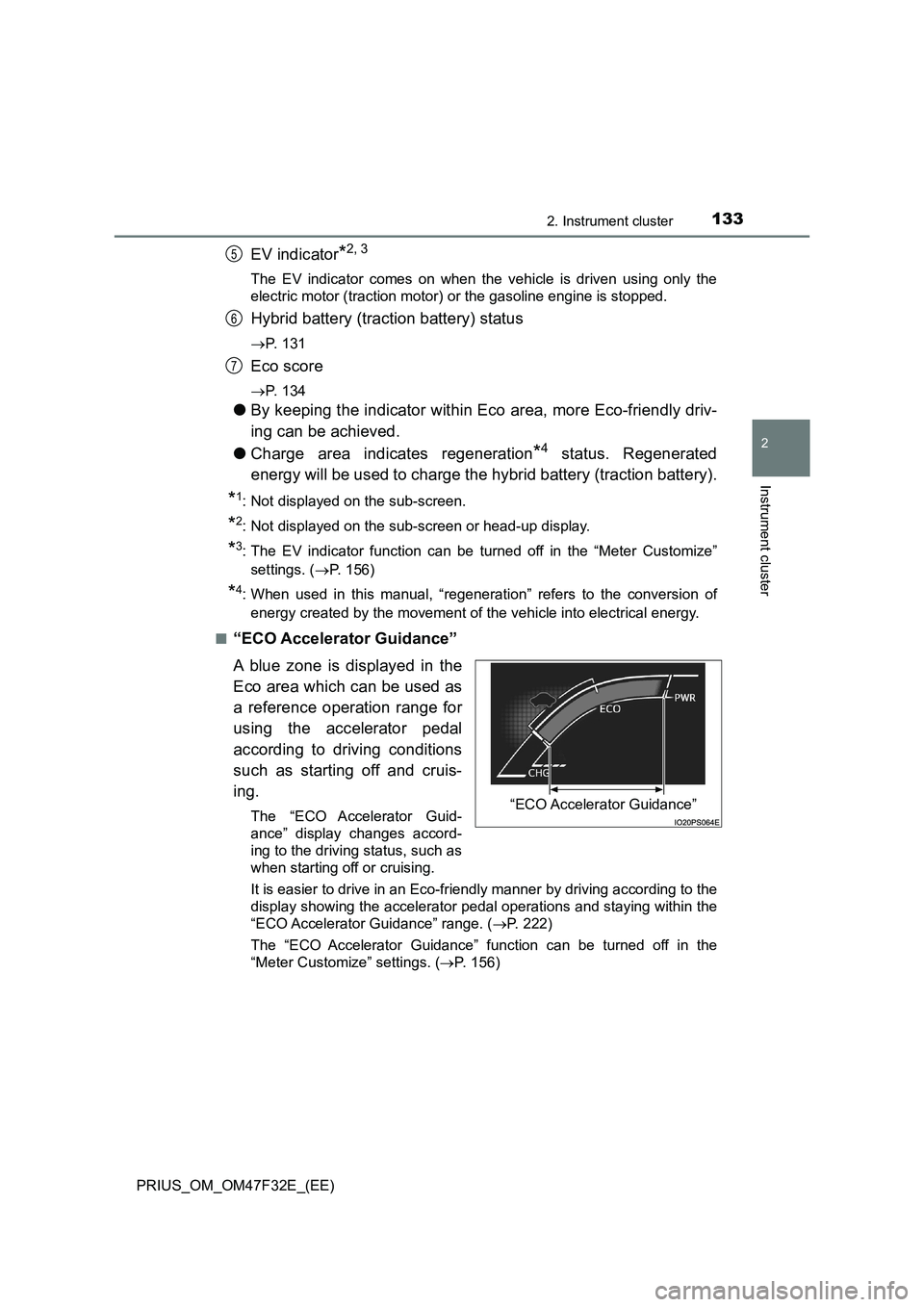
“ECO Accelerator Guidance”
A blue zone is displayed in the
Eco area which can be used as
a reference operation range for
using the accelerator pedal
according to driving conditions
such as starting off and cruis-
ing.
The “ECO Accelerator Guid-
ance” display changes accord-
ing to the driving status, such as
when starting off or cruising.
It is easier to drive in an Eco-friendly manner by driving according to the
display showing the accelerator pedal operations and staying within the
“ECO Accelerator Guidance” range. (P. 222)
The “ECO Accelerator Guidance” function can be turned off in the
“Meter Customize” settings. (P. 156)
5
6
7
“ECO Accelerator Guidance”
Page 161 of 770
1592. Instrument cluster
2
Instrument cluster
PRIUS_OM_OM47F32E_(EE)
WARNING
■Cautions while setting up the display
As the hybrid system needs to be operating during setting up the display,
ensure that the vehicle is parked in a place with adequate ventilation. In a
closed area such as a garage, exhaust gases including harmful carbon
monoxide (CO) may collect and enter the vehicle. This may lead to death or
a serious health hazard.
NOTICE
■ While setting up the display
To prevent 12-volt battery discharge, ens ure that the hybrid system is oper-
ating while setting up the display features.
Page 166 of 770
1642. Instrument cluster
PRIUS_OM_OM47F32E_(EE)
■Enabling/disabling of the head-up display
When the head-up display is turned off with the “HUD” switch, it is not dis-
played until the “HUD” switch is used to turn the head-up display on again.
(Operation of the head-up display is not linked with the power switch.)
■ Display brightness
● The brightness of the head-up display is automatically adjusted according to
the operation status of the headlights (on/off) and the brightness of the sur-
roundings.
● When the brightness of the head-up display is adjusted to a certain level or
higher, the display automatically dims when the vehicle is stopped. Once the
vehicle starts off and the vehicle speed reaches approximately 5 km/h
(3.1 mph) or more, the display automatically returns to its previous bright-
ness.
■ Vehicle speed display
In extremely cold environments, the display of the speedometer and the vehi-
cle speed of the head-up display may slightly differ.
■ Head-up display
The head-up display may seem dark and hard to see when viewed through
sunglasses, especially polarized sunglasses.
■ When the 12-volt battery is disconnected
The customize settings of the head-up display will be reset.
WARNING
■ Before using the head-up display
● Check that the position and brightness of the head-up display image does
not interfere with safe driving. Incorrect adjustment of the image’s position
or brightness may obstruct the driver’s view and lead to an accident,
resulting in death or serious injury.
● Do not continuously look at the head-up display while driving as you may
fail to see pedestrians, objects on the road, etc. ahead of the vehicle.
Page 169 of 770
1672. Instrument cluster
2
Instrument cluster
PRIUS_OM_OM47F32E_(EE)■
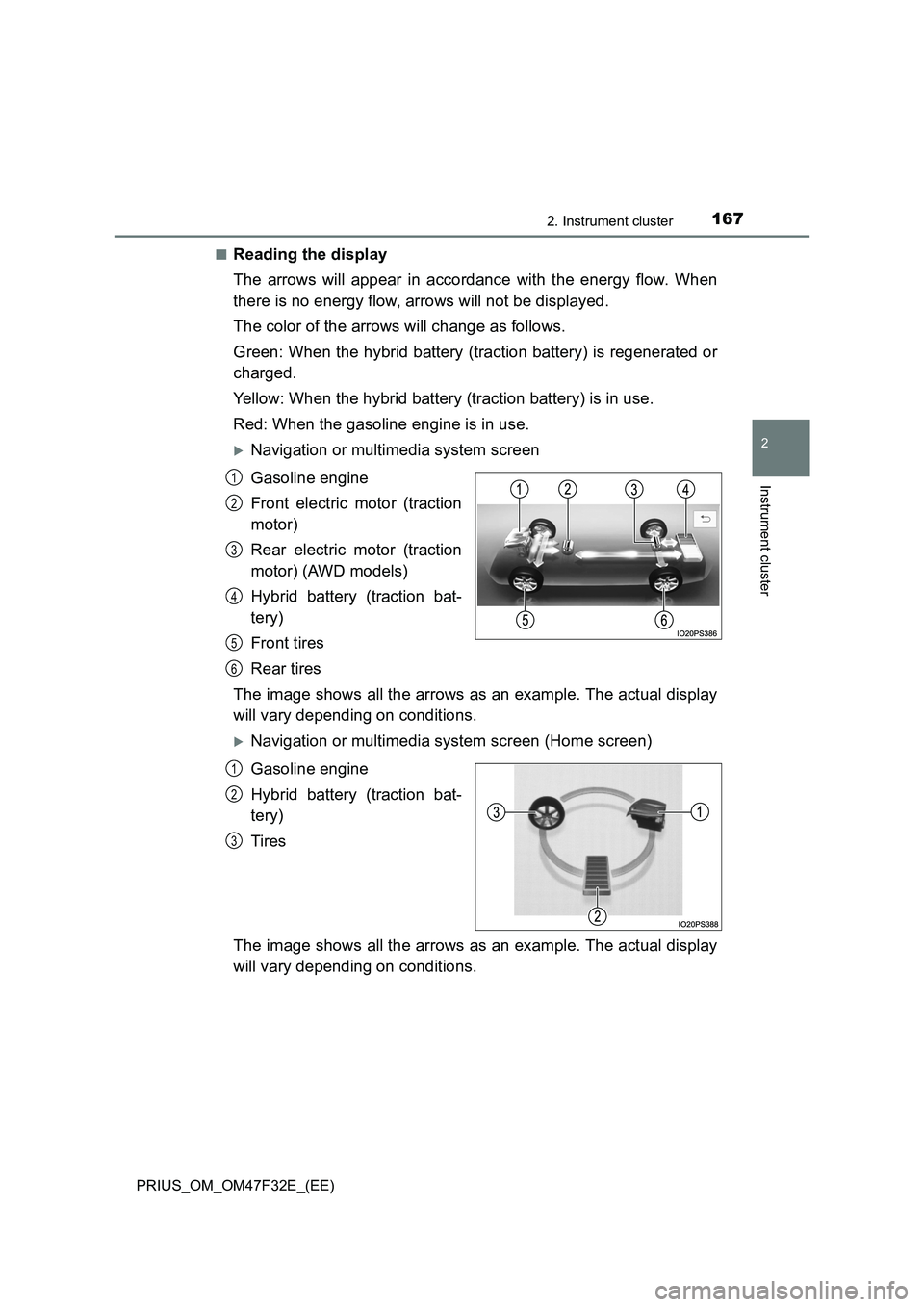
Reading the display
The arrows will appear in accordance with the energy flow. When
there is no energy flow, arrows will not be displayed.
The color of the arrows will change as follows.
Green: When the hybrid battery (traction battery) is regenerated or
charged.
Yellow: When the hybrid battery (traction battery) is in use.
Red: When the gasoline engine is in use.
Navigation or multimedia system screen
Gasoline engine
Front electric motor (traction
motor)
Rear electric motor (traction
motor) (AWD models)
Hybrid battery (traction bat-
tery)
Front tires
Rear tires
The image shows all the arrows as an example. The actual display
will vary depending on conditions.
Navigation or multimedia system screen (Home screen)
Gasoline engine
Hybrid battery (traction bat-
tery)
Tires
The image shows all the arrows as an example. The actual display
will vary depending on conditions.
1
2
3
4
5
6
1
2
3
Page 170 of 770
1682. Instrument cluster
PRIUS_OM_OM47F32E_(EE)
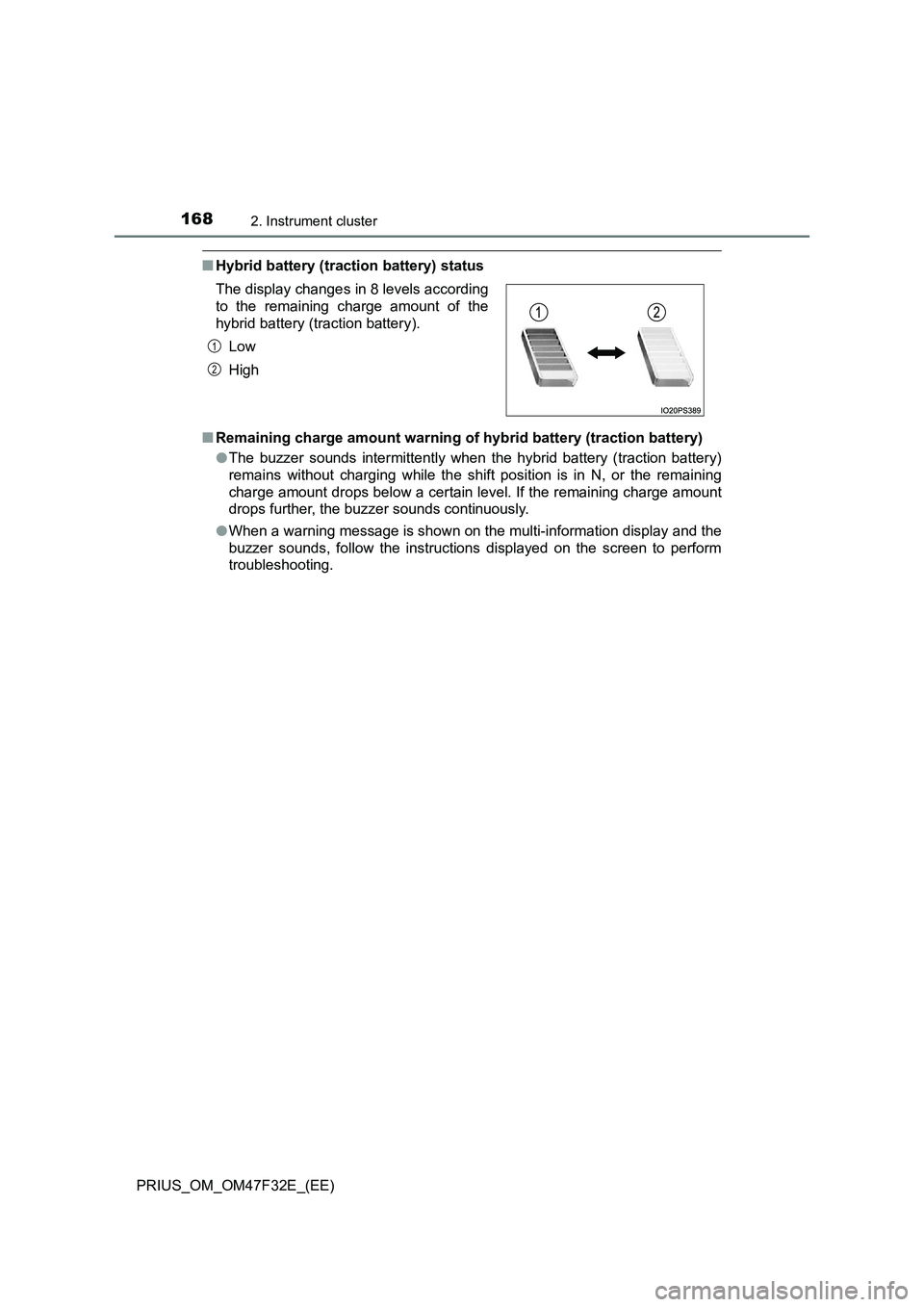
■Hybrid battery (traction battery) status
■Remaining charge amount warning of hybrid battery (traction battery)
●The buzzer sounds intermittently when the hybrid battery (traction battery)
remains without charging while the shift position is in N, or the remaining
charge amount drops below a certain level. If the remaining charge amount
drops further, the buzzer sounds continuously.
●When a warning message is shown on the multi-information display and the
buzzer sounds, follow the instructions displayed on the screen to perform
troubleshooting. The display changes in 8 levels according
to the remaining charge amount of the
hybrid battery (traction battery).
Low
High
1
2
Page 176 of 770
1743-1. Key information
PRIUS_OM_OM47F32E_(EE)■Electronic key battery depletion
●The standard battery life is 1 to 2 years.
●If the battery becomes low, an alarm will sound in the cabin and a message
will be displayed on the multi-information display when the hybrid system
stops.
●As the electronic key always receives radio waves, the battery will become
depleted even if the electronic key is not used. The following symptoms indi-
cate that the electronic key battery may be depleted. Replace the battery
when necessary. (P. 554)
• The smart entry & start system or the wireless remote control does not
operate.
• The detection area becomes smaller.
• The LED indicator on the key surface does not turn on.
You can replace the battery by yourself (P. 554). However, as there is a
danger that the electronic key may be damaged, it is recommended that
replacement is carried out by any authorized Toyota retailer or Toyota
authorized repairer, or any reliable repairer.
●To avoid serious deterioration, do not leave the electronic key within 1 m
(3 ft.) of the following electrical appliances that produce a magnetic field:
•TVs
• Personal computers
• Cellular phones, cordless phones and battery chargers
• Table lamps
• Induction cookers
Page 177 of 770
1753-1. Key information
3
Operation of each component
PRIUS_OM_OM47F32E_(EE)■If a message regarding the state of the electronic key or power switch
mode, etc. is shown
To prevent trapping the electronic key inside the vehicle, leaving the vehicle
without turning off the power switch or other passengers from unintentionally
taking the key out of the vehicle, etc., a message that prompts the user to
confirm the state of the electronic key or power switch mode may be shown
on the multi-information display. In those cases, follow the instructions on the
display immediately.
■If “Key Battery Low Replace Key Battery” is displayed on the multi-infor-
mation display
The electronic key has a low battery. Replace the electronic key battery.
(P. 554)
■Replacing the battery
P. 554
■Confirmation of the registered key number
The number of keys already registered to the vehicle can be confirmed. Ask
any authorized Toyota retailer or Toyota authorized repairer, or any reliable
repairer.
■If “A New Key has been Registered Contact Your Dealer for Details” is
displayed on the multi-information display
This message will be displayed each time the driver’s door is opened when
the doors are unlocked from the outside for approximately 10 days after a
new electronic key has been registered.
If this message is displayed but you have not had a new electronic key regis-
tered, ask any authorized Toyota retailer or Toyota authorized repairer, or any
reliable repairer to check if an unknown electronic key (other than those in
your possession) has been registered.
■If a wrong key is used
The key cylinder rotates freely to isolate inside mechanism.
Page 180 of 770
1783-2. Opening, closing and locking the doors
PRIUS_OM_OM47F32E_(EE)
■Operation signals
The emergency flashers flash to indicate that the doors have been locked/
unlocked. (Locked: Once; Unlocked: Twice)
■Security feature
If a door is not opened within approximately 30 seconds after the vehicle is
unlocked, the security feature automatically locks the vehicle again.
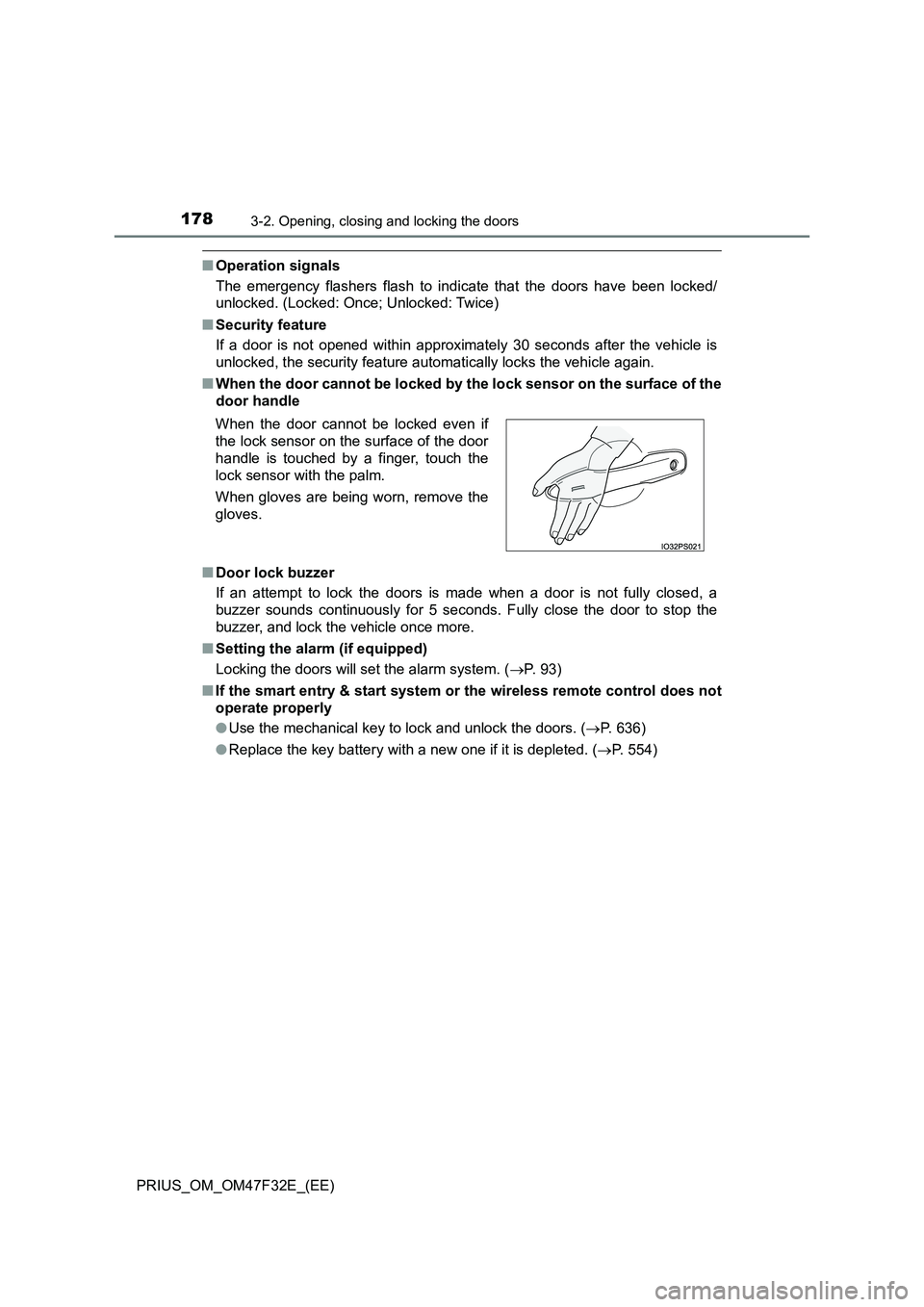
■When the door cannot be locked by the lock sensor on the surface of the
door handle
■Door lock buzzer
If an attempt to lock the doors is made when a door is not fully closed, a
buzzer sounds continuously for 5 seconds. Fully close the door to stop the
buzzer, and lock the vehicle once more.
■Setting the alarm (if equipped)
Locking the doors will set the alarm system. (P. 93)
■If the smart entry & start system or the wireless remote control does not
operate properly
●Use the mechanical key to lock and unlock the doors. (P. 636)
●Replace the key battery with a new one if it is depleted. (P. 554) When the door cannot be locked even if
the lock sensor on the surface of the door
handle is touched by a finger, touch the
lock sensor with the palm.
When gloves are being worn, remove the
gloves.
Page 191 of 770
1893-2. Opening, closing and locking the doors
3
Operation of each component
PRIUS_OM_OM47F32E_(EE)
■ When “Smart Entry & Start System Malfunction See Owner’s Manual” is
displayed on the multi-information display
The system may be malfunctioning. Have the vehicle inspected by any autho-
rized Toyota retailer or Toyota authorized repairer, or any reliable repairer
immediately.
■ Battery-saving function
The battery-saving function will be activated in order to prevent the electronic
key battery and the 12-volt battery from being discharged while the vehicle is
not in operation for a long time.
● In the following situations, the smart entry & start system may take some
time to unlock the doors.
• The electronic key has been left in an area of approximately 2 m (6 ft.) of
the outside of the vehicle for 10 minutes or longer.
• The smart entry & start system has not been used for 5 days or longer.
● If the smart entry & start system has not been used for 14 days or longer,
the doors cannot be unlocked at any doors except the driver’s door. In this
case, take hold of the driver’s door handle, or use the wireless remote con-
trol or the mechanical key, to unlock the doors.
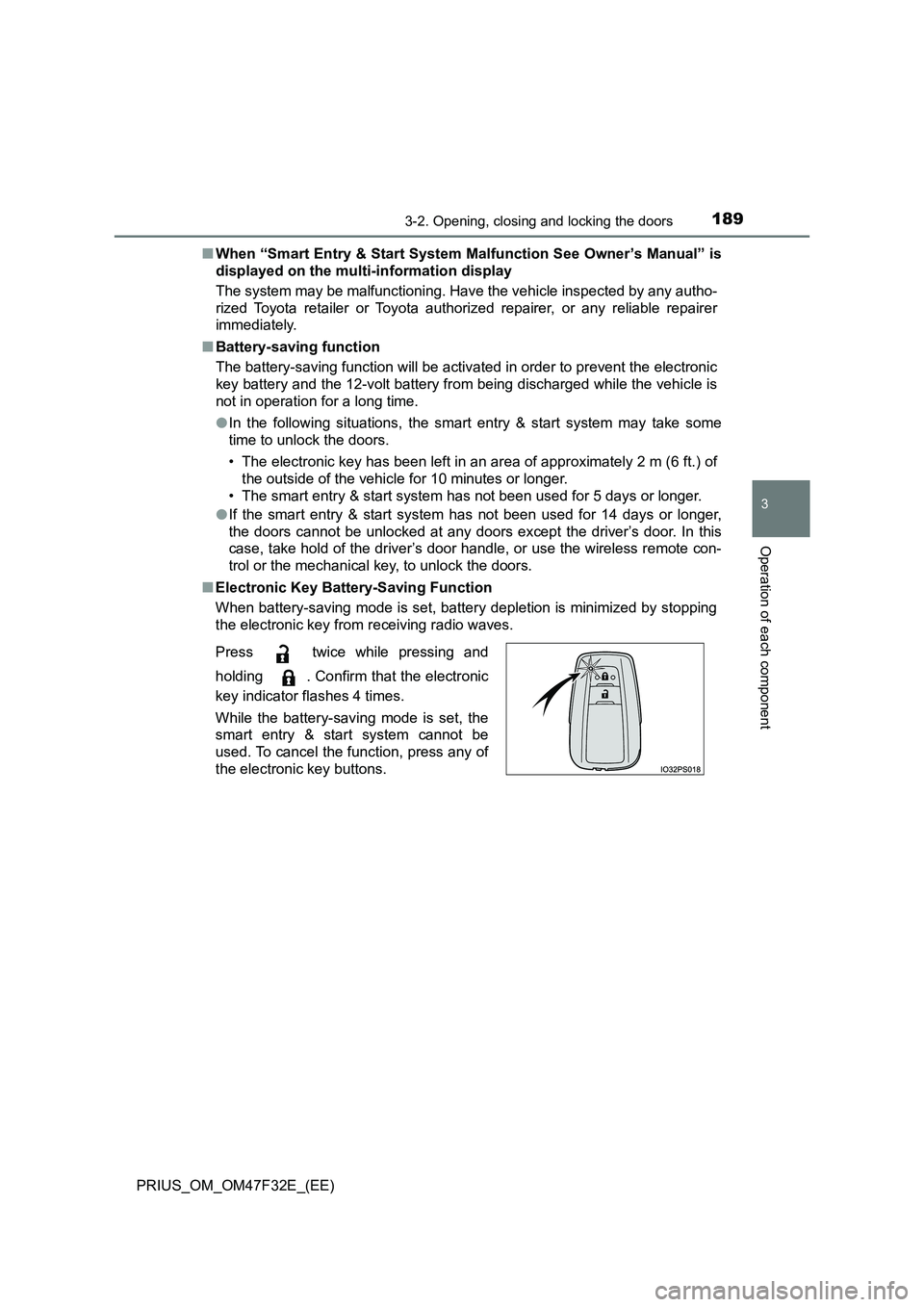
■ Electronic Key Battery-Saving Function
When battery-saving mode is set, battery depletion is minimized by stopping
the electronic key from receiving radio waves.
Press twice while pressing and
holding . Confirm that the electronic
key indicator flashes 4 times.
While the battery-saving mode is set, the
smart entry & start system cannot be
used. To cancel the function, press any of
the electronic key buttons.
Page 192 of 770
1903-2. Opening, closing and locking the doors
PRIUS_OM_OM47F32E_(EE)■Conditions affecting operation
The smart entry & start system, wireless remote control and immobilizer sys-
tem use weak radio waves. In the following situations, the communication
between the electronic key and the vehicle may be affected, preventing the
smart entry & start system, wireless remote control and immobilizer system
from operating properly. (Ways of coping: P. 636)
●When the electronic key battery is depleted
●Near a TV tower, electric power plant, gas station, radio station, large dis-
play, airport or other facility that generates strong radio waves or electrical
noise
●When the electronic key is in contact with, or is covered by the following
metallic objects
• Cards to which aluminum foil is attached
• Cigarette boxes that have aluminum foil inside
• Metallic wallets or bags
• Coins
• Hand warmers made of metal
• Media such as CDs and DVDs
●When other wireless key (that emit radio waves) is being used nearby
●When carrying the electronic key together with the following devices that
emit radio waves
• Portable radio, cellular phone, cordless phone or other wireless commu-
nication devices
• Another vehicle’s electronic key or a wireless key that emits radio waves
• Personal computers or personal digital assistants (PDAs)
• Digital audio players
• Portable game systems
●If window tint with a metallic content or metallic objects are attached to the
rear window
●When the electronic key is placed near a battery charger or electronic
devices