maintenance TOYOTA PRIUS 2023 Repair Manual
[x] Cancel search | Manufacturer: TOYOTA, Model Year: 2023, Model line: PRIUS, Model: TOYOTA PRIUS 2023Pages: 770, PDF Size: 122.55 MB
Page 547 of 770
5456-3. Do-it-yourself maintenance
PRIUS_OM_OM47F32E_(EE)
6
Maintenance and care
Cleaning the hybrid batter y (traction bat-
ter y) air intake vent and filter
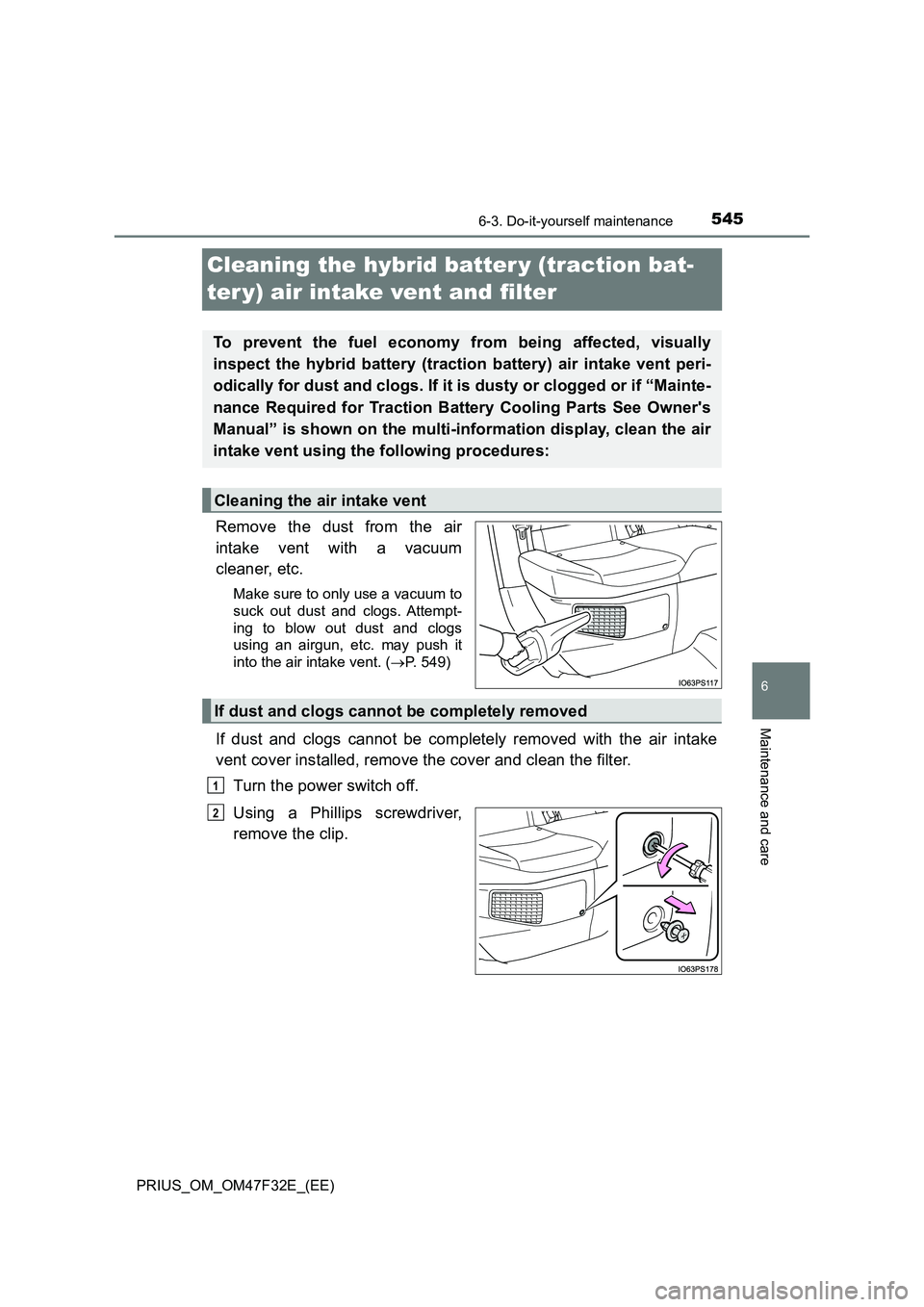
Remove the dust from the air
intake vent with a vacuum
cleaner, etc.
Make sure to only use a vacuum to
suck out dust and clogs. Attempt-
ing to blow out dust and clogs
using an airgun, etc. may push it
into the air intake vent. (P. 549)
If dust and clogs cannot be completely removed with the air intake
vent cover installed, remove the cover and clean the filter.
Turn the power switch off.
Using a Phillips screwdriver,
remove the clip.
To prevent the fuel economy from being affected, visually
inspect the hybrid battery (traction battery) air intake vent peri-
odically for dust and clogs. If it is dusty or clogged or if “Mainte-
nance Required for Traction Battery Cooling Parts See Owner's
Manual” is shown on the multi-information display, clean the air
intake vent using the following procedures:
Cleaning the air intake vent
If dust and clogs cannot be completely removed
1
2
Page 548 of 770
5466-3. Do-it-yourself maintenance
PRIUS_OM_OM47F32E_(EE)
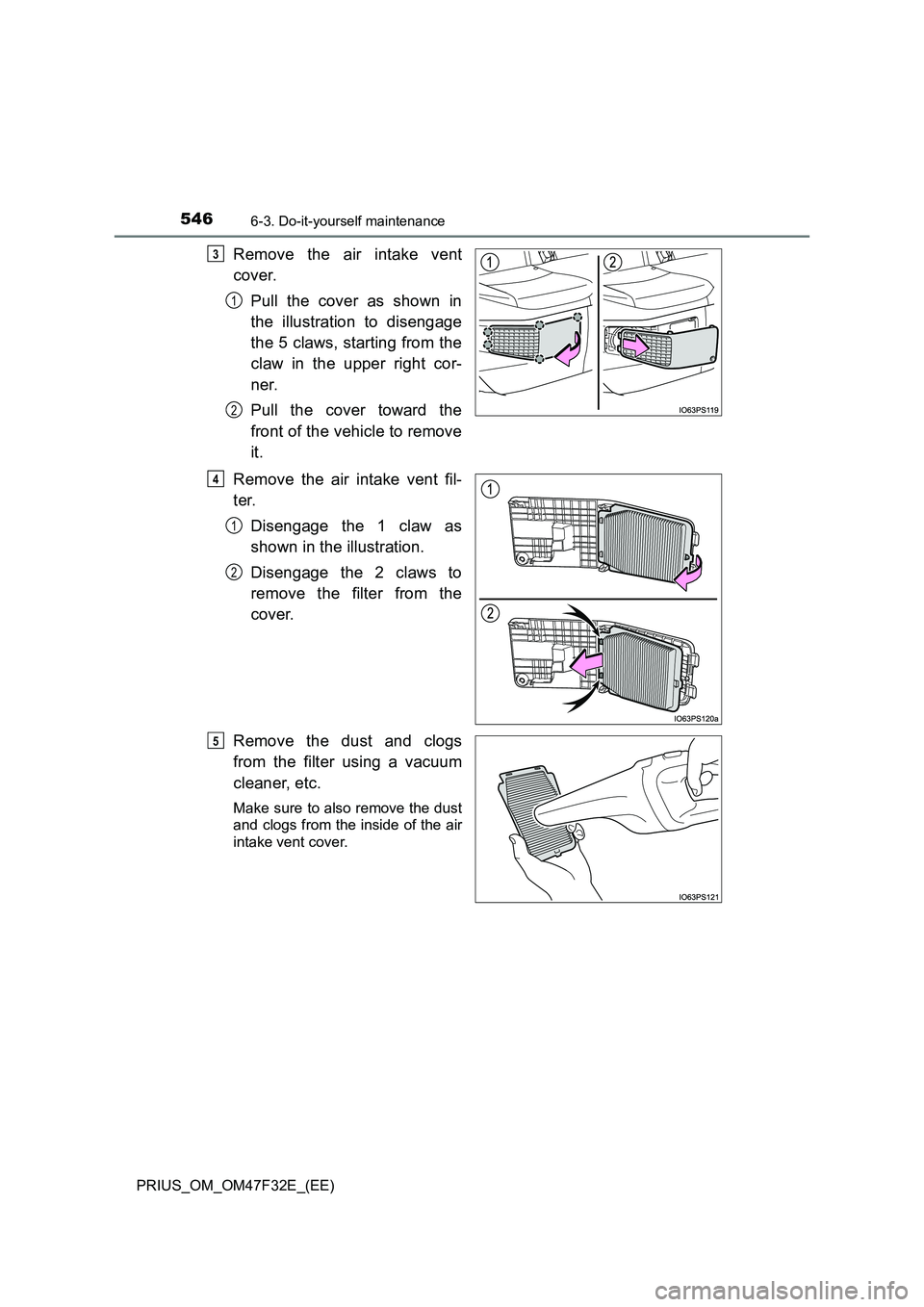
Remove the air intake vent
cover.
Pull the cover as shown in
the illustration to disengage
the 5 claws, starting from the
claw in the upper right cor-
ner.
Pull the cover toward the
front of the vehicle to remove
it.
Remove the air intake vent fil-
ter.
Disengage the 1 claw as
shown in the illustration.
Disengage the 2 claws to
remove the filter from the
cover.
Remove the dust and clogs
from the filter using a vacuum
cleaner, etc.
Make sure to also remove the dust
and clogs from the inside of the air
intake vent cover.
3
1
2
4
1
2
5
Page 549 of 770
5476-3. Do-it-yourself maintenance
PRIUS_OM_OM47F32E_(EE)
6
Maintenance and care
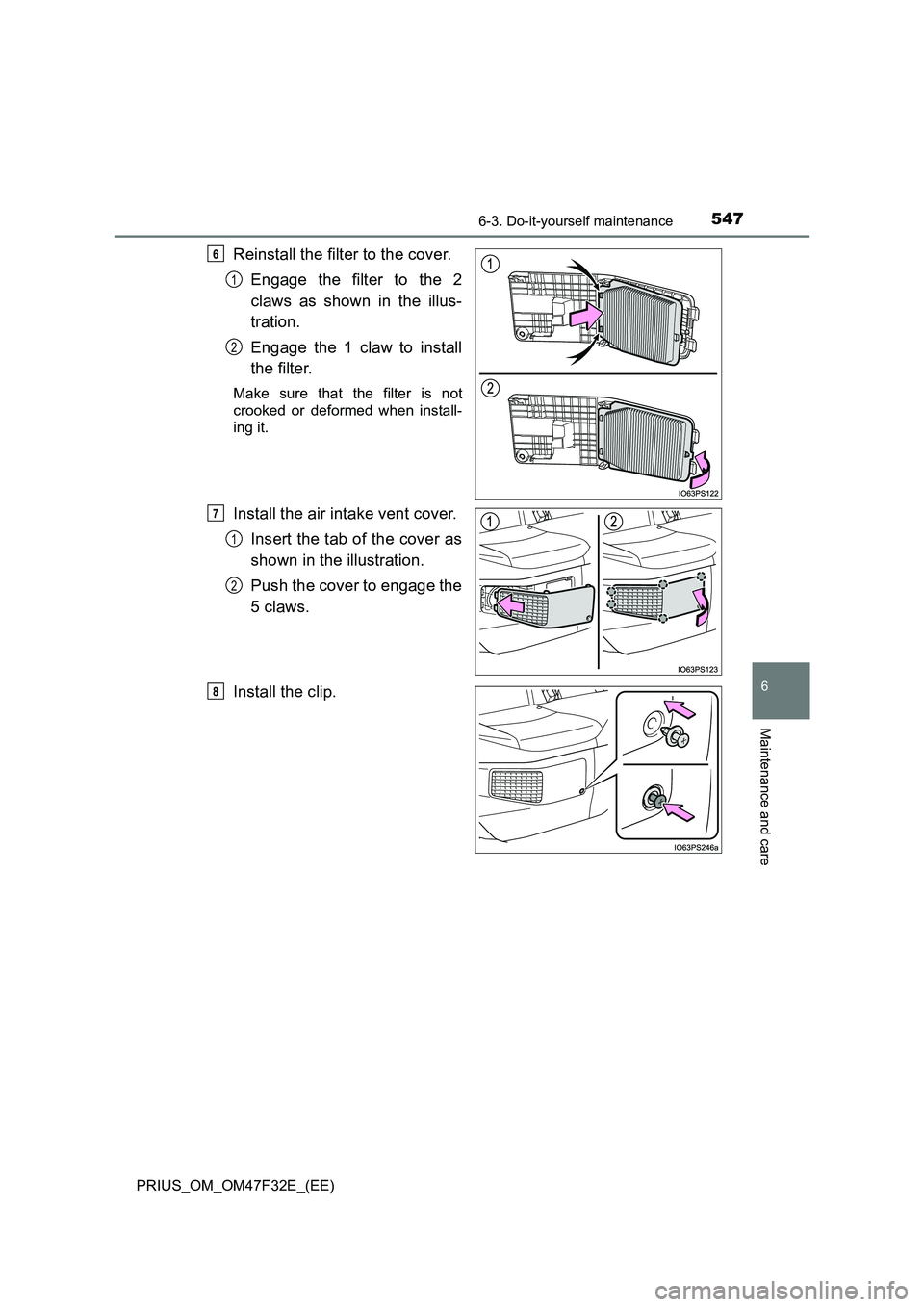
Reinstall the filter to the cover.
Engage the filter to the 2
claws as shown in the illus-
tration.
Engage the 1 claw to install
the filter.
Make sure that the filter is not
crooked or deformed when install-
ing it.
Install the air intake vent cover.
Insert the tab of the cover as
shown in the illustration.
Push the cover to engage the
5 claws.
Install the clip.
6
1
2
7
1
2
8
Page 550 of 770
5486-3. Do-it-yourself maintenance
PRIUS_OM_OM47F32E_(EE)
■Scheduled maintenance of the air intake vent is necessary when
In some situations such as when the vehicle is used frequently or in heavy
traffic or dusty areas, the air intake vent may need to be cleaned more regu-
larly. For details, refer to the “Toyota Service Booklet” or “Toyota Warranty
Booklet”.
■ Cleaning the air intake vent
● Dust in the air intake vent may interfere with the cooling of the hybrid battery
(traction battery). If charging/dischargi ng of the hybrid battery (traction bat-
tery) becomes limited, the distance that the vehicle can be driven using the
electric motor (traction motor) may be reduced and the fuel economy may
be reduced. Inspect and clean the air intake vent periodically.
● Improper handling of the air intake vent cover and filter may result in dam-
age to them. If you have any concerns about cleaning the filter, contact any
authorized Toyota retailer or Toyota authorized repairer, or any reliable
repairer.
■ If “Maintenance Required for Traction Battery Cooling Parts See Owner's
Manual” is shown on the multi-information display
● If this warning message is shown on the multi-information display, remove
the air intake vent cover and clean the filter. ( P. 545)
● After cleaning the air intake vent, start the hybrid system and check that the
warning message is no longer shown.
It may take approximately 20 minutes after the hybrid system is started until
the warning message disappears. If the warning message does not disap-
pear, have the vehicle inspected by any authorized Toyota retailer or Toyota
authorized repairer, or any reliable repairer.
WARNING
■ When cleaning the air intake vent
● Do not use water or other liquids to clean the air intake vent. If water is
applied to the hybrid battery (traction battery) or other components, a mal-
function or fire may occur.
● Before cleaning the air intake vent, make sure to turn the power switch off
to stop the hybrid system.
■ When removing the air intake vent cover
Do not touch the service plug located near the air intake vent. ( P. 87)
Page 551 of 770
5496-3. Do-it-yourself maintenance
PRIUS_OM_OM47F32E_(EE)
6
Maintenance and care
NOTICE
■When cleaning the air intake vent
■ To prevent damage to the vehicle
● Do not allow water or foreign matter to enter the air intake vent when the
cover is removed.
● Carefully handle the removed filter so that it will not be damaged. If the fil-
ter is damaged, have it replaced with a new filter by any authorized Toyota
retailer or Toyota authorized repairer, or any reliable repairer.
● Make sure to reinstall the filter and cover to their original positions after
cleaning.
● Do not install anything to the air intake vent other than the exclusive filter
for this vehicle or use the vehicle without the filter installed.
■ If “Maintenance Required for Traction Battery Cooling Parts See
Owner's Manual” is shown on the multi-information display
If the vehicle is continuously driven with the warning message (indicating
that charging/discharging of the hybrid battery [traction battery] may
become limited) displayed, the hybrid battery (traction battery) may mal-
function. If the warning message is shown, clean the air intake vent immedi-
ately.
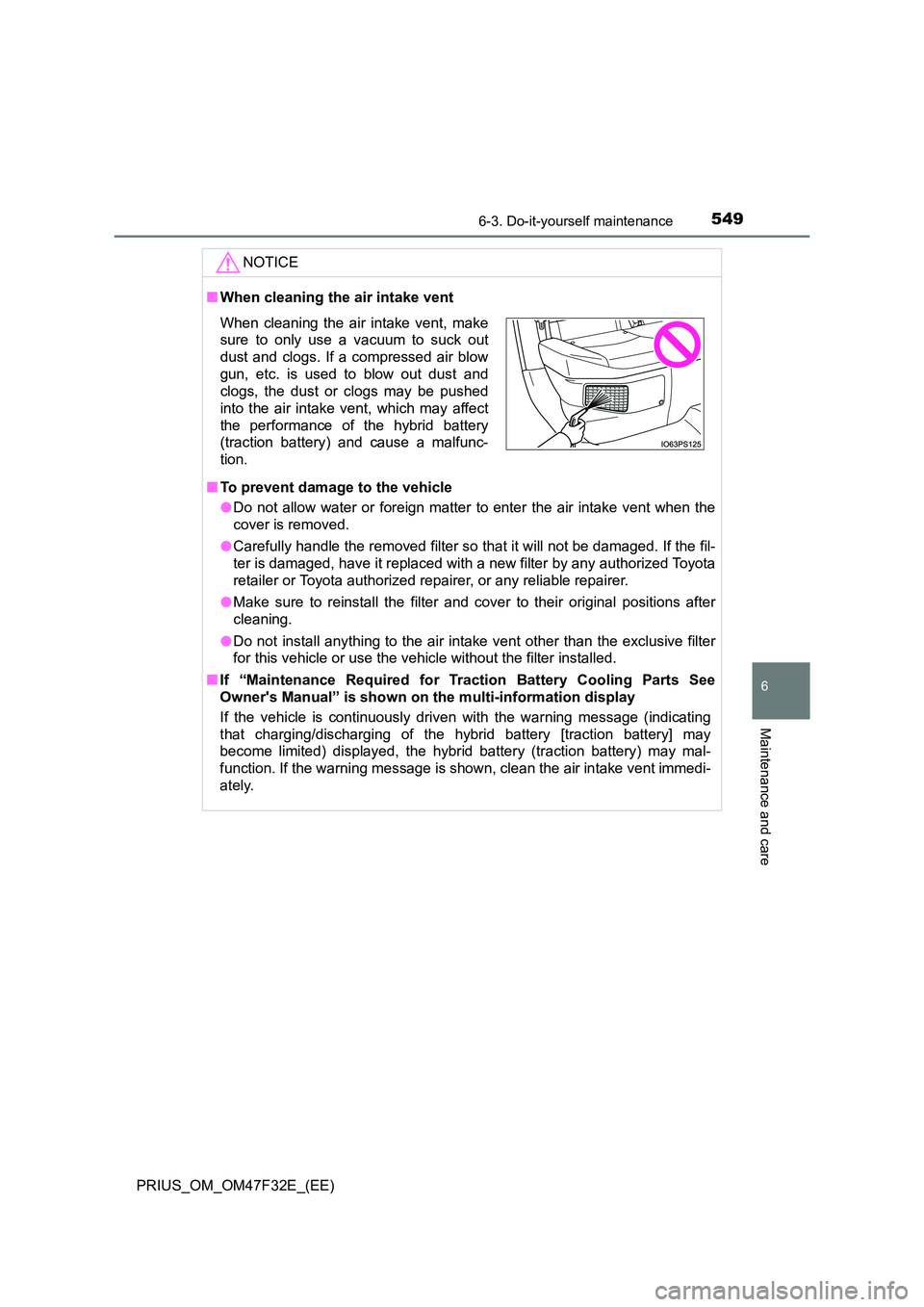
When cleaning the air intake vent, make
sure to only use a vacuum to suck out
dust and clogs. If a compressed air blow
gun, etc. is used to blow out dust and
clogs, the dust or clogs may be pushed
into the air intake vent, which may affect
the performance of the hybrid battery
(traction battery) and cause a malfunc-
tion.
Page 552 of 770
5506-3. Do-it-yourself maintenance
PRIUS_OM_OM47F32E_(EE)
Wiper insert replacement
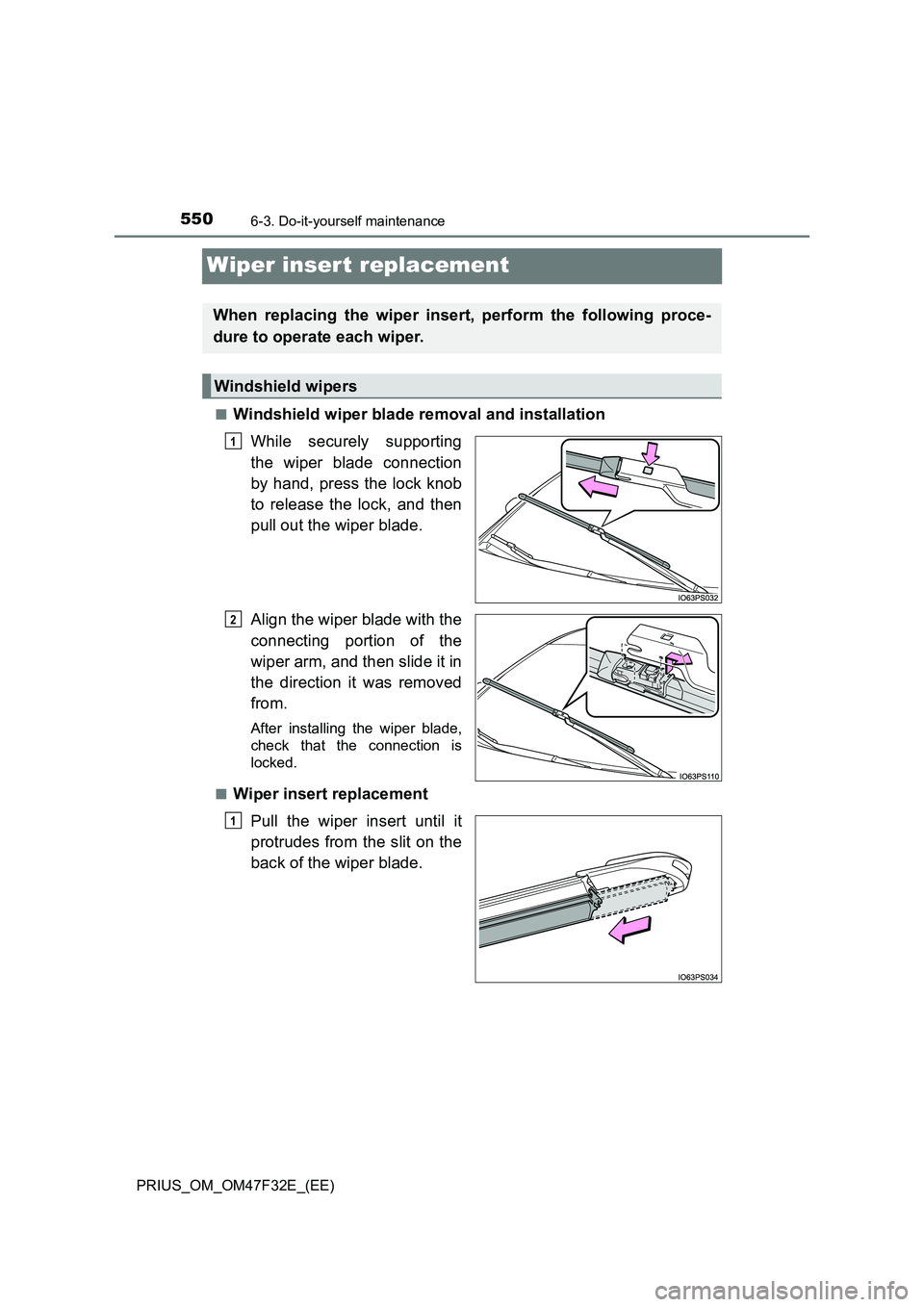
■Windshield wiper blade removal and installation
While securely supporting
the wiper blade connection
by hand, press the lock knob
to release the lock, and then
pull out the wiper blade.
Align the wiper blade with the
connecting portion of the
wiper arm, and then slide it in
the direction it was removed
from.
After installing the wiper blade,
check that the connection is
locked.
■
Wiper insert replacement
Pull the wiper insert until it
protrudes from the slit on the
back of the wiper blade.
When replacing the wiper insert, perform the following proce-
dure to operate each wiper.
Windshield wipers
1
2
1
Page 553 of 770
5516-3. Do-it-yourself maintenance
PRIUS_OM_OM47F32E_(EE)
6
Maintenance and care
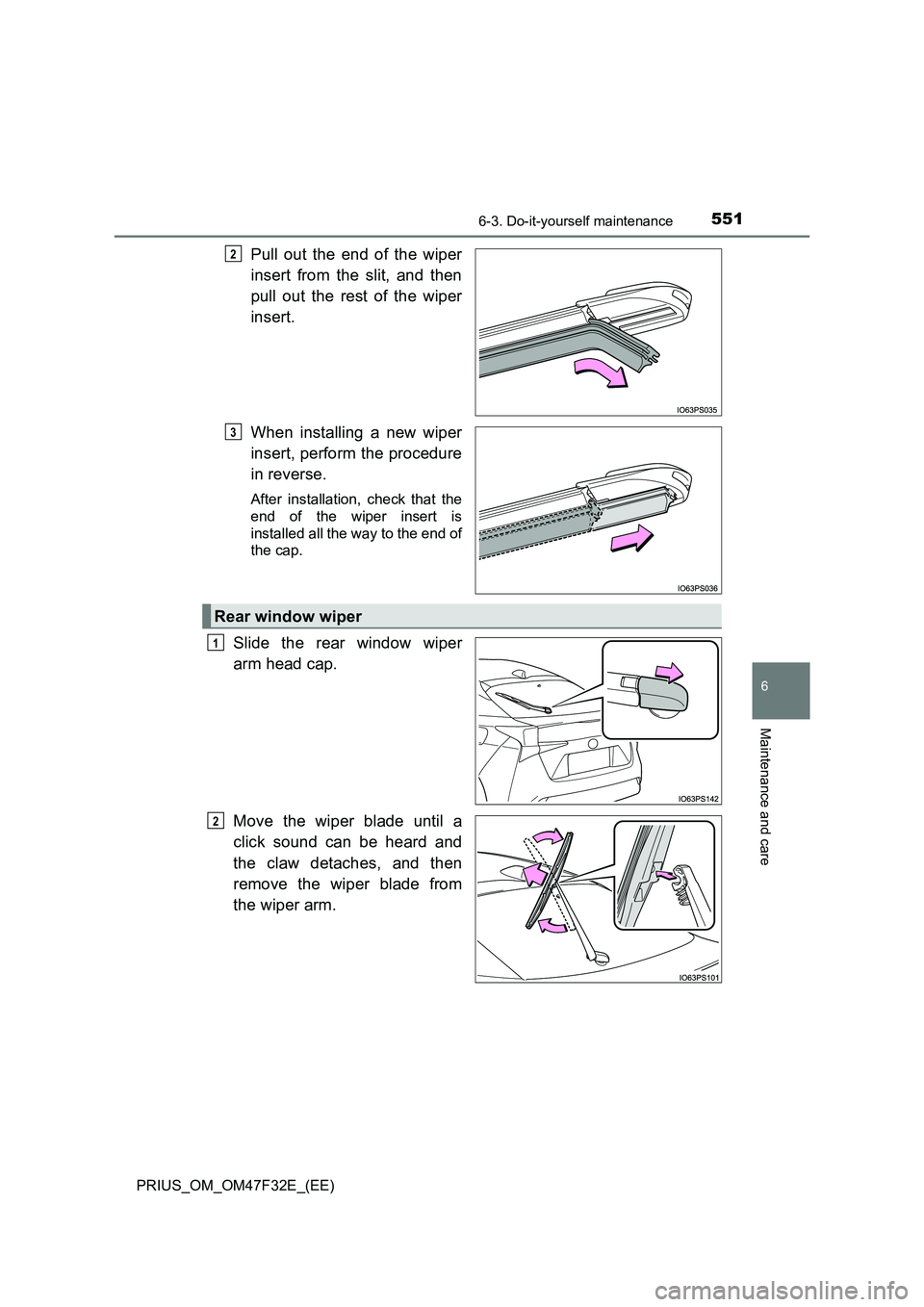
Pull out the end of the wiper
insert from the slit, and then
pull out the rest of the wiper
insert.
When installing a new wiper
insert, perform the procedure
in reverse.
After installation, check that the
end of the wiper insert is
installed all the way to the end of
the cap.
Slide the rear window wiper
arm head cap.
Move the wiper blade until a
click sound can be heard and
the claw detaches, and then
remove the wiper blade from
the wiper arm.
2
3
Rear window wiper
1
2
Page 554 of 770
5526-3. Do-it-yourself maintenance
PRIUS_OM_OM47F32E_(EE)
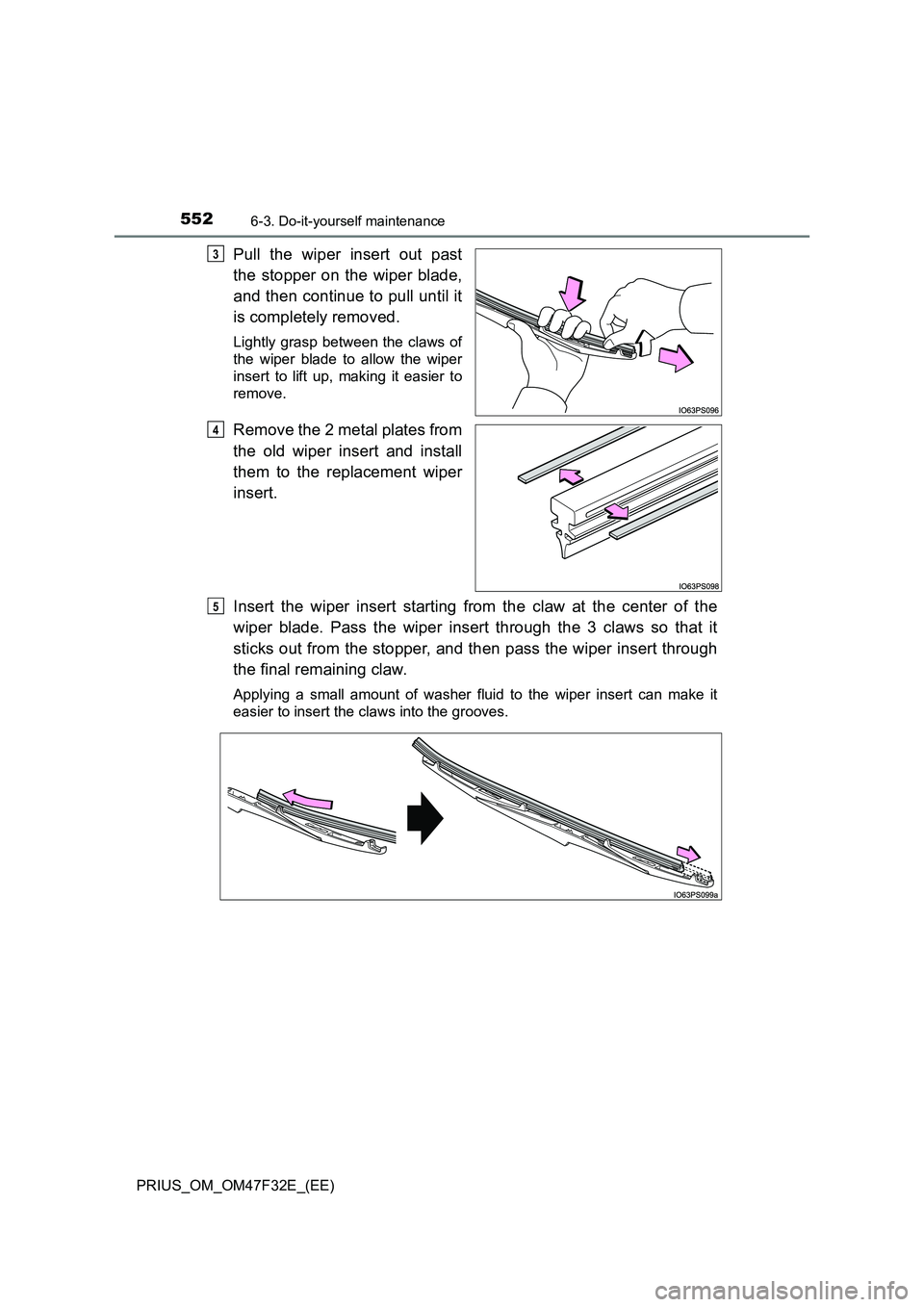
Pull the wiper insert out past
the stopper on the wiper blade,
and then continue to pull until it
is completely removed.
Lightly grasp between the claws of
the wiper blade to allow the wiper
insert to lift up, making it easier to
remove.
Remove the 2 metal plates from
the old wiper insert and install
them to the replacement wiper
insert.
Insert the wiper insert starting from the claw at the center of the
wiper blade. Pass the wiper insert through the 3 claws so that it
sticks out from the stopper, and then pass the wiper insert through
the final remaining claw.
Applying a small amount of washer fluid to the wiper insert can make it
easier to insert the claws into the grooves.
3
4
5
Page 555 of 770
5536-3. Do-it-yourself maintenance
PRIUS_OM_OM47F32E_(EE)
6
Maintenance and care
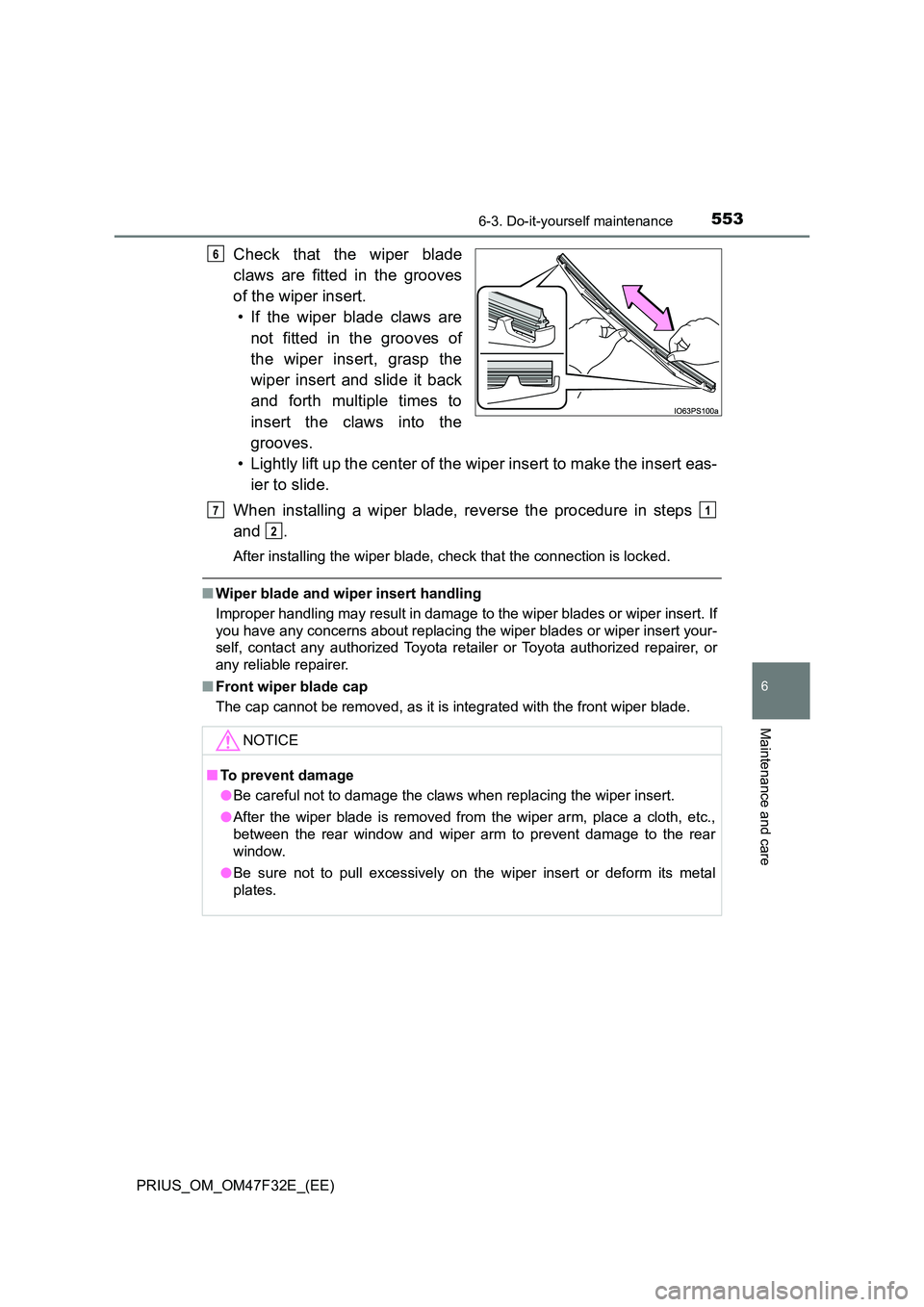
Check that the wiper blade
claws are fitted in the grooves
of the wiper insert.
• If the wiper blade claws are
not fitted in the grooves of
the wiper insert, grasp the
wiper insert and slide it back
and forth multiple times to
insert the claws into the
grooves.
• Lightly lift up the center of the wiper insert to make the insert eas-
ier to slide.
When installing a wiper blade, reverse the procedure in steps
and .
After installing the wiper blade, check that the connection is locked.
■ Wiper blade and wiper insert handling
Improper handling may result in damage to the wiper blades or wiper insert. If
you have any concerns about replacing the wiper blades or wiper insert your-
self, contact any authorized Toyota retailer or Toyota authorized repairer, or
any reliable repairer.
■ Front wiper blade cap
The cap cannot be removed, as it is integrated with the front wiper blade.
6
NOTICE
■ To prevent damage
● Be careful not to damage the claws when replacing the wiper insert.
● After the wiper blade is removed from the wiper arm, place a cloth, etc.,
between the rear window and wiper arm to prevent damage to the rear
window.
● Be sure not to pull excessively on the wiper insert or deform its metal
plates.
71
2
Page 556 of 770
5546-3. Do-it-yourself maintenance
PRIUS_OM_OM47F32E_(EE)
Electronic key batter y
●Flathead screwdriver
●Lithium battery CR2032
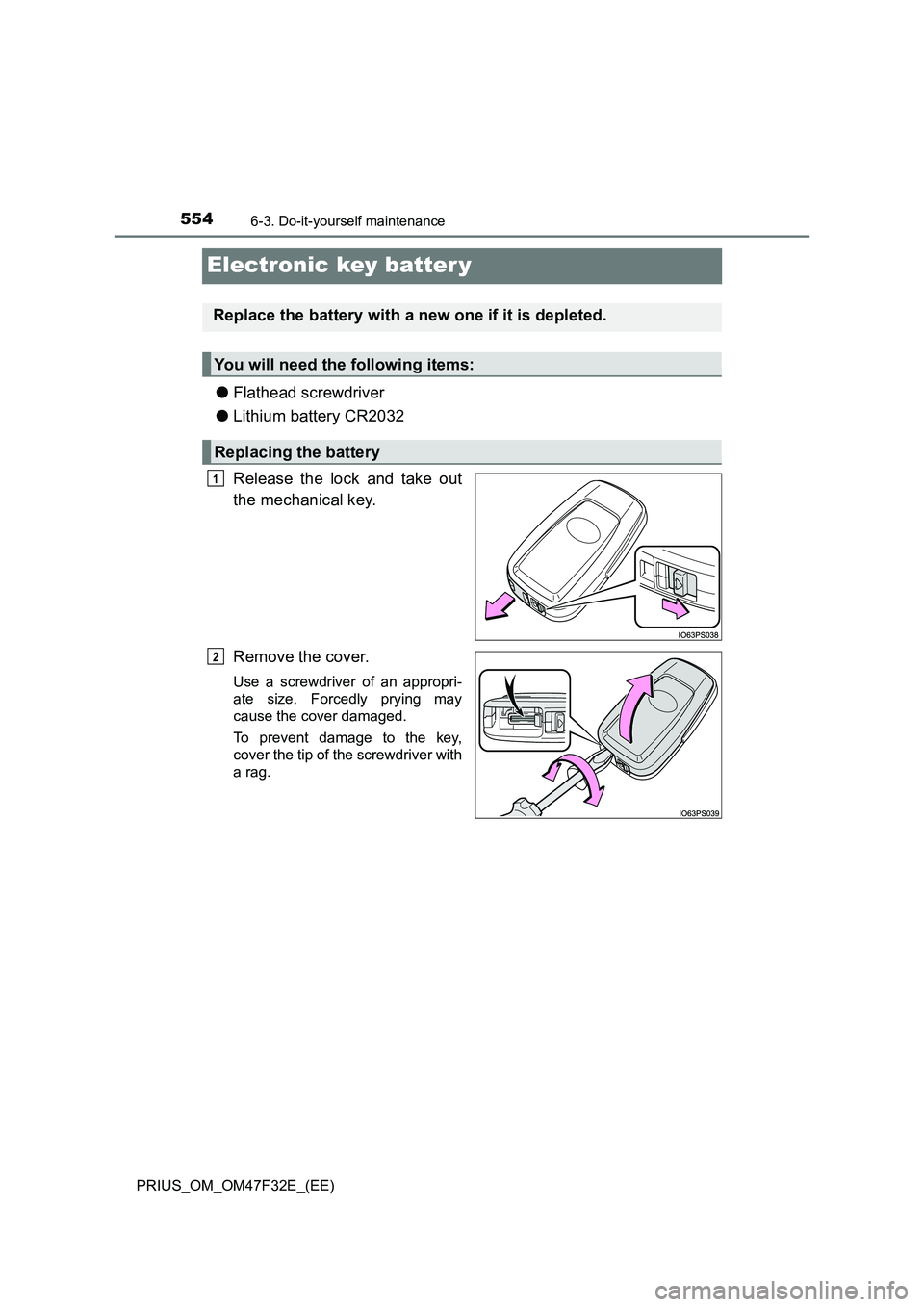
Release the lock and take out
the mechanical key.
Remove the cover.
Use a screwdriver of an appropri-
ate size. Forcedly prying may
cause the cover damaged.
To prevent damage to the key,
cover the tip of the screwdriver with
a rag.
Replace the battery with a new one if it is depleted.
You will need the following items:
Replacing the battery
1
2