warning TOYOTA PRIUS C 2019 Owners Manual (in English)
[x] Cancel search | Manufacturer: TOYOTA, Model Year: 2019, Model line: PRIUS C, Model: TOYOTA PRIUS C 2019Pages: 48, PDF Size: 5.82 MB
Page 3 of 48
1
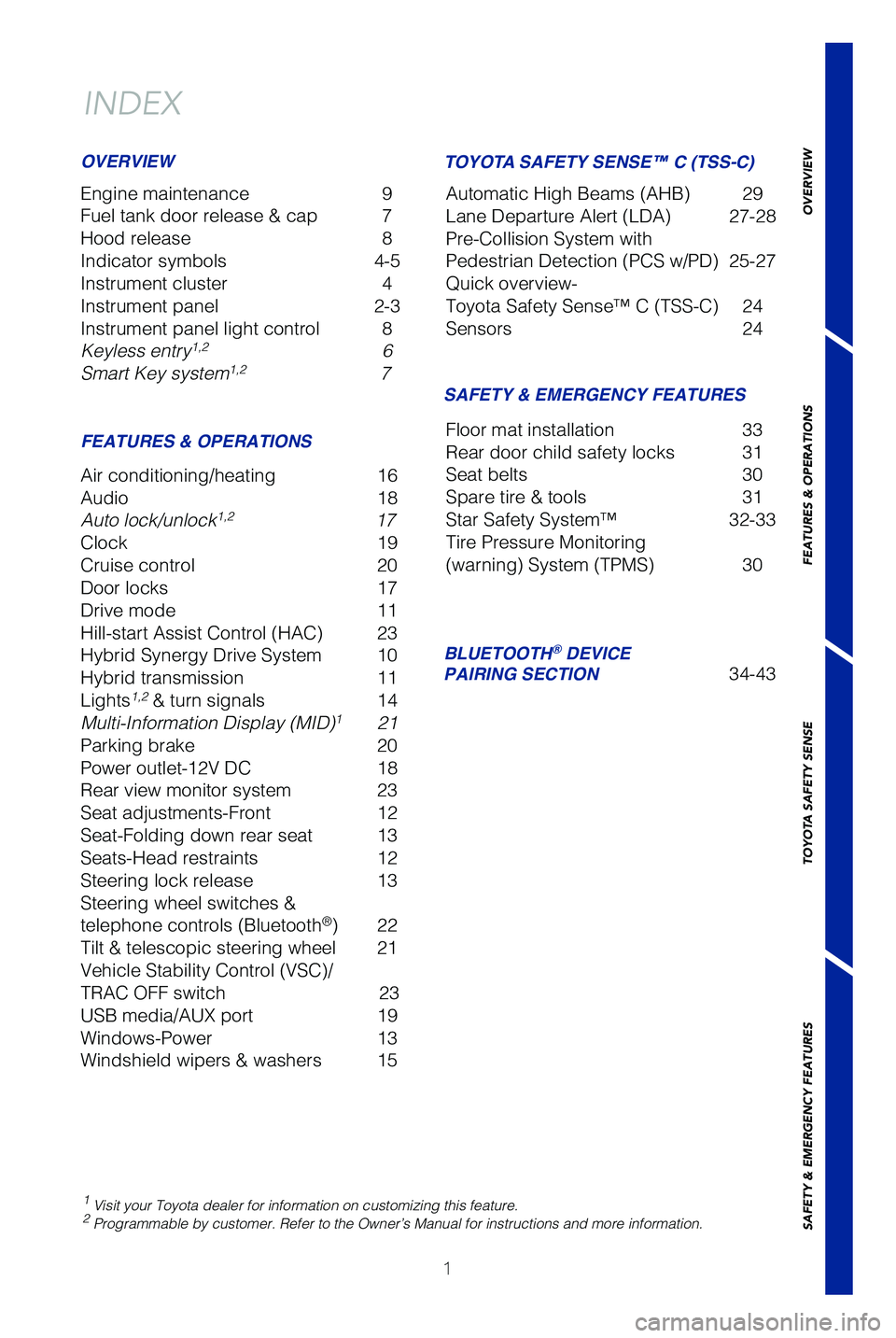
INDEX
Engine maintenance 9
Fuel tank door release & cap 7
Hood release 8
Indicator symbols 4-5
Instrument cluster 4
Instrument panel 2-3
Instrument panel light control 8
Keyless entry
1,2 6
Smart Key system1,2 7
1 Visit your Toyota dealer for information on customizing this feature.2 Programmable by customer. Refer to the Owner’s Manual for instructio\
ns and more information.
OVERVIEW
FEATURES & OPERATIONS SAFETY & EMERGENCY FEATURES
Air conditioning/heating
16
Audio 18
Auto lock/unlock
1,2 17
Clock 19
Cruise control 20
Door locks 17
Drive mode 11
Hill-start Assist Control (HAC) 23
Hybrid Synergy Drive System 10
Hybrid transmission 11
Lights
1,2 & turn signals 14
Multi-Information Display (MID)1 21
Parking brake 20
Power outlet-12V DC 18
Rear view monitor system 23
Seat adjustments-Front 12
Seat-Folding down rear seat 13
Seats-Head restraints 12
Steering lock release 13
Steering wheel switches &
telephone controls (Bluetooth
®) 22
Tilt & telescopic steering wheel 21
Vehicle Stability Control (VSC)/
TRAC OFF switch 23
USB media/AUX port 19
Windows-Power 13
Windshield wipers & washers 15Floor mat installation
33
Rear door child safety locks 31
Seat belts 30
Spare tire & tools 31
Star Safety System™ 32-33
Tire Pressure Monitoring
(warning) System (TPMS) 30
BLUETOOTH® DEVICE
PAIRING SECTION 34-43
TOYOTA SAFETY SENSE™ C (TSS-C)
Automatic High Beams (AHB) 29
Lane Departure Alert (LDA) 27-28
Pre-Collision System with
Pedestrian Detection (PCS w/PD) 25-27
Quick overview-
Toyota Safety Sense™ C (TSS-C) 24
Sensors 24
49125b_MY19_Prius_c_QRG_V2_ML_0713.indd 17/20/18 8:33 PM
OVERVIEW
FEATURES & OPERATIONS
TOYOTA SAFETY SENSE
SAFETY & EMERGENCY FEATURES
Page 4 of 48
2
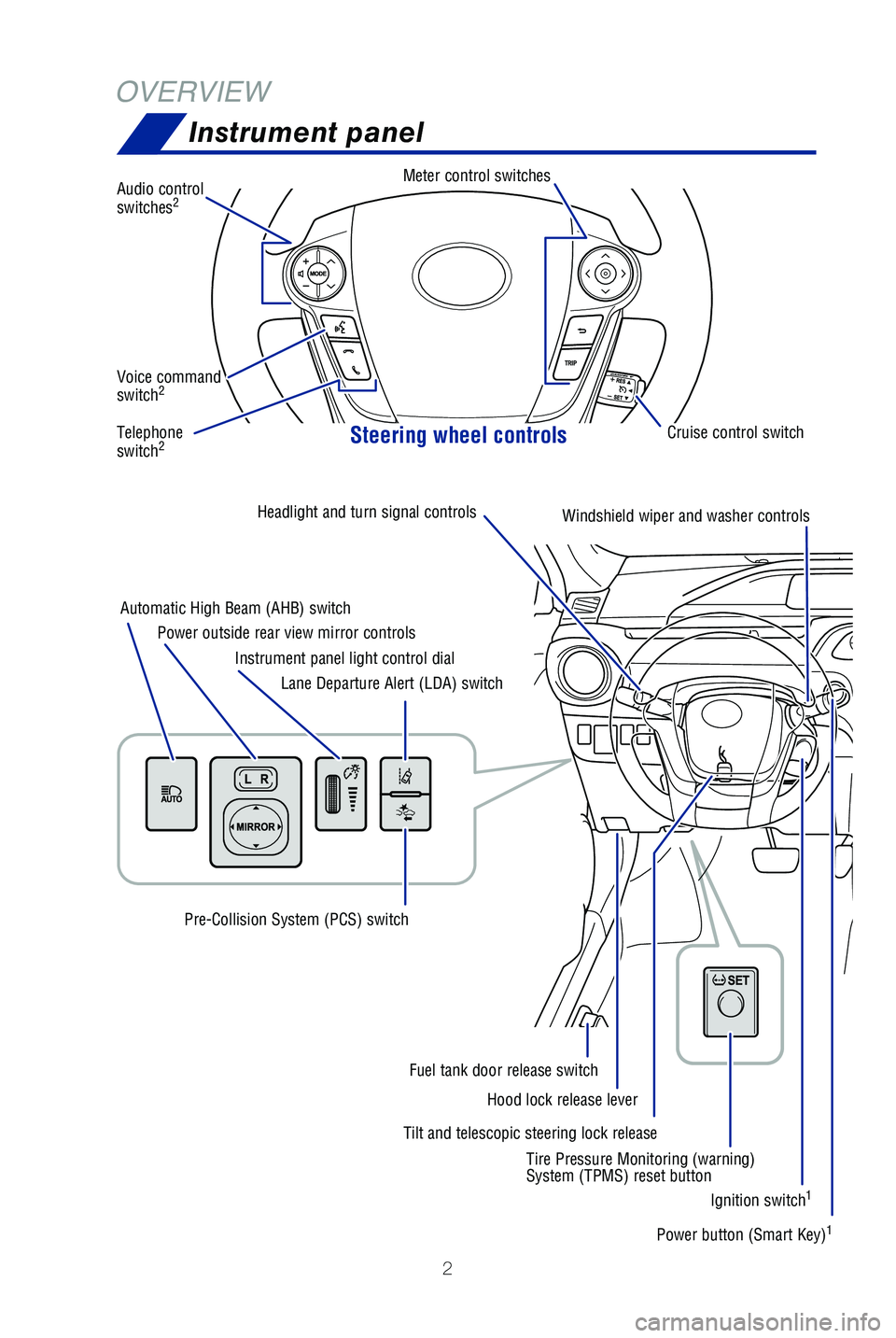
OVERVIEWInstrument panel
Steering wheel controls
Audio control
switches2
Meter control switches
Telephone
switch2
Voice command
switch2
Tilt and telescopic steering lock release
Automatic High Beam (AHB) switch
Power outside rear view mirror controls
Instrument panel light control dial
Lane Departure Alert (LDA) switch
Pre-Collision System (PCS) switch
Hood lock release lever
Fuel tank door release switch
Headlight and turn signal
controls
Windshield wiper and washer controlsEmergency flasher button
Power button (Smart Key)1
Ignition switch1
Tire Pressure Monitoring (warning)
System (TPMS) reset button Cruise control switch
49125b_MY19_Prius_c_QRG_V2_ML_0713.indd 27/20/18 8:33 PM
Page 6 of 48
 4
OVERVIEWInstrument cluster
For details, refer to “Indicators and warning lights,” Section 2, \
2019 Owner’s
Manual.
Service indicators and reminders
Driver and/or front passenger seat belt re")
4
OVERVIEWInstrument cluster
For details, refer to “Indicators and warning lights,” Section 2, \
2019 Owner’s
Manual.
Service indicators and reminders
Driver and/or front passenger seat belt reminder
(alarm will sound if speed is over 12 mph)
Brake system warning1
Brake system warning light (yellow indicator)1
Cruise control/cruise control “SET” indicators
Airbag SRS warning1
Anti-lock Brake System (ABS) warning1
Automatic High Beam (AHB) indicator1
Arrow direction indicates fuel tank door position
Speedometer Outside temperature
Average fuel consumption Clock
Transmission shift
position indicator
Fuel gauge
Multi-Information Display
AIR BAG ON/OFF indicator1
Indicator symbols
Odometer/trip meter
49125b_MY19_Prius_c_QRG_V2_ML_0713.indd 47/20/18 8:33 PM
Page 7 of 48
5
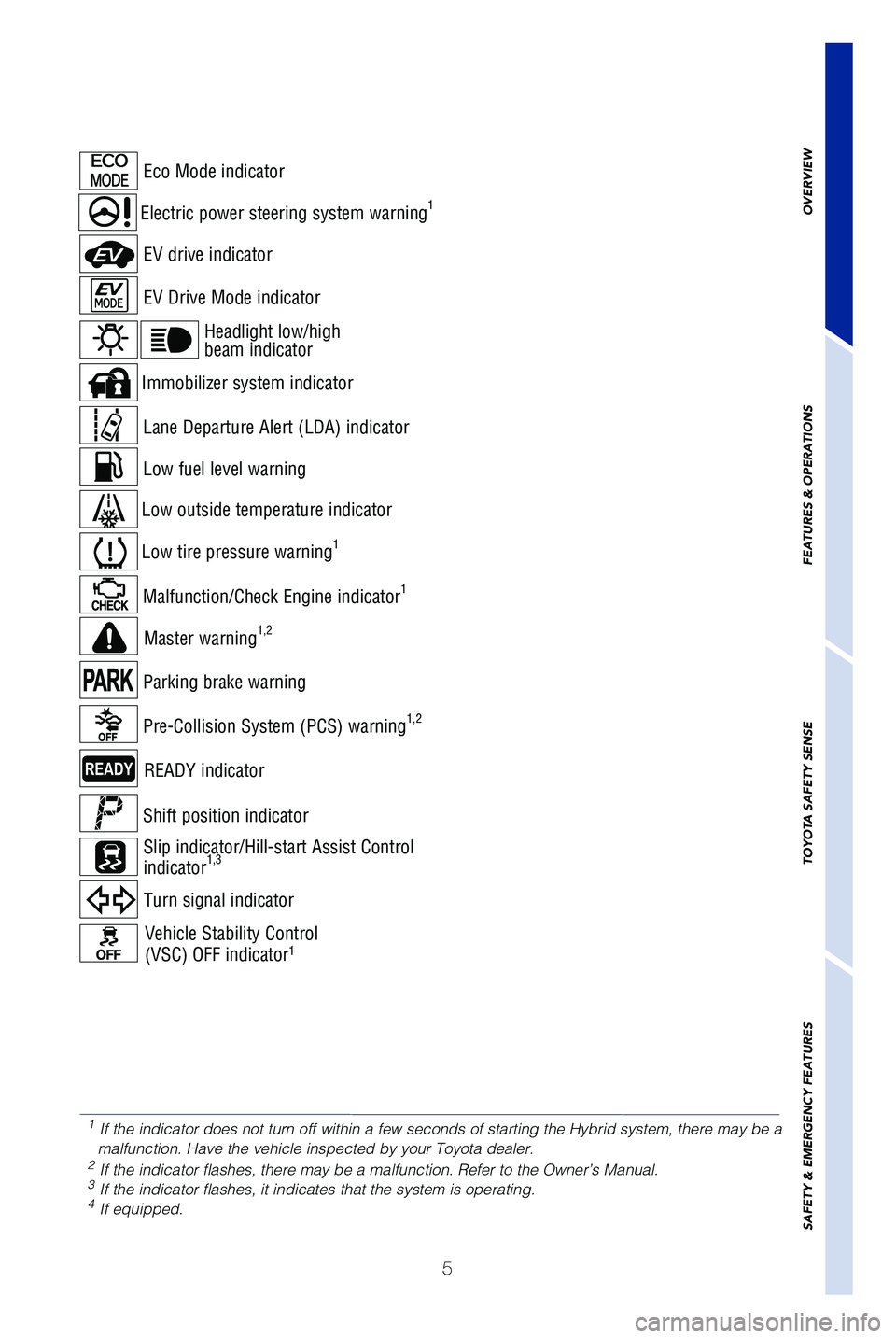
Headlight low/high
beam indicator
Turn signal indicator
Immobilizer system indicator
READY indicator
Electric power steering system warning1
Eco Mode indicator
EV Drive Mode indicator
EV drive indicator
Pre-Collision System (PCS) warning1,2
Master warning1,2
Malfunction/Check Engine indicator1
Low tire pressure warning1
Low outside temperature indicator
Low fuel level warning
Lane Departure Alert (LDA) indicator
Parking brake warning
Vehicle Stability Control
(VSC) OFF indicator1
Shift position indicator
Slip indicator/Hill-start Assist Control
indicator
1,3
OVERVIEW
FEATURES & OPERATIONS
TOYOTA SAFETY SENSE
SAFETY & EMERGENCY FEATURES
1
If the indicator does not turn off within a few seconds of starting the \
Hybrid system, there may be a
malfunction. Have the vehicle inspected by your Toyota dealer.
2 If the indicator flashes, there may be a malfunction. Refer to the Owner\
’s Manual.3 If the indicator flashes, it indicates that the system is operating.4 If equipped.
49125b_MY19_Prius_c_QRG_V2_ML_0713.indd 57/20/18 8:33 PM
Page 23 of 48
21
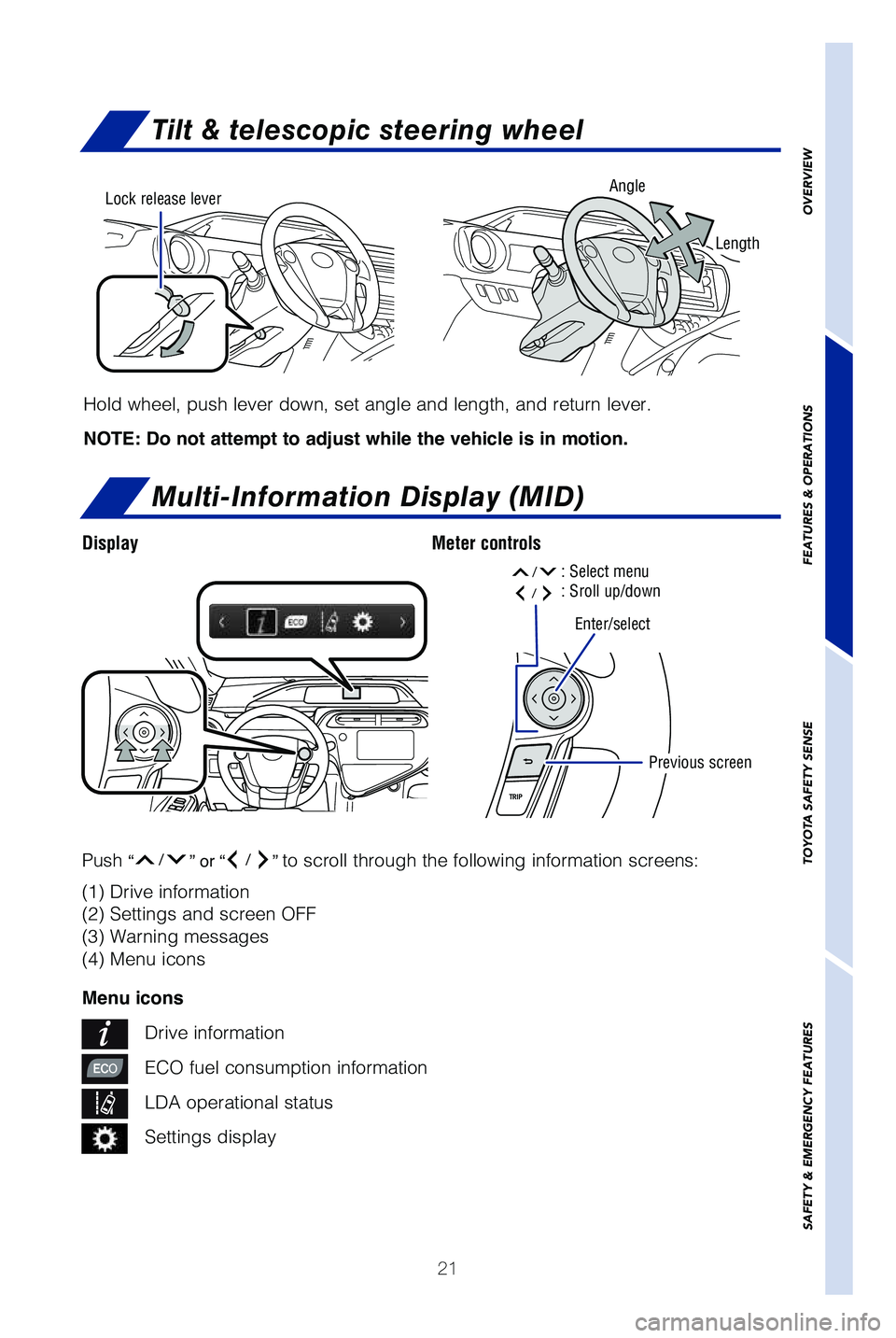
Tilt & telescopic steering wheel
Multi-Information Display (MID)
DisplayMeter controls
Hold wheel, push lever down, set angle and length, and return lever.
NOTE: Do not attempt to adjust while the vehicle is in motion.
Angle
Length
Lock release lever
(1) Drive information
(2) Settings and screen OFF
(3) Warning messages
(4) Menu icons
Menu icons
Drive information
ECO fuel consumption information
LDA operational status
Settings display
Push
“/” or “/” to scroll through the following information screens:
Enter/select
Previous screen
OVERVIEW
FEATURES & OPERATIONS
TOYOTA SAFETY SENSE
SAFETY & EMERGENCY FEATURES
: Select menu/: Sroll up/down/
49125b_MY19_Prius_c_QRG_V2_ML_0713.indd 217/20/18 8:33 PM
Page 27 of 48
 25
The Pre-Collision System uses laser sensors and camera sensor to help de\
tect a
vehicle or pedestrian in front of your vehicle.
As there is a limit to the degree of recognition accuracy and contr")
25
The Pre-Collision System uses laser sensors and camera sensor to help de\
tect a
vehicle or pedestrian in front of your vehicle.
As there is a limit to the degree of recognition accuracy and control pe\
rformance
that this system can provide, do not overly rely on this system. This sy\
stem will not
prevent collisions or lessen collision damage or injury in every situati\
on. Do not use
PCS instead of normal braking operations under any circumstances. Do not\
attempt to
test the operation of the pre-collision system yourself, as the system m\
ay not operate
or engage, possibly leading to an accident. In some situations, such as \
when driving
in inclement weather such as heavy rain, fog, snow or a sandstorm or whi\
le driving on
a curve and for a few seconds after driving on a curve, a vehicle may no\
t be detected
by the laser and camera sensors, preventing the system from operating or\
engaging
properly.
Refer to a Toyota Owner’s Manual for a list of additional situations \
in which the
system may not operate properly.
Refer to the Toyota Owner’s Manual for additional information on PCS \
w/PD
operation, settings adjustments, limitations, and precautions before att\
empting to
use it.
Pre-Collision Warning
When the system determines that the possibility of a frontal collision i\
s high, a buzzer
will sound and a warning message will be displayed on the Multi-Informat\
ion Display
(MID) to urge the driver to take evasive action.
Pre-Collision Brake Assist
If the driver notices the hazard and brakes, the system may provide addi\
tional braking
force using Brake Assist. This system may prime the brakes and may apply\
greater
braking force in relation to how strongly the brake pedal is depressed.
Pre-Collision Braking
If the driver does not brake in a set time and the system determines tha\
t the possibility
of a frontal collision with a preceding vehicle is extremely high, the s\
ystem may
automatically apply the brakes, reducing speed in order to help the driv\
er reduce the
impact and in certain cases avoid the collision.
OVERVIEW
FEATURES & OPERATIONS
TOYOTA SAFETY SENSE
SAFETY & EMERGENCY FEATURES
Pre-Collision System with Pedestrian
Detection (PCS w/PD)
49125b_MY19_Prius_c_QRG_V2_ML_0713.indd 257/20/18 8:33 PM
Page 32 of 48
30
Seat belts
Tire Pressure Monitoring (warning) System (TPMS)
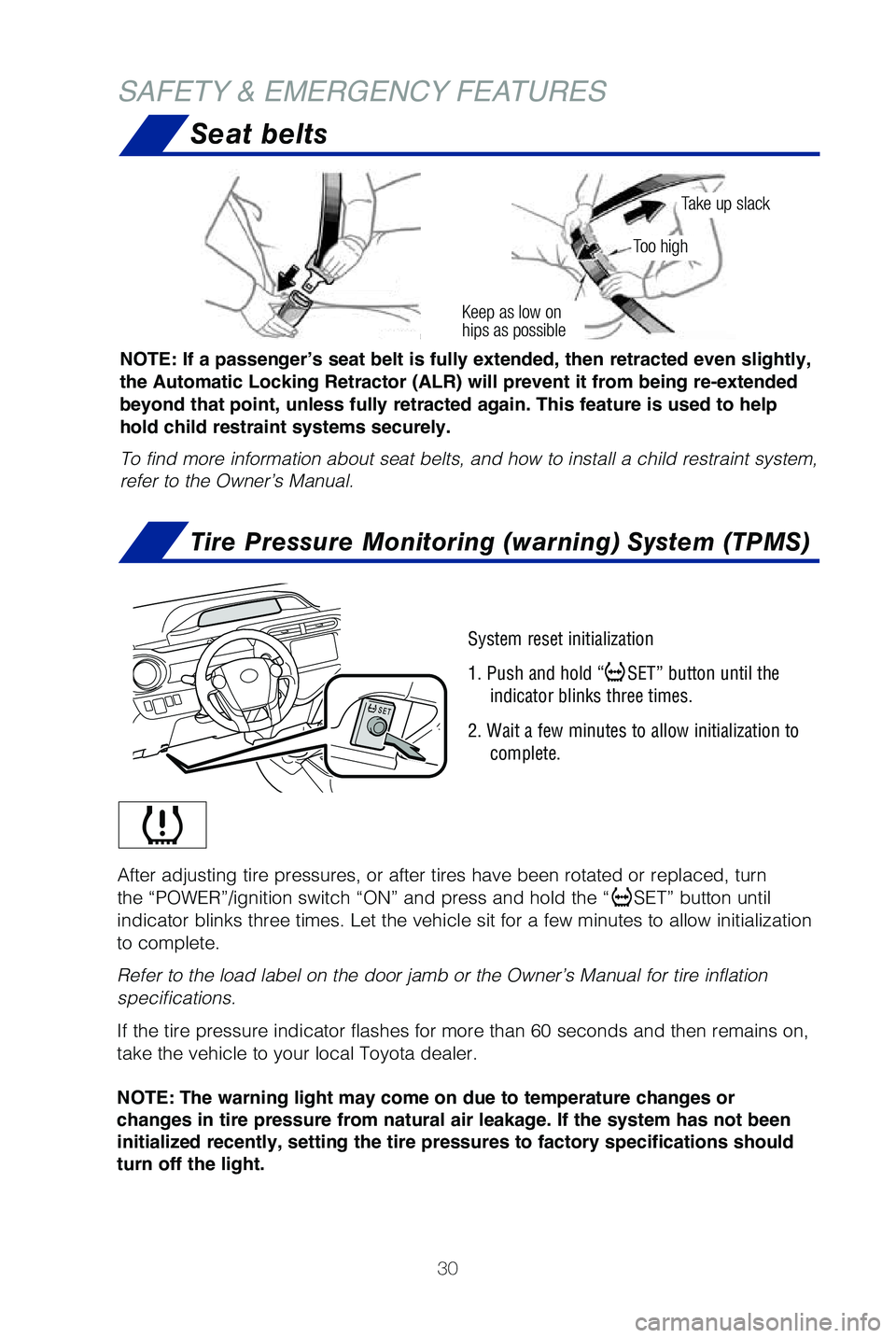
NOTE: If a passenger’s seat belt is fully extended, then retracted even slightly,
the Automatic Locking Retractor (ALR) will prevent it from being re-extended
beyond that point, unless fully retracted again. This feature is used to help
hold child restraint systems securely.
To find more information about seat belts, and how to install a child re\
straint system,
refer to the Owner’s Manual.
Keep as low on
hips as possible
Take up slack
Too high
SAFETY & EMERGENCY FEATURES
System reset initialization
1. Push and hold “
SET” button until the
indicator blinks three times.
2. Wait a few minutes to allow initialization to complete.
After adjusting tire pressures, or after tires have been rotated or repl\
aced, turn
the “POWER”/ignition switch “ON” and press and hold the “\
SET” button until
indicator blinks three times. Let the vehicle sit for a few minutes to a\
llow initialization
to complete.
Refer to the load label on the door jamb or the Owner’s Manual for ti\
re inflation
specifications.
If the tire pressure indicator flashes for more than 60 seconds and then\
remains on,
take the vehicle to your local Toyota dealer.
NOTE:
The
warning light may come on due to temperature changes or
changes in tire pressure from natural air leakage. If the system has not been
initialized recently, setting the tire pressures to factory specifications should
turn off the light.
49125b_MY19_Prius_c_QRG_V2_ML_0713.indd 307/20/18 8:33 PM