battery TOYOTA PRIUS C 2020 User Guide
[x] Cancel search | Manufacturer: TOYOTA, Model Year: 2020, Model line: PRIUS C, Model: TOYOTA PRIUS C 2020Pages: 600, PDF Size: 12.02 MB
Page 87 of 600
871-3. Hybrid system
1
For safety and security
PRIUS c_U
NOTICE
■Hybrid battery (traction battery) air intake vent
● Do not place objects that will block the air intake vent. When the air intake
vent is blocked, the battery operations will be restricted and cause a
decline in fuel consumption.
● Clean the air intake vent regularly to prevent the hybrid batte ry (traction
battery) from overheating.
● Do not get water or foreign materials in the air intake vent as this may
cause a short circuit and damage the hybrid battery (traction b attery).
● Do not carry large amounts of water such as water cooler bottle s in the
vehicle. If water spills onto the hybrid battery (traction batt ery), the battery
may be damaged. Have the vehicle inspected by your Toyota deale r.
● There is a filter installed to the air intake vent. When the fi lter remains
noticeably dirty even after cleaning the air intake vent, filte r cleaning or
replacement is recommended. For information regarding filter cl eaning or
replacement, contact your Toyota dealer.
● If “MAINTENANCE REQUIRED FOR TRACTION BATTERY COOLING
PARTS SEE OWNER’S MANUAL” is shown on the multi-information dis -
play, the air intake vent and filter may be clogged. Refer to P . 404 for infor-
mation on how to clean the air intake vent.
Page 105 of 600
1052. Instrument cluster
2
Instrument cluster
PRIUS c_U■
(Cruising range)
Displays the estimated maximum distance that can be driven with
the quantity of fuel remaining. • This distance is computed base d on your average fuel consump-
tion. As a result, the actual di stance that can be driven may differ
from that displayed.
• When only a small amount of fuel is added to the tank, the dis -
play may not be updated.
When refueling, turn the power swi tch off. If the vehicle is refu-
eled without turning the power switch off, the display may not be
updated.
◆Energy monitor
P. 1 1 2
◆Simple Screen
Displays the enlarged items (clock, outside temperature and fue l
gauge)
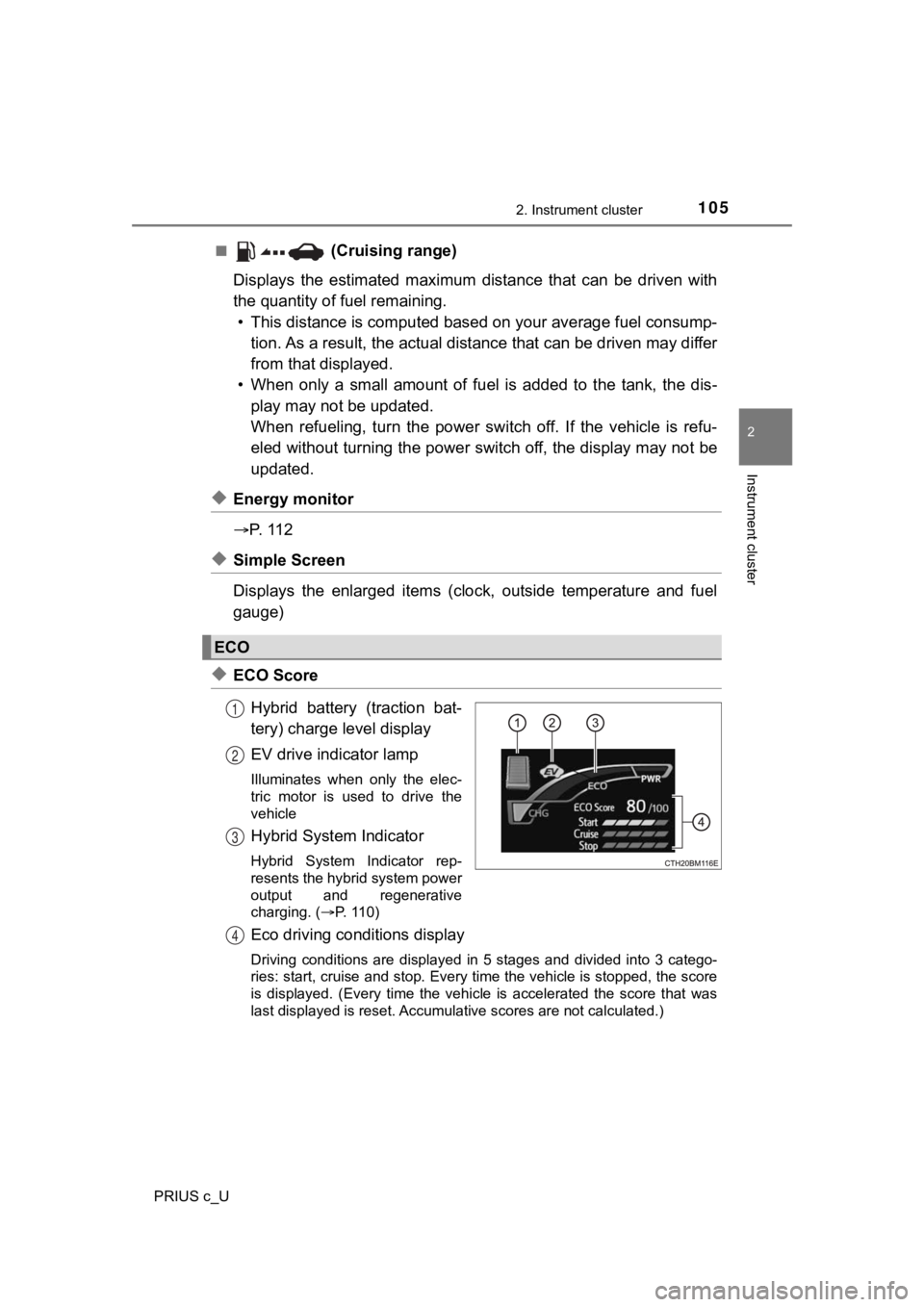
◆ECO Score
Hybrid battery (traction bat-
tery) charge level display
EV drive indicator lamp
Illuminates when only the elec-
tric motor is used to drive the
vehicle
Hybrid System Indicator
Hybrid System Indicator rep-
resents the hybrid system power
output and regenerative
charging. ( P. 110)
Eco driving conditions display
Driving conditions are displayed in 5 stages and divided into 3 catego-
ries: start, cruise and stop. Every time the vehicle is stopped, the score
is displayed. (Every time the vehicle is accelerated the score that was
last displayed is reset. Accumulative scores are not calculated .)
ECO
1
2
3
4
Page 109 of 600

1092. Instrument cluster
2
Instrument cluster
PRIUS c_U
■The clock is displayed when
Vehicles without a smart key system
The power switch is in the “ON” position.
Vehicles with a smart key system
The power switch is in ON mode.
■ Eco score
●As the accelerator pedal is not depressed, the driven distance using cruise
control (if equipped) is not included in the eco score.
● As the eco score evaluation differs according to driving conditions and envi-
ronmental factors, in some cases it may not be linked to fuel c onsumption.
■ Eco savings
●Fuel cost and savings should be used as a guide only.
● Depending on refueling methods, driving conditions and environm ental fac-
tors, the actual and displayed fuel costs may differ.
● In some cases, fuel cost and savings may not be linked to the eco score
evaluation.
■ When disconnecting and reconnecting 12-volt battery terminals
The following information data will be reset:
●Clock
● Past record (aside from the top 3 results)
● 5 min./1 min. fuel consumption display
● Cruising range
● Average vehicle speed
● Driving time
● EV driving rate/EV driven distance
Additionally, some displays may return to their default setting s.
■ Liquid crystal display
Small spots or light spots may appear on the display. This phen omenon is
characteristic of liquid crystal displays, and there is no prob lem continuing to
use the display.
Page 110 of 600
1102. Instrument cluster
PRIUS c_U■
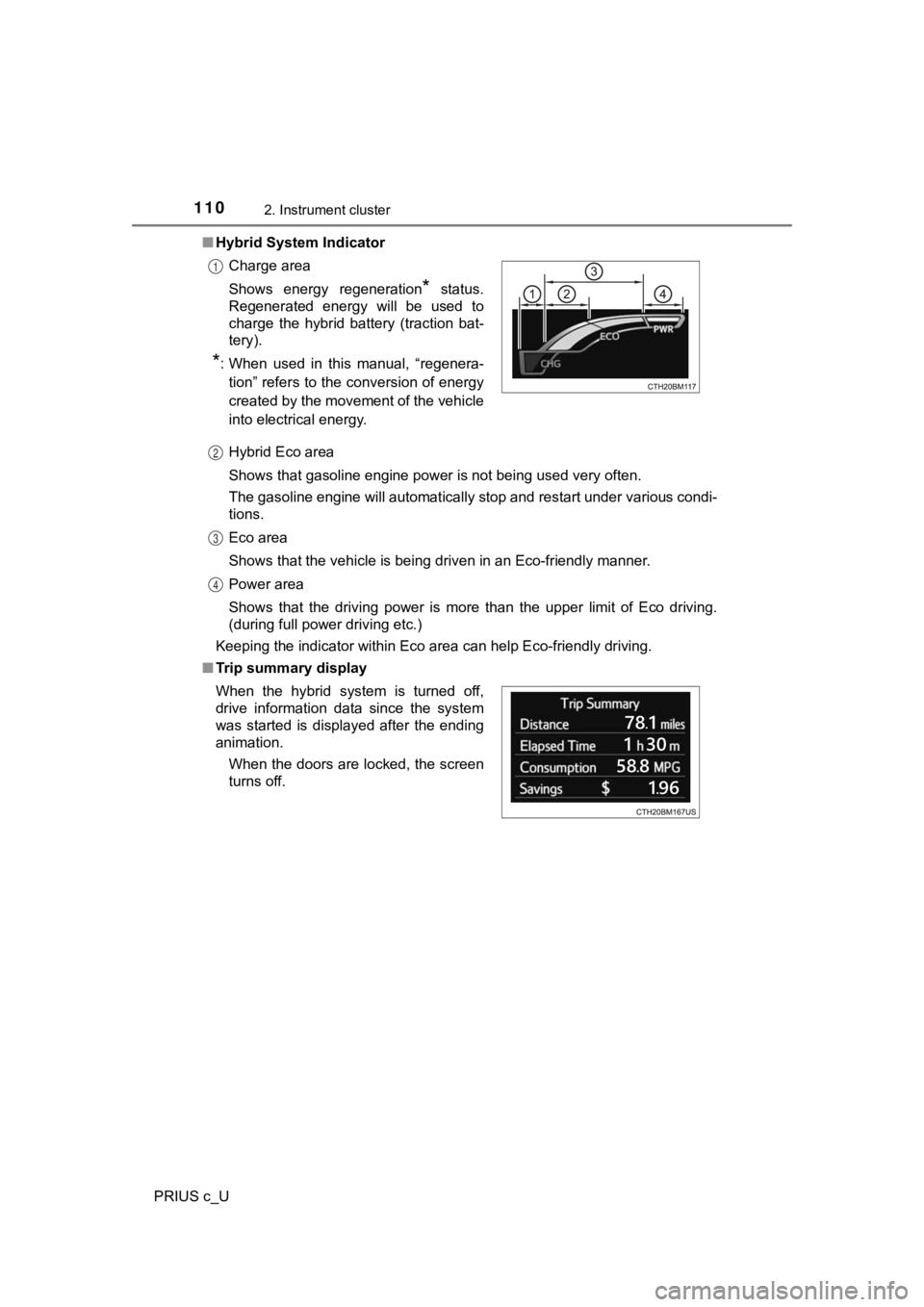
Hybrid System Indicator
Hybrid Eco area
Shows that gasoline engine power is not being used very often.
The gasoline engine will automatically stop and restart under v arious condi-
tions.
Eco area
Shows that the vehicle is being driven in an Eco-friendly manne r.
Power area
Shows that the driving power is more than the upper limit of Eco driving.
(during full power driving etc.)
Keeping the indicator within Eco area can help Eco-friendly dri ving.
■ Trip summary displayCharge area
Shows energy regeneration
* status.
Regenerated energy will be used to
charge the hybrid battery (traction bat-
tery).
*: When used in this manual, “regenera-
tion” refers to the conversion of energy
created by the movement of the vehicle
into electrical energy.
1
2
3
4
When the hybrid system is turned off,
drive information data since the system
was started is displayed after the ending
animation.
When the doors are locked, the screen
turns off.
Page 111 of 600
1112. Instrument cluster
2
Instrument cluster
PRIUS c_U
WARNING
■Eco score
Eco score should be used as a guide only. Always drive safely i n accor-
dance with road and traffic conditions.
■ The information display at low temperatures
Allow the interior of the vehicle to warm up before using the liquid crystal
information display. At extremely low temperatures, the display monitor may
respond slowly, and display changes may be delayed.
For example, there is a lag between the driver’s shifting and t he new gear
number appearing on the display. This lag could cause the drive r to down-
shift again, causing rapid and excessive engine braking and pos sibly an
accident resulting in death or injury.
■ Cautions during setting up the display
As the hybrid system needs to be running during setting up the display,
ensure that the vehicle is parked in a place with adequate vent ilation. In a
closed area such as a garage, exhaust gases including harmful c arbon
monoxide (CO) may collect and enter the vehicle. This may lead to death or
a serious health hazard.
NOTICE
■ During setting up the display
To prevent 12-volt battery discharge, ensure that the hybrid sy stem is oper-
ating while setting up the display features.
Page 113 of 600
1132. Instrument cluster
2
Instrument cluster
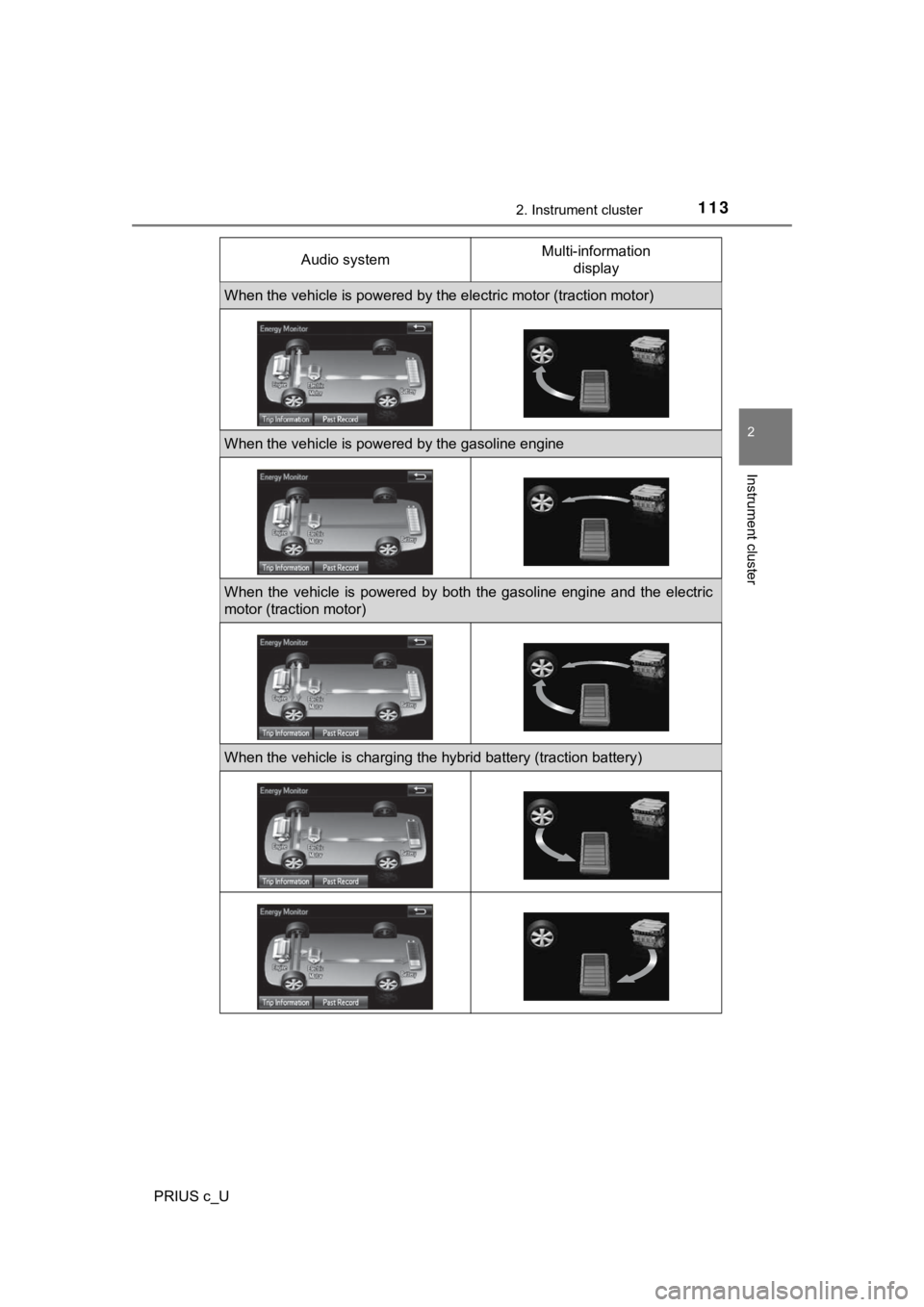
PRIUS c_UAudio system
Multi-information
display
When the vehicle is powered by t he electric motor (traction motor)
When the vehicle is powered by the gasoline engine
When the vehicle is powered by both the gasoline engine and the electric
motor (traction motor)
When the vehicle is charging the hybrid battery (traction batte ry)
Page 114 of 600
1142. Instrument cluster
PRIUS c_U
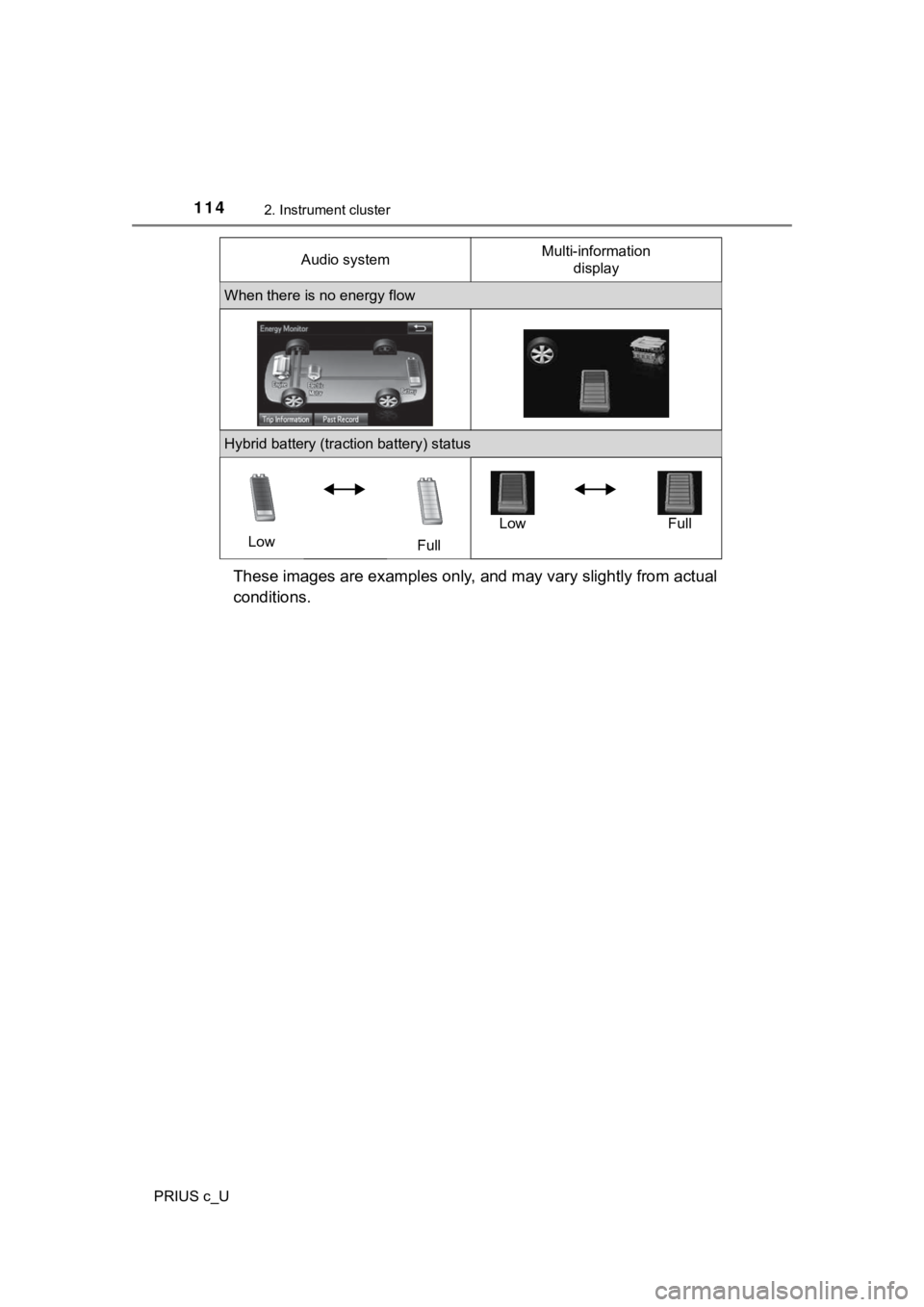
These images are examples only, and may vary slightly from actual
conditions.
When there is no energy flow
Hybrid battery (traction battery) status
Low FullLow Full
Audio system
Multi-information
display
Page 117 of 600

1172. Instrument cluster
2
Instrument cluster
PRIUS c_U
P. 1 0 5
■Remaining hybrid battery (traction battery) charge display
The charge amount of the hybrid battery (traction battery) is a utomatically
controlled by the hybrid system. For this reason, even if electricity is recov-
ered via the regenerative braking, or electricity is generated via the gasoline
engine, the displayed hybrid battery (traction battery) charge amount may not
reach the highest level (level 8). However, this does not indic ate a malfunc-
tion.
■ Resetting the consumption data (audio system)
Selecting “Clear” on the “Trip Information” screen will reset t he fuel consump-
tion and the regenerated energy for the past 15 minutes. Select ing “Clear” on
the “Past Record” screen will reset the past records and best past fuel con-
sumption. Selecting “Yes” on the following screen will confirm resetting of all
the data.
■ Updating the past record data (audio system)
Selecting “Update” on the “Past Record” screen will update the past record
data.
Fuel consumption screen (Multi-information display)
Page 123 of 600

1233-1. Key information
3
Operation of each component
PRIUS c_U■
Key battery depletion
Vehicles without a smart key system
If the wireless remote control function does not operate, the b attery may be
depleted. Replace the battery when necessary. ( P. 451)
Vehicles with a smart key system
● The standard battery life is 1 to 2 years.
● If the battery becomes low, an alarm will sound in the cabin wh en the hybrid
system stops. ( P. 503)
● As the electronic key always receives radio waves, the battery will become
depleted even if the electronic key is not used. The following symptoms indi-
cate that the electronic key battery may be depleted. Replace the battery
when necessary. ( P. 451)
• The smart key system or the wireless remote control does not o perate.
• The detection area becomes smaller.
• The LED indicator on the key surface does not turn on.
● To avoid serious deterioration, do not leave the electronic key within 3 ft. (1
m) of the following electrical appliances that produce a magnet ic field:
•TVs
• Personal computers
• Cellular phones, cordless phones and battery chargers
• Recharging cellular phones or cordless phones
• Induction cookers
• Table lamps
■ Replacing the battery
P. 451
■ Confirmation of the registered key number (vehicles with a smar t key
system)
The number of keys already registered to the vehicle can be confirmed. Ask
your Toyota dealer for details.
■ If a wrong key is used (vehicles with a smart key system)
The key cylinder rotates freely to isolate inside mechanism.
■ Customization that can be configured at Toyota dealer
Settings (e.g. wireless remote control system) can be changed.
(Customizable features: P. 560)
Page 129 of 600
1293-2. Opening, closing and locking the doors
3
Operation of each component
PRIUS c_U
■Operation signals
Vehicles without a smart key system
The emergency flashers flash to indicate that the doors have been locked/
unlocked. (Locked: once; Unlocked: twice)
Vehicles with a smart key system
A buzzer sounds and the emergency flashers flash to indicate th at the doors
have been locked/unlocked. (Locked: once; Unlocked: twice)
■ Security feature
Vehicles without a smart key system
If a door is not opened within approximately 60 seconds after t he vehicle is
unlocked, the security feature automatically locks the vehicle again.
Vehicles with a smart key system
If a door is not opened within approximately 60 seconds after t he vehicle is
unlocked, the security feature automatically locks the vehicle again. (How-
ever, depending on the location of the electronic key, the key may be
detected as being in the vehicle. In this case, vehicle may be unlocked.)
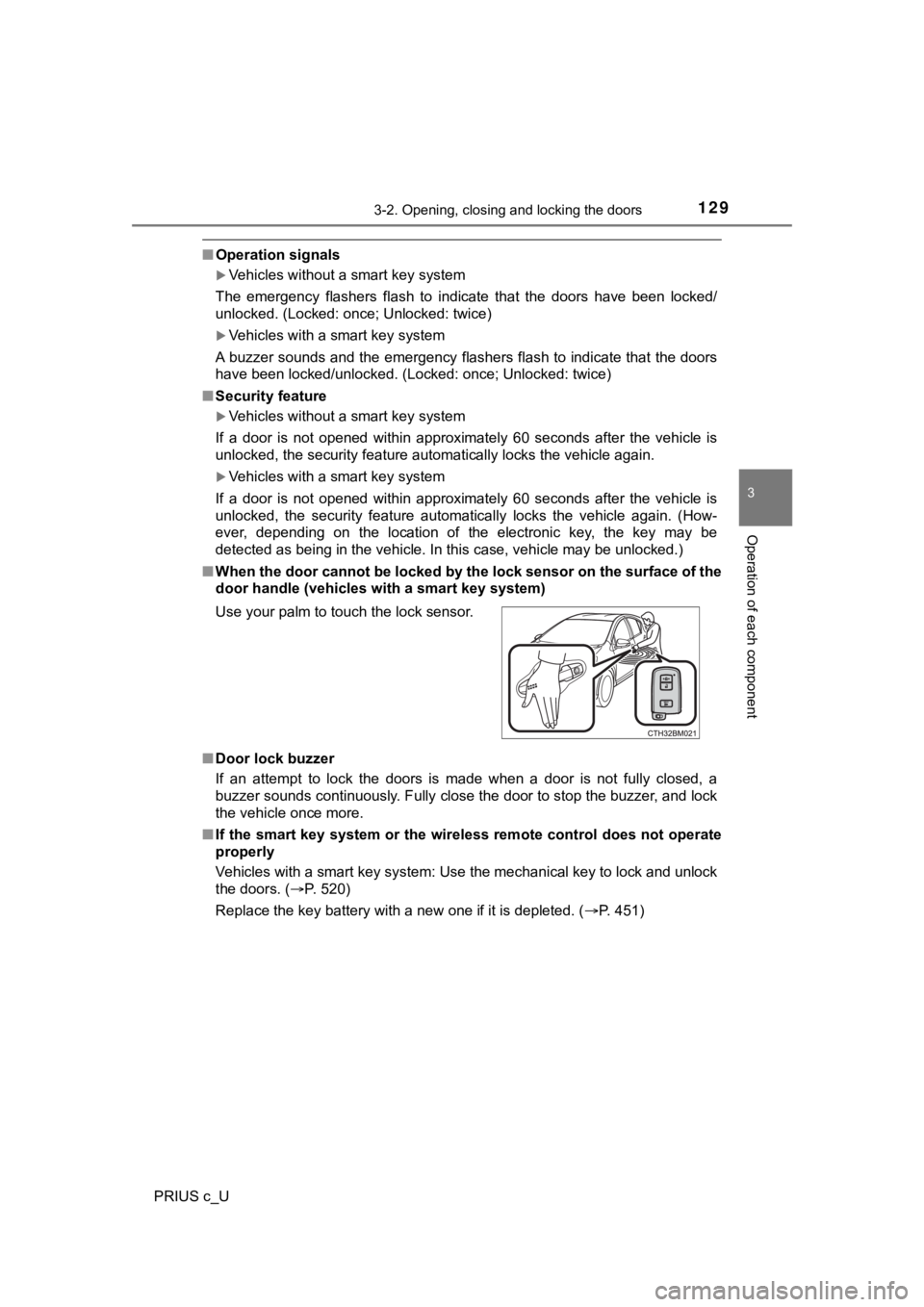
■ When the door cannot be locked by the lock sensor on the surface of the
door handle (vehicles with a smart key system)
■ Door lock buzzer
If an attempt to lock the doors is made when a door is not full y closed, a
buzzer sounds continuously. Fully close the door to stop the bu zzer, and lock
the vehicle once more.
■ If the smart key system or the wireless remote control does not operate
properly
Vehicles with a smart key system: Use the mechanical key to loc k and unlock
the doors. ( P. 520)
Replace the key battery with a new one if it is depleted. ( P. 451)
Use your palm to touch the lock sensor.