battery TOYOTA PRIUS C 2020 Owner's Manual
[x] Cancel search | Manufacturer: TOYOTA, Model Year: 2020, Model line: PRIUS C, Model: TOYOTA PRIUS C 2020Pages: 600, PDF Size: 12.02 MB
Page 134 of 600
1343-2. Opening, closing and locking the doors
PRIUS c_U
■Switching the door unlock func tion (vehicles with a smart key system)
It is possible to set which doors the entry function unlocks using the wireless
remote control.
Turn the power switch off.
When the indicator light on the key surface is not on, press an d hold
or for about 5 seconds while pressing and holding .
The setting changes each time an operation is performed, as sho wn below.
(When changing the setting continuously, release the buttons, w ait for at least
5 seconds, and repeat step 2.)
■ Conditions affecting the operation of the smart key system or w ireless
remote control
Vehicles without a smart key system
The wireless remote control function may not operate normally i n the follow-
ing situations:
● When the wireless key battery is depleted
● Near a TV tower, electric power plant, gas station, radio stati on, large dis-
play, airport or other facility that generates strong radio wav es or electrical
noise
● When carrying a portable radio, cellular phone or other wireles s communi-
cation device
● When the wireless key is in contact with, or is covered by a me tallic object
● When other wireless keys (that emits radio waves) are being use d nearby
● If window tint with a metallic content or metallic objects are attached to the
rear window
Vehicles with a smart key system
P. 143
■ Customization that can be configured at Toyota dealer
Settings (e.g. unlocking function using a key) can be changed.
(Customizable features: P. 560)
1
2
Unlocking doorsBeep
Holding the driver's door handle
unlocks only the driver's door.
Exterior: Beeps 3 times
Interior: Beeps once
Holding the front passenger’s door
handle unlocks all the doors.
Holding either front door handle
unlocks all the doors.Exterior: Beeps twice
Interior: Beeps once
Page 142 of 600
1423-2. Opening, closing and locking the doors
PRIUS c_U■
Alarms and warning indicators
A combination of exterior and interior alarms as well as warnin g messages
shown on the multi-information display is used to prevent theft of the vehicle
and accidents resulting from erroneous operation. Take appropriate mea-
sures in response to any warning message on the multi-information display.
( P. 489)
The following table describes circumstances and correction procedures when
only alarms are sounded.
■ Battery-saving function
The battery-saving function will be activated in order to preve nt the electronic
key battery and the 12-volt battery from being discharged while the vehicle is
not in operation for a long time.
● In the following situations, the smart key system may take some time to
unlock the doors.
• The electronic key has been left in an area of approximately 6 ft. (2 m) of
the outside of the vehicle for 10 minutes or longer.
• The smart key system has not been used for 5 days or longer.
● If the smart key system has not been used for 14 days or longer , the doors
cannot be unlocked at any of the doors except the driver’s door . In this case,
take hold of the driver’s door handle, or use the wireless remote control or
the mechanical key, to unlock the doors.
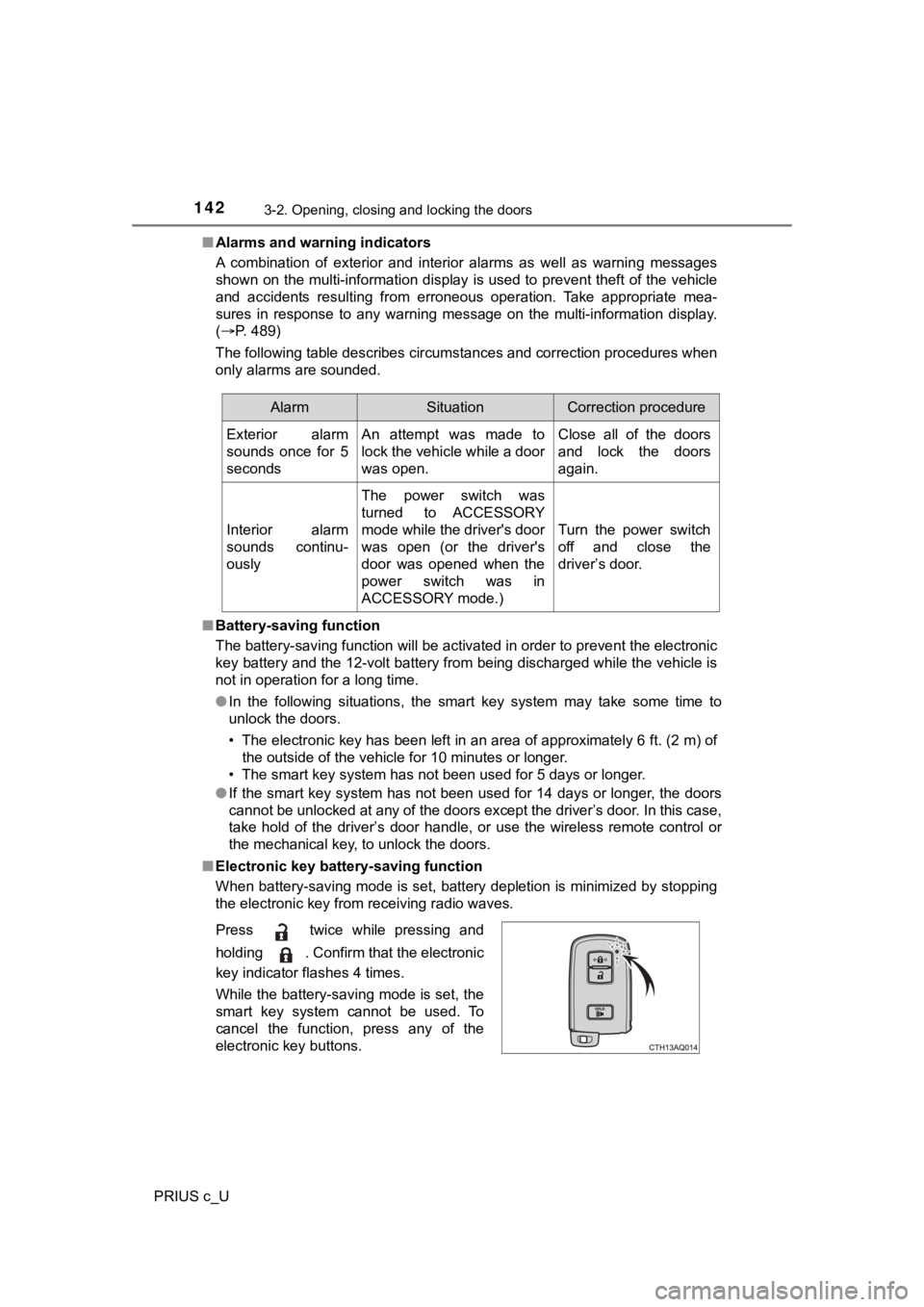
■ Electronic key battery-saving function
When battery-saving mode is set, battery depletion is minimized by stopping
the electronic key from receiving radio waves.
AlarmSituationCorrection procedure
Exterior alarm
sounds once for 5
seconds An attempt was made to
lock the vehicle while a door
was open. Close all of the doors
and lock the doors
again.
Interior alarm
sounds continu-
ously The power switch was
turned to ACCESSORY
mode while the driver's door
was open (or the driver's
door was opened when the
power switch was in
ACCESSORY mode.) Turn the power switch
off and close the
driver’s door.
Press twice while pressing and
holding . Confirm that the electronic
key indicator flashes 4 times.
While the battery-saving mode is set, the
smart key system cannot be used. To
cancel the function, press any of the
electronic key buttons.
Page 143 of 600

1433-2. Opening, closing and locking the doors
3
Operation of each component
PRIUS c_U■
Conditions affecting operation
The smart key system uses weak radio waves. In the following si tuations, the
communication between the electronic key and the vehicle may be affected,
preventing the smart key system, wireless remote control and immobilizer
system from operating properly. (Ways of coping: P. 520)
● When the electronic key battery is depleted
● Near a TV tower, electric power plant, gas station, radio stati on, large dis-
play, airport or other facility that generates strong radio wav es or electrical
noise
● When the electronic key is in contact with, or is covered by the following
metallic objects
• Cards to which aluminum foil is attached
• Cigarette boxes that have aluminum foil inside
• Metallic wallets or bags
• Coins
• Hand warmers made of metal
• Media such as CDs and DVDs
● When other wireless keys (that emit radio waves) are being used nearby
● When carrying the electronic key together with the following devices that
emit radio waves
• A portable radio, cellular phone, cordless phone or other wire less com-
munication device
• Another vehicle’s electronic key or a wireless key that emits radio waves
• Personal computers or personal digital assistants (PDAs)
• Digital audio players
• Portable game systems
● If window tint with a metallic content or metallic objects are attached to the
rear window
● When the electronic key is placed near a battery charger or ele ctronic
devices
Page 144 of 600

1443-2. Opening, closing and locking the doors
PRIUS c_U■
Notes for the entry function
●Even when the electronic key is within the effective range (det ection areas),
the system may not operate properly in the following cases:
• The electronic key is too close to the window or outside door handle, near
the ground, or in a high place when the doors are locked or unl ocked.
• The electronic key is on the instrument panel, luggage cover o r floor, in
the door pockets or glove box when the hybrid system is started or power
switch modes are changed.
● Do not exit the vehicle with the electronic key placed on the i nstrument
panel or near the door pockets. Depending on the radio wave reception con-
ditions, it may be detected by the antenna outside the cabin and the door
will become lockable from the outside, possibly trapping the electronic key
inside the vehicle.
● As long as the electronic key is within the effective range, th e doors may be
locked or unlocked by anyone. However, only the doors detecting the elec-
tronic key can be used to unlock the vehicle.
● Whether or not the electronic key is inside the vehicle, the hy brid system
could be started if the electronic key is near the window.
● The doors may unlock if a large amount of water splashes on the door han-
dle, such as in the rain or in a car wash when the electronic k ey is within the
effective range. (The door will automatically be locked after a pproximately
60 seconds if the doors are not opened and closed.)
● The lock and unlock sensors may not work properly if they come into con-
tact with ice, snow, mud, etc. Clean the sensors and attempt to operate
them again.
● If the wireless remote control is used to lock the doors when t he electronic
key is near the vehicle, there is a possibility that the door m ay not be
unlocked by the entry function. (Using the wireless remote cont rol to unlock
the doors may resume the function.)
● If the door handle becomes wet while the electronic key is with in the effec-
tive range, the door may lock and unlock repeatedly. In that ca se, follow the
following correction procedures to wash the vehicle:
• Place the electronic key in a location 6 ft. (2 m) or more awa y from the
vehicle. (Take care to ensure that the key is not stolen.)
• Set the electronic key to battery-saving mode to disable the s mart key
system. ( P. 142)
Page 194 of 600

1944-2. Driving procedures
PRIUS c_U
If the hybrid system is stopped with the shift lever in a position other
than P, the power sw itch will not be turned off but instead be turned to
ACCESSORY mode. Perform the following procedure to turn the
switch off:
Check that the park ing brake is set.
Shift the shift lever to P.
Check that is displ ayed on the multi-information display and
then press the power switch once.
Check that on the multi-information display is off.
■Auto power off function
When the shift lever is in P, if the vehicle is left in ACCESSO RY or ON mode
with the hybrid system not operating for more than 20 minutes ( ACCESSORY
mode) or one hour (ON mode), the power switch will automaticall y turn off.
However, this function cannot entirely prevent 12-volt battery discharge. Do
not leave the vehicle with the power switch in ACCESSORY or ON mode for
long periods of time when the hybrid system is not operating.
■ Sounds and vibrations sp ecific to a hybrid vehicle
P. 80
■ Electronic key battery depletion
P. 123
■ When the ambient temperature is low, such as during winter driv ing con-
ditions
When starting the hybrid system, the flashing time of the “READ Y” indicator
may be long. Leave the vehicle as it is until the “READY” indic ator is steady
on, as steady means the vehicle is able to move.
■ Conditions affecting operation
P. 143
When stopping the hybrid system with the shift lever in a posi-
tion other than P
1
2
3
4
Page 196 of 600

1964-2. Driving procedures
PRIUS c_U■
If the “READY” indicator does not come on
In the event that the “READY” indicator does not come on even a fter perform-
ing the proper procedures for starting the vehicle, contact you r Toyota dealer
immediately.
■ If the hybrid system is malfunctioning
P. 489
■ If the electronic key battery is depleted
P. 451
■ Operation of the power switch
●If the switch is not pressed shortly and firmly, the power switch mode may
not change or the hybrid system may not start.
● If attempting to restart the hybrid system immediately after tu rning the power
switch off, the hybrid system may not start in some cases. After turning the
power switch off, please wait a few seconds before restarting t he hybrid sys-
tem.
■ If the smart key system has been d eactivated in a customized setting
P. 520
Page 198 of 600
1984-2. Driving procedures
PRIUS c_U
NOTICE
■To prevent 12-volt b attery discharge
● Do not leave the power switch in ACCESSORY or ON mode for long peri-
ods of time without the hybrid system on.
● If is displayed on the multi-information display, the power sw itch is
not off. Exit the vehicle after turning the power switch off.
● Do not stop the hybrid system when the shift lever is in a position other
than P. If the hybrid system is stopped in another shift lever position, the
power switch will not be turned off but instead be turned to AC CESSORY
mode. If the vehicle is left in ACCESSORY mode, 12-volt battery dis-
charge may occur.
■ When starting the hybrid system
● Do not depress the accelerator pedal unnecessarily.
● If the hybrid system becomes difficult to start, have your vehicle checked
by your Toyota dealer immediately.
■ Symptoms indicating a malfunction with the power switch
If the power switch seems to be operating somewhat differently than usual,
such as the switch sticking slightly, there may be a malfunctio n. Contact
your Toyota dealer immediately.
Page 199 of 600
1994-2. Driving procedures
4
Driving
PRIUS c_U
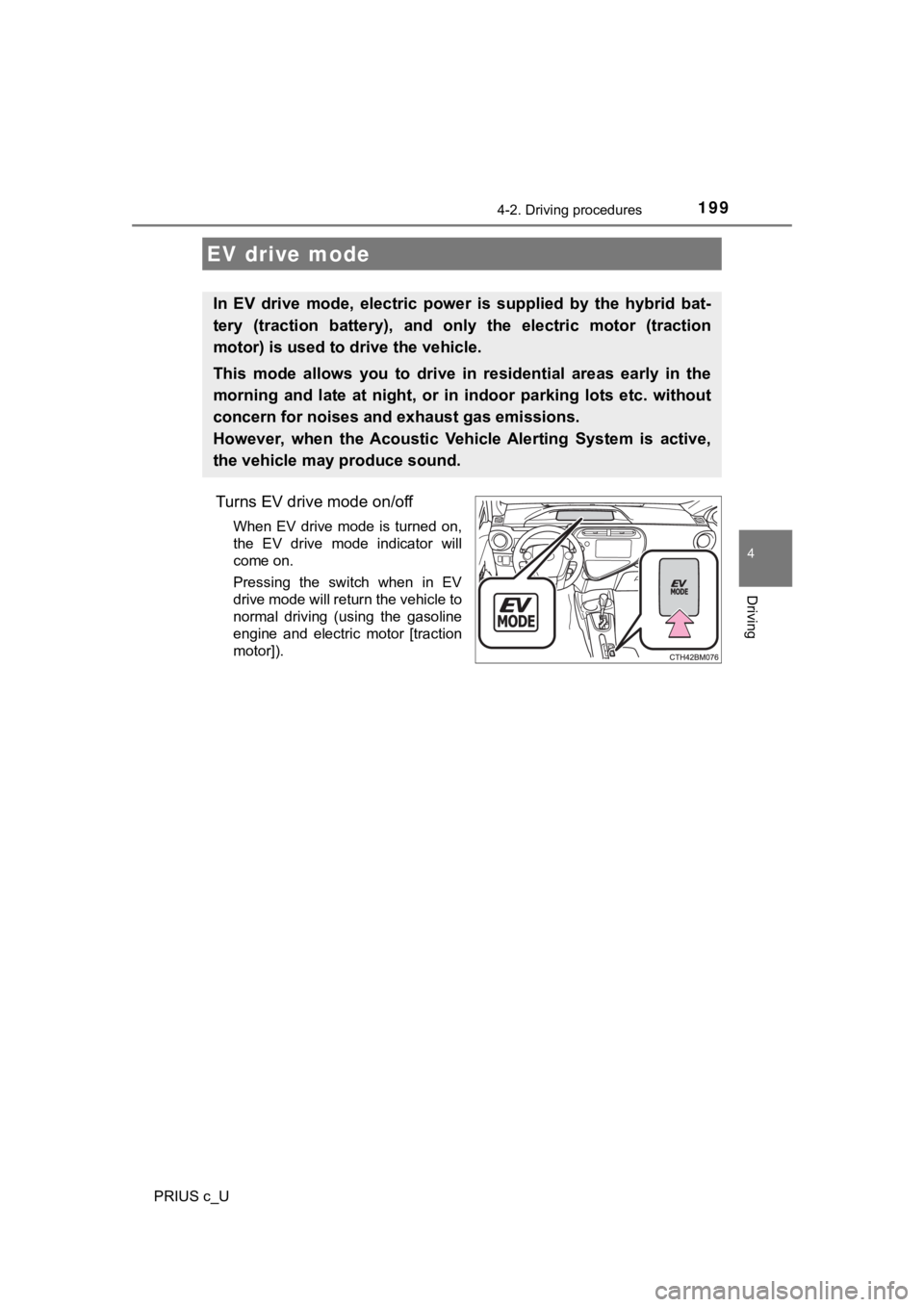
Turns EV drive mode on/off
When EV drive mode is turned on,
the EV drive mode indicator will
come on.
Pressing the switch when in EV
drive mode will return the vehicle to
normal driving (using the gasoline
engine and electric motor [traction
motor]).
EV drive mode
In EV drive mode, electric power is supplied by the hybrid bat-
tery (traction battery), and only the electric motor (traction
motor) is used to drive the vehicle.
This mode allows you to drive in residential areas early in the
morning and late at night, or in indoor parking lots etc. without
concern for noises and exhaust gas emissions.
However, when the Acoustic Vehicle Alerting System is active,
the vehicle may produce sound.
Page 200 of 600

2004-2. Driving procedures
PRIUS c_U
■Situations in which EV dri ve mode cannot be turned on
It may not be possible to turn EV drive mode on in the following situations. If it
cannot be turned on, a buzzer will sound and a message will be shown on the
multi-information display.
● The temperature of the hybrid system is high.
The vehicle has been left in the sun, driven on a hill, driven at high speeds,
etc.
● The temperature of the hybrid system is low.
The vehicle has been left in temperatures lower than about 68
F (20C) for
a long period of time etc.
● The gasoline engine is warming up.
● The hybrid battery (traction battery) is low.
The remaining battery level indicated in the energy monitor dis play is low.
( P. 112)
● Vehicle speed is high.
● The accelerator pedal is depressed firmly or the vehicle is on a hill etc.
● The windshield defogger is in use.
■ Switching to EV drive mode whe n the gasoline engine is cold
If the hybrid system is started while the gasoline engine is cold, the gasoline
engine will start automatically after a short period of time in order to warm up.
In this case, you will become unable to switch to EV drive mode .
After the hybrid system has started and the “READY” indicator h as illumi-
nated, press the EV drive mode switch before the gasoline engin e starts to
switch to EV drive mode.
Page 201 of 600

2014-2. Driving procedures
4
Driving
PRIUS c_U■
Automatic cancelation of EV drive mode
When driving in EV drive mode, the gasoline engine may automati cally restart
in the following situations. When EV drive mode is canceled, a buzzer will
sound and the EV drive mode indicator will flash and go off.
● The hybrid battery (traction battery) becomes low.
The remaining battery level indicated in the energy monitor dis play is low.
( P. 112)
● Vehicle speed is high.
● The accelerator pedal is depressed firmly or the vehicle is on a hill etc.
■ Possible driving distance when driving in EV drive mode
EV drive mode’s possible driving distance ranges from a few hun dred meters
to approximately 1.3 miles (2 km). However, depending on vehicle conditions,
there are situations when EV drive mode cannot be used.
(The distance that is possible depends on the hybrid battery [t raction battery]
level and driving conditions.)
■ Fuel economy
The hybrid system is designed to achieve the best possible fuel economy
during normal driving (using the gasoline engine and electric m otor [traction
motor]). Driving in EV drive mode more than necessary may lower fuel econ-
omy.
WARNING
■ Caution while driving
When driving in EV drive mode no engine noise is made. As such, pedestri-
ans, people riding bicycles or other people and vehicles in the surrounding
area may not be aware of the vehicle starting off or approachin g them.
Therefore, take extra care while driving even if the Acoustic V ehicle Alerting
System is active.