battery TOYOTA PRIUS C 2020 Workshop Manual
[x] Cancel search | Manufacturer: TOYOTA, Model Year: 2020, Model line: PRIUS C, Model: TOYOTA PRIUS C 2020Pages: 600, PDF Size: 12.02 MB
Page 412 of 600
4127-2. Maintenance
PRIUS c_U
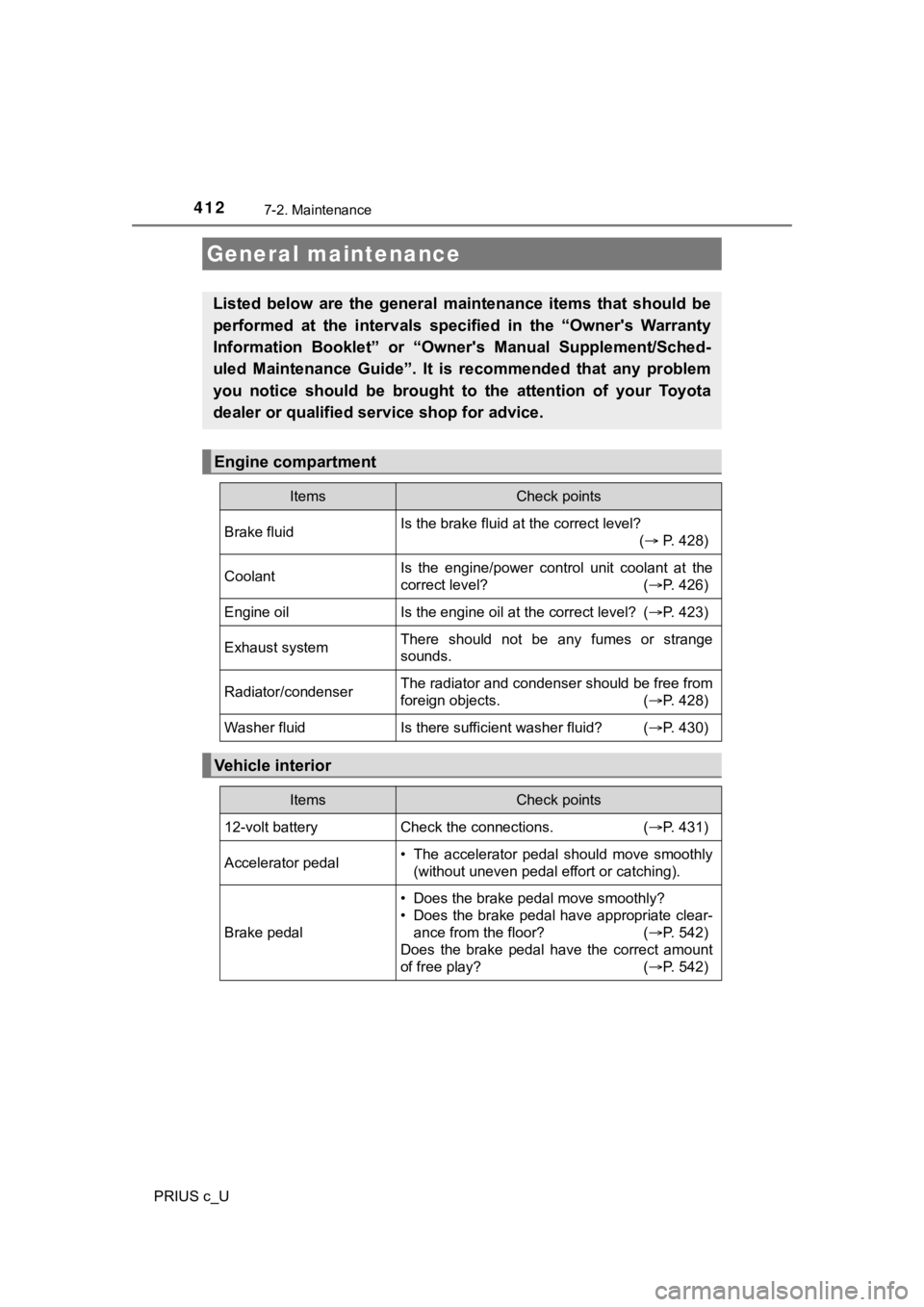
General maintenance
Listed below are the general maintenance items that should be
performed at the intervals specified in the “Owner's Warranty
Information Booklet” or “Owner's Manual Supplement/Sched-
uled Maintenance Guide”. It is recommended that any problem
you notice should be brought to the attention of your Toyota
dealer or qualified s ervice shop for advice.
Engine compartment
ItemsCheck points
Brake fluidIs the brake fluid at the correct level?
( P. 428)
CoolantIs the engine/power control unit coolant at the
correct level? ( P. 426)
Engine oilIs the engine oil at the correct level? (P. 423)
Exhaust systemThere should not be any fumes or strange
sounds.
Radiator/condenserThe radiator and condenser should be free from
foreign objects. (P. 428)
Washer fluidIs there sufficient washer fluid? (P. 430)
Vehicle interior
ItemsCheck points
12-volt battery Check the connections. (P. 431)
Accelerator pedal• The accelerator pedal should move smoothly
(without uneven pedal effort or catching).
Brake pedal
• Does the brake pedal move smoothly?
• Does the brake pedal have appropriate clear-ance from the floor? ( P. 542)
Does the brake pedal have the correct amount
of free play? ( P. 542)
Page 415 of 600
4157-2. Maintenance
7
Maintenance and care
PRIUS c_U
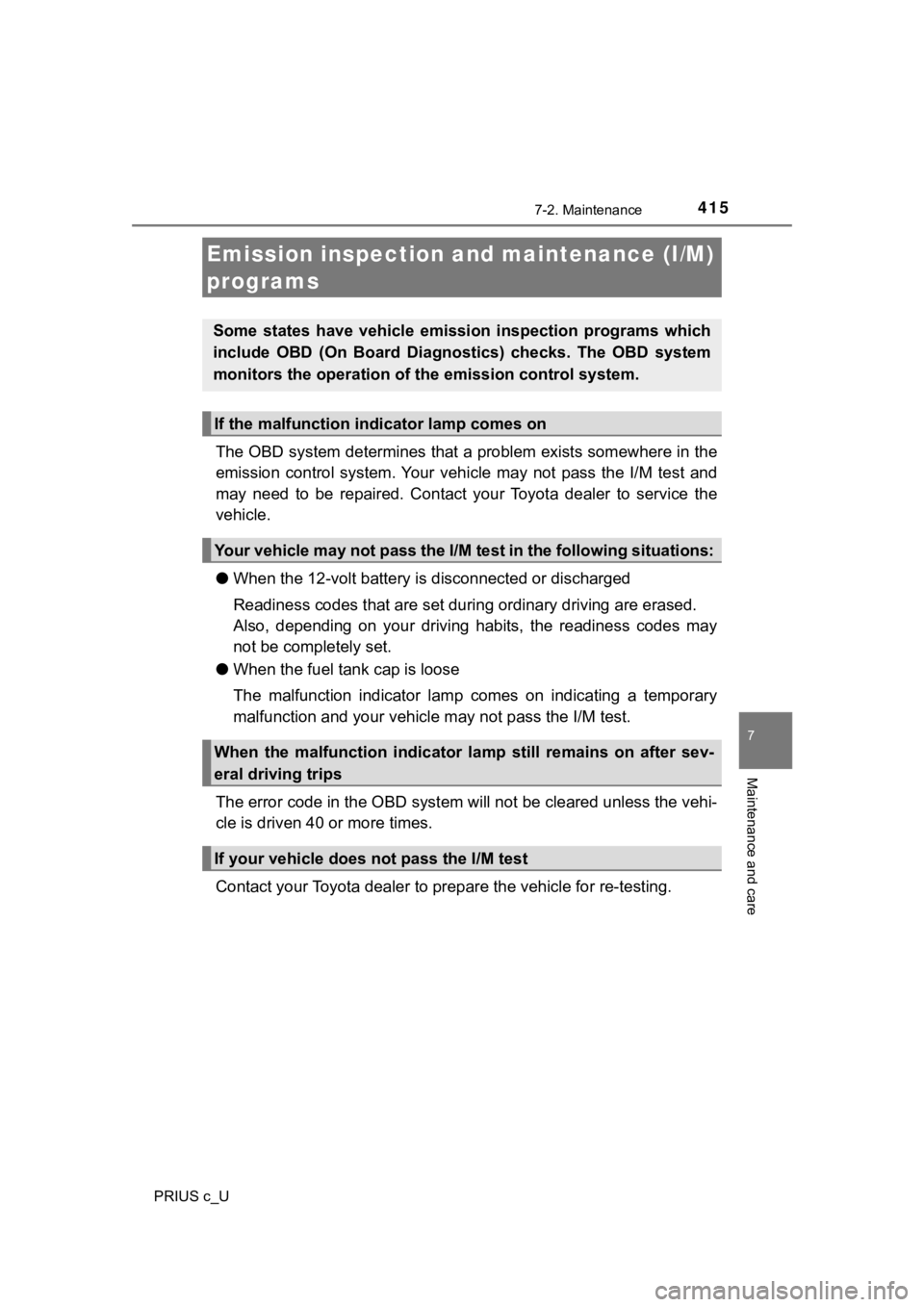
The OBD system determines that a problem exists somewhere in the
emission control system. Your vehicle may not pass the I/M test and
may need to be repaired. Contact your Toyota dealer to service the
vehicle.
● When the 12-volt battery is disconnected or discharged
Readiness codes that are set duri ng ordinary driving are erased.
Also, depending on your driving habits, the readiness codes may
not be completely set.
● When the fuel tan k cap is loose
The malfunction indicator lamp comes on indicating a temporary
malfunction and your vehicle m ay not pass the I/M test.
The error code in th e OBD system will not be cleared unless the vehi-
cle is driven 40 or more times.
Contact your Toyota dea ler to prepare the vehicle for re-testin g.
Emission inspection and maintenance (I/M)
programs
Some states have vehicle emission inspection programs which
include OBD (On Board Diagnos tics) checks. The OBD system
monitors the operation of t he emission control system.
If the malfunction indicator lamp comes on
Your vehicle may not pass the I/M test in the following situations:
When the malfunction indicator lamp still remains on after sev-
eral driving trips
If your vehicle does not pass the I/M test
Page 416 of 600
416
PRIUS c_U
7-3. Do-it-yourself maintenance
Do-it-yourself ser vice precautions
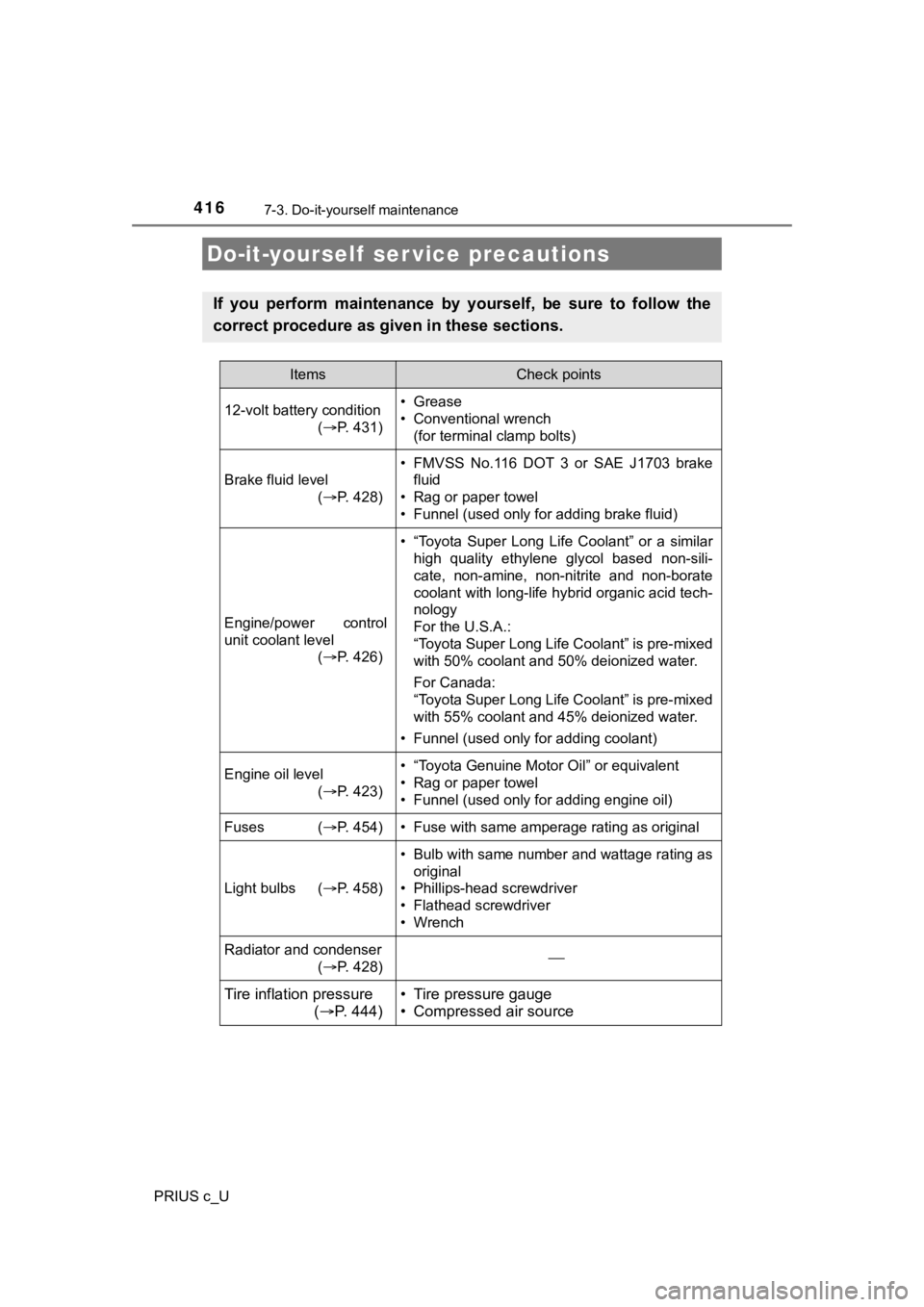
If you perform maintenance by yourself, be sure to follow the
correct procedure as given in these sections.
ItemsCheck points
12-volt battery condition (P. 431) • Grease
• Conventional wrench
(for terminal clamp bolts)
Brake fluid level
(P. 428)
• FMVSS No.116 DOT 3 or SAE J1703 brake
fluid
• Rag or paper towel
• Funnel (used only for adding brake fluid)
Engine/power control
unit coolant level (P. 426)
• “Toyota Super Long Life Coolant” or a similar
high quality ethylene glycol based non-sili-
cate, non-amine, non-nitrite and non-borate
coolant with long-life hybrid organic acid tech-
nology
For the U.S.A.:
“Toyota Super Long Life Coolant” is pre-mixed
with 50% coolant and 50% deionized water.
For Canada:
“Toyota Super Long Life Coolant” is pre-mixed
with 55% coolant and 45% deionized water.
• Funnel (used only for adding coolant)
Engine oil level (P. 423)• “Toyota Genuine Motor Oil” or equivalent
• Rag or paper towel
• Funnel (used only for adding engine oil)
Fuses ( P. 454)• Fuse with same amperage rating as original
Light bulbs (P. 458)
• Bulb with same number and wattage rating as
original
• Phillips-head screwdriver
• Flathead screwdriver
• Wrench
Radiator and condenser
(P. 428)
Tire inflation pressure
( P. 444)• Tire pressure gauge
• Compressed air source
Page 431 of 600
4317-3. Do-it-yourself maintenance
7
Maintenance and care
PRIUS c_U■
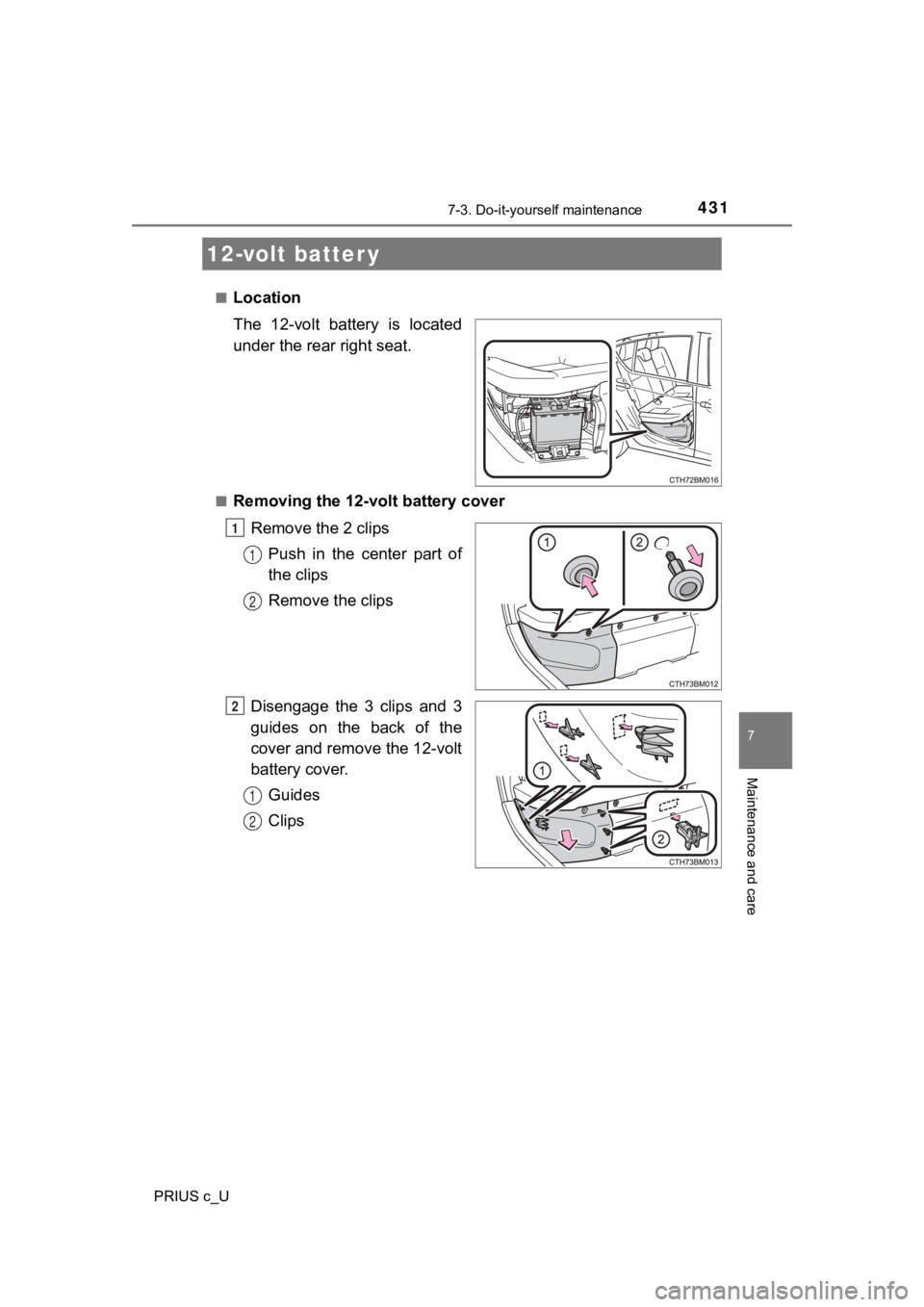
Location
The 12-volt battery is located
under the rear right seat.
■Removing the 12-volt battery cover
Remove the 2 clipsPush in the center part of
the clips
Remove the clips
Disengage the 3 clips and 3
guides on the back of the
cover and remove the 12-volt
battery cover. Guides
Clips
12-volt batter y
1
1
2
2
1
2
Page 432 of 600
4327-3. Do-it-yourself maintenance
PRIUS c_U■
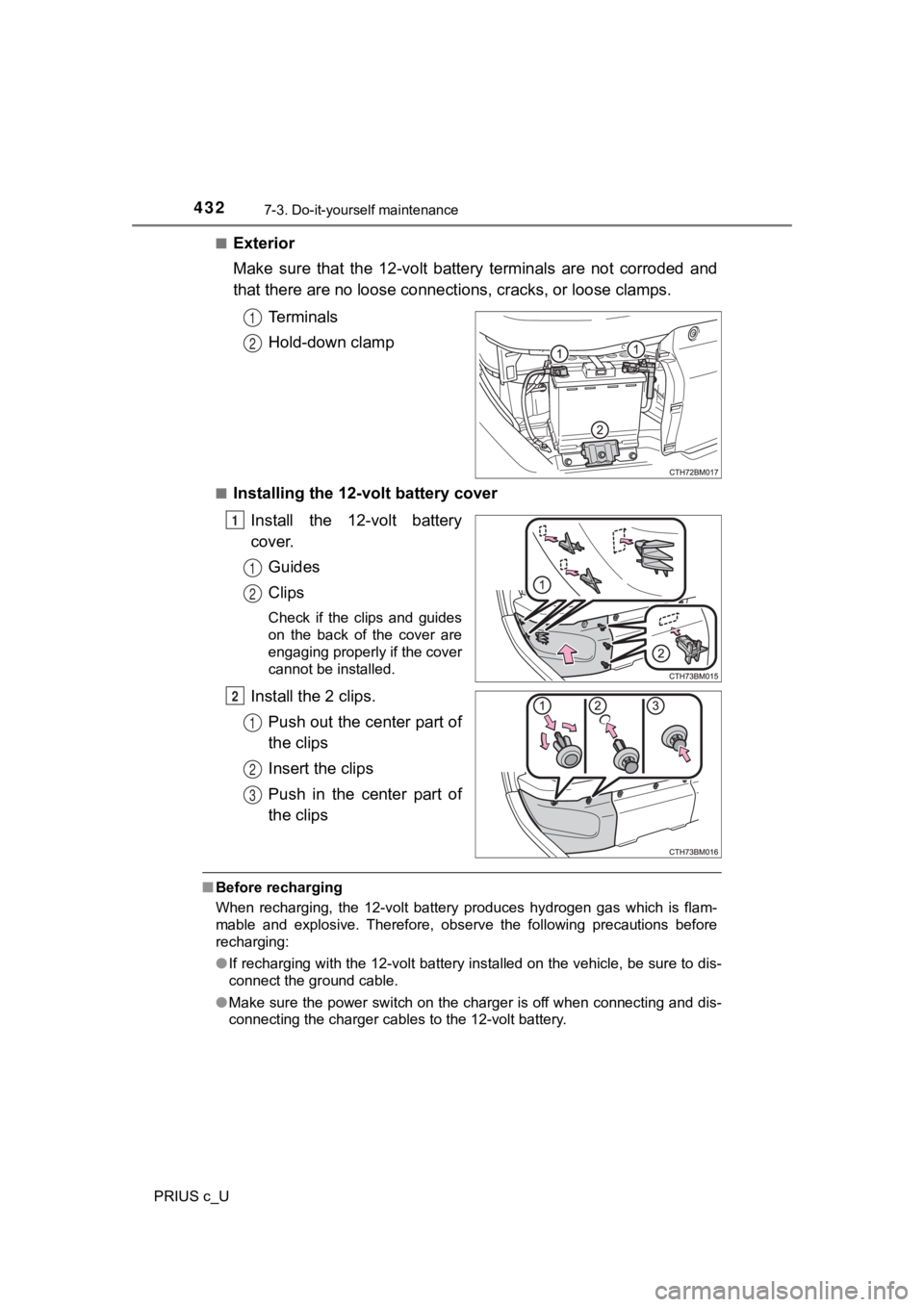
Exterior
Make sure that the 12-volt battery terminals are not corroded a
nd
that there are no loose connecti ons, cracks, or loose clamps.
Terminals
Hold-down clamp
■Installing the 12-volt battery cover Install the 12-volt battery
cover.Guides
Clips
Check if the clips and guides
on the back of the cover are
engaging properly if the cover
cannot be installed.
Install the 2 clips.Push out the center part of
the clips
Insert the clips
Push in the center part of
the clips
■Before recharging
When recharging, the 12-volt battery produces hydrogen gas which is flam-
mable and explosive. Therefore, observe the following precautio ns before
recharging:
● If recharging with the 12-volt battery installed on the vehicle , be sure to dis-
connect the ground cable.
● Make sure the power switch on the charger is off when connectin g and dis-
connecting the charger cables to the 12-volt battery.
1
2
1
1
2
2
1
2
3
Page 433 of 600
4337-3. Do-it-yourself maintenance
7
Maintenance and care
PRIUS c_U■
After recharging/reconnecting the 12-volt battery (vehicles wit h a smart
key system)
● Unlocking the doors using the smart key system may not be possi ble imme-
diately after reconnecting the 12-volt battery. If this happens, use the wire-
less remote control or the mechanical key to lock/unlock the do ors.
● Start the hybrid system with the power switch in ACCESSORY mode . The
hybrid system may not start with the power switch turned off. However, the
hybrid system will operate normally from the second attempt.
● The power switch mode is recorded by the vehicle. If the 12-vol t battery is
reconnected, the vehicle will return the power switch mode to t he status it
was in before the 12-volt battery was disconnected. Make sure t o turn off
the power before disconnect the 12-volt battery. Take extra car e when con-
necting the 12-volt battery if the power switch mode prior to d ischarge is
unknown.
If the system will not start even after multiple attempts, contact your Toyota
dealer.
WARNING
■ Chemicals in the 12-volt battery
The 12-volt battery contains poisonous and corrosive sulfuric a cid and may
produce hydrogen gas which is flammable and explosive. To reduce the risk
of death or serious injury, take the following precautions while working on or
near the 12-volt battery:
● Do not cause sparks by touching the 12-volt battery terminals w ith tools.
● Do not smoke or light a match near the 12-volt battery.
● Avoid contact with eyes, skin and clothes.
● Never inhale or swallow electrolyte.
● Wear protective safety glasses when working near the 12-volt ba ttery.
● Keep children away from the 12-volt battery.
■ Where to safely charge the 12-volt battery
Always charge the 12-volt battery in an open area. Do not charg e the 12-
volt battery in a garage or closed room where there is insuffic ient ventila-
tion.
Page 434 of 600
4347-3. Do-it-yourself maintenance
PRIUS c_U
WARNING
■How to recharge the 12-volt battery
Slow charge (5 A or less). Quick charge 15 A MAX.
■ Emergency measures regarding electrolyte
● If electrolyte gets in your eyes
Flush your eyes with clean water for at least 15 minutes and ge t immedi-
ate medical attention. If possible, continue to apply water wit h a sponge or
cloth while traveling to the nearest medical facility.
● If electrolyte gets on your skin
Wash the affected area thoroughly. If you feel pain or burning, get medical
attention immediately.
● If electrolyte gets on your clothes
It can soak through clothing on to your skin. Immediately take off the cloth-
ing and follow the procedure above if necessary.
● If you accidentally swallow electrolyte
Drink a large quantity of water or milk. Get emergency medical attention
immediately.
■ When disconnecting the 12-volt battery
Do not disconnect the negative (-) terminal on the body side. T he discon-
nected negative (-) terminal may touch the positive (+) termina l, which may
cause a short and result in death or serious injury.
■ When replacing the 12-volt battery
Use a 12-volt battery designed for this vehicle. Failure to do so may cause
gas (hydrogen) to enter the passenger compartment, causing a fire or
explosion.
For replacement of the 12-volt battery, contact your Toyota dea ler.
NOTICE
■When recharging th e 12-volt battery
Never recharge the 12-volt battery while the hybrid system is o perating.
Also, be sure all accessories are turned off.
Page 451 of 600
4517-3. Do-it-yourself maintenance
7
Maintenance and care
PRIUS c_U
●Flathead screwdriver
● Small flathead screwdriver
● Lithium battery CR2016 (vehicles without a smart key system), o r
CR2032 (vehicles with a smart key system)
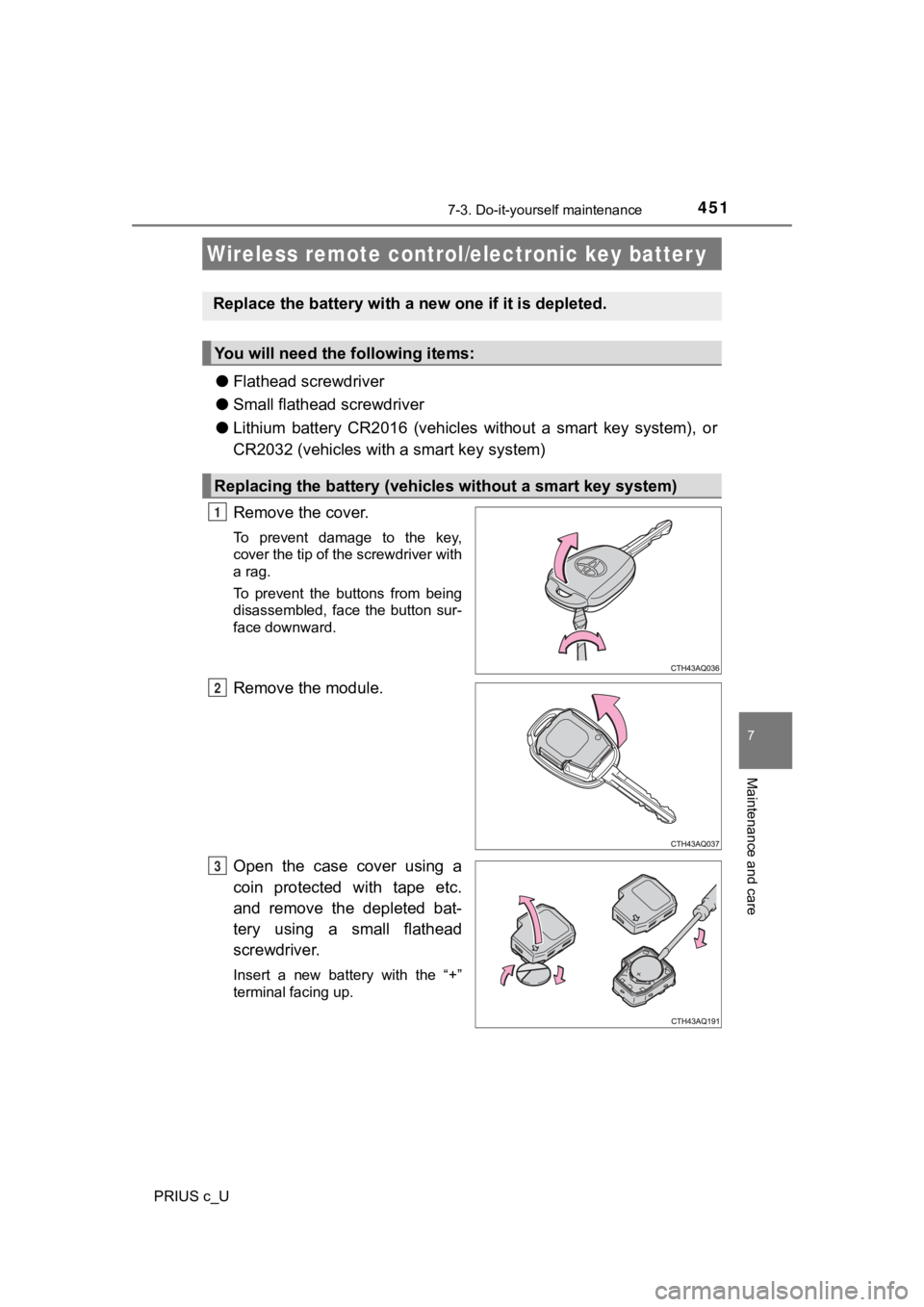
Remove the cover.
To prevent damage to the key,
cover the tip of the screwdriver with
a rag.
To prevent the buttons from being
disassembled, face the button sur-
face downward.
Remove the module.
Open the case cover using a
coin protected with tape etc.
and remove the depleted bat-
tery using a small flathead
screwdriver.
Insert a new battery with the “+”
terminal facing up.
Wireless remote control/electronic key batter y
Replace the battery with a n ew one if it is depleted.
You will need the following items:
Replacing the battery (vehicles without a smart key system)
1
2
3
Page 452 of 600
4527-3. Do-it-yourself maintenance
PRIUS c_U
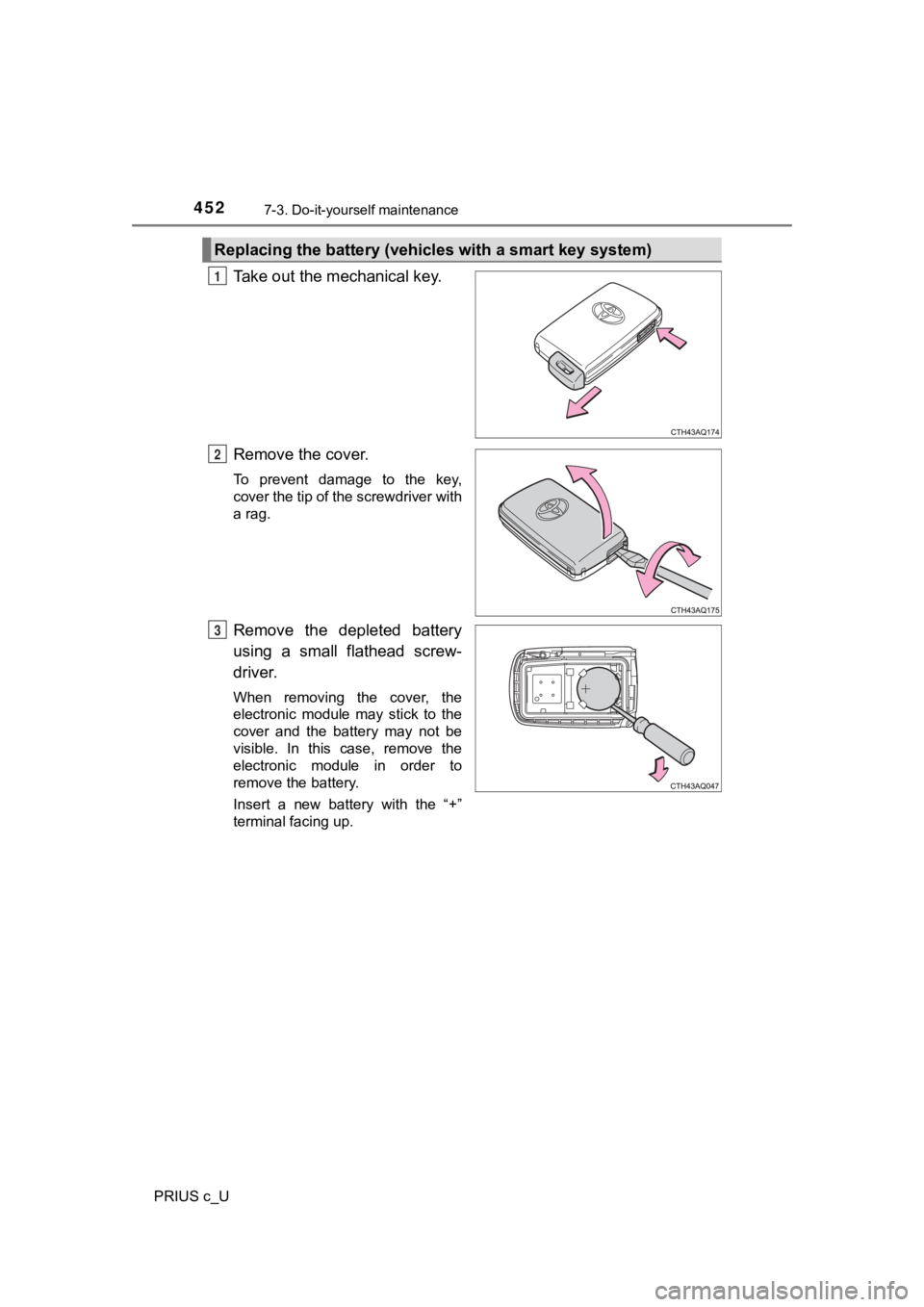
Take out the mechanical key.
Remove the cover.
To prevent damage to the key,
cover the tip of the screwdriver with
a rag.
Remove the depleted battery
using a small flathead screw-
driver.
When removing the cover, the
electronic module may stick to the
cover and the battery may not be
visible. In this case, remove the
electronic module in order to
remove the battery.
Insert a new battery with the “+”
terminal facing up.
Replacing the battery (vehicles with a smart key system)
1
2
3
Page 453 of 600
4537-3. Do-it-yourself maintenance
7
Maintenance and care
PRIUS c_U
■Use a CR2016 (vehicles without a smart key system) or CR2032 (v ehicles
with a smart key system) lithium battery
● Batteries can be purchased at your Toyota dealer, local electri cal appliance
shops or camera stores.
● Replace only with the same or equivalent type recommended by the manu-
facturer.
● Dispose of used batteries according to local laws.
■ If the key battery is depleted
The following symptoms may occur:
●The smart key system (if equipped) and wireless remote control will not
function properly.
● The operational range will be reduced.
WARNING
■Removed battery a nd other parts
These parts are small and if swallowed by a child, they can cause choking.
Keep away from children. Failure to do so could result in death or serious
injury.
NOTICE
■ For normal operation after replacing the battery
Observe the following precautions to prevent accidents:
● Always work with dry hands.
Moisture may cause the battery to rust.
● Do not touch or move any other component inside the remote cont rol.
● Do not bend either of the battery terminals.