phone TOYOTA PRIUS C 2020 User Guide
[x] Cancel search | Manufacturer: TOYOTA, Model Year: 2020, Model line: PRIUS C, Model: TOYOTA PRIUS C 2020Pages: 600, PDF Size: 12.02 MB
Page 287 of 600
2875-2. Basic Operations (Multimedia system)
5
Audio system
PRIUS c_U
Select to change on/off.
Select to change on/off.
■Using cellular phones
Interference may be heard through the multimedia system's speakers if a cel-
lular phone is being used inside or close to the vehicle while the multimedia
system is operating.
■ Certification (caution)
Laser product
This product is a class 1 laser product.
Do not open the cover of the player or attempt to repair the un it yourself.
Refer servicing to qualified personnel.
● Laser products
• Do not take this unit apart or attempt to make any changes you rself.
This is an intricate unit that uses a laser pickup to retrieve information
from the surface of compact discs. The laser is carefully shiel ded so that
its rays remain inside the cabinet. Therefore, never try to dis assemble the
player or alter any of its parts since you may be exposed to la ser rays and
dangerous voltages.
• This product utilizes a laser. Use of controls or adjustments or performance of procedures other than
those specified herein may result in hazardous radiation exposu re.
THE USE OF OPTICAL INSTRUM ENTS WITH THIS PRODUCT WILL
INCREASE EYE HAZARD.
Random playback
Repeat play
NOTICE
■ To prevent 12-volt b attery discharge
Do not leave the multimedia system on longer than necessary when the
hybrid system is off.
■ To avoid damaging the multimedia system
Take care not to spill drinks or other fluids on the multimedia system.
Page 288 of 600
288
PRIUS c_U
5-3. Setup (Multimedia system)
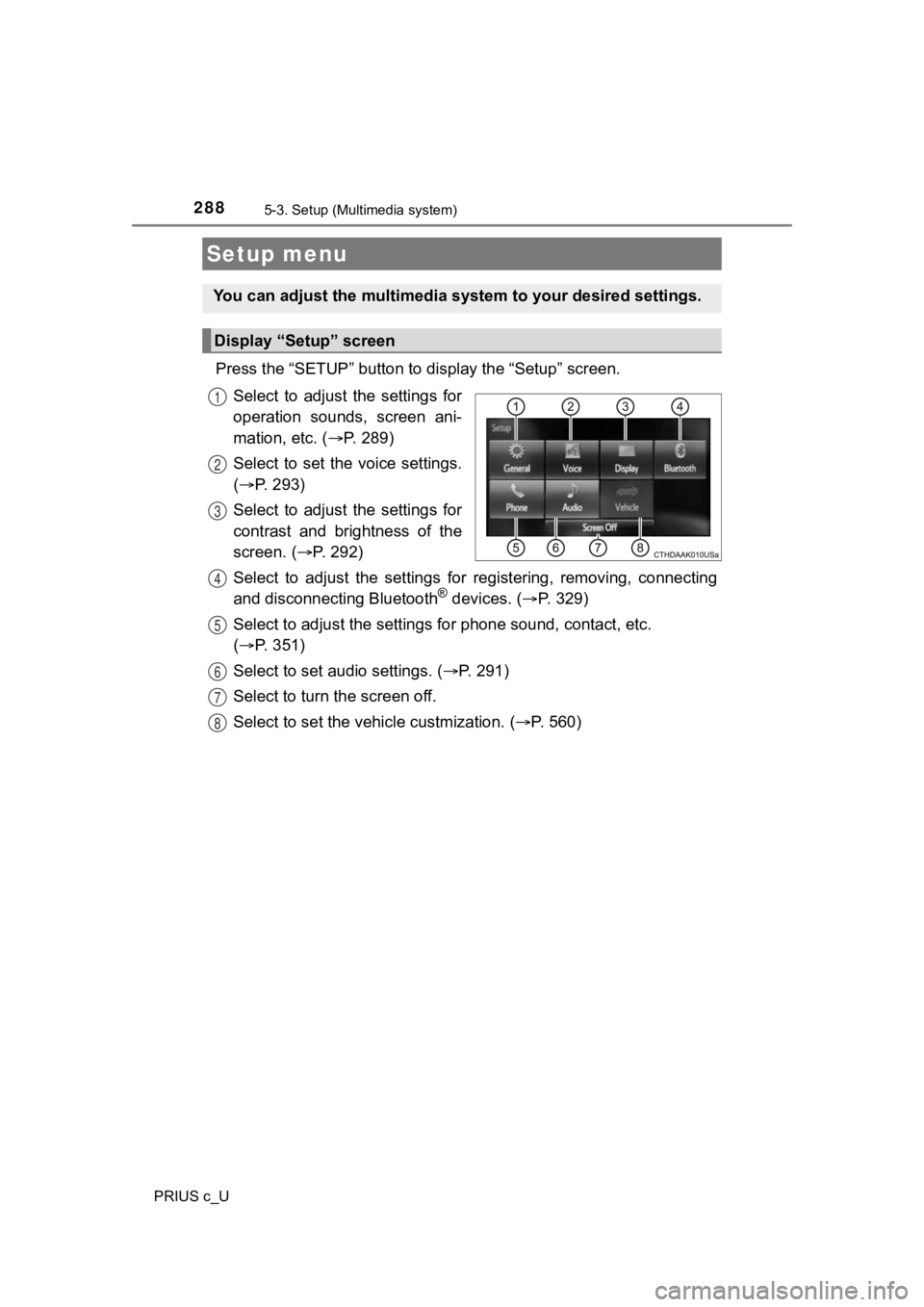
Press the “SETUP” button to display the “Setup” screen.
Select to adjust the settings for
operation sounds, screen ani-
mation, etc. ( P. 289)
Select to set the voice settings.
( P. 293)
Select to adjust the settings for
contrast and brightness of the
screen. ( P. 2 9 2 )
Select to adjust the settings for registering, removing, connec ting
and disconnecting Bluetooth
® devices. ( P. 3 2 9 )
Select to adjust the settings f or phone sound, contact, etc.
( P. 351)
Select to set audio settings. ( P. 2 9 1 )
Select to turn the screen off.
Select to set the vehicle custmization. ( P. 560)
Setup menu
You can adjust the multimedia system to your desired settings.
Display “Setup” screen
1
2
3
4
5
6
7
8
Page 290 of 600

2905-3. Setup (Multimedia system)
PRIUS c_U
Select “Delete Personal Data” on the “General Settings” screen.
Select “Delete”.
Check carefully beforehand, as data cannot be retrieved once de leted.
A confirmation screen will be displayed. Select “Yes”.
The following personal data will be deleted or changed to its d efault
settings.
• General settings
• Audio settings
• Phone settings
Delete personal data
1
2
3
Page 308 of 600

3085-7. Using an external device (Multimedia system)
PRIUS c_U
■Cord hook
P. 284
■ About iPod
●“Made for iPod” and “Made for iPhone” mean that an electronic a ccessory
has been designed to connect specifically to iPod or iPhone, re spectively,
and has been certified by the developer to meet Apple performance stan-
dards.
● Apple is not responsible for the operation of this device or it s compliance
with safety and regulatory standards. Please note that the use of this acces-
sory with iPod or iPhone may affect wireless performance.
● iPhone, iPod, iPod classic, iPod nano, and iPod touch are trade marks of
Apple Inc., registered in the U.S. and other countries. Lightning is a trade-
mark of Apple Inc.
■ iPod cover art
●Depending on the iPod and songs in the iPod, iPod cover art may be dis-
played.
● This function can be changed to on/off. ( P. 291)
● It may take time to display iPod cover art, and the iPod may no t be operated
while the cover art display is in process.
● Only iPod cover art that is saved in JPEG format can be display ed.
Page 310 of 600

3105-7. Using an external device (Multimedia system)
PRIUS c_U■
Compatible models
The following iPod
®, iPod nano®, iPod classic®, iPod touch® and iPhone®
devices can be used with this system.
●Made for
• iPod touch (5th generation)
• iPod touch (4th generation)
• iPod touch (3rd generation)
• iPod touch (2nd generation)
• iPod touch (1st generation)
• iPod classic
• iPod with video
• iPod nano (7th generation)
• iPod nano (6th generation)
• iPod nano (5th generation)
• iPod nano (4th generation)
• iPod nano (3rd generation)
• iPod nano (2nd generation)
• iPod nano (1st generation)
• iPhone 5S
• iPhone 5C
• iPhone 5
• iPhone 4S
• iPhone 4
• iPhone 3GS
• iPhone 3G
• iPhone
This system only supports audio playback.
Depending on differences between models or software versions et c., some
models might be incompatible with this system.
WARNING
■ While driving
Do not connect an iPod or operate the controls.
NOTICE
■Cord hook ( P. 285)
■ To prevent damage to the iPod or its terminals
● Do not leave the iPod in the vehicle. The temperature inside th e vehicle
may become high, resulting in damage to the iPod.
● Do not push down on or apply unnecessary pressure to the iPod w hile it is
connected.
● Do not insert foreign objects into the port.
Page 317 of 600
317
5
Audio system
PRIUS c_U
5-8. Connecting Bluetooth® (Multimedia system)
■About Bluetooth®
Preparations to use wireless communica-
tion
The following can be performed using Bluetooth® wireless com-
munication:
■A portable audio player can be operated and listened to via
multimedia system
■Hands-free phone calls can be made via a cellular phone
In order to use wireless communication, register and connect a
Bluetooth
® device by performing the following procedures.
The Bluetooth® word mark and logos are
registered trademarks owned Bluetooth
SIG, Inc. and any use of such marks by
Fujitsu Ten Limited is under license.
Other trademarks and trade names are
those of their respective owners.
Page 320 of 600

3205-8. Connecting Bluetooth® (Multimedia system)
PRIUS c_U
Device registration/connection flow
1. Register the Bluetooth® device to be used with multimedia
system ( P. 322, 323, 324)
2. Connect the Bluetooth® device to be used
( P. 3 2 6 )
To be used for audio To be used for hands-free
phone
3. Start Bluetooth® connec-
tion ( P. 3 2 6 )3. Start Bluetooth® connec-
tion ( P. 3 2 6 )
4. Check connection status
( P. 3 3 0 )4. Check connection status
( P. 333)
5. Use Bluetooth® audio
( P. 3 3 0 )5. Use Bluetooth® phone
( P. 332)
Page 323 of 600
3235-8. Connecting Bluetooth® (Multimedia system)
5
Audio system
PRIUS c_U
Turn the Bluetooth® connection setting of your cellular phone on.
Press the “ ” button.
Select “OK” to register a phone.
Follow the steps in “How to register a Bluetooth
® device” from
“STEP 3”. ( P. 3 2 4 )
Registering a Bluetooth® phone for the first
time
To use the hands-free system, it is necessary to register a
Bluetooth® phone with the system.
Once the phone has been registe red, it is possible to use the
hands-free system.
For details about regis tering a Bluetooth
® device (P. 324)
1
2
3
4
Page 324 of 600
3245-8. Connecting Bluetooth® (Multimedia system)
PRIUS c_U
Display the “Bluetooth* Setup” screen. (P. 321)
*: Bluetooth is a registered trademark of Bluetooth SIG, Inc.
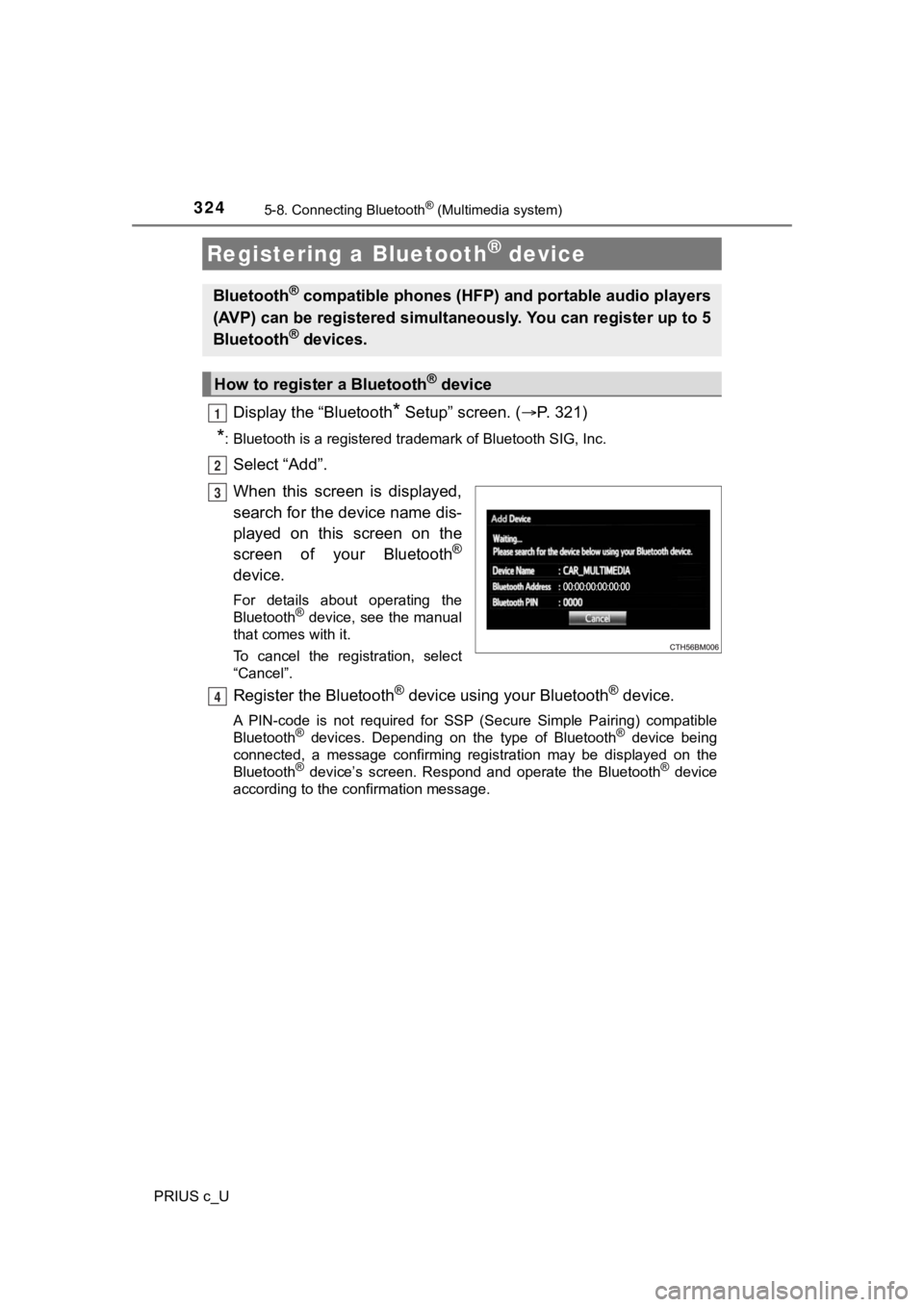
Select “Add”.
When this screen is displayed,
search for the device name dis-
played on this screen on the
screen of your Bluetooth
®
device.
For details about operating the
Bluetooth® device, see the manual
that comes with it.
To cancel the registration, select
“Cancel”.
Register the Bluetooth® device using your Bluetooth® device.
A PIN-code is not required for SS P (Secure Simple Pairing) compatible
Bluetooth® devices. Depending on the type of Bluetooth® device being
connected, a message confirming registration may be displayed o n the
Bluetooth
® device’s screen. Respond and operate the Bluetooth® device
according to the confirmation message.
Registering a Bluetooth® device
Bluetooth® compatible phones (HFP) a nd portable audio players
(AVP) can be registered simulta neously. You can register up to 5
Bluetooth
® devices.
How to registe r a Bluetooth® device
1
2
3
4
Page 326 of 600
3265-8. Connecting Bluetooth® (Multimedia system)
PRIUS c_U
Press the “SETUP” button.
Select “Bluetooth
*”.
*: Bluetooth is a registered trademark of Bluetooth SIG, Inc.
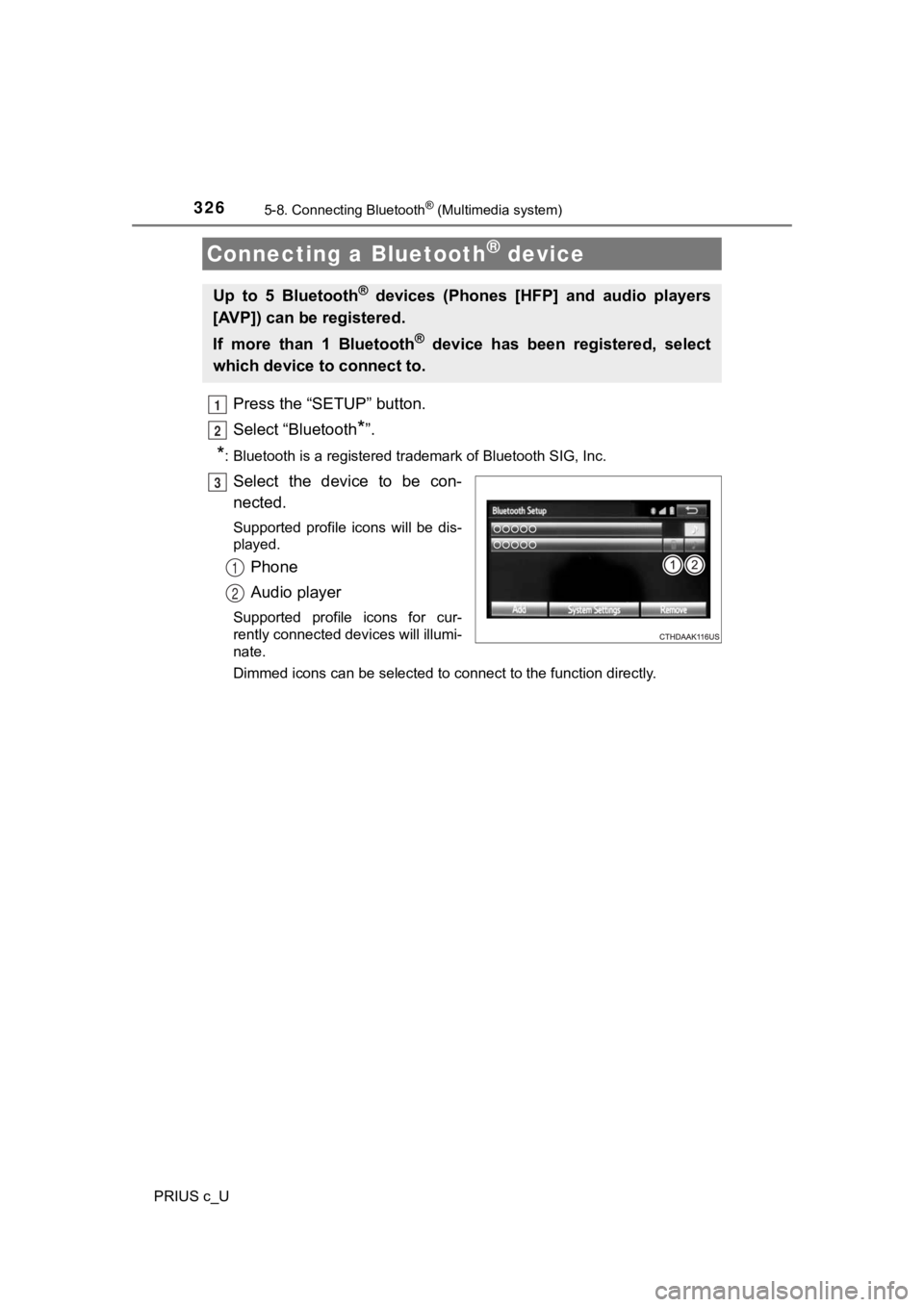
Select the device to be con-
nected.
Supported profile icons will be dis-
played.
Phone
Audio player
Supported profile icons for cur-
rently connected devices will illumi-
nate.
Dimmed icons can be selected to connect to the function directly.
Connecting a Bluetooth® device
Up to 5 Bluetooth® devices (Phones [HFP] and audio players
[AVP]) can be registered.
If more than 1 Bluetooth
® device has been registered, select
which device to connect to.
1
2
3
1
2