ECU TOYOTA PRIUS C 2020 Repair Manual
[x] Cancel search | Manufacturer: TOYOTA, Model Year: 2020, Model line: PRIUS C, Model: TOYOTA PRIUS C 2020Pages: 600, PDF Size: 12.02 MB
Page 284 of 600
2845-2. Basic Operations (Multimedia system)
PRIUS c_U■
iPod
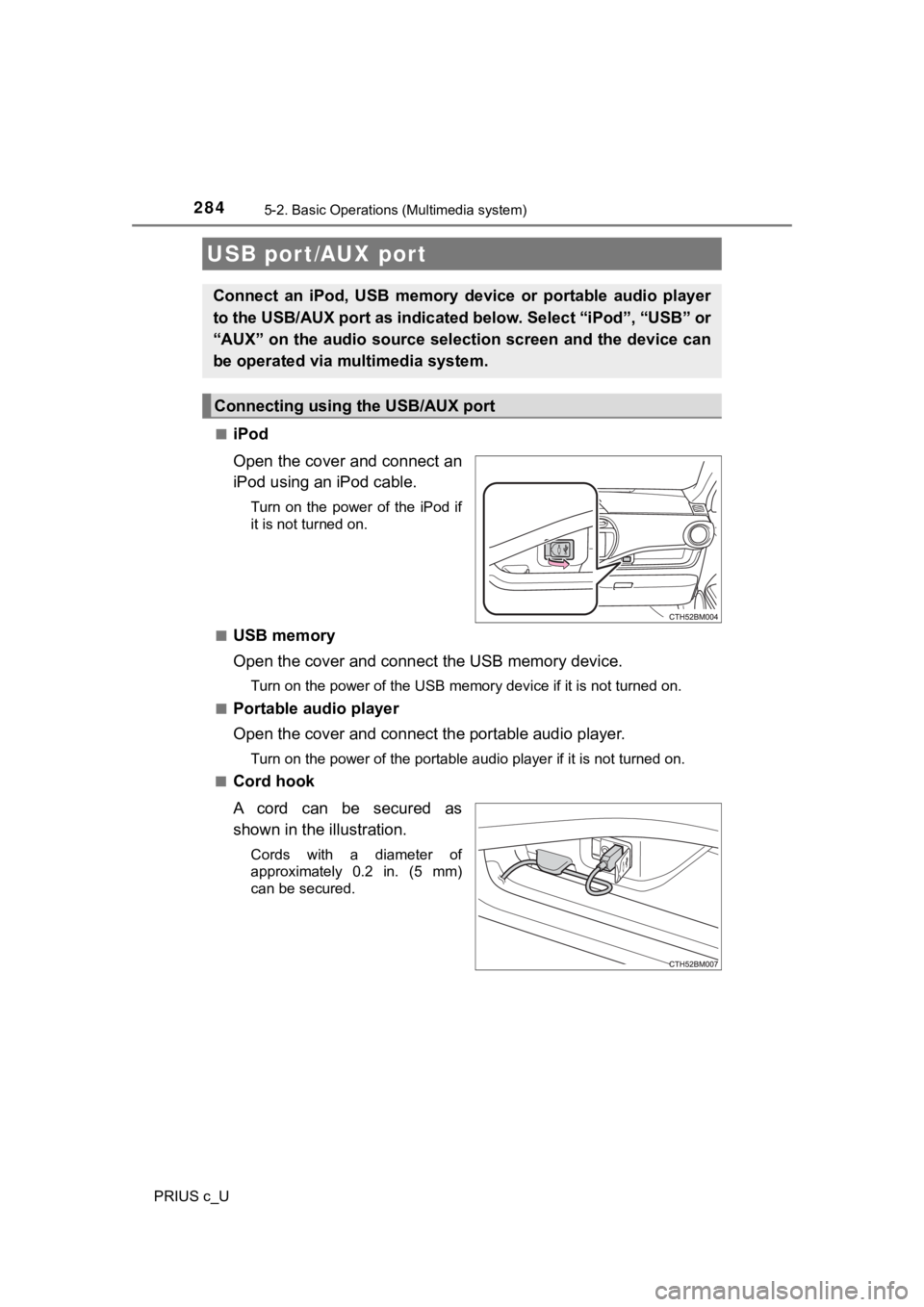
Open the cover and connect an
iPod using an iPod cable.
Turn on the power of the iPod if
it is not turned on.
■
USB memory
Open the cover and connec t the USB memory device.
Turn on the power of the USB memory device if it is not turned on.
■
Portable audio player
Open the cover and connect the portable audio player.
Turn on the power of the portable audio player if it is not tur ned on.
■
Cord hook
A cord can be secured as
shown in the illustration.
Cords with a diameter of
approximately 0.2 in. (5 mm)
can be secured.
USB port/AUX port
Connect an iPod, USB memory device or portable audio player
to the USB/AUX port as indicated below. Select “iPod”, “USB” or
“AUX” on the audio source select ion screen and the device can
be operated via multimedia system.
Connecting using the USB/AUX port
Page 285 of 600
2855-2. Basic Operations (Multimedia system)
5
Audio system
PRIUS c_U
■AUX port
The AUX port only supports audio input.
WARNING
■While driving
Do not connect a device or operate the device controls.
NOTICE
■Cord hook
Do not secure items other than cords on the cord hook. Doing so may dam-
age the cord hook.
Page 324 of 600
3245-8. Connecting Bluetooth® (Multimedia system)
PRIUS c_U
Display the “Bluetooth* Setup” screen. (P. 321)
*: Bluetooth is a registered trademark of Bluetooth SIG, Inc.
Select “Add”.
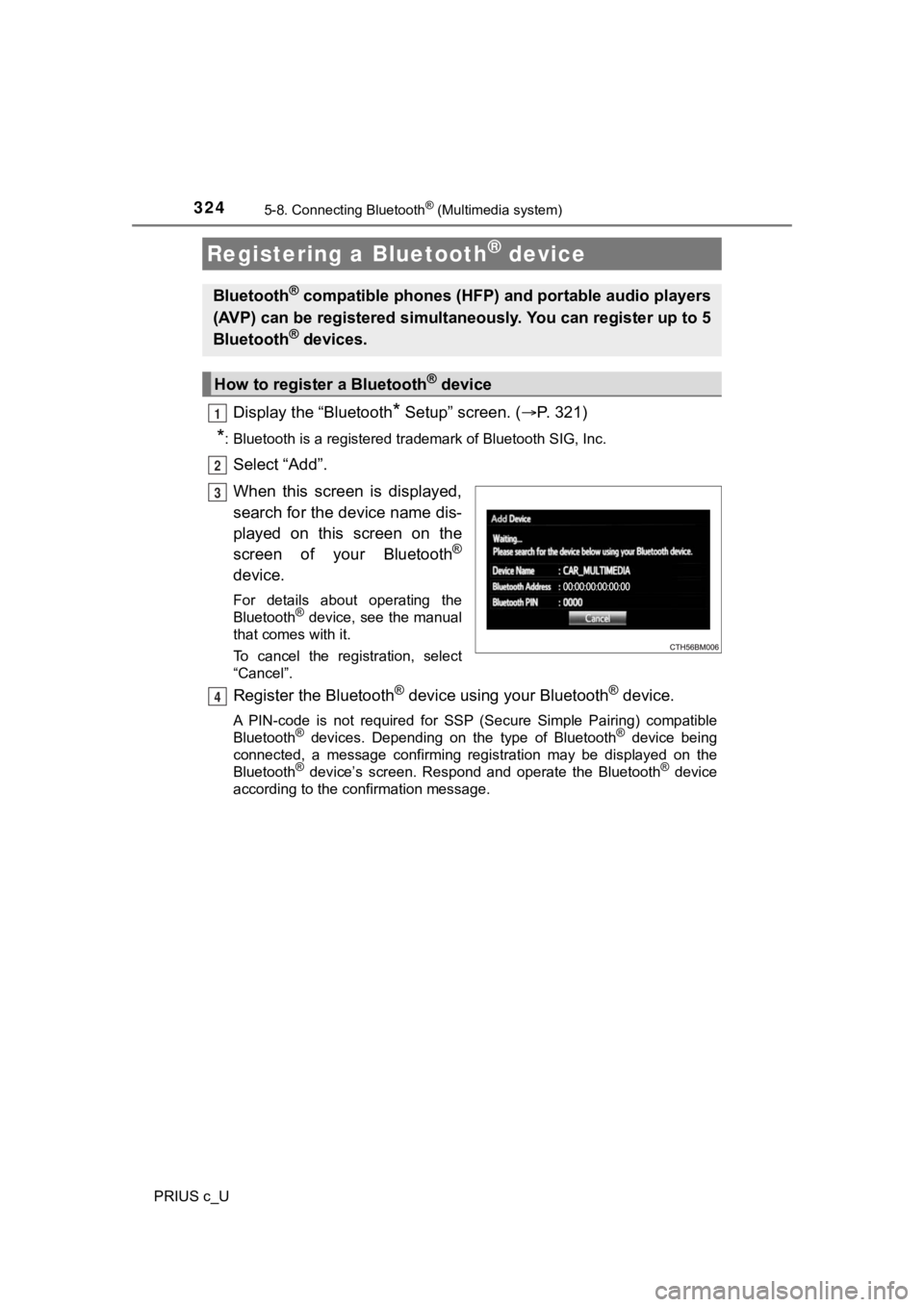
When this screen is displayed,
search for the device name dis-
played on this screen on the
screen of your Bluetooth
®
device.
For details about operating the
Bluetooth® device, see the manual
that comes with it.
To cancel the registration, select
“Cancel”.
Register the Bluetooth® device using your Bluetooth® device.
A PIN-code is not required for SS P (Secure Simple Pairing) compatible
Bluetooth® devices. Depending on the type of Bluetooth® device being
connected, a message confirming registration may be displayed o n the
Bluetooth
® device’s screen. Respond and operate the Bluetooth® device
according to the confirmation message.
Registering a Bluetooth® device
Bluetooth® compatible phones (HFP) a nd portable audio players
(AVP) can be registered simulta neously. You can register up to 5
Bluetooth
® devices.
How to registe r a Bluetooth® device
1
2
3
4
Page 364 of 600
3645-10. Bluetooth® phone (Multimedia system)
PRIUS c_U
In other situations
Even though all conceivable measures have been taken, the symptom sta-
tus does not change.
The cellular phone is not close enough to this system.
Bring the cellular phone closer to this system.
The cellular phone is the most likely cause of the symptom.
Turn the cellular phone off, remove and reinstall the battery pack,
and then restart th e cellular phone.
Enable the cellular phone’s Bluetooth
® connection.
Stop the cellular phone’s security software and close all appli ca-
tions.
Before using an application installed on the cellular phone, ca re-
fully check its source and how it s operation might affect this sys-
tem.
Page 413 of 600
4137-2. Maintenance
7
Maintenance and care
PRIUS c_U
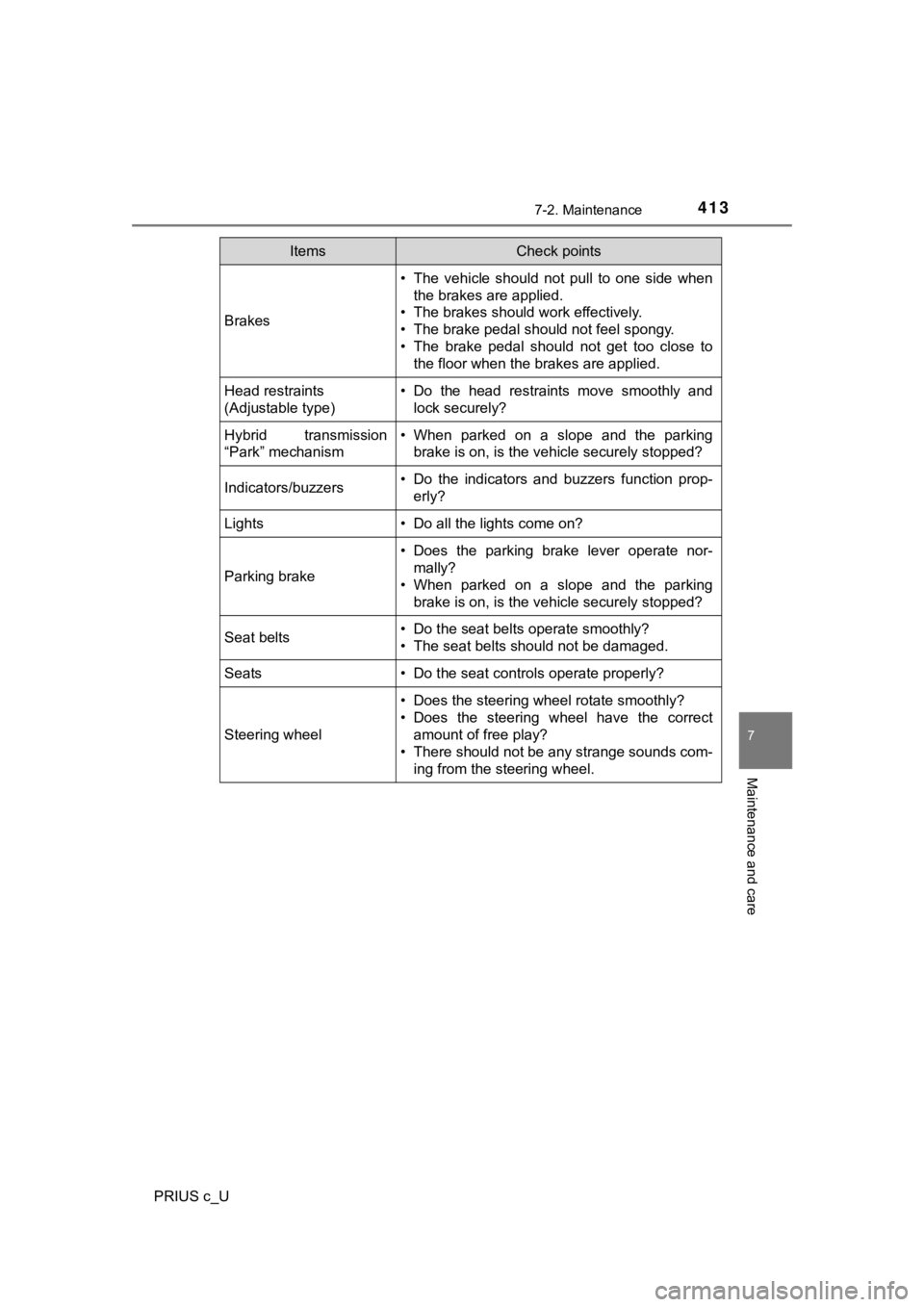
Brakes
• The vehicle should not pull to one side whenthe brakes are applied.
• The brakes should work effectively.
• The brake pedal should not feel spongy.
• The brake pedal should not get too close to the floor when the brakes are applied.
Head restraints
(Adjustable type)• Do the head restraints move smoothly andlock securely?
Hybrid transmission
“Park” mechanism• When parked on a slope and the parkingbrake is on, is the vehicle securely stopped?
Indicators/buzzers• Do the indicators and buzzers function prop-erly?
Lights• Do all the lights come on?
Parking brake
• Does the parking brake lever operate nor-mally?
• When parked on a slope and the parking
brake is on, is the vehicle securely stopped?
Seat belts• Do the seat belts operate smoothly?
• The seat belts should not be damaged.
Seats• Do the seat controls operate properly?
Steering wheel
• Does the steering wheel rotate smoothly?
• Does the steering wheel have the correctamount of free play?
• There should not be any strange sounds com-
ing from the steering wheel.
ItemsCheck points
Page 420 of 600

4207-3. Do-it-yourself maintenance
PRIUS c_U
WARNING
■Pre-driving check
Check that the hood is fully closed and locked.
If the hood is not locked properly, it may open while the vehic le is in motion
and cause an accident, which may result in death or serious inj ury.
■ After installing the sup port rod into the slot
Make sure the rod supports the hood securely from falling down on to your
head or body.
NOTICE
■ When closing the hood
Be sure to return the support rod to its clip before closing th e hood. Closing
the hood with the support rod up could cause the hood to bend.
Page 465 of 600

4657-3. Do-it-yourself maintenance
7
Maintenance and care
PRIUS c_U
■LED light bulbs
The headlights/daytime running lights, front fog lights (if equipped), side
marker lights, side turn signal lights, stop/tail lights and hi gh mounted stop-
light consist of a number of LEDs. If any of the LEDs burn out, take your vehi-
cle to your Toyota dealer to have the light replaced.
■ Condensation build-up on the inside of the lens
Temporary condensation build-up on the inside of the headlight lens does not
indicate a malfunction. Contact your Toyota dealer for more information in the
following situations:
● Large drops of water have built up on the inside of the lens.
● Water has built up inside the headlight.
WARNING
■Replacing light bulbs
● Turn off the lights. Do not attempt to replace the bulb immedia tely after
turning off the lights.
The bulbs become very hot and may cause burns.
● Do not touch the glass portion of the light bulb with bare hands. When it is
unavoidable to hold the glass portion, use and hold with a clea n dry cloth
to avoid getting moisture and oils on the bulb.
Also, if the bulb is scratched or dropped, it may blow out or crack.
● Fully install light bulbs and any parts used to secure them. Fa ilure to do so
may result in heat damage, fire, or water entering the headligh t unit. This
may damage the headlights or cause condensation to build up on the lens.
■ To prevent damage or fire
Make sure bulbs are fully seated and locked.
Page 469 of 600
4698-1. Essential information
8
When trouble arises
PRIUS c_U
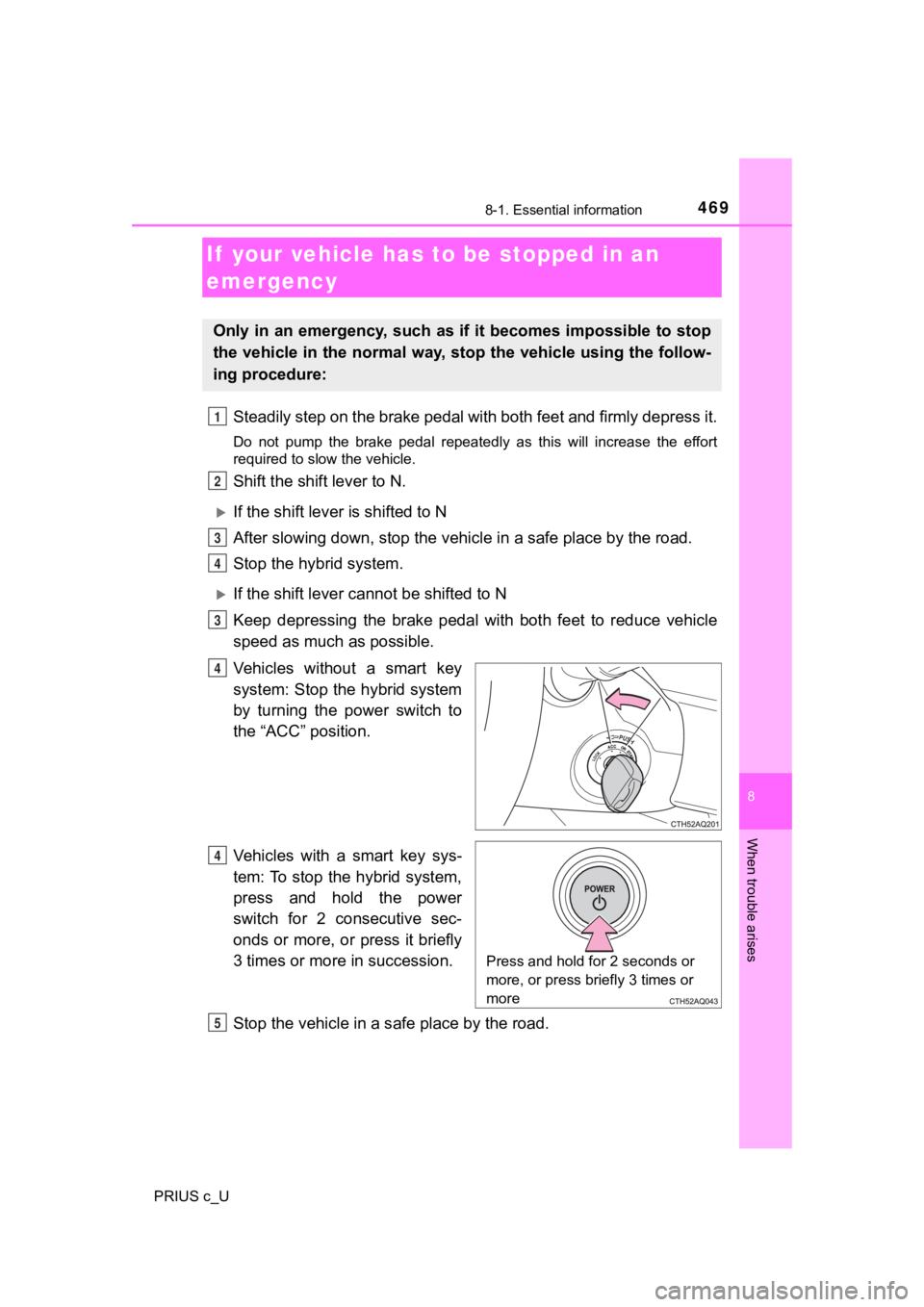
Steadily step on the brake pedal with both feet and firmly depress it.
Do not pump the brake pedal repeatedly as this will increase th e effort
required to slow the vehicle.
Shift the shift lever to N.
If the shift lever is shifted to N
After slowing down, stop the vehi cle in a safe place by the road.
Stop the hybrid system.
If the shift lever cann ot be shifted to N
Keep depressing the brake pedal with both feet to reduce vehicl e
speed as much as possible.
Vehicles without a smart key
system: Stop the hybrid system
by turning the power switch to
the “ACC” position.
Vehicles with a smart key sys-
tem: To stop the hybrid system,
press and hold the power
switch for 2 consecutive sec-
onds or more, or press it briefly
3 times or more in succession.
Stop the vehicle in a s afe place by the road.
If your vehicle has to be stopped in an
emergency
Only in an emergency, such as if it becomes impossible to stop
the vehicle in the normal way, st op the vehicle using the follow-
ing procedure:
1
2
3
4
3
4
Press and hold for 2 seconds or
more, or press briefly 3 times or
more
Q
R
Page 474 of 600
4748-2. Steps to take in an emergency
PRIUS c_U
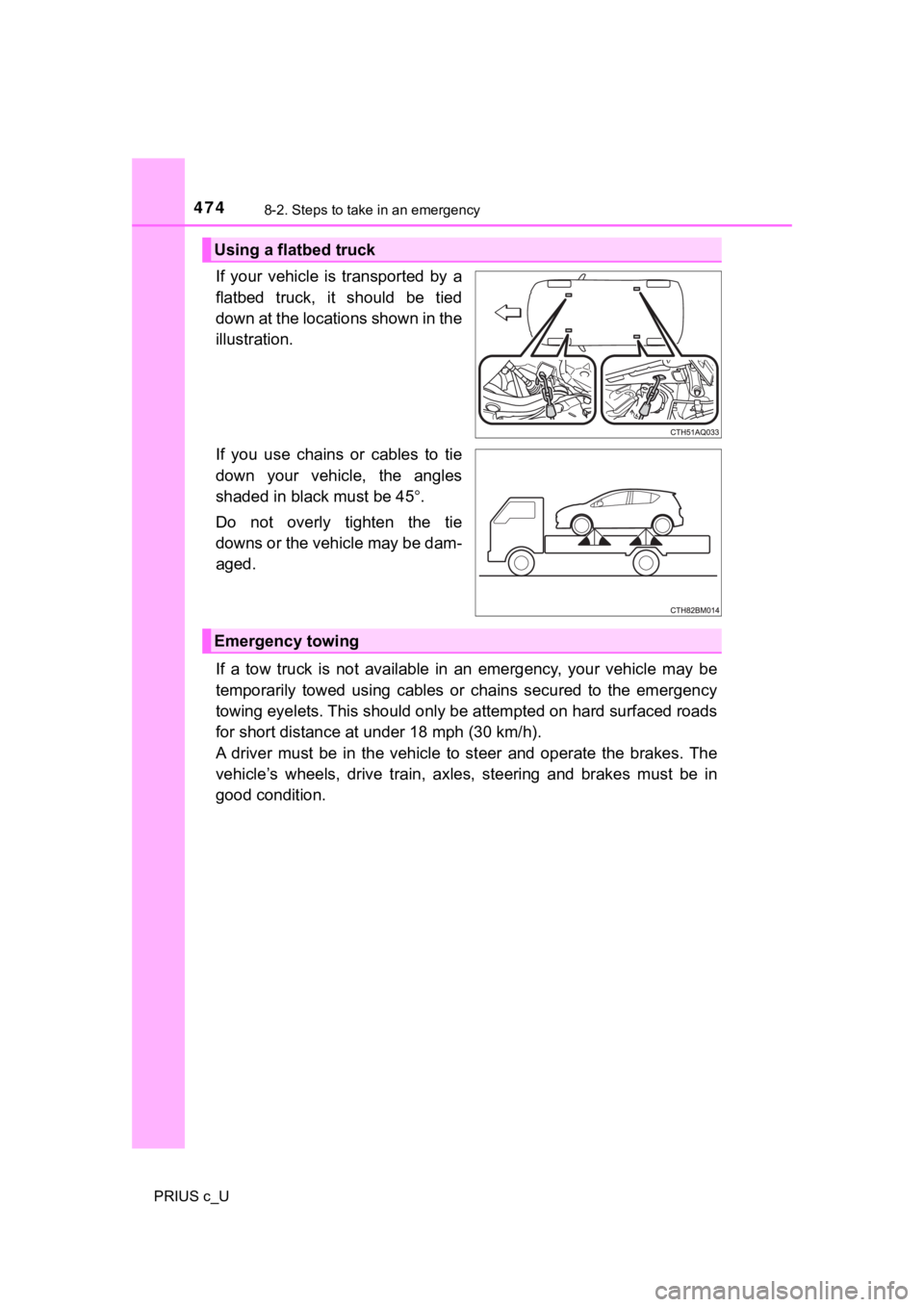
If your vehicle is transported by a
flatbed truck, it should be tied
down at the locations shown in the
illustration.
If you use chains or cables to tie
down your vehicle, the angles
shaded in black must be 45.
Do not overly tighten the tie
downs or the vehicle may be dam-
aged.
If a tow truck is not available in an emergency, your vehicle m ay be
temporarily towed using cables or chains secured to the emergen cy
towing eyelets. This should only be attempted on hard surfaced roads
for short distance at u nder 18 mph (30 km/h).
A driver must be in the vehicle to steer and operate the brakes . The
vehicle’s wheels, drive train, a xles, steering and brakes must be in
good condition.
Using a flatbed truck
Emergency towing
Page 475 of 600
4758-2. Steps to take in an emergency
8
When trouble arises
PRIUS c_U
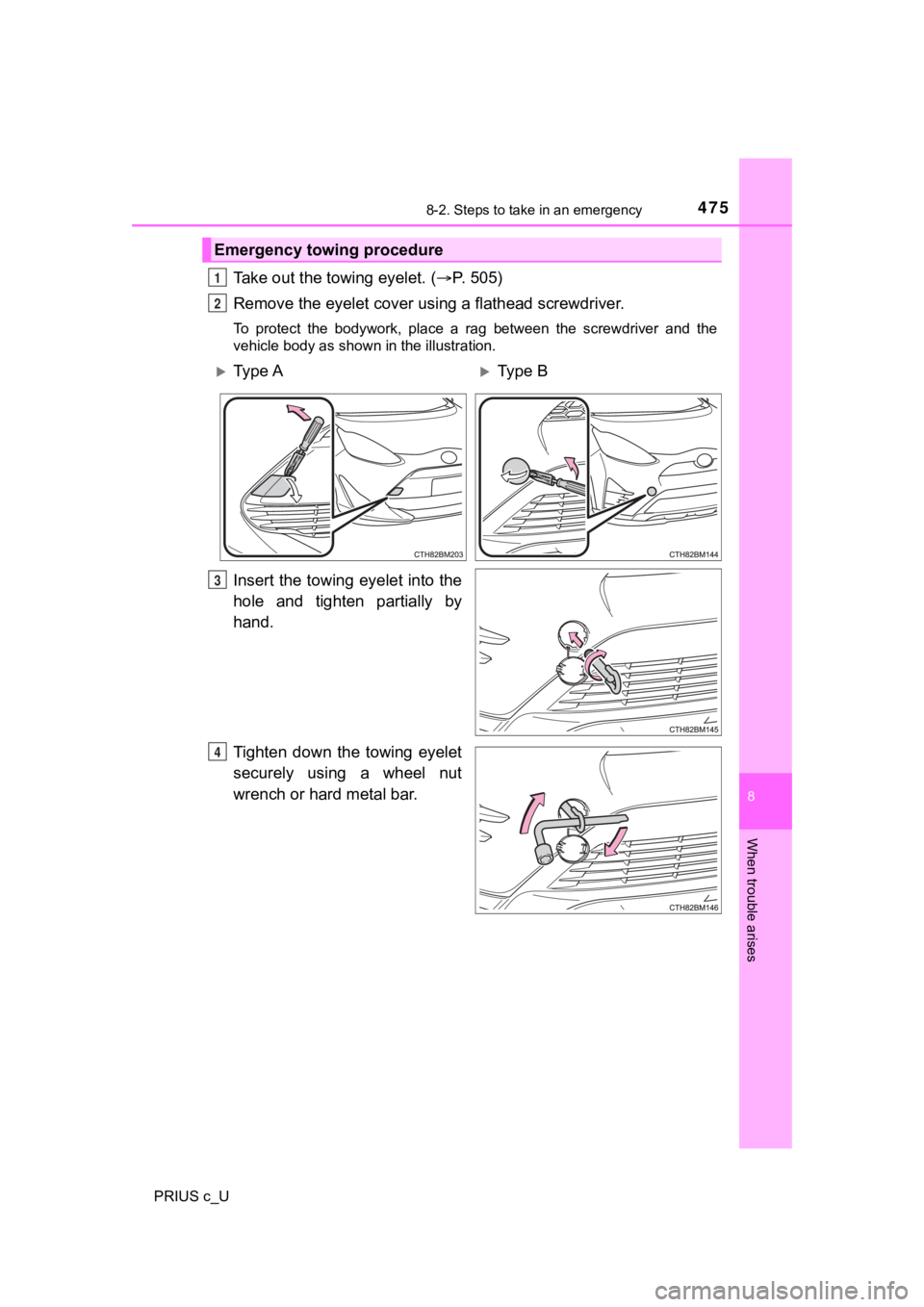
Take out the towing eyelet. (P. 505)
Remove the eyelet cover usi ng a flathead screwdriver.
To protect the bodywork, place a rag between the screwdriver an d the
vehicle body as shown in the illustration.
Insert the towing eyelet into the
hole and tighten partially by
hand.
Tighten down the towing eyelet
securely using a wheel nut
wrench or hard metal bar.
Emergency towing procedure
1
2
Ty p e AType B
3
4