charging TOYOTA PRIUS PLUG-IN 2015 Manual PDF
[x] Cancel search | Manufacturer: TOYOTA, Model Year: 2015, Model line: PRIUS PLUG-IN, Model: TOYOTA PRIUS PLUG-IN 2015Pages: 728, PDF Size: 20.85 MB
Page 151 of 728
108
1-2. Charging
PRIUS PHV_OM_OM47A11U_(U)
Inspecting the charging cable
Inspecting the electrical leakage detection function
Check that the electrical leakage detection function operates properly
by following the procedure below.
In the unlikely event that the electrical leakage detection function
does not operate properly, contact your Toyota dealer as soon as
possible.
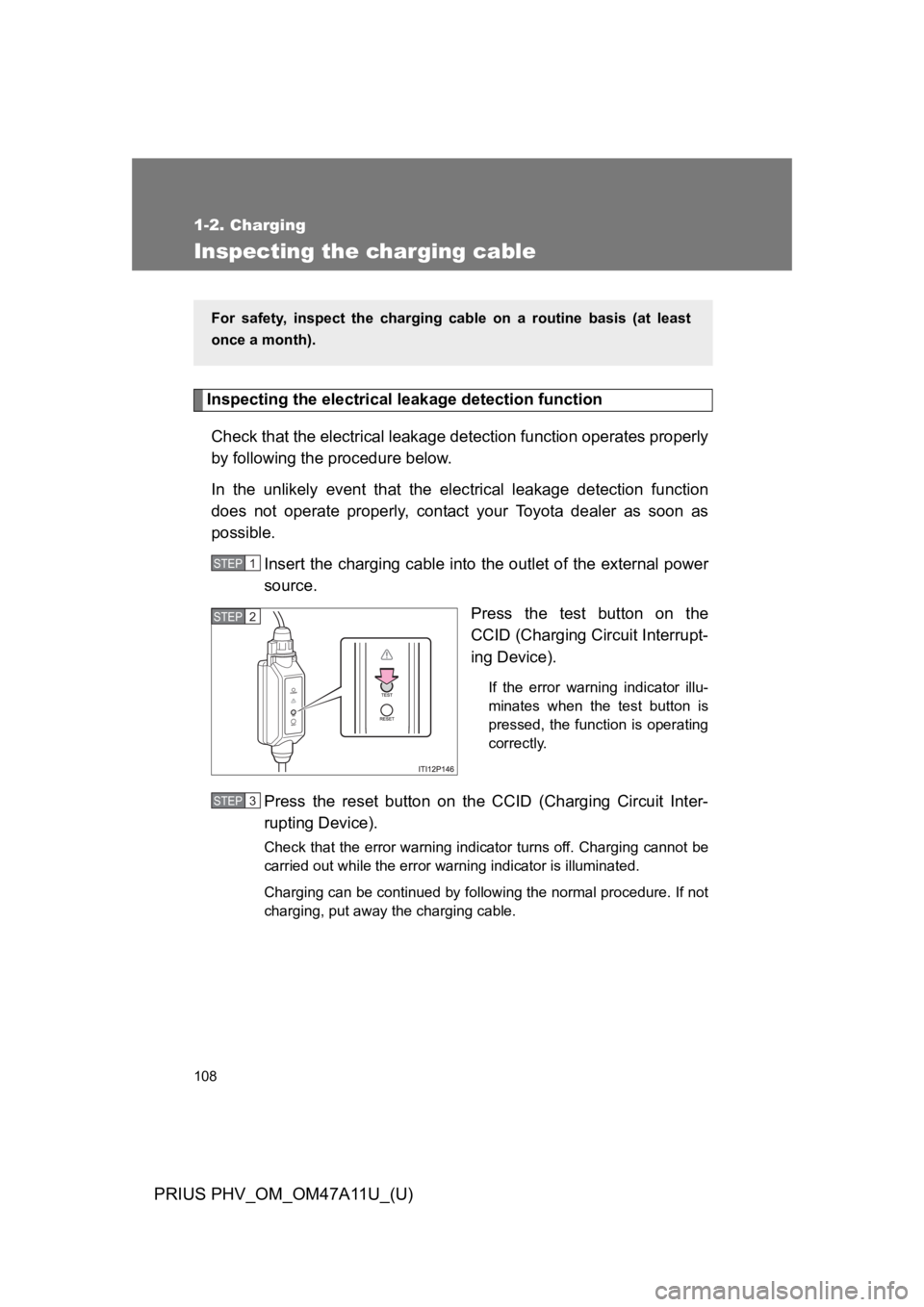
Insert the charging cable into the outlet of the external power
source.
Press the test button on the
CCID (Charging Circuit Interrupt-
ing Device).
If the error warning indicator illu-
minates when the test button is
pressed, the function is operating
correctly.
Press the reset button on the CCID (Charging Circuit Inter-
rupting Device).
Check that the error warning indicator turns off. Charging cannot be
carried out while the error warning indicator is illuminated.
Charging can be continued by following the normal procedure. If not
charging, put away the charging cable.
For safety, inspect the charging cable on a routine basis (at least
once a month).
STEP 1
STEP 2
STEP 3
Page 152 of 728
109
1-2. Charging
1
Before driving
PRIUS PHV_OM_OM47A11U_(U)
CAUTION
■Routine inspection
Check the following points regularly.
If use is continued without inspection, fire or electric shock may occur,
possibly resulting in death or serious injury.
●The charging cable, plug, charging connector, CCID (Charging Circuit
Interrupting Device) etc. have not been damaged
●The outlet has not been damaged
●The plug can be securely inserted into the socket
●The plug does not get extremely hot during use
●The tip of the plug has not been deformed
●The plug is not dirtied by dust etc.
Inspect the plug after removing it from the outlet.
■Maintaining the charging cable
When the cable is dirty, first remove the dirt with a hard, wringed cloth, and
then wipe the cable with a dry cloth. Do not wash with water, as doing so
could cause a fire or electrical shock when charging, which could lead to
death or serious injury.
■When not using the charging cable for a long time
Remove the plug from the outlet. Dust could accumulate on the plug or in
the outlet, possibly causing overheating which could lead to a fire.
Also, keep the cable in a place free from moisture.
Page 170 of 728

127
1-4. Opening, closing and locking the doors
1
Before driving
PRIUS PHV_OM_OM47A11U_(U)
■If the smart key system does not operate properly
●Locking and unlocking the doors: Use the mechanical key. (oP. 5 9 9 )
●Starting the hybri d system: oP. 6 0 0
■Electronic key battery depletion
●The standard battery life is 1 to 2 years.
●If the battery becomes low, an alarm will sound in the cabin when the
hybrid system stops. (oP. 1 1 8 )
●As the electronic key always receives radio waves, the battery will
become depleted even if the electronic key is not used. The following
symptoms indicate that the electronic key battery may be depleted.
Replace the battery when necessary. (oP. 4 9 7 )
•The smart key system or the wireless remote control does not operate.
•The detection area becomes smaller.
•The LED indicator on the key surface does not turn on.
●To a v o i d s e r i o u s d e t e r i o r a t i o n , d o n o t l e a v e t h e e l e c t r o n i c k e y w i t h i n 3 f t .
(1 m) of the following electrical appliances that produce a magnetic field:
•TVs
•Personal computers
•Cellular phones, cordless phones and battery chargers
•Recharging cellular phones or cordless phones
•Induction cookers
•Table lamps
■When the electronic key battery is fully depleted
oP. 4 9 7
■Customization
Settings (e.g. smart key system) can be changed.
(Customizable features oP. 6 4 7 )
Page 270 of 728
228
PRIUS PHV_OM_OM47A11U_(U)
2-1. Driving procedures
Driving the vehicle
The following procedures should be observed to ensure safe driv-
ing:
■Before starting the hybrid system
Check that the charging cable is disconnected. (oP. 9 6 )
■Starting the hybrid system
oP. 2 4 2
■Driving
With the brake pedal depressed, shift the shift position to D.
(oP. 2 4 9 )
Check that the shift position indicator shows D. (oP. 2 6 2 )
Release the parking brake. (oP. 2 6 0 )
Gradually release the brake pedal and gently depress the
accelerator pedal to accelerate the vehicle.
■Stopping
With the shift position in D, depress the brake pedal.
If necessary, set the parking brake.
When the vehicle will be stopped for an extended period of time,
shift the shift position to P. (oP. 2 5 2 )
STEP 1
STEP 2
STEP 3
STEP 1
STEP 2
Page 284 of 728
242
2-1. Driving procedures
PRIUS PHV_OM_OM47A11U_(U)
Power (ignition) switch
Performing the following operations when carrying the electronic
key on your person starts the hybrid system or changes “POWER”
switch modes.
■Starting the hybrid system
Check that the charging cable is disconnected. (oP. 9 6 )
Check that the parking brake is set.
Firmly depress the brake pedal.
Check that the “POWER” switch indicator turns green. If the indi-
cator does not turn green, the hybrid system cannot be started.
When the shift position is N, the hybrid system cannot start. Shift
the shift position to P when starting the hybrid system. (oP. 2 5 2 )
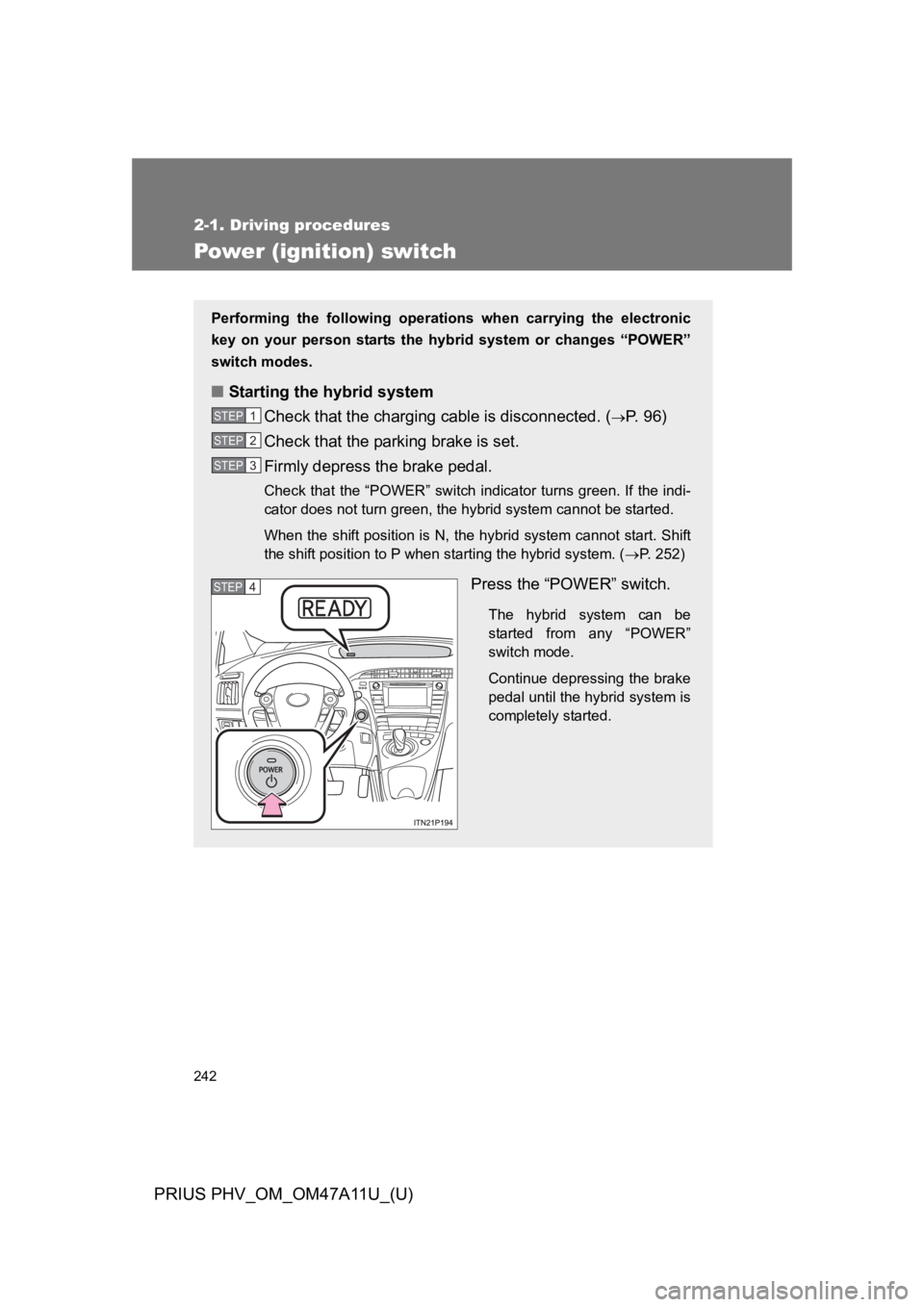
Press the “POWER” switch.
The hybrid system can be
started from any “POWER”
switch mode.
Continue depressing the brake
pedal until the hybrid system is
completely started.
STEP 1
STEP 2
STEP 3
STEP 4
Page 287 of 728

245
2-1. Driving procedures
PRIUS PHV_OM_OM47A11U_(U)
2
When driving
■Auto power off function
If the vehicle is left in ACCESSORY mode for more than 20 minutes or ON
mode (the hybrid system is not operating) for more than an hour with the
shift position in P, the “POWER” switch will automatically turn off. However,
this function cannot entirely prevent the 12-volt battery from discharging. Do
not leave the vehicle with the “POWER” switch in ACCESSORY or ON mode
for long periods of time when the hybrid system is not operating.
■Sounds and vibrations specific to a hybrid vehicle
oP. 4 2
■Electronic key battery depletion
oP. 1 2 7
■When the ambient temperature is low, such as during winter driving
conditions
The “READY” indicator may flash for a long time when the hybrid system is
starting. Driving will become possible once the “READY” indicator has illumi-
nated. Wait until the “READY” indicator has illuminated.
■Conditions affecting operation
oP. 1 2 3
■Notes for the entry function
oP. 1 2 4
■If the hybrid system does not start
●The immobilizer system may not have been deactivated. (oP. 1 8 3 )
Contact your Toyota dealer.
●The charging cable may be connected to the vehicle. (oP. 9 6 )
Page 296 of 728

254
2-1. Driving procedures
PRIUS PHV_OM_OM47A11U_(U)
In addition, if an attempt is made to change the shift position by moving the
shift lever or by pressing the P position switch in any of the following situa-
tions, the buzzer will sound and the shifting operation will be disabled or the
shift position will automatically change to N. When this happens, select an
appropriate shift position.
●Situations where the shifting operation will be disabled:
•When an attempt is made to change the shift position from P to other
position by moving the shift lever without depressing the brake pedal.
•When an attempt is made to change the shift position from P or N to B
by moving the shift lever.
•When an attempt is made to change the shift position from P to another
position by moving the shift lever while the charging cable is connected
to the vehicle.
●Situations where the shift position will automatically change to N:
•When the P position switch is pressed while the vehicle is running.*1
•When an attempt is made to select the R position by moving the shift
lever when the vehicle is moving forward.*2
•When an attempt is made to select the D position by moving the shift
lever when the vehicle is moving in reverse.*3
•When an attempt is made to change the shift position from R to B by
moving the shift lever.
*1:Shift position may be changed to P when driving at extremely low
speeds.
*2:Shift position may be changed to R when driving at low speeds.
*3:Shift position may be changed to D when driving at low speeds.
Page 298 of 728

256
2-1. Driving procedures
PRIUS PHV_OM_OM47A11U_(U)
■When canceling Eco drive mode/power mode
●Press the switch again. Also, power mode will be canceled automatically
when the “POWER” switch is turned off. However, Eco drive mode will
not be canceled automatically until the switch is pressed, even if the
“POWER” switch is turned off.
●When in Eco drive mode, if the power mode switch is pressed or the
operation is reversed, the mode will switch to that of the last switch to be
pressed.
■After charging/reconnecting the 12-volt battery
oP. 4 7 8
■Customization
Settings (e.g. Reverse warning buzzer) can be changed.
(Customizable features oP. 6 4 7 )
Page 300 of 728

258
2-1. Driving procedures
PRIUS PHV_OM_OM47A11U_(U)
NOTICE
■Hybrid battery (traction battery) charge
If the shift position is in N, the hybrid battery (traction battery) will not be
charged. To help prevent the battery from discharging, avoid leaving the N
position selected for an extended period of time.
■Situations where shift control system malfunctions are possible
If any of the following situations occurs, shift control system malfunctions are
possible.
Immediately stop the vehicle in a safe place on level ground, apply the park-
ing brake, and then contact your Toyota dealer.
●When the “P LOCK MALFUNCTION” warning message appears on the
multi-information display. (oP. 5 5 2 )
●When the shift position indicator remains off.
■Notes regarding shift lever and P position switch operation
Avoid repeatedly operating the shift lever and P position switch in quick suc-
cession.
The system protection function may activate and it will not be temporarily
possible to shift the shift position other than P. If this happens, please wait
for approximately 20 seconds before attempting to change the shift position
again.
Page 310 of 728
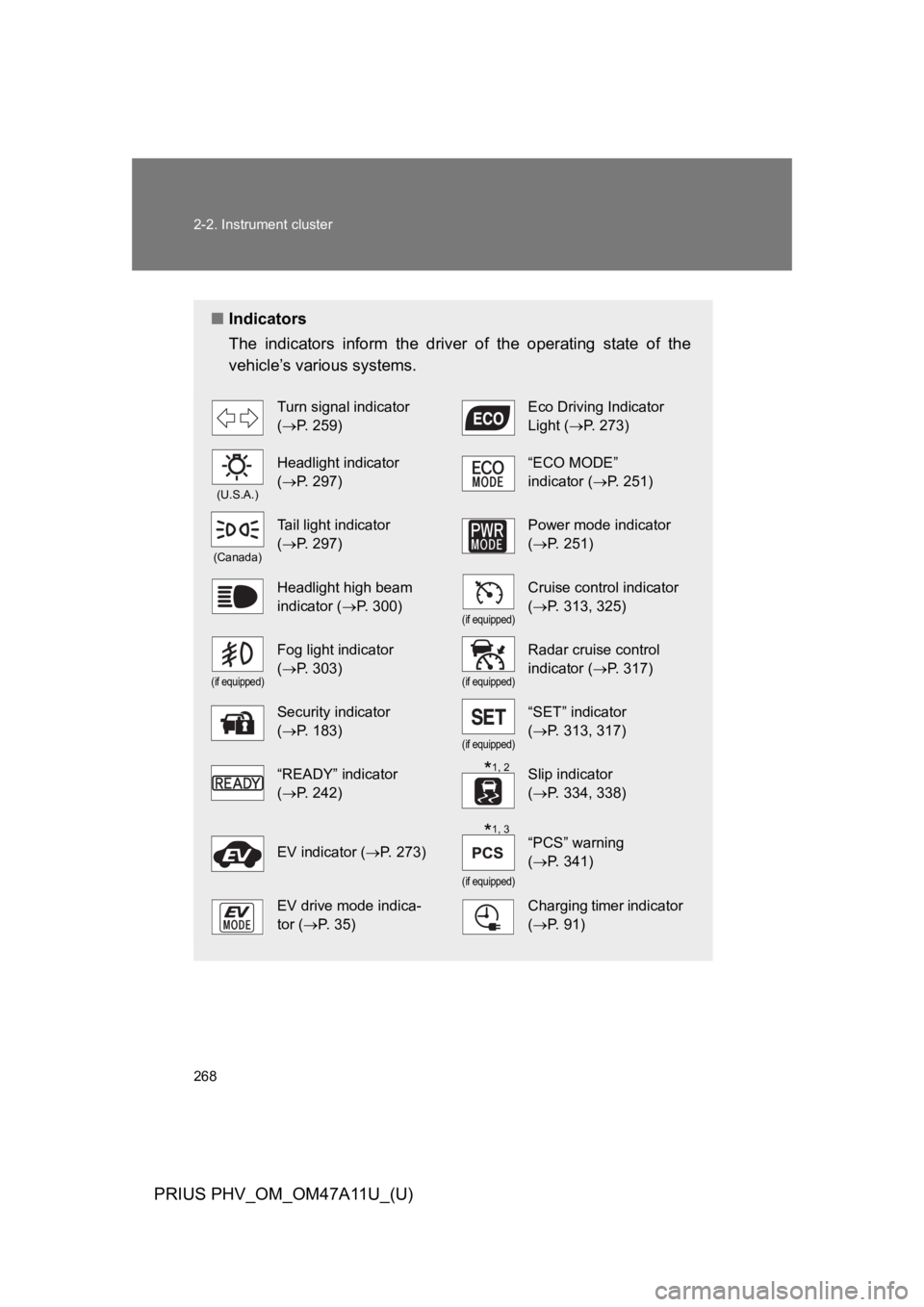
268
2-2. Instrument cluster
PRIUS PHV_OM_OM47A11U_(U)
■Indicators
The indicators inform the driver of the operating state of the
vehicle’s various systems.
Turn signal indicator
(oP. 2 5 9 )
Eco Driving Indicator
Light (oP. 2 7 3 )
(U.S.A.)
Headlight indicator
(oP. 2 9 7 )
“ECO MODE”
indicator (oP. 2 5 1 )
(Canada)
Ta i l l i g h t i n d i c a t o r
(oP. 2 9 7 )
Power mode indicator
(oP. 2 5 1 )
Headlight high beam
indicator (oP. 3 0 0 )(if equipped)
Cruise control indicator
(oP. 3 1 3 , 3 2 5 )
(if equipped)
Fog light indicator
(oP. 3 0 3 )(if equipped)
Radar cruise control
indicator (oP. 3 1 7 )
Security indicator
(oP. 1 8 3 )(if equipped)
“SET” indicator
(oP. 3 1 3 , 3 1 7 )
“READY” indicator
(oP. 2 4 2 )
Slip indicator
(oP. 3 3 4 , 3 3 8 )
EV indicator (oP. 2 7 3 )
(if equipped)
“PCS” warning
(oP. 3 4 1 )
EV drive mode indica-
tor (oP. 3 5 )
Charging timer indicator
(oP. 9 1 )
*1, 2
*1, 3