cruise control TOYOTA PRIUS PLUG-IN HYBRID 2015 1.G Owners Manual
[x] Cancel search | Manufacturer: TOYOTA, Model Year: 2015, Model line: PRIUS PLUG-IN HYBRID, Model: TOYOTA PRIUS PLUG-IN HYBRID 2015 1.GPages: 692, PDF Size: 12.42 MB
Page 3 of 692

1
2
3
4
5
6
7
3
PRIUS PHV_OM_OM47A11U_(U)
1-9. Safety informationCorrect driving posture........ 185
SRS airbags ........................ 187
Front passenger occupant classification system ......... 202
Child restraint systems........ 208
Installing child restraints...... 213
2-1. Driving procedures Driving the vehicle............... 228
Power (ignition) switch ........ 242
Hybrid transmission ............ 249
Turn signal lever ................. 259
Parking brake ...................... 260
Horn .................................... 261
2-2. Instrument cluster Gauges and meters ............ 262
Indicators and warning lights ................................. 267
Multi-information display ..... 271
Head-up display .................. 290 2-3. Operating the lights and
windshield wipers
Headlight switch ................. 297
Fog light switch................... 303
Windshield wipers and washer.............................. 305
Rear window wiper and washer.............................. 309
Headlight cleaner switch .... 312
2-4. Using other driving systems
Cruise control ..................... 313
Dynamic radar cruise control .............................. 317
Driving assist systems ........ 333
Hill-start assist control ........ 338
PCS (Pre-Collision System) ............................ 340
2-5. Driving information Cargo and luggage ............. 349
Vehicle load limits............... 354
Winter driving tips ............... 355
Trailer towing ...................... 360
Dinghy towing ..................... 361
2When driving
Page 17 of 692
17
PRIUS PHV_OM_OM47A11U_(U)
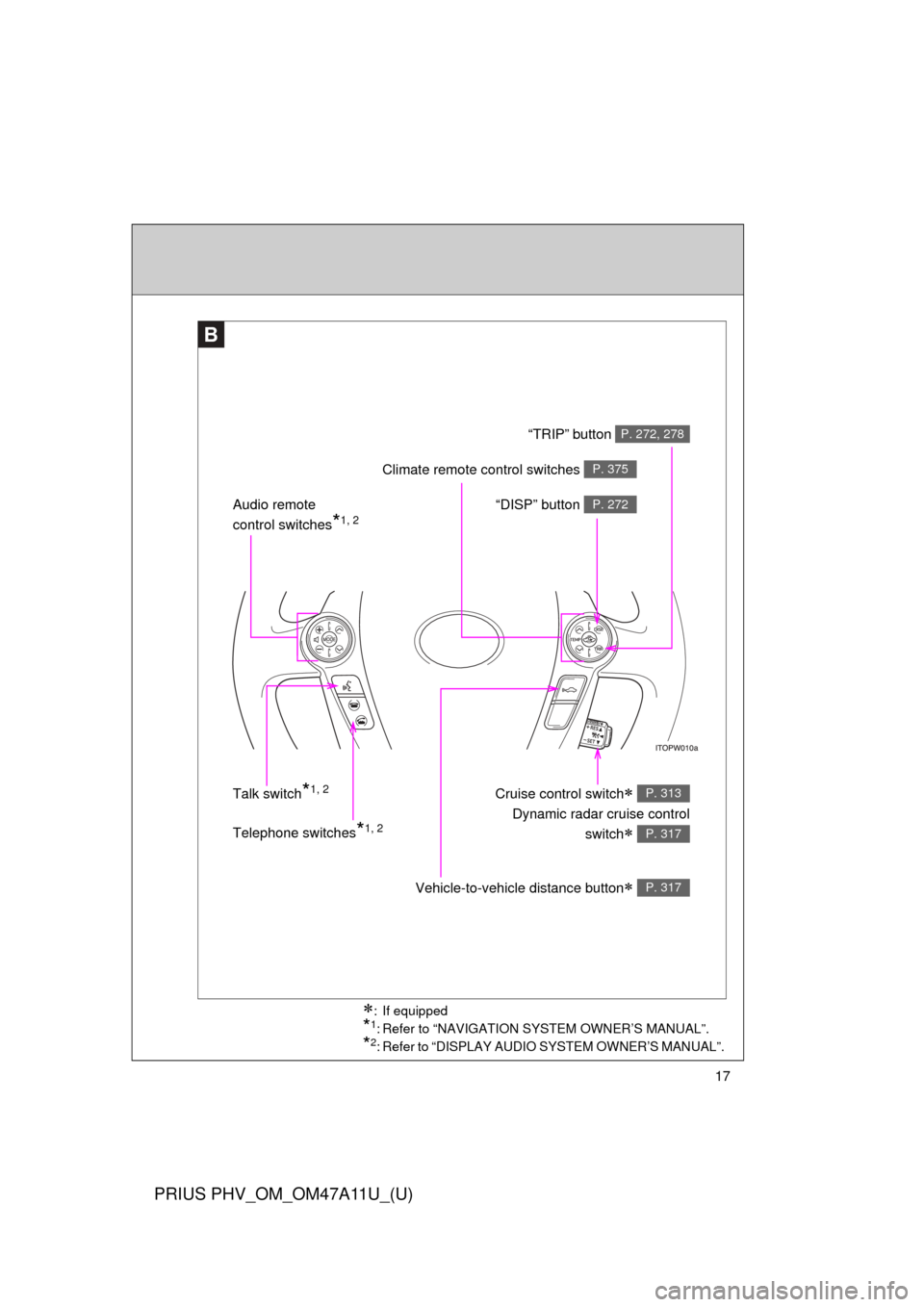
B
Telephone switches*1, 2 “DISP” button
P. 272Audio remote
control switches
*1, 2
Cruise control switch
Dynamic radar cruise control
switch
P. 313
P. 317
Vehicle-to-vehicle distance button P. 317
Talk switch*1, 2
“TRIP” button P. 272, 278
Climate remote control switches P. 375
: If equipped
*1: Refer to “NAVIGATION SYSTEM OWNER’S MANUAL”.
*2: Refer to “DISPLAY AUDIO SYSTEM OWNER’S MANUAL”.
Page 23 of 692

23
PRIUS PHV_OM_OM47A11U_(U)
Installation of a mobile two-way radio system
The installation of a mobile two-way radio system in your vehicle could affect
electronic systems such as:
●Multiport fuel injection system/sequential multiport fuel injection system
● Cruise control system
● Anti-lock brake system
● SRS airbag system
● Seat belt pretensioner system
Be sure to check with your Toyota dealer for precautionary measures or spe-
cial instructions regarding installation of a mobile two-way radio system.
High voltage parts and cables on the hybrid vehicles emit approximately the
same amount of electromagnetic waves as the conventional gasoline pow-
ered vehicles or home electronic appliances despite of their electromagnetic
shielding.
Unwanted noise may occur in the reception of the mobile two-way radio.
Page 227 of 692
When driving2
227
PRIUS PHV_OM_OM47A11U_(U)
2-1. Driving proceduresDriving the vehicle............ 228
Power (ignition) switch ..... 242
Hybrid transmission ......... 249
Turn signal lever .............. 259
Parking brake ................... 260
Horn ................................. 261
2-2. Instrument cluster Gauges and meters ......... 262
Indicators and warning lights .............................. 267
Multi-information display............................ 271
Head-up display ............... 290 2-3. Operating the lights and
windshield wipers
Headlight switch ............... 297
Fog light switch ................ 303
Windshield wipers and washer ........................... 305
Rear window wiper and washer ........................... 309
Headlight cleaner switch ............................. 312
2-4. Using other driving systems
Cruise control ................... 313
Dynamic radar cruise control ............................ 317
Driving assist systems ..... 333
Hill-start assist control ...... 338
PCS (Pre-Collision System).......................... 340
2-5. Driving information Cargo and luggage .......... 349
Vehicle load limits ............ 354
Winter driving tips ............ 355
Trailer towing ................... 360
Dinghy towing .................. 361
Page 255 of 692

255
2-1. Driving procedures
PRIUS PHV_OM_OM47A11U_(U)
2
When driving
■
Reverse warning buzzer
When shifting into R, a buzzer will sound to inform the driver that the shift
position is in R.
■ Automatically P position selection function
When the shift position is in a position other than P, pressing the “POWER”
switch with the vehicle stopped completely will cause the shift position to
change to P automatically, and then the “POWER” switch will turn off.
■ If the shift position cannot be shifted from P
There is a possibility that the 12-volt battery is discharged. Check the 12-volt
battery in this situation. ( P. 601)
■ About engine braking
When shift position B is selected, releasing the accelerator pedal will apply
engine braking.
●When the vehicle is driven at high speeds, compared to ordinary gaso-
line-fueled vehicles, the engine braking deceleration is felt less than that
of other vehicles.
● The vehicle can be accelerated even when shift position B is selected.
If the vehicle is driven continuously in the B position, fuel efficiency will
become low. Usually, shift the shift position to D.
■ When driving with cruise control or radar cruise control activated
Even if switching the driving mode to power mode with the intent of enabling
engine braking, engine braking will not activate because cruise control or
radar cruise control will not be canceled.
Page 268 of 692
268 2-2. Instrument cluster
PRIUS PHV_OM_OM47A11U_(U)
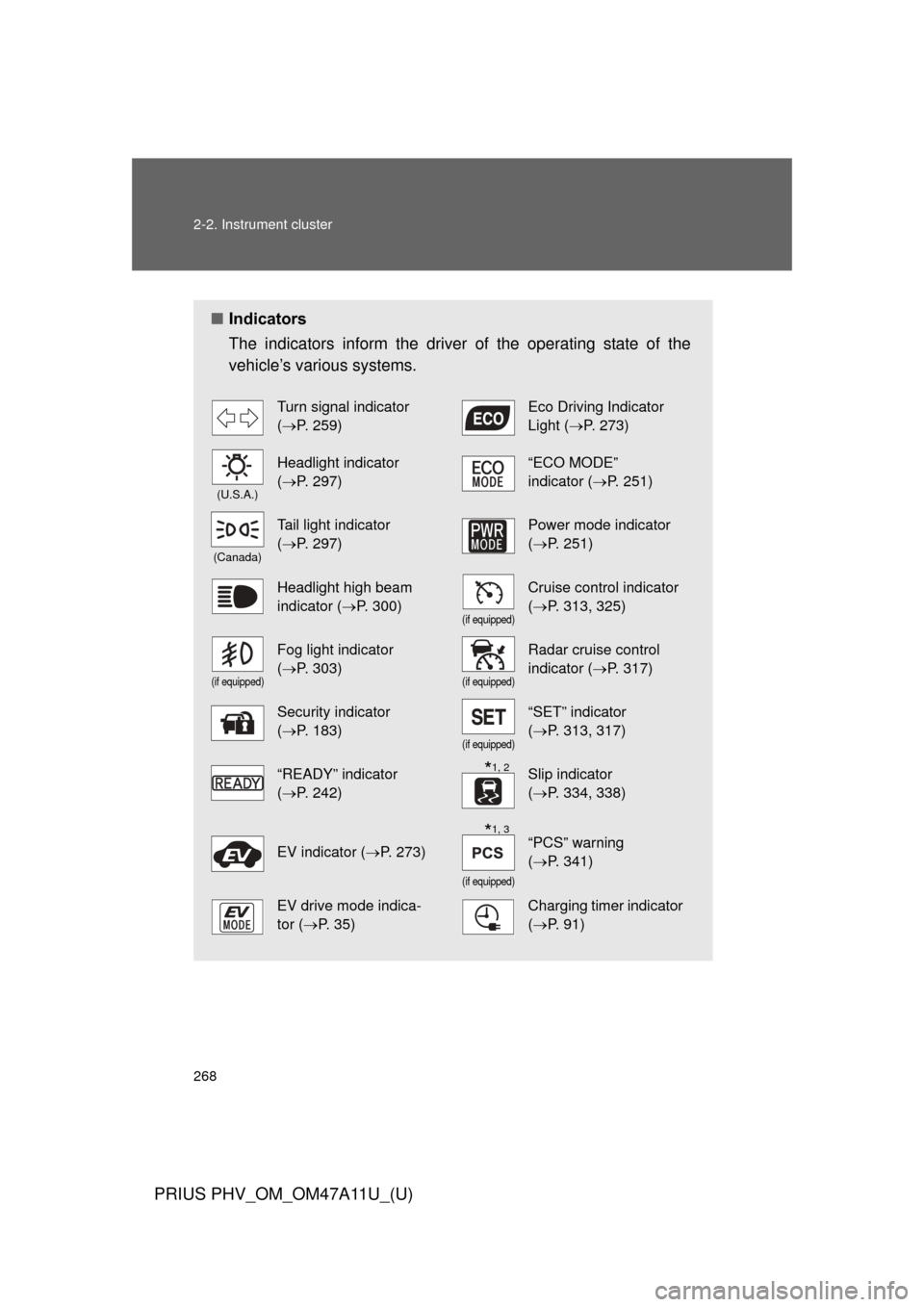
■Indicators
The indicators inform the driver of the operating state of the
vehicle’s various systems.
Turn signal indicator
(P. 259)Eco Driving Indicator
Light ( P. 273)
(U.S.A.)
Headlight indicator
(P. 297)“ECO MODE”
indicator (P. 251)
(Canada)
Tail light indicator
(P. 297)Power mode indicator
(P. 251)
Headlight high beam
indicator ( P. 300)
(if equipped)
Cruise control indicator
(P. 313, 325)
(if equipped)
Fog light indicator
(P. 303)
(if equipped)
Radar cruise control
indicator (P. 317)
Security indicator
(P. 183)
(if equipped)
“SET” indicator
(P. 313, 317)
“READY” indicator
(P. 242)Slip indicator
(P. 334, 338)
EV indicator ( P. 273)
(if equipped)
“PCS” warning
(P. 341)
EV drive mode indica-
tor ( P. 35)Charging timer indicator
(P. 91)
*1, 2
*1, 3
Page 271 of 692
271
2-2. Instrument cluster
PRIUS PHV_OM_OM47A11U_(U)
2
When driving
Multi-information display
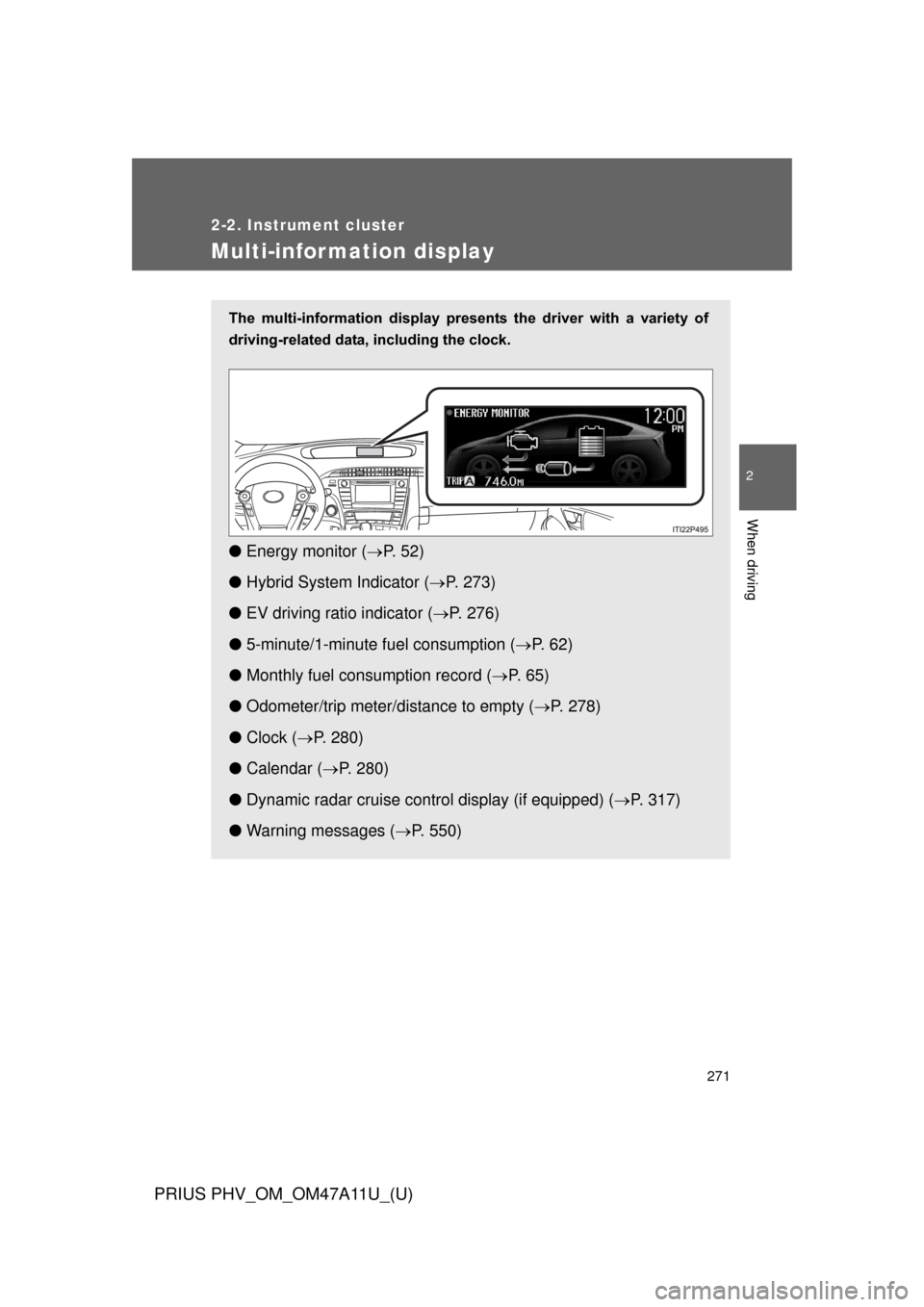
The multi-information display presents the driver with a variety of
driving-related data, including the clock.
● Energy monitor ( P. 5 2 )
● Hybrid System Indicator ( P. 273)
● EV driving ratio indicator ( P. 276)
● 5-minute/1-minute fu el consumption (P. 6 2 )
● Monthly fuel consumption record ( P. 6 5 )
● Odometer/trip meter/distance to empty ( P. 278)
● Clock ( P. 280)
● Calendar ( P. 280)
● Dynamic radar cruise control display (if equipped) ( P. 317)
● Warning messages ( P. 550)
Page 291 of 692
291
2-2. Instrument cluster
PRIUS PHV_OM_OM47A11U_(U)
2
When driving
■
Head-up display contents
●Speedometer
Displays the vehicle speed.
●Hybrid System Indicator
Provides assistance for Eco-friendly driving.
●Turn-by-turn navigation*
Displays a notification of upcoming intersections during navigation
system route guidance. ( P. 294)
●Dynamic radar cruise control*
Displays the approach warning. ( P. 317)
●PCS (Pre-Collision System)*
Indicates that there is a possibility of collision. ( P. 340)
*: If equipped
Page 313 of 692
313
PRIUS PHV_OM_OM47A11U_(U)
2
When driving
2-4. Using other driving systems
Cruise control
: If equipped
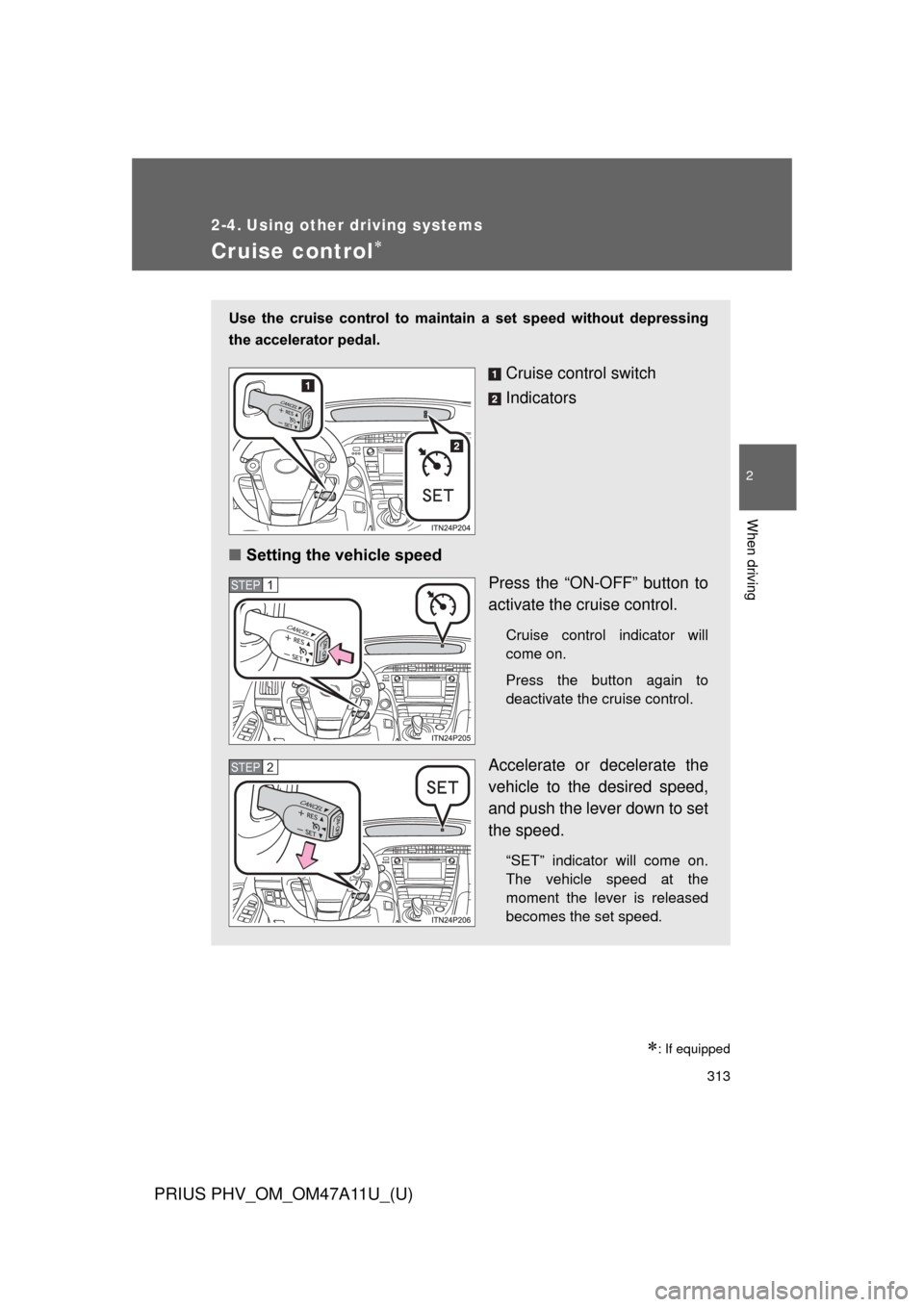
Use the cruise control to maintain a set speed without depressing
the accelerator pedal.
Cruise control switch
Indicators
■ Setting the vehicle speed
Press the “ON-OFF” button to
activate the cruise control.
Cruise control indicator will
come on.
Press the button again to
deactivate the cruise control.
Accelerate or decelerate the
vehicle to the desired speed,
and push the lever down to set
the speed.
“SET” indicator will come on.
The vehicle speed at the
moment the lever is released
becomes the set speed.
STEP 1
STEP 2
Page 315 of 692
315
2-4. Using other
driving systems
PRIUS PHV_OM_OM47A11U_(U)
2
When driving
■Cruise control can be set when
●The shift position is in D.
● Vehicle speed is above approximately 25 mph (40 km/h).
■ Accelerating after setting the vehicle speed
●The vehicle can be accelerated normally. After acceleration, the set
speed resumes.
● Even without canceling the cruise control, the set speed can be
increased by first accelerating the vehicle to the desired speed and then
pushing the lever down to set the new speed.
■ Automatic cruise control cancelation
Cruise control will stop maintaining the vehicle speed in any of the following
situations.
●Actual vehicle speed falls more than approximately 10 mph (16 km/h)
below the preset vehicle speed.
At this time, the memorized set speed is not retained.
● Actual vehicle speed is below approximately 25 mph (40 km/h).
● Enhanced VSC is activated.
■ If the cruise control indicator light flashes
Press the “ON-OFF” button once to deactivate the system, and then press
the button again to reactivate the system.
If the cruise control speed cannot be set or if the cruise control cancels
immediately after being activated, there may be a malfunction in the cruise
control system. Have the vehicle inspected by your Toyota dealer.