display TOYOTA PRIUS PRIME 2017 2.G Navigation Manual
[x] Cancel search | Manufacturer: TOYOTA, Model Year: 2017, Model line: PRIUS PRIME, Model: TOYOTA PRIUS PRIME 2017 2.GPages: 304, PDF Size: 4.56 MB
Page 189 of 304
189
2. SETUP
PRIUS PRIME_Navi_OM47A96U_(U)
16.07.05 09:53
PHONE
7
1Select “New Contact” .
2Enter the name and select “OK”.
3Enter the phone number and select
“OK”.
4Select the phone type for the phone
number.
5To add another number to this contact,
select “Yes”.
■REGISTERING A NEW CONTACT IN
A DIFFERENT WAY (FROM THE
“Call History” SCREEN)
1Display the phone top screen.
(→P.169)
2Select the “Call History” tab and se-
lect a contact not yet registered in the
contact list.
3Select “Add to Contacts” .
4Follow the steps in “REGISTERING A
NEW CONTACT TO THE CONTACT
LIST” from “STEP 2”. ( →P.189)
REGISTERING A NEW
CONTACT TO THE CONTACT
LIST
New contact data can be registered.
Up to 4 numbers per person can be
registered. For PBAP compatible
Bluetooth
® phones, this function is
available when “Automatic Transfer” is
set to off. ( →P.186)
For only OPP compatible Bluetooth®
phones, this function is available when
“Automatic Transfer” is set to off.
(→ P.186)
Page 190 of 304
190
2. SETUP
PRIUS PRIME_Navi_OM47A96U_(U)
16.07.05 09:53
1Select “Edit Contacts” .
2Select the desired contact.
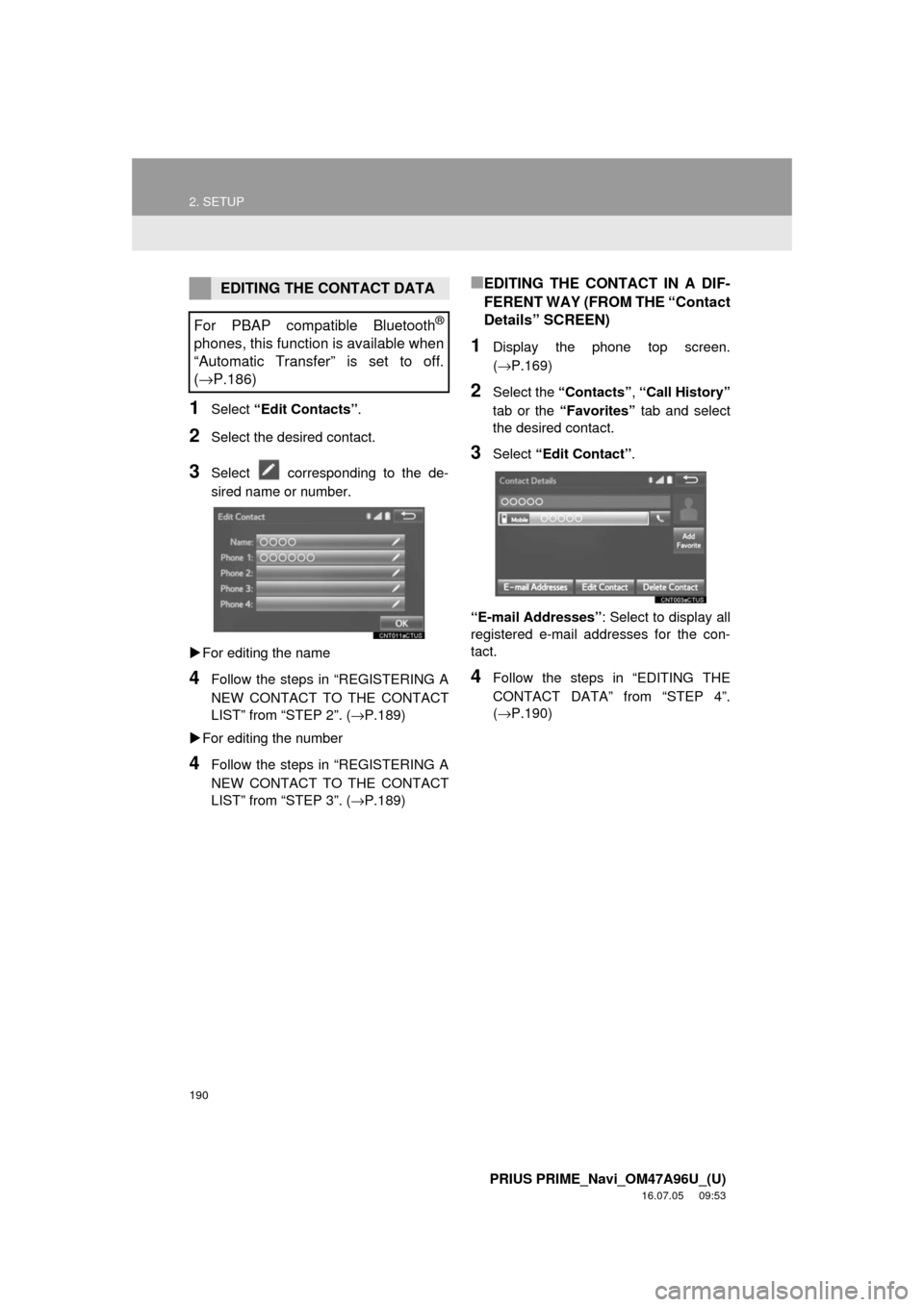
3Select corresponding to the de-
sired name or number.
For editing the name
4Follow the steps in “REGISTERING A
NEW CONTACT TO THE CONTACT
LIST” from “STEP 2”. ( →P.189)
For editing the number
4Follow the steps in “REGISTERING A
NEW CONTACT TO THE CONTACT
LIST” from “STEP 3”. ( →P.189)
■EDITING THE CONTACT IN A DIF-
FERENT WAY (FROM THE “Contact
Details” SCREEN)
1Display the phone top screen.
(→P.169)
2Select the “Contacts” , “Call History”
tab or the “Favorites” tab and select
the desired contact.
3Select “Edit Contact”.
“E-mail Addresses” : Select to display all
registered e-mail addresses for the con-
tact.
4Follow the steps in “EDITING THE
CONTACT DATA” from “STEP 4”.
(→ P.190)
EDITING THE CONTACT DATA
For PBAP compatible Bluetooth
®
phones, this function is available when
“Automatic Transfer” is set to off.
( → P.186)
Page 191 of 304
191
2. SETUP
PRIUS PRIME_Navi_OM47A96U_(U)
16.07.05 09:53
PHONE
7
1Select “Delete Contacts” .
2Select the desired contact and select
“Delete”.
3Select “Yes” when the confirmation
screen appears.
■DELETING THE CONTACT IN A DIF-
FERENT WAY (FROM THE “Contact
Details” SCREEN)
1Display the phone top screen.
(→P.169)
2Select the “Contacts” , “Call History”
tab or the “Favorites” tab and select
the desired contact.
3Select “Delete Contact” .
4Select “Yes” when the confirmation
screen appears.
DELETING THE CONTACT
DATA
For PBAP compatible Bluetooth
®
phones, this function is available when
“Automatic Transfer” is set to off.
( →P.186)
INFORMATION
● Multiple data can be selected and
deleted at the same time.
INFORMATION
●When a Bluetooth® phone is deleted,
the contact data will be deleted at the
same time.
Page 192 of 304
192
2. SETUP
PRIUS PRIME_Navi_OM47A96U_(U)
16.07.05 09:53
■REGISTERING THE CONTACTS IN
THE FAVORITES LIST
1Select “Add Favorite” .
2Select the desired contact to add to the
favorites list.
Dimmed contacts are already stored as a
favorite.
3Check that a confirmation screen is
displayed when the operation is com-
plete.
When 15 contacts have already been
registered to the favorites list
1When 15 contacts have already been
registered to the favorites list, a regis-
tered contact needs to be replaced.
Select “Yes” when the confirmation
screen appears to replace a contact.
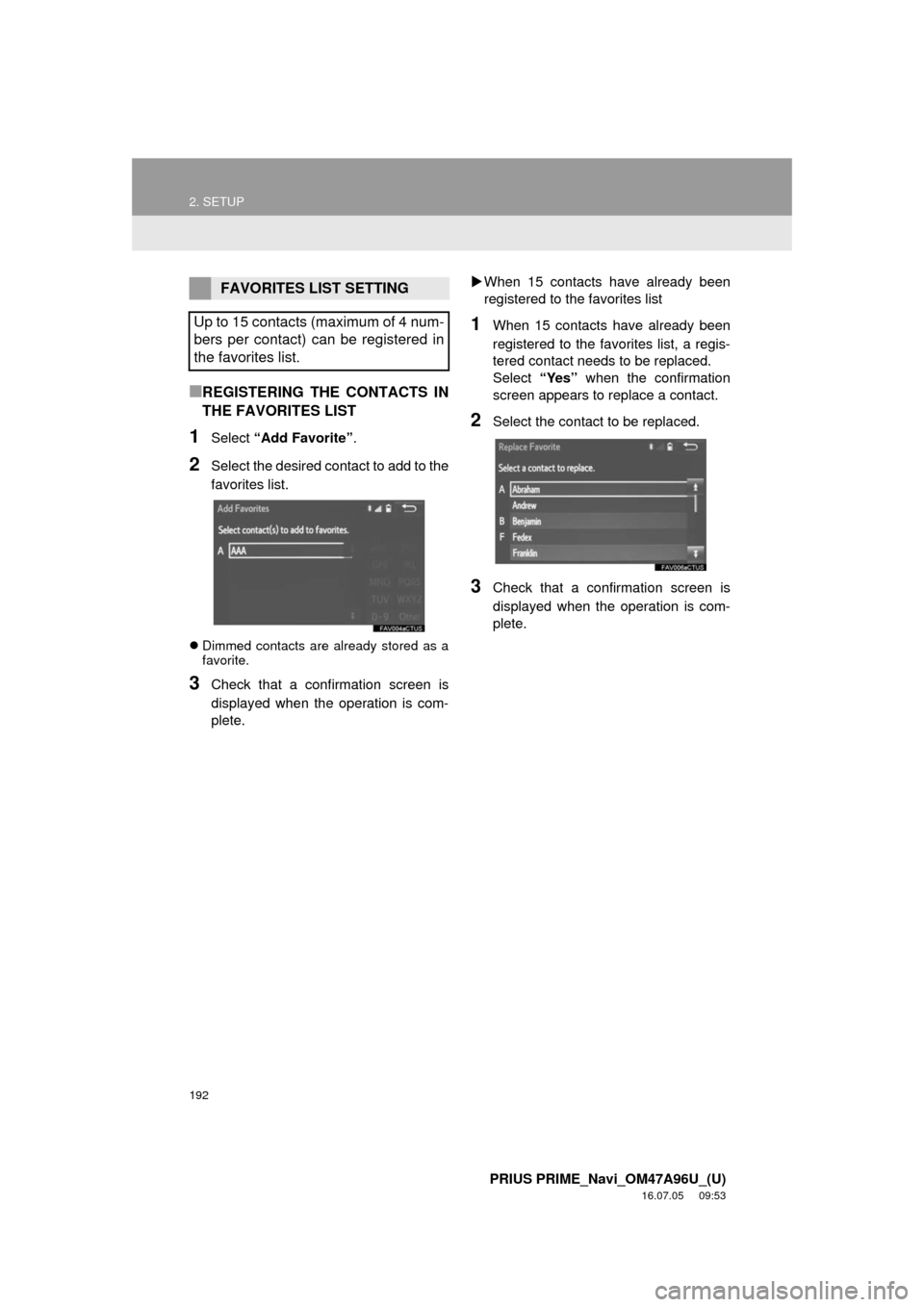
2Select the contact to be replaced.
3Check that a confirmation screen is
displayed when the operation is com-
plete.
FAVORITES LIST SETTING
Up to 15 contacts (maximum of 4 num-
bers per contact) can be registered in
the favorites list.
Page 193 of 304
193
2. SETUP
PRIUS PRIME_Navi_OM47A96U_(U)
16.07.05 09:53
PHONE
7
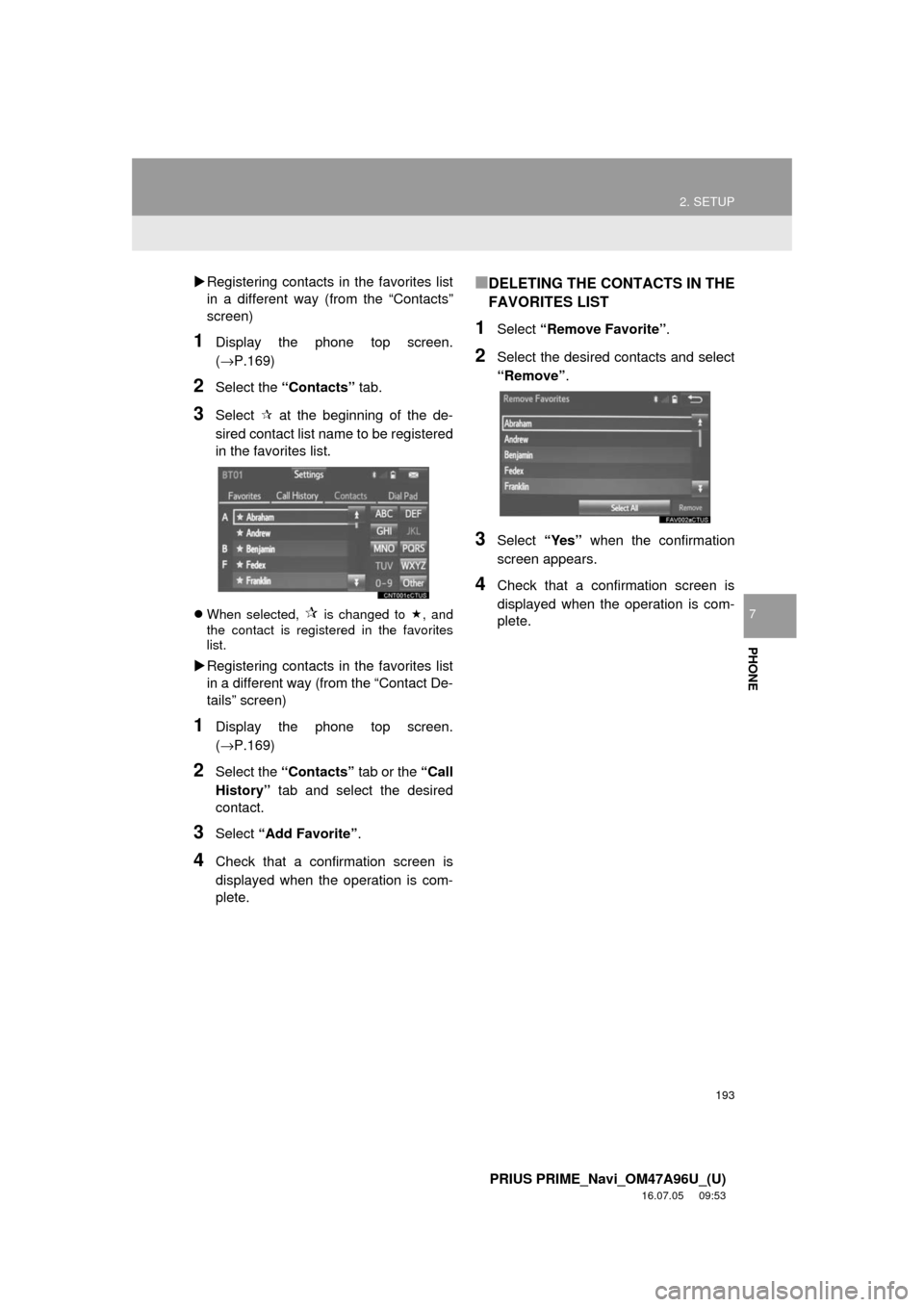
Registering contacts in the favorites list
in a different way (from the “Contacts”
screen)
1Display the phone top screen.
(→P.169)
2Select the “Contacts” tab.
3Select at the beginning of the de-
sired contact list name to be registered
in the favorites list.
When selected, is changed to , and
the contact is registered in the favorites
list.
Registering contacts in the favorites list
in a different way (from the “Contact De-
tails” screen)
1Display the phone top screen.
(→P.169)
2Select the “Contacts” tab or the “Call
History” tab and select the desired
contact.
3Select “Add Favorite” .
4Check that a confirmation screen is
displayed when the operation is com-
plete.
■DELETING THE CONTACTS IN THE
FAVORITES LIST
1Select “Remove Favorite” .
2Select the desired contacts and select
“Remove”.
3Select “Yes” when the confirmation
screen appears.
4Check that a confirmation screen is
displayed when the operation is com-
plete.
Page 194 of 304
194
2. SETUP
PRIUS PRIME_Navi_OM47A96U_(U)
16.07.05 09:53
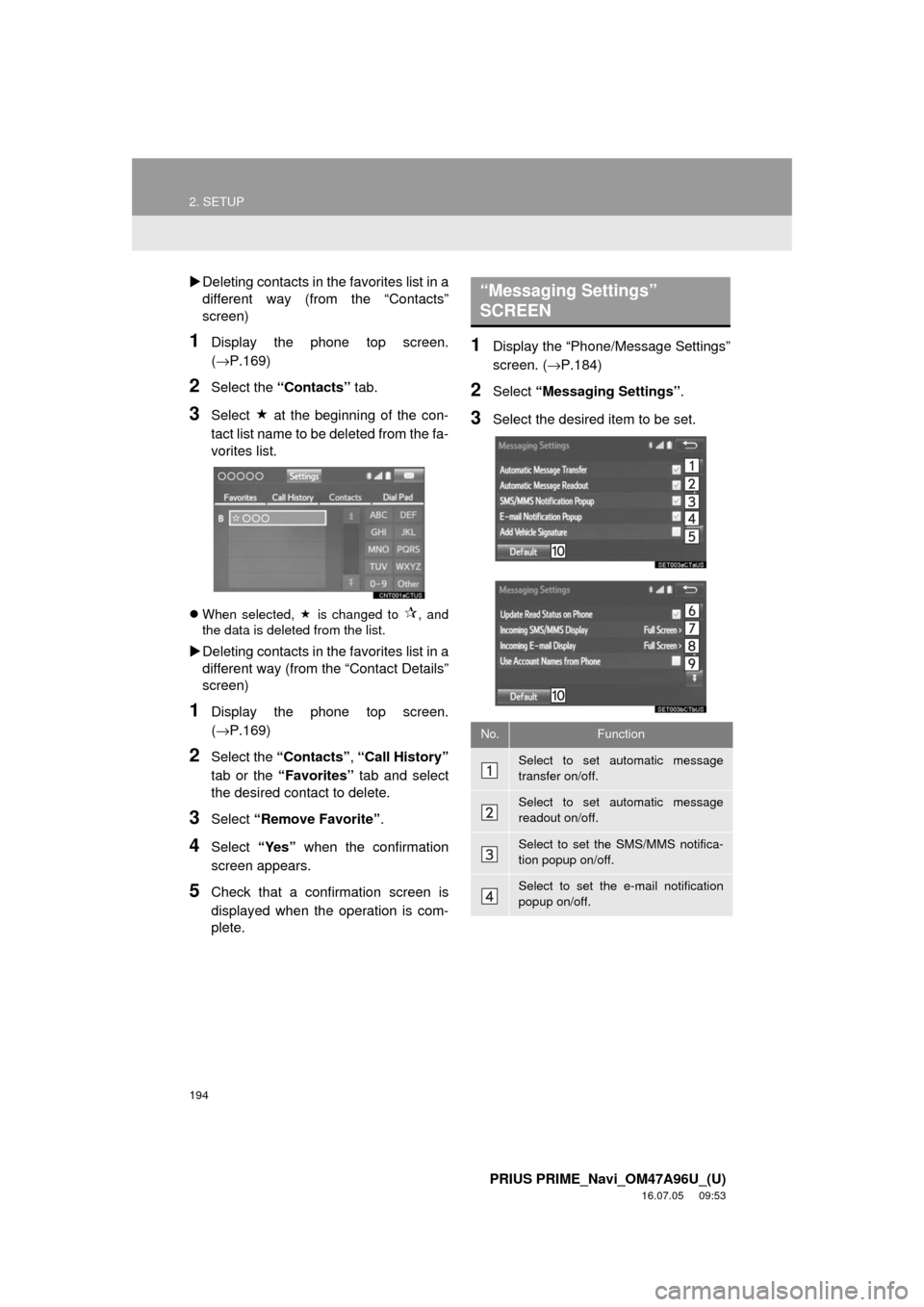
Deleting contacts in the favorites list in a
different way (from the “Contacts”
screen)
1Display the phone top screen.
(→P.169)
2Select the “Contacts” tab.
3Select at the beginning of the con-
tact list name to be deleted from the fa-
vorites list.
When selected, is changed to , and
the data is deleted from the list.
Deleting contacts in the favorites list in a
different way (from the “Contact Details”
screen)
1Display the phone top screen.
(→P.169)
2Select the “Contacts” , “Call History”
tab or the “Favorites” tab and select
the desired contact to delete.
3Select “Remove Favorite” .
4Select “Yes” when the confirmation
screen appears.
5Check that a confirmation screen is
displayed when the operation is com-
plete.
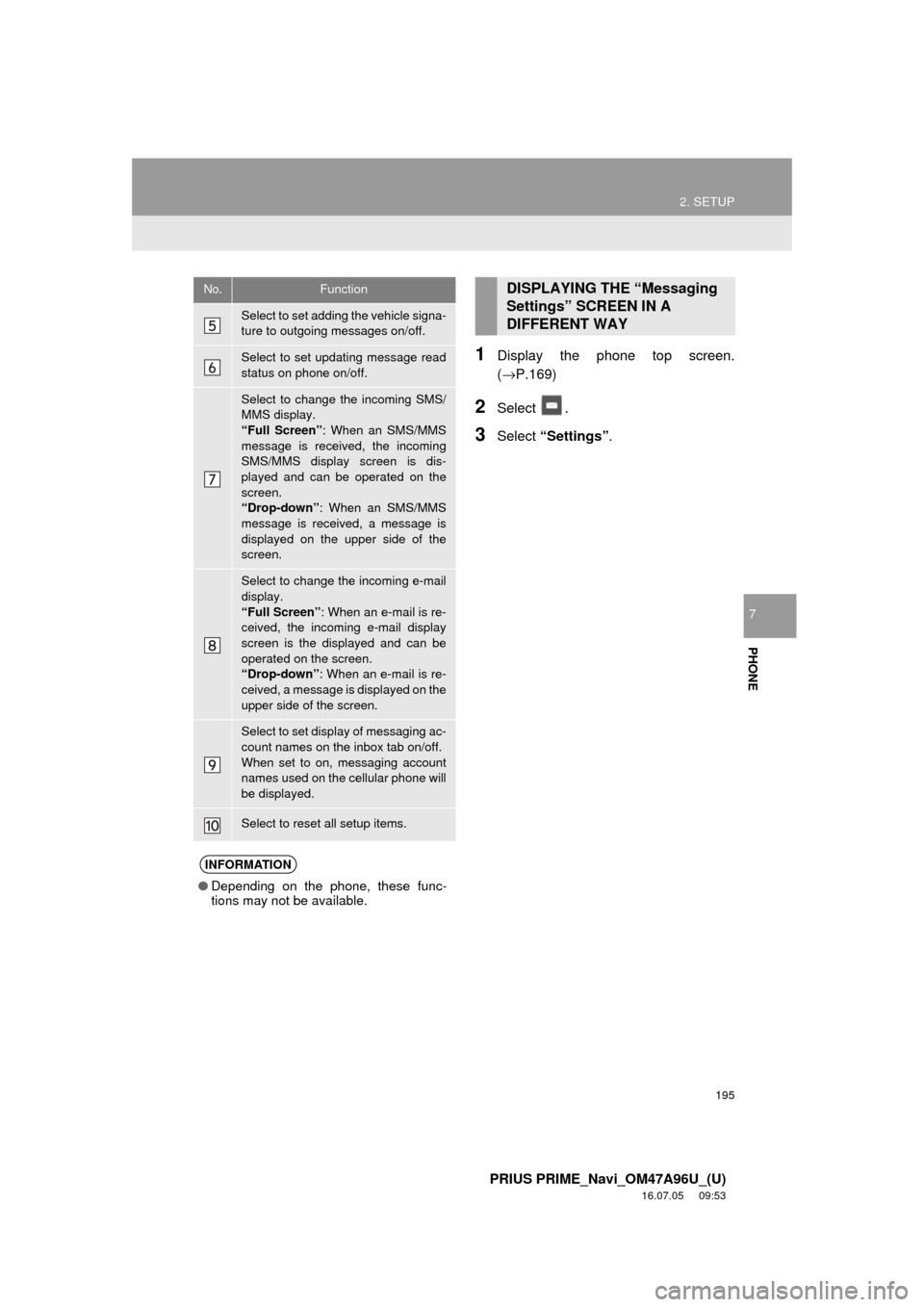
1Display the “Phone/Message Settings”
screen. ( →P.184)
2Select “Messaging Settings”.
3Select the desired item to be set.
“Messaging Settings”
SCREEN
No.Function
Select to set automatic message
transfer on/off.
Select to set automatic message
readout on/off.
Select to set the SMS/MMS notifica-
tion popup on/off.
Select to set the e-mail notification
popup on/off.
Page 195 of 304
195
2. SETUP
PRIUS PRIME_Navi_OM47A96U_(U)
16.07.05 09:53
PHONE
7
1Display the phone top screen.
(→P.169)
2Select .
3Select “Settings” .
Select to set adding the vehicle signa-
ture to outgoing messages on/off.
Select to set updating message read
status on phone on/off.
Select to change the incoming SMS/
MMS display.
“Full Screen” : When an SMS/MMS
message is received, the incoming
SMS/MMS display screen is dis-
played and can be operated on the
screen.
“Drop-down” : When an SMS/MMS
message is received, a message is
displayed on the upper side of the
screen.
Select to change the incoming e-mail
display.
“Full Screen” : When an e-mail is re-
ceived, the incoming e-mail display
screen is the displayed and can be
operated on the screen.
“Drop-down” : When an e-mail is re-
ceived, a message is displayed on the
upper side of the screen.
Select to set display of messaging ac-
count names on the inbox tab on/off.
When set to on, messaging account
names used on the cellular phone will
be displayed.
Select to reset all setup items.
INFORMATION
● Depending on the phone, these func-
tions may not be available.
No.FunctionDISPLAYING THE “Messaging
Settings” SCREEN IN A
DIFFERENT WAY
Page 196 of 304
196
2. SETUP
PRIUS PRIME_Navi_OM47A96U_(U)
16.07.05 09:53
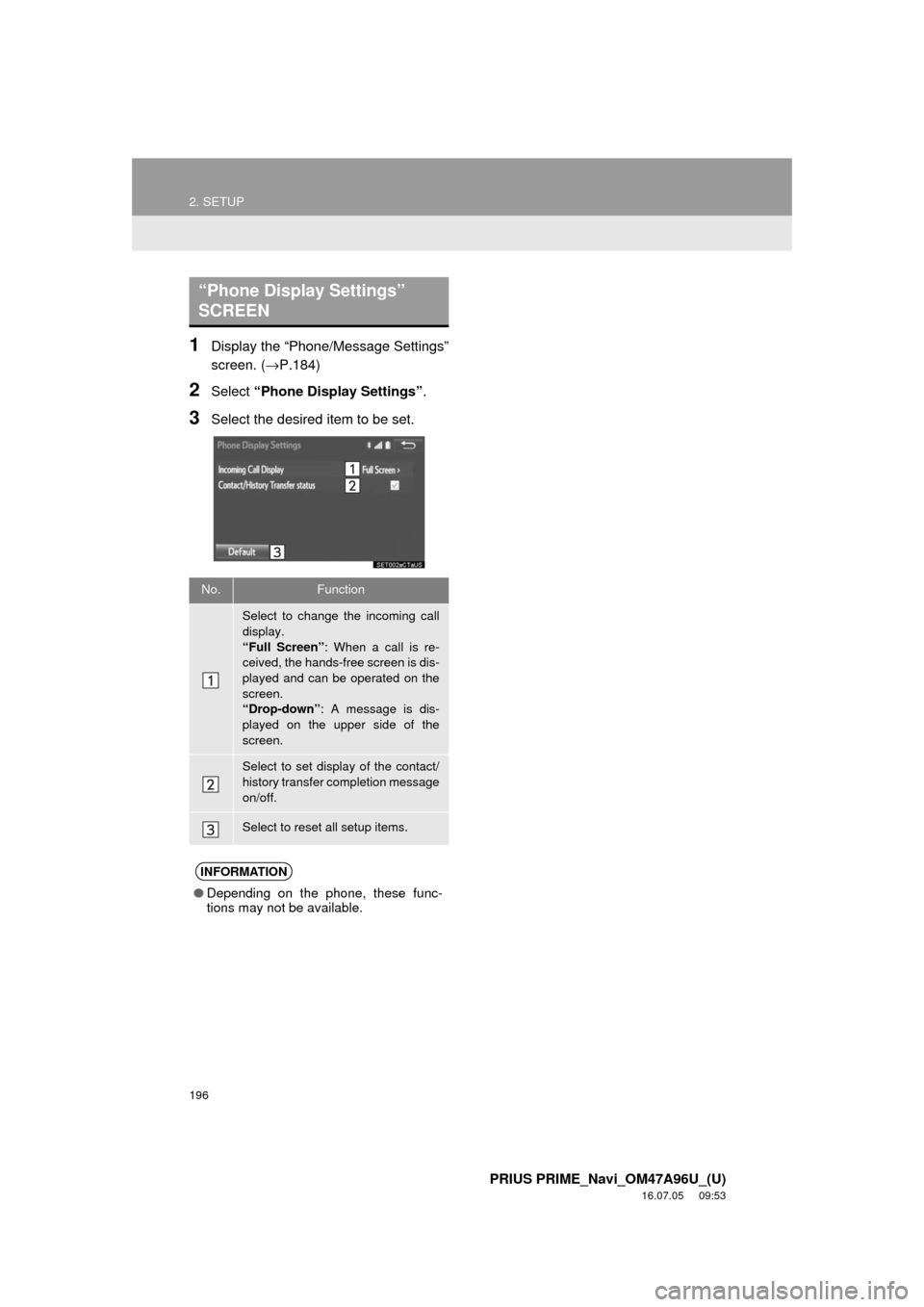
1Display the “Phone/Message Settings”
screen. (→P.184)
2Select “Phone Display Settings” .
3Select the desired item to be set.
“Phone Display Settings”
SCREEN
No.Function
Select to change the incoming call
display.
“Full Screen”: When a call is re-
ceived, the hands-free screen is dis-
played and can be operated on the
screen.
“Drop-down” : A message is dis-
played on the upper side of the
screen.
Select to set display of the contact/
history transfer completion message
on/off.
Select to reset all setup items.
INFORMATION
● Depending on the phone, these func-
tions may not be available.
Page 199 of 304
199
3. WHAT TO DO IF...
PRIUS PRIME_Navi_OM47A96U_(U)
16.07.05 09:53
PHONE
7
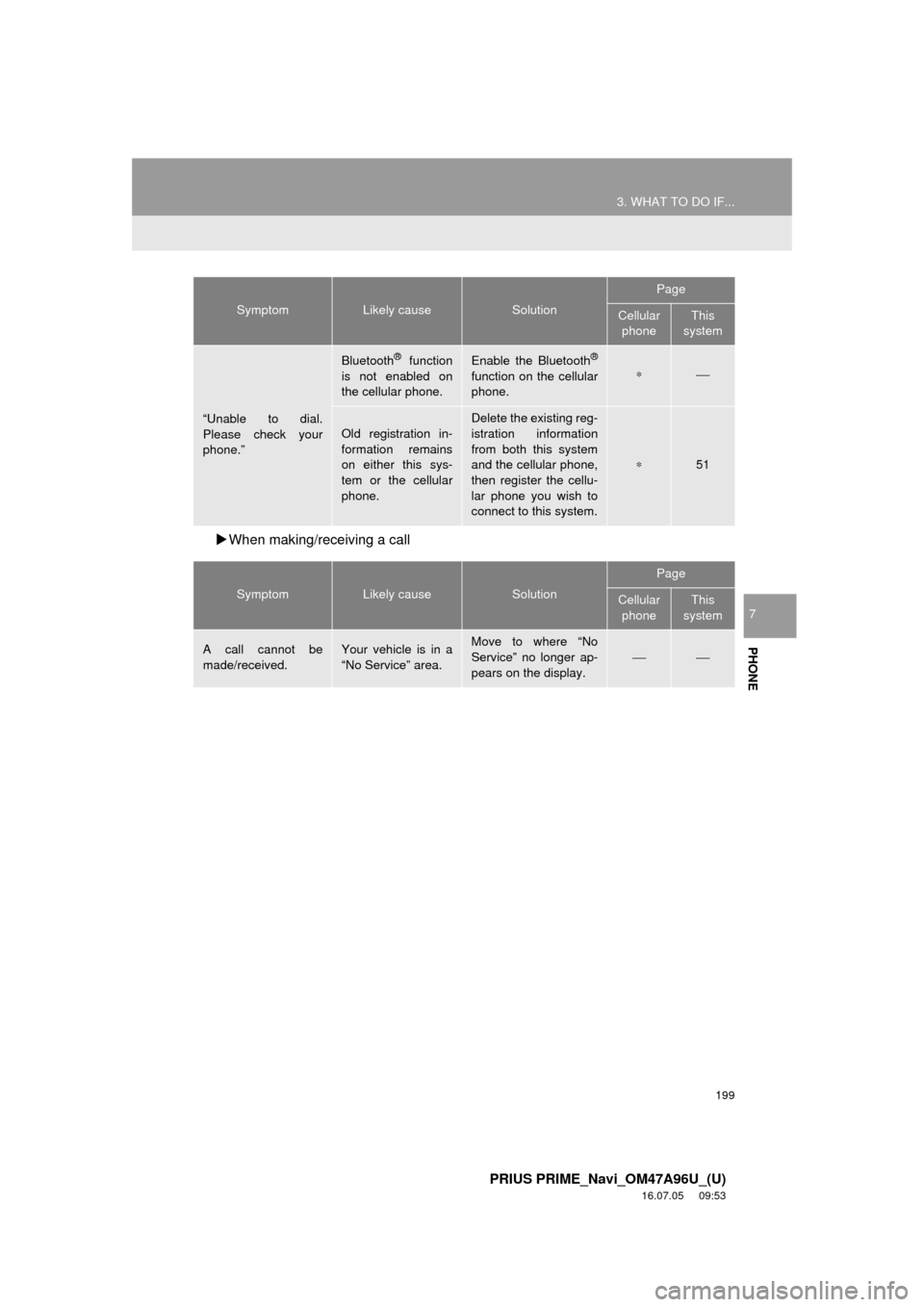
When making/receiving a call
“Unable to dial.
Please check your
phone.”
Bluetooth® function
is not enabled on
the cellular phone.Enable the Bluetooth®
function on the cellular
phone.∗⎯
Old registration in-
formation remains
on either this sys-
tem or the cellular
phone.Delete the existing reg-
istration information
from both this system
and the cellular phone,
then register the cellu-
lar phone you wish to
connect to this system.
∗51
SymptomLikely causeSolution
Page
Cellular phoneThis
system
A call cannot be
made/received.Your vehicle is in a
“No Service” area.Move to where “No
Service” no longer ap-
pears on the display.
⎯⎯
SymptomLikely causeSolution
Page
Cellular phoneThis
system
Page 202 of 304
202
3. WHAT TO DO IF...
PRIUS PRIME_Navi_OM47A96U_(U)
16.07.05 09:53
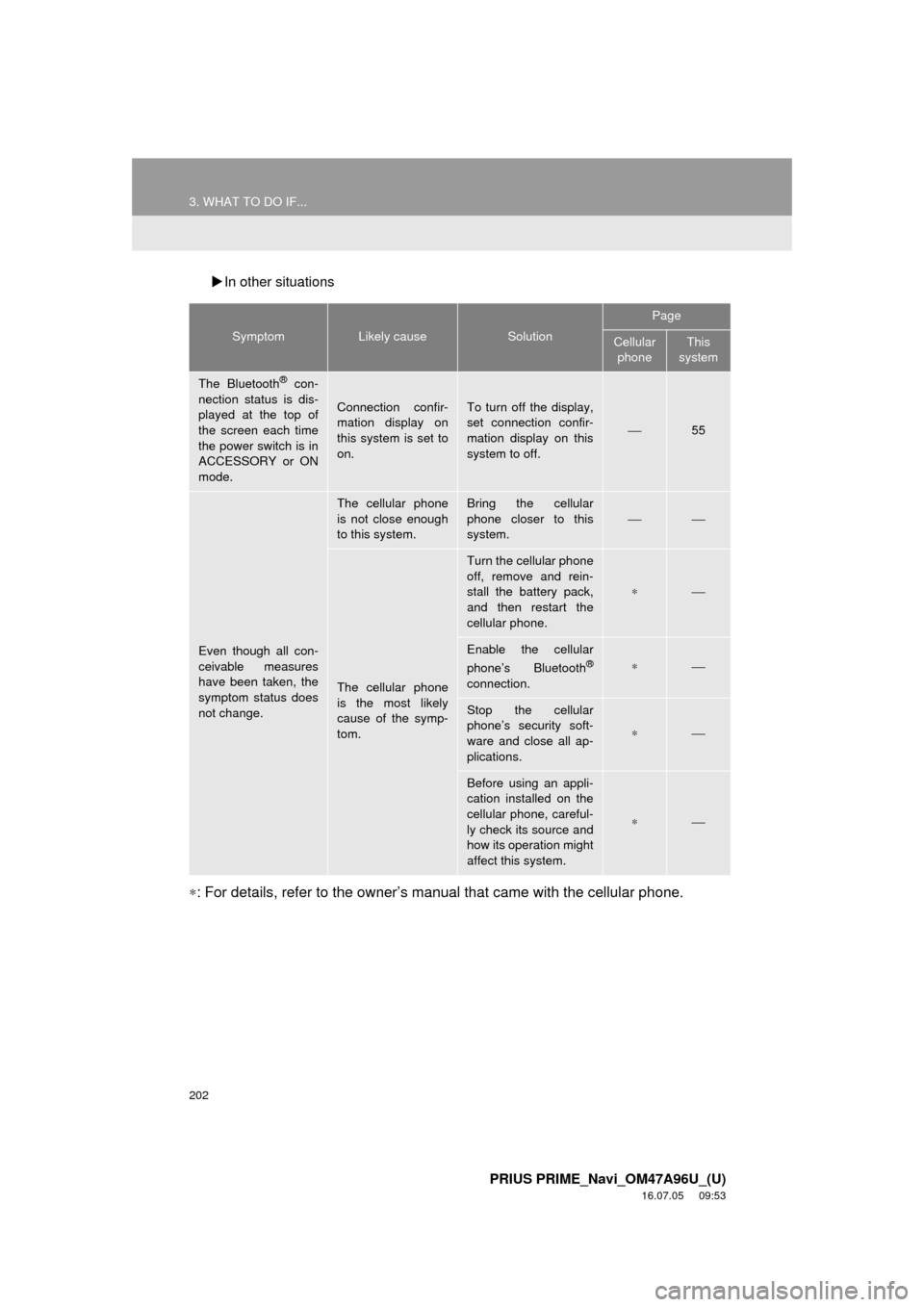
In other situations
∗: For details, refer to the owner’s manual that came with the cellular phone.
SymptomLikely causeSolution
Page
Cellular
phoneThis
system
The Bluetooth® con-
nection status is dis-
played at the top of
the screen each time
the power switch is in
ACCESSORY or ON
mode.
Connection confir-
mation display on
this system is set to
on.To turn off the display,
set connection confir-
mation display on this
system to off.
⎯55
Even though all con-
ceivable measures
have been taken, the
symptom status does
not change.
The cellular phone
is not close enough
to this system.Bring the cellular
phone closer to this
system.
⎯⎯
The cellular phone
is the most likely
cause of the symp-
tom.
Turn the cellular phone
off, remove and rein-
stall the battery pack,
and then restart the
cellular phone.
∗⎯
Enable the cellular
phone’s Bluetooth®
connection.
∗⎯
Stop the cellular
phone’s security soft-
ware and close all ap-
plications.
∗⎯
Before using an appli-
cation installed on the
cellular phone, careful-
ly check its source and
how its operation might
affect this system.
∗⎯