light TOYOTA PRIUS PRIME 2017 2.G Owners Manual
[x] Cancel search | Manufacturer: TOYOTA, Model Year: 2017, Model line: PRIUS PRIME, Model: TOYOTA PRIUS PRIME 2017 2.GPages: 784, PDF Size: 14.98 MB
Page 456 of 784
456
PRIUS PRIME_OM_OM47A88U_(U)
5-5. Using the driving support systems
■Using the exit parallel park ing assist mode to depart
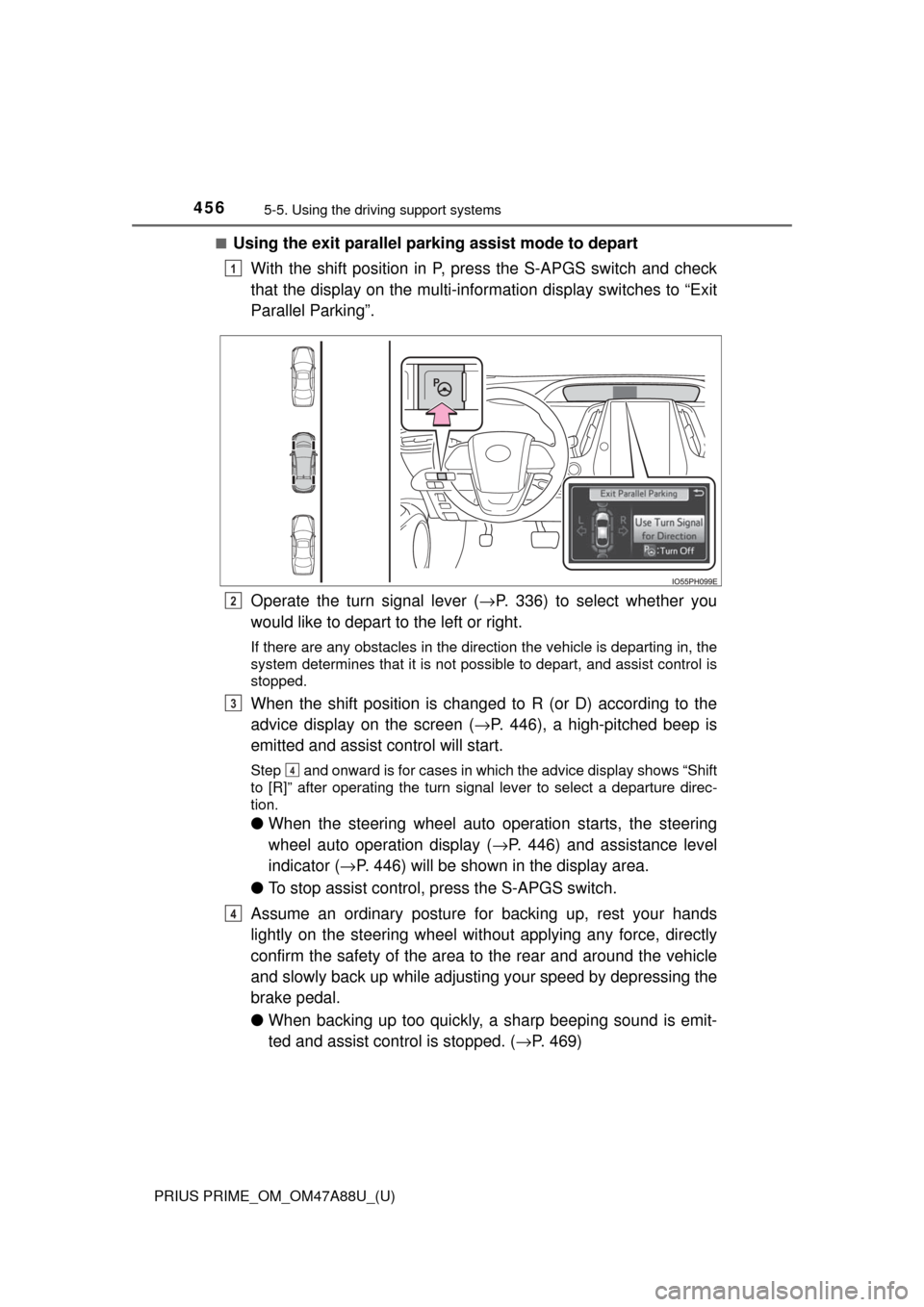
With the shift position in P, press the S-APGS switch and check
that the display on the multi-information display switches to “Exit
Parallel Parking”.
Operate the turn signal lever ( →P. 336) to select whether you
would like to depart to the left or right.
If there are any obstacles in the direction the vehicle is departing in, the
system determines that it is not possible to depart, and assist control is
stopped.
When the shift position is changed to R (or D) according to the
advice display on the screen ( →P. 446), a high-pitched beep is
emitted and assist control will start.
Step and onward is for cases in which the advice display shows “Shift
to [R]” after operating the turn signal lever to select a departure direc-
tion.
● When the steering wheel auto operation starts, the steering
wheel auto operation display ( →P. 446) and assistance level
indicator ( →P. 446) will be shown in the display area.
● To stop assist control, press the S-APGS switch.
Assume an ordinary posture for backing up, rest your hands
lightly on the steering wheel wi thout applying any force, directly
confirm the safety of the area to the rear and around the vehicle
and slowly back up while adjusti ng your speed by depressing the
brake pedal.
● When backing up too quickly, a sharp beeping sound is emit-
ted and assist control is stopped. ( →P. 469)
1
2
3
4
4
Page 457 of 784
PRIUS PRIME_OM_OM47A88U_(U)
4575-5. Using the driving support systems
5
Driving
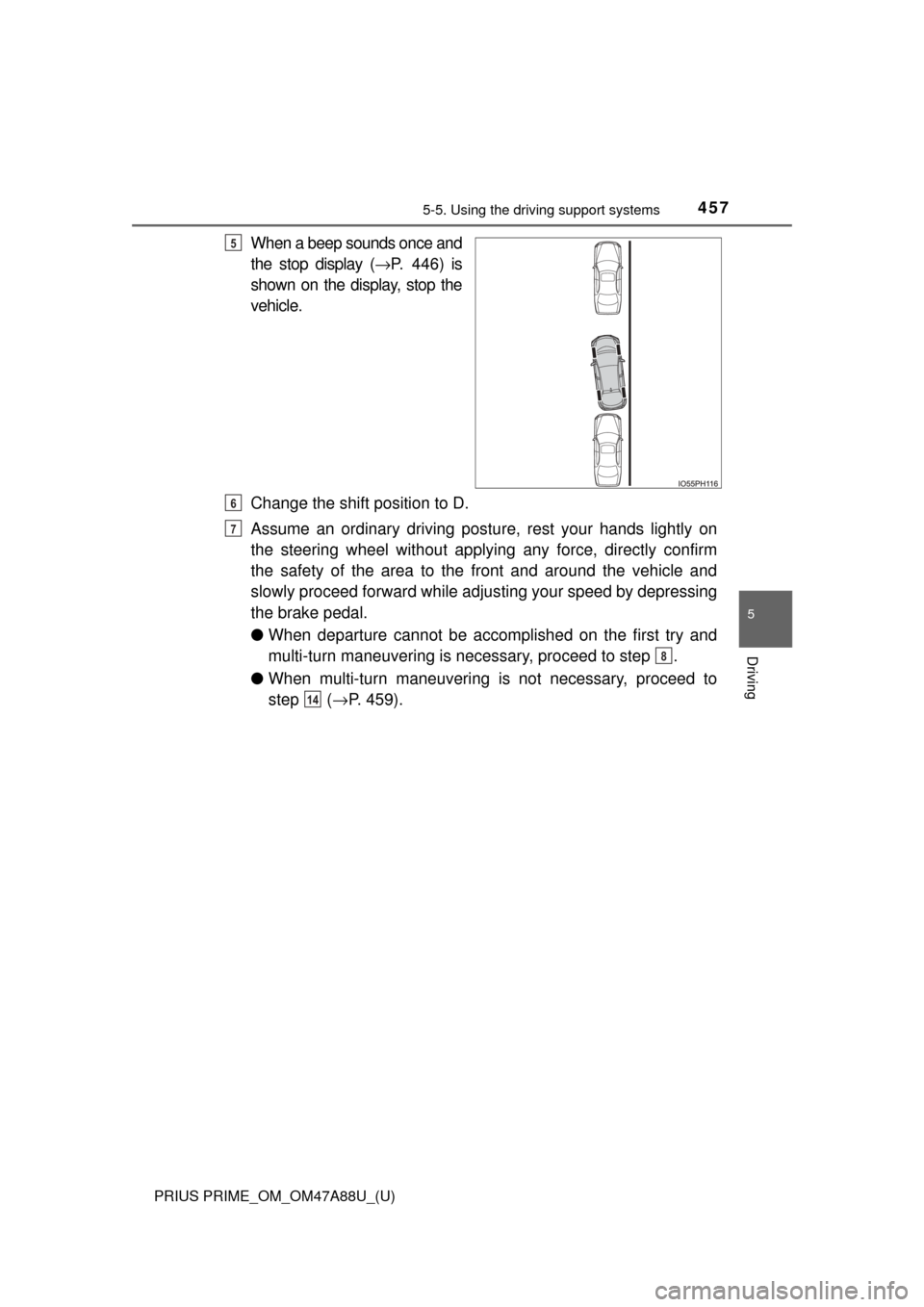
When a beep sounds once and
the stop display (→P. 446) is
shown on the display, stop the
vehicle.
Change the shift position to D.
Assume an ordinary driving postu re, rest your hands lightly on
the steering wheel without applying any force, directly confirm
the safety of the area to the front and around the vehicle and
slowly proceed forward while adjus ting your speed by depressing
the brake pedal.
● When departure cannot be accomplished on the first try and
multi-turn maneuvering is necessary, proceed to step .
● When multi-turn maneuvering is not necessary, proceed to
step ( →P. 459).5
6
7
8
14
Page 458 of 784
458
PRIUS PRIME_OM_OM47A88U_(U)
5-5. Using the driving support systems
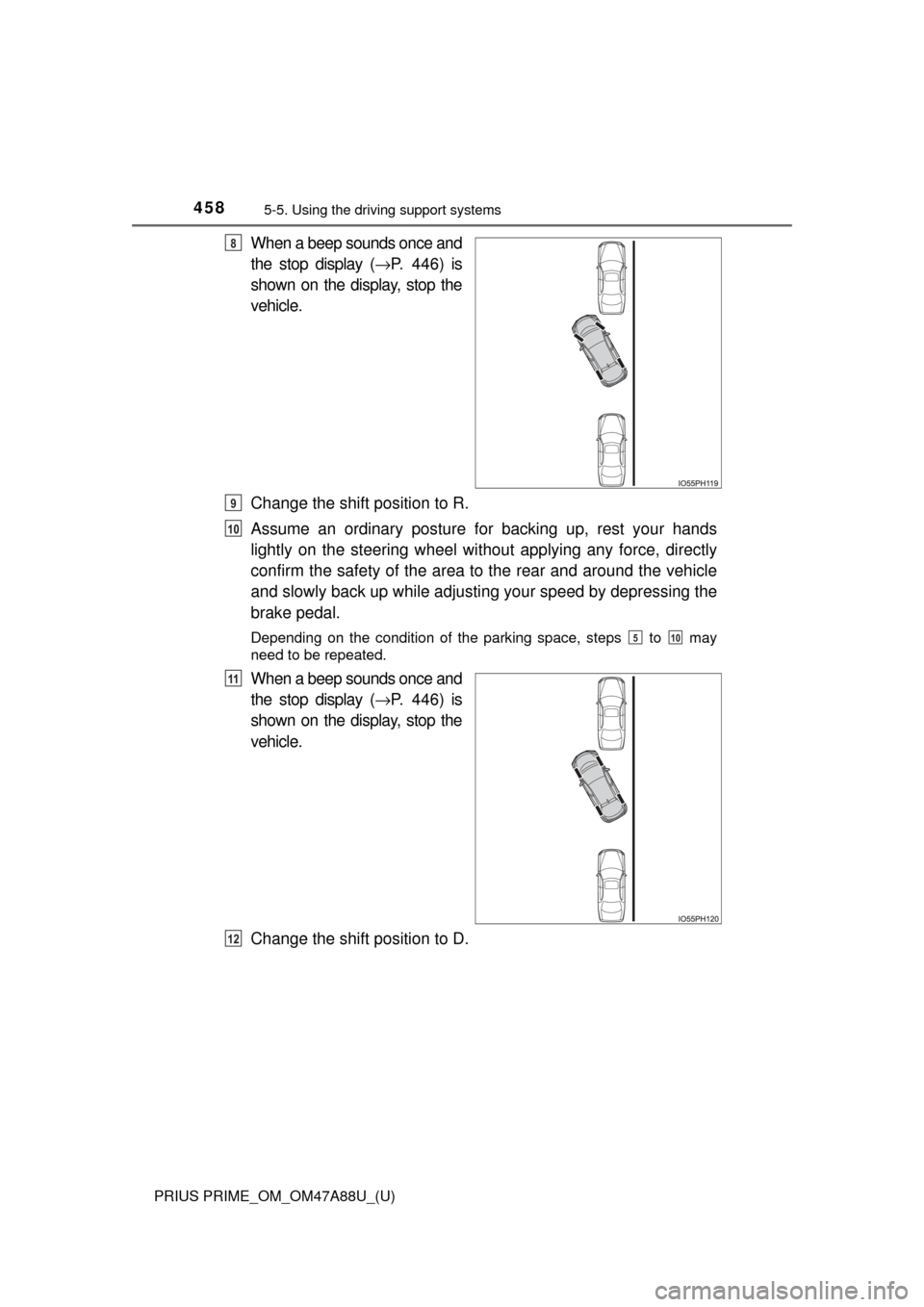
When a beep sounds once and
the stop display (→P. 446) is
shown on the display, stop the
vehicle.
Change the shift position to R.
Assume an ordinary posture for backing up, rest your hands
lightly on the steering wheel wi thout applying any force, directly
confirm the safety of the area to the rear and around the vehicle
and slowly back up while adjusti ng your speed by depressing the
brake pedal.
Depending on the condition of the parking space, steps to may
need to be repeated.
When a beep sounds once and
the stop display ( →P. 446) is
shown on the display, stop the
vehicle.
Change the shift position to D.
8
9
10
510
11
12
Page 459 of 784
PRIUS PRIME_OM_OM47A88U_(U)
4595-5. Using the driving support systems
5
Driving
Assume an ordinary driving postu re, rest your hands lightly on
the steering wheel without applying any force, directly confirm
the safety of the area to the front and around the vehicle and
slowly proceed forward while adjus ting your speed by depressing
the brake pedal.
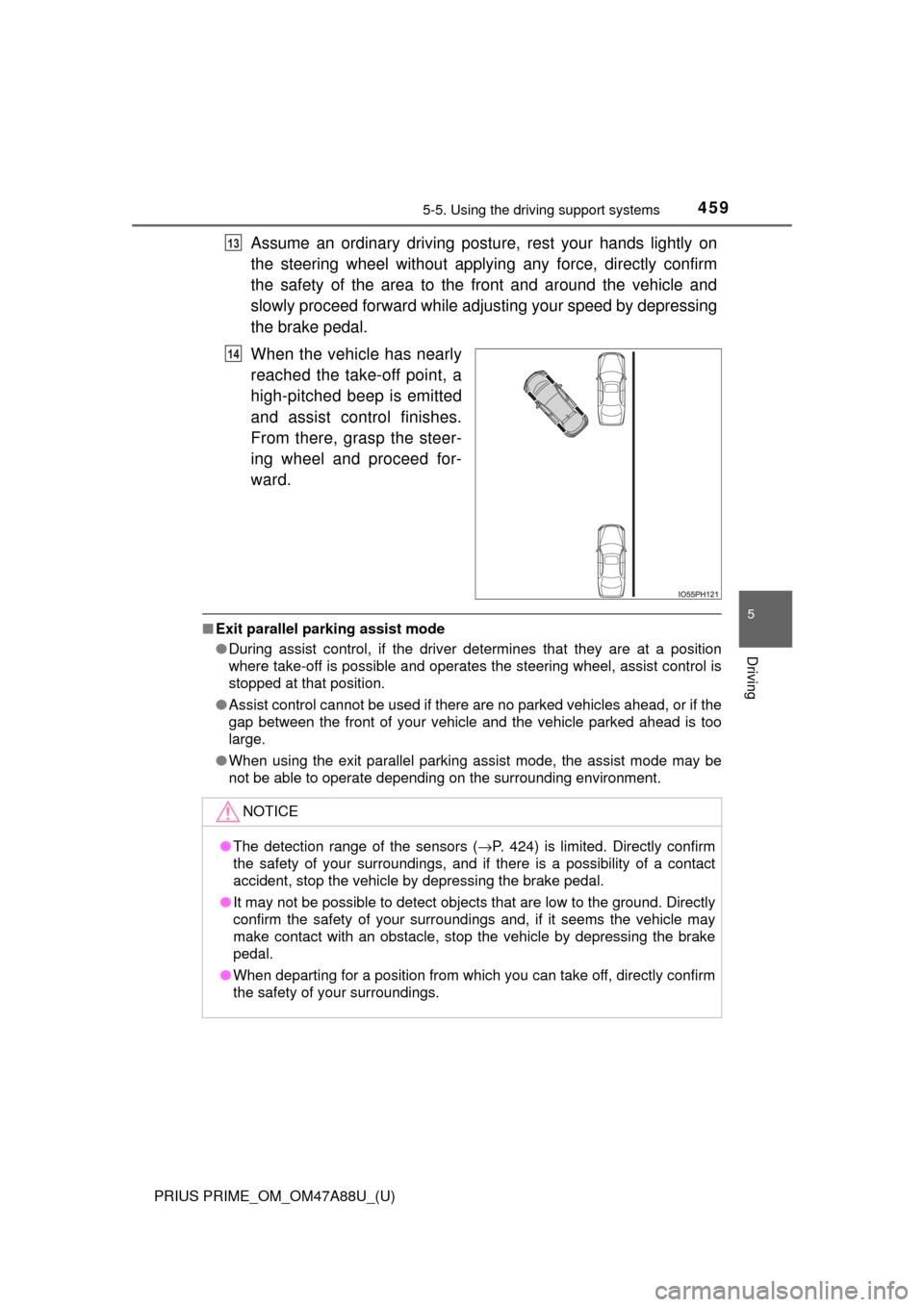
When the vehicle has nearly
reached the take-off point, a
high-pitched beep is emitted
and assist control finishes.
From there, grasp the steer-
ing wheel and proceed for-
ward.
■ Exit parallel parking assist mode
●During assist control, if the driver determines that they are at a position
where take-off is possible and operates the steering wheel, assist control is
stopped at that position.
● Assist control cannot be used if there are no parked vehicles ahead, or if the
gap between the front of your vehicle and the vehicle parked ahead is too
large.
● When using the exit parallel parking assist mode, the assist mode may be
not be able to operate depending on the surrounding environment.
13
14
NOTICE
●The detection range of the sensors ( →P. 424) is limited. Directly confirm
the safety of your surroundings, and if there is a possibility of a contact
accident, stop the vehicle by depressing the brake pedal.
● It may not be possible to detect objects that are low to the ground. Directly
confirm the safety of your surroundings and, if it seems the vehicle may\
make contact with an obstacle, stop the vehicle by depressing the brake
pedal.
● When departing for a position from which you can take off, directly confirm
the safety of your surroundings.
Page 462 of 784
462
PRIUS PRIME_OM_OM47A88U_(U)
5-5. Using the driving support systems
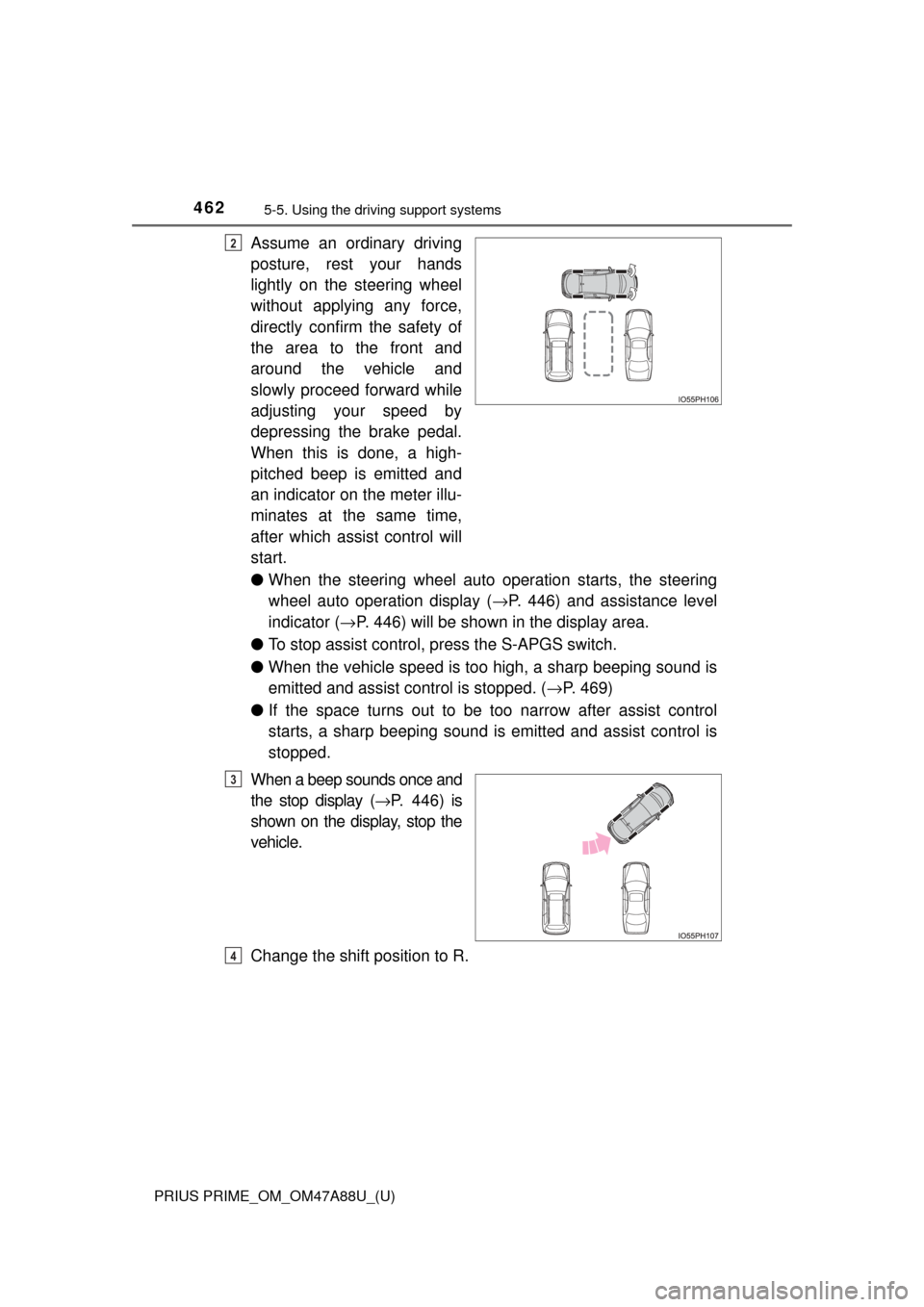
Assume an ordinary driving
posture, rest your hands
lightly on the steering wheel
without applying any force,
directly confirm the safety of
the area to the front and
around the vehicle and
slowly proceed forward while
adjusting your speed by
depressing the brake pedal.
When this is done, a high-
pitched beep is emitted and
an indicator on the meter illu-
minates at the same time,
after which assist control will
start.
●When the steering wheel auto operation starts, the steering
wheel auto operation display ( →P. 446) and assistance level
indicator ( →P. 446) will be shown in the display area.
● To stop assist control, press the S-APGS switch.
● When the vehicle speed is to o high, a sharp beeping sound is
emitted and assist co ntrol is stopped. (→P. 469)
● If the space turns out to be to o narrow after assist control
starts, a sharp beeping sound is emitted and assist control is
stopped.
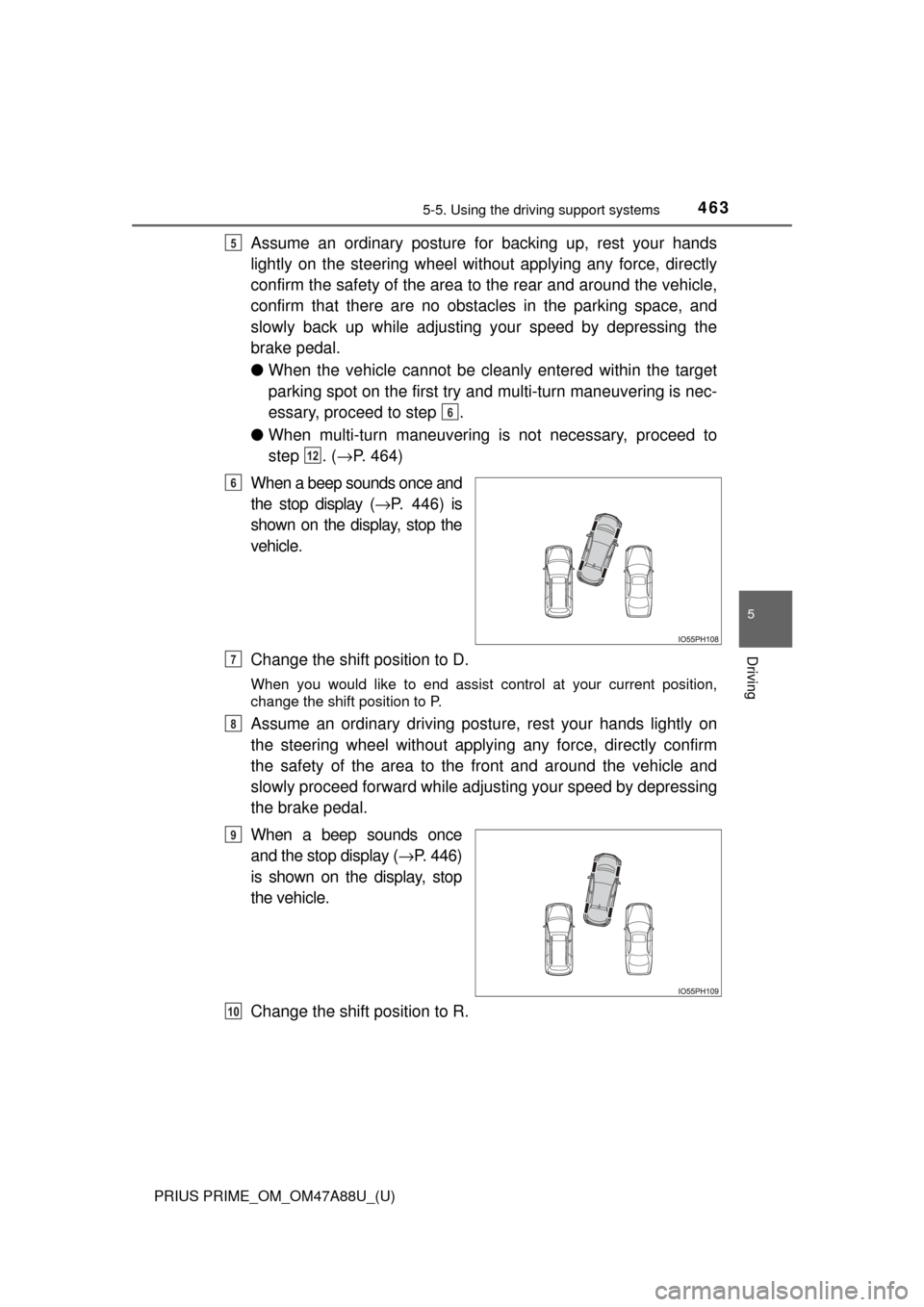
When a beep sounds once and
the stop display ( →P. 446) is
shown on the display, stop the
vehicle.
Change the shift position to R.2
3
4
Page 463 of 784
PRIUS PRIME_OM_OM47A88U_(U)
4635-5. Using the driving support systems
5
Driving
Assume an ordinary posture for backing up, rest your hands
lightly on the steering wheel wi thout applying any force, directly
confirm the safety of the area to the rear and around the vehicle,
confirm that there are no obst acles in the parking space, and
slowly back up while adjusting your speed by depressing the
brake pedal.
● When the vehicle cannot be cleanly entered within the target
parking spot on the first try and multi-turn maneuvering is nec-
essary, proceed to step .
● When multi-turn maneuvering is not necessary, proceed to
step . ( →P. 464)
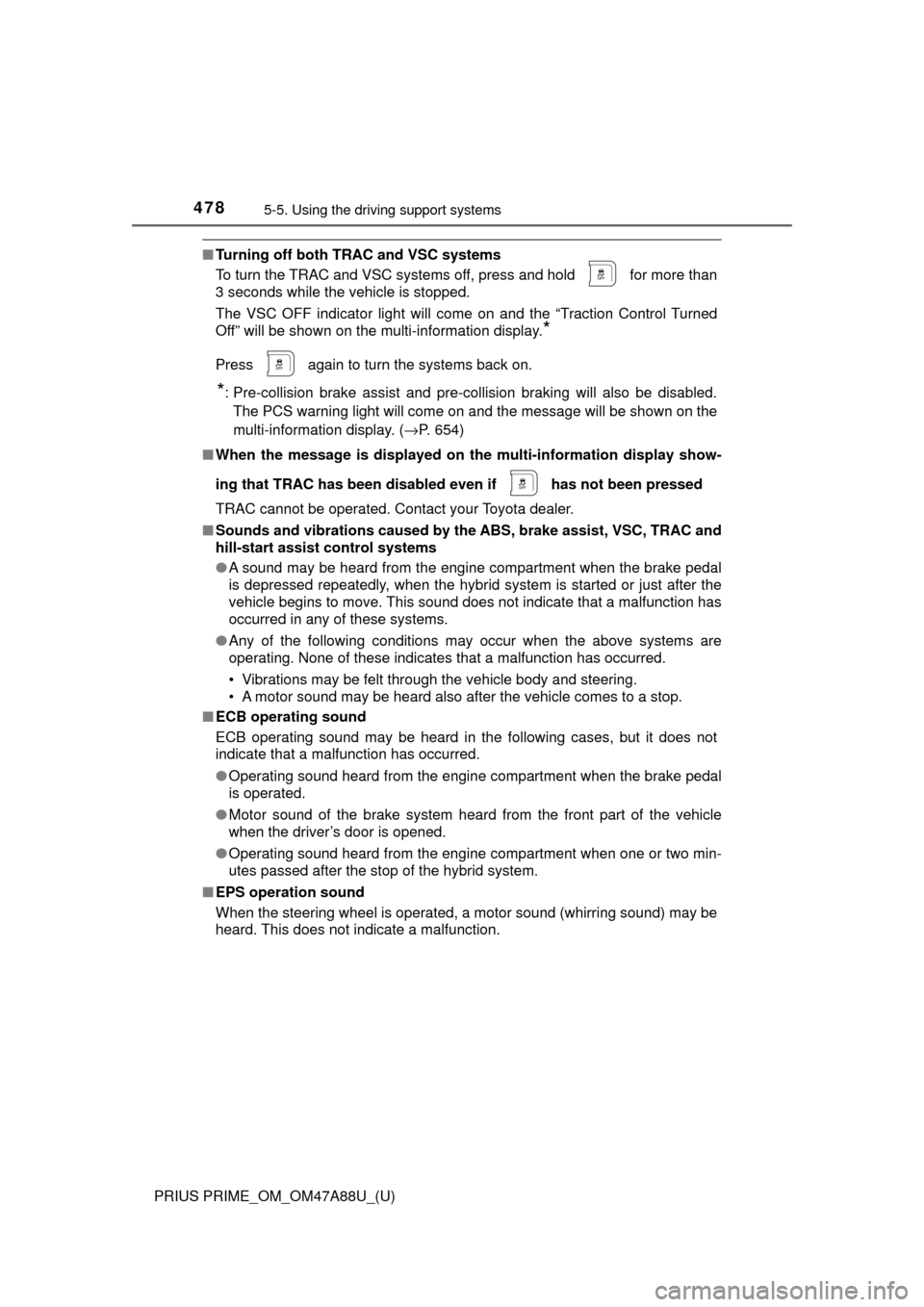
When a beep sounds once and
the stop display ( →P. 446) is
shown on the display, stop the
vehicle.
Change the shift position to D.
When you would like to end assist control at your current position,
change the shift position to P.
Assume an ordinary driving postu re, rest your hands lightly on
the steering wheel without applying any force, directly confirm
the safety of the area to the front and around the vehicle and
slowly proceed forward while adjus ting your speed by depressing
the brake pedal.
When a beep sounds once
and the stop display ( →P. 446)
is shown on the display, stop
the vehicle.
Change the shift position to R.
5
6
12
6
7
8
9
10
Page 464 of 784

464
PRIUS PRIME_OM_OM47A88U_(U)
5-5. Using the driving support systems
Assume an ordinary posture for backing up, rest your hands
lightly on the steering wheel wi thout applying any force, directly
confirm the safety of the area to the rear and around the vehicle
slowly back up while adjusting your speed by depressing the
brake pedal.
Depending on the condition of the parking space, steps to may
need to be repeated.
When the vehicle is almost entirely within the target parking spot,
a high-pitched beep is emitted and the stop display is shown on
the display ( →P. 446), stop the vehicle.
This completes the back-in parking assist mode.
● For safety, the buzzer sounds slightly before the vehicle is
completely entered within the target parking spot. Further-
more, at that point, system o peration will also finish. Firmly
hold the steering wheel and slowly back up while adjusting
your speed by depressing the brake pedal to reach the desired
parking spot.
● Be sure to back up while checking the area to the front and
rear of the vehicle directly and by using the mirrors.
■Back-in parking assist mode operating conditions
●In order to operate the function correctly, drive slowly (at a speed at which
the vehicle can be quickly stopped).
● In order to operate the function correctly, drive slowly (at a speed at which
the vehicle can be quickly stopped). Come to a full stop so that the center of
the parking space is nearly perpendicular to the vehicle, and then operate
the S-APGS switch.
● The function cannot be used when the vehicle speed is approximately
19 mph (30 km/h) or higher.
● The front side sensors and rear side sensors are used to detect parked
vehicles and determine the parking spot. Therefore, when detection is not
possible ( →P. 475), guidance is not issued.
● If there are no parked vehicles, the parking spot cannot be determined.
Therefore, the back-in parking assist mode cannot be operated.
● If unable to detect the environment surrounding the parking space, the
back-in parking assist mode may not be able to operate.
11
611
12
Page 477 of 784
PRIUS PRIME_OM_OM47A88U_(U)
4775-5. Using the driving support systems
5
Driving
◆Hill-start assist control
Helps to reduce the backward move ment of the vehicle when start-
ing on an uphill
◆EPS (Electric Power Steering)
Employs an electric motor to redu ce the amount of effort needed to
turn the steering wheel.
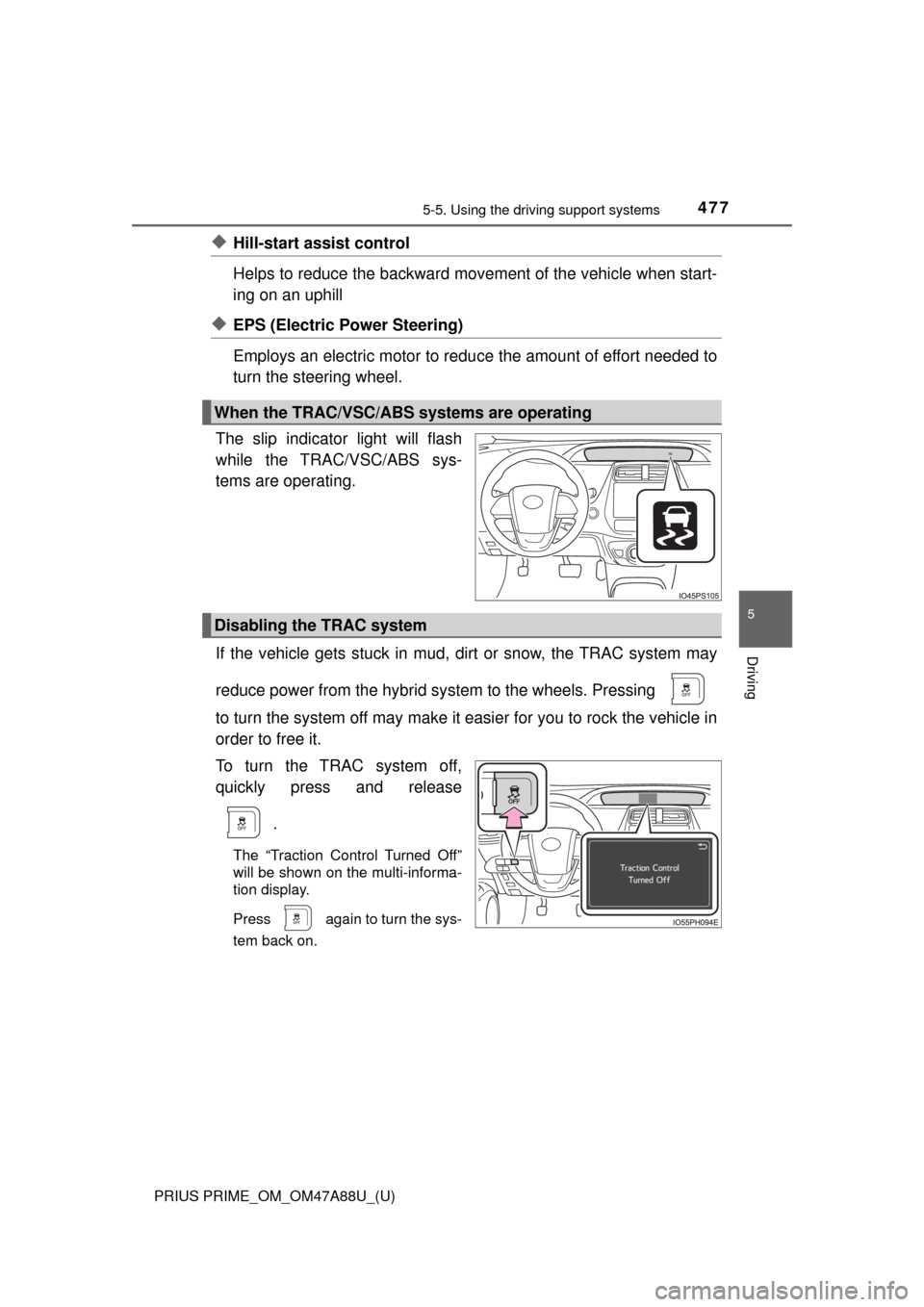
The slip indicator light will flash
while the TRAC/VSC/ABS sys-
tems are operating.
If the vehicle gets stuck in mud, di rt or snow, the TRAC system may
reduce power from the hybrid sy stem to the wheels. Pressing
to turn the system off may make it easier for you to rock the vehicle in
order to free it.
To turn the TRAC system off,
quickly press and release
.
The “Traction Control Turned Off”
will be shown on the multi-informa-
tion display.
Press
again to turn the sys-
tem back on.
When the TRAC/VSC/ABS systems are operating
Disabling the TRAC system
Page 478 of 784
478
PRIUS PRIME_OM_OM47A88U_(U)
5-5. Using the driving support systems
■Turning off both TRAC and VSC systems
To turn the TRAC and VSC systems off, press and hold for more than
3 seconds while the vehicle is stopped.
The VSC OFF indicator light will come on and the “Traction Control Turned
Off” will be shown on the multi-information display.
*
Press again to turn the systems back on.
*: Pre-collision brake assist and pre-collision braking will also be disabled.
The PCS warning light will come on and the message will be shown on the
multi-information display. ( →P. 654)
■ When the message is displayed on th e multi-information display show-
ing that TRAC has been disable d even if has not been pressed
TRAC cannot be operated. Contact your Toyota dealer.
■ Sounds and vibrations caused by the ABS, brake assist, VSC, TRAC and
hill-start assist control systems
●A sound may be heard from the engine compartment when the brake pedal
is depressed repeatedly, when the hybrid system is started or just after the
vehicle begins to move. This sound does not indicate that a malfunction has
occurred in any of these systems.
● Any of the following conditions may occur when the above systems are
operating. None of these indicates that a malfunction has occurred.
• Vibrations may be felt through the vehicle body and steering.
• A motor sound may be heard also after the vehicle comes to a stop.
■ ECB operating sound
ECB operating sound may be heard in the following cases, but it does not
indicate that a malfunction has occurred.
●Operating sound heard from the engine compartment when the brake pedal
is operated.
● Motor sound of the brake system heard from the front part of the vehicle
when the driver’s door is opened.
● Operating sound heard from the engine compartment when one or two min-
utes passed after the stop of the hybrid system.
■ EPS operation sound
When the steering wheel is operated, a motor sound (whirring sound) may be
heard. This does not indicate a malfunction.
Page 479 of 784
PRIUS PRIME_OM_OM47A88U_(U)
4795-5. Using the driving support systems
5
Driving
■Reduced effectiveness of the EPS system
The effectiveness of the EPS system is reduced to prevent the system from
overheating when there is frequent steering input over an extended period of
time. The steering wheel may feel heavy as a result. Should this occur, refrain
from excessive steering input or stop the vehicle and turn the hybrid system
off. The EPS system should return to normal within 10 minutes.
■ Electric power steering system warning light (warning buzzer)
→P. 654
■ Automatic reactivation of TRAC and VSC systems
After turning the TRAC and VSC systems off, the systems will be automati-
cally re-enabled in the following situations:
● When the power switch is turned off
● If only the TRAC system is turned off, the TRAC will turn on when vehicle
speed increases
If both the TRAC and VSC systems are turned off, automatic re-enabling will
not occur when vehicle speed increases.
■ Operating conditions of hill-start assist control
When the following four conditions are met, the hill-start assist control will
operate:
● The shift position is in a position other than P or N (when starting off forward/
backward on an upward incline)
● The vehicle is stopped
● The accelerator pedal is not depressed
● The parking brake is not engaged
■ Automatic system cancelation of hill-start assist control
The hill-start assist control will turn off in any of the following situations:
● Shift the shift position to P or N
● The accelerator pedal is depressed
● The parking brake is engaged
● Approximately 2 seconds elapse after the brake pedal is released