light TOYOTA PRIUS PRIME 2017 2.G Owners Manual
[x] Cancel search | Manufacturer: TOYOTA, Model Year: 2017, Model line: PRIUS PRIME, Model: TOYOTA PRIUS PRIME 2017 2.GPages: 784, PDF Size: 14.98 MB
Page 480 of 784

480
PRIUS PRIME_OM_OM47A88U_(U)
5-5. Using the driving support systems
WARNING
■The ABS does not operate effectively when
● The limits of tire gripping performance have been exceeded (such as
excessively worn tires on a snow covered road).
● The vehicle hydroplanes while driving at high speed on wet or slick road.
■ Stopping distance when the ABS is operating may exceed that of nor-
mal conditions
The ABS is not designed to shorten the vehicle’s stopping distance. Always
maintain a safe distance from the vehicle in front of you, especially in the
following situations:
● When driving on dirt, gravel or snow-covered roads
● When driving with tire chains
● When driving over bumps in the road
● When driving over roads with potholes or uneven surfaces
■ TRAC/VSC may not operate effectively when
Directional control and power may not be achievable while driving on slip-
pery road surfaces, even if the TRAC/VSC systems are operating.
Drive the vehicle carefully in conditions where stability and power may be
lost.
■ Hill-start assist control does not operate effectively when
● Do not overly rely on hill-start assist control. Hill-start assist control may
not operate effectively on steep inclines and roads covered with ice.
● Unlike the parking brake, hill-start assist control is not intended to hold the
vehicle stationary for an extended period of time. Do not attempt to use
hill-start assist control to hold the vehicle on an incline, as doing so may
lead to an accident.
■ When the TRAC, VSC an d/or ABS is activated
The slip indicator light flashes. Always drive carefully. Reckless driving may
cause an accident. Exercise particular care when the indicator light flashes.
Page 482 of 784
482
PRIUS PRIME_OM_OM47A88U_(U)
5-6. Driving tips
Winter driving tips
●Use fluids that are appropriate to the prevailing outside tempera-
tures. • Engine oil
• Engine/power control unit coolant
• Washer fluid
● Have a service technician inspec t the condition of the 12-volt bat-
tery.
● Have the vehicle fitted with four snow tires or purchase a set of tire
chains for the front tires.
Ensure that all tires are the same size and brand, and that chains match
the size of the tires.
Perform the following accordin g to the driving conditions:
● Do not try to forcibly open a window or move a wiper that is frozen.
Pour warm water over the frozen area to melt the ice. Wipe away
the water immediately to prevent it from freezing.
● To ensure proper operation of the climate control system fan,
remove any snow that has accumulated on the air inlet vents in
front of the windshield.
● Check for and remove any excess ice or snow that may have accu-
mulated on the exterior lights, vehicle’s roof, chassis, around the
tires or on the brakes.
● Remove any snow or mud from the bottom of your shoes before
getting in the vehicle.
Carry out the necessary preparations and inspections before
driving the vehicle in winter. Al ways drive the vehicle in a man-
ner appropriate to the prevailing weather conditions.
Preparation for winter
Before driving the vehicle
Page 487 of 784

487
PRIUS PRIME_OM_OM47A88U_(U)
6Interior features
6-1. Using the air conditioning system and defogger
Automatic air conditioning system (vehicles with
7-inch display) ................. 488
Automatic air conditioning system (vehicles with
11.6-inch display) ............ 498
Remote Air Conditioning System ............................ 509
Heated steering wheel/ seat heaters .................... 513 6-2. Using the interior lights
Interior lights list ................ 515• Front interior light .......... 516
• Front personal lights ..... 516
• Rear interior light .......... 517
6-3. Using the storage features List of storage features ..... 518• Glove box...................... 519
• Console box .................. 519
• Cup holders .................. 520
• Bottle holders/door pockets ................. 521
• Auxiliary boxes.............. 522
Luggage compartment features ........................... 523
6-4. Using the other interior features
Other interior features ....... 530 • Sun visors ..................... 530
• Vanity mirrors................ 530
• Power outlets ................ 531
• Wireless charger ........... 532
• Coat hooks.................... 540
• Assist grips ................... 540
Garage door opener.......... 541
Safety Connect ................. 548
Page 511 of 784

PRIUS PRIME_OM_OM47A88U_(U)
5116-1. Using the air conditioning system and defogger
6
Interior features
■Security feature
Any unlocked doors will be automatically locked when the system is operat-
ing. The buzzer sounds and the emergency flashers flash to indicate that the
doors have been locked or the system has been turned off.
(The doors locked: Once; The system turned off: Twice)
■ Conditions affecting operation
→P. 281
■ When using the Remote Air Conditioning System
A charging message will be displayed on the multi-information display. Differ-
ent messages will be displayed depending on when the Remote Air Condi-
tioning System was started (after charging or during charging).
■ While the Remote Air Conditioning System is operating
●Depending on the operating condition of the Remote Air Conditioning Sys-
tem, the electric fan may spin and an operating noise may be heard. How-
ever, this does not indicate a malfunction.
● The Remote Air Conditioning System may stop operating temporarily if
other features that use electricity (for example, the seat heater, lights, wind-
shield wipers) are in operation or if the charge level of the 12-volt battery
becomes low.
● The headlights, windshield wiper, combination meter, etc. will not operate
while the Remote Air Conditioning System is operating.
■ Electronic key battery depletion
→P. 264
■ When the electronic key battery is fully depleted
→P. 627
■ Customization
Setting (e.g. Operation using “A/C” on the wireless remote control) can be
changed. (Customizable features →P. 732)
■ Smartphone-linked op eration (vehicles with 11.6-inch display)
After applying to Entune, it is possible to use the smartphone application to
operate the Remote Air Conditioning System.
For details about Entune, refer to http://www.toyota.com/entune/.
Page 514 of 784
5146-1. Using the air conditioning system and defogger
PRIUS PRIME_OM_OM47A88U_(U)
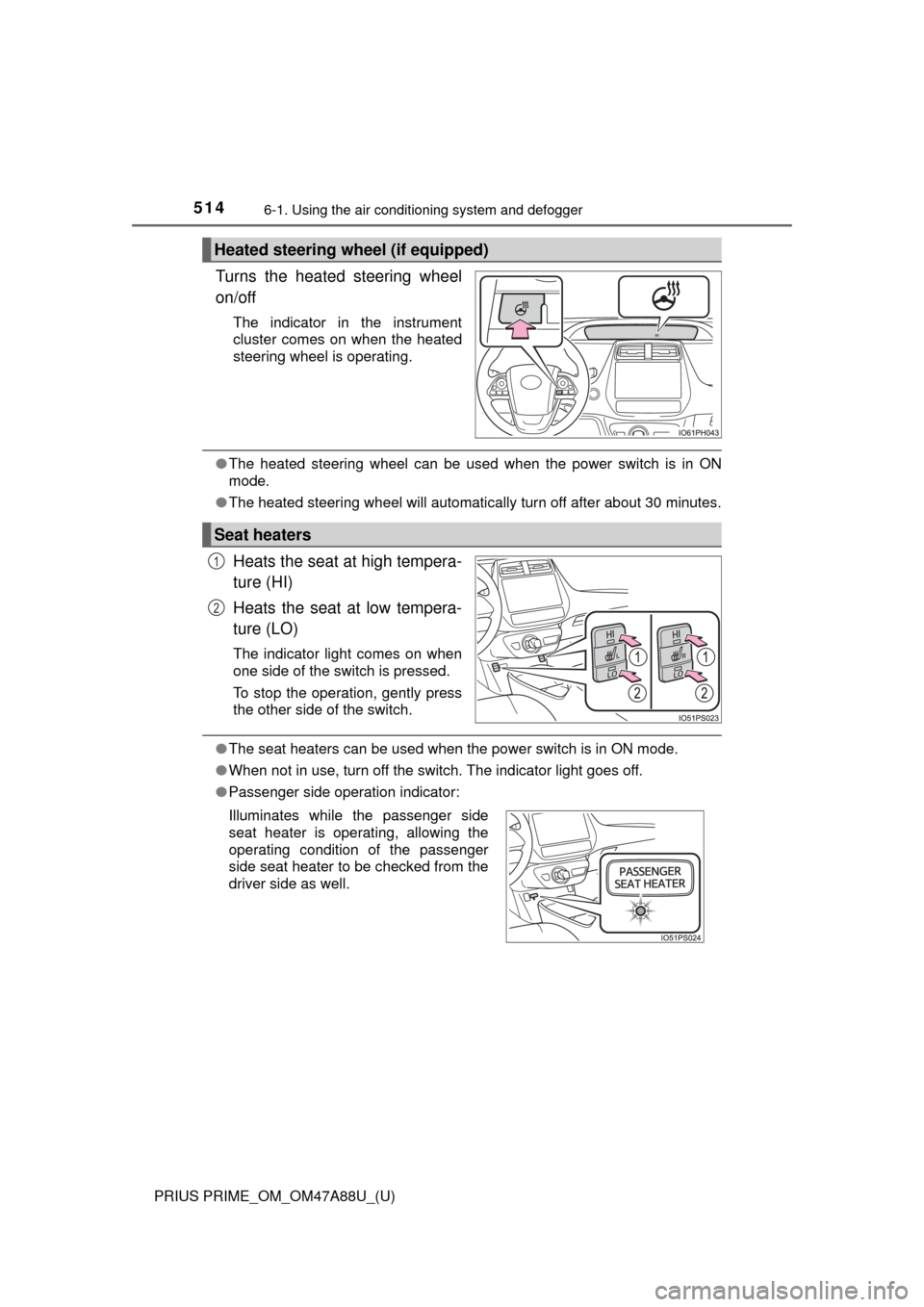
Turns the heated steering wheel
on/off
The indicator in the instrument
cluster comes on when the heated
steering wheel is operating.
●The heated steering wheel can be used when the power switch is in ON
mode.
● The heated steering wheel will automatically turn off after about 30 minutes.
Heats the seat at high tempera-
ture (HI)
Heats the seat at low tempera-
ture (LO)
The indicator light comes on when
one side of the switch is pressed.
To stop the operation, gently press
the other side of the switch.
●The seat heaters can be used when the power switch is in ON mode.
● When not in use, turn off the switch. The indicator light goes off.
● Passenger side operation indicator:
Heated steering wheel (if equipped)
Seat heaters
1
2
Illuminates while the passenger side
seat heater is operating, allowing the
operating condition of the passenger
side seat heater to be checked from the
driver side as well.
Page 515 of 784
515
PRIUS PRIME_OM_OM47A88U_(U)
6-2. Using the interior lights
6
Interior features
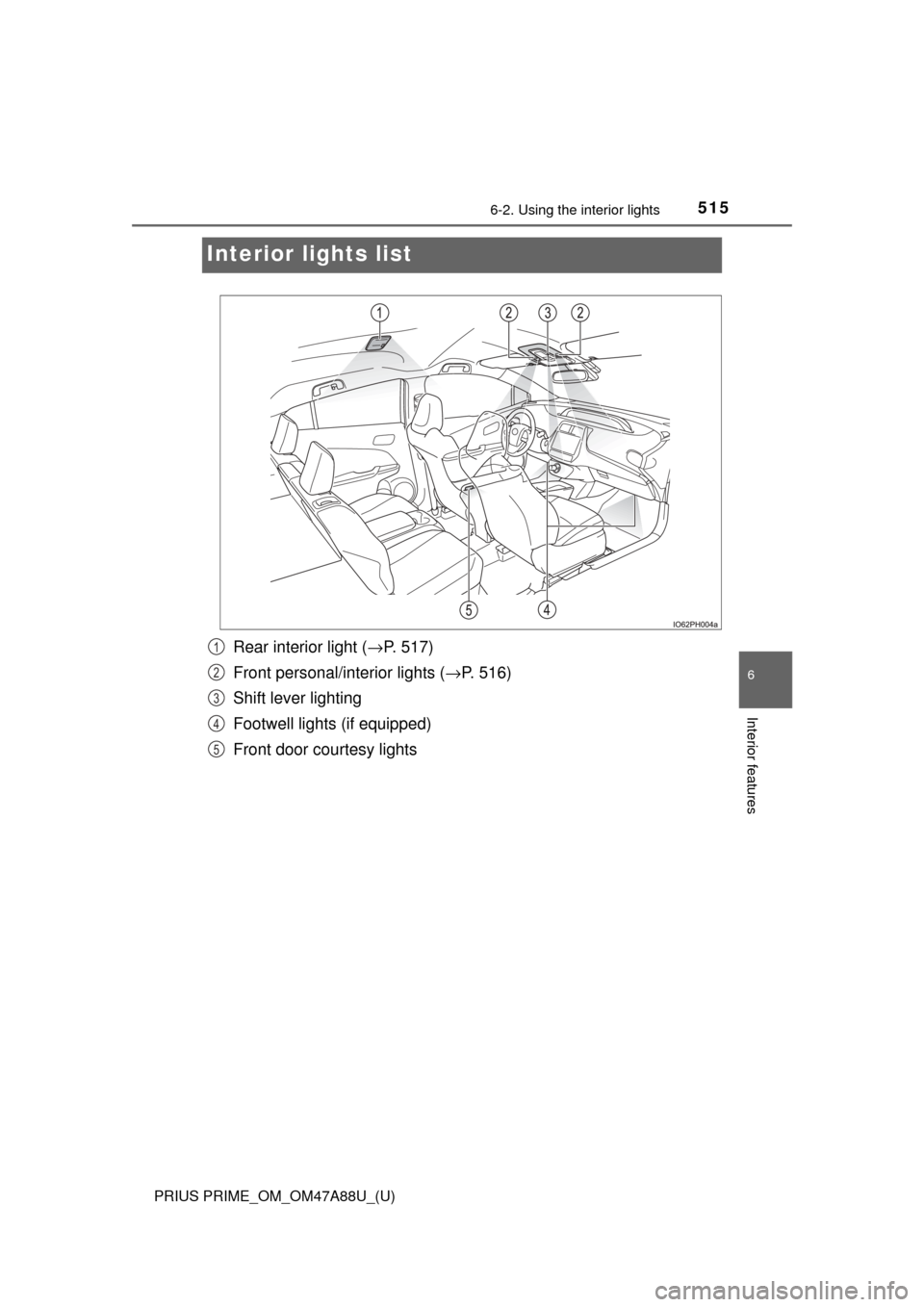
Interior lights list
Rear interior light ( →P. 517)
Front personal/interior lights ( →P. 516)
Shift lever lighting
Footwell lights (if equipped)
Front door courtesy lights1
2
3
4
5
Page 516 of 784
516
PRIUS PRIME_OM_OM47A88U_(U)
6-2. Using the interior lights
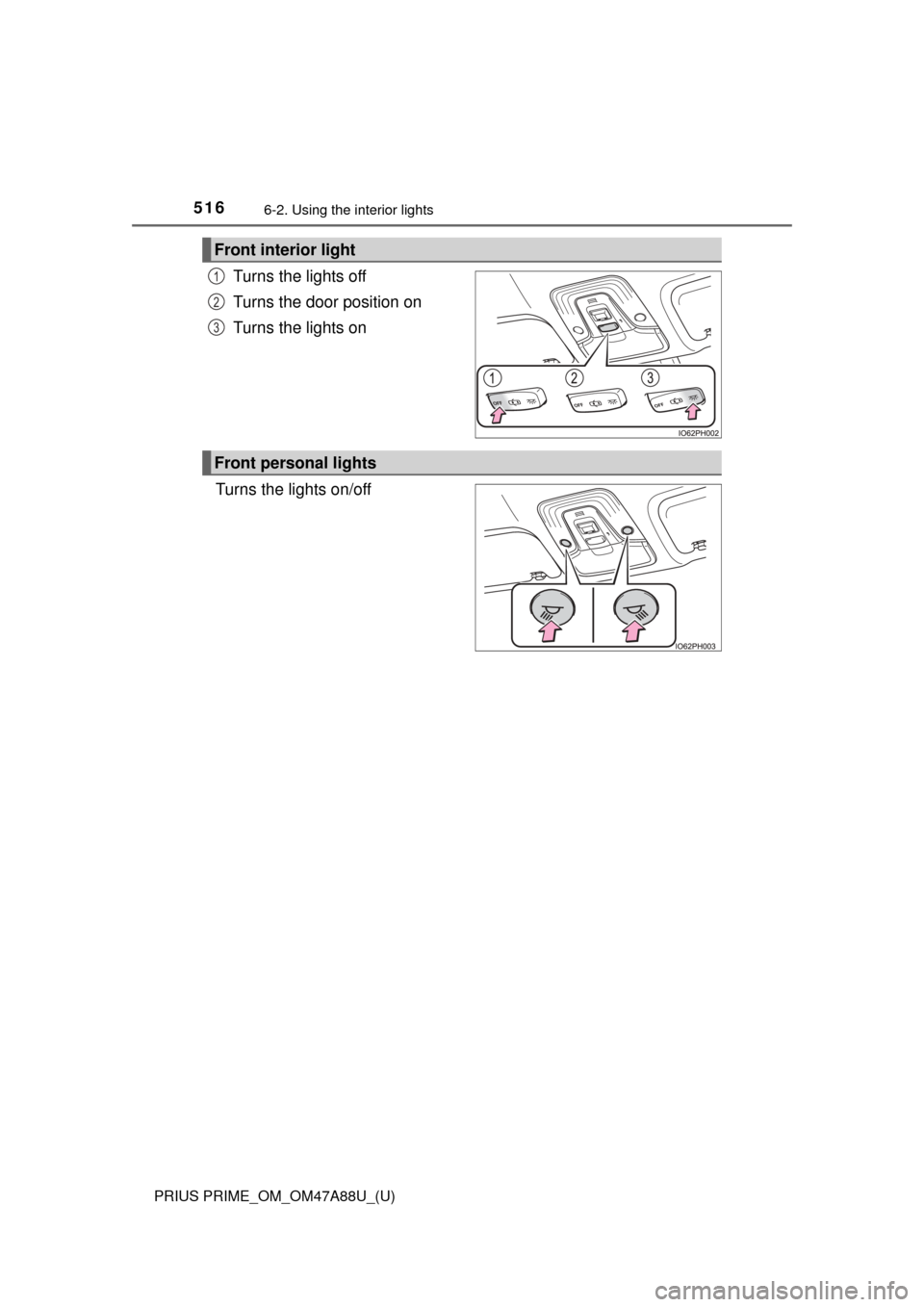
Turns the lights off
Turns the door position on
Turns the lights on
Turns the lights on/off
Front interior light
1
2
3
Front personal lights
Page 517 of 784
PRIUS PRIME_OM_OM47A88U_(U)
5176-2. Using the interior lights
6
Interior features
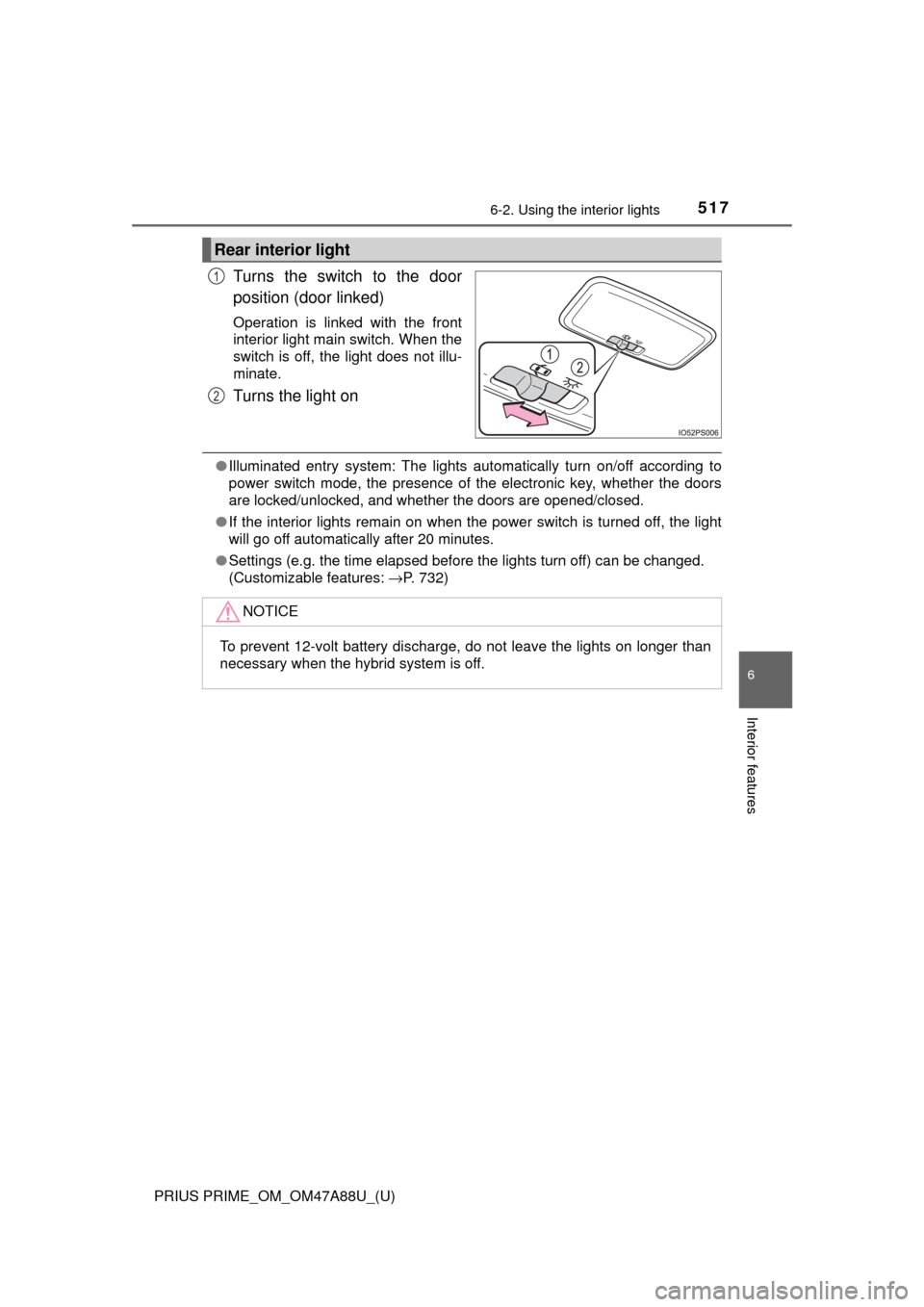
Turns the switch to the door
position (door linked)
Operation is linked with the front
interior light main switch. When the
switch is off, the light does not illu-
minate.
Turns the light on
●Illuminated entry system: The lights automatically turn on/off according to
power switch mode, the presence of the electronic key, whether the doors
are locked/unlocked, and whether the doors are opened/closed.
● If the interior lights remain on when the power switch is turned off, the light
will go off automatically after 20 minutes.
● Settings (e.g. the time elapsed before the lights turn off) can be changed.
(Customizable features: →P. 732)
Rear interior light
1
2
NOTICE
To prevent 12-volt battery discharge, do not leave the lights on longer than
necessary when the hybrid system is off.
Page 518 of 784
518
PRIUS PRIME_OM_OM47A88U_(U)
6-3. Using the storage features
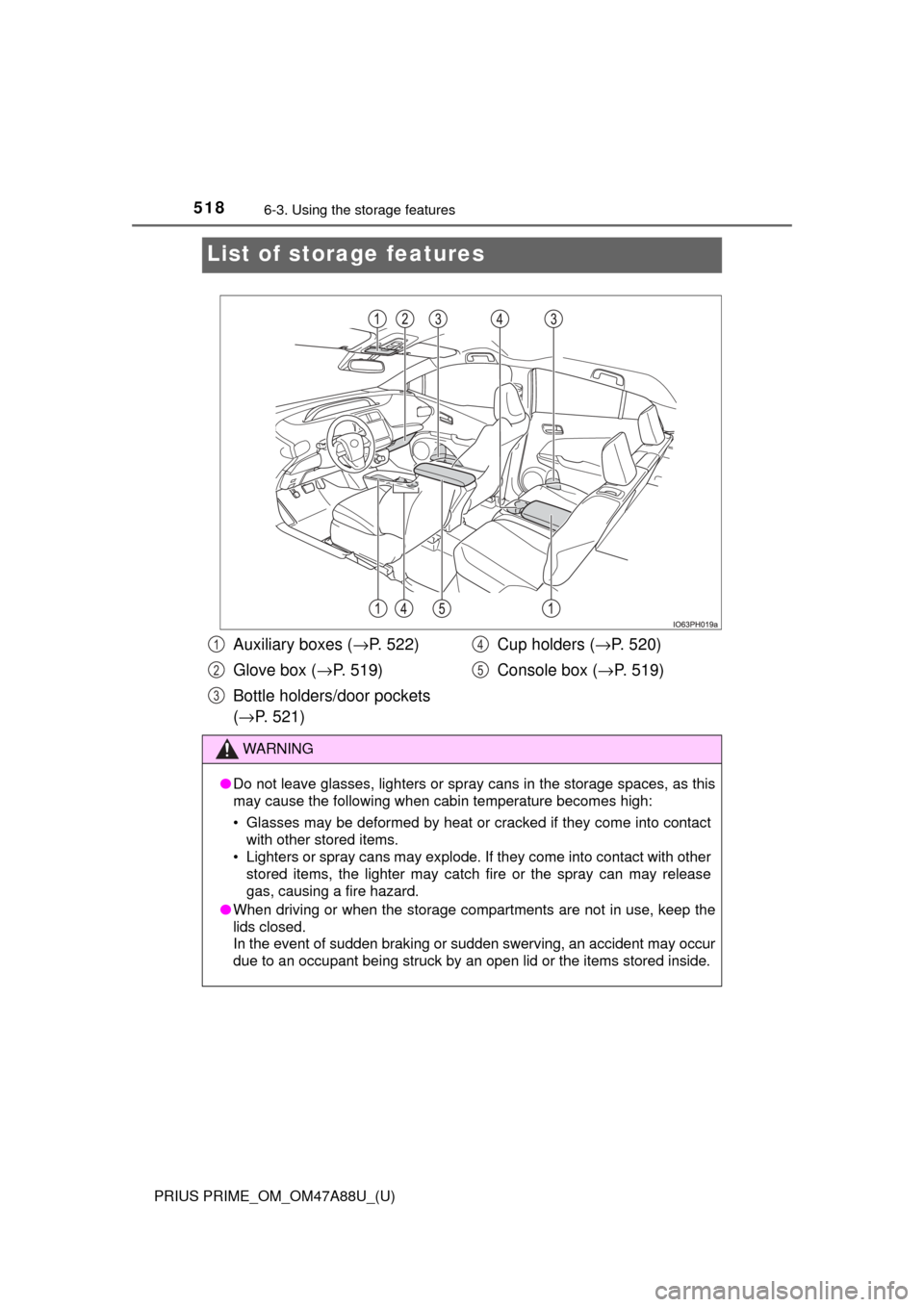
List of storage features
Auxiliary boxes ( →P. 522)
Glove box ( →P. 519)
Bottle holders/door pockets
( → P. 521) Cup holders (
→P. 520)
Console box ( →P. 519)
WARNING
●Do not leave glasses, lighters or spray cans in the storage spaces, as t\
his
may cause the following when cabin temperature becomes high:
• Glasses may be deformed by heat or cracked if they come into contact
with other stored items.
• Lighters or spray cans may explode. If they come into contact with other stored items, the lighter may catch fire or the spray can may release
gas, causing a fire hazard.
● When driving or when the storage com partments are not in use, keep the
lids closed.
In the event of sudden braking or sudden swerving, an accident may occur
due to an occupant being struck by an open lid or the items stored inside.
1
2
3
4
5
Page 519 of 784
PRIUS PRIME_OM_OM47A88U_(U)
5196-3. Using the storage features
6
Interior features
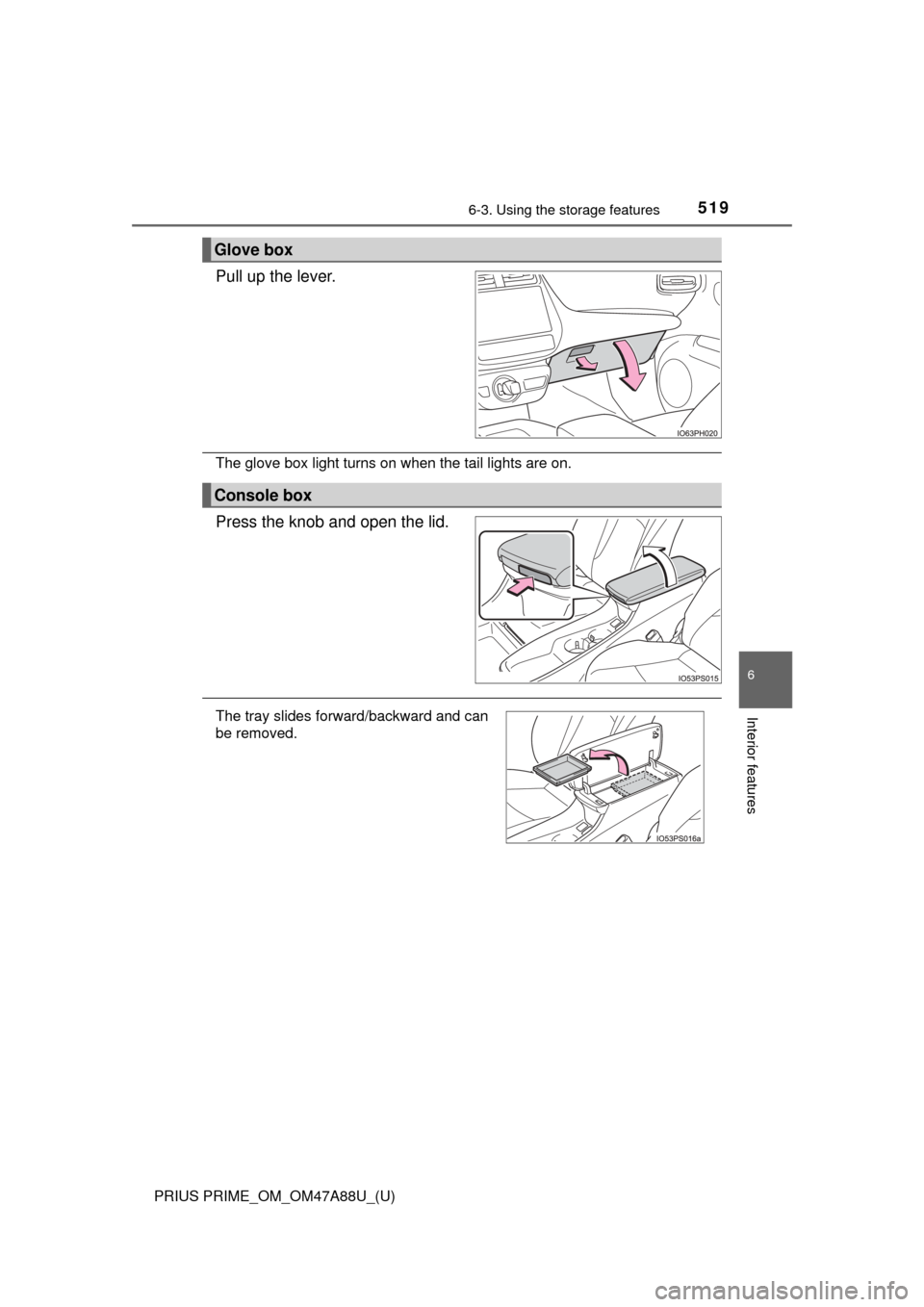
Pull up the lever.
The glove box light turns on when the tail lights are on.
Press the knob and open the lid.
Glove box
Console box
The tray slides forward/backward and can
be removed.