remote control TOYOTA PRIUS PRIME 2017 2.G User Guide
[x] Cancel search | Manufacturer: TOYOTA, Model Year: 2017, Model line: PRIUS PRIME, Model: TOYOTA PRIUS PRIME 2017 2.GPages: 784, PDF Size: 14.98 MB
Page 268 of 784
268
PRIUS PRIME_OM_OM47A88U_(U)
4-2. Opening, closing and locking the doors
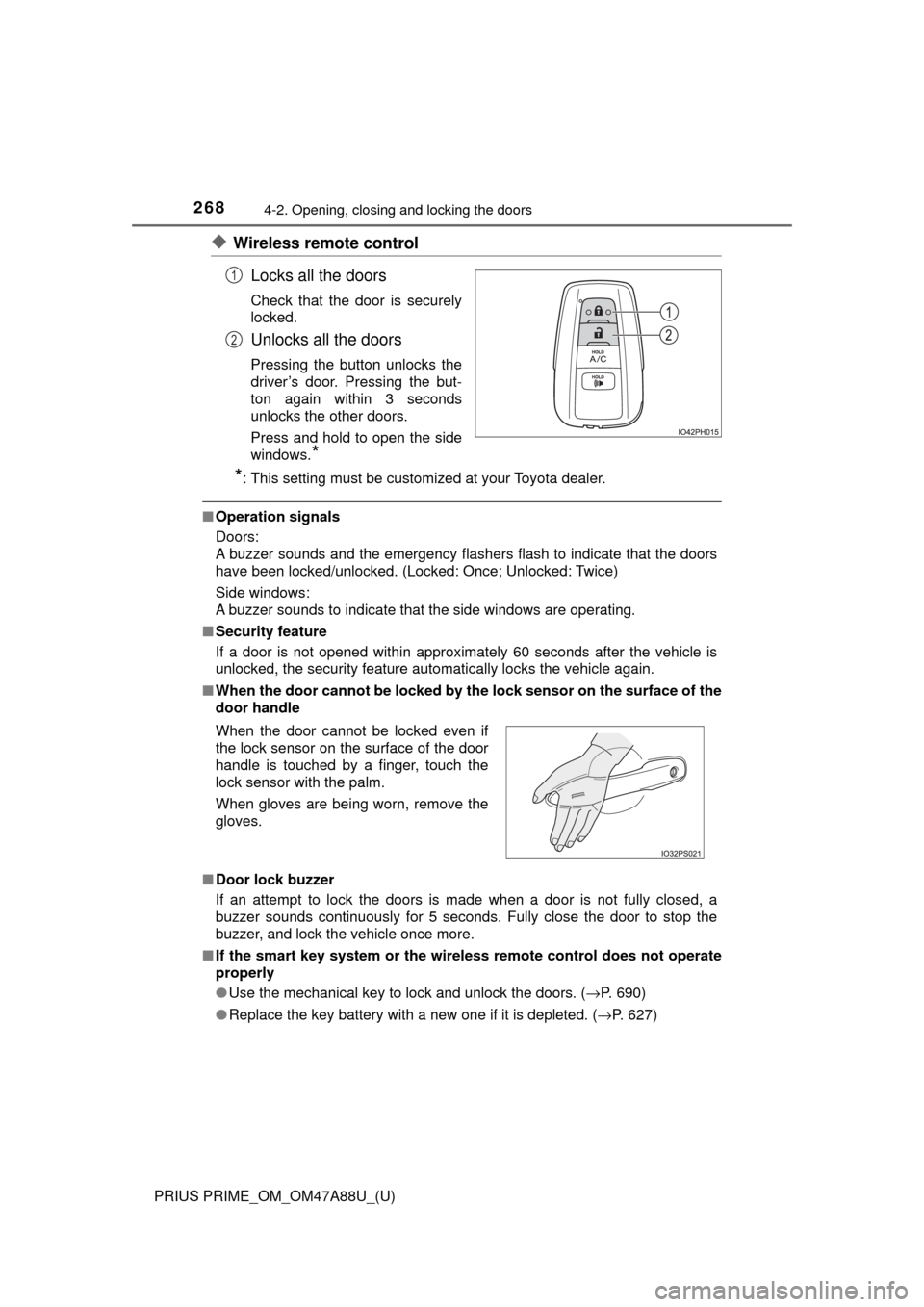
◆Wireless remote controlLocks all the doors
Check that the door is securely
locked.
Unlocks all the doors
Pressing the button unlocks the
driver’s door. Pressing the but-
ton again within 3 seconds
unlocks the other doors.
Press and hold to open the side
windows.
*
*
: This setting must be customized at your Toyota dealer.
■ Operation signals
Doors:
A buzzer sounds and the emergency flashers flash to indicate that the doors
have been locked/unlocked. (Locked: Once; Unlocked: Twice)
Side windows:
A buzzer sounds to indicate that the side windows are operating.
■ Security feature
If a door is not opened within approximately 60 seconds after the vehicle is
unlocked, the security feature automatically locks the vehicle again.
■ When the door cannot be locked by th e lock sensor on the surface of the
door handle
■ Door lock buzzer
If an attempt to lock the doors is made when a door is not fully closed, a
buzzer sounds continuously for 5 seconds. Fully close the door to stop the
buzzer, and lock the vehicle once more.
■ If the smart key system or the wireless remote control does not operate
properly
●Use the mechanical key to lock and unlock the doors. ( →P. 690)
● Replace the key battery with a new one if it is depleted. ( →P. 627)
1
2
When the door cannot be locked even if
the lock sensor on the surface of the door
handle is touched by a finger, touch the
lock sensor with the palm.
When gloves are being worn, remove the
gloves.
Page 271 of 784
PRIUS PRIME_OM_OM47A88U_(U)
2714-2. Opening, closing and locking the doors
4
Operation of each component
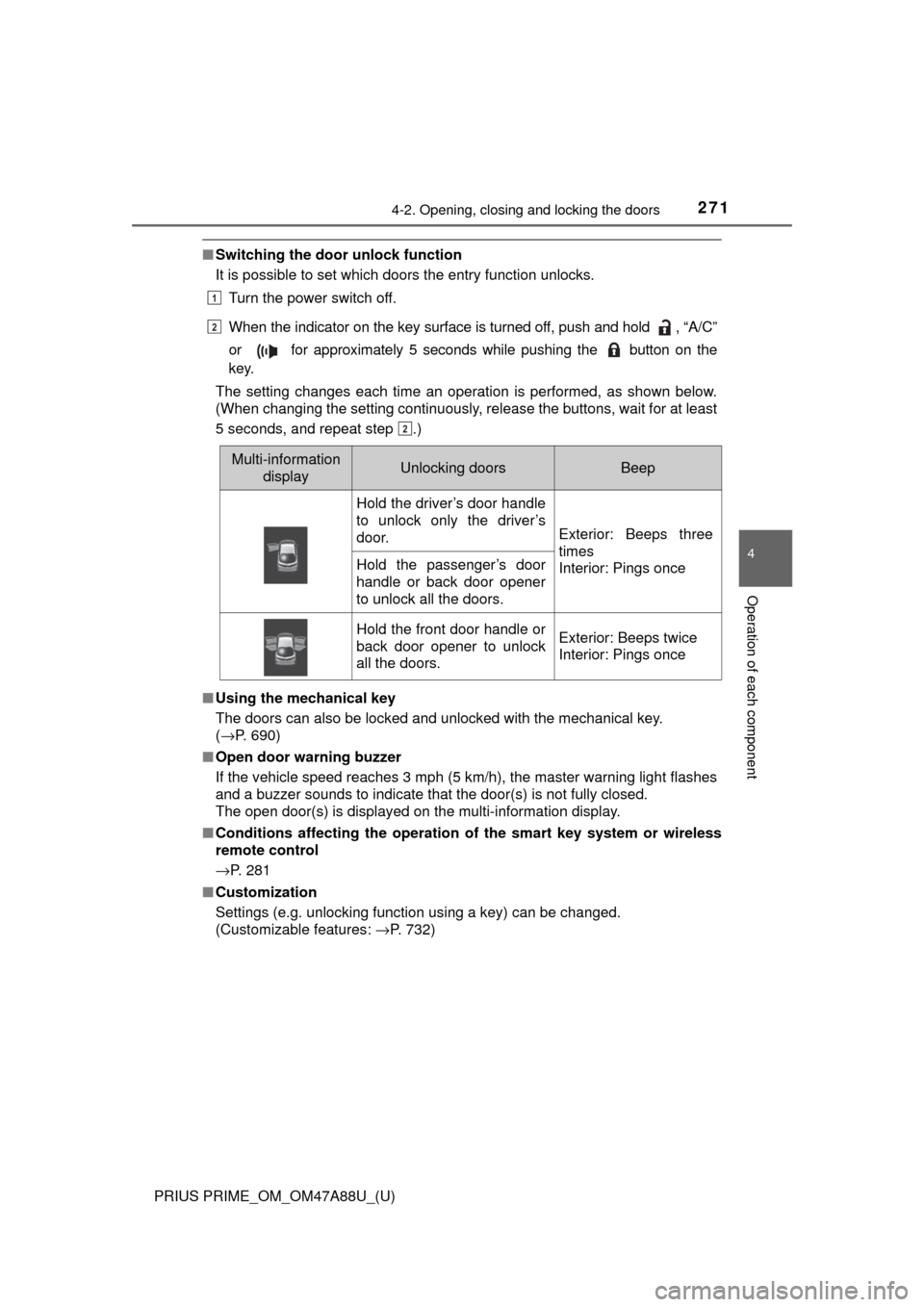
■Switching the door unlock function
It is possible to set which doors the entry function unlocks.
Turn the power switch off.
When the indicator on the key surface is turned off, push and hold , “A/C”
or for approximately 5 seconds while pushing the button on the
key.
The setting changes each time an operation is performed, as shown below.
(When changing the setting continuously, release the buttons, wait for at least
5 seconds, and repeat step .)
■ Using the mechanical key
The doors can also be locked and unlocked with the mechanical key.
(→P. 690)
■ Open door warning buzzer
If the vehicle speed reaches 3 mph (5 km/h), the master warning light flashes
and a buzzer sounds to indicate that the door(s) is not fully closed.
The open door(s) is displayed on the multi-information display.
■ Conditions affecting the operation of the smart key system or wireless
remote control
→P. 281
■ Customization
Settings (e.g. unlocking function using a key) can be changed.
(Customizable features: →P. 732)
Multi-information
displayUnlocking doorsBeep
Hold the driver’s door handle
to unlock only the driver’s
door.
Exterior: Beeps three
times
Interior: Pings once
Hold the passenger’s door
handle or back door opener
to unlock all the doors.
Hold the front door handle or
back door opener to unlock
all the doors.Exterior: Beeps twice
Interior: Pings once
1
2
2
Page 272 of 784

272
PRIUS PRIME_OM_OM47A88U_(U)
4-2. Opening, closing and locking the doors
WARNING
■To prevent an accident
Observe the following precautions while driving the vehicle.
Failure to do so may result in a door opening and an occupant throwing out
of the vehicle, resulting in death or serious injury.
● Ensure that all doors are properly closed and locked.
● Do not pull the inside handle of the doors while driving.
Be especially careful for the front doors, as the doors may be opened even
if the inside lock buttons are in locked position.
● Set the rear door child-protector locks when children are seated in the rear
seats.
■ When opening or closing a door
Check the surroundings of the vehicle such as whether the vehicle is on an
incline, whether there is enough space for a door to open and whether a
strong wind is blowing. When opening or closing the door, hold the door
handle tightly to prepare for any unpredictable movement.
■ When using the wireless remote co ntrol and operating the power win-
dows
Operate the power window after checking to make sure that there is no pos-\
sibility of any passenger having any of their body parts caught in the side
window. Also, do not allow children to operate the wireless remote control. It
is possible for children and other passengers to get caught in the power
window.
Page 273 of 784
273
PRIUS PRIME_OM_OM47A88U_(U)
4-2. Opening, closing and locking the doors
4
Operation of each component
Back door
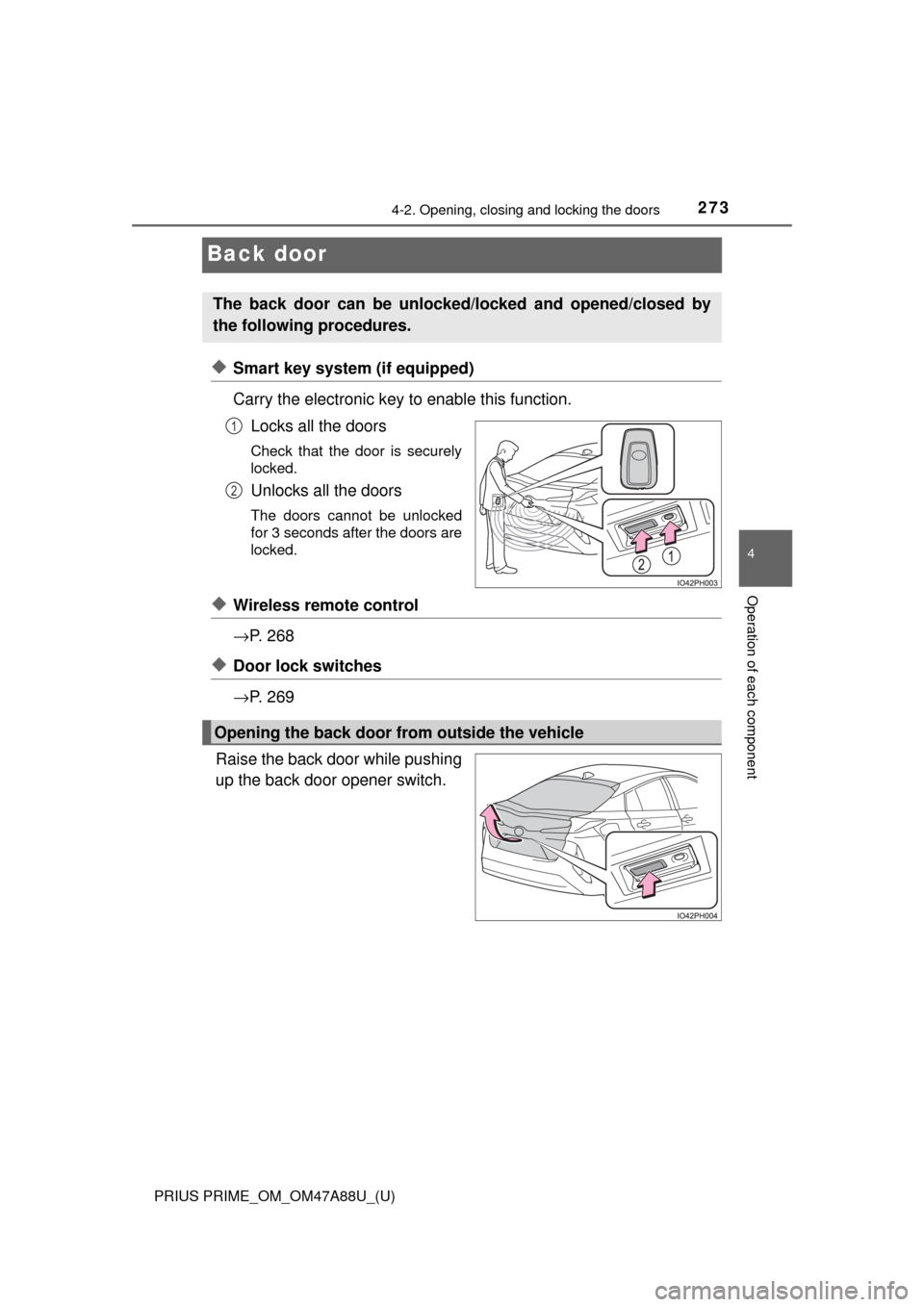
◆Smart key system (if equipped)
Carry the electronic key to enable this function.Locks all the doors
Check that the door is securely
locked.
Unlocks all the doors
The doors cannot be unlocked
for 3 seconds after the doors are
locked.
◆Wireless remote control
→P. 2 6 8
◆Door lock switches
→P. 2 6 9
Raise the back door while pushing
up the back door opener switch.
The back door can be unlocked/locked and opened/closed by
the following procedures.
1
2
Opening the back door from outside the vehicle
Page 280 of 784
280
PRIUS PRIME_OM_OM47A88U_(U)
4-2. Opening, closing and locking the doors
■When “Smart Key System malfunct ion See owner’s manual” is dis-
played on the multi-information display
The system may be malfunctioning. Have the vehicle inspected by your
Toyota dealer immediately.
■ Battery-saving function
The battery-saving function will be activated in order to prevent the electronic
key battery and the 12-volt battery from being discharged while the vehicle is
not in operation for a long time.
●In the following situations, the smart key system may take some time to
unlock the doors.
• The electronic key has been left in an area of approximately 6 ft. (2 m) of
the outside of the vehicle for 10 minutes or longer.
• The smart key system has not been used for 5 days or longer.
● If the smart key system has not been used for 14 days or longer, the doors
cannot be unlocked at any doors except the driver’s door. In this case, take
hold of the driver’s door handle, or use the wireless remote control or the
mechanical key, to unlock the doors.
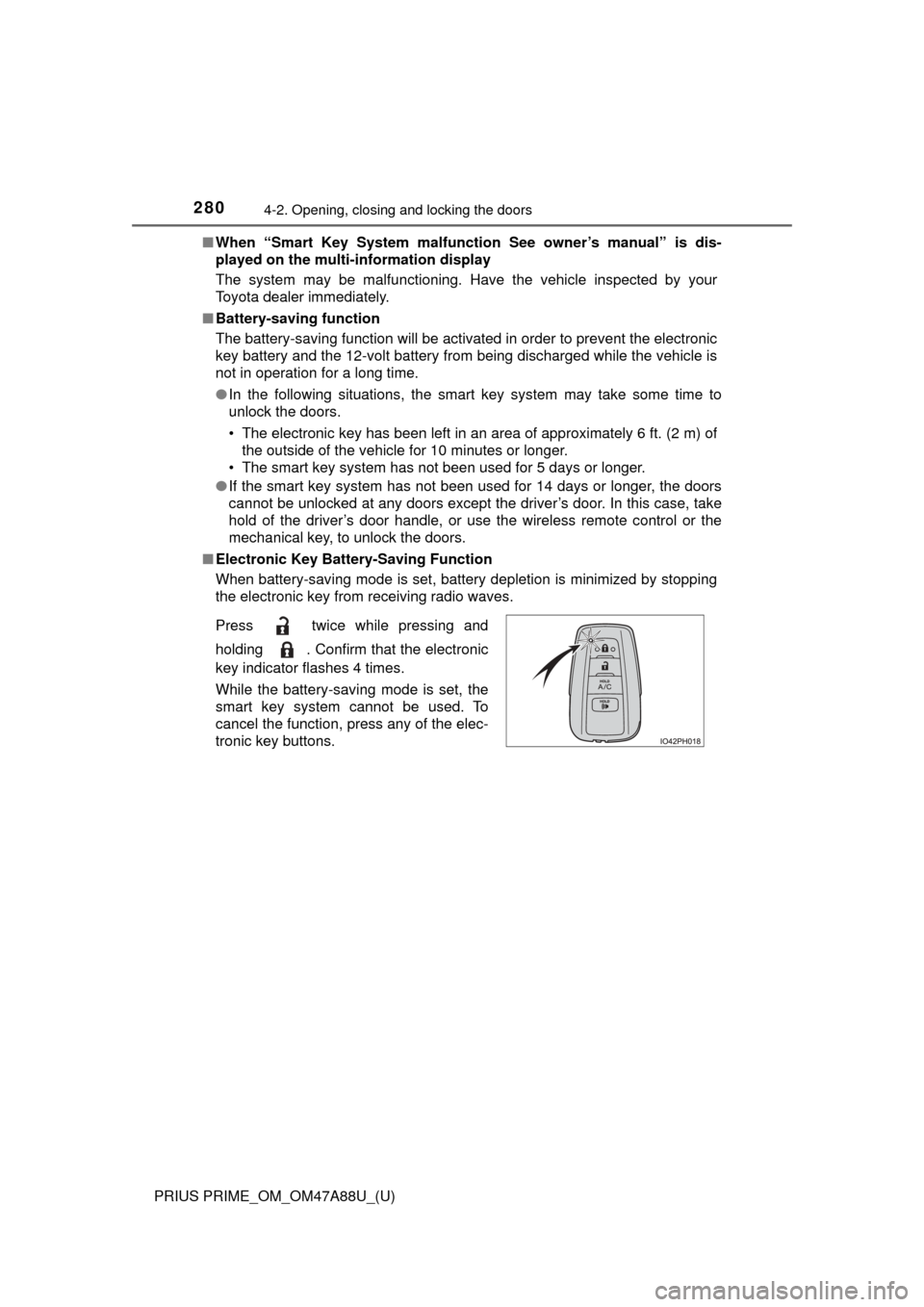
■ Electronic Key Battery-Saving Function
When battery-saving mode is set, battery depletion is minimized by stopping
the electronic key from receiving radio waves.
Press twice while pressing and
holding . Confirm that the electronic
key indicator flashes 4 times.
While the battery-saving mode is set, the
smart key system cannot be used. To
cancel the function, press any of the elec-
tronic key buttons.
Page 281 of 784

PRIUS PRIME_OM_OM47A88U_(U)
2814-2. Opening, closing and locking the doors
4
Operation of each component
■Conditions affecting operation
The smart key system, wireless remote control and immobilizer system use
weak radio waves. In the following situations, the communication between\
the electronic key and the vehicle may be affected, preventing the smart key
system, wireless remote control and immobilizer system from operating prop-
erly. (Ways of coping: →P. 690)
● When the electronic key battery is depleted
● Near a TV tower, electric power plant, gas station, radio station, large dis-
play, airport or other facility that generates strong radio waves or electrical
noise
● When the electronic key is in contact with, or is covered by the following
metallic objects
• Cards to which aluminum foil is attached
• Cigarette boxes that have aluminum foil inside
• Metallic wallets or bags
• Coins
• Hand warmers made of metal
• Media such as CDs and DVDs
● When other wireless key (that emit radio waves) is being used nearby
● When carrying the electronic key together with the following devices that
emit radio waves
• Portable radio, cellular phone, cordless phone or other wireless commu-
nication devices
• Another vehicle’s electronic key or a wireless key that emits radio waves
• Personal computers or personal digital assistants (PDAs)
• Digital audio players
• Portable game systems
● If window tint with a metallic content or metallic objects are attached to the
rear window
● When the electronic key is placed near a battery charger or electronic
devices
Page 282 of 784

282
PRIUS PRIME_OM_OM47A88U_(U)
4-2. Opening, closing and locking the doors
■Note for the entry function
●Even when the electronic key is within the effective range (detection areas),
the system may not operate properly in the following cases:
• The electronic key is too close to the window or outside door handle, near
the ground, or in a high place when the doors are locked or unlocked.
• The electronic key is on the instrument panel, floor, or in the door pockets
or glove box when the hybrid system is started or power switch modes
are changed.
● Do not leave the electronic key on top of the instrument panel or near t\
he
door pockets when exiting the vehicle. Depending on the radio wave recep-
tion conditions, it may be detected by the antenna outside the cabin and the
door will become lockable from the out side, possibly trapping the electronic
key inside the vehicle.
● As long as the electronic key is within the effective range, the doors may be
unlocked or locked by anyone.
● Even if the electronic key is not inside the vehicle, it may be possible to start
the hybrid system if the electronic key is near the window.
● The doors may unlock if a large amount of water splashes on the door han-
dle, such as in the rain or in a car wash when the electronic key is within the
effective range. (The door will automatically be locked after approximately
60 seconds if the doors are not opened and closed.)
● If the wireless remote control is used to lock the doors when the electronic
key is near the vehicle, there is a possibility that the door may not be
unlocked by the entry function. (Use the wireless remote control to unlock
the doors.)
● Touching the door lock sensor while wearing gloves may delay or prevent
lock operation. Remove the gloves and touch the lock sensor again.
● When the lock operation is performed using the lock sensor, recognition sig-
nals will be shown up to two consecutive times. After this, no recognition
signals will be given.
● If the door handle becomes wet while the electronic key is within the effec-
tive range, the door may lock and unlock repeatedly. In this case, follow the
following correction procedures to wash the vehicle.
• Place the electronic key in a location 6 ft. (2 m) or more away from the
vehicle. (Take care to ensure that the key is not stolen.)
• Set electronic key to battery-saving mode to disable the smart key sys-
tem. ( →P. 280)
● If the electronic key is inside the vehicle and a door handle becomes wet
during a car wash, a message may be shown on the multi-information dis-
play and a buzzer will sound outside the vehicle. To turn off the alarm, lock
all the doors.
Page 283 of 784
PRIUS PRIME_OM_OM47A88U_(U)
2834-2. Opening, closing and locking the doors
4
Operation of each component
●The lock sensor may not work properly if it comes into contact with ice,
snow, mud, etc. Clean the lock sensor and attempt to operate it again.
● A sudden approach to the effective range or door handle may prevent the
doors from being unlocked. In this case, return the door handle to the origi-
nal position and check that the doors unlock before pulling the door handle
again.
● If there is another electronic key in the detection area, it may take slightly
longer to unlock the doors after the door handle is gripped.
■ When the vehicle is not driven for extended periods
●To prevent theft of the vehicle, do not leave the electronic key within 6 ft.
(2 m) of the vehicle.
● The smart key system can be deactivated in advance. ( →P. 732)
■ To operate the system properly
Make sure to carry the electronic key when operating the system. Do not get
the electronic key too close to the vehicle when operating the system from the
outside of the vehicle.
Depending on the position and holding condition of the electronic key, the key
may not be detected correctly and the system may not operate properly. (The
alarm may go off accidentally, or the door lock prevention may not operate.)
■ If the smart key system do es not operate properly
● Locking and unlocking the doors: Use the mechanical key. ( →P. 690)
● Starting the hybrid system: →P. 691
■ Customization
Settings (e.g. smart key system) can be changed.
(Customizable features: →P. 732)
■ If the smart key system has been deactivated in a customized setting
●Unlocking and locking the doors:
Use the wireless remote control or mechanical key. ( →P. 268, 690)
● Unlocking the charging port lid: →P. 1 1 5
● Unlocking and locking the charging connector: →P. 1 1 9
● Starting the hybrid system and changing power switch modes: →P. 691
● Stopping the hybrid system: →P. 325
Page 302 of 784
302
PRIUS PRIME_OM_OM47A88U_(U)
4-5. Opening and closing the windows
■Door lock linked window operation
●The power windows can be opened and closed using the mechanical key.
*
(→P. 690)
● The power windows can be opened using the wireless remote control.
*
(→P. 268)
*: These settings must be customized at your Toyota dealer.
■ Power window open reminder function
The buzzer sounds and a message is shown on the multi-information display
in the instrument cluster when the power switch is turned off and the driver’s
door is opened with the power windows open.
■ Customization
Settings (e.g. linked door lock operation) can be changed.
(Customizable features: →P. 732)
WARNING
Observe the following precautions.
Failing to do so may result in death or serious injury.
■Closing the windows
● The driver is responsible for all the power window operations, including the
operation for the passengers. In order to prevent accidental operation,
especially by a child, do not let a child operate the power windows. It is
possible for children and other passengers to have body parts caught in
the power window. Also, when riding with a child, it is recommended to use
the window lock switch. ( →P. 300)
● When using the wireless remote control or mechanical key and operating
the power windows, operate the power window after checking to make
sure that there is no possibility of any passenger having any of their body
parts caught in the side window. Also do not let a child operate side win-
dow by the wireless remote control or mechanical key. It is possible for
children and other passengers to get caught in the power window.
● When exiting the vehicle, turn the power switch off, carry the key and exit
the vehicle along with the child. There may be accidental operation, due to
mischief, etc., that may possibly lead to an accident.
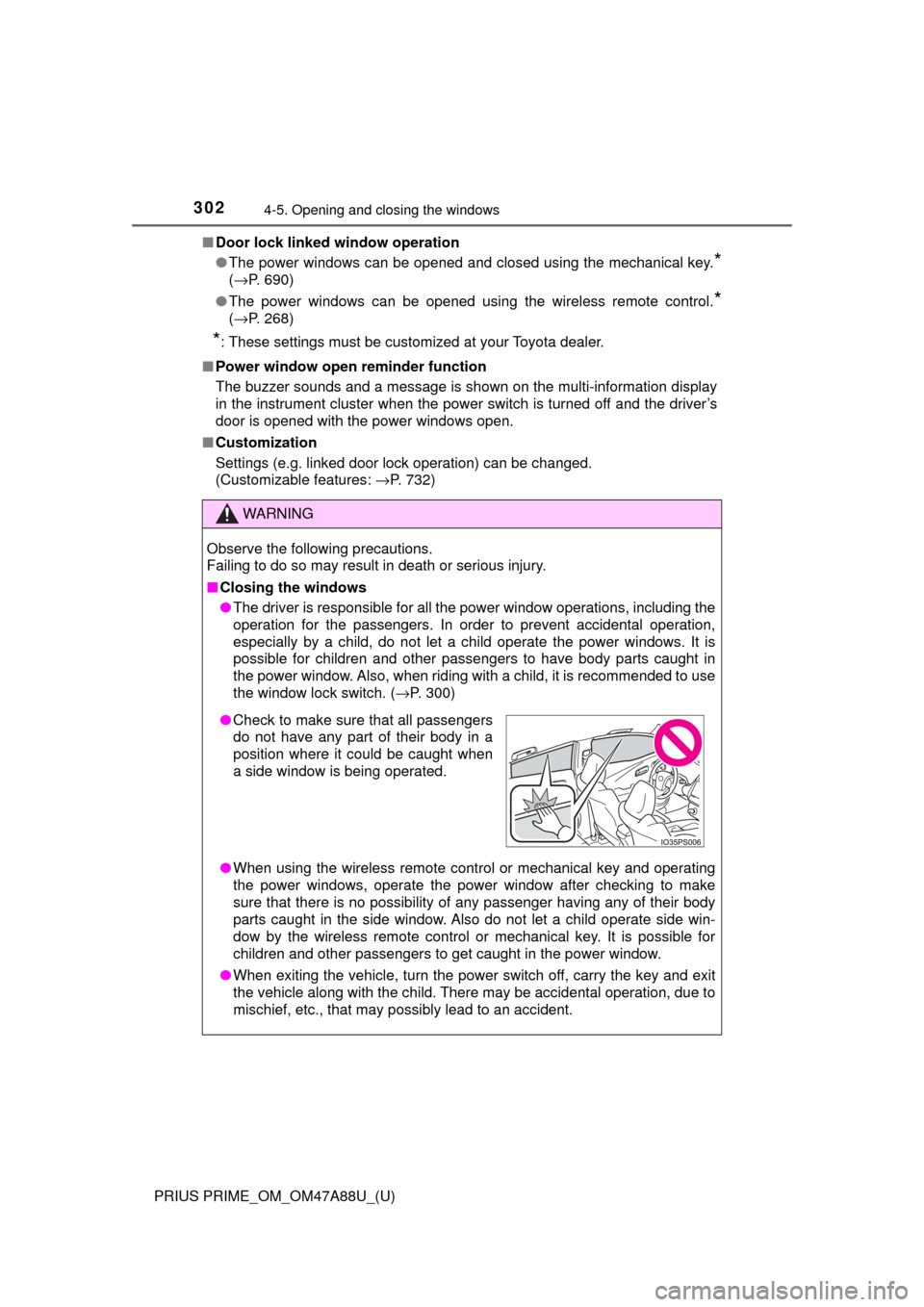
●Check to make sure that all passengers
do not have any part of their body in a
position where it could be caught when
a side window is being operated.
Page 493 of 784
PRIUS PRIME_OM_OM47A88U_(U)
4936-1. Using the air conditioning system and defogger
6
Interior features
■Heating
●In HV mode, the gasoline engine may operate in order to exhaust heat from
the engine coolant via the heater.
● In EV mode, heating is done by a heat pump system.
• When the outside temperature is low or it is snowing, compared to con-
ventional vehicles, heating may be less effective and warm air may not
come out.
• If frost has formed on the outside heat exchanger, the heating perfor- mance will decline. The frost can be removed from the outside heat
exchanger by operating the Remote Air Conditioning System before driv-
ing ( →P. 509). When frosted over, the heating operation of the Remote
Air Conditioning System starts after defrosting.
• When is turned on, the heating is controlled optimally. Therefore, the set heating performance may not be achieved even if the fan speed
setting is increased.
● In the following situations the gasoline engine may operate in order to
exhaust heat from the engine coolant via the heater even in EV mode.
• The outside temperature is approximately -10 °C or low
• is operating
■ Using automatic mode
Fan speed is adjusted automatically according to the temperature setting and
the ambient conditions.
Therefore, the fan may stop for a while until warm or cool air is ready to flow
immediately after is pressed.
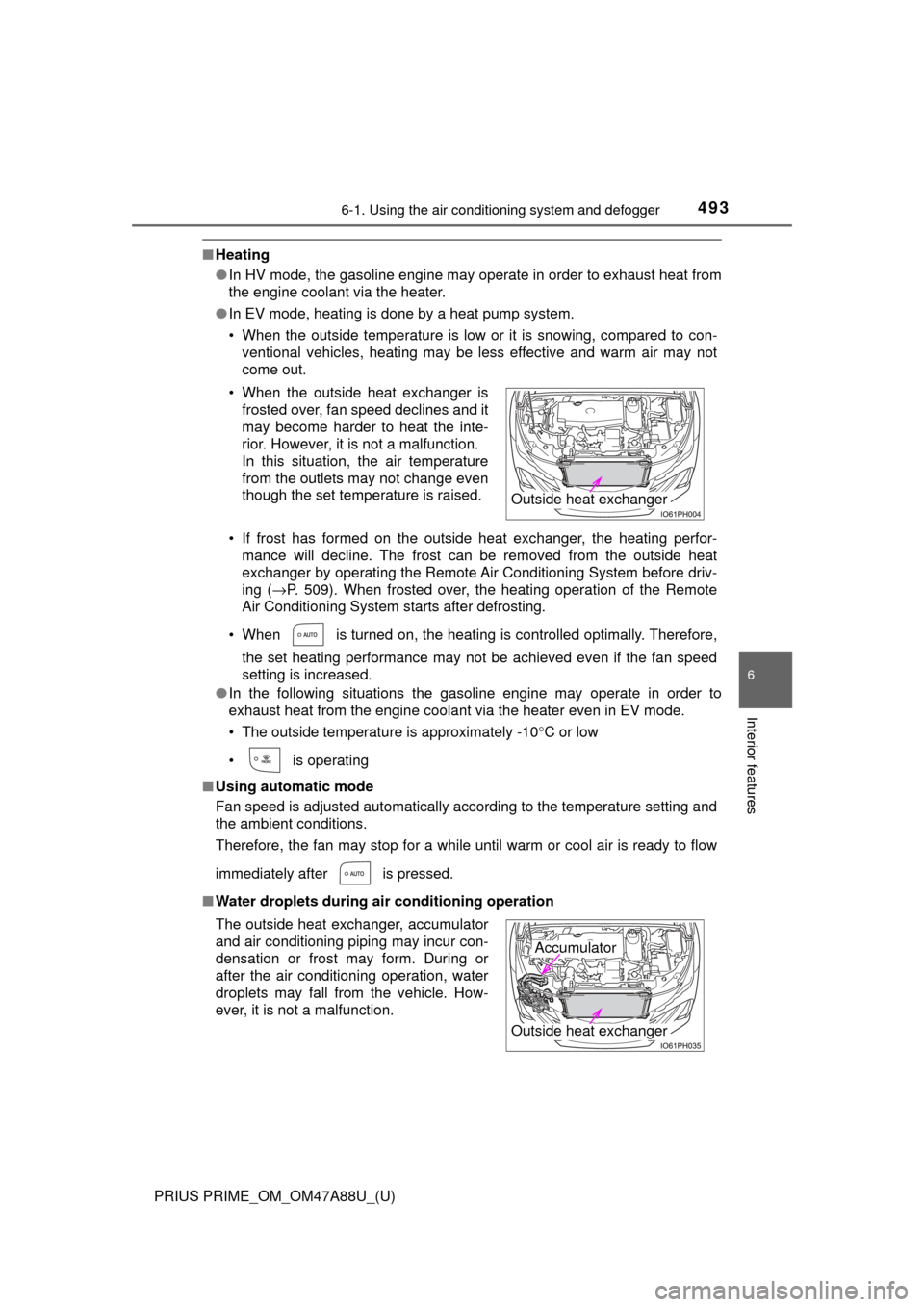
■ Water droplets during air conditioning operation• When the outside heat exchanger is
frosted over, fan speed declines and it
may become harder to heat the inte-
rior. However, it is not a malfunction.
In this situation, the air temperature
from the outlets may not change even
though the set temperature is raised.
The outside heat exchanger, accumulator
and air conditioning piping may incur con-
densation or frost may form. During or
after the air conditioning operation, water
droplets may fall from the vehicle. How-
ever, it is not a malfunction.
Outside heat exchanger
Outside heat exchanger
Accumulator