light control switch TOYOTA PRIUS PRIME 2017 2.G Owner's Manual
[x] Cancel search | Manufacturer: TOYOTA, Model Year: 2017, Model line: PRIUS PRIME, Model: TOYOTA PRIUS PRIME 2017 2.GPages: 784, PDF Size: 14.98 MB
Page 479 of 784

PRIUS PRIME_OM_OM47A88U_(U)
4795-5. Using the driving support systems
5
Driving
■Reduced effectiveness of the EPS system
The effectiveness of the EPS system is reduced to prevent the system from
overheating when there is frequent steering input over an extended period of
time. The steering wheel may feel heavy as a result. Should this occur, refrain
from excessive steering input or stop the vehicle and turn the hybrid system
off. The EPS system should return to normal within 10 minutes.
■ Electric power steering system warning light (warning buzzer)
→P. 654
■ Automatic reactivation of TRAC and VSC systems
After turning the TRAC and VSC systems off, the systems will be automati-
cally re-enabled in the following situations:
● When the power switch is turned off
● If only the TRAC system is turned off, the TRAC will turn on when vehicle
speed increases
If both the TRAC and VSC systems are turned off, automatic re-enabling will
not occur when vehicle speed increases.
■ Operating conditions of hill-start assist control
When the following four conditions are met, the hill-start assist control will
operate:
● The shift position is in a position other than P or N (when starting off forward/
backward on an upward incline)
● The vehicle is stopped
● The accelerator pedal is not depressed
● The parking brake is not engaged
■ Automatic system cancelation of hill-start assist control
The hill-start assist control will turn off in any of the following situations:
● Shift the shift position to P or N
● The accelerator pedal is depressed
● The parking brake is engaged
● Approximately 2 seconds elapse after the brake pedal is released
Page 588 of 784

588
PRIUS PRIME_OM_OM47A88U_(U)
7-3. Do-it-yourself maintenance
■After recharging/reconnect ing the 12-volt battery
● Unlocking the doors using the smart key system may not be possible imme-
diately after reconnecting the 12-volt battery. If this happens, use the wire-
less remote control or the mechanical key to lock/unlock the doors.
● Start the hybrid system with the power switch in ACCESSORY mode. The
hybrid system may not start with the power switch turned off. However, the
hybrid system will operate normally from the second attempt.
● The power switch mode is recorded by the vehicle. If the 12-volt battery is
reconnected, the vehicle will return the power switch mode to the status it
was in before the 12-volt battery was disconnected. Make sure to turn off
the power before disconnect the 12-volt battery. Take extra care when con-
necting the 12-volt battery if the power switch mode prior to discharge is
unknown.
If the system will not start even after multiple attempts at all methods above,
contact your Toyota dealer.
WARNING
■ Chemicals in the 12-volt battery
The 12-volt battery contains poisonous and corrosive sulfuric acid and may
produce hydrogen gas which is flammable and explosive. To reduce the risk
of death or serious injury, take the following precautions while working on or
near the 12-volt battery:
● Do not cause sparks by touching the 12-volt battery terminals with tools.
● Do not smoke or light a match near the 12-volt battery.
● Avoid contact with eyes, skin and clothes.
● Never inhale or swallow electrolyte.
● Wear protective safety glasses when working near the 12-volt battery.
● Keep children away from the 12-volt battery.
■ Where to safely charge the 12-volt battery
Always charge the 12-volt battery in an open area. Do not charge the
12-volt battery in a garage or closed room where there is insufficient ventila-
tion.
■ How to recharge th e 12-volt battery
Only perform a slow charge (5 A or less). The 12-volt battery may explode if
charged at a quicker rate.
Page 596 of 784
596
PRIUS PRIME_OM_OM47A88U_(U)
7-3. Do-it-yourself maintenance
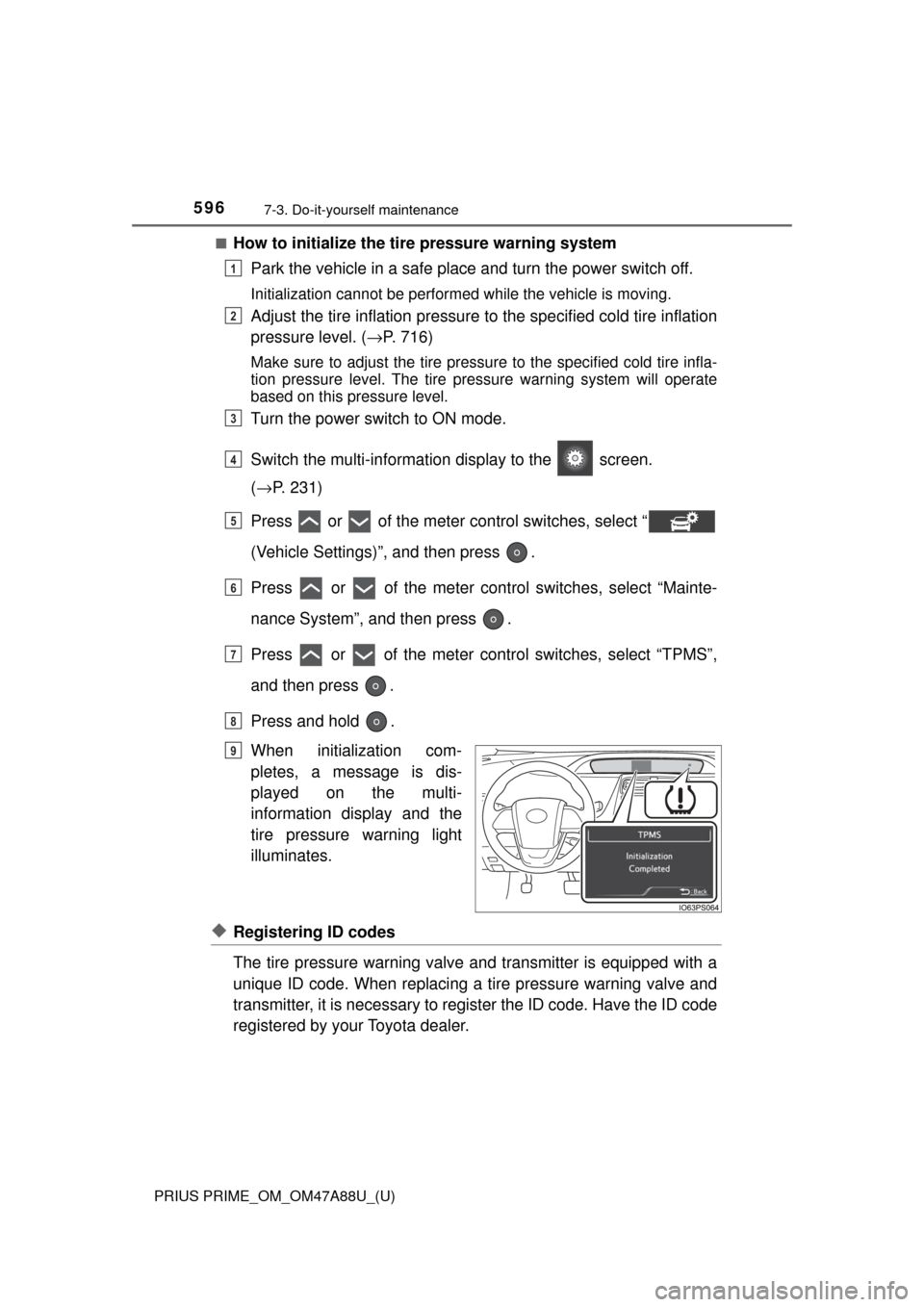
■How to initialize the tire pressure warning systemPark the vehicle in a safe place and turn the power switch off.
Initialization cannot be performed while the vehicle is moving.
Adjust the tire inflation pressure to the specified cold tire inflation
pressure level. ( →P. 716)
Make sure to adjust the tire pressu re to the specified cold tire infla-
tion pressure level. The tire pressure warning system will operate
based on this pressure level.
Turn the power switch to ON mode.
Switch the multi-informatio n display to the screen.
( → P. 231)
Press or of the meter control switches, select “
(Vehicle Settings)”, and then press .
Press or of the meter cont rol switches, select “Mainte-
nance System”, and then press .
Press or of the meter control switches, select “TPMS”,
and then press .
Press and hold .
When initialization com-
pletes, a message is dis-
played on the multi-
information display and the
tire pressure warning light
illuminates.
◆Registering ID codes
The tire pressure warning valve and transmitter is equipped with a
unique ID code. When replacing a tire pressure warning valve and
transmitter, it is necessary to register the ID code. Have the ID code
registered by your Toyota dealer.
1
2
3
4
5
6
7
8
Until Complete
9
Page 660 of 784

6608-2. Steps to take in an emergency
PRIUS PRIME_OM_OM47A88U_(U)■
If the tire pressure warning light frequently comes on after blinking
for 1 minute
If the tire pressure warning light
frequently comes on after blinking for
1 minute when the power switch is tu rned to ON mode, have it checked
by your Toyota dealer.
■ Warning buzzer
In some cases, the buzzer may not be heard due to being in a noisy location
or audio sound.
WARNING
■When the electric power steerin g system warning light comes on
When the light comes on yellow, the assist to the power steering is
restricted. When the light comes on red, the assist to the power steering is
lost and handling operations of the steering wheel become extremely
heavy. When steering wheel operations are heavier than usual, grip the
steering wheel firmly and operate it using more force than usual.
■
If the tire pressure warning light comes on
Be sure to observe the following precautions. Failure to do so could
cause a loss of vehicle control and result in death or serious injury.
●Stop your vehicle in a safe place as soon as possible. Adjust the tire
inflation pressure immediately.
●If the tire pressure warning light co mes on even after tire inflation pres-
sure adjustment, it is probable that you have a flat tire. Check the tires.
If a tire is flat, repair the flat tire by using emergency tire puncture
repair kit.
●Avoid abrupt maneuvering and braking. If the vehicle tires deteriorate,
you could lose control of the steering wheel or the brakes.
■If a blowout or sudden air leakage should occur
The tire pressure warning system may not activate immediately.
Page 665 of 784

6658-2. Steps to take in an emergency
PRIUS PRIME_OM_OM47A88U_(U)
8
When trouble arises
■Warning messages
The warning messages explained below may differ from the actual messages
according to operation conditions and vehicle specifications.
■ System warning lights
The master warning light does not come on or flash in the following cases.
Instead, a separate system warning light will come on along with a message
shown on the multi-information display.
●“Antilock Brake System Malfunction Visit Your Dealer”:
The ABS warning light comes on. ( →P. 654)
● “Braking Power Low Visit Your Dealer”:
The brake system warning light (yellow) will come on. ( →P. 653)
● Indicates that a door is not fully closed while the vehicle is stopped.:
The Open door warning light comes on. ( →P. 655)
■ If “Visit Your Dealer” is shown
The system or part shown on the multi-information display is malfunctioning.
Have the vehicle inspected by your Toyota dealer.
■ If a message about an operation is shown
●If a message about an operation of the accelerator pedal or brake pedal is
shown
A warning message about an operation of the brake pedal may be shown
while the driving assist systems such as PCS (Pre-Collision System) or the
dynamic radar cruise control with full-speed range is operating. If a warning
message is shown, be sure to decelerate the vehicle or follow an instruction
shown on the multi-information display.
● A warning message is shown when Drive-Start Control, Brake Override Sys-
tem or Intelligent Clearance Sonar (if equipped) operates ( →P. 308, 308,
435). Follow the instructions on the multi-information display.
● If a message about an operation of the power switch is shown
An instruction for operation of the power switch is shown when the incorrect
procedure for starting the hybrid system is performed or the power switch is
operated incorrectly. Follow the instructions shown on the multi-information
display to operate the power switch again.
● If a message about a shift operation is shown
To prevent the shift position from being selected incorrectly or the vehicle
from moving unexpectedly, the shift position may be changed automatically
(→P. 332) or shift operation may be required. In this case, change the shift
position following the instructions on the multi-information display.
● If a message or image about an open/close state of a part or replenishment
of a consumable is shown
Confirm the part indicated by the multi-information display or a warning light,
and then perform the coping method such as closing the open door or
replenishing a consumable.
Page 738 of 784
738
PRIUS PRIME_OM_OM47A88U_(U)
9-2. Customization
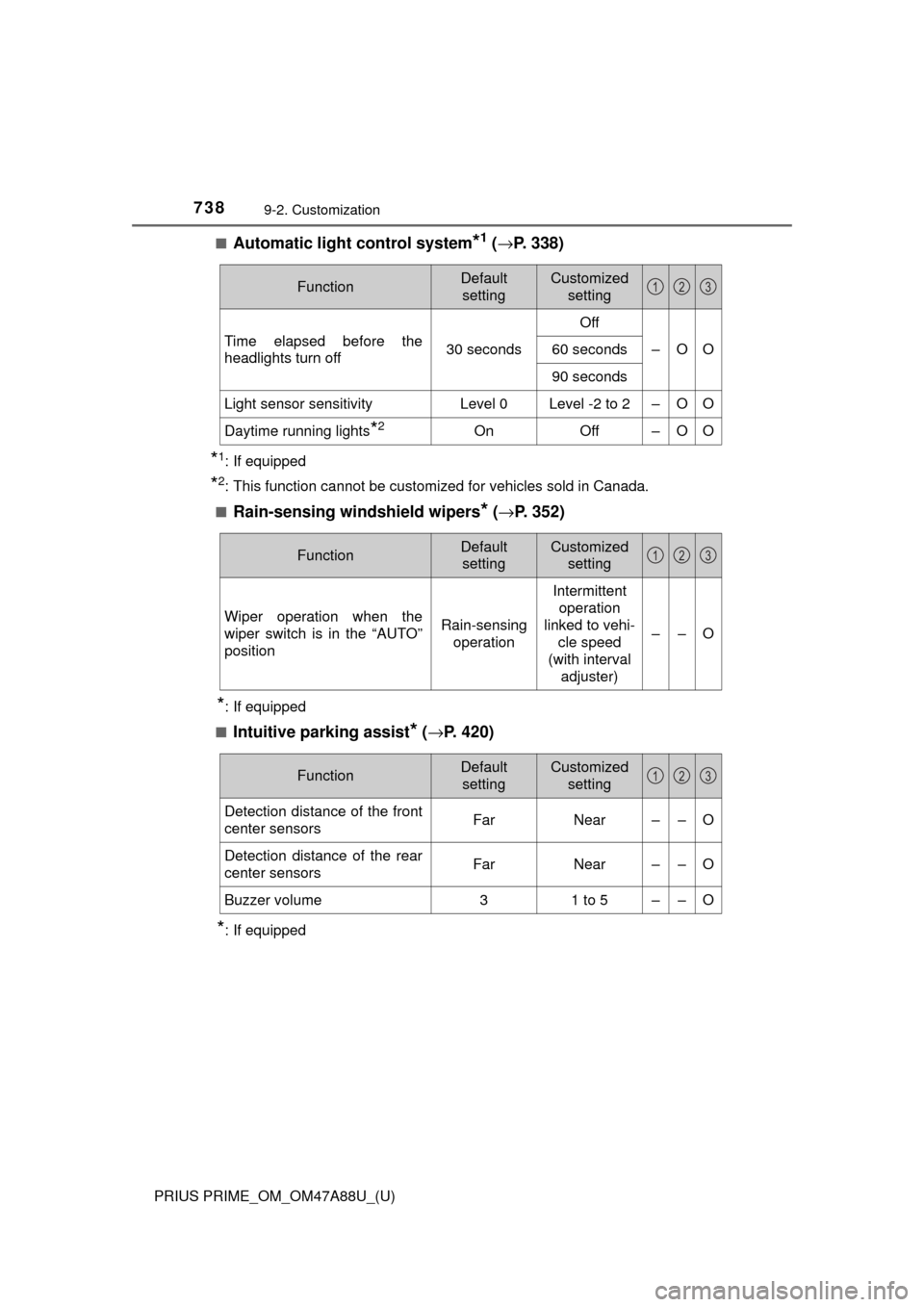
■Automatic light control system*1 (→ P. 338)
*1: If equipped
*2: This function cannot be customized for vehicles sold in Canada.
■
Rain-sensing windshield wipers* ( → P. 352)
*: If equipped
■
Intuitive parking assist* ( → P. 420)
*: If equipped
FunctionDefault
settingCustomized setting
Time elapsed before the
headlights turn off 30 secondsOff
–OO
60 seconds
90 seconds
Light sensor sensitivityLevel 0Level -2 to 2–OO
Daytime running lights*2OnOff–OO
123
FunctionDefault
settingCustomized setting
Wiper operation when the
wiper switch is in the “AUTO”
positionRain-sensing operation
Intermittent operation
linked to vehi- cle speed
(with interval
adjuster)
––O
123
FunctionDefault settingCustomized setting
Detection distance of the front
center sensorsFarNear––O
Detection distance of the rear
center sensorsFarNear––O
Buzzer volume31 to 5––O
123
Page 740 of 784
740
PRIUS PRIME_OM_OM47A88U_(U)
9-2. Customization
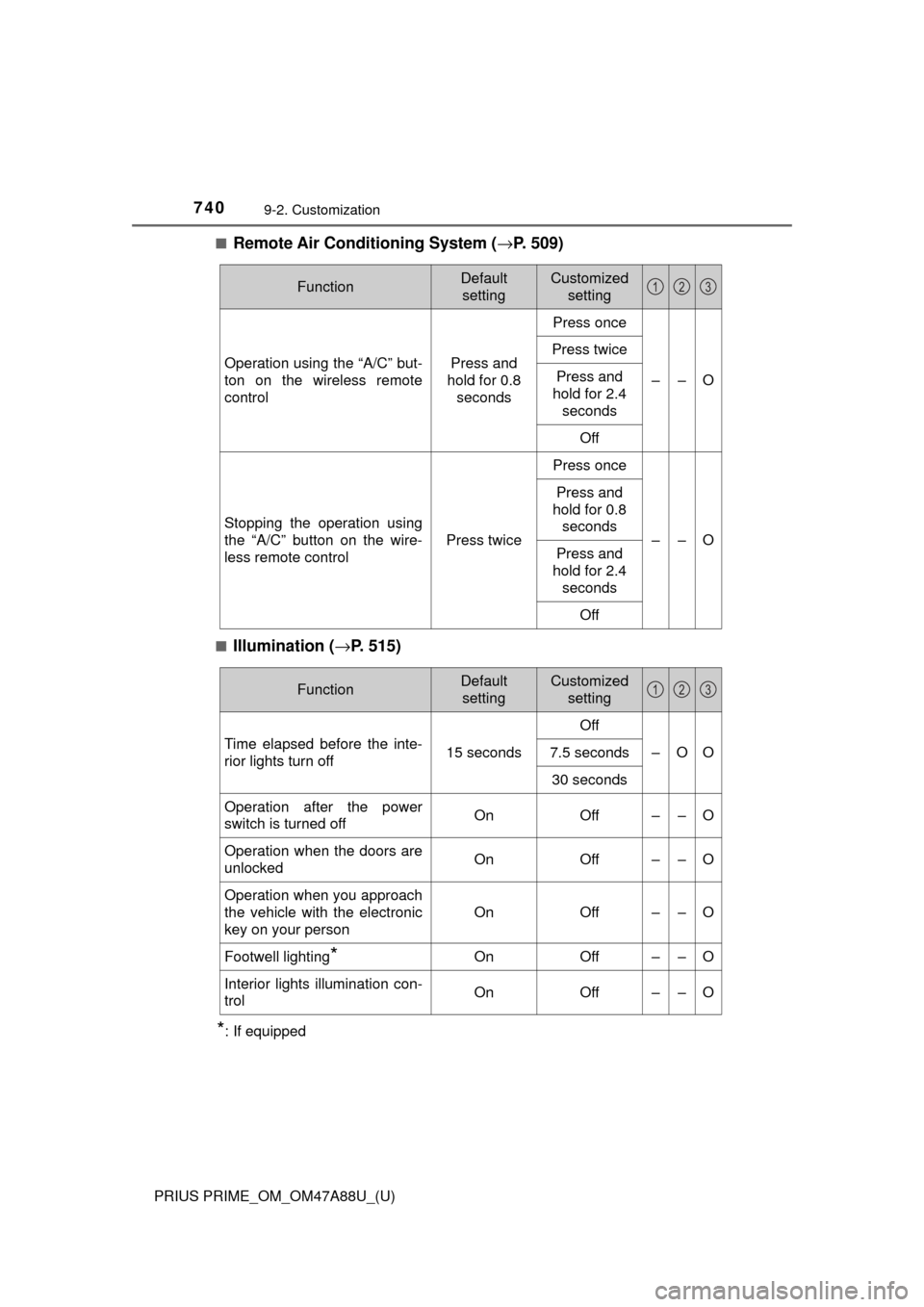
■Remote Air Conditioning System (→P. 509)
■Illumination ( →P. 515)
*: If equipped
FunctionDefault
settingCustomized setting
Operation using the “A/C” but-
ton on the wireless remote
controlPress and
hold for 0.8 seconds
Press once
––O
Press twice
Press and
hold for 2.4
seconds
Off
Stopping the operation using
the “A/C” button on the wire-
less remote control
Press twice
Press once
––O
Press and
hold for 0.8 seconds
Press and
hold for 2.4
seconds
Off
123
FunctionDefault settingCustomized setting
Time elapsed before the inte-
rior lights turn off 15 secondsOff
–OO
7.5 seconds
30 seconds
Operation after the power
switch is turned offOnOff––O
Operation when the doors are
unlockedOnOff––O
Operation when you approach
the vehicle with the electronic
key on your person
OnOff––O
Footwell lighting*OnOff––O
Interior lights illumination con-
trolOnOff––O
123
Page 770 of 784

770Alphabetical index
PRIUS PRIME_OM_OM47A88U_(U)
Drive information ..................... 207
Drive-Start Control .................. 308
Driver’s seat belt reminder light......................................... 656
Driving ...................................... 306
Break-in tips .......................... 309
Correct posture ....................... 28
Driving in the rain .................. 307
Driving mode select switch ... 406
Plug-in hybrid vehicle driving tips ........................................ 97
Procedures ........................... 306
Winter drive tips .................... 482
Dynamic radar cruise control
with full-speed range ............ 391
ECB (Electronically Controlled Brake System) .... 476
Eco drive mode ........................ 406
EDR (Event data recorder) ........ 11
Electric motor (traction motor) ....................... 78
Location .................................. 78
Specification ......................... 711
Electric Power Steering (EPS)....................................... 477
Function ................................ 477
Warning light ......................... 654
Electronic key .......................... 262
Battery-saving function ......... 280
If the electronic key does not operate properly ........... 690
Replacing the battery ............ 627
Electronically Controlled Brake System (ECB) ............. 476 Emergency, in case of
If a warning buzzer sounds... 653
If a warning light turns on ..... 653
If a warning message is displayed ............................ 663
If the 12-volt battery is discharged.......................... 694
If the electronic key does
not operate properly ........... 690
If the hybrid system will not start .............................. 688
If you have a flat tire ............. 671
If you lose your keys ..... 263, 266
If you think something is wrong .............................. 652
If your vehicle becomes stuck ................................... 705
If your vehicle has to be stopped in an emergency ... 645
If your vehicle needs to be
towed.................................. 646
If your vehicle overheats....... 700
Emergency flashers ................ 644
Emergency tire puncture
repair kit ................................. 671
Energy monitor ........ 208, 247, 253
Engine Accessory mode ................... 326
Compartment ........................ 580
Engine switch ....................... 324
Exhaust gas precautions ........ 56
Hood ..................................... 577
How to start the hybrid system .......... ...................... 324
Identification number ............ 710
If the hybrid system will not start .............................. 688
If your vehicle has to be stopped in an emergency ... 645
Ignition switch (power switch) .................... 324
Overheating .......................... 700
Power switch ........................ 324
E
Page 772 of 784

772Alphabetical index
PRIUS PRIME_OM_OM47A88U_(U)
Hands-free system (for cellular phone)
*
Head restraints ........................ 291
Head-up display ....................... 238
Headlights ................................ 338
Automatic High Beam system ......... ....................... 343
Headlight aim ................ 633, 758
Light switch ........................... 338
Replacing light bulbs............. 640
Heated steering wheel............. 514
Heaters
Automatic air conditioning system .... 488, 498
Heated steering wheel .......... 514
Outside rear view mirrors ........................ 491, 502
Seat heaters ......................... 513
High coolant temperature
warning light .......................... 655
High mounted stoplight Replacing .............................. 640
High-voltage components ........ 90
Hill-start assist control............ 477
Hood ......................................... 577
Hooks Coat hooks............................ 540
Grocery bag hook ................. 524
Retaining hooks (floor mat)..... 26
Horn .......................................... 294
HV mode ..................................... 79 Hybrid battery
(traction battery) ..................... 90
Air intake vent ......................... 91
Charging ............................... 102
Location .................................. 90
Specification ......................... 711
Status indicator ..................... 104
Hybrid battery (traction battery)
air intake vent .......................... 91
Hybrid system............................ 78 Brake Override System ........ 308
Consumption
screen ................ 218, 250, 256
Drive-Start Control ................ 308
Emergency shut off system .... 91
Energy monitor ..... 208, 247, 253
High voltage components ....... 90
Hybrid System Indicator ....... 210
If the hybrid system will not start .............................. 688
Overheating .......................... 700
Plug-in hybrid system precautions........................... 90
Plug-in hybrid vehicle driving tips........................................ 97
Power switch ........................ 324
Regenerative braking ............. 86
Starting the hybrid system .... 324
Vehicle proximity notification system................ 85
Hybrid System Indicator ......... 210
Hybrid transmission................ 330
H
Page 773 of 784
773Alphabetical index
PRIUS PRIME_OM_OM47A88U_(U)
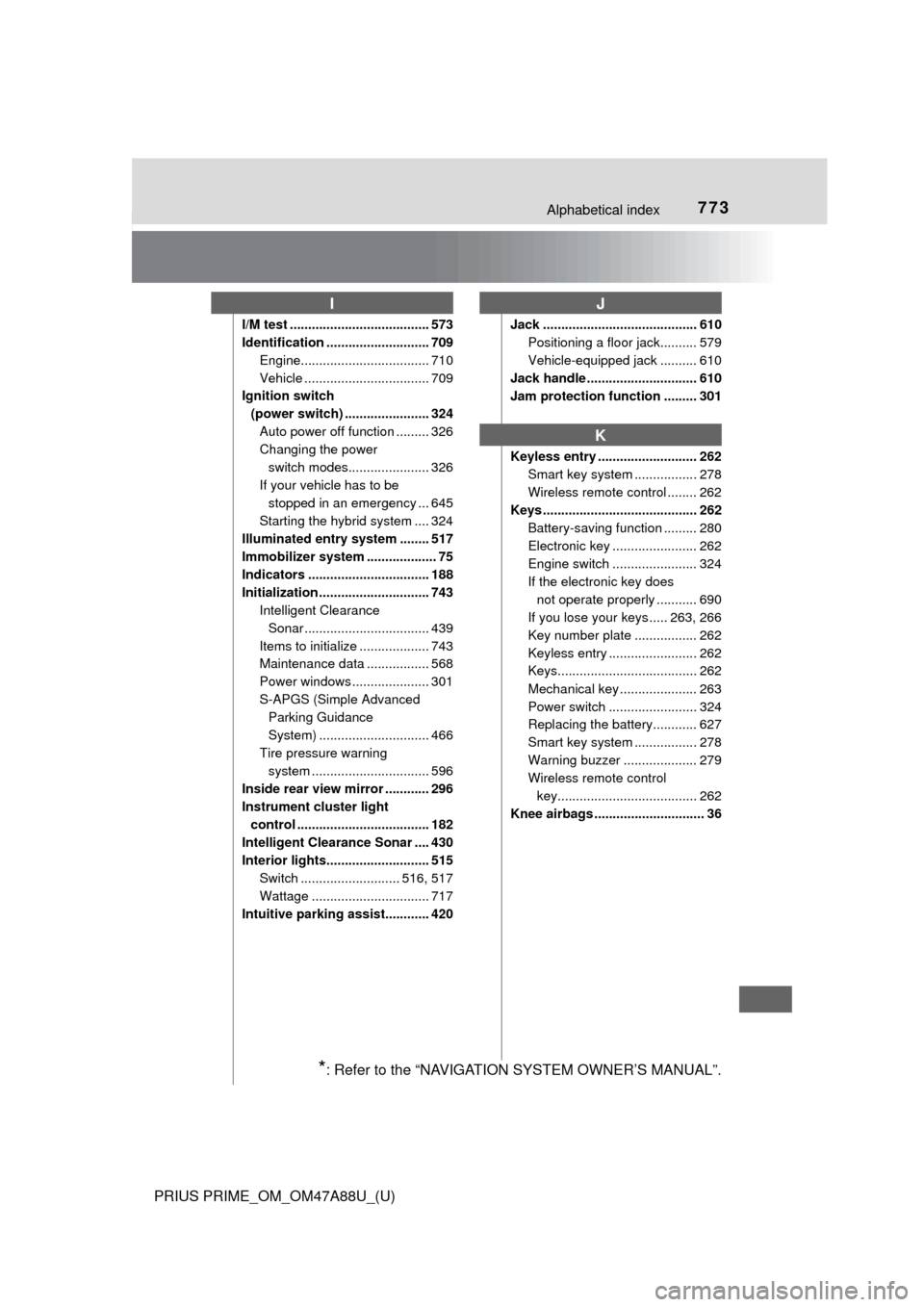
I/M test ...................................... 573
Identification ............................ 709Engine................................... 710
Vehicle .................................. 709
Ignition switch
(power switch) ....................... 324 Auto power off function ......... 326
Changing the power switch modes...................... 326
If your vehicle has to be stopped in an emergency ... 645
Starting the hybrid system .... 324
Illuminated entry system ........ 517
Immobilizer system ................... 75
Indicators ................................. 188
Initialization .............................. 743 Intelligent Clearance
Sonar .................................. 439
Items to initialize ................... 743
Maintenance data ................. 568
Power windows ..................... 301
S-APGS (Simple Advanced Parking Guidance
System) .............................. 466
Tire pressure warning system ......... ....................... 596
Inside rear view mirror ............ 296
Instrument cluster light
control .................................... 182
Intelligent Clearance Sonar .... 430
Interior lights............................ 515
Switch ........................... 516, 517
Wattage ................................ 717
Intuitive parking assist............ 420 Jack .......................................... 610
Positioning a floor jack.......... 579
Vehicle-equipped jack .......... 610
Jack handle .............................. 610
Jam protection function ......... 301
Keyless entry ........................... 262 Smart key system ................. 278
Wireless remote control ........ 262
Keys .......................................... 262
Battery-saving function ......... 280
Electronic key ....................... 262
Engine switch ....................... 324
If the electronic key does not operate properly ........... 690
If you lose your keys ..... 263, 266
Key number plate ................. 262
Keyless entry ........................ 262
Keys...................................... 262
Mechanical key ..................... 263
Power switch ........................ 324
Replacing the battery............ 627
Smart key system ................. 278
Warning buzzer .................... 279
Wireless remote control key...................................... 262
Knee airbags .............................. 36
IJ
K
*: Refer to the “NAVIGATION SYSTEM OWNER’S MANUAL”.