light control switch TOYOTA PRIUS PRIME 2017 2.G User Guide
[x] Cancel search | Manufacturer: TOYOTA, Model Year: 2017, Model line: PRIUS PRIME, Model: TOYOTA PRIUS PRIME 2017 2.GPages: 784, PDF Size: 14.98 MB
Page 207 of 784
PRIUS PRIME_OM_OM47A88U_(U)
2073. Instrument cluster
3
Instrument cluster
Press or of the meter control switches and select the icon
of the desired item.
The selected icon is highlighted and the display switches to the information
screen.
When split screen display is selected for the main display, the sub-screen
of the main display can also be selected. ( →P. 201)
Press or of the meter control switches to switch the con-
tents of the display.
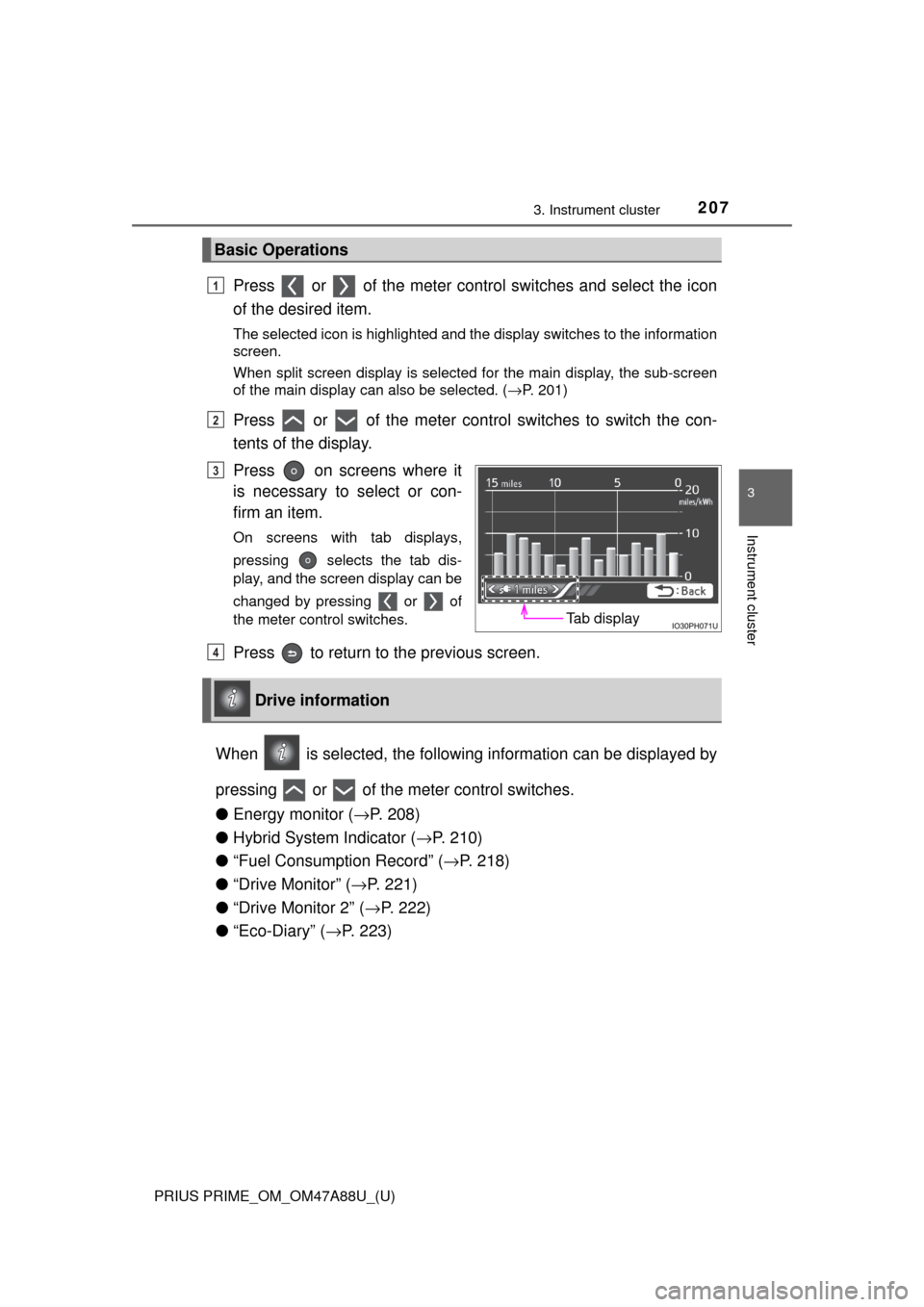
Press on screens where it
is necessary to select or con-
firm an item.
On screens with tab displays,
pressing selects the tab dis-
play, and the screen display can be
changed by pressing or of
the meter control switches.
Press to return to the previous screen.
When is selected, the followi ng information can be displayed by
pressing or of the meter control switches.
● Energy monitor ( →P. 208)
● Hybrid System Indicator ( →P. 210)
● “Fuel Consumption Record” ( →P. 218)
● “Drive Monitor” ( →P. 221)
● “Drive Monitor 2” ( →P. 222)
● “Eco-Diary” ( →P. 223)
Basic Operations
1
2
Tab display
3
Drive information
4
Page 234 of 784
234
PRIUS PRIME_OM_OM47A88U_(U)
3. Instrument cluster
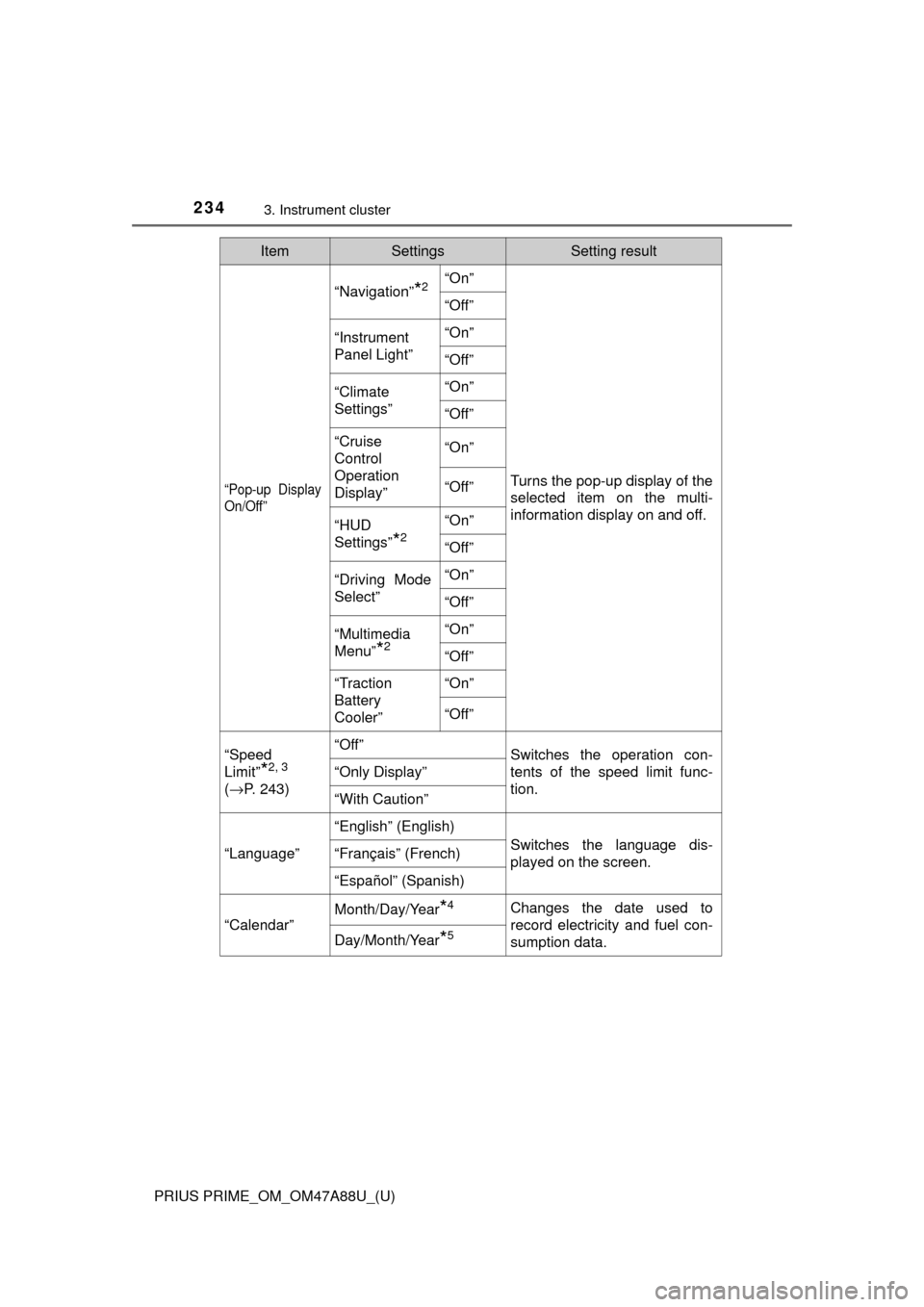
“Pop-up Display
On/Off”
“Navigation”*2“On”
Turns the pop-up display of the
selected item on the multi-
information display on and off.
“Off”
“Instrument
Panel Light”“On”
“Off”
“Climate
Settings”“On”
“Off”
“Cruise
Control
Operation
Display”“On”
“Off”
“HUD
Settings”
*2
“On”
“Off”
“Driving Mode
Select”
“On”
“Off”
“Multimedia
Menu”
*2
“On”
“Off”
“Traction
Battery
Cooler”“On”
“Off”
“Speed
Limit”
*2, 3
(
→ P. 243)
“Off”Switches the operation con-
tents of the speed limit func-
tion.
“Only Display”
“With Caution”
“Language”
“English” (English)
Switches the language dis-
played on the screen.“Français” (French)
“Español” (Spanish)
“Calendar”
Month/Day/Year*4Changes the date used to
record electricity and fuel con-
sumption data.
Day/Month/Year*5
ItemSettingsSetting result
Page 271 of 784
PRIUS PRIME_OM_OM47A88U_(U)
2714-2. Opening, closing and locking the doors
4
Operation of each component
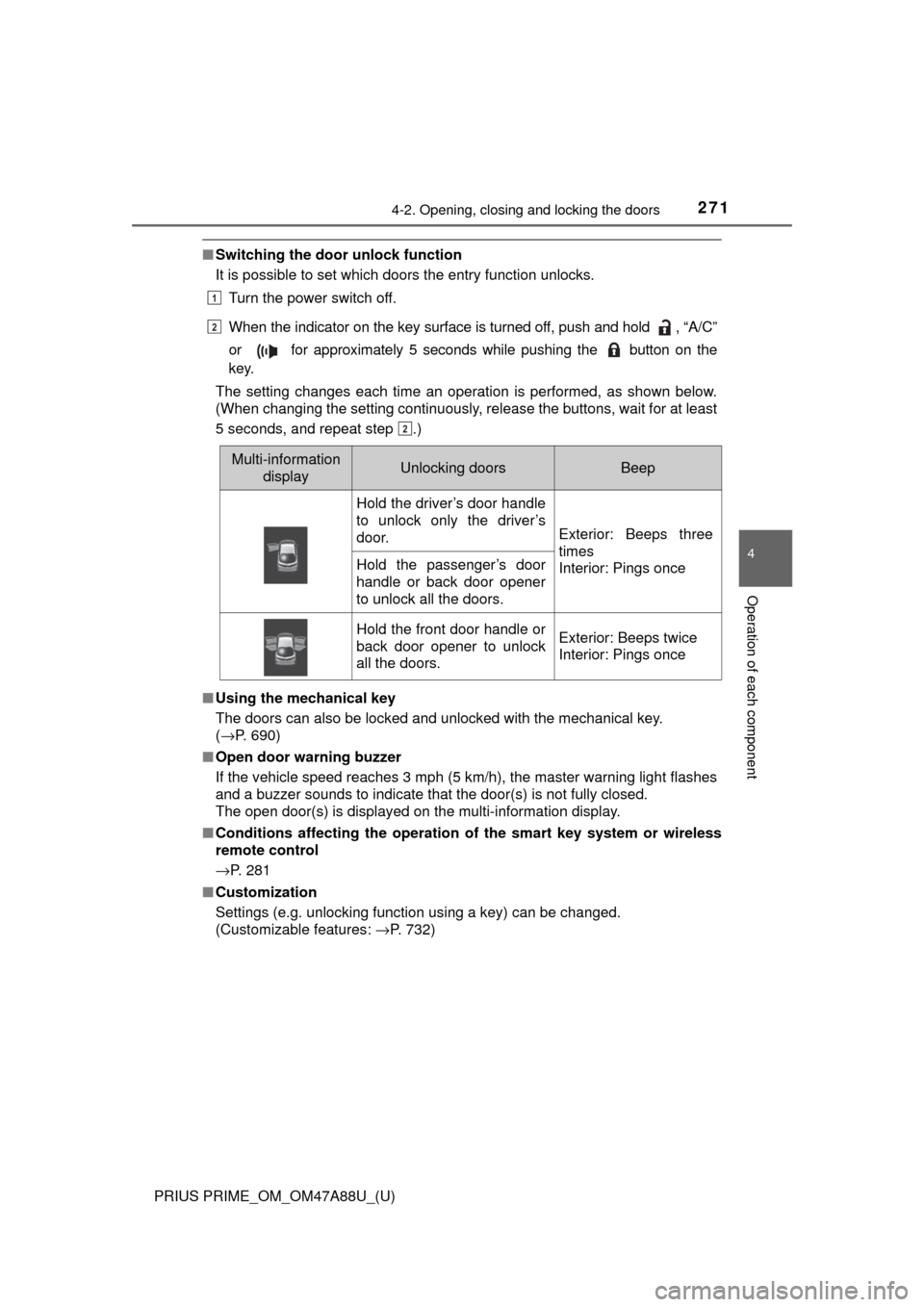
■Switching the door unlock function
It is possible to set which doors the entry function unlocks.
Turn the power switch off.
When the indicator on the key surface is turned off, push and hold , “A/C”
or for approximately 5 seconds while pushing the button on the
key.
The setting changes each time an operation is performed, as shown below.
(When changing the setting continuously, release the buttons, wait for at least
5 seconds, and repeat step .)
■ Using the mechanical key
The doors can also be locked and unlocked with the mechanical key.
(→P. 690)
■ Open door warning buzzer
If the vehicle speed reaches 3 mph (5 km/h), the master warning light flashes
and a buzzer sounds to indicate that the door(s) is not fully closed.
The open door(s) is displayed on the multi-information display.
■ Conditions affecting the operation of the smart key system or wireless
remote control
→P. 281
■ Customization
Settings (e.g. unlocking function using a key) can be changed.
(Customizable features: →P. 732)
Multi-information
displayUnlocking doorsBeep
Hold the driver’s door handle
to unlock only the driver’s
door.
Exterior: Beeps three
times
Interior: Pings once
Hold the passenger’s door
handle or back door opener
to unlock all the doors.
Hold the front door handle or
back door opener to unlock
all the doors.Exterior: Beeps twice
Interior: Pings once
1
2
2
Page 283 of 784
PRIUS PRIME_OM_OM47A88U_(U)
2834-2. Opening, closing and locking the doors
4
Operation of each component
●The lock sensor may not work properly if it comes into contact with ice,
snow, mud, etc. Clean the lock sensor and attempt to operate it again.
● A sudden approach to the effective range or door handle may prevent the
doors from being unlocked. In this case, return the door handle to the origi-
nal position and check that the doors unlock before pulling the door handle
again.
● If there is another electronic key in the detection area, it may take slightly
longer to unlock the doors after the door handle is gripped.
■ When the vehicle is not driven for extended periods
●To prevent theft of the vehicle, do not leave the electronic key within 6 ft.
(2 m) of the vehicle.
● The smart key system can be deactivated in advance. ( →P. 732)
■ To operate the system properly
Make sure to carry the electronic key when operating the system. Do not get
the electronic key too close to the vehicle when operating the system from the
outside of the vehicle.
Depending on the position and holding condition of the electronic key, the key
may not be detected correctly and the system may not operate properly. (The
alarm may go off accidentally, or the door lock prevention may not operate.)
■ If the smart key system do es not operate properly
● Locking and unlocking the doors: Use the mechanical key. ( →P. 690)
● Starting the hybrid system: →P. 691
■ Customization
Settings (e.g. smart key system) can be changed.
(Customizable features: →P. 732)
■ If the smart key system has been deactivated in a customized setting
●Unlocking and locking the doors:
Use the wireless remote control or mechanical key. ( →P. 268, 690)
● Unlocking the charging port lid: →P. 1 1 5
● Unlocking and locking the charging connector: →P. 1 1 9
● Starting the hybrid system and changing power switch modes: →P. 691
● Stopping the hybrid system: →P. 325
Page 305 of 784
305
PRIUS PRIME_OM_OM47A88U_(U)
5Driving
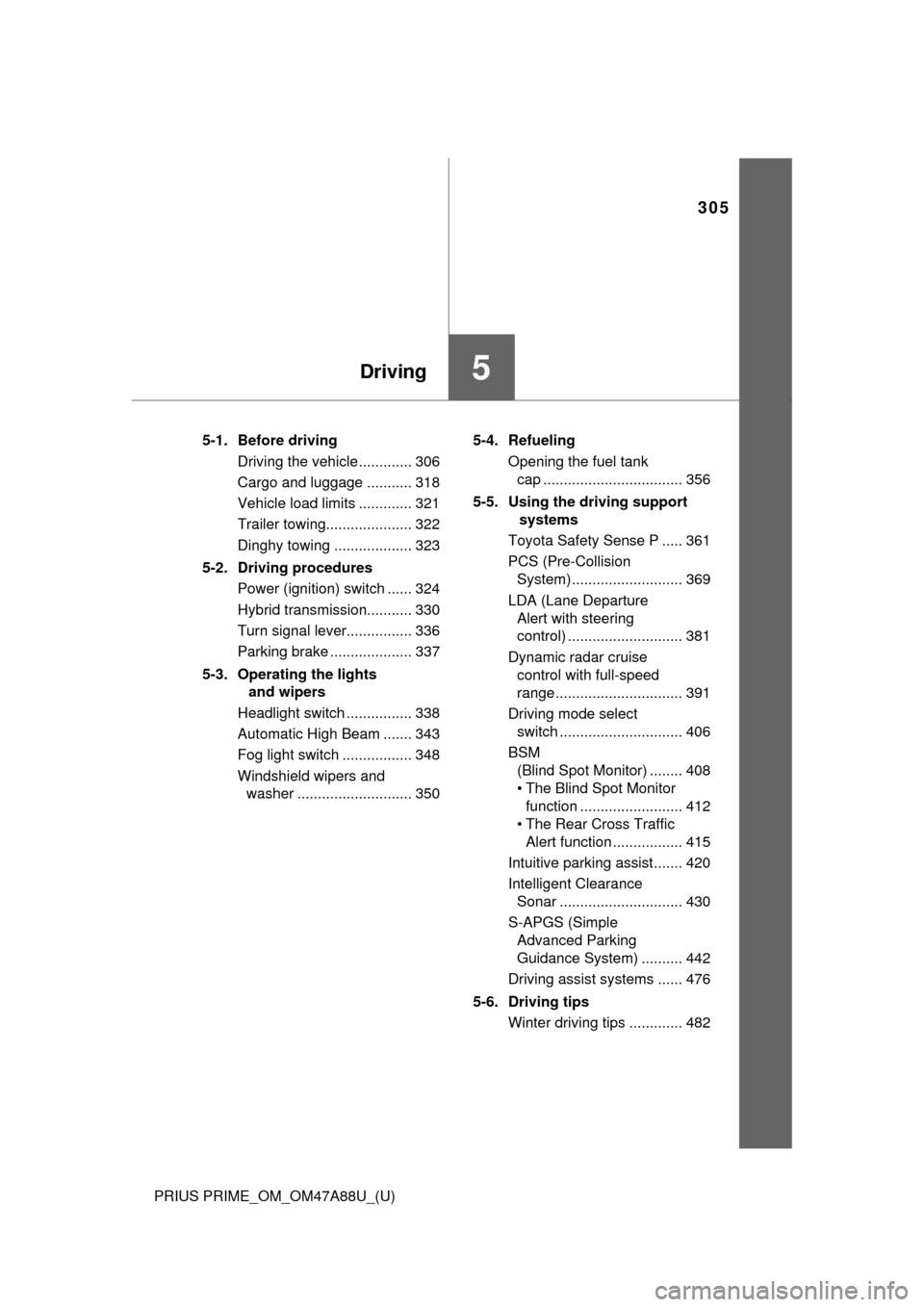
5-1. Before drivingDriving the vehicle ............. 306
Cargo and luggage ........... 318
Vehicle load limits ............. 321
Trailer towing..................... 322
Dinghy towing ................... 323
5-2. Driving procedures Power (ignition) switch ...... 324
Hybrid transmission........... 330
Turn signal lever................ 336
Parking brake .................... 337
5-3. Operating the lights and wipers
Headlight switch ................ 338
Automatic High Beam ....... 343
Fog light switch ................. 348
Windshield wipers and washer ............................ 350 5-4. Refueling
Opening the fuel tank cap .................................. 356
5-5. Using the driving support systems
Toyota Safety Sense P ..... 361
PCS (Pre-Collision System)........................... 369
LDA (Lane Departure Alert with steering
control) ............................ 381
Dynamic radar cruise control with full-speed
range............................... 391
Driving mode select switch .............................. 406
BSM (Blind Spot Monitor) ........ 408
• The Blind Spot Monitor
function ......................... 412
• The Rear Cross Traffic
Alert function ................. 415
Intuitive parking assist....... 420
Intelligent Clearance Sonar .............................. 430
S-APGS (Simple Advanced Parking
Guidance System) .......... 442
Driving assist systems ...... 476
5-6. Driving tips Winter driving tips ............. 482
Page 341 of 784
PRIUS PRIME_OM_OM47A88U_(U)
3415-3. Operating the lights and wipers
5
Driving
■Daytime running light system
●To make your vehicle more visible to other drivers during daytime driving,
the daytime running lights turn on automatically whenever the hybrid system
is started and the parking brake is released with the headlight switch in the
/ / position. (Illuminate dimmer than the headlights.) Day-
time running lights are not designed for use at night.
For the U.S.A.: Daytime running lights can be turned off by operating the
headlight switch.
● Compared to turning on the headlights, the daytime running light system
offers greater durability and consumes less electricity, so it can help improve
fuel economy.
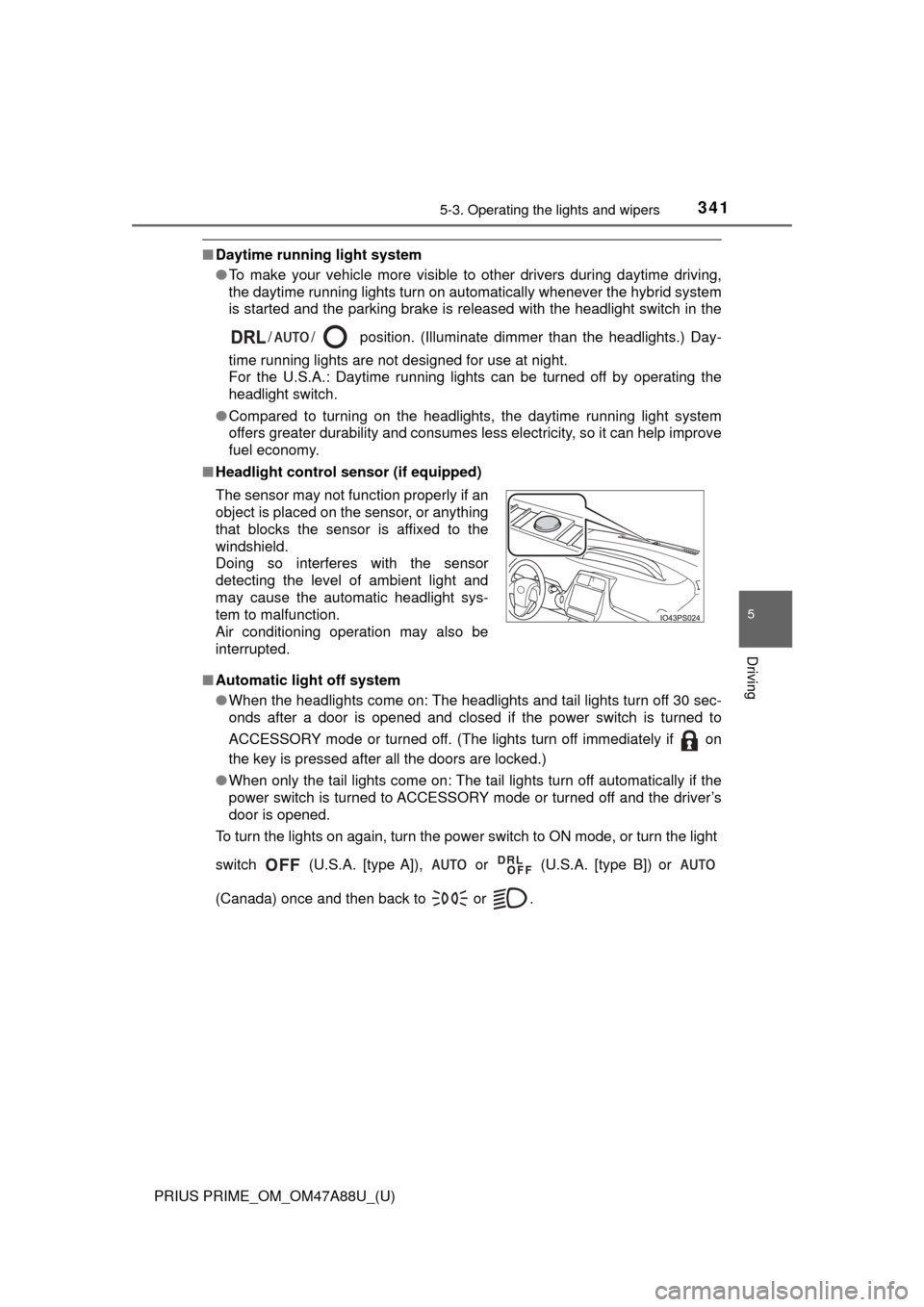
■ Headlight control sensor (if equipped)
■ Automatic light off system
●When the headlights come on: The headlights and tail lights turn off 30 sec-
onds after a door is opened and closed if the power switch is turned to
ACCESSORY mode or turned off. (The lights turn off immediately if on
the key is pressed after all the doors are locked.)
● When only the tail lights come on: The tail lights turn off automatically if the
power switch is turned to ACCESSORY mode or turned off and the driver’s
door is opened.
To turn the lights on again, turn the power switch to ON mode, or turn th\
e light
switch (U.S.A. [type A]), or (U.S.A. [type B]) or
(Canada) once and then back to or . The sensor may not function properly if an
object is placed on the sensor, or anything
that blocks the sensor is affixed to the
windshield.
Doing so interferes with the sensor
detecting the level of ambient light and
may cause the automatic headlight sys-
tem to malfunction.
Air conditioning operation may also be
interrupted.
Page 451 of 784
PRIUS PRIME_OM_OM47A88U_(U)
4515-5. Using the driving support systems
5
Driving
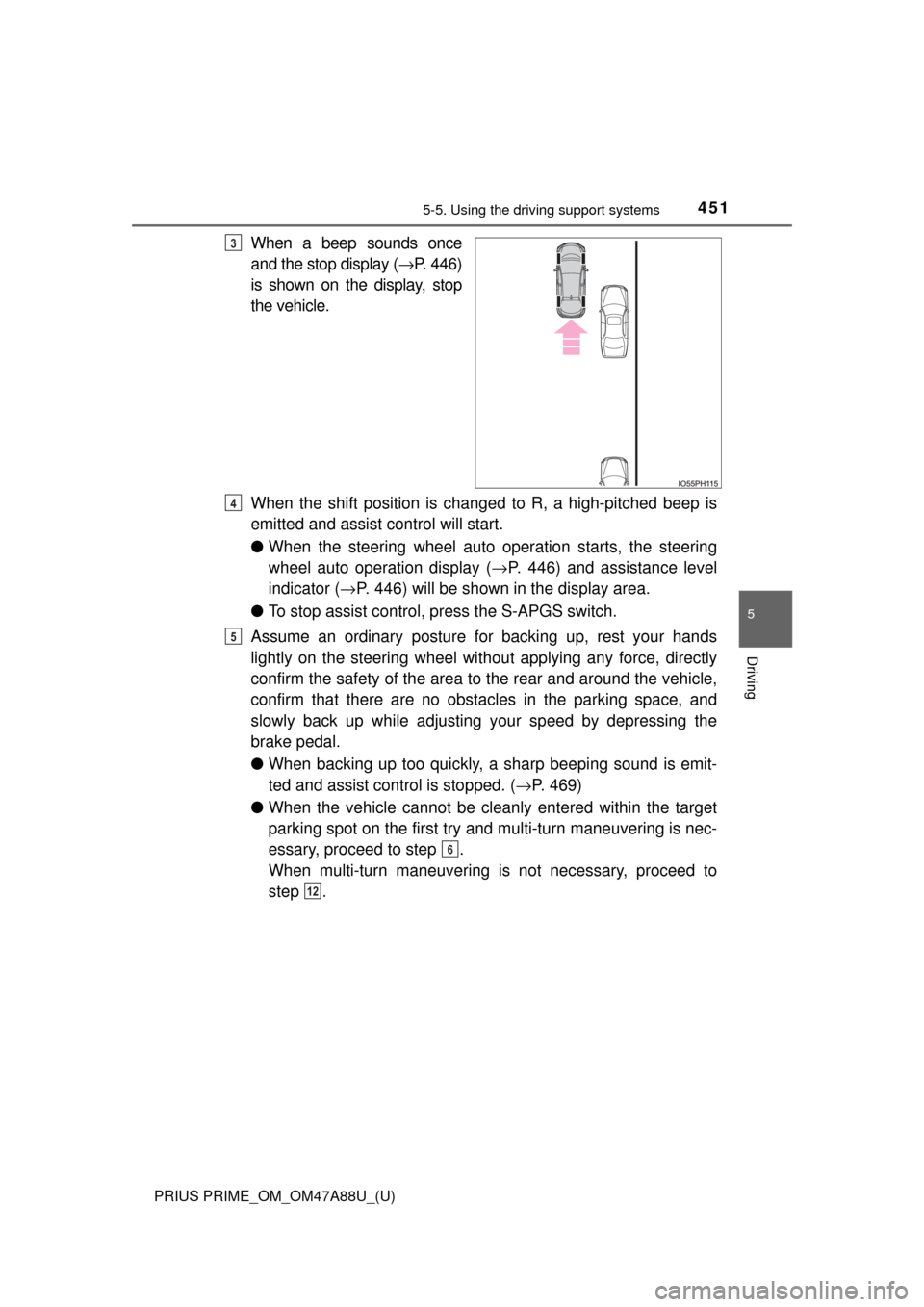
When a beep sounds once
and the stop display ( →P. 446)
is shown on the display, stop
the vehicle.
When the shift position is changed to R, a high-pitched beep is
emitted and assist control will start.
● When the steering wheel auto operation starts, the steering
wheel auto operation display ( →P. 446) and assistance level
indicator ( →P. 446) will be shown in the display area.
● To stop assist control, press the S-APGS switch.
Assume an ordinary posture for backing up, rest your hands
lightly on the steering wheel wi thout applying any force, directly
confirm the safety of the area to the rear and around the vehicle,
confirm that there are no obst acles in the parking space, and
slowly back up while adjusting your speed by depressing the
brake pedal.
● When backing up too quickly, a sharp beeping sound is emit-
ted and assist control is stopped. ( →P. 469)
● When the vehicle cannot be cleanly entered within the target
parking spot on the first try and multi-turn maneuvering is nec-
essary, proceed to step .
When multi-turn maneuvering is not necessary, proceed to
step .3
4
5
6
12
Page 454 of 784
454
PRIUS PRIME_OM_OM47A88U_(U)
5-5. Using the driving support systems
NOTICE
●If the road surface has any dips or inclines, the target parking spot cannot
be correctly set. Therefore, the vehicle may be parked at an angle or may
deviate from the parking spot. In these cases, do not use the parallel park-
ing assist mode.
● When there is a wall or other obstacle on the inner side of the parking
space, or when another parked vehicle extends into the road from its park-
ing spot, the target parking spot may be set in a position that juts out\
slightly into the road.
● Depending on the surrounding environment, such as other parked vehi-
cles, the vehicle may be parked at an angle or may deviate from the park-
ing spot. Manually adjust vehicle alignment as necessary.
● The system provides assistance to guide the vehicle based on position of
adjacent vehicles, even if there ar e obstacles, bumps, drops or curb
stones in the parking space.
If it seems the vehicle may make contact, stop the vehicle by depressing
the brake pedal, and then press the S-APGS switch to turn off the system.
● It may not be possible to detect objects that are low to the ground. Directly
confirm the safety of your surroundings and, if it seems the vehicle may\
make contact with an obstacle, stop the vehicle by depressing the brake
pedal.
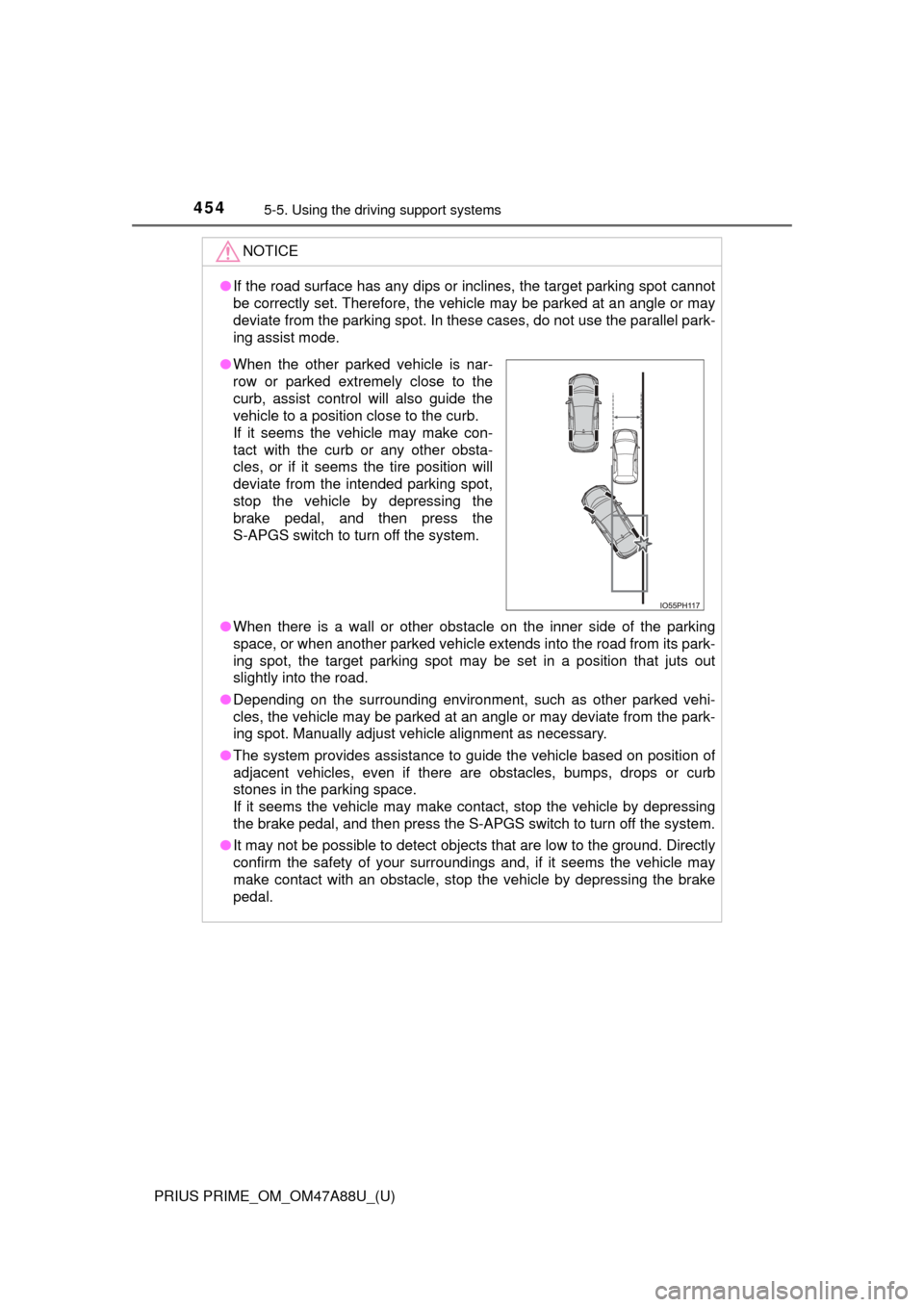
●When the other parked vehicle is nar-
row or parked extremely close to the
curb, assist control will also guide the
vehicle to a position close to the curb.
If it seems the vehicle may make con-
tact with the curb or any other obsta-
cles, or if it seems the tire position will
deviate from the intended parking spot,
stop the vehicle by depressing the
brake pedal, and then press the
S-APGS switch to turn off the system.
Page 456 of 784
456
PRIUS PRIME_OM_OM47A88U_(U)
5-5. Using the driving support systems
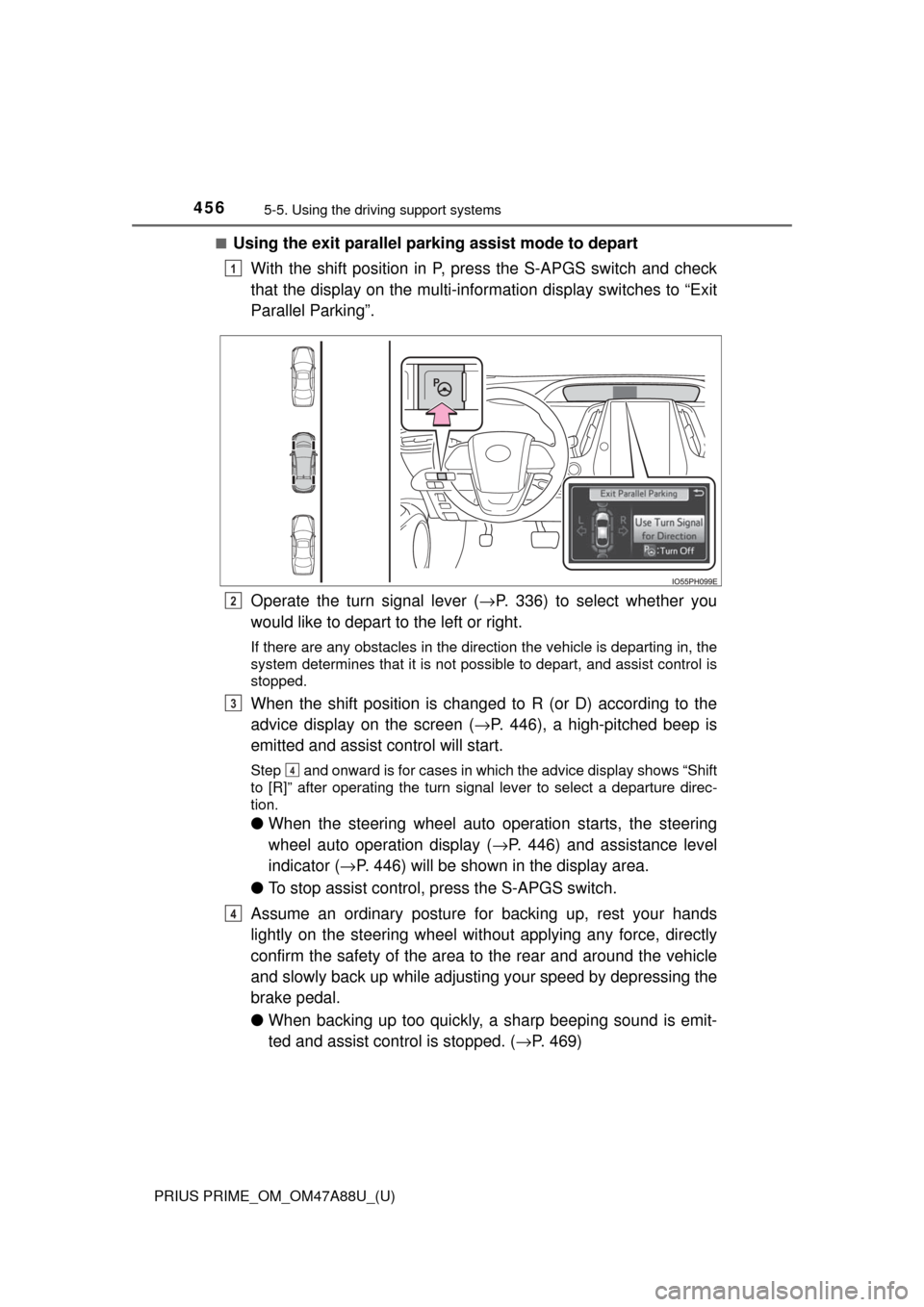
■Using the exit parallel park ing assist mode to depart
With the shift position in P, press the S-APGS switch and check
that the display on the multi-information display switches to “Exit
Parallel Parking”.
Operate the turn signal lever ( →P. 336) to select whether you
would like to depart to the left or right.
If there are any obstacles in the direction the vehicle is departing in, the
system determines that it is not possible to depart, and assist control is
stopped.
When the shift position is changed to R (or D) according to the
advice display on the screen ( →P. 446), a high-pitched beep is
emitted and assist control will start.
Step and onward is for cases in which the advice display shows “Shift
to [R]” after operating the turn signal lever to select a departure direc-
tion.
● When the steering wheel auto operation starts, the steering
wheel auto operation display ( →P. 446) and assistance level
indicator ( →P. 446) will be shown in the display area.
● To stop assist control, press the S-APGS switch.
Assume an ordinary posture for backing up, rest your hands
lightly on the steering wheel wi thout applying any force, directly
confirm the safety of the area to the rear and around the vehicle
and slowly back up while adjusti ng your speed by depressing the
brake pedal.
● When backing up too quickly, a sharp beeping sound is emit-
ted and assist control is stopped. ( →P. 469)
1
2
3
4
4
Page 462 of 784
462
PRIUS PRIME_OM_OM47A88U_(U)
5-5. Using the driving support systems
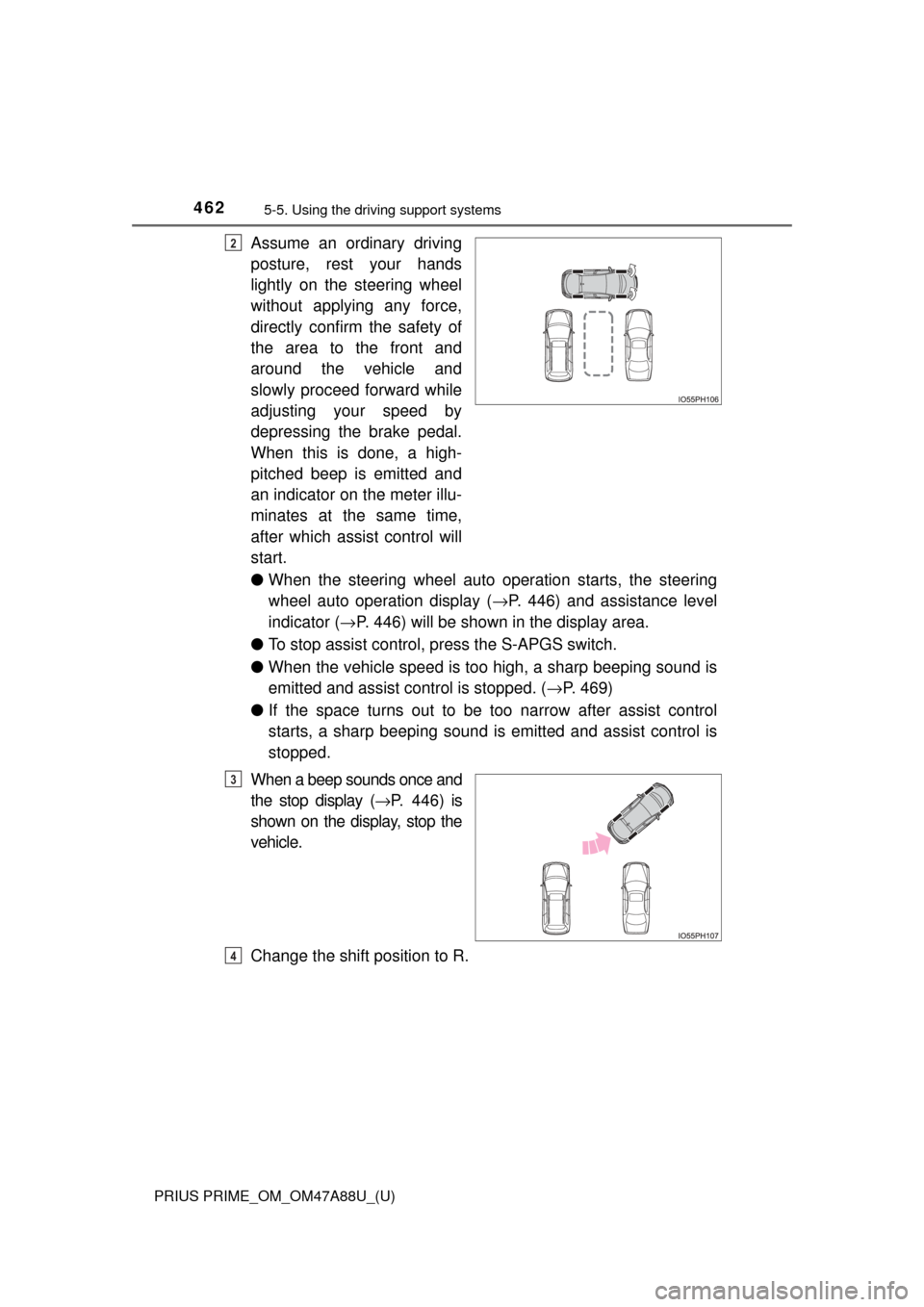
Assume an ordinary driving
posture, rest your hands
lightly on the steering wheel
without applying any force,
directly confirm the safety of
the area to the front and
around the vehicle and
slowly proceed forward while
adjusting your speed by
depressing the brake pedal.
When this is done, a high-
pitched beep is emitted and
an indicator on the meter illu-
minates at the same time,
after which assist control will
start.
●When the steering wheel auto operation starts, the steering
wheel auto operation display ( →P. 446) and assistance level
indicator ( →P. 446) will be shown in the display area.
● To stop assist control, press the S-APGS switch.
● When the vehicle speed is to o high, a sharp beeping sound is
emitted and assist co ntrol is stopped. (→P. 469)
● If the space turns out to be to o narrow after assist control
starts, a sharp beeping sound is emitted and assist control is
stopped.
When a beep sounds once and
the stop display ( →P. 446) is
shown on the display, stop the
vehicle.
Change the shift position to R.2
3
4