indicator TOYOTA PRIUS PRIME 2017 2.G Owner's Guide
[x] Cancel search | Manufacturer: TOYOTA, Model Year: 2017, Model line: PRIUS PRIME, Model: TOYOTA PRIUS PRIME 2017 2.GPages: 784, PDF Size: 14.98 MB
Page 128 of 784

128
PRIUS PRIME_OM_OM47A88U_(U)
2-2. Charging
■“Traction Battery Cooler”
●When the hybrid battery (traction battery) is above a certain temperature
and the power switch is turned off, a check screen is displayed on the multi-
information display that indicates whether “Traction Battery Cooler” is imple-
mented. Approximately 5 minutes after selecting “Yes” on this screen, sys-
tem operation becomes possible.
● When charging starts, “Traction Battery Cooler” only operates if the hybrid
battery (traction battery) temperature is hot.
● The charging indicator is illuminated while “Traction Battery Cooler” is on
standby or operating.
● “Traction Battery Cooler” is implem ented for a maximum of approximately
30 minutes. However, when the “Departure” time is set ( →P. 147) and there
is not sufficient time between the current time and the time that charging will
complete, “Traction Battery Cooler” operation time may become shorter.
● When there is a small amount of remaining charge in the hybrid battery
(traction battery), even if the hybrid battery (traction battery) is hot, “Traction
Battery Cooler” may not be implemented.
● When the following operations are performed while “Traction Battery Cooler”
is operating, the hybrid battery (traction battery) cooling operation stops.
• A door is opened
• The hood is opened
• The power switch is turned to any mode other than off
• The shift position is changed to any position other than P
• The Remote Air Conditioning System is operated ( →P. 509)
• “Charge Now” is implemented ( →P. 156, 165)
• The amount of remaining charge in the hybrid battery (traction battery) is
below a certain amount
● When the power switch is turned off, a check screen is displayed on the
multi-information display that indicates whether “Traction Battery Cooler” is
implemented. This check screen can be turned on and off in the “Meter Cus-
tomize” settings on the multi-information display ( →P. 234). However, when
the check screen is set to “Off”, “Traction Battery Cooler” is no longer oper-
ates.
● “Traction Battery Cooler” uses the power of the hybrid battery (traction bat-
tery) and external power source.
• While “Traction Battery Cooler” is operating, the amount of the remaining
charge of the hybrid battery (traction battery) increases and decreases in
a certain range, and does not increase as in normal charging.
• The operation of “Traction Battery Cooler” is recognized as charging by a
charging equipment. The charging equipment that calculates the fee
according to charging time causes a charging fee.
Page 132 of 784
132
PRIUS PRIME_OM_OM47A88U_(U)
2-2. Charging
Before charging, always check the following items.
●The parking brake is applied.( →P. 337)
● The headlights are switched off or set to AUTO, and lights such as
the emergency flashers and interior lights etc. are switched off.
If these light switches are turned ON, then these features will consume
electricity, and charging time will increase.
●The power switch is off. ( →P. 324)
Before charging, make sure that ea ch part of the charging cable is in
good condition. ( →P. 11 2 )
■Safety functions
●The hybrid system will not start while the charging cable is attached to the
vehicle, even if the power switch is operated.
● If the charging cable is connected while the “READY” indicator is illumi-
nated, the hybrid system will stop automatically and driving will not be possi-
ble.
● When the charging cable is connected to the vehicle, the shift position can-
not be changed from P to another position.
■ During charging
The followings occur, however, it does not indicate a malfunction.
●The charging starting time may differ depending on the state of the vehicle.
● During charging, the sound of the fan may be heard from the charging
equipment cooling air intake vents. ( →P. 135)
● During and after charging, the rear seat and its surrounding area in which
the charging equipment is installed may get warm.
Confirm the following before charging
Inspecting the charging cable
Page 136 of 784
136
PRIUS PRIME_OM_OM47A88U_(U)
2-2. Charging
How to charge
→P. 1 3 2
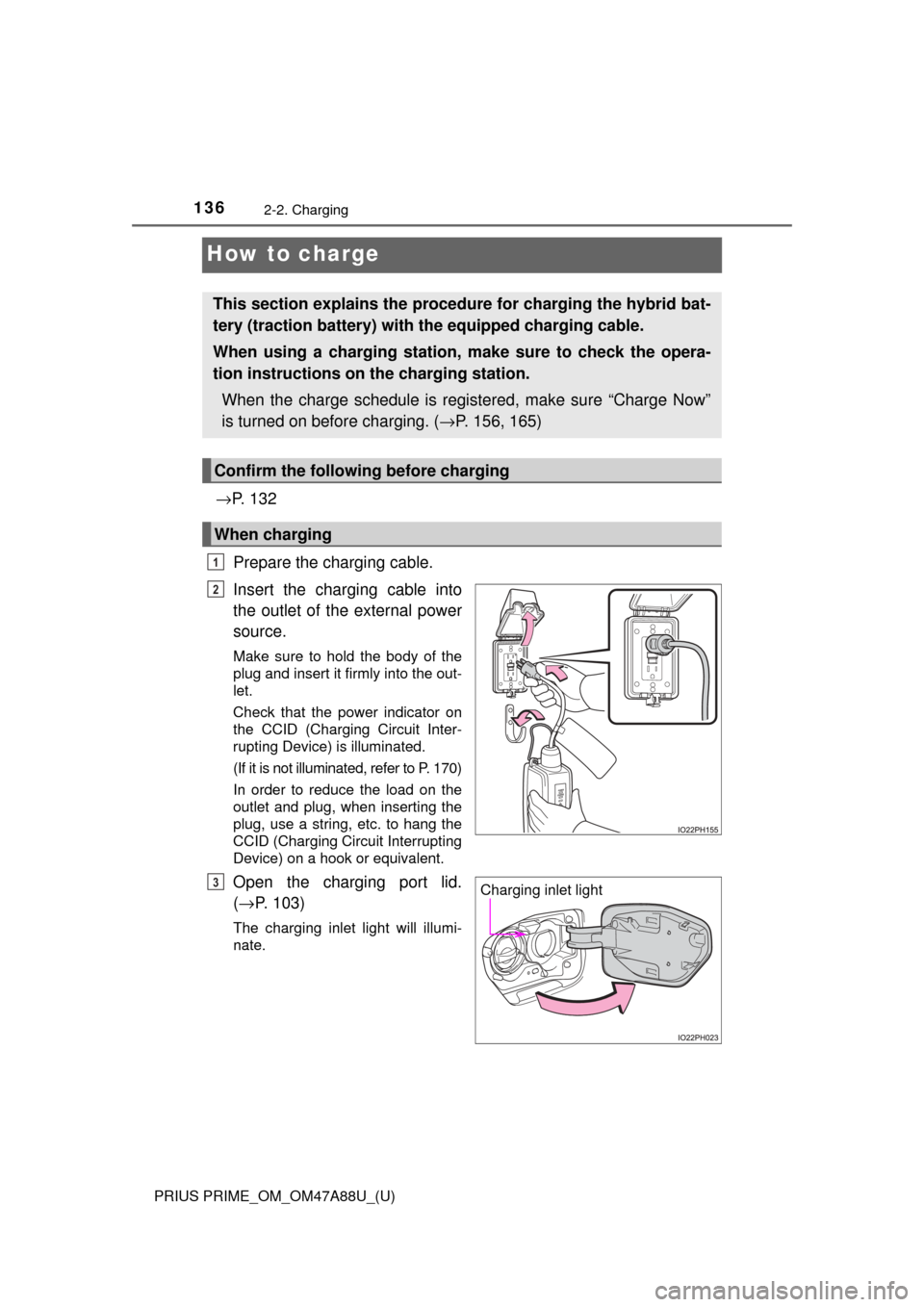
Prepare the charging cable.
Insert the charging cable into
the outlet of the external power
source.
Make sure to hold the body of the
plug and insert it firmly into the out-
let.
Check that the power indicator on
the CCID (Charging Circuit Inter-
rupting Device) is illuminated.
(If it is not illuminated, refer to P. 170)
In order to reduce the load on the
outlet and plug, when inserting the
plug, use a string, etc. to hang the
CCID (Charging Circuit Interrupting
Device) on a hook or equivalent.
Open the charging port lid.
( → P. 103)
The charging inlet light will illumi-
nate.
This section explains the proce dure for charging the hybrid bat-
tery (traction battery) with the equipped charging cable.
When using a charging station, make sure to check the opera-
tion instructions on the charging station.
When the charge schedule is registered, make sure “Charge Now”
is turned on before charging. ( →P. 156, 165)
Confirm the following before charging
When charging
1
2
Charging inlet light3
Page 138 of 784
138
PRIUS PRIME_OM_OM47A88U_(U)
2-2. Charging
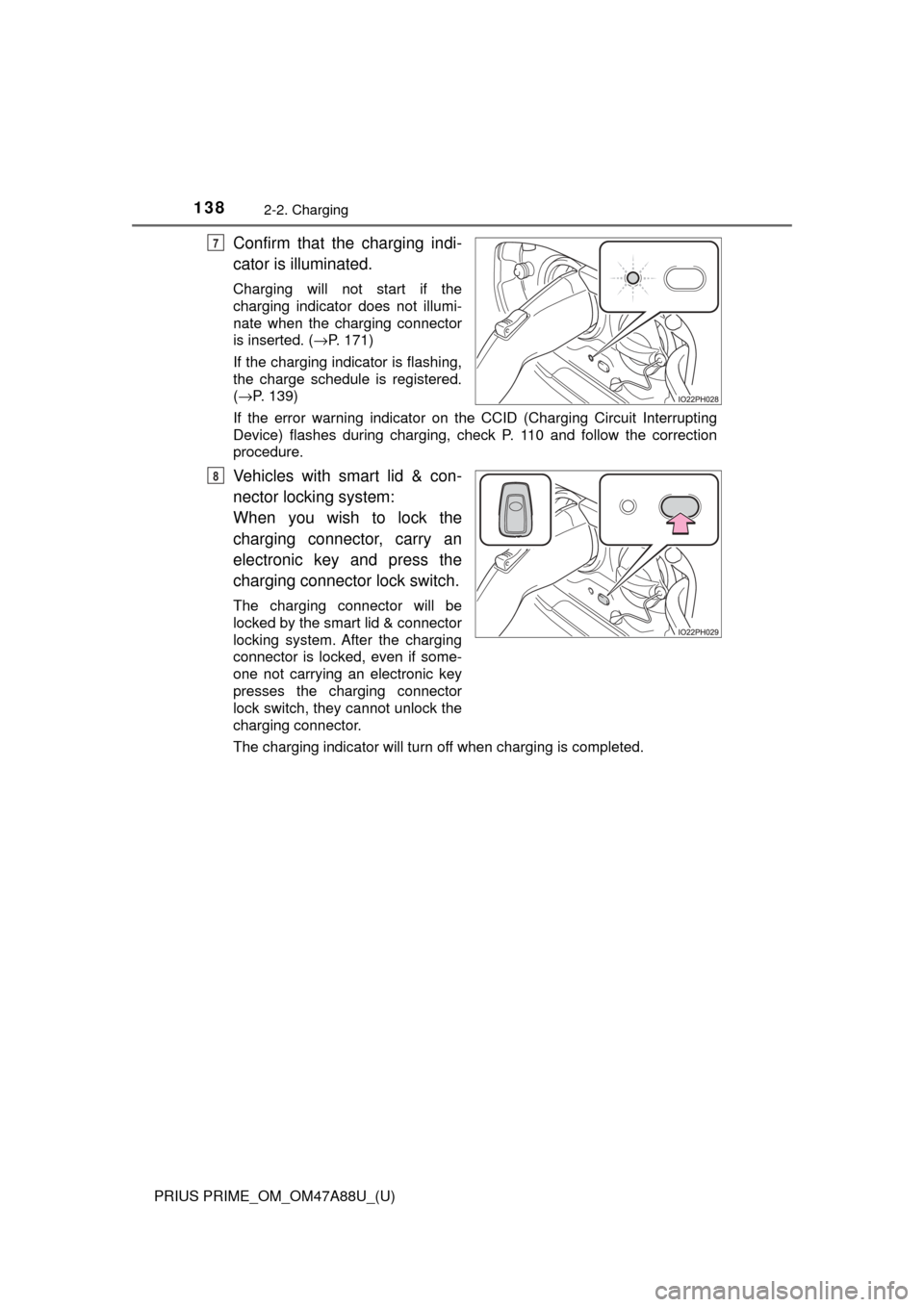
Confirm that the charging indi-
cator is illuminated.
Charging will not start if the
charging indicator does not illumi-
nate when the charging connector
is inserted. (→P. 171)
If the charging indicator is flashing,
the charge schedule is registered.
( →P. 139)
If the error warning indicator on th e CCID (Charging Circuit Interrupting
Device) flashes during charging, check P. 110 and follow the correction
procedure.
Vehicles with smart lid & con-
nector locking system:
When you wish to lock the
charging connector, carry an
electronic key and press the
charging connector lock switch.
The charging connector will be
locked by the smart lid & connector
locking system. After the charging
connector is locked, even if some-
one not carrying an electronic key
presses the charging connector
lock switch, they cannot unlock the
charging connector.
The charging indicator will turn off when charging is completed.
7
8
Page 139 of 784

PRIUS PRIME_OM_OM47A88U_(U)
1392-2. Charging
2
Plug-in hybrid system
■During charging
●The surface of the CCID (Charging Circuit Interrupting Device) may become
hot, but this does not indicate a malfunction.
● Depending on radio wave conditions, interference may be heard on the
radio.
● The current charging condition and the estimated time until charging will
complete can be checked on the multi-information display or 11.6-inch dis-
play (if equipped). ( →P. 130)
● During charging, the hybrid battery (traction battery) status indicator illumi-
nates and flashes, and changes according to the charging amount.
(→P. 104)
■ If the charging indicator flashes after connecting the charging cable
The charge schedule ( →P. 147) is registered and charging cannot be per-
formed immediately. To cancel chargi ng using the timer and start charging
immediately, perform any of the following procedures.
● Turn “Charge Now” on ( →P. 156, 165)
● While the charging indicator is flashing, remove and reconnect the charging
connector within 5 seconds
■ When the charging connector cannot be inserted into the charging inlet
(vehicles with smart lid & connector locking system)
→P. 1 1 9
Page 140 of 784
140
PRIUS PRIME_OM_OM47A88U_(U)
2-2. Charging
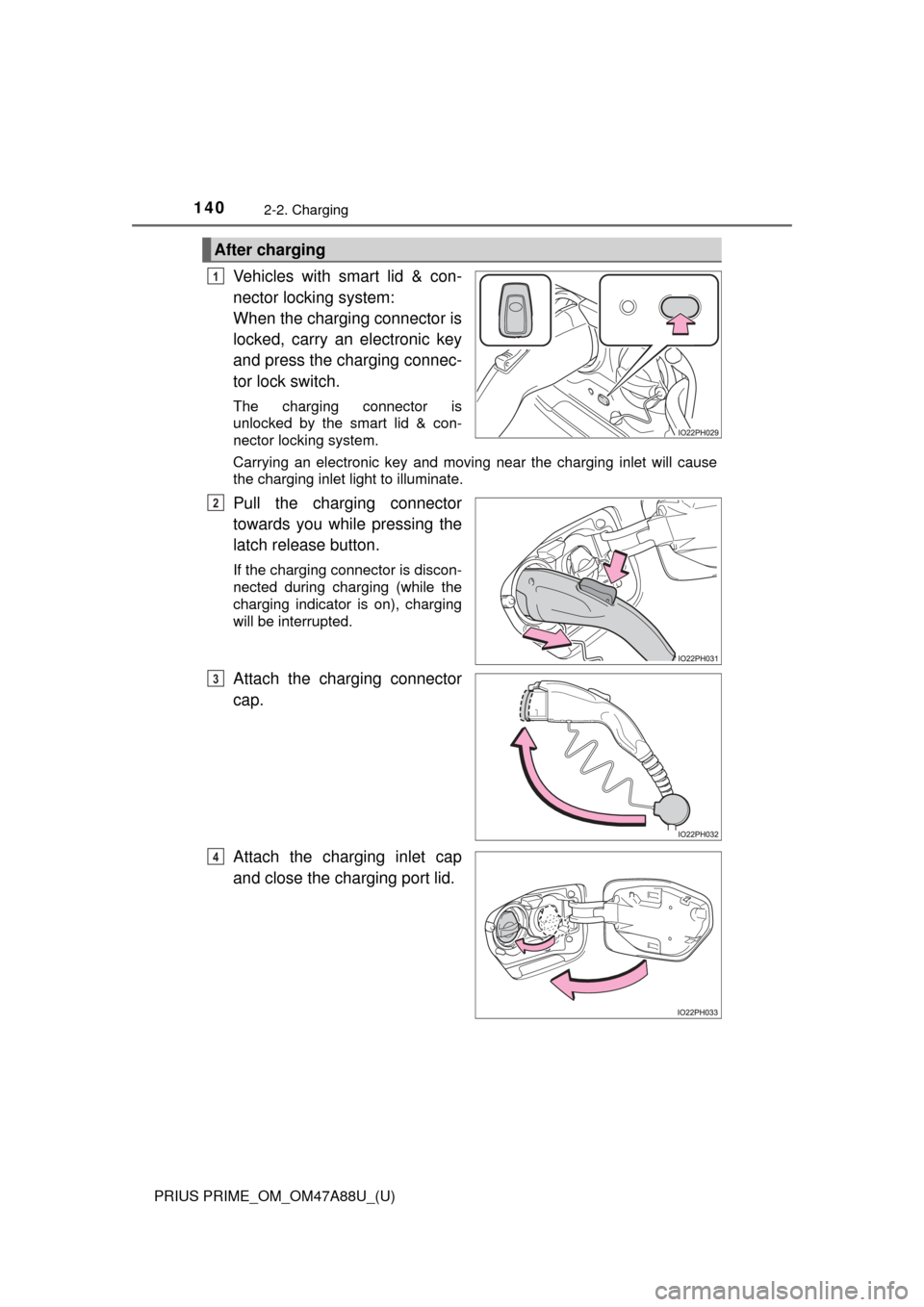
Vehicles with smart lid & con-
nector locking system:
When the charging connector is
locked, carry an electronic key
and press the charging connec-
tor lock switch.
The charging connector is
unlocked by the smart lid & con-
nector locking system.
Carrying an electronic key and moving near the charging inlet will cause
the charging inlet light to illuminate.
Pull the charging connector
towards you while pressing the
latch release button.
If the charging connector is discon-
nected during charging (while the
charging indicator is on), charging
will be interrupted.
Attach the charging connector
cap.
Attach the charging inlet cap
and close the charging port lid.
After charging
1
2
3
4
Page 141 of 784
PRIUS PRIME_OM_OM47A88U_(U)
1412-2. Charging
2
Plug-in hybrid system
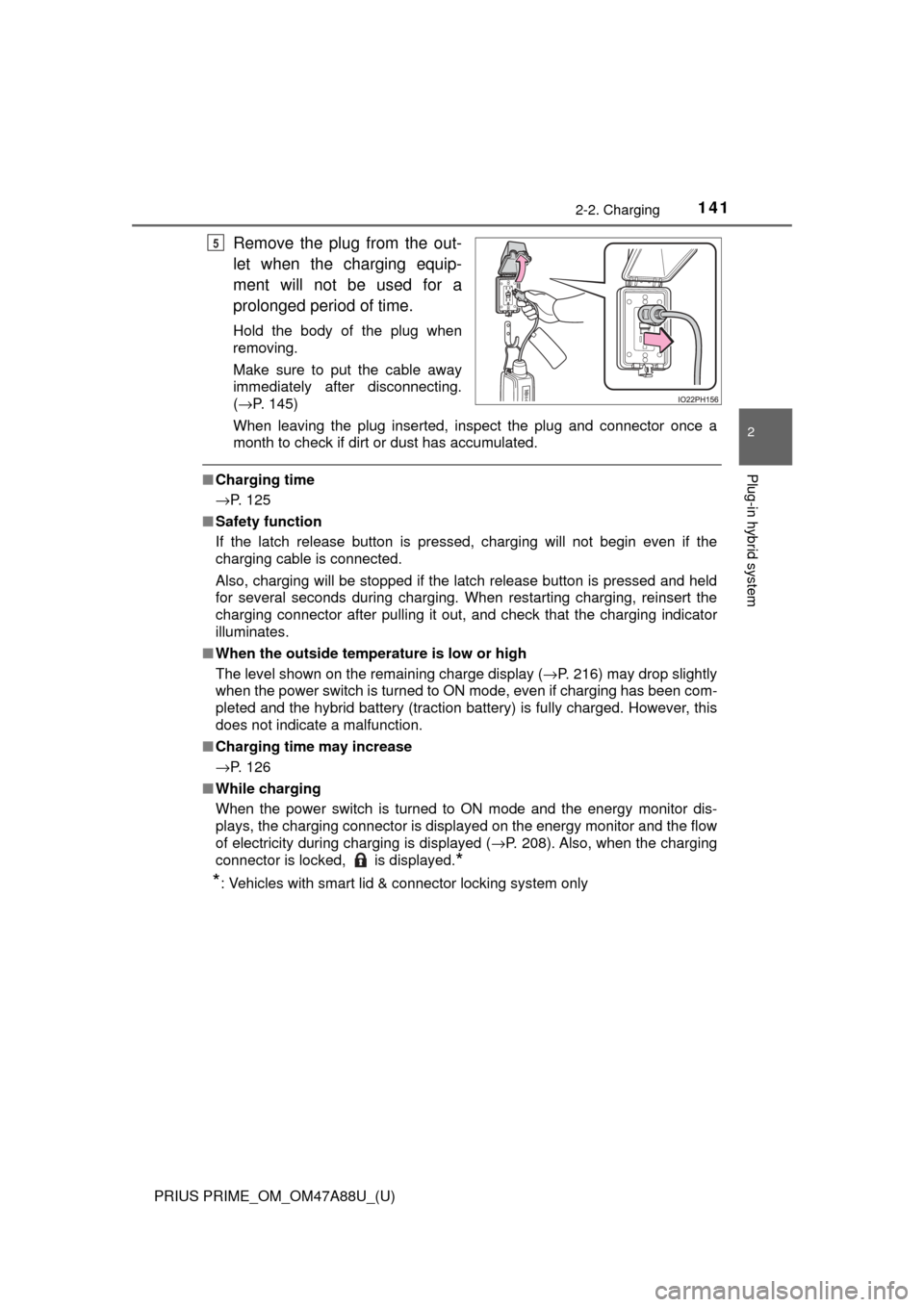
Remove the plug from the out-
let when the charging equip-
ment will not be used for a
prolonged period of time.
Hold the body of the plug when
removing.
Make sure to put the cable away
immediately after disconnecting.
(→P. 145)
When leaving the plug inserted, inspect the plug and connector once a
month to check if dirt or dust has accumulated.
■ Charging time
→P. 125
■ Safety function
If the latch release button is pressed, charging will not begin even if the
charging cable is connected.
Also, charging will be stopped if the latch release button is pressed and held
for several seconds during charging. When restarting charging, reinsert the
charging connector after pulling it out, and check that the charging indicator
illuminates.
■ When the outside temper ature is low or high
The level shown on the remaining charge display ( →P. 216) may drop slightly
when the power switch is turned to ON mode, even if charging has been com-
pleted and the hybrid battery (traction battery) is fully charged. However, this
does not indicate a malfunction.
■ Charging time may increase
→P. 126
■ While charging
When the power switch is turned to ON mode and the energy monitor dis-
plays, the charging connector is displayed on the energy monitor and the flow
of electricity during charging is displayed ( →P. 208). Also, when the charging
connector is locked, is displayed.
*
*
: Vehicles with smart lid & connector locking system only
5
Page 144 of 784

144
PRIUS PRIME_OM_OM47A88U_(U)
2-2. Charging
WARNING
■If the error warning indicator on the CCID (Charging Circuit Interrupt-
ing Device) illuminates or flashes during charging
There may be an electrical leakage in the power source path, or there may
be a malfunction in the charging cable or CCID (Charging Circuit Interr\
upt-
ing Device). Refer to P. 110 and follow the correction procedure. If the error
warning indicator does not turn off even after performing the correction pro-
cedure, immediately stop charging, remove the charging cable and contact
your Toyota dealer. Continuing to charge the vehicle in that condition may
lead to unforeseen accidents or serious injury.
■ After charging
Remove the plug if it will not be used for a long time.
Dirt and dust may accumulate plug or outlet, which could cause a malfunc-
tion or fire, possibly leading to death or serious injury.
■ Charging equipment
There is charging equipment under the rear seats. Make sure to observe
the following precautions regarding the charging equipment. Failure to
observe these precautions may result in death or serious injury such as
burns and electric shocks.
● The charging equipment is hot during charging. Do not touch the charging
equipment, as doing so may result in burns.
● Do not disassemble, repair or modify the charging equipment.
When the charging equipment needs to be repaired, consult your Toyota
dealer.
Page 146 of 784
146
PRIUS PRIME_OM_OM47A88U_(U)
2-2. Charging
NOTICE
■Using private power generator
Do not use private power generators as a power source for charging.
Doing so may make charging unstable, the voltage may be insufficient, and
the error warning indicator on the CCID (Charging Circuit Interrupting
Device) of the charging cable may flash.
■ Usable temperature range
● Do not charge if the outside temperature is -22 °F (-30 °C) or below, as it is
likely that charging will take longer, and equipment related to charging will
be damaged.
● Do not leave the vehicle or the charging cable in areas where the outside
temperature is lower than -40 °F (-40 °C). The vehicle or charging cable will
probably be damaged.
■ Charging equipment
Due to the environment in which the power equipment is located, charging
may be unstable due to noise, the voltage may be insufficient, and the error
warning indicator on the CCID (Charging Circuit Interrupting Device) of the
charging cable may flash.
Page 149 of 784

PRIUS PRIME_OM_OM47A88U_(U)
1492-2. Charging
2
Plug-in hybrid system
■Timer settings
A maximum of 15 charge schedules can be registered.
■ To make sure that the charging timer function operates correctly
Check the following items.
●Adjust the clock to the correct time ( →P. 185)
● Check that the power switch is turned off
● After registering the charge schedule, connect the charging cable
The charging start time is determined based on the charge schedule at the
time that the charging cable was connected.
● After connecting the charging cable, check that the charging indicator
flashes ( →P. 106)
● Do not use an outlet that has a power cut off function (including a timer func-
tion)
Use an outlet that constantly supplies electricity. For outlets where the
power is cut off due to a timer function, etc., charging may not be carried
out according to plan if the power is cut off during the set time.
■ When the charging cable rema ins connected to the vehicle
Even if multiple consecutive charge schedules are registered, the next
charge will not be carried out according to the timer until the charging cable is
removed and reconnected after charging completes. Also, when the hybrid
battery (traction battery) is fully charged, charging according to the timer will
not be carried out.
■ “Climate Prep”
●When the air conditioning-linked setting is turned on, the air conditioning
operates until the set departure time. T herefore, the air conditioning will con-
sume electricity and charging may not complete by the set departure time.
● If the hybrid battery (traction battery) is fully charged, charging will not be
carried out, even if the charge schedule is set. However, if “Climate Prep” is
turned on, the air conditioning will operate only once when it nears the time
set in “Departure”. If this occurs, the air conditioning will consume electricity
and the remaining charge of the hybrid battery (traction battery) when
departing may be decreased.
■ Smartphone-linked op eration (vehicles with 11.6-inch display)
After applying to Entune, it is possible to use the smartphone application to
change charging timer settings.
For details about Entune, refer to http://www.toyota.com/entune/.