indicator TOYOTA PRIUS PRIME 2017 2.G Repair Manual
[x] Cancel search | Manufacturer: TOYOTA, Model Year: 2017, Model line: PRIUS PRIME, Model: TOYOTA PRIUS PRIME 2017 2.GPages: 784, PDF Size: 14.98 MB
Page 211 of 784

PRIUS PRIME_OM_OM47A88U_(U)
2113. Instrument cluster
3
Instrument cluster
EV indicator*1, 2
The EV indicator comes on when the vehicle is driven using only the
electric motor (traction motor) or the gasoline engine is stopped.
Hybrid battery (traction battery) status
→P. 216
Eco score
→P. 214
EV driving range
→P. 239
●By keeping the indicator within Ec o area, more Eco-friendly driv-
ing can be achieved.
● Charge area indicates regeneration
*3 status. Regenerated
energy will be used to charge the hybrid battery (traction battery).
*1: Not displayed on the sub-screen or head-up display.
*2: The EV indicator function can be turned off in the “Meter Customize”
settings. ( →P. 233)
*3: When used in this manual, “regeneration” refers to the conversion of
energy created by the movement of the vehicle into electrical energy.
5
6
7
8
Page 212 of 784
212
PRIUS PRIME_OM_OM47A88U_(U)
3. Instrument cluster
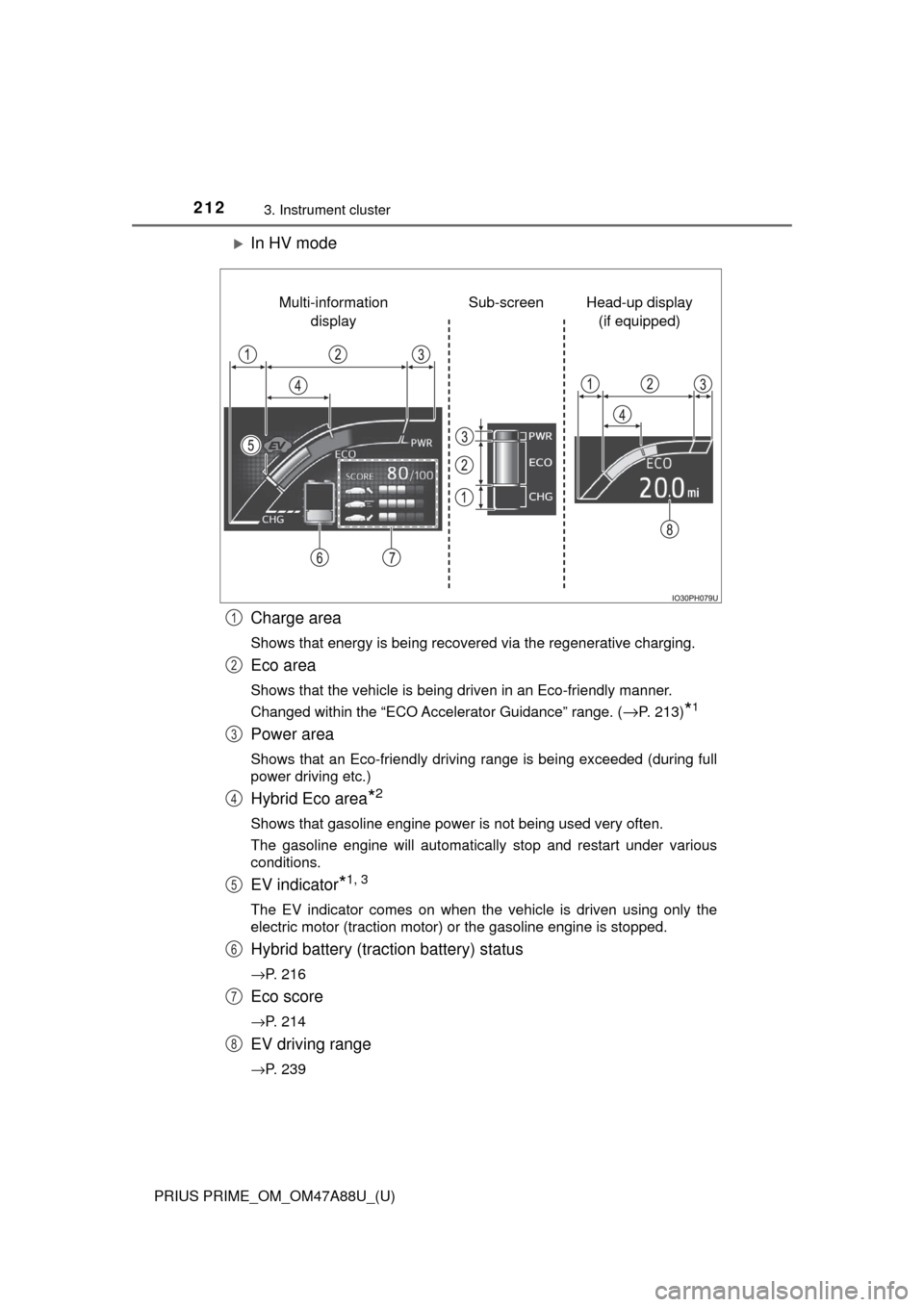
In HV mode
Charge area
Shows that energy is being recovered via the regenerative charging.
Eco area
Shows that the vehicle is being driven in an Eco-friendly manner.
Changed within the “ECO Accelerator Guidance” range. (
→P. 213)*1
Power area
Shows that an Eco-friendly driving range is being exceeded (during full
power driving etc.)
Hybrid Eco area*2
Shows that gasoline engine power is not being used very often.
The gasoline engine will automatically stop and restart under various
conditions.
EV indicator*1, 3
The EV indicator comes on when the vehicle is driven using only the
electric motor (traction motor) or the gasoline engine is stopped.
Hybrid battery (traction battery) status
→P. 216
Eco score
→P. 214
EV driving range
→P. 239
Head-up display (if equipped)
Sub-screen
Multi-information
display
1
2
3
4
5
6
7
8
Page 213 of 784
PRIUS PRIME_OM_OM47A88U_(U)
2133. Instrument cluster
3
Instrument cluster
●By keeping the indicator within Ec o area, more Eco-friendly driv-
ing can be achieved.
● Charge area indicates regeneration
*4 status. Regenerated
energy will be used to charge the hybrid battery (traction battery).
*1: Not displayed on the sub-screen or head-up display.
*2: Not displayed on the sub-screen.
*3: The EV indicator function can be turned off in the “Meter Customize”
settings. ( →P. 233)
*4: When used in this manual, “regeneration” refers to the conversion of
energy created by the movement of the vehicle into electrical energy.
■
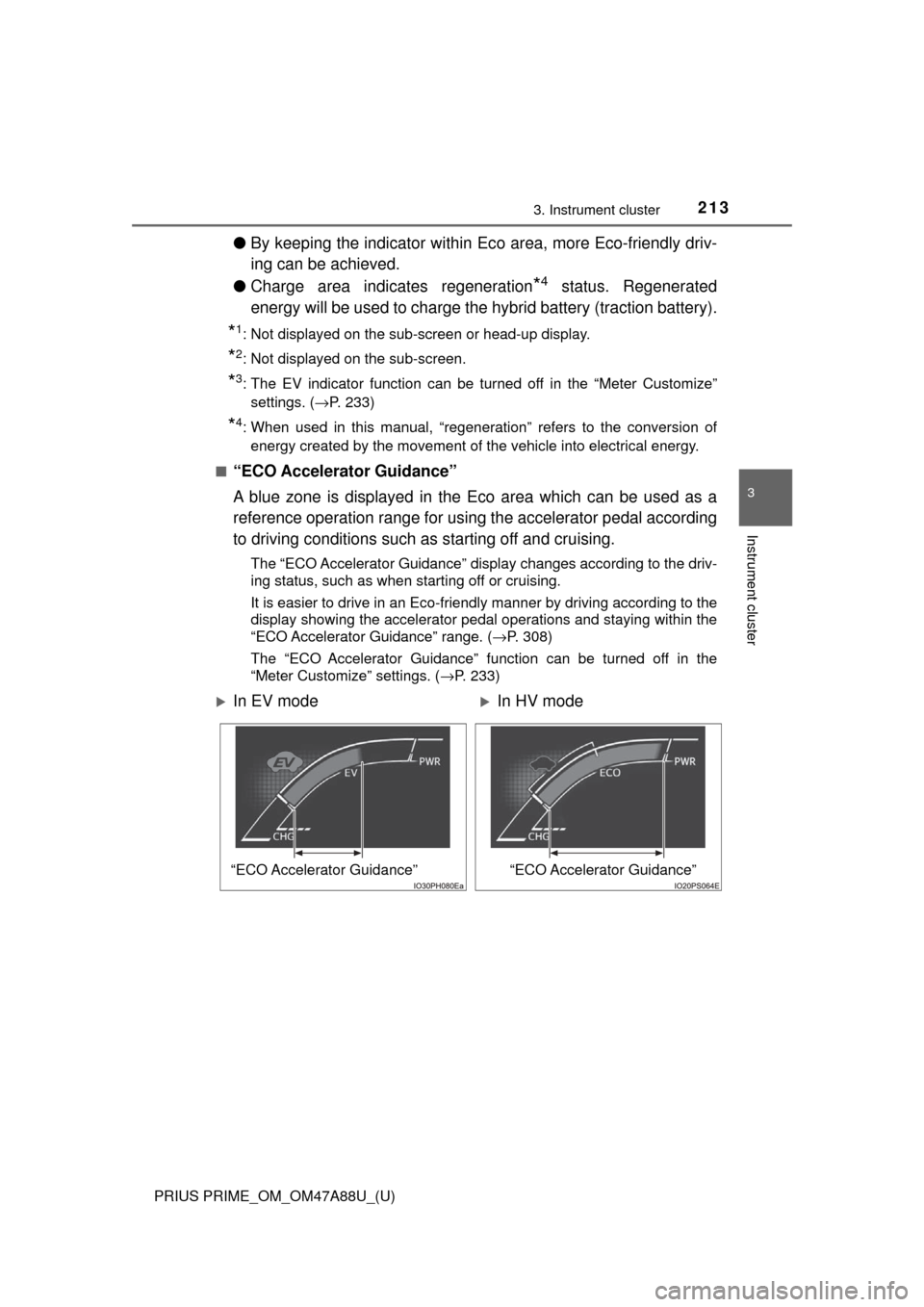
“ECO Accelerator Guidance”
A blue zone is displayed in the Eco area which can be used as a
reference operation range for using the accelerator pedal according
to driving conditions such as starting off and cruising.
The “ECO Accelerator Guidance” display changes according to the driv-
ing status, such as when starting off or cruising.
It is easier to drive in an Eco-friendly manner by driving according to the
display showing the accelerator pedal operations and staying within the
“ECO Accelerator Guidance” range. ( →P. 308)
The “ECO Accelerator Guidance” function can be turned off in the
“Meter Customize” settings. ( →P. 233)
In EV modeIn HV mode
“ECO Accelerator Guidance”“ECO Accelerator Guidance”
Page 215 of 784
PRIUS PRIME_OM_OM47A88U_(U)
2153. Instrument cluster
3
Instrument cluster
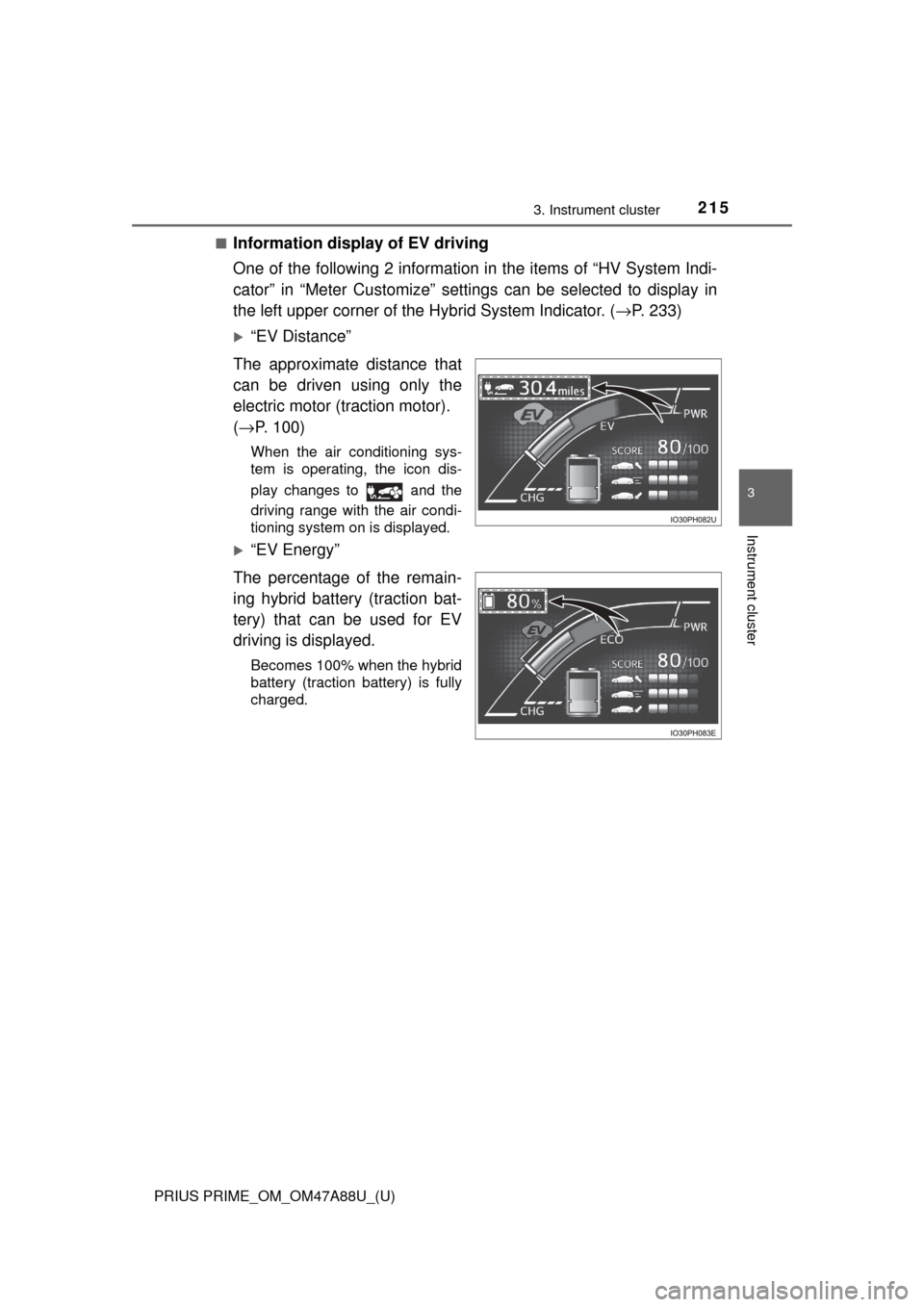
■Information display of EV driving
One of the following 2 information in the items of “HV System Indi-
cator” in “Meter Customize” settings can be selected to display in
the left upper corner of the Hybrid System Indicator. ( →P. 233)
“EV Distance”
The approximate distance that
can be driven using only the
electric motor (traction motor).
( → P. 100)
When the air conditioning sys-
tem is operating, the icon dis-
play changes to and the
driving range with the air condi-
tioning system on is displayed.
“EV Energy”
The percentage of the remain-
ing hybrid battery (traction bat-
tery) that can be used for EV
driving is displayed.
Becomes 100% when the hybrid
battery (traction battery) is fully
charged.
Page 216 of 784
216
PRIUS PRIME_OM_OM47A88U_(U)
3. Instrument cluster
■When operation of each function stops
● The Hybrid System Indicator stops operating in the following situations.
• The “READY” indicator is not illuminated.
• The shift position is not D or B.
● The Eco score and “ECO Accelerator Guidance” stop operating in the fol-
lowing situations.
• The Hybrid System Indicator is not operating.
• Dynamic radar cruise control with full-speed range is being used.
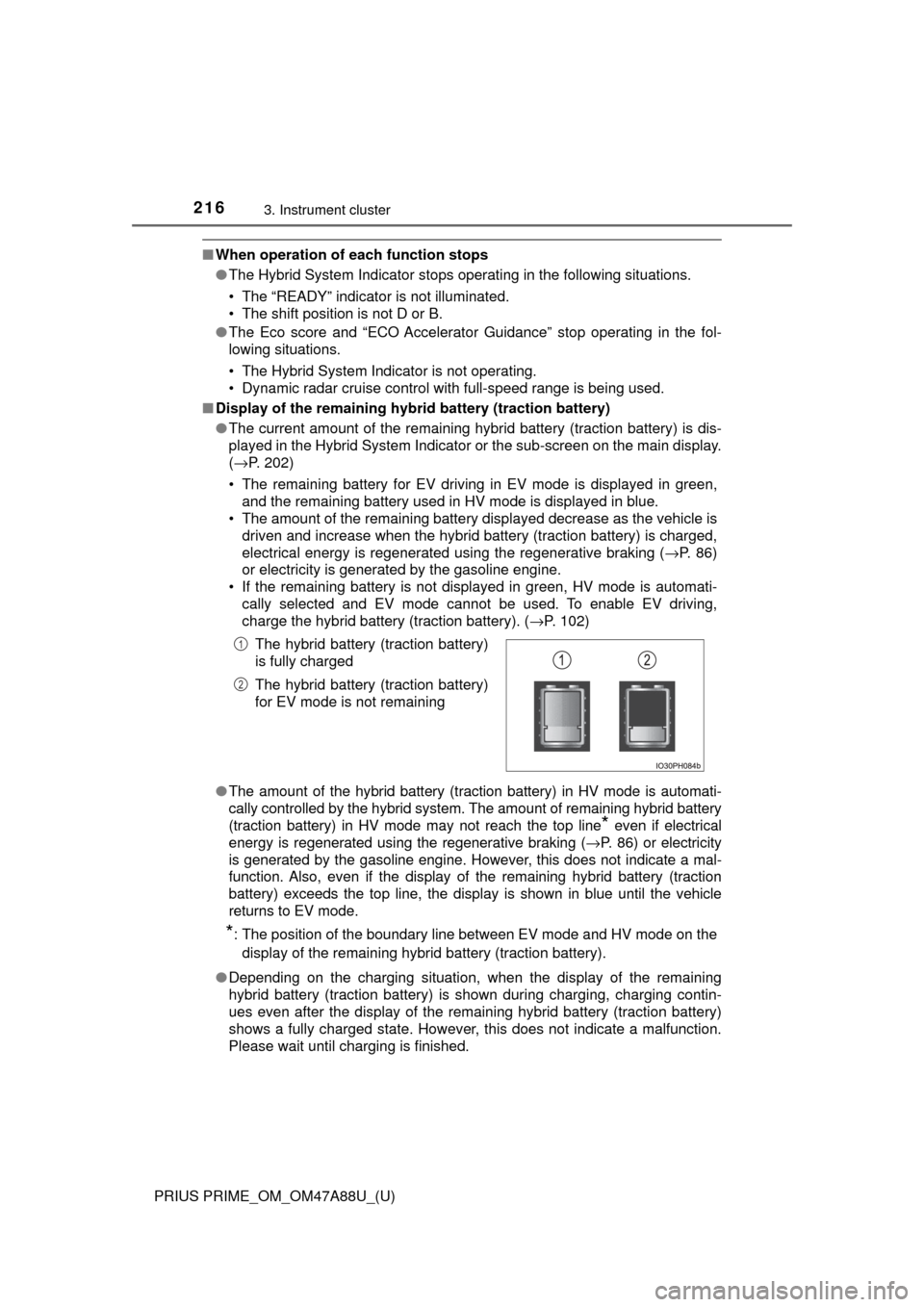
■ Display of the remaining hybr id battery (traction battery)
● The current amount of the remaining hybrid battery (traction battery) is dis-
played in the Hybrid System Indicator or the sub-screen on the main display.
(→P. 202)
• The remaining battery for EV driving in EV mode is displayed in green, and the remaining battery used in HV mode is displayed in blue.
• The amount of the remaining battery displayed decrease as the vehicle is
driven and increase when the hybrid battery (traction battery) is charged,
electrical energy is regenerated using the regenerative braking (→P. 86)
or electricity is generated by the gasoline engine.
• If the remaining battery is not displayed in green, HV mode is automati- cally selected and EV mode cannot be used. To enable EV driving,
charge the hybrid battery (traction battery). ( →P. 102)
● The amount of the hybrid battery (traction battery) in HV mode is automati-
cally controlled by the hybrid system. The amount of remaining hybrid battery
(traction battery) in HV mode may not reach the top line
* even if electrical
energy is regenerated using the regenerative braking ( →P. 86) or electricity
is generated by the gasoline engine. However, this does not indicate a mal-
function. Also, even if the display of the remaining hybrid battery (traction
battery) exceeds the top line, the display is shown in blue until the vehicle
returns to EV mode.
*: The position of the boundary line between EV mode and HV mode on the
display of the remaining hybrid battery (traction battery).
● Depending on the charging situation, when the display of the remaining
hybrid battery (traction battery) is shown during charging, charging contin-
ues even after the display of the remaining hybrid battery (traction battery)
shows a fully charged state. However, this does not indicate a malfunction.
Please wait until charging is finished. The hybrid battery (traction battery)
is fully charged
The hybrid battery (traction battery)
for EV mode is not remaining
1
2
Page 233 of 784
PRIUS PRIME_OM_OM47A88U_(U)
2333. Instrument cluster
3
Instrument cluster
*: If equipped
■
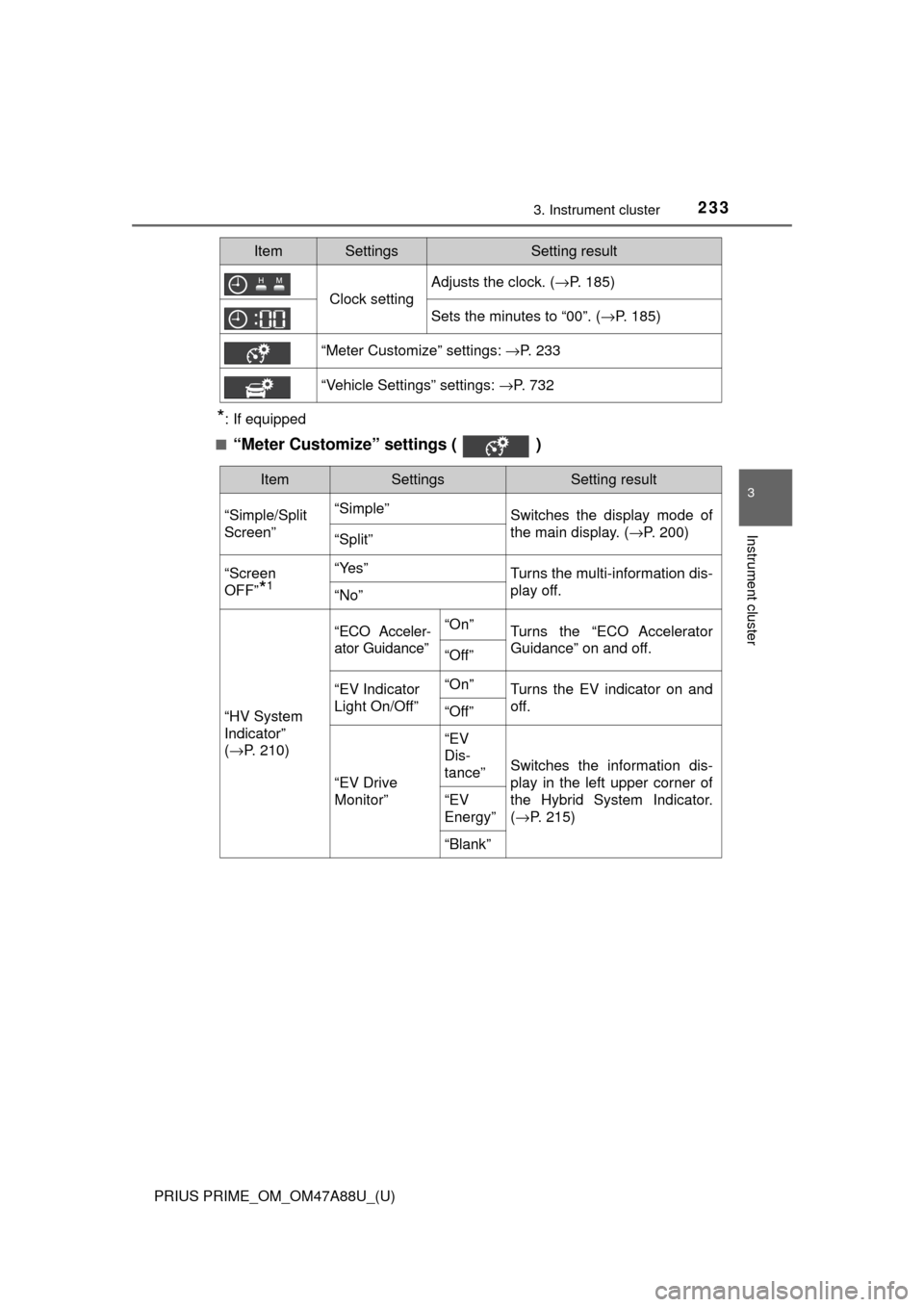
“Meter Customize” settings ( )
Clock setting
Adjusts the clock. ( →P. 185)
Sets the minutes to “00”. (→P. 185)
“Meter Customize” settings: →P. 233
“Vehicle Settings” settings: →P. 732
ItemSettingsSetting result
ItemSettingsSetting result
“Simple/Split
Screen” “Simple”
Switches the display mode of
the main display. (→P. 200)
“Split”
“Screen
OFF”
*1
“Yes”Turns the multi-information dis-
play off.
“No”
“HV System
Indicator”
( → P. 210)
“ECO Acceler-
ator Guidance”“On”Turns the “ECO Accelerator
Guidance” on and off.
“Off”
“EV Indicator
Light On/Off” “On”Turns the EV indicator on and
off.
“Off”
“EV Drive
Monitor”“EV
Dis-
tance”
Switches the information dis-
play in the left upper corner of
the Hybrid System Indicator.
(
→ P. 215)
“EV
Energy”
“Blank”
Page 238 of 784
238
PRIUS PRIME_OM_OM47A88U_(U)
3. Instrument cluster
Head-up display∗
The units used on the display may differ depending on the target region.
∗: If equipped
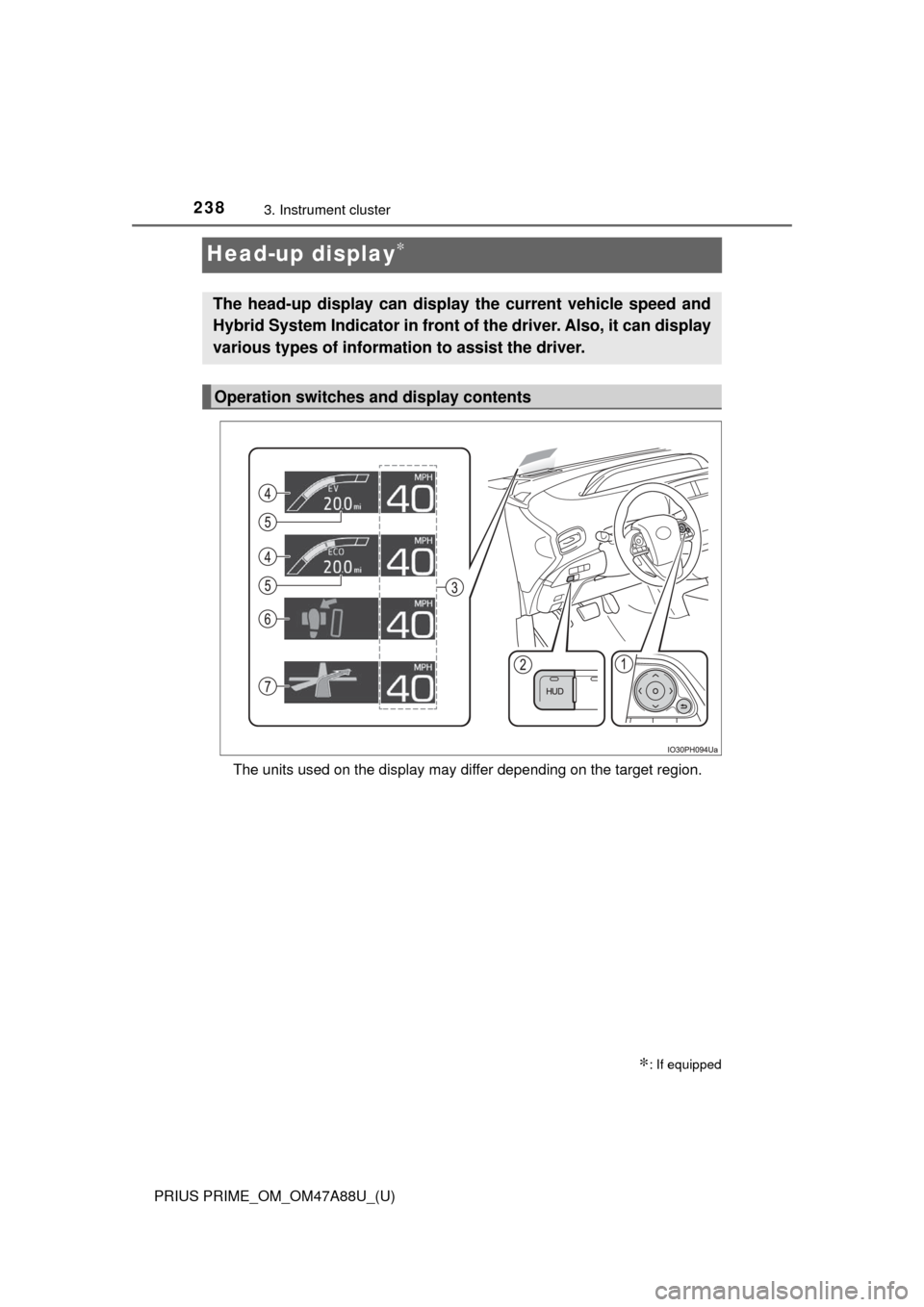
The head-up display can display the current vehicle speed and
Hybrid System Indicator in front of the driver. Also, it can display
various types of information to assist the driver.
Operation switches and display contents
Page 239 of 784

PRIUS PRIME_OM_OM47A88U_(U)
2393. Instrument cluster
3
Instrument cluster
Meter control switches
These switches are used when adjusting the display position and bright-
ness of the head-up display. (→P. 241)
“HUD” (Head-up display) switch (→P. 2 4 0)
Vehicle speed display
Hybrid System Indicator ( →P. 210)
The display contents of the Hybrid System Indicator are different in EV
mode and HV mode.
EV driving range
Indicates the estimated distance that can be driven using the current
remaining hybrid battery (traction battery). ( →P. 100)
When the air conditioning system is operating, the driving range with the
air conditioning system on is displayed.
The EV driving range may shorten even when not driving due to power
consumption by the system.
Insert display ( →P. 2 4 2)
This display inserts information from each driving support system accord-
ing to driving conditions.
Route guidance display ( →P. 243)
This display is automatically shown when the navigation system is per-
forming route guidance.
1
2
3
4
5
6
7
Page 240 of 784
240
PRIUS PRIME_OM_OM47A88U_(U)
3. Instrument cluster
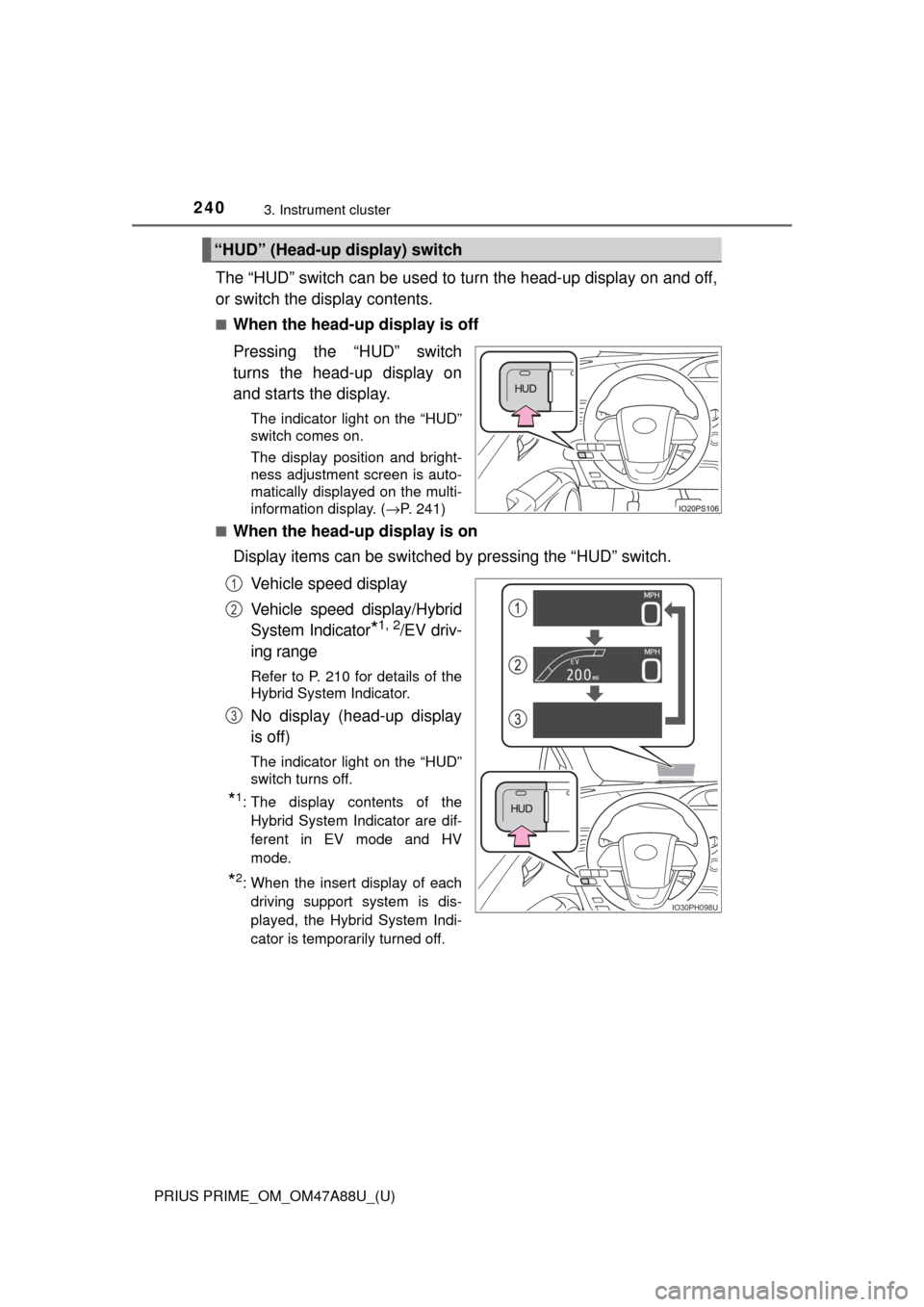
The “HUD” switch can be used to turn the head-up display on and off,
or switch the display contents.
■When the head-up display is off
Pressing the “HUD” switch
turns the head-up display on
and starts the display.
The indicator light on the “HUD”
switch comes on.
The display position and bright-
ness adjustment screen is auto-
matically displayed on the multi-
information display. (→P. 241)
■
When the head-up display is on
Display items can be switched by pressing the “HUD” switch.
Vehicle speed display
Vehicle speed display/Hybrid
System Indicator
*1, 2/EV driv-
ing range
Refer to P. 210 for details of the
Hybrid System Indicator.
No display (head-up display
is off)
The indicator light on the “HUD”
switch turns off.
*1: The display contents of the Hybrid System Indicator are dif-
ferent in EV mode and HV
mode.
*2: When the insert display of eachdriving support system is dis-
played, the Hybrid System Indi-
cator is temporarily turned off.
“HUD” (Head-up display) switch
IO30PH098U
1
2
3
Page 249 of 784
PRIUS PRIME_OM_OM47A88U_(U)
2493. Instrument cluster
3
Instrument cluster
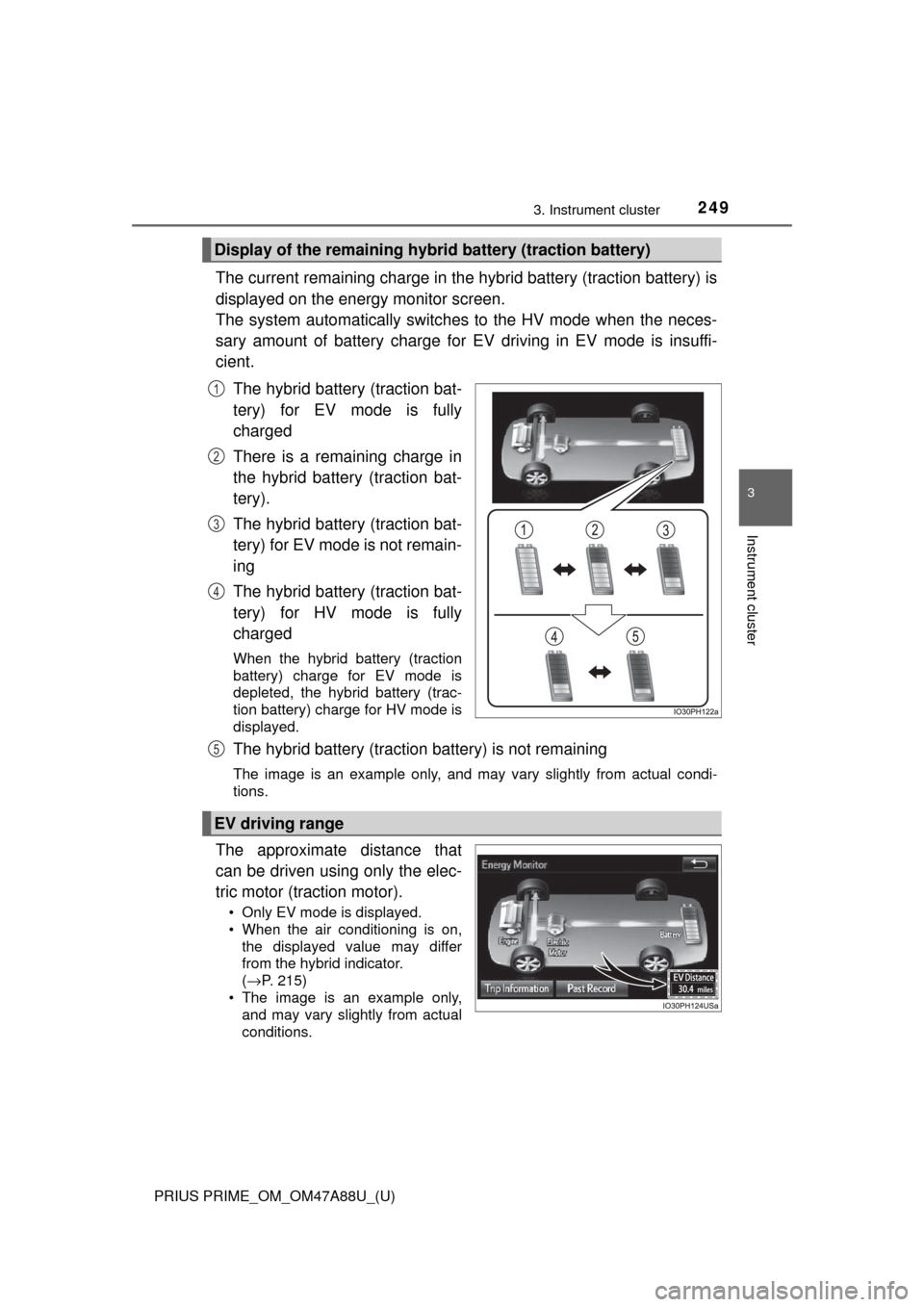
The current remaining charge in the hybrid battery (traction battery) is
displayed on the energy monitor screen.
The system automatically switches to the HV mode when the neces-
sary amount of battery charge for EV driving in EV mode is insuffi-
cient.
The hybrid battery (traction bat-
tery) for EV mode is fully
charged
There is a remaining charge in
the hybrid battery (traction bat-
tery).
The hybrid battery (traction bat-
tery) for EV mode is not remain-
ing
The hybrid battery (traction bat-
tery) for HV mode is fully
charged
When the hybrid battery (traction
battery) charge for EV mode is
depleted, the hybrid battery (trac-
tion battery) charge for HV mode is
displayed.
The hybrid battery (traction battery) is not remaining
The image is an example only, and may vary slightly from actual condi-
tions.
The approximate distance that
can be driven using only the elec-
tric motor (traction motor).
• Only EV mode is displayed.
• When the air conditioning is on,the displayed value may differ
from the hybrid indicator.
(→ P. 215)
• The image is an example only, and may vary slightly from actual
conditions.
Display of the remaining hybr id battery (traction battery)
1
2
3
4
EV driving range
5