light TOYOTA PRIUS PRIME 2017 2.G Repair Manual
[x] Cancel search | Manufacturer: TOYOTA, Model Year: 2017, Model line: PRIUS PRIME, Model: TOYOTA PRIUS PRIME 2017 2.GPages: 784, PDF Size: 14.98 MB
Page 209 of 784
PRIUS PRIME_OM_OM47A88U_(U)
2093. Instrument cluster
3
Instrument cluster
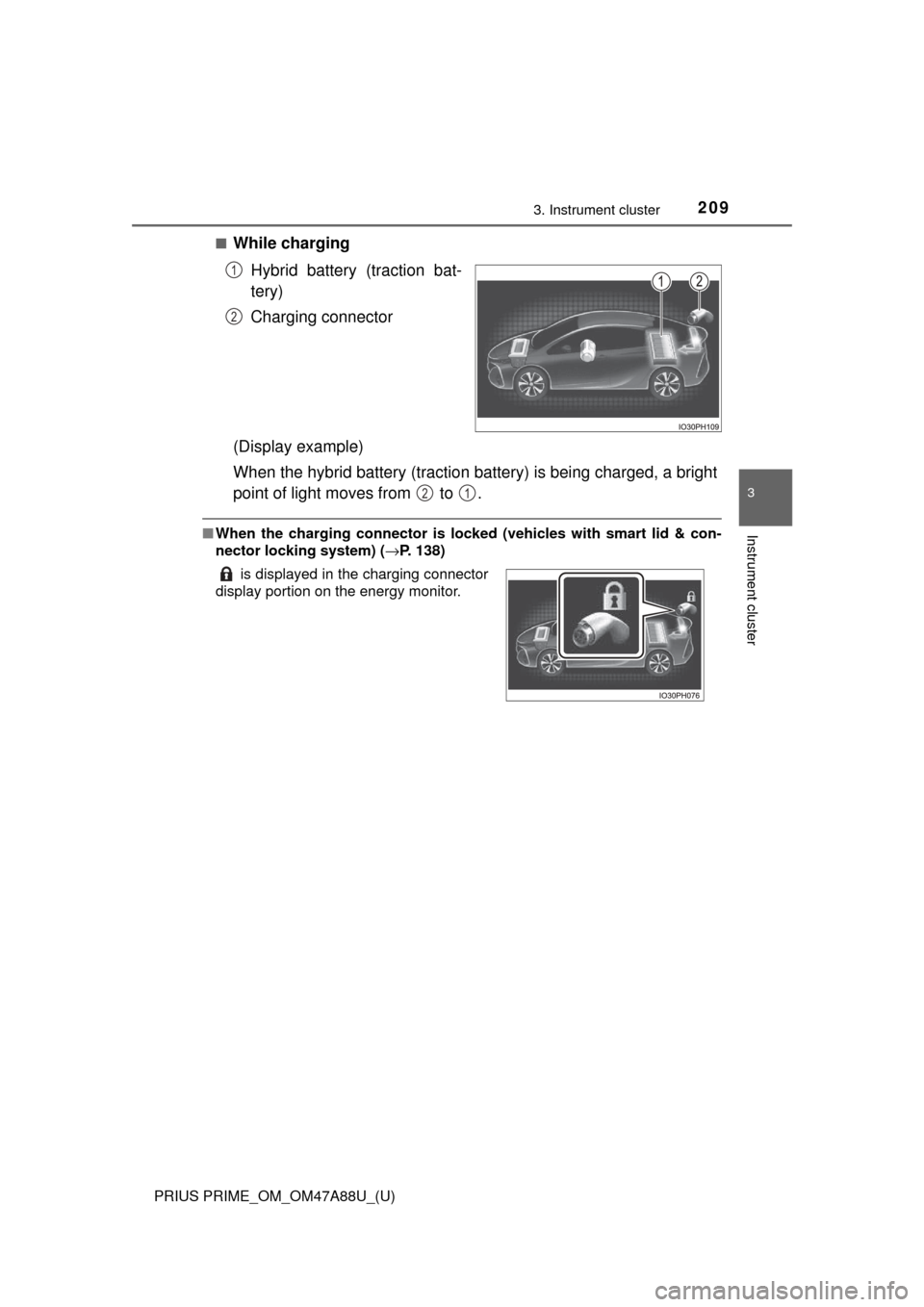
■While chargingHybrid battery (traction bat-
tery)
Charging connector
(Display example)
When the hybrid battery (traction battery) is being charged, a bright
point of light moves from to .
■ When the charging connector is lo cked (vehicles with smart lid & con-
nector locking system) ( →P. 138)
1
2
is displayed in the charging connector
display portion on the energy monitor.
21
Page 233 of 784
PRIUS PRIME_OM_OM47A88U_(U)
2333. Instrument cluster
3
Instrument cluster
*: If equipped
■
“Meter Customize” settings ( )
Clock setting
Adjusts the clock. ( →P. 185)
Sets the minutes to “00”. (→P. 185)
“Meter Customize” settings: →P. 233
“Vehicle Settings” settings: →P. 732
ItemSettingsSetting result
ItemSettingsSetting result
“Simple/Split
Screen” “Simple”
Switches the display mode of
the main display. (→P. 200)
“Split”
“Screen
OFF”
*1
“Yes”Turns the multi-information dis-
play off.
“No”
“HV System
Indicator”
( → P. 210)
“ECO Acceler-
ator Guidance”“On”Turns the “ECO Accelerator
Guidance” on and off.
“Off”
“EV Indicator
Light On/Off” “On”Turns the EV indicator on and
off.
“Off”
“EV Drive
Monitor”“EV
Dis-
tance”
Switches the information dis-
play in the left upper corner of
the Hybrid System Indicator.
(
→ P. 215)
“EV
Energy”
“Blank”
Page 234 of 784
234
PRIUS PRIME_OM_OM47A88U_(U)
3. Instrument cluster
“Pop-up Display
On/Off”
“Navigation”*2“On”
Turns the pop-up display of the
selected item on the multi-
information display on and off.
“Off”
“Instrument
Panel Light”“On”
“Off”
“Climate
Settings”“On”
“Off”
“Cruise
Control
Operation
Display”“On”
“Off”
“HUD
Settings”
*2
“On”
“Off”
“Driving Mode
Select”
“On”
“Off”
“Multimedia
Menu”
*2
“On”
“Off”
“Traction
Battery
Cooler”“On”
“Off”
“Speed
Limit”
*2, 3
(
→ P. 243)
“Off”Switches the operation con-
tents of the speed limit func-
tion.
“Only Display”
“With Caution”
“Language”
“English” (English)
Switches the language dis-
played on the screen.“Français” (French)
“Español” (Spanish)
“Calendar”
Month/Day/Year*4Changes the date used to
record electricity and fuel con-
sumption data.
Day/Month/Year*5
ItemSettingsSetting result
Page 240 of 784
240
PRIUS PRIME_OM_OM47A88U_(U)
3. Instrument cluster
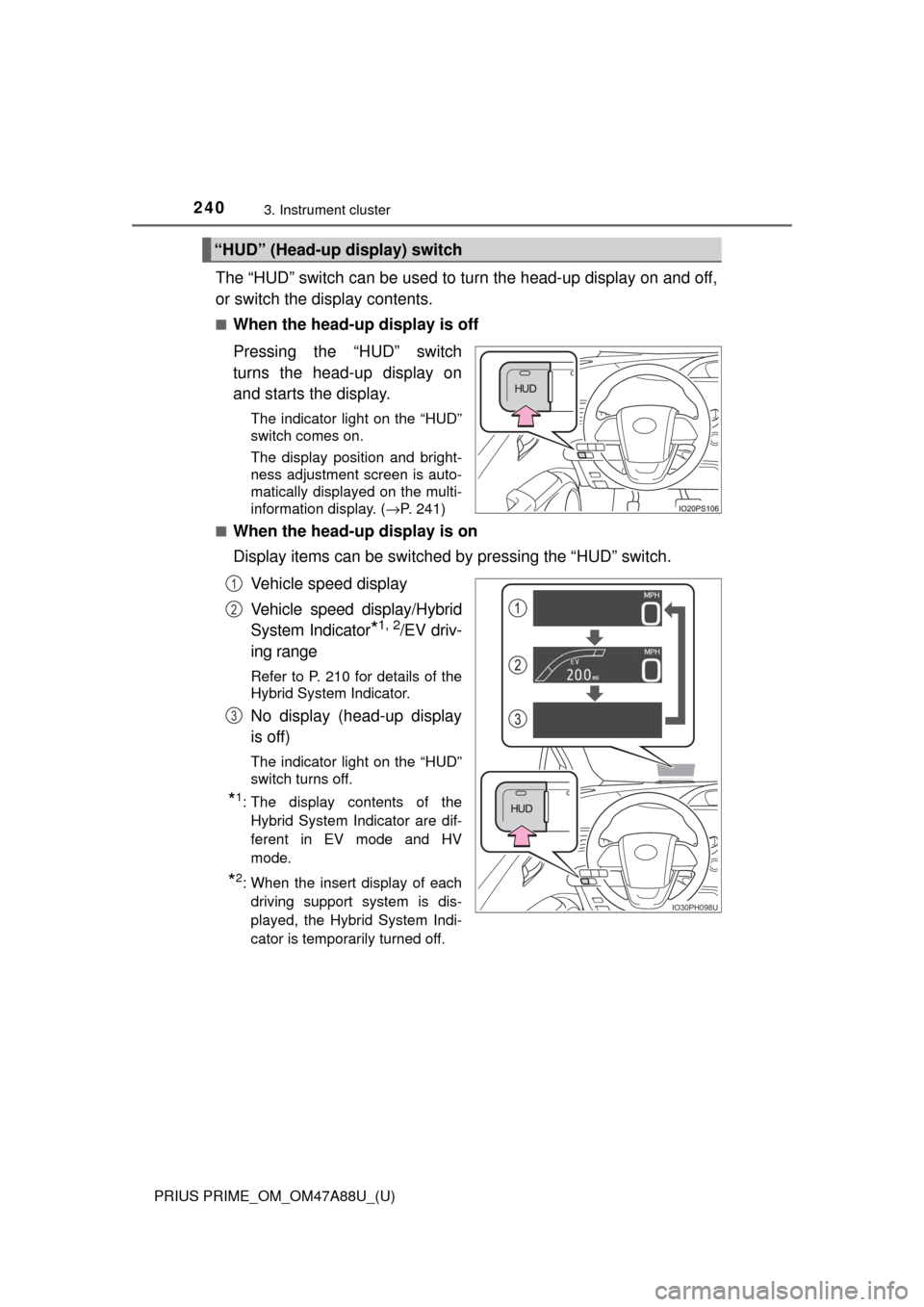
The “HUD” switch can be used to turn the head-up display on and off,
or switch the display contents.
■When the head-up display is off
Pressing the “HUD” switch
turns the head-up display on
and starts the display.
The indicator light on the “HUD”
switch comes on.
The display position and bright-
ness adjustment screen is auto-
matically displayed on the multi-
information display. (→P. 241)
■
When the head-up display is on
Display items can be switched by pressing the “HUD” switch.
Vehicle speed display
Vehicle speed display/Hybrid
System Indicator
*1, 2/EV driv-
ing range
Refer to P. 210 for details of the
Hybrid System Indicator.
No display (head-up display
is off)
The indicator light on the “HUD”
switch turns off.
*1: The display contents of the Hybrid System Indicator are dif-
ferent in EV mode and HV
mode.
*2: When the insert display of eachdriving support system is dis-
played, the Hybrid System Indi-
cator is temporarily turned off.
“HUD” (Head-up display) switch
IO30PH098U
1
2
3
Page 242 of 784
242
PRIUS PRIME_OM_OM47A88U_(U)
3. Instrument cluster
■Insert displays of the driving support systems
Insert displays are linked with the operation of the following sys-
tems and used to show some of the information shown on the multi-
information display on the head-up display.
*: If equipped
■
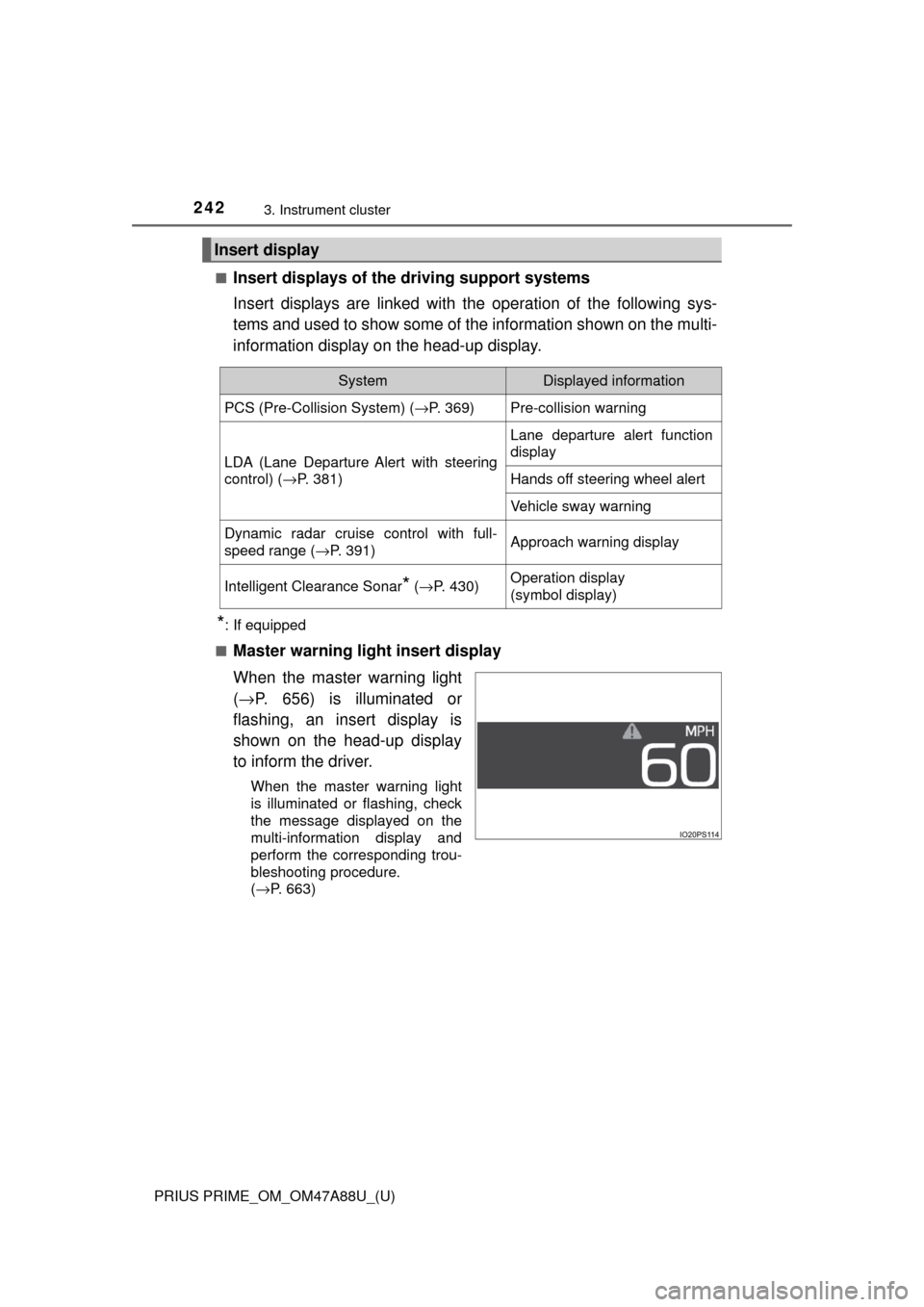
Master warning light insert display
When the master warning light
( → P. 656) is illuminated or
flashing, an insert display is
shown on the head-up display
to inform the driver.
When the master warning light
is illuminated or flashing, check
the message displayed on the
multi-information display and
perform the corresponding trou-
bleshooting procedure.
( →P. 663)
Insert display
SystemDisplayed information
PCS (Pre-Collision System) ( →P. 369)Pre-collision warning
LDA (Lane Departure Alert with steering
control) (→P. 381)
Lane departure alert function
display
Hands off steering wheel alert
Vehicle sway warning
Dynamic radar cruise control with full-
speed range ( →P. 391)Approach warning display
Intelligent Clearance Sonar* (→ P. 430)Operation display
(symbol display)
Page 244 of 784

244
PRIUS PRIME_OM_OM47A88U_(U)
3. Instrument cluster
■Enabling/disabling of the head-up display
When the head-up display is turned off with the “HUD” switch, it is not dis-
played until the “HUD” switch is used to turn the head-up display on again.
(Operation of the head-up display is not linked with the power switch.)
■ Display brightness
●The brightness of the head-up display is automatically adjusted according to
the operation status of the headlights (on/off) and the brightness of the sur-
roundings.
● When the brightness of the head-up display is adjusted to a certain level or
higher, the display automatically dims when the vehicle is stopped. Once the
vehicle starts off and the vehicle speed reaches approximately 3.1 mph
(5 km/h) or more, the display automatically returns to its previous bright-
ness.
■ Vehicle speed display
In extremely cold environments, the display of the speedometer and the vehi-
cle speed of the head-up display may slightly differ.
■ Head-up display
The head-up display may seem dark and hard to see when viewed through
sunglasses, especially polarized sunglasses.
■ When the 12-volt battery is disconnected
The customize settings of the head-up display will be reset.
■ Route guidance display
The route guidance is not displayed on both the head-up display and multi-
information display simultaneously. When the route guidance is displayed on
the head-up display, the multi-information display does not display the route
guidance even if the navigation system-linked display ( →P. 225) is selected
on the multi-information display.
Page 247 of 784

PRIUS PRIME_OM_OM47A88U_(U)
2473. Instrument cluster
3
Instrument cluster
■Function summary
The energy monitor can be used to check the vehicle drive status,
hybrid system operation status and energy regeneration status.
■Flow of energy and display details
When energy is flowing, an arrow appears and a bright point of light
moves to show the direction of the flow of energy. When energy is
not flowing, the bright point of light are not displayed.
If the “Trip Information” or “Past Record” screen is displayed, select
“Energy”.
How to read the energy monitor
Audio system screen
When the vehicle is powered by
the electric motor (traction
motor)
When the vehicle is powered by
both the gasoline engine and
the electric motor (traction
motor)
When the vehicle is powered by
the gasoline engine
Page 248 of 784
248
PRIUS PRIME_OM_OM47A88U_(U)
3. Instrument cluster
These images are examples only, and may vary slightly from actual
conditions.
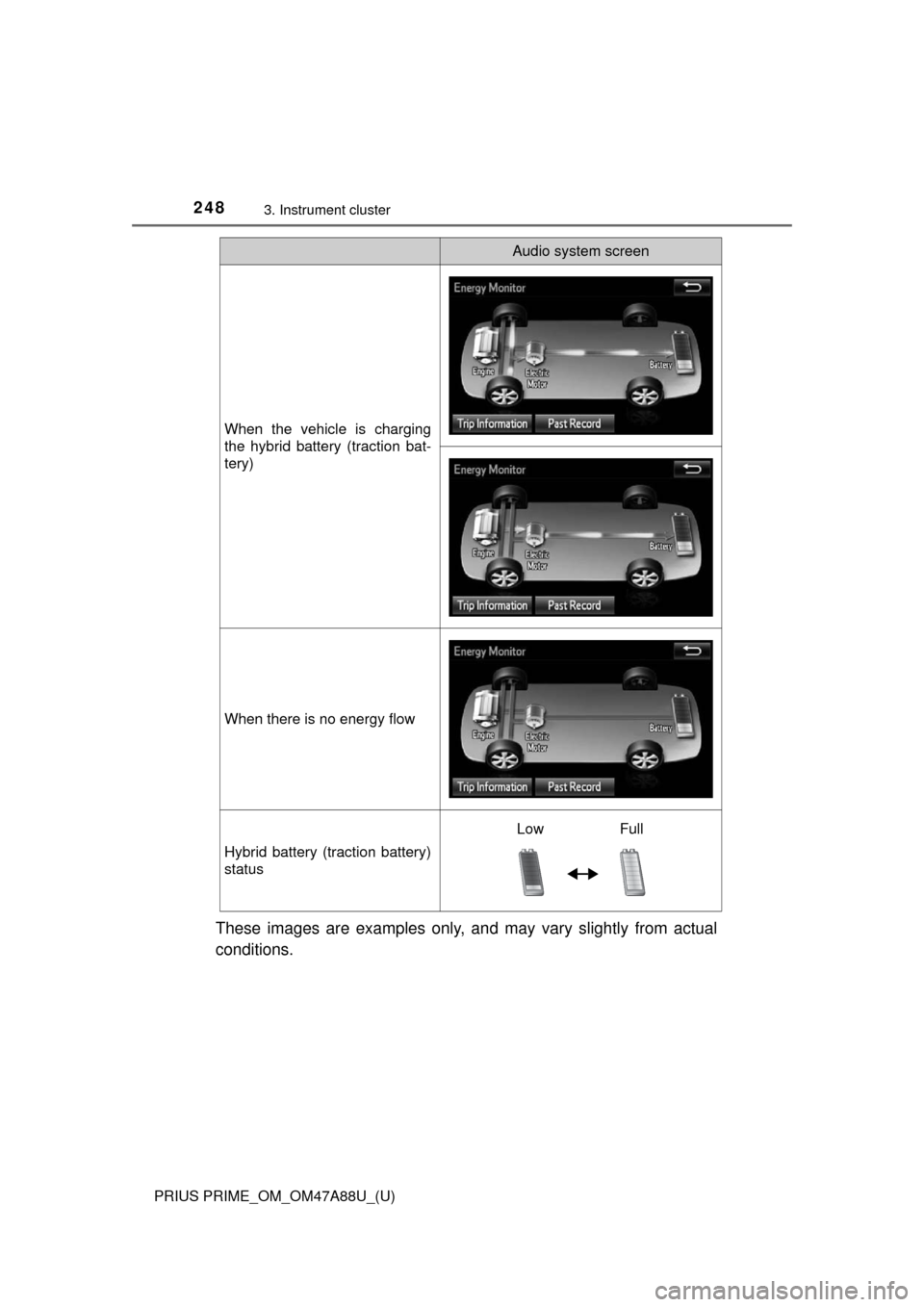
When the vehicle is charging
the hybrid battery (traction bat-
tery)
When there is no energy flow
Hybrid battery (traction battery)
status
Audio system screen
Low Full
Page 249 of 784
PRIUS PRIME_OM_OM47A88U_(U)
2493. Instrument cluster
3
Instrument cluster
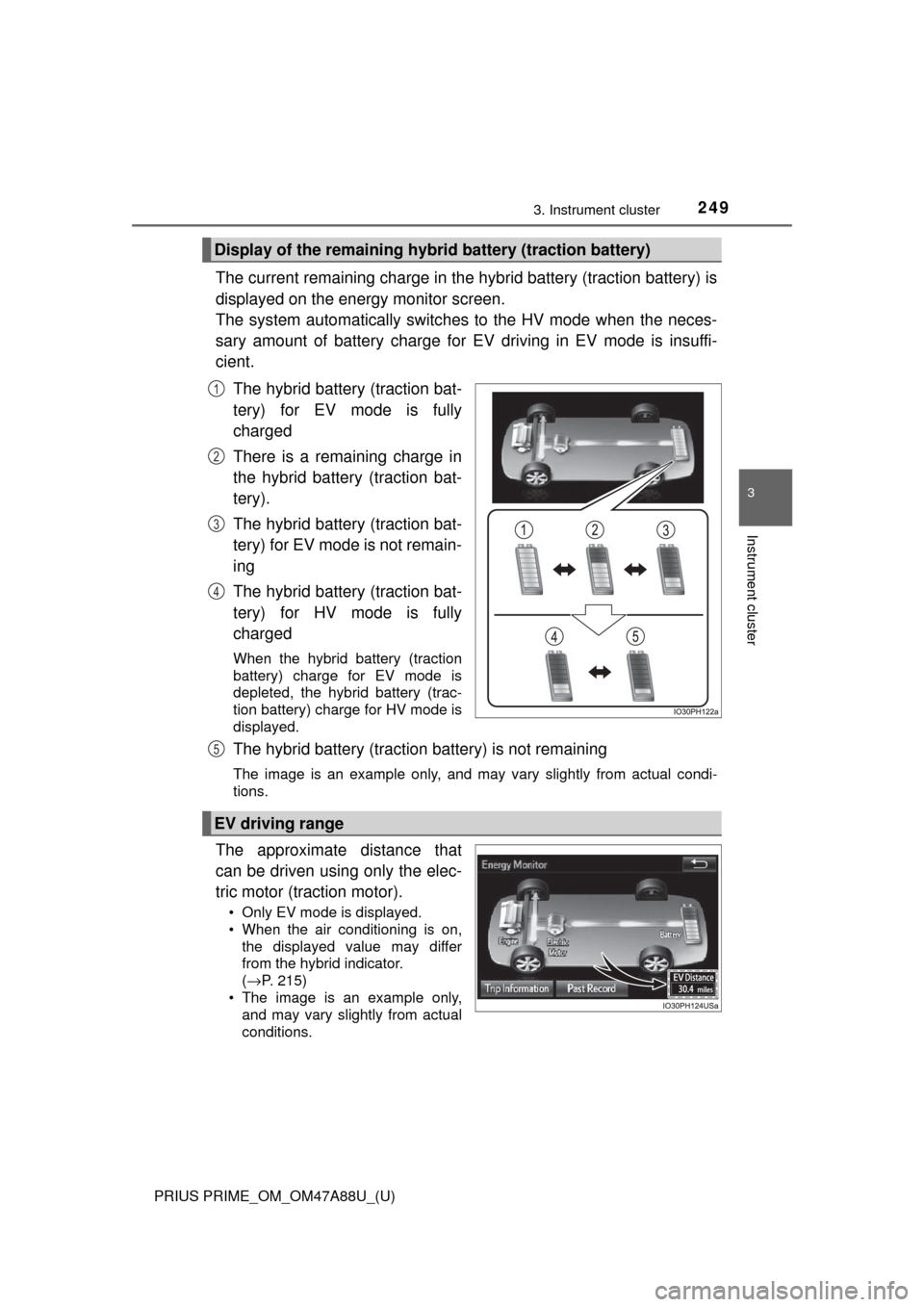
The current remaining charge in the hybrid battery (traction battery) is
displayed on the energy monitor screen.
The system automatically switches to the HV mode when the neces-
sary amount of battery charge for EV driving in EV mode is insuffi-
cient.
The hybrid battery (traction bat-
tery) for EV mode is fully
charged
There is a remaining charge in
the hybrid battery (traction bat-
tery).
The hybrid battery (traction bat-
tery) for EV mode is not remain-
ing
The hybrid battery (traction bat-
tery) for HV mode is fully
charged
When the hybrid battery (traction
battery) charge for EV mode is
depleted, the hybrid battery (trac-
tion battery) charge for HV mode is
displayed.
The hybrid battery (traction battery) is not remaining
The image is an example only, and may vary slightly from actual condi-
tions.
The approximate distance that
can be driven using only the elec-
tric motor (traction motor).
• Only EV mode is displayed.
• When the air conditioning is on,the displayed value may differ
from the hybrid indicator.
(→ P. 215)
• The image is an example only, and may vary slightly from actual
conditions.
Display of the remaining hybr id battery (traction battery)
1
2
3
4
EV driving range
5
Page 250 of 784
250
PRIUS PRIME_OM_OM47A88U_(U)
3. Instrument cluster
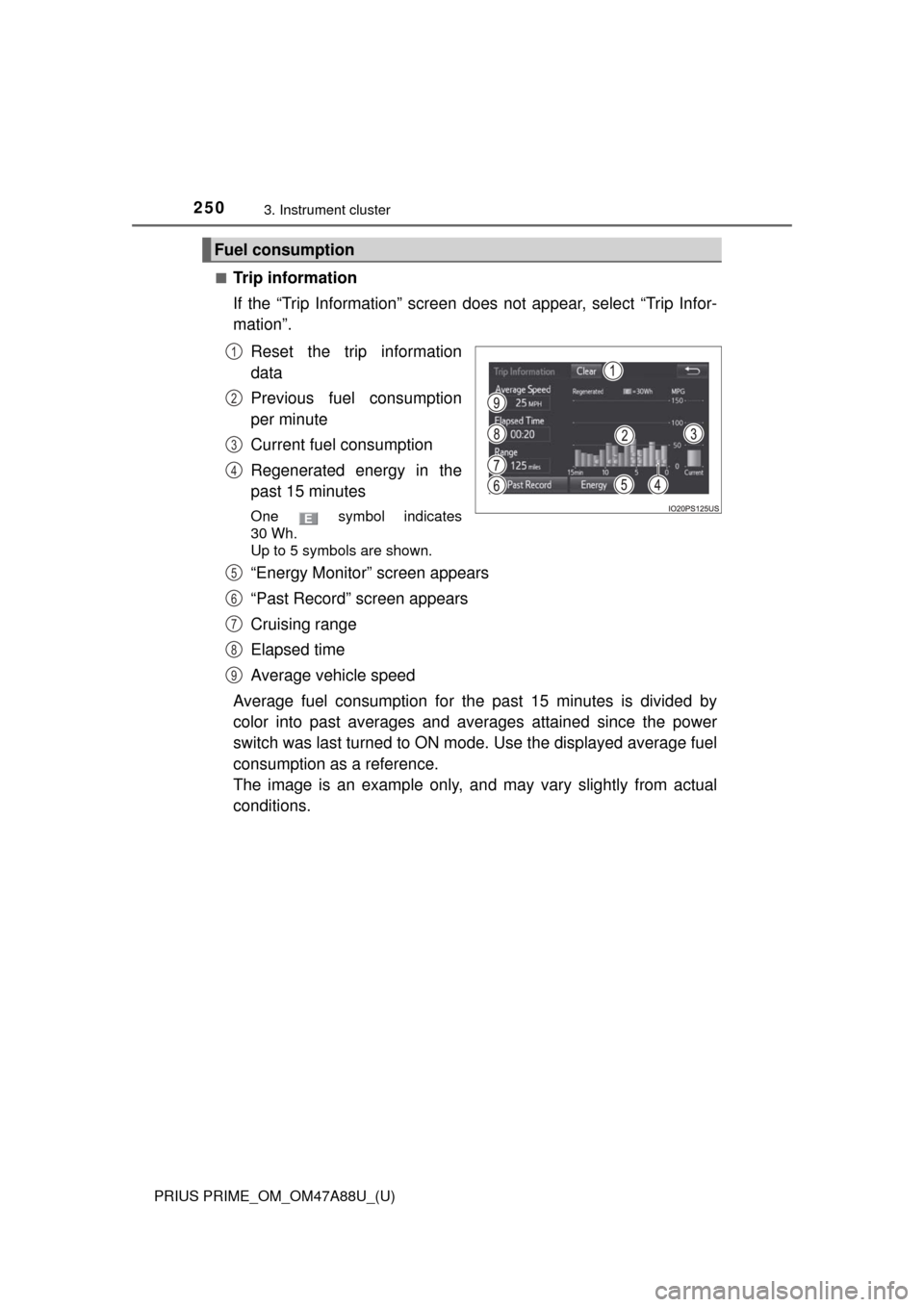
■Trip information
If the “Trip Information” screen does not appear, select “Trip Infor-
mation”.Reset the trip information
data
Previous fuel consumption
per minute
Current fuel consumption
Regenerated energy in the
past 15 minutes
One symbol indicates
30 Wh.
Up to 5 symbols are shown.
“Energy Monitor” screen appears
“Past Record” screen appears
Cruising range
Elapsed time
Average vehicle speed
Average fuel consumption for the past 15 minutes is divided by
color into past averages and av erages attained since the power
switch was last turned to ON mode. Use the displayed average fuel
consumption as a reference.
The image is an example only, an d may vary slightly from actual
conditions.
Fuel consumption
1
2
3
4
5
6
7
8
9