door TOYOTA PRIUS PRIME 2018 Owners Manual (in English)
[x] Cancel search | Manufacturer: TOYOTA, Model Year: 2018, Model line: PRIUS PRIME, Model: TOYOTA PRIUS PRIME 2018Pages: 40, PDF Size: 4.63 MB
Page 6 of 40
6
PRIUS PRIME_QG_OM47C25U_(U)
1. Charging operation
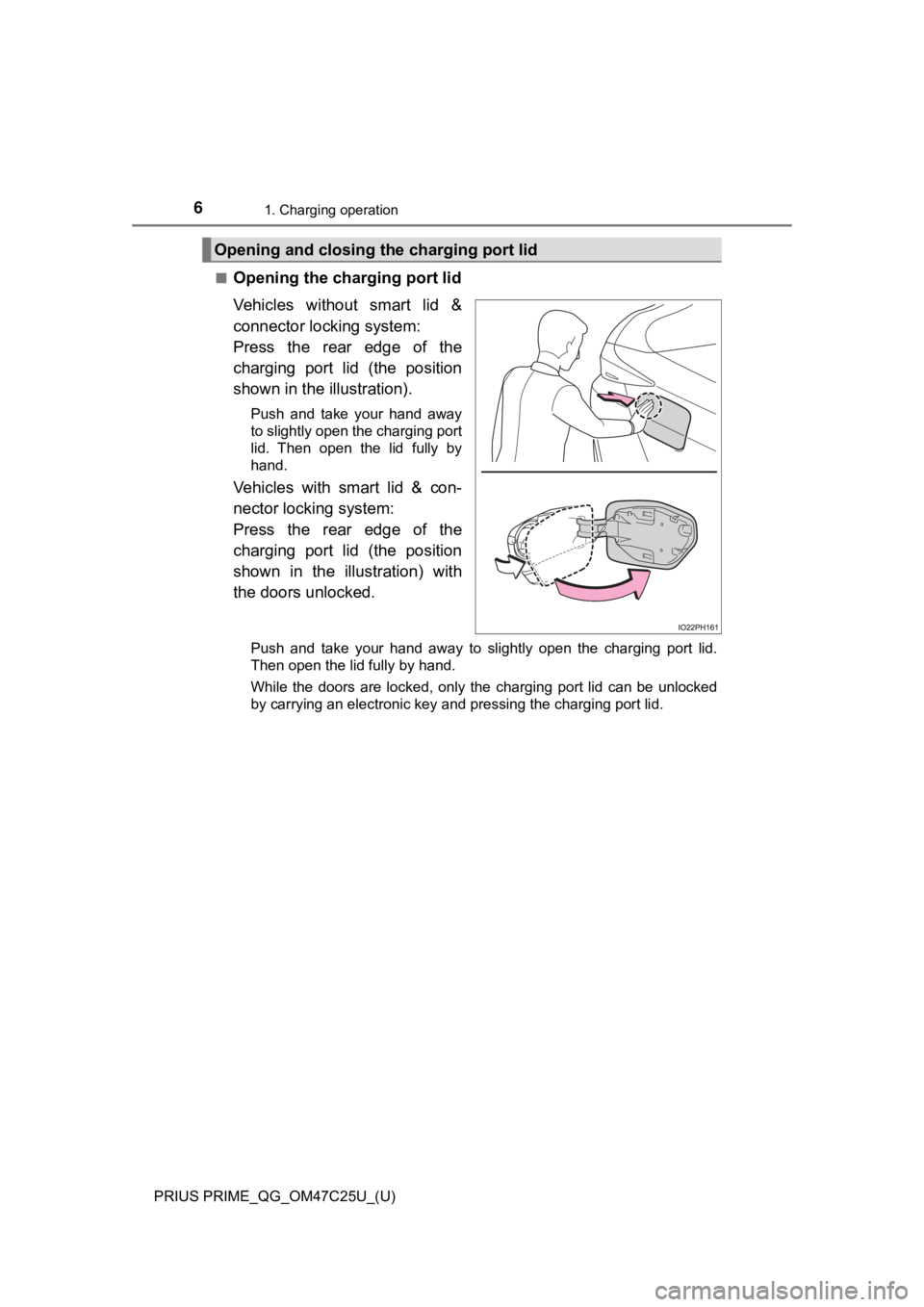
■Opening the charging port lid
Vehicles without smart lid &
connector locking system:
Press the rear edge of the
charging port lid (the position
shown in the illustration).
Push and take your hand away
to slightly open the charging port
lid. Then open the lid fully by
hand.
Vehicles with smart lid & con-
nector locking system:
Press the rear edge of the
charging port lid (the position
shown in the illustration) with
the doors unlocked.
Push and take your hand away to slightly open the charging port lid.
Then open the lid fully by hand.
While the doors are locked, only the charging port lid can be unlocked
by carrying an electronic key and pressing the charging port lid.
Opening and closing the charging port lid
Page 7 of 40
PRIUS PRIME_QG_OM47C25U_(U)
71. Charging operation
1
Charging operation
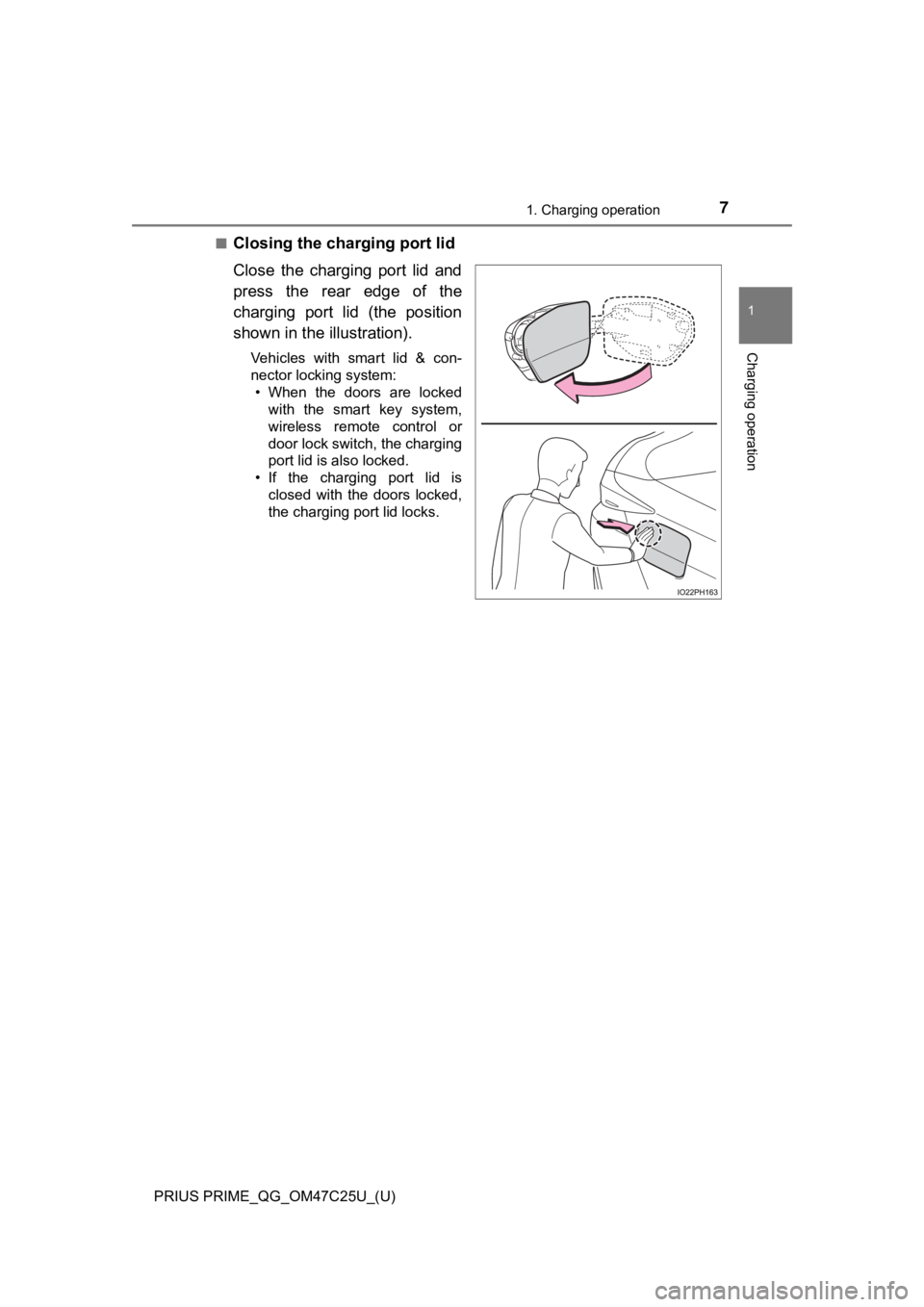
■Closing the charging port lid
Close the charging port lid and
press the rear edge of the
charging port lid (the position
shown in the illustration).
Vehicles with smart lid & con-
nector locking system:
• When the doors are locked
with the smart key system,
wireless remote control or
door lock switch, the charging
port lid is also locked.
• If the charging port lid is
closed with the doors locked,
the charging port lid locks.
Page 9 of 40

9
PRIUS PRIME_QG_OM47C25U_(U)
1. Charging operation
1
Charging operation
How to charge
This vehicle has been designed to allow charging from an external
power source using a charging cable for exclusive use with standard
household AC outlets.
However, the vehicle differs greatly from standard household electri-
cal goods in the following ways, and incorrect usage could cause fire
or electric shock, possibly leading to death or serious injury.
●The charging operation is designed to operate at 12A continuously
for the charge duration (up to 5 hours 10 minutes).
●Charging can be conducted outdoors.
To charge properly, follow the procedure after reading the explanation
below. Charging is intended to be carried out by licensed drivers only
who properly understand the charging procedure.
●Charging should not be carried out by children.
●When charging with a charging equipment, follow the procedures
for using each equipment.
●When charging using a public charging facility, check the setting of
the charging timer function.
• When the charge schedule is registered, temporarily turn off the
function or turn “Charge Now” on.
• When the charge schedule is set to ON, charging will not start
even if the charging cable is connected. Also, charging fee may
occur due to connection of the charging cable.
Charging precautions
Page 15 of 40
PRIUS PRIME_QG_OM47C25U_(U)
151. Charging operation
1
Charging operation
WARNING
■When charging
Observe the following precautions.
Failure to do so may cause an unexpected accident, resulting in death or
serious injury.
●Connect to a power source suitable for charging.
●Check that the charging inlet, charging cable, plug and outlet are free of
foreign matter.
●Only use outlets where the plug can be securely inserted.
●Do not charge if the charging cable is coiled or bundled.
●Wrapping 120 V charging cable while in-use is not recommended because
cable may overheat. Failure to rewrap charging cable when not in-use
could result in strangulation or tripping hazard.
●Do not wash the vehicle while the charging cable is connected to the vehi-
cle and when the charging lid is open.
●Do not touch the terminals of the charging connector and charging inlet
with a sharp metal objects (needles etc.) or hands, or short them with for-
eign objects.
●When charging outdoors, make sure to connect to a weatherproof outlet
for outdoor use.
●<0027005200030051005200570003004c0051005600480055005700030057004b004800030053004f0058004a0003004c004900030057004b00480003005200580057004f004800570003004c00560003005600580045005000480055004a00480047000300
4c00510003005a004400570048005500030052005500030056[now.
●<00290052004f004f0052005a00030057004b004800560048000300530052004c0051005700560003005a004b0048005100030046004b00440055004a004c0051004a0003005a004b004c004f00480003004c00570003004c0056000300550044004c005100
4c0051004a0003005200550003005600510052005a004c0051[g.
• Check that no snow, water or ice has accumulated around the charging
connector terminals and the vehicle charging inlet. Tap snow, water or
ice gently from connector prior to inserting charging connector into the
vehicle’s charging inlet.
• Do not connect the plug if your hands are wet. Also, do not get the plug
or outlet wet.
●Do not charge the vehicle during a lightning storm.
●Do not let the wheels on the charging cable, plug, charging connector and
CCID (Charging Circuit Interrupting Device).
●Firmly insert the plug into the outlet.
●Do not use an extension cord and converting adaptor.
Page 17 of 40
PRIUS PRIME_QG_OM47C25U_(U)
171. Charging operation
1
Charging operation
NOTICE
■After charging
●After disconnecting the charging connector from the charging inlet, make
sure to put on the charging inlet cap and close the charging port lid.
If the charging inlet cap is not put on, water or foreign objects may enter
<0057004b004800030046004b00440055004a004c0051004a0003004c0051004f00480057000f0003005a004b004c0046004b0003004600520058004f00470003004f004800440047000300570052000300590048004b004c0046004f004800030047004400
500044004a00480011[
• Vehicles without smart lid & connector locking system: The charging
port lid does not have a lock. Take care not to press and open the door
accidentally.
• Vehicles with smart lid & connector locking system: If the charging port
lid is not locked, take care as it may open if unintentionally touched.
●After removing the plug from the outlet, keep it in a safe place free from
moisture and dust.
The charging cable or plug may be damaged if the cable is stepped on or
ridden over by the vehicle.
■Using private power generator
Do not use private power generators as a power source for charging.
Doing so may make charging unstable, the voltage may be insufficient, and
the error warning indicator on the CCID (Charging Circuit Interrupting
Device) of the charging cable may flash.
■Usable temperature range
●Do not charge if the outside temperature is -22F (-30C) or below, as it is
likely that charging will take longer, and equipment related to charging will
be damaged.
●Do not leave the vehicle or the charging cable in areas where the outside
temperature is lower than -40F (-40C). The vehicle or charging cable will
probably be damaged.
■Charging equipment
Due to the environment in which the power equipment is located, charging
may be unstable due to noise, the voltage may be insufficient, and the error
warning indicator on the CCID (Charging Circuit Interrupting Device) of the
charging cable may flash.
Page 23 of 40
23
PRIUS PRIME_QG_OM47C25U_(U)
1. Charging operation
1
Charging operation
Charging tips
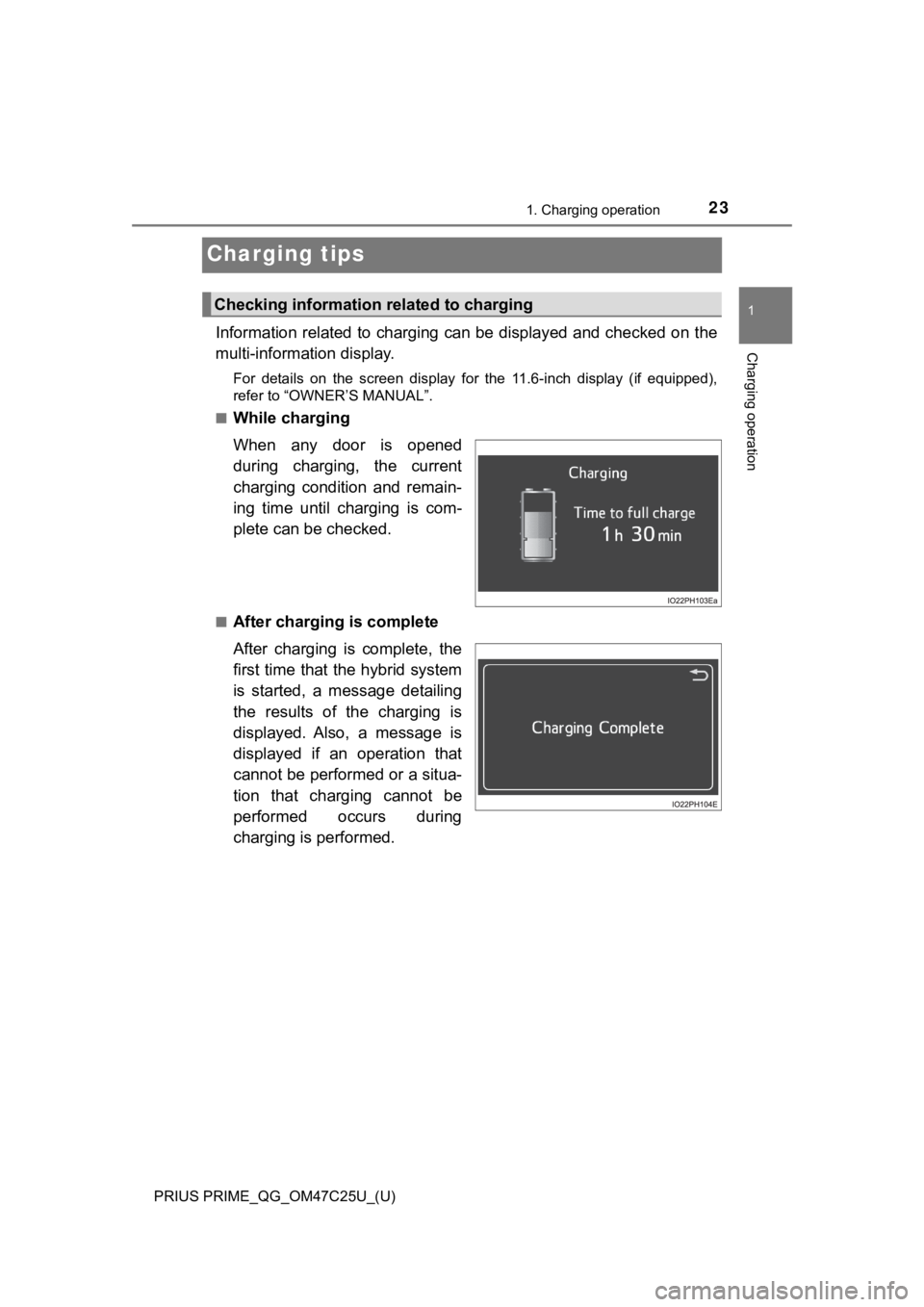
Information related to charging can be displayed and checked on the
multi-information display.
For details on the screen display for the 11.6-inch display (if equipped),
refer to “OWNER’S MANUAL”.
■
While charging
When any door is opened
during charging, the current
charging condition and remain-
ing time until charging is com-
plete can be checked.
■After charging is complete
After charging is complete, the
first time that the hybrid system
is started, a message detailing
the results of the charging is
displayed. Also, a message is
displayed if an operation that
cannot be performed or a situa-
tion that charging cannot be
performed occurs during
charging is performed.
Checking information related to charging
Page 26 of 40
26
PRIUS PRIME_QG_OM47C25U_(U)
3. Basic operation
Basic operation
■Before leaving the vehicle
Check the temperature setting of the air conditioning system.
The Remote Air Conditioning System will operate in accordance with
the temperature settings of the air conditioning system.
■
Activating the Remote Air Conditioning System
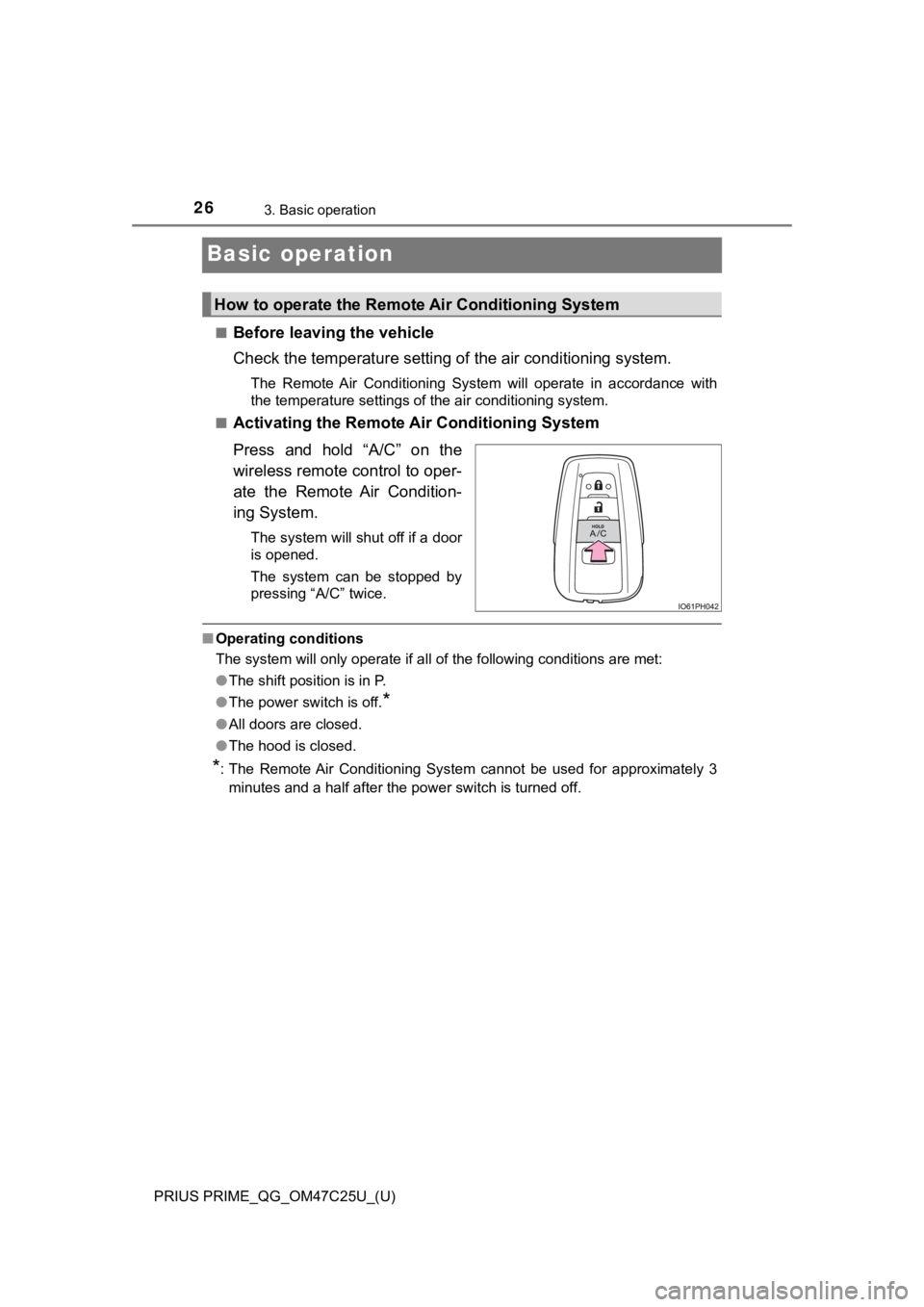
Press and hold “A/C” on the
wireless remote control to oper-
ate the Remote Air Condition-
ing System.
The system will shut off if a door
is opened.
The system can be stopped by
pressing “A/C” twice.
■Operating conditions
<0037004b004800030056005c00560057004800500003005a004c004f004f000300520051004f005c000300520053004800550044005700480003004c004900030044004f004f00030052004900030057004b0048000300490052004f004f0052005a004c00
51004a00030046005200510047004c0057004c005200510056[ are met:
●The shift position is in P.
●The power switch is off.
*
●All doors are closed.
●The hood is closed.
*: The Remote Air Conditioning System cannot be used for approximately 3
minutes and a half after the power switch is turned off.
How to operate the Remote Air Conditioning System
Page 27 of 40
PRIUS PRIME_QG_OM47C25U_(U)
273. Basic operation
3
Basic operation
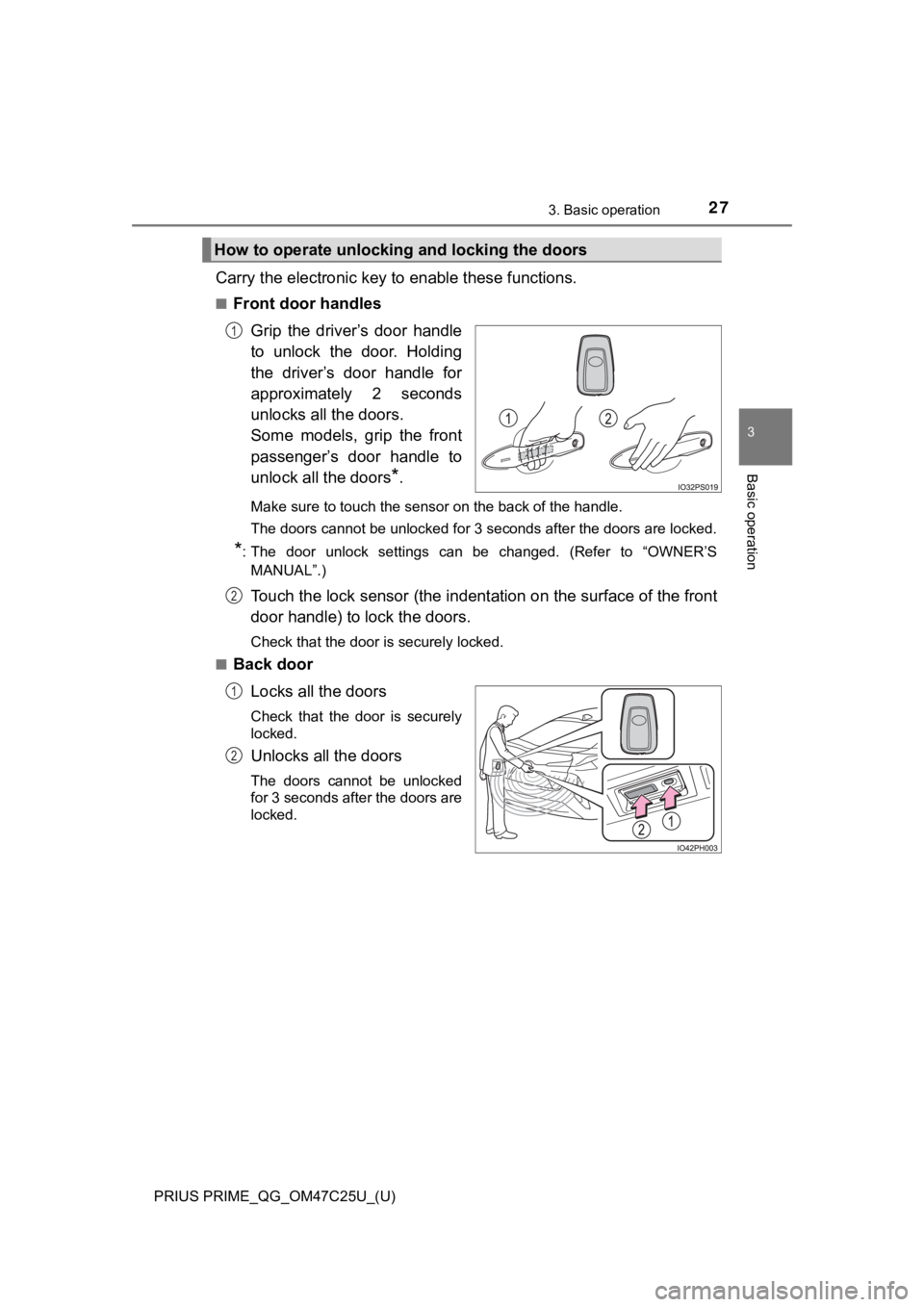
Carry the electronic key to enable these functions.
■Front door handles
Grip the driver’s door handle
to unlock the door. Holding
the driver’s door handle for
approximately 2 seconds
unlocks all the doors.
Some models, grip the front
passenger’s door handle to
unlock all the doors
*.
Make sure to touch the sensor on the back of the handle.
The doors cannot be unlocked for 3 seconds after the doors are locked.
*: The door unlock settings can be changed. (Refer to “OWNER’S
MANUAL”.)
Touch the lock sensor (the indentation on the surface of the front
door handle) to lock the doors.
Check that the door is securely locked.
■
Back door
Locks all the doors
Check that the door is securely
locked.
Unlocks all the doors
The doors cannot be unlocked
for 3 seconds after the doors are
locked.
How to operate unlocking and locking the doors
1
2
1
2