ECU TOYOTA PRIUS PRIME 2018 Owners Manual (in English)
[x] Cancel search | Manufacturer: TOYOTA, Model Year: 2018, Model line: PRIUS PRIME, Model: TOYOTA PRIUS PRIME 2018Pages: 68, PDF Size: 2.08 MB
Page 7 of 68
5
1 If indicator does not turn off within a few seconds of starting Hybrid System, there may be a
malfunction. Have vehicle inspected by your Toyota dealer.
2 If this light flashes, refer to “Full-Speed Range Dynamic Radar Cruise Control,” Section 5-5, 2018
Owner’s Manual.
3 The indicator flashes to indicate a malfunction.4 If equipped.
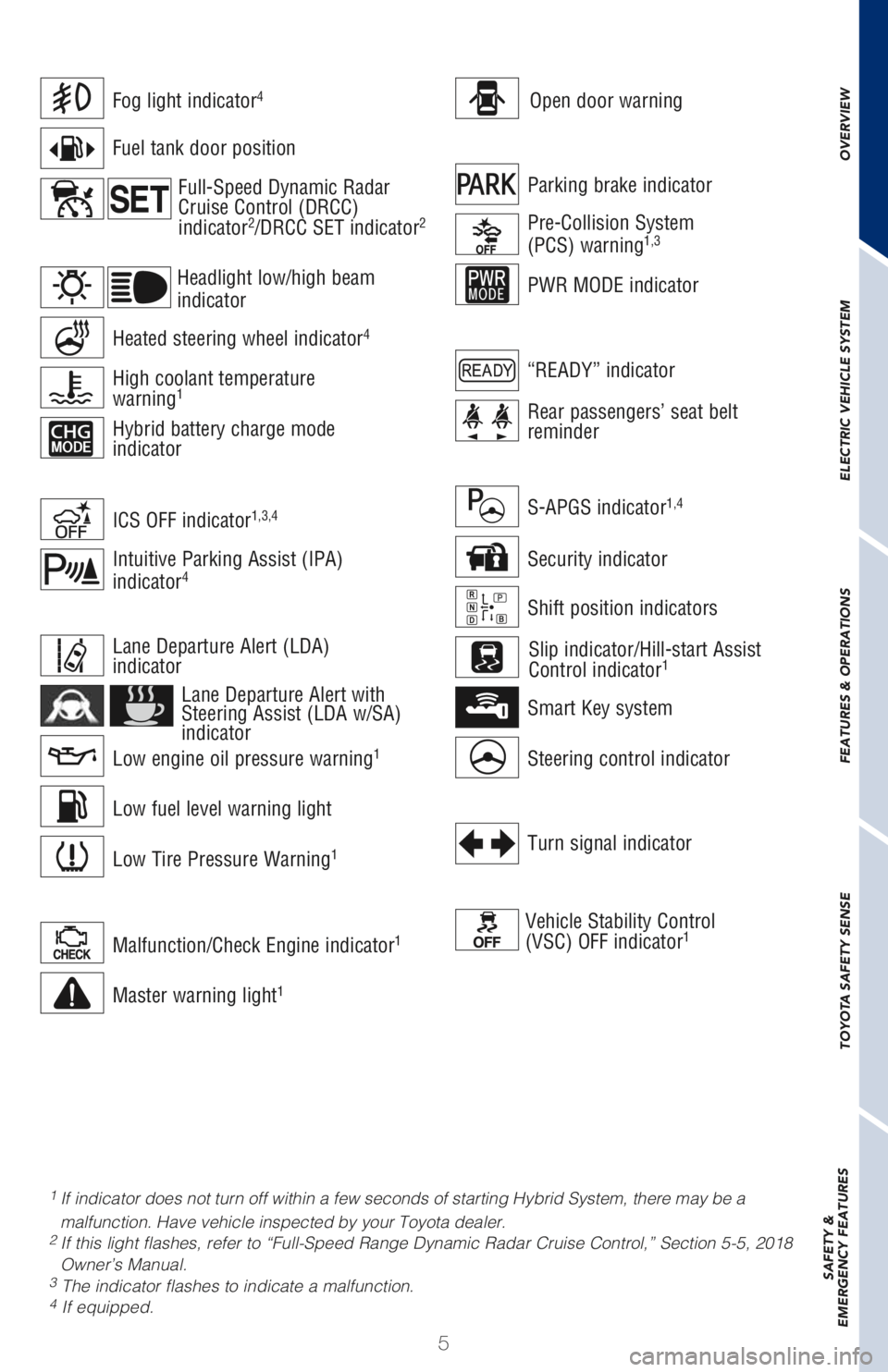
Open door warningFog light indicator4
Malfunction/Check Engine indicator1
Master warning light1
Low engine oil pressure warning1
Low Tire Pressure Warning1
Low fuel level warning light
Lane Departure Alert (LDA)
indicator
Heated steering wheel indicator4
Intuitive Parking Assist (IPA)
indicator4
Fuel tank door position
Lane Departure Alert with
Steering Assist (LDA w/SA)
indicator
High coolant temperature
warning1
Hybrid battery charge mode
indicator
Headlight low/high beam
indicator
ICS OFF indicator1,3,4
Parking brake indicator
PWR MODE indicator
Pre-Collision System
(PCS) warning1,3
Rear passengers’ seat belt
reminder
“READY” indicator
Turn signal indicator
Vehicle Stability Control
(VSC) OFF indicator1
Shift position indicators
Steering control indicator
S-APGS indicator1,4
Smart Key system
Security indicator
Slip indicator/Hill-start Assist
Control indicator1
OVERVIEW ELECTRIC VEHICLE SYSTEM FEATURES & OPERATIONS TOYOTA SAFETY SENSE SAFETY &
EMERGENCY FEATURES
Full-Speed Dynamic Radar
Cruise Control (DRCC)
indicator
2/DRCC SET indicator2
Page 13 of 68
11 The Prius Prime may be charged immediately, or scheduled to charge at a
specific time. Before charging, it is recommended that:
• Parking brake is securely set
• All lights are turned off
• The POWER switch is OFF
Refer to “Things to Know Before Charging,” in the Owner’s Manual before
attempting to charge the hybrid battery.
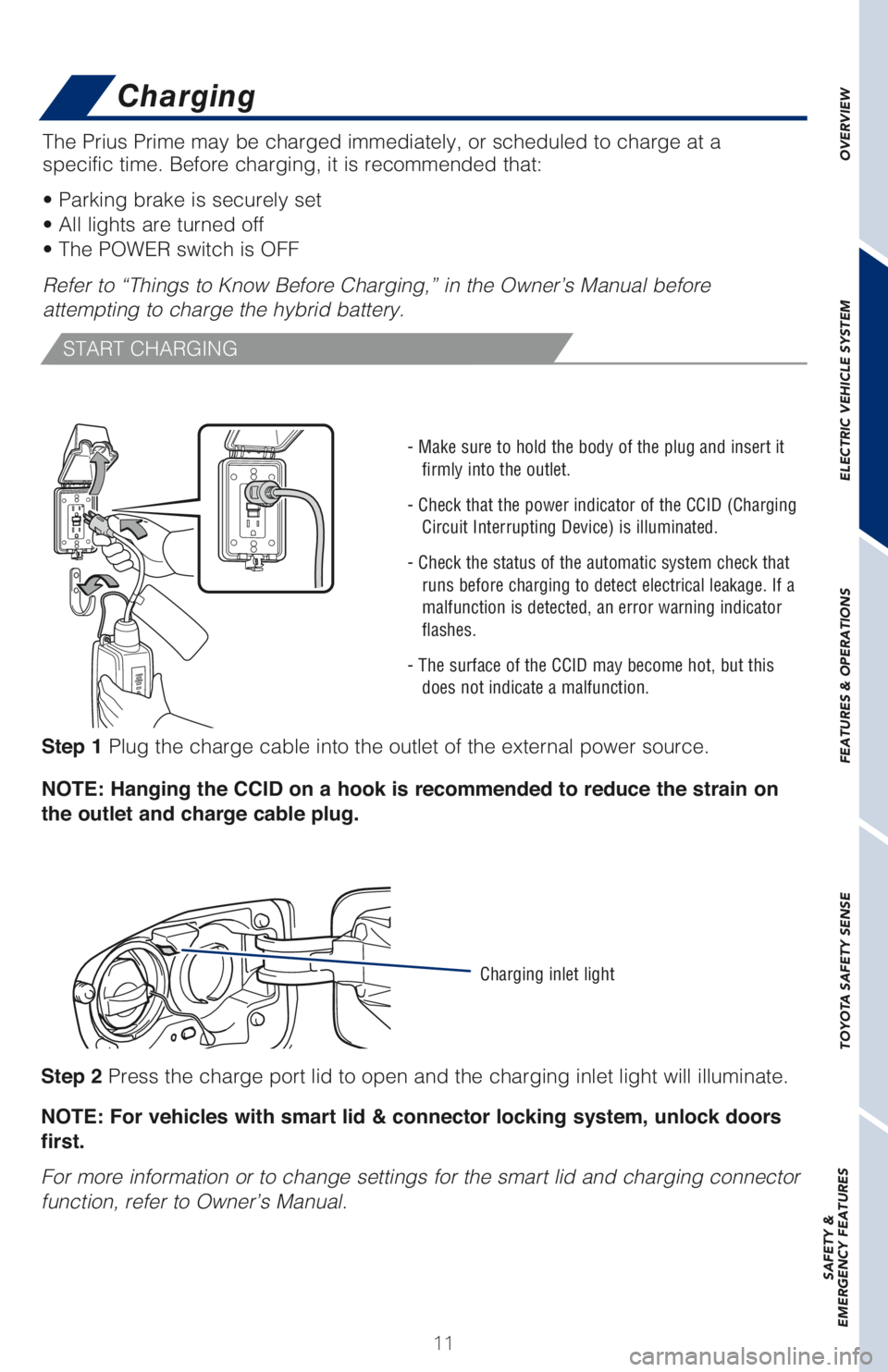
Step 1 Plug the charge cable into the outlet of the external power source.
NOTE: Hanging the CCID on a hook is recommended to reduce the strain on
the outlet and charge cable plug.
OVERVIEW ELECTRIC VEHICLE SYSTEM FEATURES & OPERATIONS TOYOTA SAFETY SENSE SAFETY &
EMERGENCY FEATURES
START CHARGING
- Make sure to hold the body of the plug and insert it
firmly into the outlet.
- Check that the power indicator of the CCID (Charging
Circuit Interrupting Device) is illuminated.
- Check the status of the automatic system check that
runs before charging to detect electrical leakage. If a
malfunction is detected, an error warning indicator
flashes.
- The surface of the CCID may become hot, but this
does not indicate a malfunction.
Step 2 Press the charge port lid to open and the charging inlet light will illuminate.
NOTE: For vehicles with smart lid & connector locking system, unlock doors
first.
For more information or to change settings for the smart lid and charging connector
function, refer to Owner’s Manual.
Charging inlet light
Charging
Page 38 of 68
36
Blind Spot Monitor with Rear Cross
Traffic Alert (BSM w/RCTA)
(if equipped)
Garage door opener (HomeLink®) (if equipped)
Garage door openers manufactured under license from HomeLink®* can be
programmed to operate garage doors, estate gates, security lighting, etc.
Refer to the Owner’s Manual for more details.
For programming assistance, contact HomeLink
® at 1-800-355-3515, or visit http://
www.homelink.com.
* HomeLink® is a registered trademark of Johnson Controls, Inc.
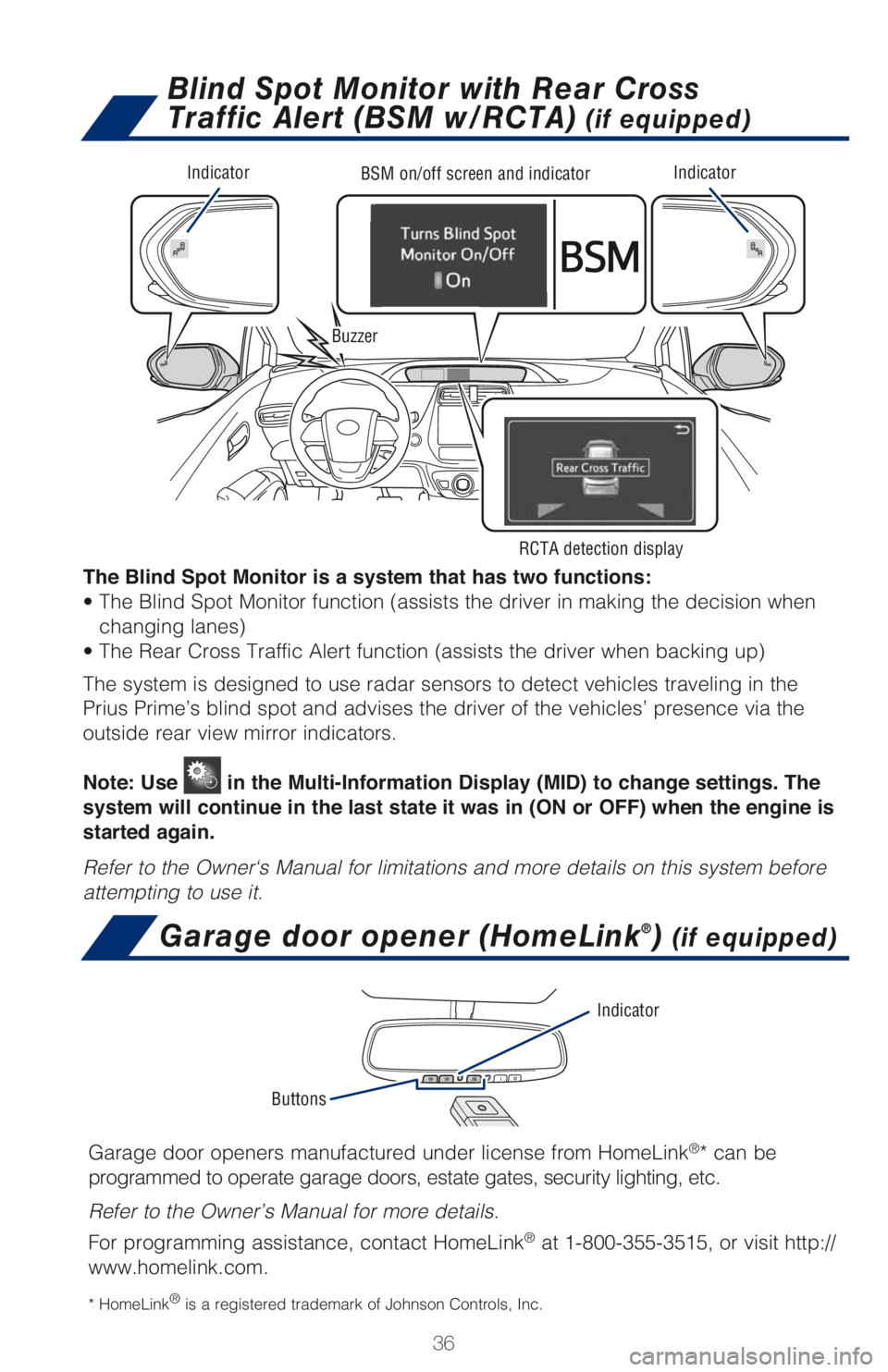
IndicatorIndicatorBSM on/off screen and indicator
Buzzer
RCTA detection display
The Blind Spot Monitor is a system that has two functions:
• The Blind Spot Monitor function (assists the driver in making the decision when
changing lanes)
• The Rear Cross Traffic Alert function (assists the driver when backing up)
The system is designed to use radar sensors to detect vehicles traveling in the
Prius Prime’s blind spot and advises the driver of the vehicles’ presence via the
outside rear view mirror indicators.
Note: Use
in the Multi-Information Display (MID) to change settings. The
system will continue in the last state it was in (ON or OFF) when the engine is
started again.
Refer to the Owner‘s Manual for limitations and more details on this system before
attempting to use it.
Buttons
Indicator