remote start TOYOTA PRIUS PRIME 2018 Owners Manual (in English)
[x] Cancel search | Manufacturer: TOYOTA, Model Year: 2018, Model line: PRIUS PRIME, Model: TOYOTA PRIUS PRIME 2018Pages: 68, PDF Size: 2.08 MB
Page 9 of 68
7
Smart Key system
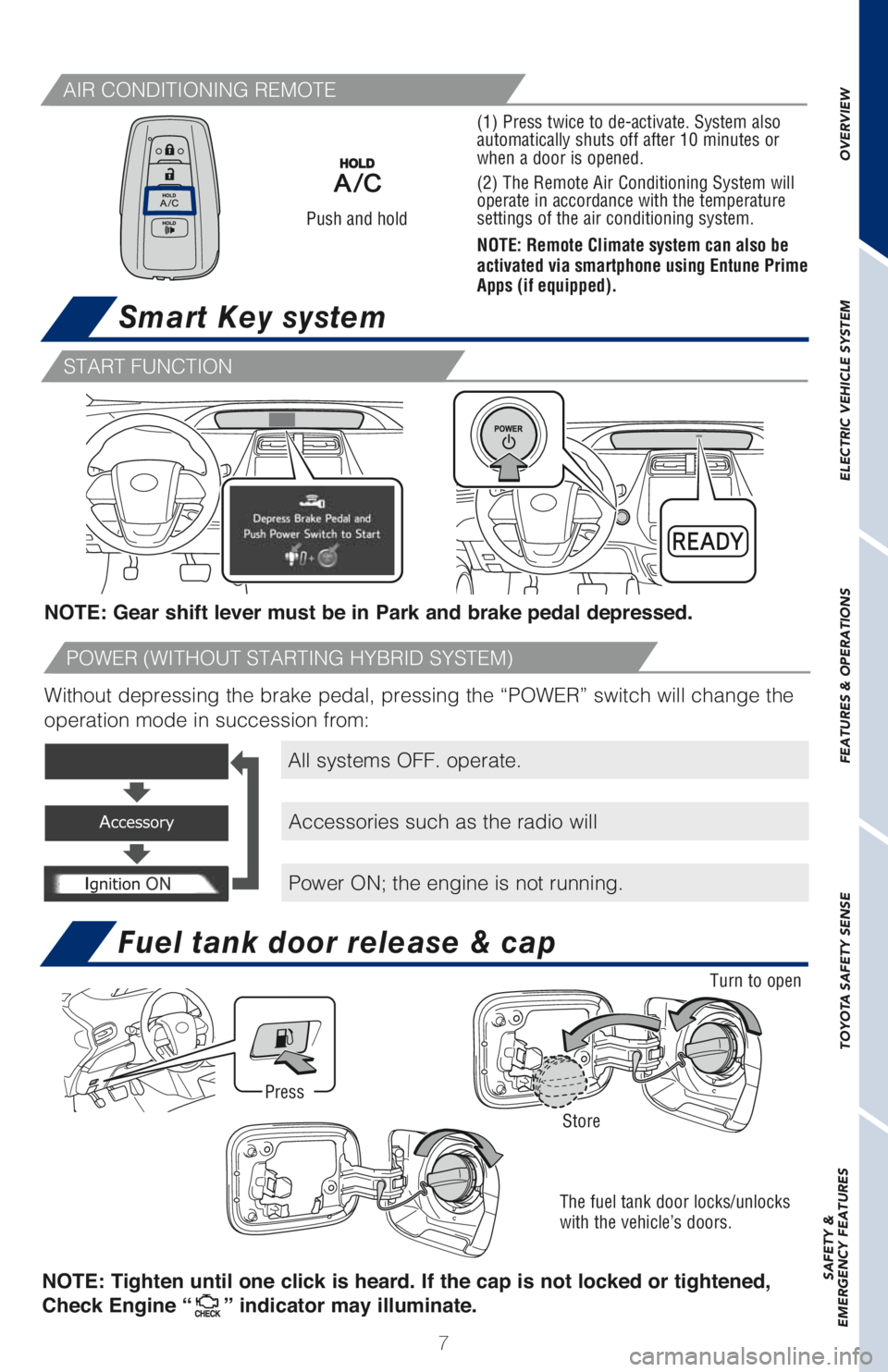
All systems OFF. operate.
Accessories such as the radio will
Power ON; the engine is not running. NOTE: Gear shift lever must be in Park and brake pedal depressed.
Without depressing the brake pedal, pressing the “POWER” switch will change the
operation mode in succession from:
Push and hold
Fuel tank door release & cap
The fuel tank door locks/unlocks
with the vehicle’s doors.
OVERVIEW ELECTRIC VEHICLE SYSTEM FEATURES & OPERATIONS TOYOTA SAFETY SENSE SAFETY &
EMERGENCY FEATURES
Turn to open
Store
Press
AIR CONDITIONING REMOTE
START FUNCTION
POWER (WITHOUT STARTING HYBRID SYSTEM)
NOTE: Tighten until one click is heard. If the cap is not locked or tightened,
Check Engine “
” indicator may illuminate.
(1) Press twice to de-activate. System also
automatically shuts off after 10 minutes or
when a door is opened.
(2) The Remote Air Conditioning System will
operate in accordance with the temperature
settings of the air conditioning system.
NOTE: Remote Climate system can also be
activated via smartphone using Entune Prime
Apps (if equipped).
Page 19 of 68
17
OVERVIEW ELECTRIC VEHICLE SYSTEM FEATURES & OPERATIONS TOYOTA SAFETY SENSE SAFETY &
EMERGENCY FEATURES
Charging system safety functions
Prime Applications (if equipped)
- The Hybrid System will not start while the charging cable is attached to the
vehicle, even if the POWER switch is operated.
- If the charge cable is connected while the READY indicator is illuminated, the
Hybrid System will stop automatically and driving will not be possible.
- When the charge cable is connected to the vehicle, the shift position cannot be
changed from P to another position.
- If the latch release button is pressed, charging will not begin even if the charge
cable is connected.
- Charging will stop if the latch release button is pressed and held for several
seconds during charging. When restarting charging, reinsert the charge
connector after pulling it out, and check that the charging indicator illuminates.
Prime Applications is a service for Prius Prime vehicles that is added to the Safety
Connect® and Entune® products. It provides charge support, comfort support and
drive support via the vehicle’s navigation system and the owner’s smartphone. The
Prime Apps include Charge Management, Remote Climate, Charging Station Map,
Vehicle Finder and ECO Dashboard.
Both an active Safety Connect
® account and an active Entune® account are
required for the services.
The following functions of the Prime Applications can be used with the navigation
system:
Type A Download of nearby charging stations to the map screen.
Type B View list of nearby charging stations and corresponding charging station
information (such as voltage supported).
For details, please refer to http://www.toyota.com/entune.