warning lights TOYOTA PRIUS PRIME 2018 Owners Manual (in English)
[x] Cancel search | Manufacturer: TOYOTA, Model Year: 2018, Model line: PRIUS PRIME, Model: TOYOTA PRIUS PRIME 2018Pages: 68, PDF Size: 2.08 MB
Page 13 of 68
11 The Prius Prime may be charged immediately, or scheduled to charge at a
specific time. Before charging, it is recommended that:
• Parking brake is securely set
• All lights are turned off
• The POWER switch is OFF
Refer to “Things to Know Before Charging,” in the Owner’s Manual before
attempting to charge the hybrid battery.
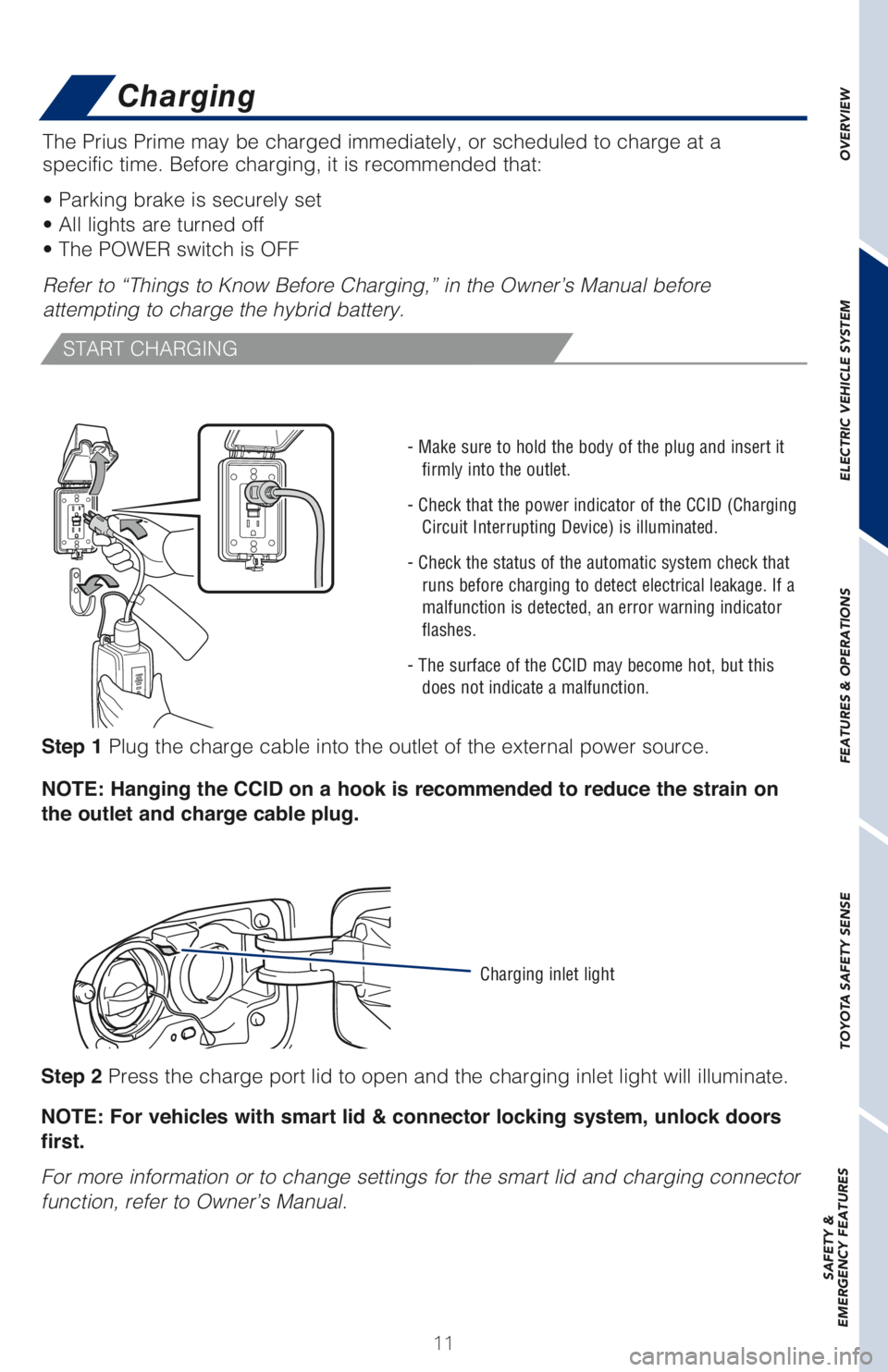
Step 1 Plug the charge cable into the outlet of the external power source.
NOTE: Hanging the CCID on a hook is recommended to reduce the strain on
the outlet and charge cable plug.
OVERVIEW ELECTRIC VEHICLE SYSTEM FEATURES & OPERATIONS TOYOTA SAFETY SENSE SAFETY &
EMERGENCY FEATURES
START CHARGING
- Make sure to hold the body of the plug and insert it
firmly into the outlet.
- Check that the power indicator of the CCID (Charging
Circuit Interrupting Device) is illuminated.
- Check the status of the automatic system check that
runs before charging to detect electrical leakage. If a
malfunction is detected, an error warning indicator
flashes.
- The surface of the CCID may become hot, but this
does not indicate a malfunction.
Step 2 Press the charge port lid to open and the charging inlet light will illuminate.
NOTE: For vehicles with smart lid & connector locking system, unlock doors
first.
For more information or to change settings for the smart lid and charging connector
function, refer to Owner’s Manual.
Charging inlet light
Charging
Page 47 of 68
45
ADJUSTING DISTANCE
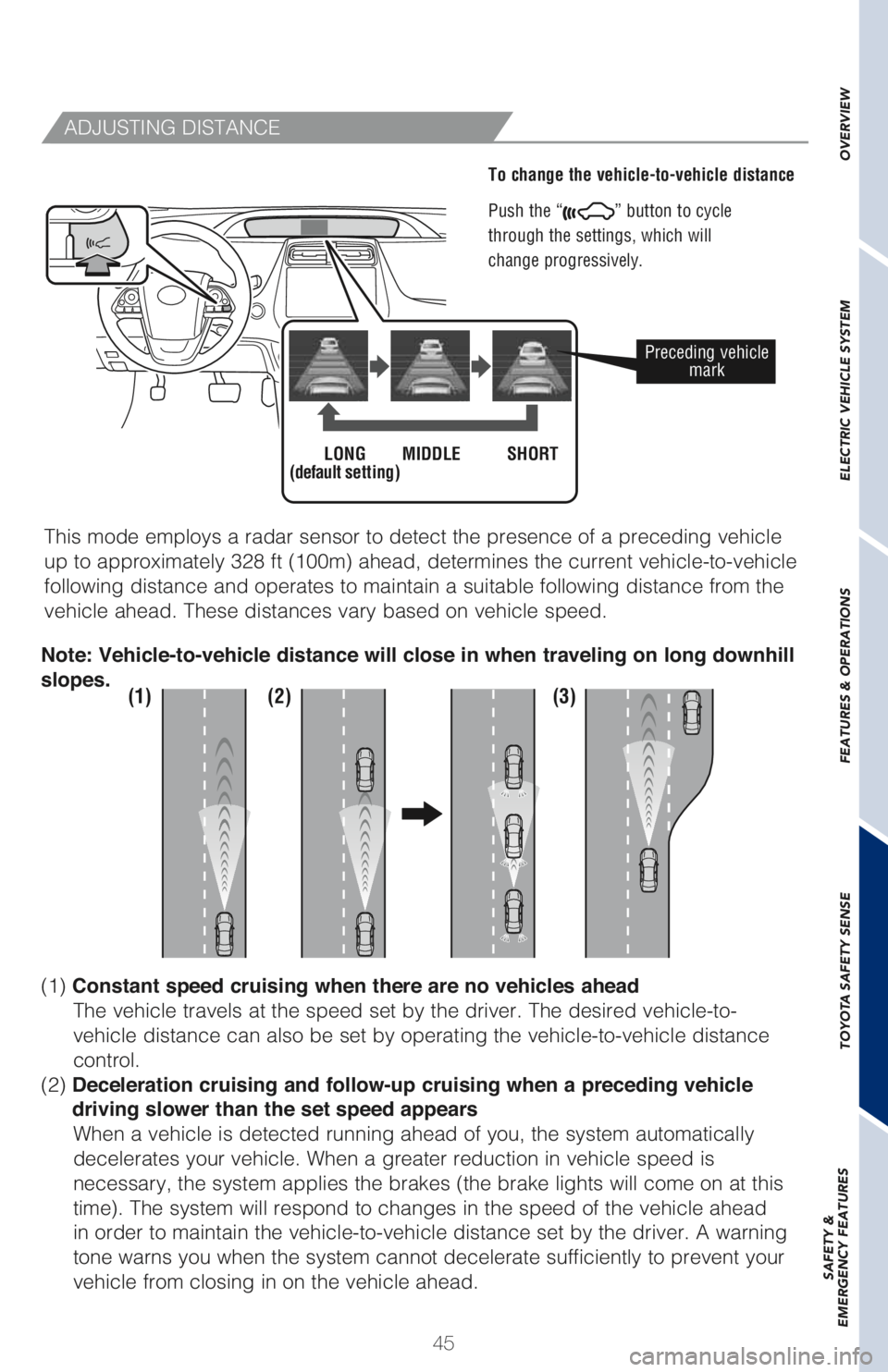
To change the vehicle-to-vehicle distance
Push the “
” button to cycle
through the settings, which will
change progressively.
This mode employs a radar sensor to detect the presence of a preceding vehicle
up to approximately 328 ft (100m) ahead, determines the current vehicle-to-vehicle
following distance and operates to maintain a suitable following distance from the
vehicle ahead. These distances vary based on vehicle speed.
Preceding vehicle
mark
LONG
(default setting)MIDDLE SHORT
(1) (2) (3)
(1) Constant speed cruising when there are no vehicles ahead
The vehicle travels at the speed set by the driver. The desired vehicle-to-
vehicle distance can also be set by operating the vehicle-to-vehicle distance
control.
(2) Deceleration cruising and follow-up cruising when a preceding vehicle
driving slower than the set speed appears
When a vehicle is detected running ahead of you, the system automatically
decelerates your vehicle. When a greater reduction in vehicle speed is
necessary, the system applies the brakes (the brake lights will come on at this
time). The system will respond to changes in the speed of the vehicle ahead
in order to maintain the vehicle-to-vehicle distance set by the driver. A warning
tone warns you when the system cannot decelerate sufficiently to prevent your
vehicle from closing in on the vehicle ahead. Note: Vehicle-to-vehicle distance will close in when traveling on long downhill
slopes.
OVERVIEW ELECTRIC VEHICLE SYSTEM FEATURES & OPERATIONS TOYOTA SAFETY SENSE SAFETY &
EMERGENCY FEATURES