air condition TOYOTA PRIUS PRIME 2019 Owners Manual (in English)
[x] Cancel search | Manufacturer: TOYOTA, Model Year: 2019, Model line: PRIUS PRIME, Model: TOYOTA PRIUS PRIME 2019Pages: 68, PDF Size: 3.34 MB
Page 3 of 68
1
OVERVIEW
ELECTRIC VEHICLE SYSTEM
FEATURES & OPERATIONS
TOYOTA SAFETY SENSE
SAFETY &
EMERGENCY FEATURES
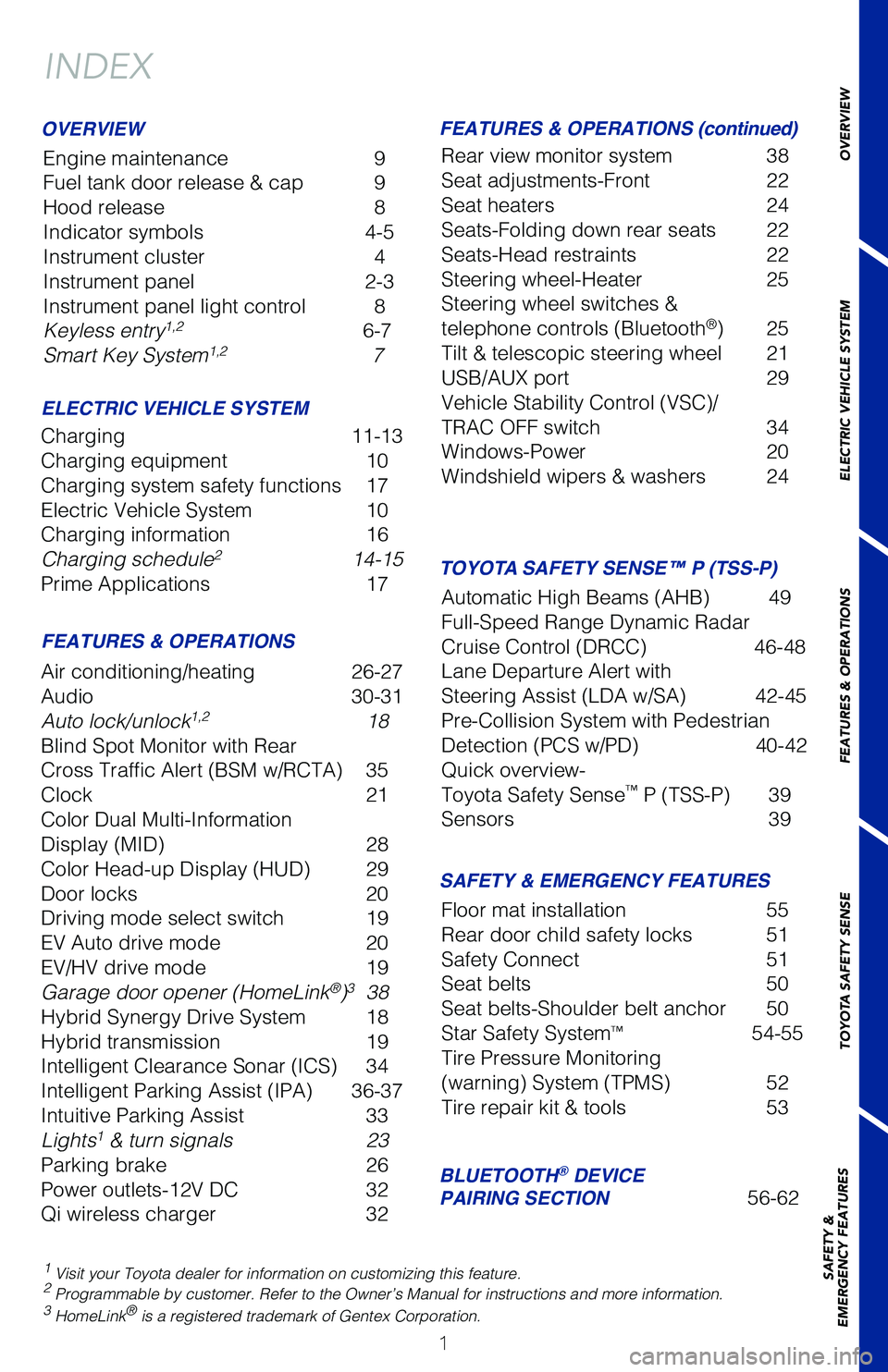
INDEX
Engine maintenance
9
Fuel tank door release & cap 9
Hood release 8
Indicator symbols 4-5
Instrument cluster 4
Instrument panel 2-3
Instrument panel light control 8
Keyless entry
1,2 6-7
Smart Key System1,2 7
1 Visit your Toyota dealer for information on customizing this feature.2 Programmable by customer. Refer to the Owner’s Manual for instructio\
ns and more information.3 HomeLink® is a registered trademark of Gentex Corporation.
OVERVIEW
ELECTRIC VEHICLE SYSTEM FEATURES & OPERATIONS (continued)
FEATURES & OPERATIONS SAFETY & EMERGENCY FEATURES
Charging 11-13
Charging equipment 10
Charging system safety functions 17
Electric Vehicle System 10
Charging information 16
Charging schedule
2 14-15
Prime Applications 17
Air conditioning/heating 26-27
Audio 30-31
Auto lock/unlock
1,2 18
Blind Spot Monitor with Rear
Cross Traffic Alert (BSM w/RCTA) 35
Clock 21
Color Dual Multi-Information
Display (MID) 28
Color Head-up Display (HUD) 29
Door locks 20
Driving mode select switch 19
EV Auto drive mode 20
EV/HV drive mode 19
Garage door opener (HomeLink
®)3 38
Hybrid Synergy Drive System 18
Hybrid transmission 19
Intelligent Clearance Sonar (ICS) 34
Intelligent Parking Assist (IPA) 36-37
Intuitive Parking Assist 33
Lights
1 & turn signals 23
Parking brake 26
Power outlets-12V DC 32
Qi wireless charger 32Rear view monitor system 38
Seat adjustments-Front
22
Seat heaters 24
Seats-Folding down rear seats 22
Seats-Head restraints 22
Steering wheel-Heater 25
Steering wheel switches &
telephone controls (Bluetooth
®) 25
Tilt & telescopic steering wheel 21
USB/AUX port 29
Vehicle Stability Control (VSC)/
TRAC OFF switch 34
Windows-Power 20
Windshield wipers & washers 24
Floor mat installation 55
Rear door child safety locks 51
Safety Connect 51
Seat belts 50
Seat belts-Shoulder belt anchor 50
Star Safety System
™ 54-55
Tire Pressure Monitoring
(warning) System (TPMS) 52
Tire repair kit & tools 53
BLUETOOTH® DEVICE
PAIRING SECTION 56-62
TOYOTA SAFETY SENSE™ P (TSS-P)
Automatic High Beams (AHB) 49
Full-Speed Range Dynamic Radar
Cruise Control (DRCC) 46-48
Lane Departure Alert with
Steering Assist (LDA w/SA) 42-45
Pre-Collision System with Pedestrian
Detection (PCS w/PD) 40-42
Quick overview-
Toyota Safety Sense
™ P (TSS-P) 39
Sensors 39
Page 5 of 68
 3
OVERVIEW
ELECTRIC VEHICLE SYSTEM
FEATURES & OPERATIONS
TOYOTA SAFETY SENSE
SAFETY &
EMERGENCY FEATURES
1 If equipped.2 For details, refer to the “Navigation System Owner’s Manual and “\
201")
3
OVERVIEW
ELECTRIC VEHICLE SYSTEM
FEATURES & OPERATIONS
TOYOTA SAFETY SENSE
SAFETY &
EMERGENCY FEATURES
1 If equipped.2 For details, refer to the “Navigation System Owner’s Manual and “\
2019 Prius Prime Entune™
Audio Quick Reference Guide”.
“P” position switch
Driving mode switch
Electric Vehicle/Hybrid
Vehicle (EV/HV) mode
select switch
Electric Vehicle (EV)
Auto mode switch
11.6” Display1
Audio system1,2/Navigation system2
and Air conditioning controls
Shift lever
Multi-Information Display (MID)
Emergency flasher switch (11.6” display)
Emergency flasher switch (7” display)7” Display
1
Audio system1,2/
Navigation system2
Gauges and meters
Driver side seat
heater switches Passenger side
seat heater switches Air conditioning controls
Page 9 of 68
 7
Smart Key system
Without depressing the brake pedal, pressing the “POWER” switch wi\
ll change the
operation mode in succession from:
Push and hold
OVERVIEW
ELECTRIC VEHICLE SYSTEM
FEATURES & O")
7
Smart Key system
Without depressing the brake pedal, pressing the “POWER” switch wi\
ll change the
operation mode in succession from:
Push and hold
OVERVIEW
ELECTRIC VEHICLE SYSTEM
FEATURES & OPERATIONS
TOYOTA SAFETY SENSE
SAFETY &
EMERGENCY FEATURES
NOTE: The Smart Key must be carried to enable the start function. With gear
shift lever in Park and the brake pedal depressed, push the “POWER” switch.
Off - All systems OFF. Emergency flashers can be used.
Accessory – Some electrical components can be used.
On - All electrical components can be used.
AIR CONDITIONING REMOTE
START FUNCTION
POWER (WITHOUT STARTING HYBRID SYSTEM)
(1) Press twice to de-activate. System also
automatically shuts off after 10 minutes or
when a door is opened.
(2) The Remote Air Conditioning System will
operate in accordance with the temperature
settings of the air conditioning system.
NOTE: Remote Climate system can also be
activated via smartphone using Entune Prime
Apps (if equipped).
Page 20 of 68
 18
Hybrid Synergy Drive System
FEATURES & OPERATIONS
The Hybrid Synergy Drive System utilizes a computer-controlled gasoline \
engine
and electric motor to provide the most efficient combination of p")
18
Hybrid Synergy Drive System
FEATURES & OPERATIONS
The Hybrid Synergy Drive System utilizes a computer-controlled gasoline \
engine
and electric motor to provide the most efficient combination of power fo\
r the
vehicle. To conserve energy, when the brakes are applied the braking for\
ce
generates electricity which is then sent to the traction battery. In add\
ition, the
engine shuts off when the vehicle is stopped. The benefits are better fu\
el economy,
reduced vehicle emissions and improved performance.
NOTE: Fuel consumption and energy information of the Hybrid System are shown on the Multi-Information Display.
-Ensure tire pressures are maintained at levels specified in the Owner’\
s Manual.
-When possible, link trips to reduce engine cold starts.
-Avoid driving at speeds that are higher than necessary, especially on t\
he highway.
-When possible, avoid sudden stops to maximize regenerative braking ener\
gy.
-Minimize use of the air conditioning.
TIPS FOR IMPROVED FUEL ECONOMY
STARTING YOUR VEHICLE
Auto lock/unlock
Automatic door locks can be programmed to operate in different modes, or\
turned
OFF.
Shift position linked door locking/unlocking function
-Doors lock when shifting from Park.
-Doors unlock when shifting into Park.
Speed linked door locking function
-Doors lock when the vehicle speed is approximately 12 mph or higher.
Driver’s door linked door unlocking function
-Doors unlock when the “POWER” switch is set to OFF and driver’\
s door is opened within approximately 45 seconds.
Refer to the Owner’s Manual for more details.
Push
(1) Put the shift lever in “P.”
(2) Depress the brake pedal, and “”
will be displayed on the Multi-Information
Display.
(3) Press the “POWER” switch briefly and
firmly.
(4) The “READY” light will blink. After
a few seconds, when the light remains
steady and a beep sounds, you may
begin driving.
Page 28 of 68
26
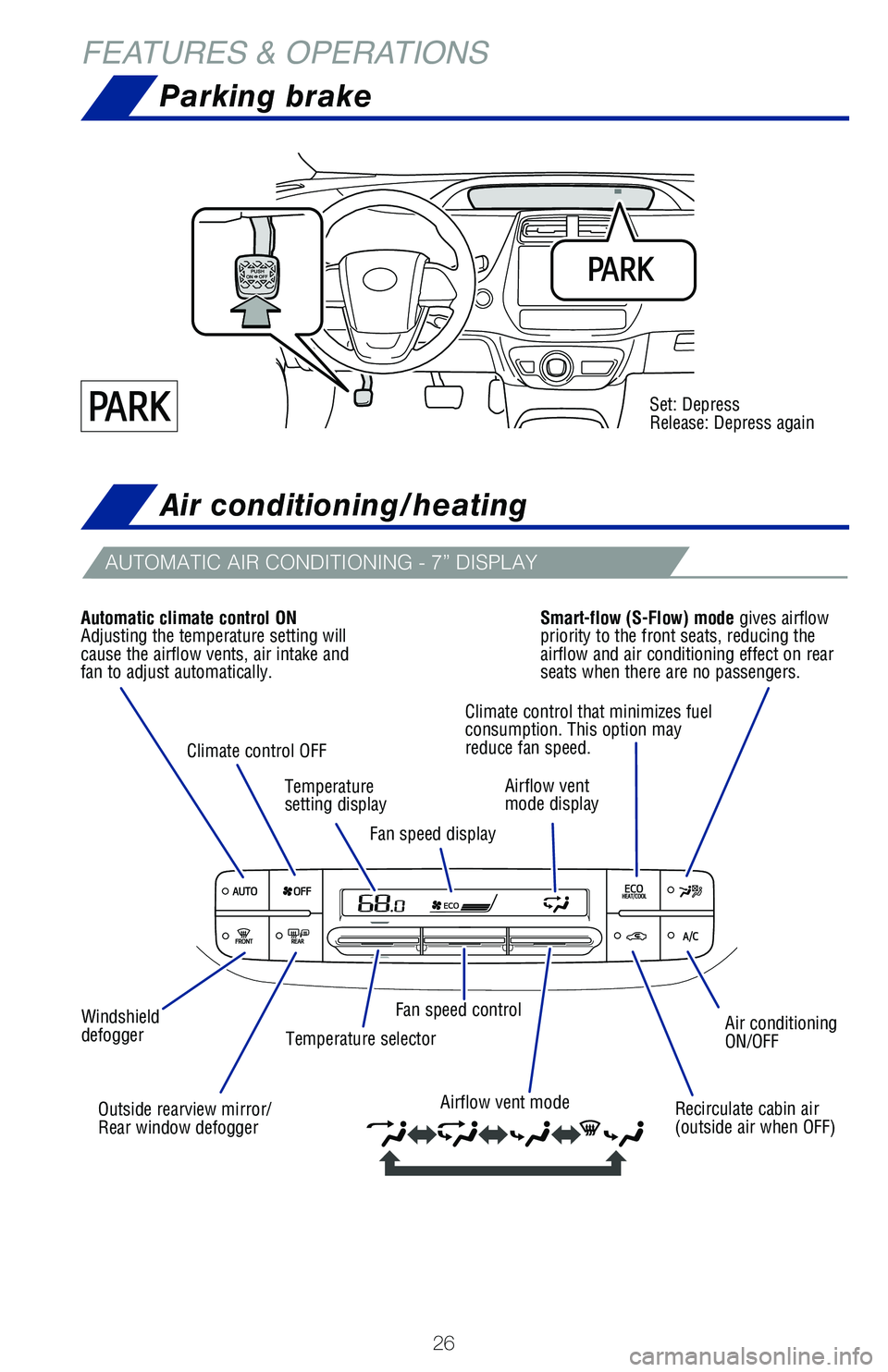
FEATURES & OPERATIONSAir conditioning/heating
AUTOMATIC AIR CONDITIONING - 7” DISPLAY
Air conditioning
ON/OFF
Recirculate cabin air
(outside air when OFF)
Airflow vent mode
Fan speed control
Windshield
defogger Temperature selector
Outside rearview mirror/
Rear window defogger
Automatic climate control ON
Adjusting the temperature setting will
cause the airflow vents, air intake and
fan to adjust automatically.
Smart-flow (S-Flow) mode gives airflow
priority to the front seats, reducing the
airflow and air conditioning effect on rear
seats when there are no passengers.
Climate control OFF Temperature
setting displayFan speed display Airflow vent
mode display
Climate control that minimizes fuel
consumption. This option may
reduce fan speed.
Parking brake
Set: Depress
Release: Depress again
Page 29 of 68
27
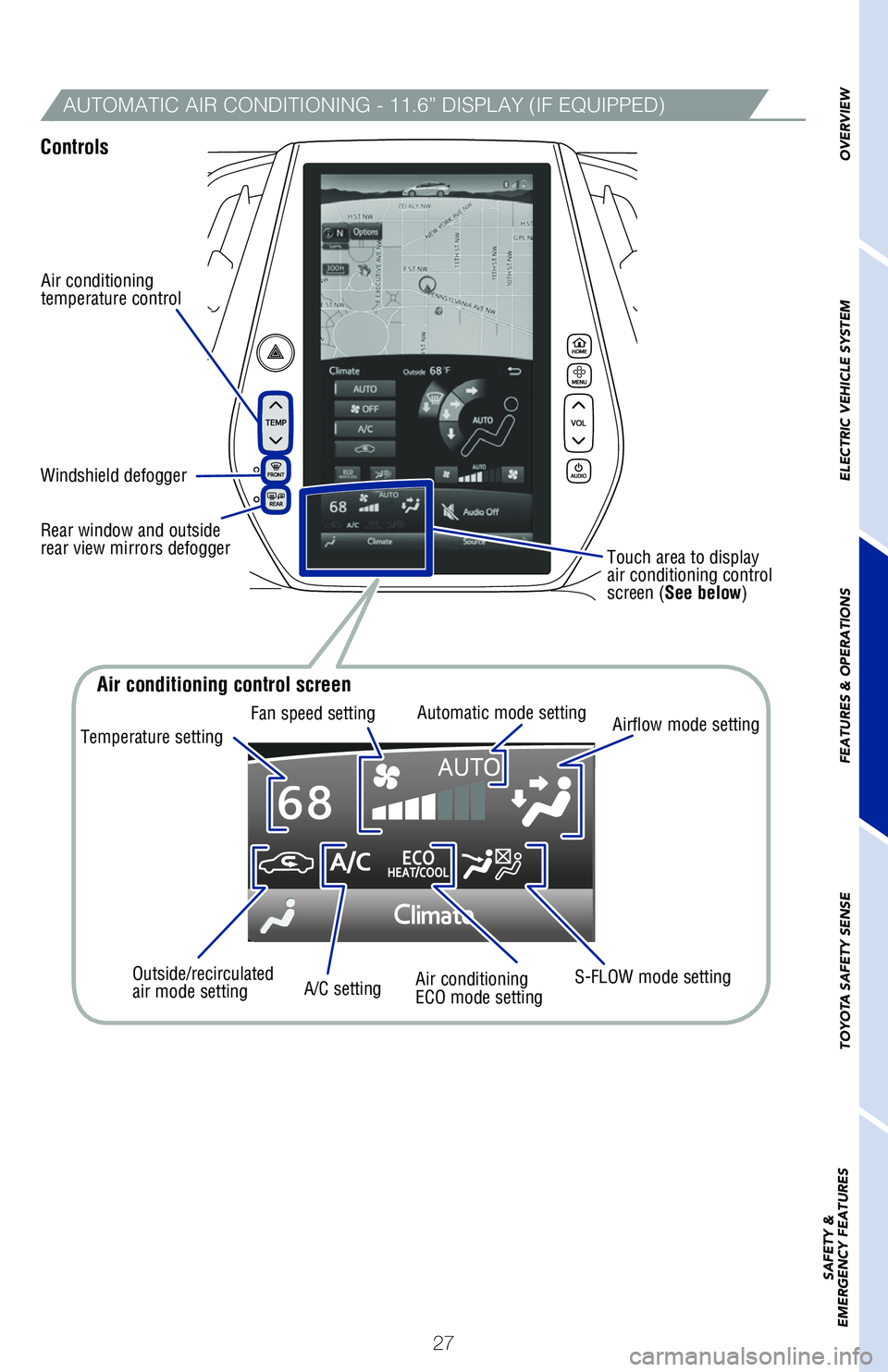
AUTOMATIC AIR CONDITIONING - 11.6” DISPLAY (IF EQUIPPED)
Controls
Air conditioning
temperature control
Touch area to display
air conditioning control
screen (See below)
Windshield defogger
Rear window and outside
rear view mirrors defogger
OVERVIEW
ELECTRIC VEHICLE SYSTEM
FEATURES & OPERATIONS
TOYOTA SAFETY SENSE
SAFETY &
EMERGENCY FEATURES
Temperature setting Fan speed setting
Automatic mode setting
Air conditioning control screen
Airflow mode setting
S-FLOW mode setting
Air conditioning
ECO mode setting
A/C setting
Outside/recirculated
air mode setting
Page 30 of 68
28
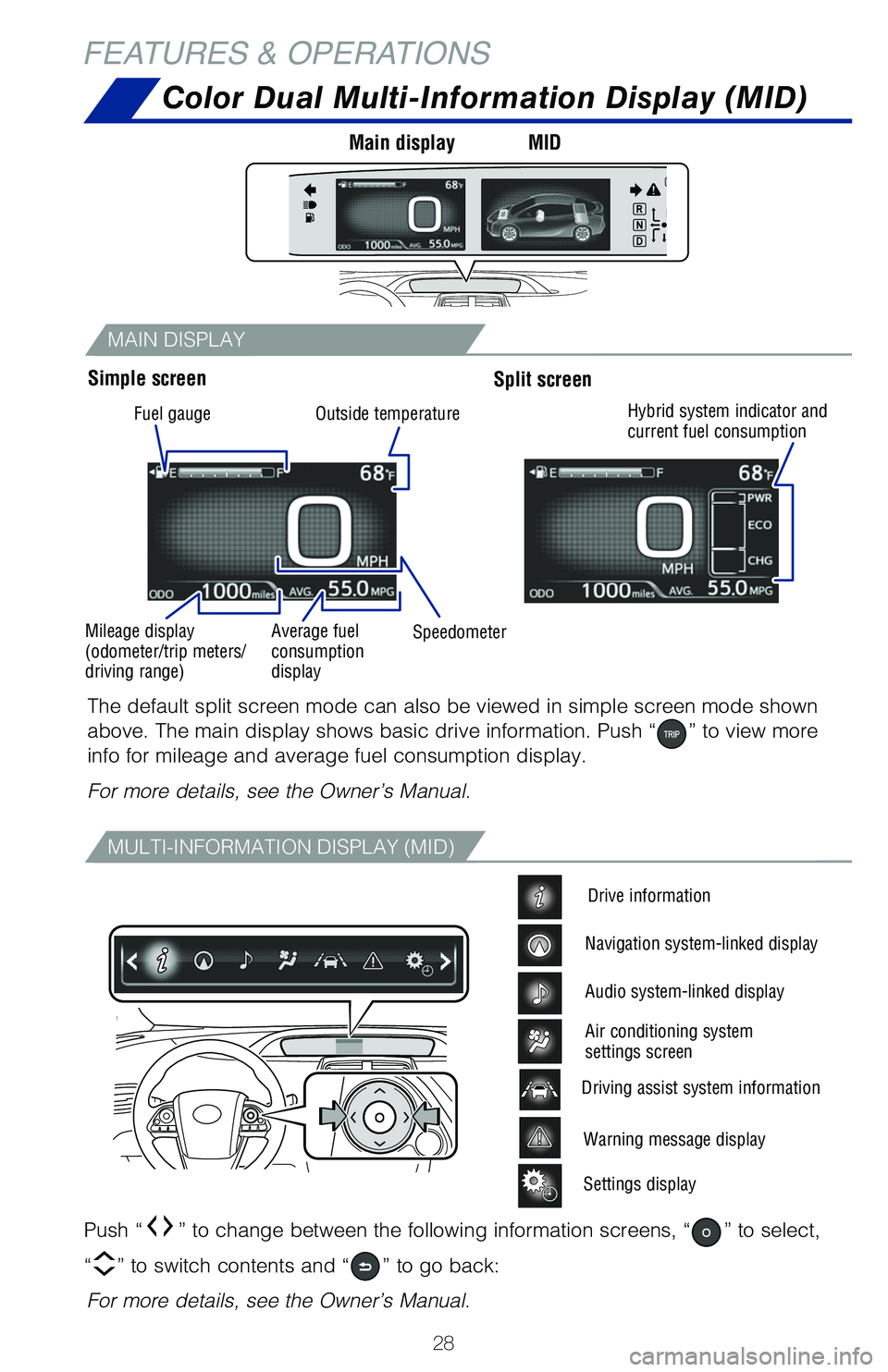
MAIN DISPLAY
MULTI-INFORMATION DISPLAY (MID)
Color Dual Multi-Information Display (MID)
Push “” to change between the following information screens, “” to select,
“
” to switch contents and “” to go back:
The default split screen mode can also be viewed in simple screen mode s\
hown
above. The main display shows basic drive information. Push “
” to view more
info for mileage and average fuel consumption display.
For more details, see the Owner’s Manual.
For more details, see the Owner’s Manual.
Warning message display
Settings display
Driving assist system information
Drive information
Navigation system-linked display
Audio system-linked display
Air conditioning system
settings screen
Simple screen Main display
MIDSplit screen
FEATURES & OPERATIONS
Fuel gauge
Mileage display
(odometer/trip meters/
driving range) Average fuel
consumption
display
Speedometer
Outside temperature
Hybrid system indicator and
current fuel consumption