audio TOYOTA PRIUS PRIME 2019 Owners Manual (in English)
[x] Cancel search | Manufacturer: TOYOTA, Model Year: 2019, Model line: PRIUS PRIME, Model: TOYOTA PRIUS PRIME 2019Pages: 68, PDF Size: 3.34 MB
Page 3 of 68
1
OVERVIEW
ELECTRIC VEHICLE SYSTEM
FEATURES & OPERATIONS
TOYOTA SAFETY SENSE
SAFETY &
EMERGENCY FEATURES
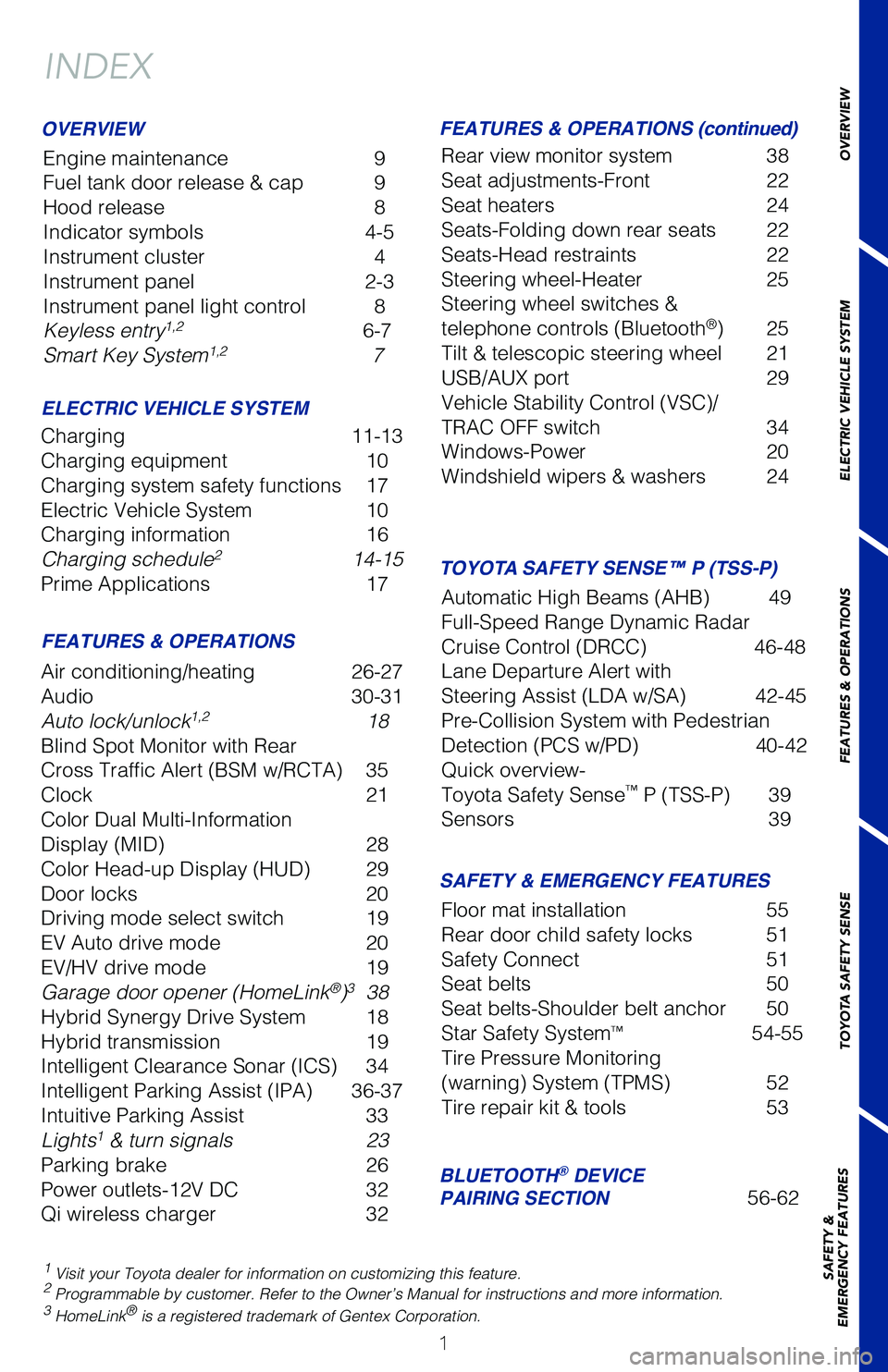
INDEX
Engine maintenance
9
Fuel tank door release & cap 9
Hood release 8
Indicator symbols 4-5
Instrument cluster 4
Instrument panel 2-3
Instrument panel light control 8
Keyless entry
1,2 6-7
Smart Key System1,2 7
1 Visit your Toyota dealer for information on customizing this feature.2 Programmable by customer. Refer to the Owner’s Manual for instructio\
ns and more information.3 HomeLink® is a registered trademark of Gentex Corporation.
OVERVIEW
ELECTRIC VEHICLE SYSTEM FEATURES & OPERATIONS (continued)
FEATURES & OPERATIONS SAFETY & EMERGENCY FEATURES
Charging 11-13
Charging equipment 10
Charging system safety functions 17
Electric Vehicle System 10
Charging information 16
Charging schedule
2 14-15
Prime Applications 17
Air conditioning/heating 26-27
Audio 30-31
Auto lock/unlock
1,2 18
Blind Spot Monitor with Rear
Cross Traffic Alert (BSM w/RCTA) 35
Clock 21
Color Dual Multi-Information
Display (MID) 28
Color Head-up Display (HUD) 29
Door locks 20
Driving mode select switch 19
EV Auto drive mode 20
EV/HV drive mode 19
Garage door opener (HomeLink
®)3 38
Hybrid Synergy Drive System 18
Hybrid transmission 19
Intelligent Clearance Sonar (ICS) 34
Intelligent Parking Assist (IPA) 36-37
Intuitive Parking Assist 33
Lights
1 & turn signals 23
Parking brake 26
Power outlets-12V DC 32
Qi wireless charger 32Rear view monitor system 38
Seat adjustments-Front
22
Seat heaters 24
Seats-Folding down rear seats 22
Seats-Head restraints 22
Steering wheel-Heater 25
Steering wheel switches &
telephone controls (Bluetooth
®) 25
Tilt & telescopic steering wheel 21
USB/AUX port 29
Vehicle Stability Control (VSC)/
TRAC OFF switch 34
Windows-Power 20
Windshield wipers & washers 24
Floor mat installation 55
Rear door child safety locks 51
Safety Connect 51
Seat belts 50
Seat belts-Shoulder belt anchor 50
Star Safety System
™ 54-55
Tire Pressure Monitoring
(warning) System (TPMS) 52
Tire repair kit & tools 53
BLUETOOTH® DEVICE
PAIRING SECTION 56-62
TOYOTA SAFETY SENSE™ P (TSS-P)
Automatic High Beams (AHB) 49
Full-Speed Range Dynamic Radar
Cruise Control (DRCC) 46-48
Lane Departure Alert with
Steering Assist (LDA w/SA) 42-45
Pre-Collision System with Pedestrian
Detection (PCS w/PD) 40-42
Quick overview-
Toyota Safety Sense
™ P (TSS-P) 39
Sensors 39
Page 4 of 68
2
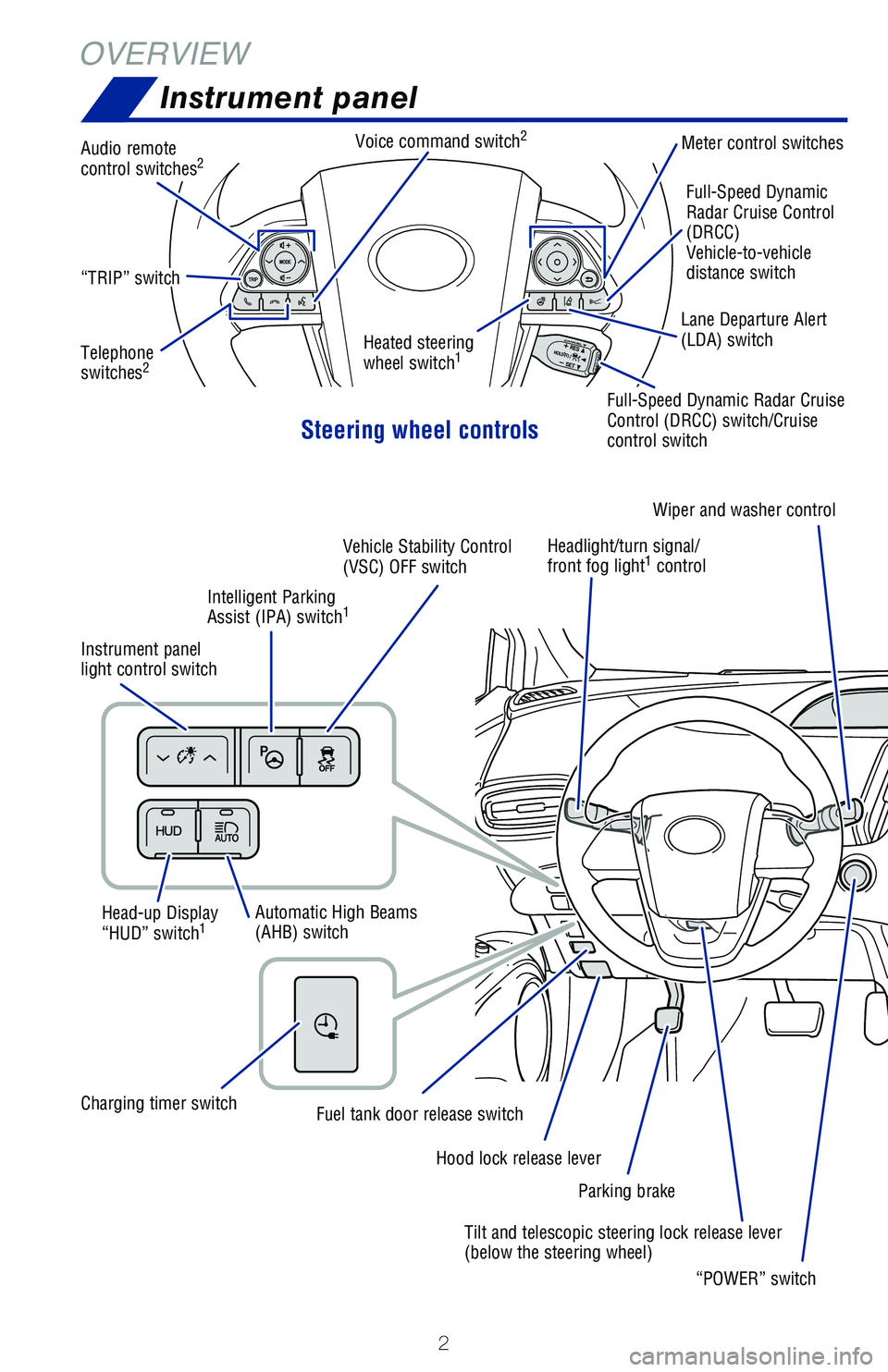
OVERVIEWInstrument panel
Steering wheel controls
Heated steering
wheel switch1
Full-Speed Dynamic
Radar Cruise Control
(DRCC)
Vehicle-to-vehicle
distance switch
“TRIP” switch
Audio remote
control switches2
Telephone
switches2
Voice command switch2Meter control switches
Head-up Display
“HUD” switch
1
Instrument panel
light control switch Headlight/turn signal/
front fog light
1 control
Automatic High Beams
(AHB) switch Tilt and telescopic steering lock release lever
(below the steering wheel)
Hood lock release lever
Fuel tank door release switchCharging timer switchIntelligent Parking
Assist (IPA) switch
1
Vehicle Stability Control
(VSC) OFF switch
Parking brakeWiper and washer control
“POWER” switch
Lane Departure Alert
(LDA) switch
Full-Speed Dynamic Radar Cruise
Control (DRCC) switch/Cruise
control switch
Page 5 of 68
 3
OVERVIEW
ELECTRIC VEHICLE SYSTEM
FEATURES & OPERATIONS
TOYOTA SAFETY SENSE
SAFETY &
EMERGENCY FEATURES
1 If equipped.2 For details, refer to the “Navigation System Owner’s Manual and “\
201")
3
OVERVIEW
ELECTRIC VEHICLE SYSTEM
FEATURES & OPERATIONS
TOYOTA SAFETY SENSE
SAFETY &
EMERGENCY FEATURES
1 If equipped.2 For details, refer to the “Navigation System Owner’s Manual and “\
2019 Prius Prime Entune™
Audio Quick Reference Guide”.
“P” position switch
Driving mode switch
Electric Vehicle/Hybrid
Vehicle (EV/HV) mode
select switch
Electric Vehicle (EV)
Auto mode switch
11.6” Display1
Audio system1,2/Navigation system2
and Air conditioning controls
Shift lever
Multi-Information Display (MID)
Emergency flasher switch (11.6” display)
Emergency flasher switch (7” display)7” Display
1
Audio system1,2/
Navigation system2
Gauges and meters
Driver side seat
heater switches Passenger side
seat heater switches Air conditioning controls
Page 27 of 68
 25
Bluetooth
® technology allows dialing or receipt of calls without removing your han\
ds
from the steering wheel or using a cable to connect the compatible telep\
hone and
the system.
* Push and")
25
Bluetooth
® technology allows dialing or receipt of calls without removing your han\
ds
from the steering wheel or using a cable to connect the compatible telep\
hone and
the system.
* Push and hold to access Mobile Assistant. When a compatible smartphone \
is
Bluetooth® connected push and hold the off hook switch 2-3 seconds to access
Siri® Eyes Free.
Refer to “Bluetooth
® Device Pairing Section” in this guide, for more information
about phone connections and compatibility.
Refer to the “Navigation System Owner’s manual” for more datail\
s.
Steering wheel-Heater (if equipped)
Push
OVERVIEW
ELECTRIC VEHICLE SYSTEM
FEATURES & OPERATIONS
TOYOTA SAFETY SENSE
SAFETY &
EMERGENCY FEATURES
MICROPHONE
STEERING WHEEL AUDIO AND TELEPHONE CONTROLS
Steering wheel switches &
telephone controls (Bluetooth®)
Type A (7” display)Type B (7” display/11.6” display)
NOTE: Concentrating on the road should always be your first priority whi\
le
driving. Do not use the hands-free phone system if it will distract you\
.
Volume control
Start call/
Mobile Assistant access*
End callVoice command switch “MODE”
Push to turn audio ON and select
an audio mode. Push and hold to
mute/unmute or pause/resume the
current operation.
“
vv” Use to search within the
selected audio medium (radio,
CD, etc.).
The “POWER” switch must be in ACCESSORY or IGNITION ON position to be used.
The heater switch will be turned off after about 30 minutes.
Page 30 of 68
28
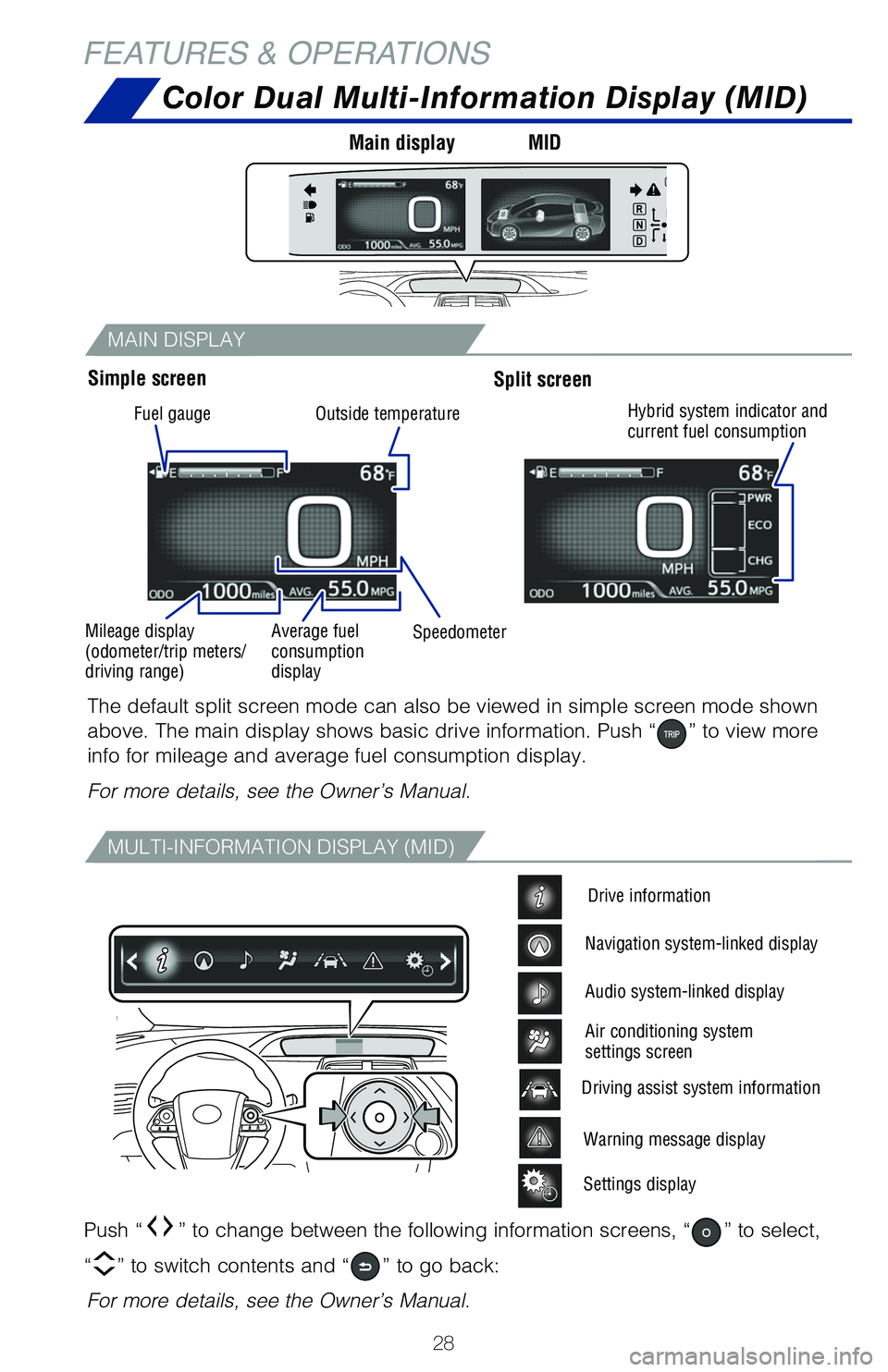
MAIN DISPLAY
MULTI-INFORMATION DISPLAY (MID)
Color Dual Multi-Information Display (MID)
Push “” to change between the following information screens, “” to select,
“
” to switch contents and “” to go back:
The default split screen mode can also be viewed in simple screen mode s\
hown
above. The main display shows basic drive information. Push “
” to view more
info for mileage and average fuel consumption display.
For more details, see the Owner’s Manual.
For more details, see the Owner’s Manual.
Warning message display
Settings display
Driving assist system information
Drive information
Navigation system-linked display
Audio system-linked display
Air conditioning system
settings screen
Simple screen Main display
MIDSplit screen
FEATURES & OPERATIONS
Fuel gauge
Mileage display
(odometer/trip meters/
driving range) Average fuel
consumption
display
Speedometer
Outside temperature
Hybrid system indicator and
current fuel consumption
Page 31 of 68
 29
Color Head-up display (HUD) (if equipped)
The color head-up display can display the current vehicle speed and hybr\
id system
indicator in front of the driver. Also, it can display various types o")
29
Color Head-up display (HUD) (if equipped)
The color head-up display can display the current vehicle speed and hybr\
id system
indicator in front of the driver. Also, it can display various types of \
information to
assist the driver.
Meter control switches adjust
position and brightness of HUD
Head-up display (HUD) switch
activates or switches between items Vehicle speed display
Hybrid system current driving and
energy regeneration status Insert display driving support
system information Cruise control display shows
Cruise control indicators
Route guidance display
OVERVIEW
ELECTRIC VEHICLE SYSTEM
FEATURES & OPERATIONS
TOYOTA SAFETY SENSE
SAFETY &
EMERGENCY FEATURES
USB media/AUX port
USB media port
By connecting a USB-compatible portable audio device or USB memory stick into
the USB media port, you can listen to music through the vehicle’s speaker system.
AUX port
By inserting an AUX cable into the AUX port, you can listen to music from a
portable audio device through the vehicle’s speaker system while in AUX mode.
Page 32 of 68
 30
ENTUNE™ PREMIUM AUDIO WITH INTEGRATED NAVIGATION
Audio
HOME SCREEN - the home screen offers a two panel and a three panel layou\
t. Information and
layout will vary depending on selected set up.")
30
ENTUNE™ PREMIUM AUDIO WITH INTEGRATED NAVIGATION
Audio
HOME SCREEN - the home screen offers a two panel and a three panel layou\
t. Information and
layout will vary depending on selected set up.
FEATURES & OPERATIONS
Eject CDSeek station/
CD track select
Map card
insert
Touch screen display Turn to tune radio
stations manually
or select tracks
or files
Touch to pause or
resume playing
NOTE: Concentrating on the road should always be your first priority whi\
le
driving. Do not use the Entune system if it will distract you.
Button
Access Bluetooth
hands-free
system
AUDIO Button
Access to audio
functions.
HOME Button
Access to
Home screen.
7” Display
APPS Button
Access to
sports, stocks,
news, traffic
and weather.
Push to turn ON/OFF,
turn to adjust the
volume.
Refer to the “Navigation System Owner’s Manual” and “2019 Pr\
ius Prime Entune
™
Audio Quick Reference Guide”.
Page 33 of 68
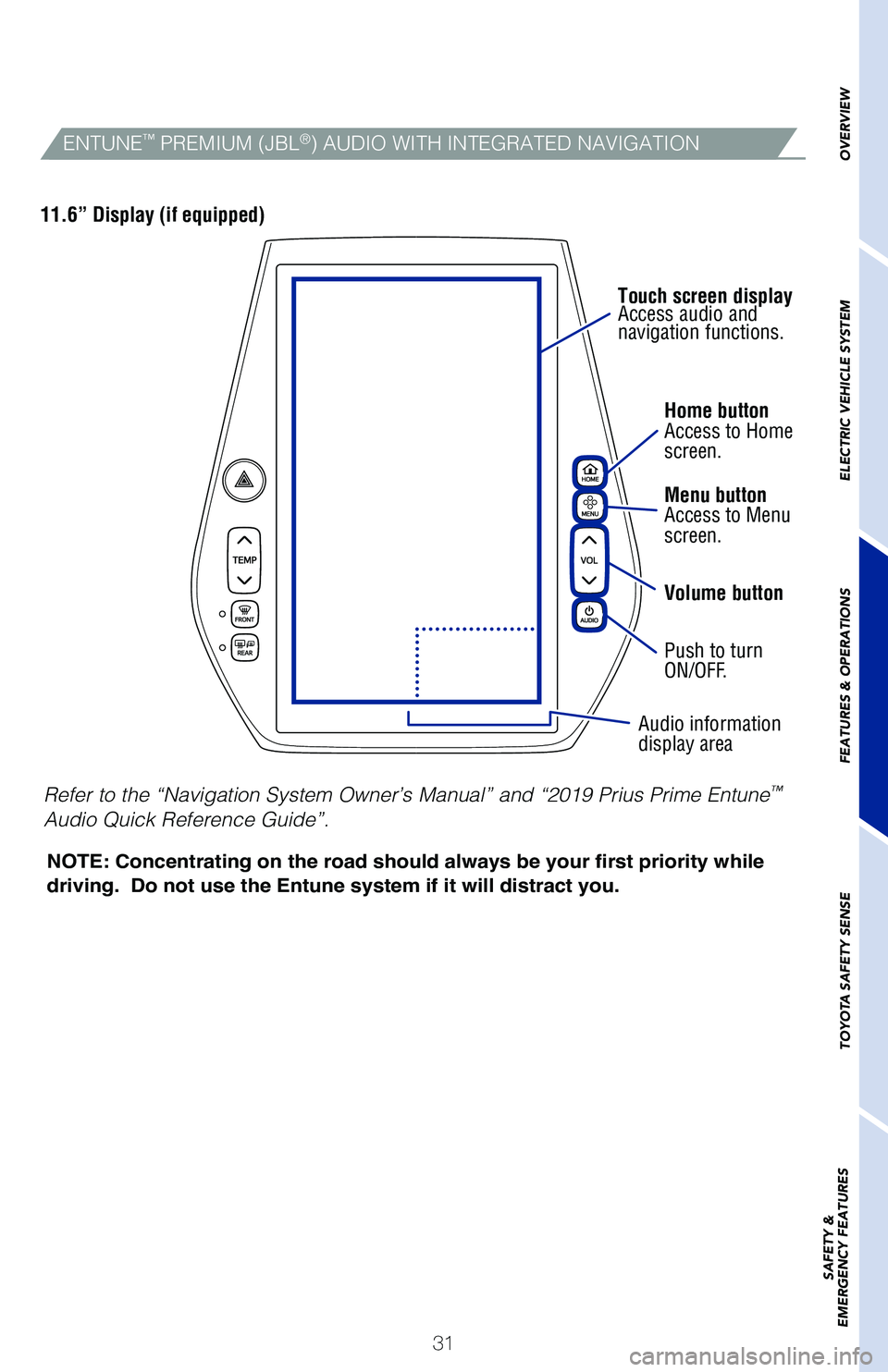
31Home button
Access to Home
screen.
Menu button
Access to Menu
screen.
Volume button
Push to turn
ON/OFF.
Audio information
display area
Touch screen display
Access audio and
navigation functions.
NOTE: Concentrating on the road should always be your first priority whi\
le
driving. Do not use the Entune system if it will distract you.
11.6” Display (if equipped)
OVERVIEW
ELECTRIC VEHICLE SYSTEM
FEATURES & OPERATIONS
TOYOTA SAFETY SENSE
SAFETY &
EMERGENCY FEATURESENTUNE™ PREMIUM (JBL®) AUDIO WITH INTEGRATED NAVIGATION
Refer to the “Navigation System Owner’s Manual” and “2019 Pr\
ius Prime Entune™
Audio Quick Reference Guide”.
Page 44 of 68
 42
TOYOTA SAFETY SENSE™
DISABLING PRE-COLLISION SYSTEM (PCS)
LDA in TSS-P uses an in-vehicle camera designed to detect visible white \
and
yellow lane markers in front of the vehicle and the vehicl")
42
TOYOTA SAFETY SENSE™
DISABLING PRE-COLLISION SYSTEM (PCS)
LDA in TSS-P uses an in-vehicle camera designed to detect visible white \
and
yellow lane markers in front of the vehicle and the vehicle’s positio\
n on the road.
If the system determines that the vehicle is starting to unintentionally\
deviate from
its lane, the system alerts the driver with an audio and visual alert. W\
hen the alerts
occur, the driver must check the surrounding road situation and carefull\
y operate
the steering wheel to move the vehicle back to the center part of their \
lane.
LDA is designed to function at speeds of approximately 32 MPH or higher \
on
relatively straight roadways.
In addition to the alert function, LDA w/SA also features a steering ass\
ist
function. When enabled, if the system determines that the vehicle is on \
a path
to unintentionally depart from its lane, the system may provide small co\
rrective
steering inputs to the steering wheel for a short period of time to help\
keep the
vehicle in its lane.
(1) Press “” switches and select from the Multi-Information Display (MID).
(2) Press “
” switches and select the setting function from the MID and then
press “
”. The setting screen is displayed.
(3) Press “
” each time to change the setting. You can press “” to go back to
the menu.
Lane Departure Alert with Steering Assist
(LDA w/SA)
Page 59 of 68
 57
Pairing your phone is the first step in connecting with your Toyota for \
hands-free
calling and for audio streaming via Bluetooth. This pairing process is q\
uick and
easy: all Android mobile di")
57
Pairing your phone is the first step in connecting with your Toyota for \
hands-free
calling and for audio streaming via Bluetooth. This pairing process is q\
uick and
easy: all Android mobile digital devices have Bluetooth integrated; all \
you have to
do is setup the phone and multimedia system to “talk” to each othe\
r and form a
connection.
2
Initiate Bluetooth® on your Android®
STEP 1
STEP 5
STEP 2STEP 3STEP 4
From your APPS
SCREEN, select
SETTINGS. Select
CONNECTIONS and
select
BLUETOOTH. Ensure
BLUETOOTH
is
ON. Select
YOUR PHONE
DEVICE to make it
discoverable.
Phone will seek out
Bluetooth devices
while remaining
discoverable.
While your Android device is seeking
out Bluetooth devices, proceed to
your Entune Multimedia Head Unit on
your Toyota vehicle.
1 To determine which head unit is installed in your vehicle, refer to the\
Audio section in this guide. Entune™ Premium Audio screens are shown in this section. Screens and features \
may vary by
Entune™ system. 2 Some Android devices may have slightly different SETTINGS screen layout\
depending on manu- facturer of device and Android OS version.
To begin the Bluetooth® Pairing process, press the HOME button on the faceplate of
your Toyota Vehicle Entune™ Multimedia Head Unit.1
Bluetooth® Pairing for Android phone and
Entune™ touch screen system