display TOYOTA PRIUS PRIME 2019 Owners Manual (in English)
[x] Cancel search | Manufacturer: TOYOTA, Model Year: 2019, Model line: PRIUS PRIME, Model: TOYOTA PRIUS PRIME 2019Pages: 68, PDF Size: 3.34 MB
Page 3 of 68
1
OVERVIEW
ELECTRIC VEHICLE SYSTEM
FEATURES & OPERATIONS
TOYOTA SAFETY SENSE
SAFETY &
EMERGENCY FEATURES
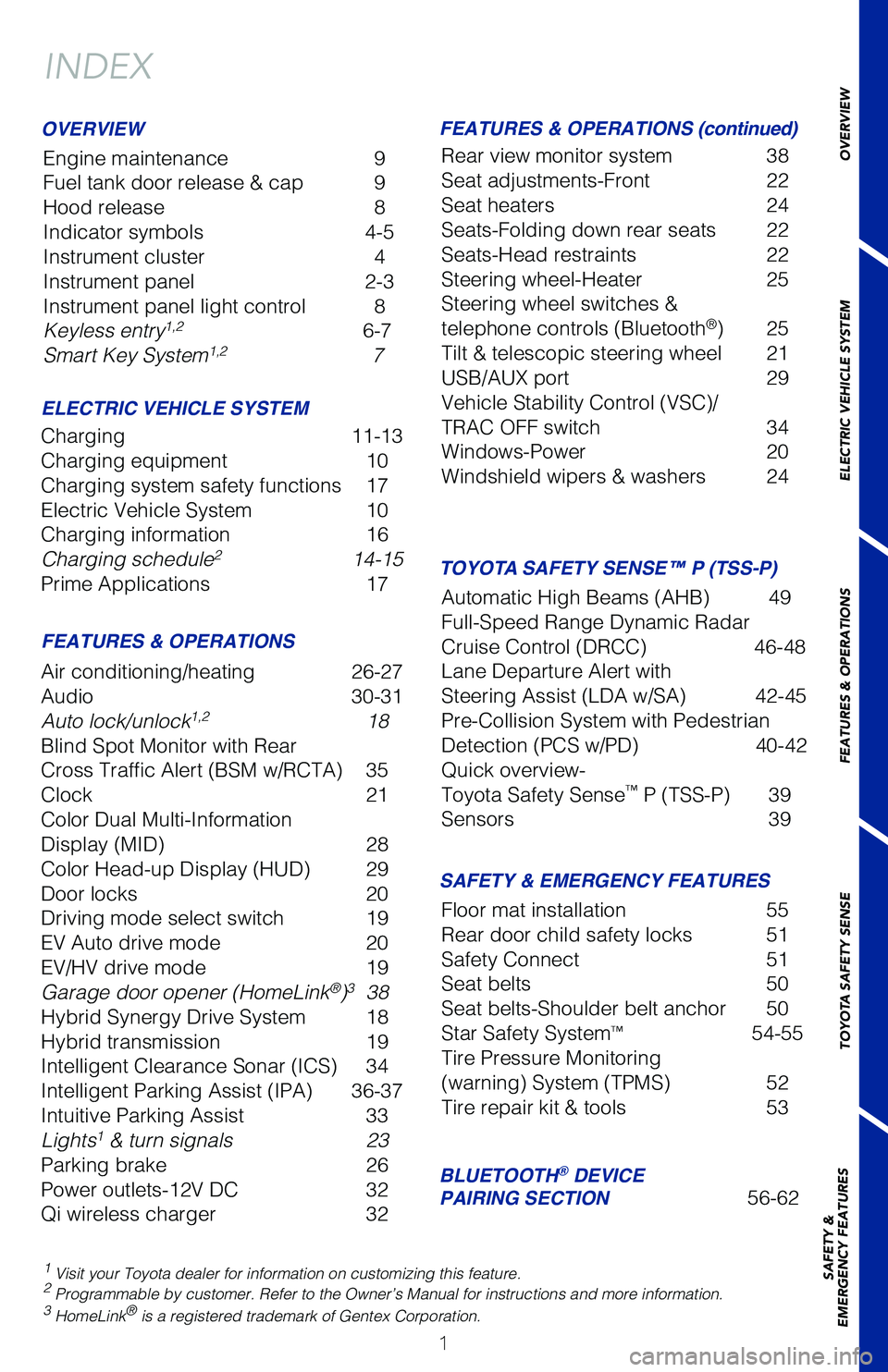
INDEX
Engine maintenance
9
Fuel tank door release & cap 9
Hood release 8
Indicator symbols 4-5
Instrument cluster 4
Instrument panel 2-3
Instrument panel light control 8
Keyless entry
1,2 6-7
Smart Key System1,2 7
1 Visit your Toyota dealer for information on customizing this feature.2 Programmable by customer. Refer to the Owner’s Manual for instructio\
ns and more information.3 HomeLink® is a registered trademark of Gentex Corporation.
OVERVIEW
ELECTRIC VEHICLE SYSTEM FEATURES & OPERATIONS (continued)
FEATURES & OPERATIONS SAFETY & EMERGENCY FEATURES
Charging 11-13
Charging equipment 10
Charging system safety functions 17
Electric Vehicle System 10
Charging information 16
Charging schedule
2 14-15
Prime Applications 17
Air conditioning/heating 26-27
Audio 30-31
Auto lock/unlock
1,2 18
Blind Spot Monitor with Rear
Cross Traffic Alert (BSM w/RCTA) 35
Clock 21
Color Dual Multi-Information
Display (MID) 28
Color Head-up Display (HUD) 29
Door locks 20
Driving mode select switch 19
EV Auto drive mode 20
EV/HV drive mode 19
Garage door opener (HomeLink
®)3 38
Hybrid Synergy Drive System 18
Hybrid transmission 19
Intelligent Clearance Sonar (ICS) 34
Intelligent Parking Assist (IPA) 36-37
Intuitive Parking Assist 33
Lights
1 & turn signals 23
Parking brake 26
Power outlets-12V DC 32
Qi wireless charger 32Rear view monitor system 38
Seat adjustments-Front
22
Seat heaters 24
Seats-Folding down rear seats 22
Seats-Head restraints 22
Steering wheel-Heater 25
Steering wheel switches &
telephone controls (Bluetooth
®) 25
Tilt & telescopic steering wheel 21
USB/AUX port 29
Vehicle Stability Control (VSC)/
TRAC OFF switch 34
Windows-Power 20
Windshield wipers & washers 24
Floor mat installation 55
Rear door child safety locks 51
Safety Connect 51
Seat belts 50
Seat belts-Shoulder belt anchor 50
Star Safety System
™ 54-55
Tire Pressure Monitoring
(warning) System (TPMS) 52
Tire repair kit & tools 53
BLUETOOTH® DEVICE
PAIRING SECTION 56-62
TOYOTA SAFETY SENSE™ P (TSS-P)
Automatic High Beams (AHB) 49
Full-Speed Range Dynamic Radar
Cruise Control (DRCC) 46-48
Lane Departure Alert with
Steering Assist (LDA w/SA) 42-45
Pre-Collision System with Pedestrian
Detection (PCS w/PD) 40-42
Quick overview-
Toyota Safety Sense
™ P (TSS-P) 39
Sensors 39
Page 4 of 68
2
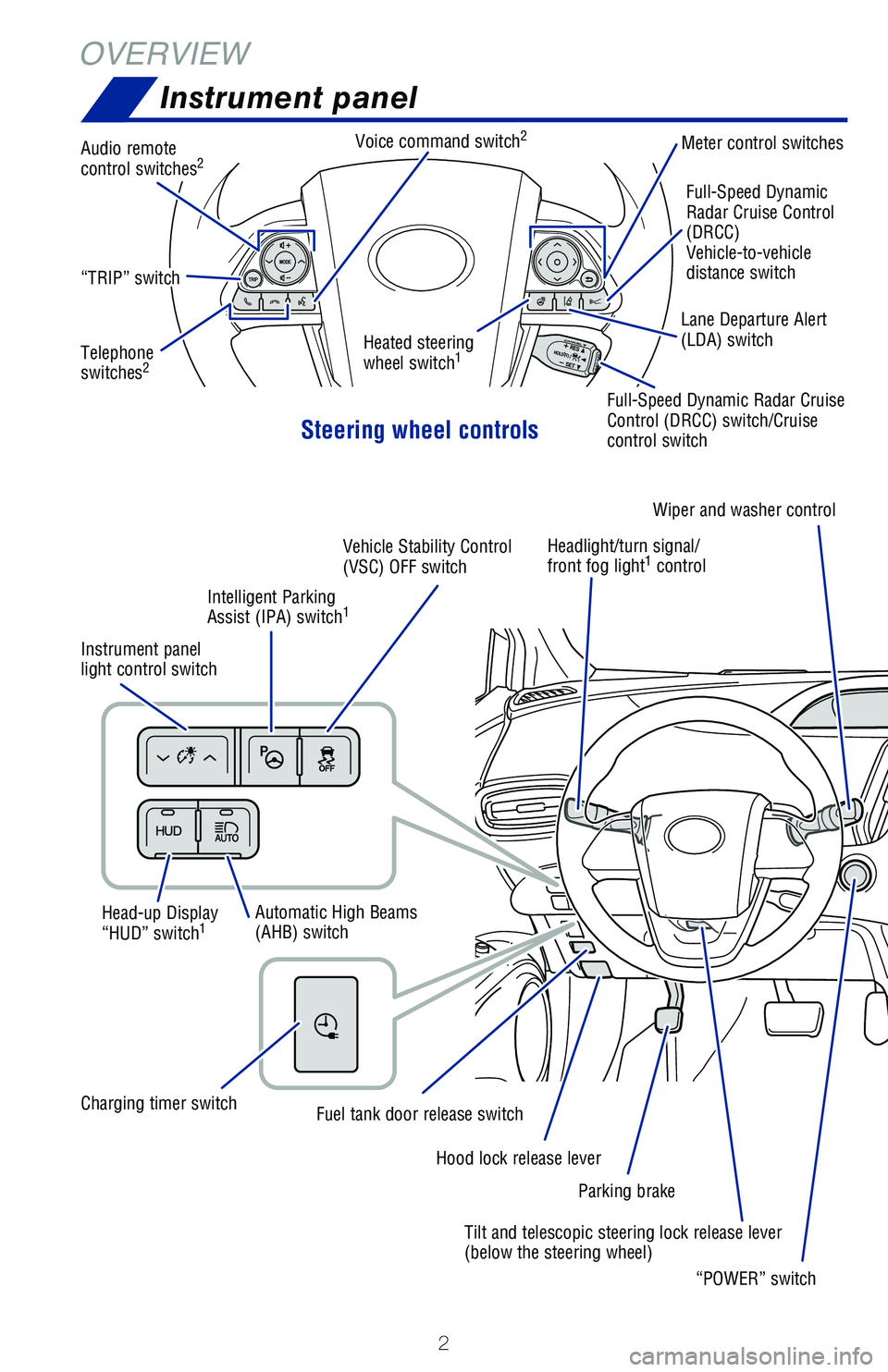
OVERVIEWInstrument panel
Steering wheel controls
Heated steering
wheel switch1
Full-Speed Dynamic
Radar Cruise Control
(DRCC)
Vehicle-to-vehicle
distance switch
“TRIP” switch
Audio remote
control switches2
Telephone
switches2
Voice command switch2Meter control switches
Head-up Display
“HUD” switch
1
Instrument panel
light control switch Headlight/turn signal/
front fog light
1 control
Automatic High Beams
(AHB) switch Tilt and telescopic steering lock release lever
(below the steering wheel)
Hood lock release lever
Fuel tank door release switchCharging timer switchIntelligent Parking
Assist (IPA) switch
1
Vehicle Stability Control
(VSC) OFF switch
Parking brakeWiper and washer control
“POWER” switch
Lane Departure Alert
(LDA) switch
Full-Speed Dynamic Radar Cruise
Control (DRCC) switch/Cruise
control switch
Page 5 of 68
 3
OVERVIEW
ELECTRIC VEHICLE SYSTEM
FEATURES & OPERATIONS
TOYOTA SAFETY SENSE
SAFETY &
EMERGENCY FEATURES
1 If equipped.2 For details, refer to the “Navigation System Owner’s Manual and “\
201")
3
OVERVIEW
ELECTRIC VEHICLE SYSTEM
FEATURES & OPERATIONS
TOYOTA SAFETY SENSE
SAFETY &
EMERGENCY FEATURES
1 If equipped.2 For details, refer to the “Navigation System Owner’s Manual and “\
2019 Prius Prime Entune™
Audio Quick Reference Guide”.
“P” position switch
Driving mode switch
Electric Vehicle/Hybrid
Vehicle (EV/HV) mode
select switch
Electric Vehicle (EV)
Auto mode switch
11.6” Display1
Audio system1,2/Navigation system2
and Air conditioning controls
Shift lever
Multi-Information Display (MID)
Emergency flasher switch (11.6” display)
Emergency flasher switch (7” display)7” Display
1
Audio system1,2/
Navigation system2
Gauges and meters
Driver side seat
heater switches Passenger side
seat heater switches Air conditioning controls
Page 6 of 68
4
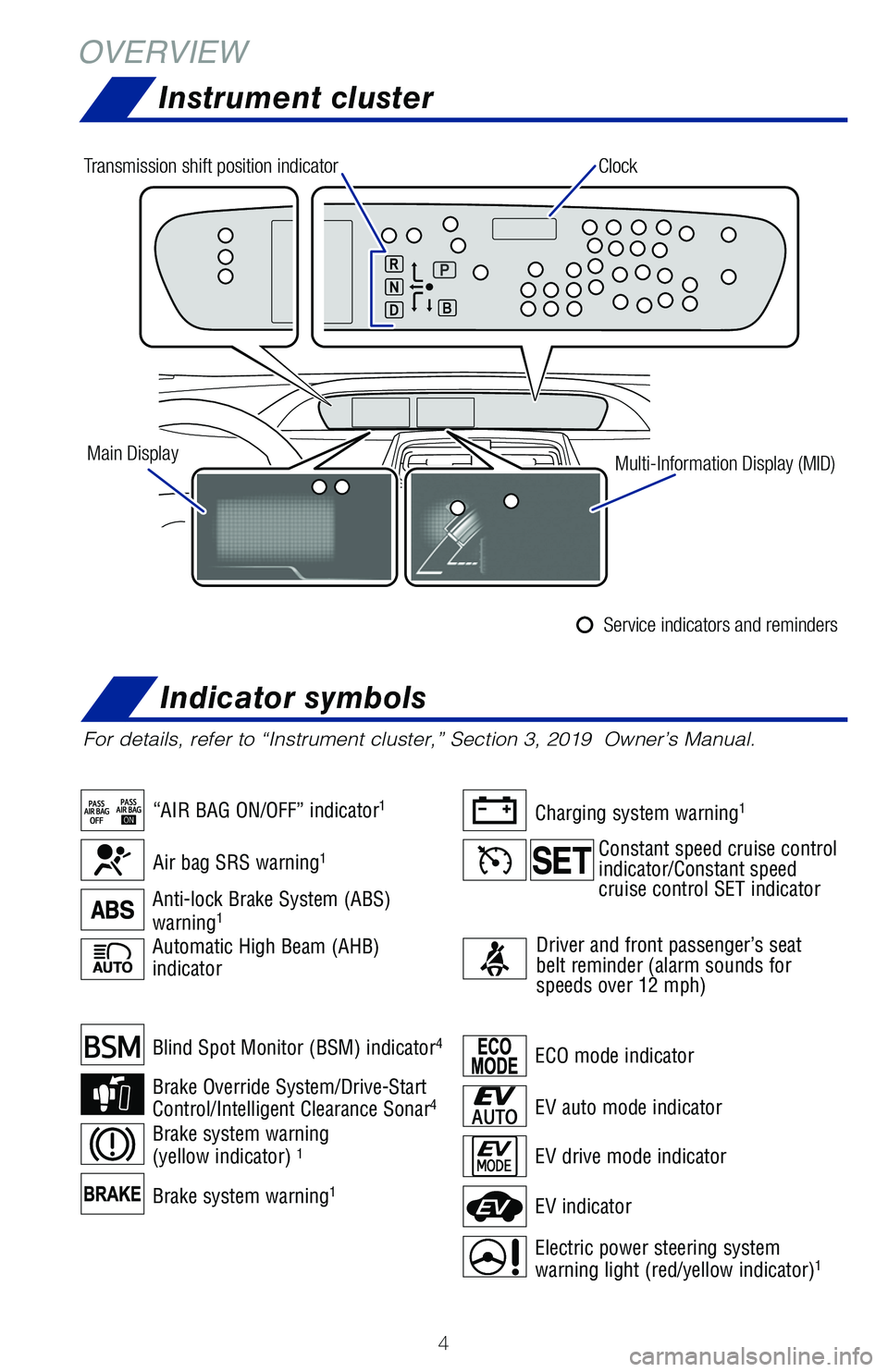
Brake system warning1
Blind Spot Monitor (BSM) indicator4
Brake Override System/Drive-Start
Control/Intelligent Clearance Sonar4
Brake system warning
(yellow indicator) 1
Automatic High Beam (AHB)
indicator
OVERVIEW
Instrument cluster
For details, refer to “Instrument cluster,” Section 3, 2019 Owner’s Manual.
ECO mode indicator
EV drive mode indicator
EV indicator
Electric power steering system
warning light (red/yellow indicator)1
EV auto mode indicator
Air bag SRS warning1
“AIR BAG ON/OFF” indicator1
Anti-lock Brake System (ABS)
warning1
Charging system warning1
Driver and front passenger’s seat
belt reminder (alarm sounds for
speeds over 12 mph)
Clock
Main Display Multi-Information Display (MID)
Transmission shift position indicator
Service indicators and reminders
Constant speed cruise control
indicator/Constant speed
cruise control SET indicator
Indicator symbols
Page 16 of 68
14
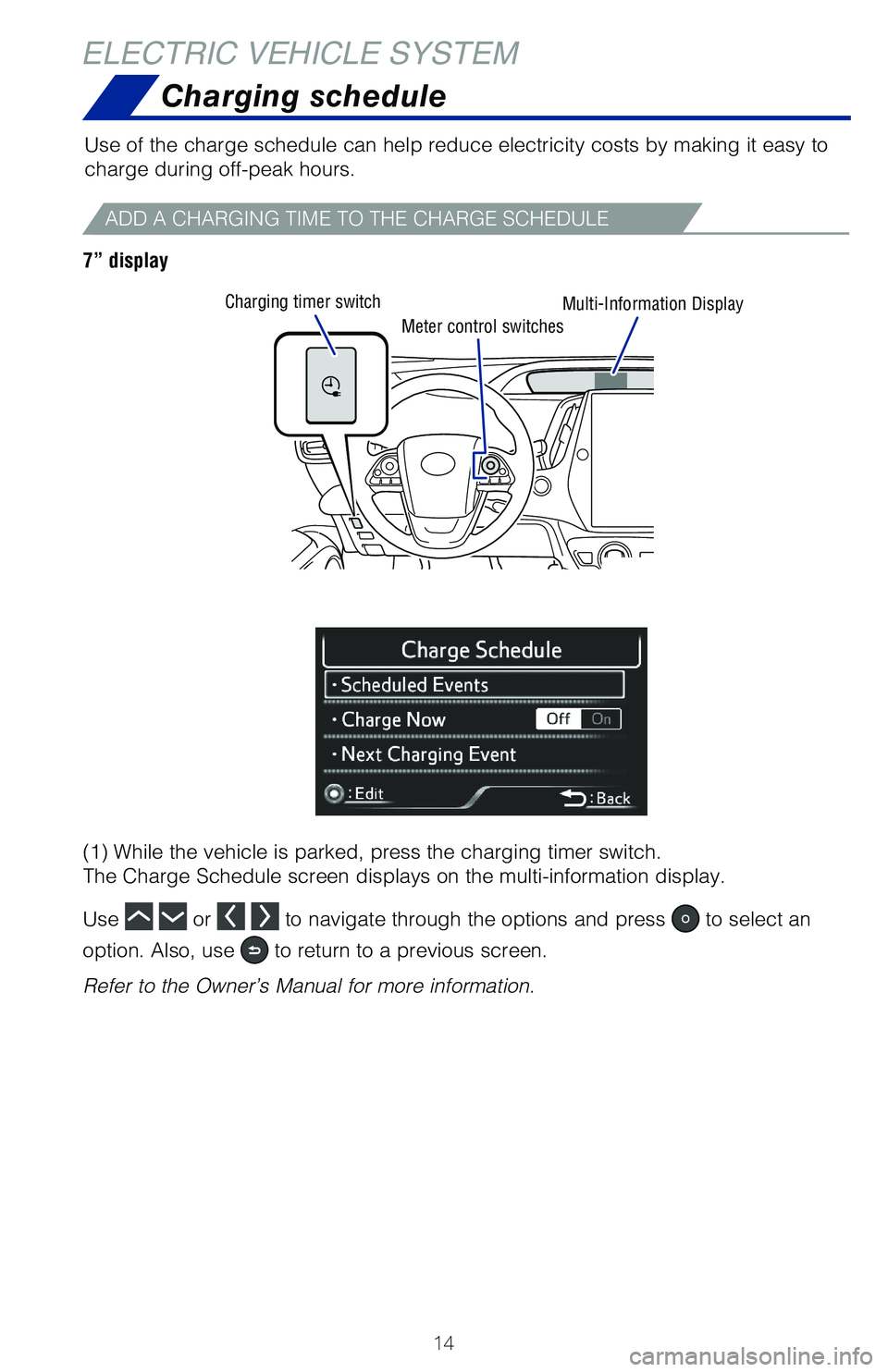
Meter control switches
Charging timer switch
Multi-Information Display
ELECTRIC VEHICLE SYSTEM
ADD A CHARGING TIME TO THE CHARGE SCHEDULE
Use of the charge schedule can help reduce electricity costs by making it easy to
charge during off-peak hours.
7” display
(1) While the vehicle is parked, press the charging timer switch.
The Charge Schedule screen displays on the multi-information display.
Use
or to navigate through the options and press to select an
option. Also, use
to return to a previous screen.
Refer to the Owner’s Manual for more information.
Charging schedule
Page 17 of 68
15
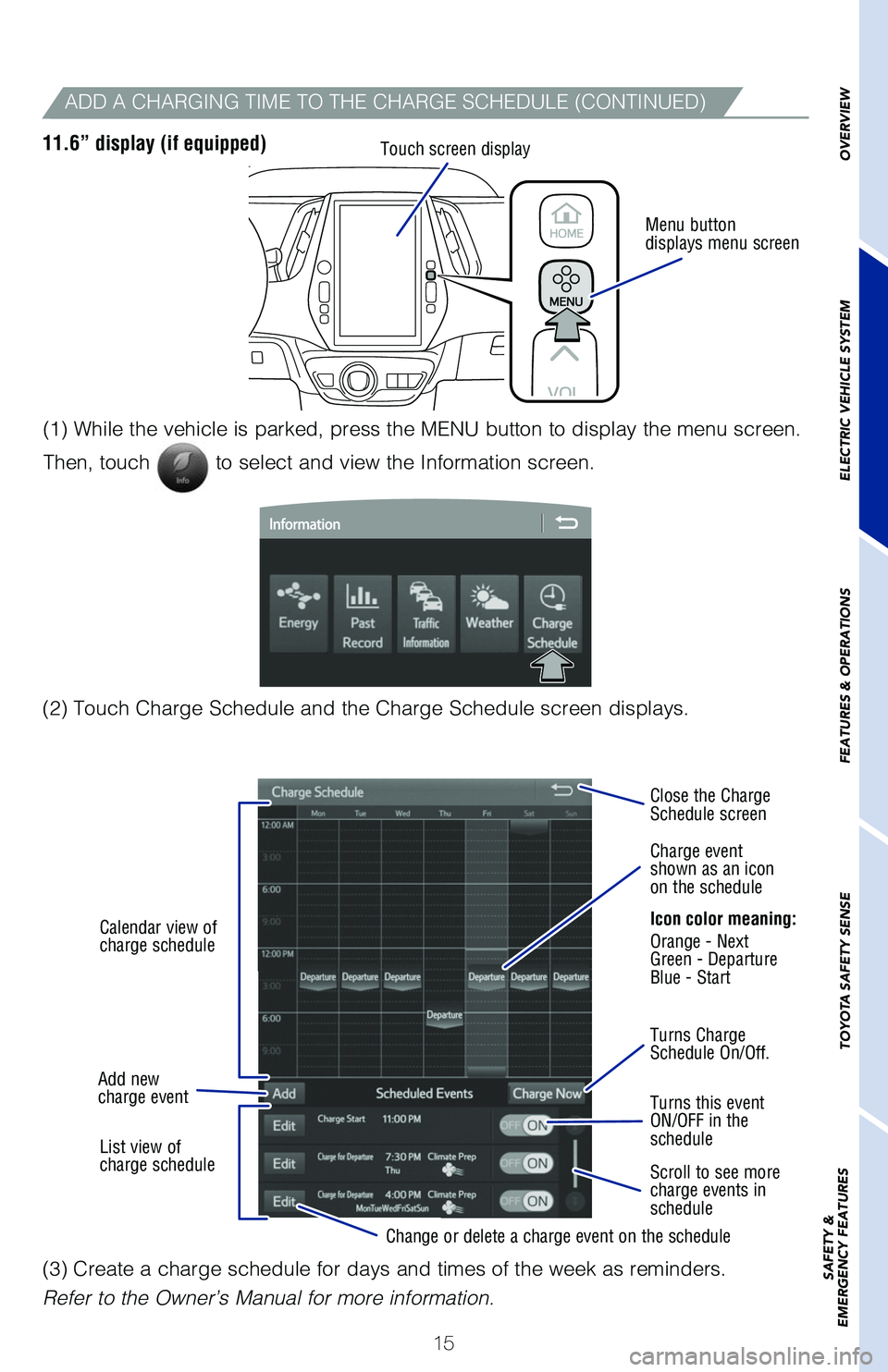
Menu button
displays menu screen
Touch screen display
ADD A CHARGING TIME TO THE CHARGE SCHEDULE (CONTINUED)
11.6” display (if equipped)
(2) Touch Charge Schedule and the Charge Schedule screen displays. (1) While the vehicle is parked, press the MENU button to display the menu screen.
Then, touch
to select and view the Information screen.
Calendar view of
charge schedule
Add new
charge event Turns Charge
Schedule On/Off. Close the Charge
Schedule screen
Turns this event
ON/OFF in the
schedule
Scroll to see more
charge events in
schedule Charge event
shown as an icon
on the schedule
Icon color meaning:
Orange - Next
Green - Departure
Blue - Start
List view of
charge schedule Change or delete a charge event on the schedule
(3) Create a charge schedule for days and times of the week as reminders.
Refer to the Owner’s Manual for more information.
OVERVIEW
ELECTRIC VEHICLE SYSTEM
FEATURES & OPERATIONS
TOYOTA SAFETY SENSE
SAFETY &
EMERGENCY FEATURES
Page 18 of 68
16
ELECTRIC VEHICLE SYSTEMCharging Information
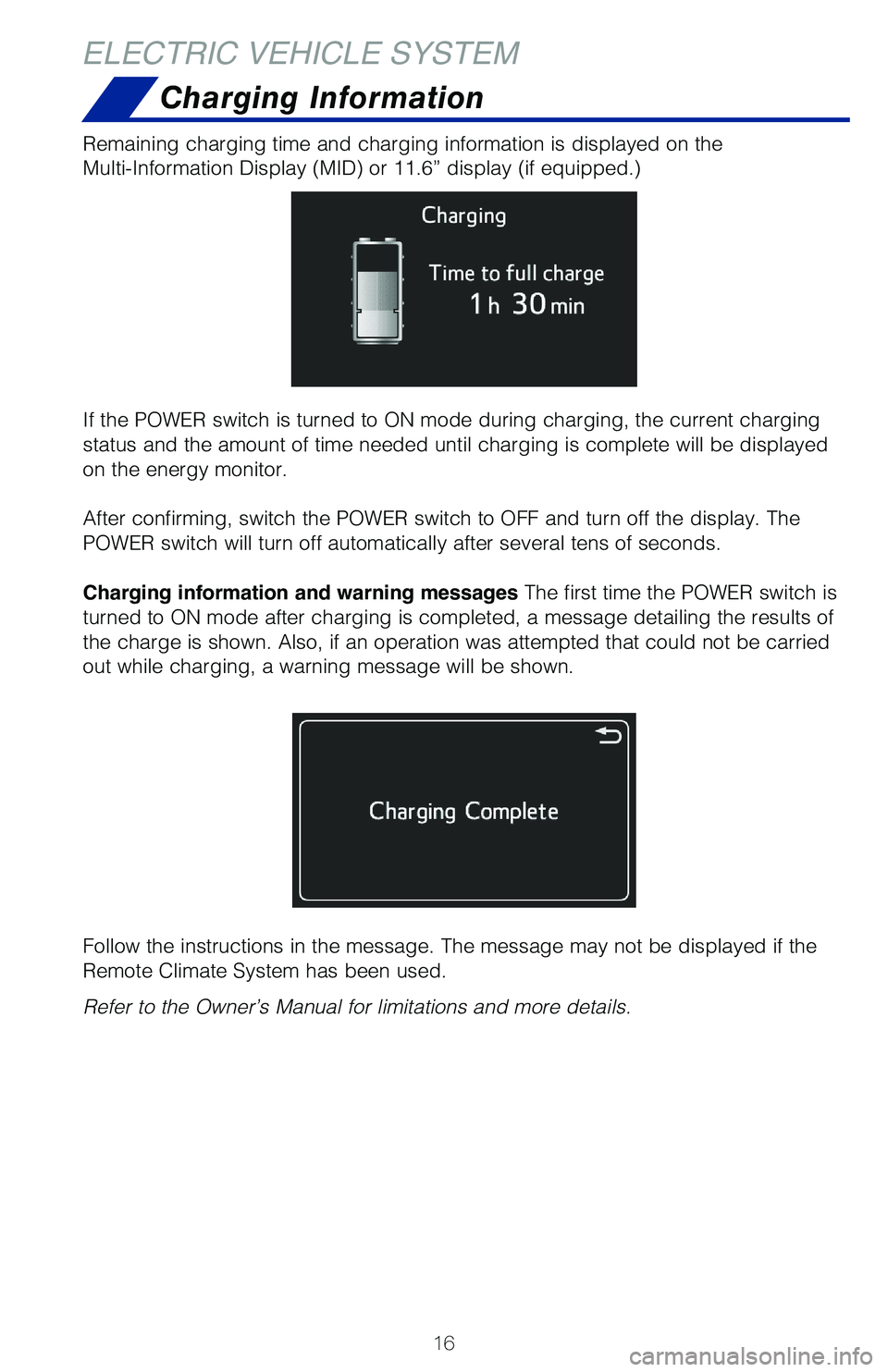
Remaining charging time and charging information is displayed on the
Multi-Information Display (MID) or 11.6” display (if equipped.)
If the POWER switch is turned to ON mode during charging, the current ch\
arging
status and the amount of time needed until charging is complete will be \
displayed
on the energy monitor.
After confirming, switch the POWER switch to OFF and turn off the displa\
y. The
POWER switch will turn off automatically after several tens of seconds.
Charging information and warning messages The first time the POWER switch is
turned to ON mode after charging is completed, a message detailing the r\
esults of
the charge is shown. Also, if an operation was attempted that could not \
be carried
out while charging, a warning message will be shown.
Follow the instructions in the message. The message may not be displayed\
if the
Remote Climate System has been used.
Refer to the Owner’s Manual for limitations and more details.
Page 20 of 68
 18
Hybrid Synergy Drive System
FEATURES & OPERATIONS
The Hybrid Synergy Drive System utilizes a computer-controlled gasoline \
engine
and electric motor to provide the most efficient combination of p")
18
Hybrid Synergy Drive System
FEATURES & OPERATIONS
The Hybrid Synergy Drive System utilizes a computer-controlled gasoline \
engine
and electric motor to provide the most efficient combination of power fo\
r the
vehicle. To conserve energy, when the brakes are applied the braking for\
ce
generates electricity which is then sent to the traction battery. In add\
ition, the
engine shuts off when the vehicle is stopped. The benefits are better fu\
el economy,
reduced vehicle emissions and improved performance.
NOTE: Fuel consumption and energy information of the Hybrid System are shown on the Multi-Information Display.
-Ensure tire pressures are maintained at levels specified in the Owner’\
s Manual.
-When possible, link trips to reduce engine cold starts.
-Avoid driving at speeds that are higher than necessary, especially on t\
he highway.
-When possible, avoid sudden stops to maximize regenerative braking ener\
gy.
-Minimize use of the air conditioning.
TIPS FOR IMPROVED FUEL ECONOMY
STARTING YOUR VEHICLE
Auto lock/unlock
Automatic door locks can be programmed to operate in different modes, or\
turned
OFF.
Shift position linked door locking/unlocking function
-Doors lock when shifting from Park.
-Doors unlock when shifting into Park.
Speed linked door locking function
-Doors lock when the vehicle speed is approximately 12 mph or higher.
Driver’s door linked door unlocking function
-Doors unlock when the “POWER” switch is set to OFF and driver’\
s door is opened within approximately 45 seconds.
Refer to the Owner’s Manual for more details.
Push
(1) Put the shift lever in “P.”
(2) Depress the brake pedal, and “”
will be displayed on the Multi-Information
Display.
(3) Press the “POWER” switch briefly and
firmly.
(4) The “READY” light will blink. After
a few seconds, when the light remains
steady and a beep sounds, you may
begin driving.
Page 23 of 68
21
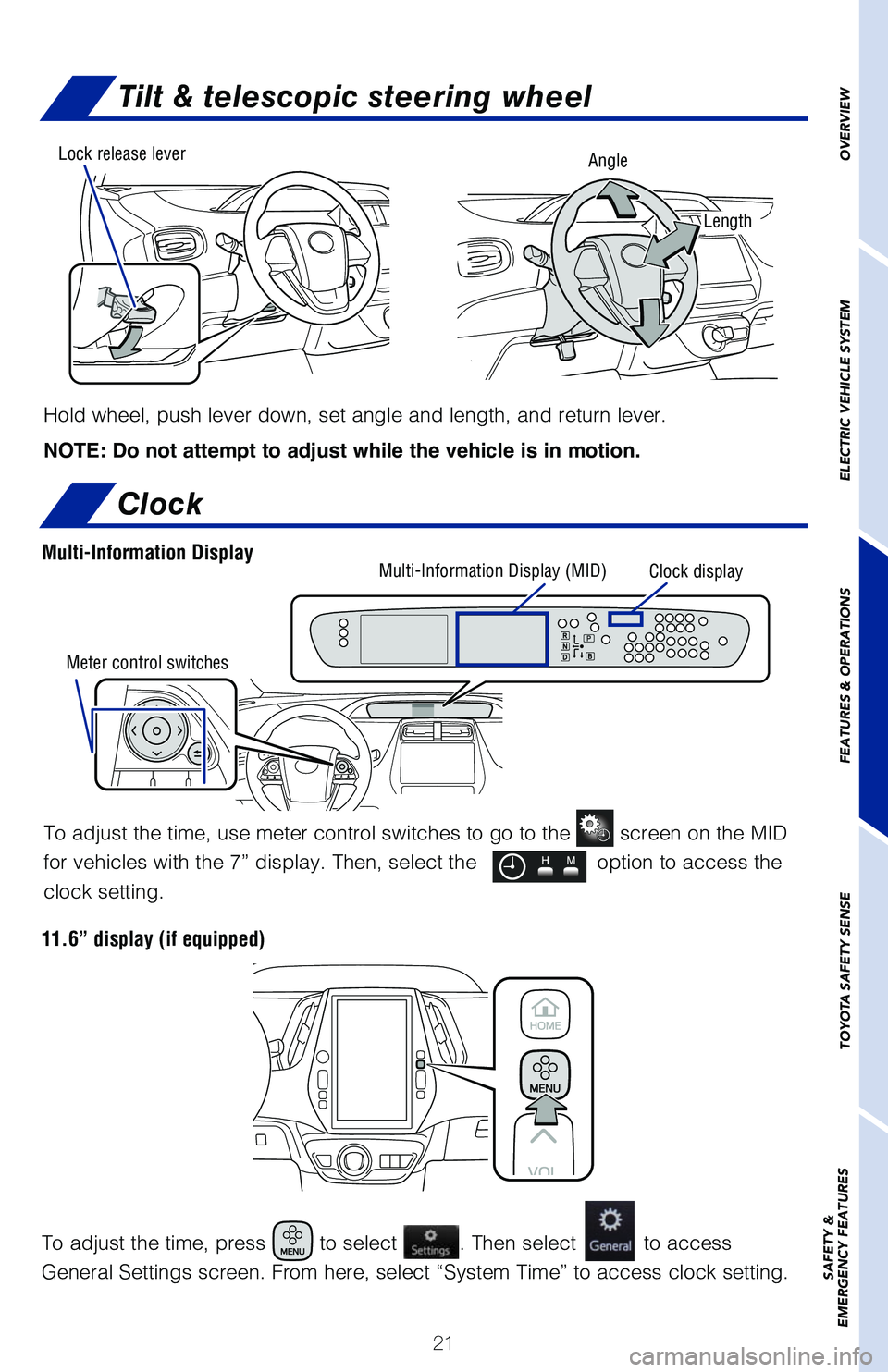
Tilt & telescopic steering wheel
Hold wheel, push lever down, set angle and length, and return lever.
NOTE: Do not attempt to adjust while the vehicle is in motion.
Angle
Length
Lock release leverOVERVIEW
ELECTRIC VEHICLE SYSTEM
FEATURES & OPERATIONS
TOYOTA SAFETY SENSE
SAFETY &
EMERGENCY FEATURES
Clock
To adjust the time, use meter control switches to go to the screen on the MID
for vehicles with the 7” display. Then, select the
option to access the
clock setting.
To adjust the time, press
to select . Then select to access
General Settings screen. From here, select “System Time” to access\
clock setting.
Multi-Information Display (MID) Clock display
Meter control switchesMulti-Information Display
11.6” display (if equipped)
Page 27 of 68
 25
Bluetooth
® technology allows dialing or receipt of calls without removing your han\
ds
from the steering wheel or using a cable to connect the compatible telep\
hone and
the system.
* Push and")
25
Bluetooth
® technology allows dialing or receipt of calls without removing your han\
ds
from the steering wheel or using a cable to connect the compatible telep\
hone and
the system.
* Push and hold to access Mobile Assistant. When a compatible smartphone \
is
Bluetooth® connected push and hold the off hook switch 2-3 seconds to access
Siri® Eyes Free.
Refer to “Bluetooth
® Device Pairing Section” in this guide, for more information
about phone connections and compatibility.
Refer to the “Navigation System Owner’s manual” for more datail\
s.
Steering wheel-Heater (if equipped)
Push
OVERVIEW
ELECTRIC VEHICLE SYSTEM
FEATURES & OPERATIONS
TOYOTA SAFETY SENSE
SAFETY &
EMERGENCY FEATURES
MICROPHONE
STEERING WHEEL AUDIO AND TELEPHONE CONTROLS
Steering wheel switches &
telephone controls (Bluetooth®)
Type A (7” display)Type B (7” display/11.6” display)
NOTE: Concentrating on the road should always be your first priority whi\
le
driving. Do not use the hands-free phone system if it will distract you\
.
Volume control
Start call/
Mobile Assistant access*
End callVoice command switch “MODE”
Push to turn audio ON and select
an audio mode. Push and hold to
mute/unmute or pause/resume the
current operation.
“
vv” Use to search within the
selected audio medium (radio,
CD, etc.).
The “POWER” switch must be in ACCESSORY or IGNITION ON position to be used.
The heater switch will be turned off after about 30 minutes.