warning lights TOYOTA PRIUS PRIME 2019 Owners Manual (in English)
[x] Cancel search | Manufacturer: TOYOTA, Model Year: 2019, Model line: PRIUS PRIME, Model: TOYOTA PRIUS PRIME 2019Pages: 68, PDF Size: 3.34 MB
Page 3 of 68
1
OVERVIEW
ELECTRIC VEHICLE SYSTEM
FEATURES & OPERATIONS
TOYOTA SAFETY SENSE
SAFETY &
EMERGENCY FEATURES
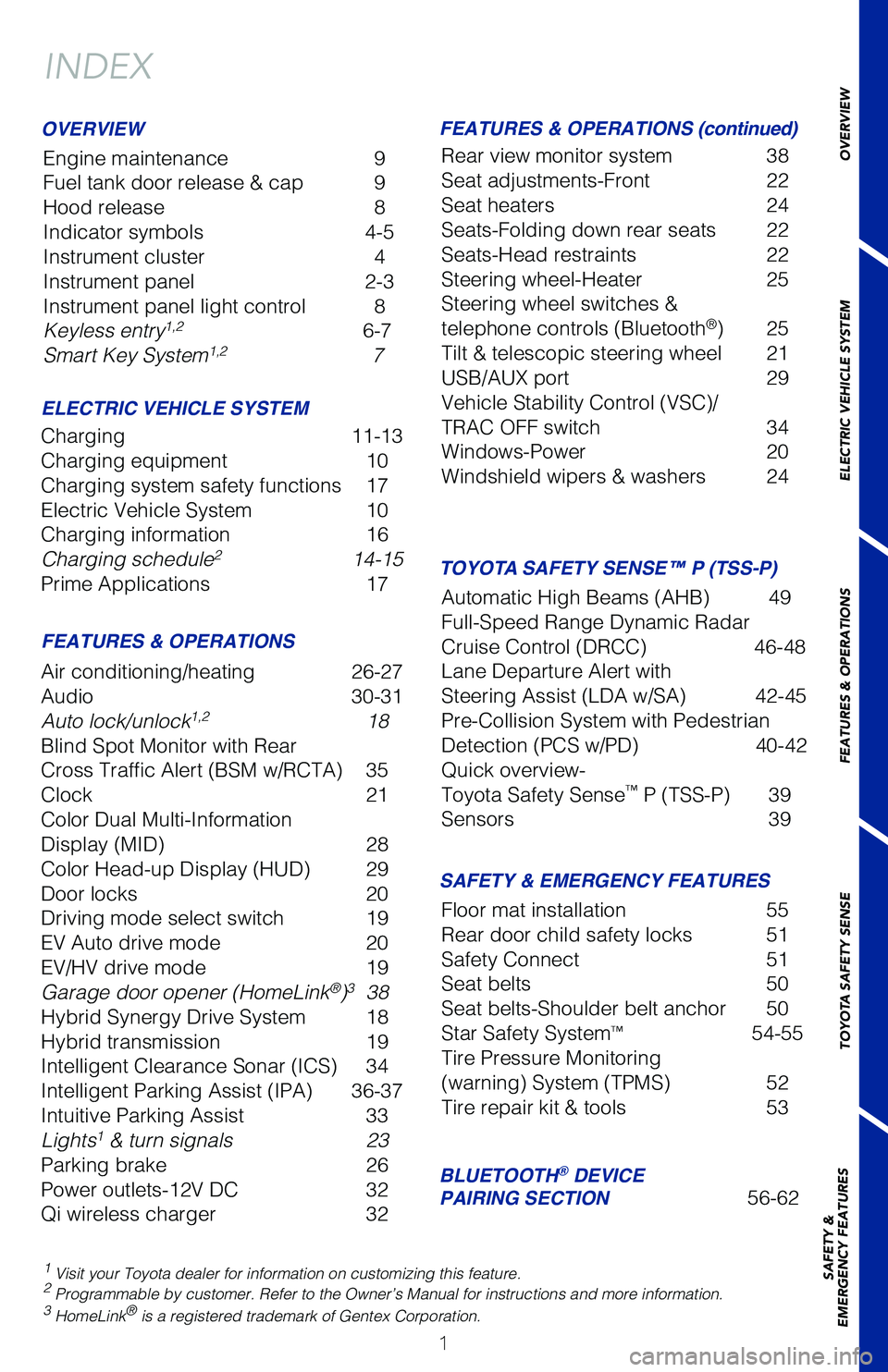
INDEX
Engine maintenance
9
Fuel tank door release & cap 9
Hood release 8
Indicator symbols 4-5
Instrument cluster 4
Instrument panel 2-3
Instrument panel light control 8
Keyless entry
1,2 6-7
Smart Key System1,2 7
1 Visit your Toyota dealer for information on customizing this feature.2 Programmable by customer. Refer to the Owner’s Manual for instructio\
ns and more information.3 HomeLink® is a registered trademark of Gentex Corporation.
OVERVIEW
ELECTRIC VEHICLE SYSTEM FEATURES & OPERATIONS (continued)
FEATURES & OPERATIONS SAFETY & EMERGENCY FEATURES
Charging 11-13
Charging equipment 10
Charging system safety functions 17
Electric Vehicle System 10
Charging information 16
Charging schedule
2 14-15
Prime Applications 17
Air conditioning/heating 26-27
Audio 30-31
Auto lock/unlock
1,2 18
Blind Spot Monitor with Rear
Cross Traffic Alert (BSM w/RCTA) 35
Clock 21
Color Dual Multi-Information
Display (MID) 28
Color Head-up Display (HUD) 29
Door locks 20
Driving mode select switch 19
EV Auto drive mode 20
EV/HV drive mode 19
Garage door opener (HomeLink
®)3 38
Hybrid Synergy Drive System 18
Hybrid transmission 19
Intelligent Clearance Sonar (ICS) 34
Intelligent Parking Assist (IPA) 36-37
Intuitive Parking Assist 33
Lights
1 & turn signals 23
Parking brake 26
Power outlets-12V DC 32
Qi wireless charger 32Rear view monitor system 38
Seat adjustments-Front
22
Seat heaters 24
Seats-Folding down rear seats 22
Seats-Head restraints 22
Steering wheel-Heater 25
Steering wheel switches &
telephone controls (Bluetooth
®) 25
Tilt & telescopic steering wheel 21
USB/AUX port 29
Vehicle Stability Control (VSC)/
TRAC OFF switch 34
Windows-Power 20
Windshield wipers & washers 24
Floor mat installation 55
Rear door child safety locks 51
Safety Connect 51
Seat belts 50
Seat belts-Shoulder belt anchor 50
Star Safety System
™ 54-55
Tire Pressure Monitoring
(warning) System (TPMS) 52
Tire repair kit & tools 53
BLUETOOTH® DEVICE
PAIRING SECTION 56-62
TOYOTA SAFETY SENSE™ P (TSS-P)
Automatic High Beams (AHB) 49
Full-Speed Range Dynamic Radar
Cruise Control (DRCC) 46-48
Lane Departure Alert with
Steering Assist (LDA w/SA) 42-45
Pre-Collision System with Pedestrian
Detection (PCS w/PD) 40-42
Quick overview-
Toyota Safety Sense
™ P (TSS-P) 39
Sensors 39
Page 13 of 68
 11
The Prius Prime may be charged immediately, or scheduled to charge at a \
specific time. Before charging, it is recommended that:
• Parking brake is securely set
• All lights are turned off
â€")
11
The Prius Prime may be charged immediately, or scheduled to charge at a \
specific time. Before charging, it is recommended that:
• Parking brake is securely set
• All lights are turned off
• The POWER switch is OFF
Refer to “Things to Know Before Charging,” in the Owner’s Manua\
l before
attempting to charge the hybrid battery.
Step 1 Plug the charge cable into the outlet of the external power source.
NOTE: Hanging the CCID on a hook is recommended to reduce the strain on
the outlet and charge cable plug.
OVERVIEW
ELECTRIC VEHICLE SYSTEM
FEATURES & OPERATIONS
TOYOTA SAFETY SENSE
SAFETY &
EMERGENCY FEATURES
START CHARGING
- Make sure to hold the body of the plug and insert it
firmly into the outlet.
- Check that the power indicator of the CCID (Charging Circuit Interrupting Device) is illuminated.
- Check the status of the automatic system check that runs before charging to detect electrical leakage. If a
malfunction is detected, an error warning indicator
flashes.
- The surface of the CCID may become hot, but this does not indicate a malfunction.
Step 2 Press the charge port lid to open and the charging inlet light will ill\
uminate.
NOTE: For vehicles with smart lid & connector locking system, unlock doors
first.
For more information or to change settings for the smart lid and chargin\
g connector
function, refer to the Owner’s Manual.
Charging inlet light
Charging
Page 49 of 68
47
OVERVIEW
ELECTRIC VEHICLE SYSTEM
FEATURES & OPERATIONS
TOYOTA SAFETY SENSE
SAFETY &
EMERGENCY FEATURES
ADJUSTING DISTANCE
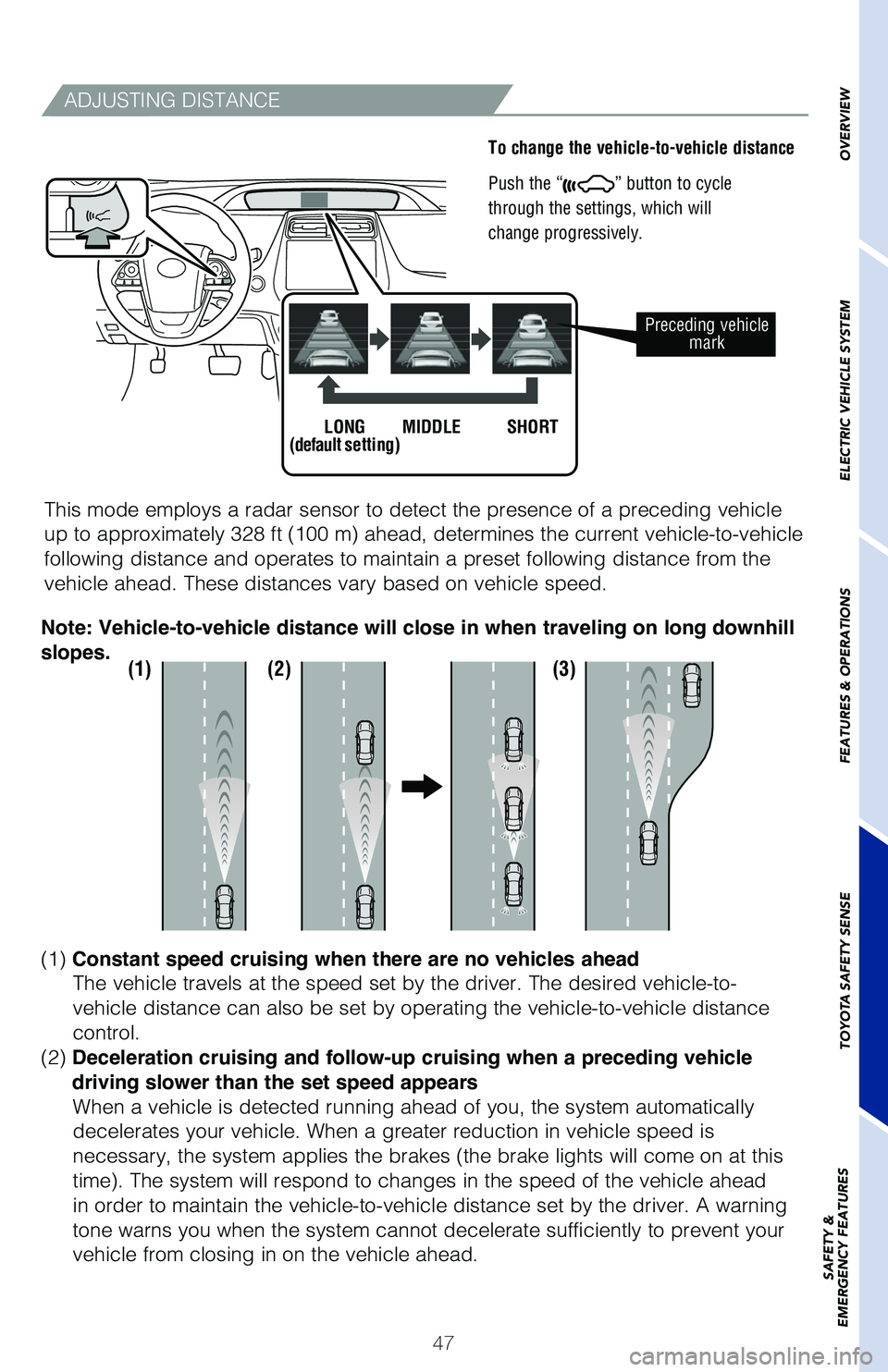
To change the vehicle-to-vehicle distance
Push the “
” button to cycle
through the settings, which will
change progressively.
This mode employs a radar sensor to detect the presence of a preceding v\
ehicle
up to approximately 328 ft (100 m) ahead, determines the current vehicle-to-vehicle
following distance and operates to maintain a preset following distance \
from the
vehicle ahead. These distances vary based on vehicle speed.
Preceding vehicle mark
LONG
(default setting) MIDDLE SHORT
(1) (2) (3)
(1) Constant speed cruising when there are no vehicles ahead
The vehicle travels at the speed set by the driver. The desired vehicle-\
to-
vehicle distance can also be set by operating the vehicle-to-vehicle dis\
tance
control.
(2) Deceleration cruising and follow-up cruising when a preceding vehicle
driving slower than the set speed appears When a vehicle is detected running ahead of you, the system automaticall\
y
decelerates your vehicle. When a greater reduction in vehicle speed is
necessary, the system applies the brakes (the brake lights will come on at this
time). The system will respond to changes in the speed of the vehicle ahead
in order to maintain the vehicle-to-vehicle distance set by the driver. \
A warning
tone warns you when the system cannot decelerate sufficiently to prevent\
your
vehicle from closing in on the vehicle ahead.
Note: Vehicle-to-vehicle distance will close in when traveling on long downhill
slopes.