wheel TOYOTA PRIUS PRIME 2020 (in English) User Guide
[x] Cancel search | Manufacturer: TOYOTA, Model Year: 2020, Model line: PRIUS PRIME, Model: TOYOTA PRIUS PRIME 2020Pages: 792, PDF Size: 16.56 MB
Page 102 of 792

102
PRIUS PRIME_OM_OM47C77U_(U)
2-1. Plug-in hybrid system
WARNING
■Road accident cautions
Observe the following precautions to reduce the risk of death o r serious
injury:
● Pull your vehicle off the road, apply the parking brake, shift the shift posi-
tion to P, and turn the hybrid system off.
● Do not touch the high voltage parts, cables and connectors.
● If electric wires are exposed inside or outside your vehicle, an electric
shock may occur. Never touch exposed electric wires.
● Do not touch the battery if liquid is leaking from or adhering to it.
If electrolyte (carbonic-based organic electrolyte) from the hy brid battery
(traction battery) comes into contact with the eyes or skin, it could cause
blindness or skin wounds. In the unlikely event that it comes into contact
with the eyes or skin, wash it off immediately with a large amount of water,
and seek immediate medical attention.
● If electrolyte is leaking from the hybrid battery (traction bat tery), do not
approach the vehicle.
Even in the unlikely event that the hybrid battery (traction ba ttery) is dam-
aged, the internal construction of the battery will prevent a l arge amount of
electrolyte from leaking out. However, any electrolyte that doe s leak out
will give off a vapor. This vapor is an irritant to skin and eyes and could
cause acute poisoning if inhaled.
● Do not bring burning or high-tem perature items close to the electrolyte.
The electrolyte may ignite and cause a fire.
● If a fire occurs in the hybrid vehicle, leave the vehicle as soon as possible.
Never use a fire extinguisher that is not meant for electric fires. Using even
a small amount of water may be dangerous.
● If your vehicle needs to be towed, do so with front wheels raised. If the
wheels connected to the electric motor (traction motor) are on the ground
when towing, the motor may continue to generate electricity. Th is may
cause a fire. ( P. 655)
● Carefully inspect the ground under the vehicle. If you find that liquid has
leaked onto the ground, the fuel system may have been damaged. Leave
the vehicle as soon as possible.
Page 124 of 792
124
PRIUS PRIME_OM_OM47C77U_(U)
2-2. Charging
■If the charging port lid does not open using the normal procedu re
If the charging port lid does not open when using the normal pr ocedure, it can
be opened in an emergency by performing the following steps.
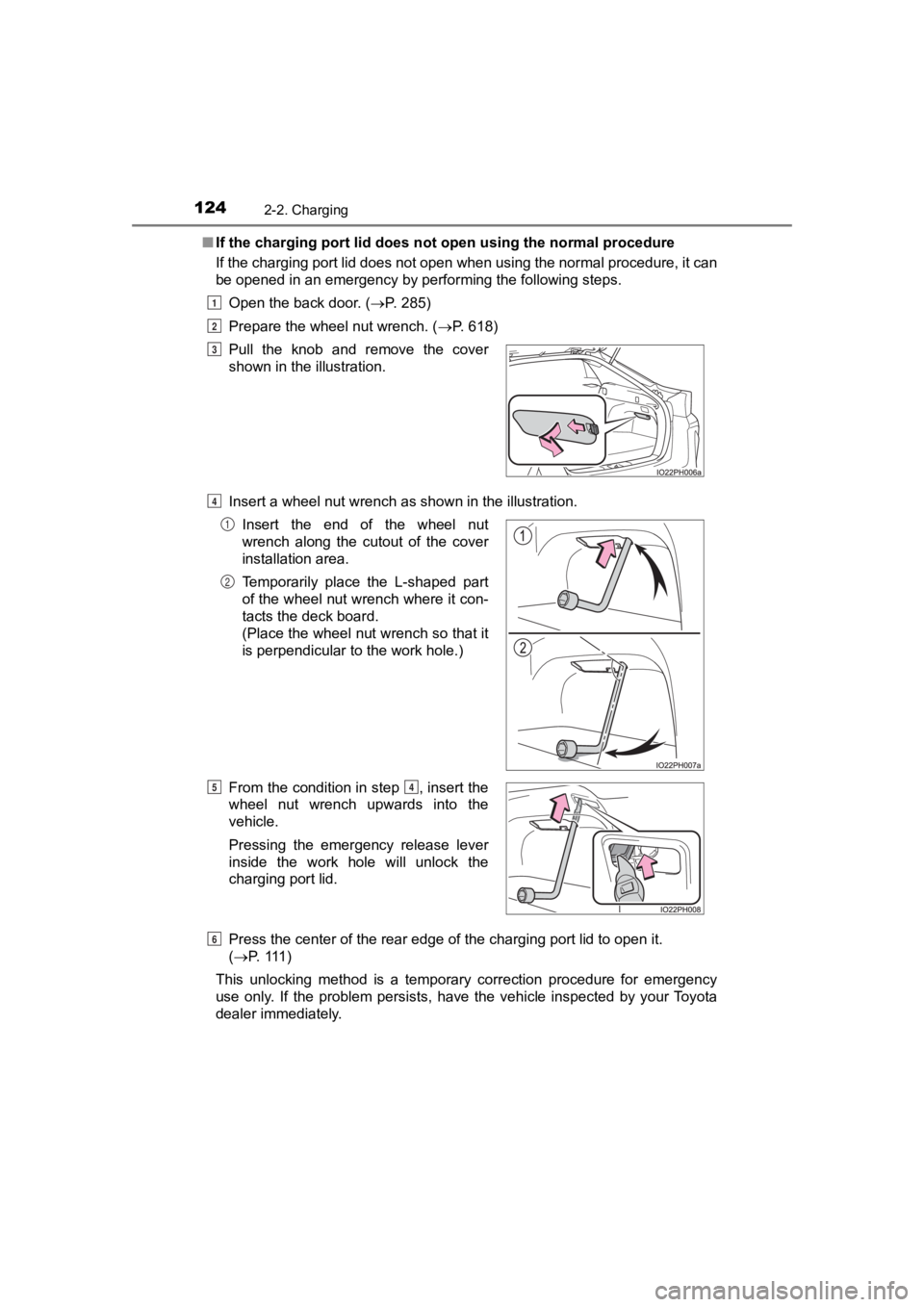
Open the back door. ( P. 285)
Prepare the wheel nut wrench. ( P. 618)
Insert a wheel nut wrench as shown in the illustration.
Press the center of the rear edge of the charging port lid to o pen it.
( P. 111 )
This unlocking method is a temporary correction procedure for emergency
use only. If the problem persists, have the vehicle inspected by your Toyota
dealer immediately. Pull the knob and remove the cover
shown in the illustration.
Insert the end of the wheel nut
wrench along the cutout of the cover
installation area.
Temporarily place the L-shaped part
of the wheel nut wrench where it con-
tacts the deck board.
(Place the wheel nut wrench so that it
is perpendicular to the work hole.)
From the condition in step , insert the
wheel nut wrench upwards into the
vehicle.
Pressing the emergency release lever
inside the work hole will unlock the
charging port lid.
1
2
3
4
1
2
54
6
Page 153 of 792
PRIUS PRIME_OM_OM47C77U_(U)
1532-2. Charging
2
Plug-in hybrid system
WARNING
■When charging
Observe the following precautions.
Failure to do so may cause an unexpected accident, resulting in death or
serious injury.
● Connect to a power source suitable for charging. ( P. 131)
● Check that the charging inlet, charging cable, plug and outlet are free of
foreign matter.
● Only use outlets where the plug can be securely inserted.
● Do not charge if the charging cable is coiled or bundled.
● Wrapping 120 V charging cable while in-use is not recommended b ecause
cable may overheat. Failure to rewrap charging cable when not in-use
could result in strangulation or tripping hazard.
● Do not wash the vehicle while the charging cable is connected to the vehi-
cle and when the charging lid is open.
● Do not touch the terminals of the charging connector and chargi ng inlet
with a sharp metal objects (needles etc.) or hands, or short th em with for-
eign objects.
● When charging outdoors, make sure to connect to a weatherproof outlet
for outdoor use.
● Do not insert the plug if the outlet is submerged in water or s no w.
● Follow these points when charging while it is raining or snowin g.
• Check that no snow, water or ice has accumulated around the charging connector terminals and the vehicle charging inlet. Tap snow, w ater or
ice gently from connector prior to inserting charging connector into the
vehicle’s charging inlet.
• Do not connect the plug if your hands are wet. Also, do not get the plug or outlet wet.
● Do not charge the vehicle during a lightning storm.
● Do not let the wheels on the charging cable, plug, charging connector and
CCID (Charging Circuit Interrupting Device).
● Firmly insert the plug into the outlet.
● Do not use an extension cord and converting adaptor.
Page 173 of 792
PRIUS PRIME_OM_OM47C77U_(U)
1732-2. Charging
2
Plug-in hybrid system
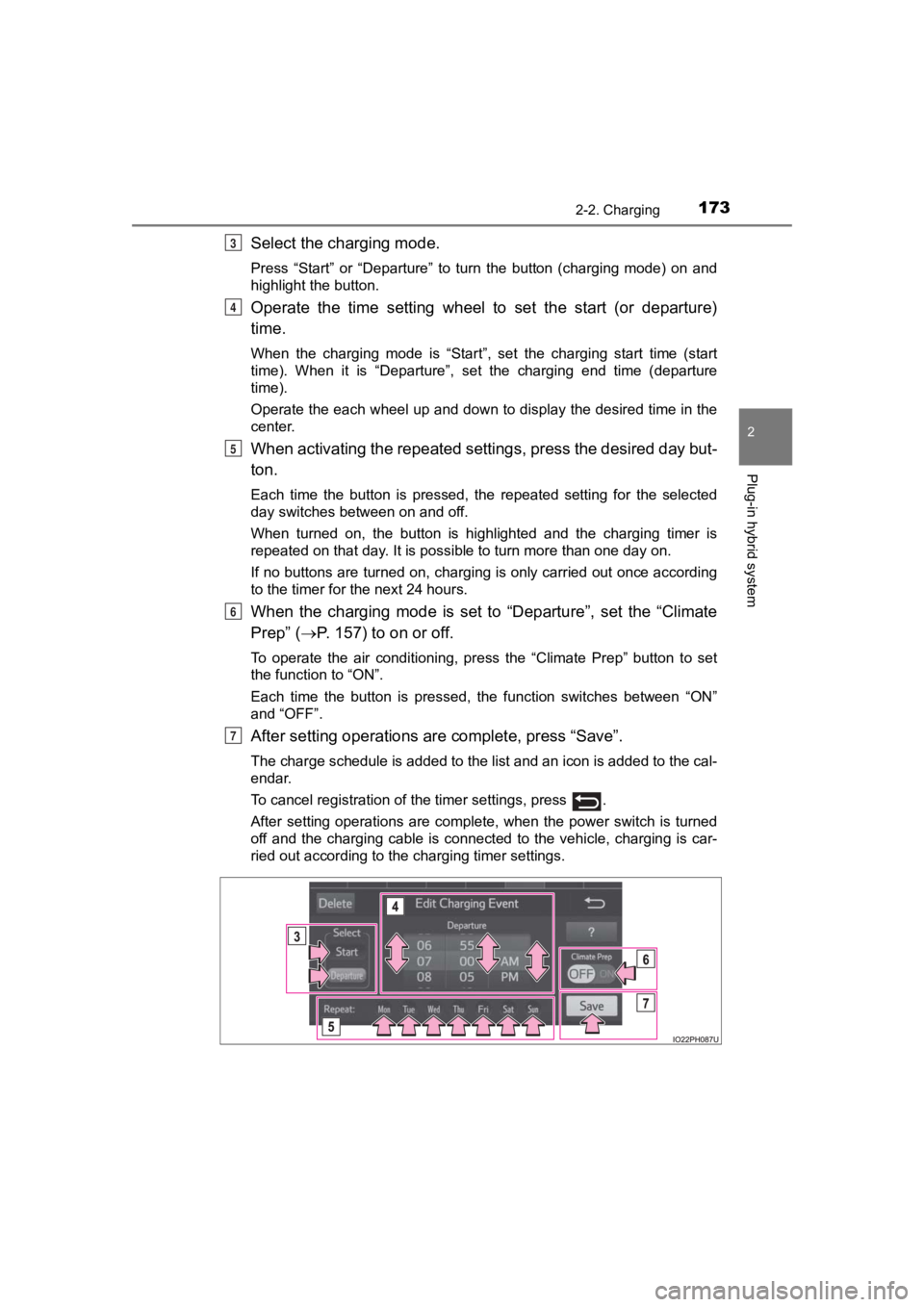
Select the charging mode.
Press “Start” or “Departure” to turn the button (charging mode) on and
highlight the button.
Operate the time setting wheel to set the start (or departure)
time.
When the charging mode is “Start”, set the charging start time (start
time). When it is “Departure”, set the charging end time (depar ture
time).
Operate the each wheel up and down to display the desired time in the
center.
When activating the repeated settings, press the desired day bu t-
ton.
Each time the button is pressed, the repeated setting for the selected
day switches between on and off.
When turned on, the button is highlighted and the charging timer is
repeated on that day. It is possible to turn more than one day on.
If no buttons are turned on, charging is only carried out once according
to the timer for the next 24 hours.
When the charging mode is set to “Departure”, set the “Climate
Prep” ( P. 157) to on or off.
To operate the air conditioning, press the “Climate Prep” butto n to set
the function to “ON”.
Each time the button is pressed, the function switches between “ON”
and “OFF”.
After setting operations are complete, press “Save”.
The charge schedule is added to the list and an icon is added to the cal-
endar.
To cancel registration of the timer settings, press .
After setting operations are complete, when the power switch is turned
off and the charging cable is connected to the vehicle, charging is car-
ried out according to the charging timer settings.
3
4
5
6
7
Page 177 of 792
PRIUS PRIME_OM_OM47C77U_(U)
1772-2. Charging
2
Plug-in hybrid system
■Changing “Next Charging Event”*
*
: When “Charge Now” is turned on etc., the registered “Next Charging Event” cannot be changed.
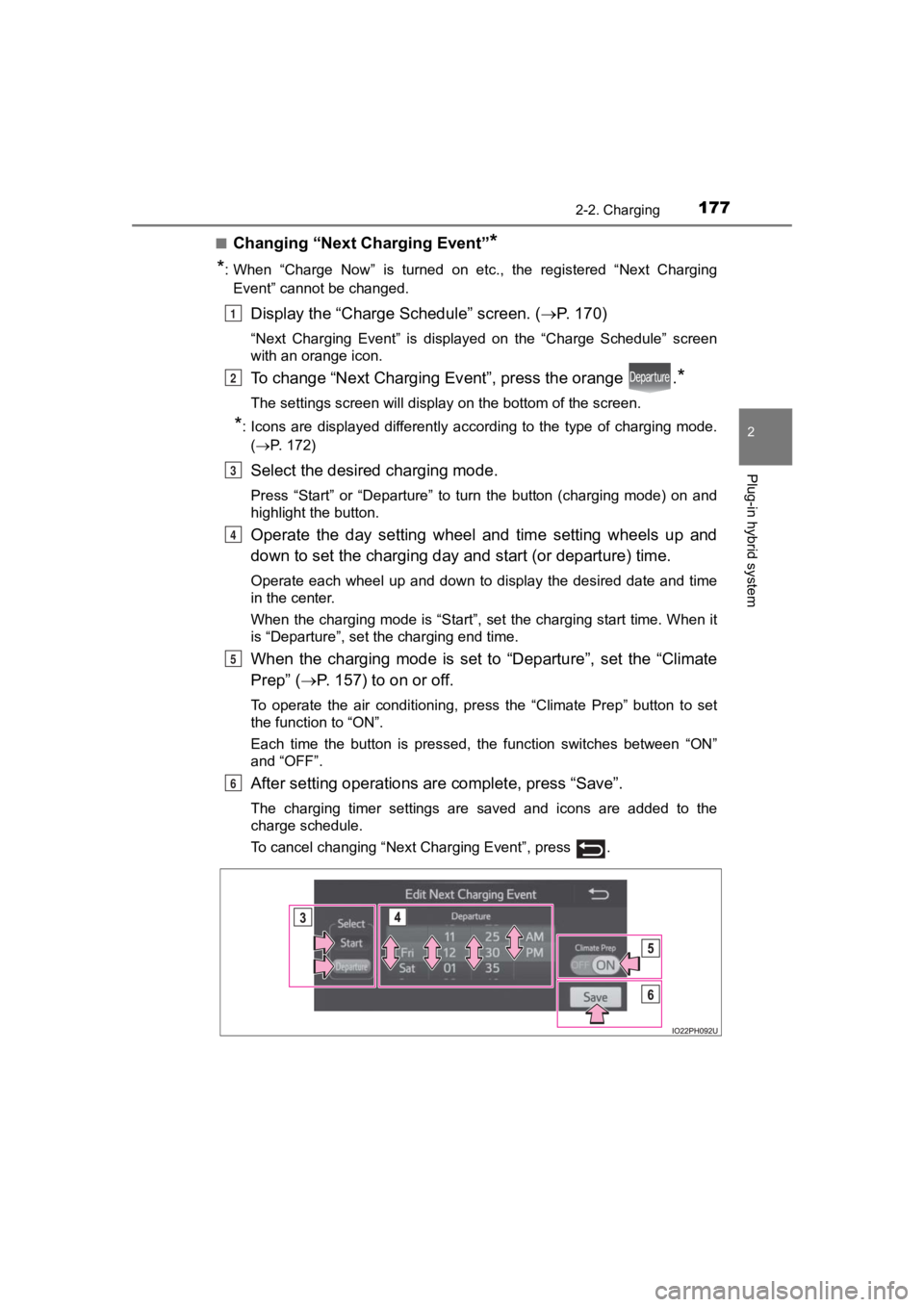
Display the “Charge Schedule” screen. ( P. 1 7 0 )
“Next Charging Event” is displayed on the “Charge Schedule” scr een
with an orange icon.
To change “Next Charging Ev ent”, press the orange .*
The settings screen will display on the bottom of the screen.
*: Icons are displayed differently according to the type of charg ing mode.
( P. 172)
Select the desired charging mode.
Press “Start” or “Departure” to turn the button (charging mode) on and
highlight the button.
Operate the day setting wheel and time setting wheels up and
down to set the charging day and start (or departure) time.
Operate each wheel up and down to display the desired date and time
in the center.
When the charging mode is “Start”, set the charging start time. When it
is “Departure”, set the charging end time.
When the charging mode is set to “Departure”, set the “Climate
Prep” ( P. 157) to on or off.
To operate the air conditioning, press the “Climate Prep” butto n to set
the function to “ON”.
Each time the button is pressed, the function switches between “ON”
and “OFF”.
After setting operations are complete, press “Save”.
The charging timer settings are saved and icons are added to the
charge schedule.
To cancel changing “Next Charging Event”, press .
1
2
3
4
5
6
Page 193 of 792
PRIUS PRIME_OM_OM47C77U_(U)
1933. Instrument cluster
3
Instrument cluster
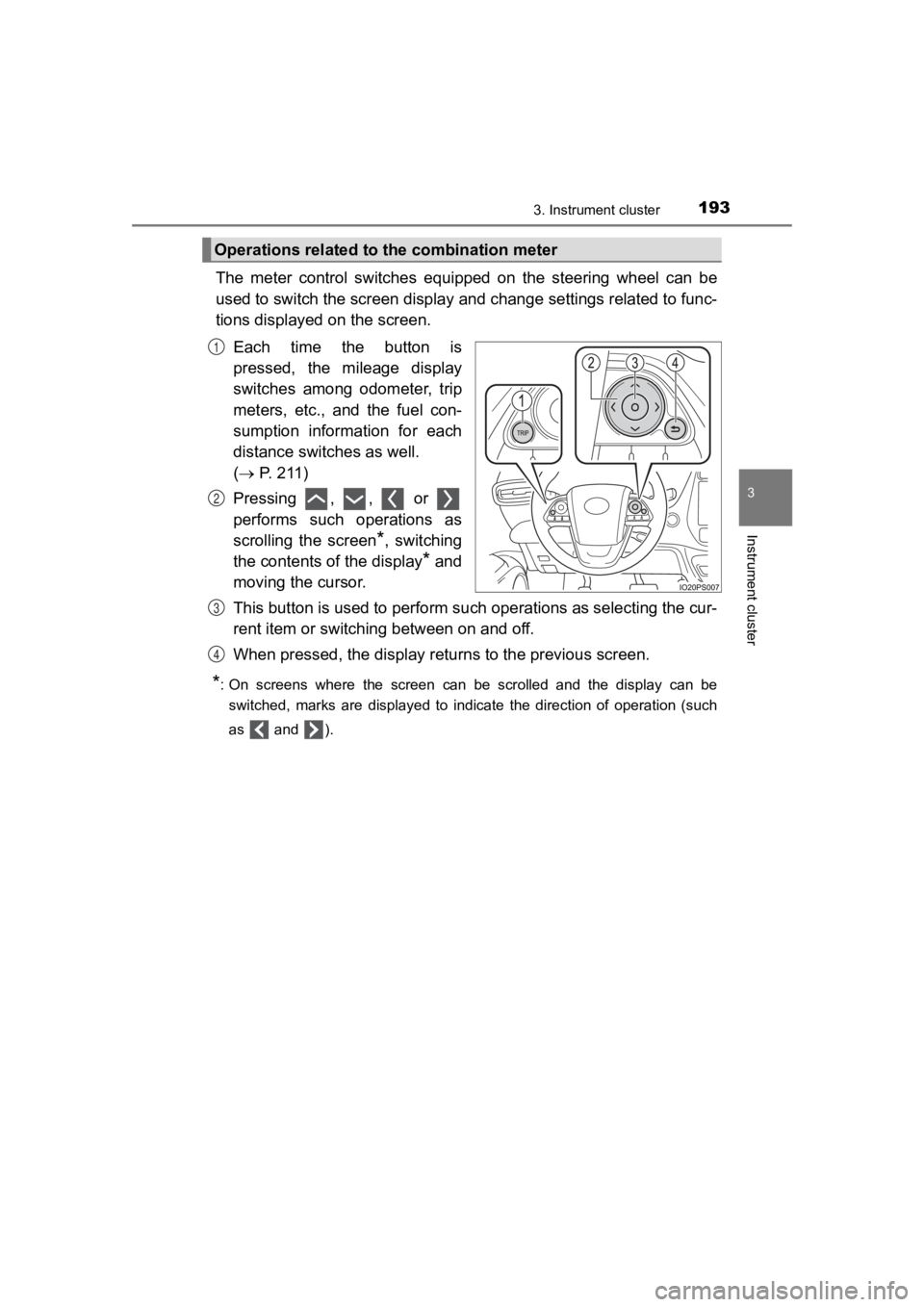
The meter control switches equipped on the steering wheel can be
used to switch the screen displa y and change settings related to func-
tions displayed on the screen.
Each time the button is
pressed, the mileage display
switches among odometer, trip
meters, etc., and the fuel con-
sumption information for each
distance switches as well.
( P. 211)
Pressing , , or
performs such operations as
scrolling the screen
*, switching
the contents of the display
* and
moving the cursor.
This button is used to perform s uch operations as selecting the cur-
rent item or switching between on and off.
When pressed, the display returns to the previous screen.
*: On screens where the screen can be scrolled and the display ca n be
switched, marks are displayed to indicate the direction of oper ation (such
as and ).
Operations related to the combination meter
1
2
3
4
Page 197 of 792
PRIUS PRIME_OM_OM47C77U_(U)
1973. Instrument cluster
3
Instrument cluster
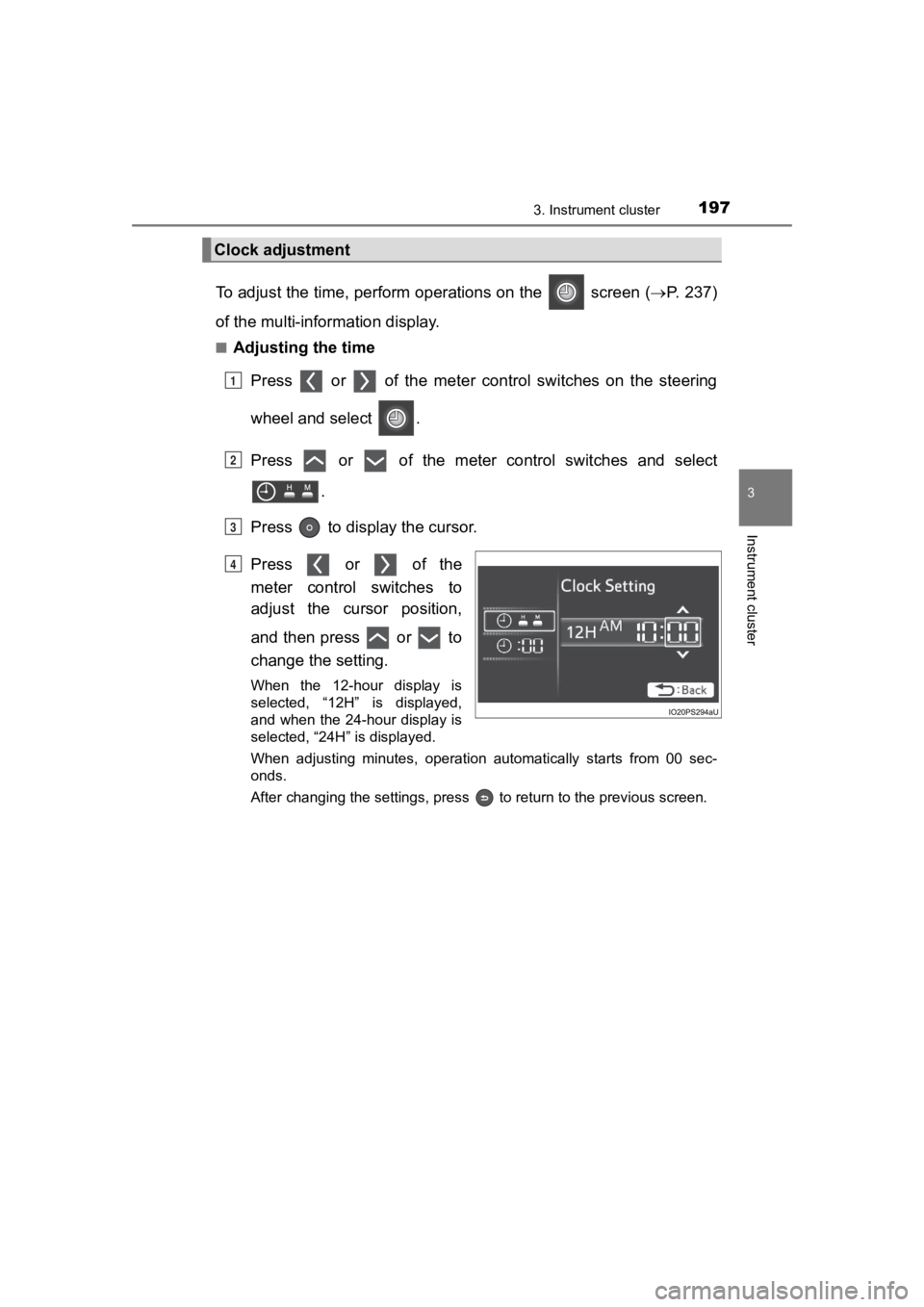
To adjust the time, perform operations on the screen (P. 2 3 7 )
of the multi-information display.
■Adjusting the time
Press or of the meter cont rol switches on the steering
wheel and select .
Press or of the meter control switches and select .
Press to display the cursor.
Press or of the
meter control switches to
adjust the cursor position,
and then press or to
change the setting.
When the 12-hour display is
selected, “12H” is displayed,
and when the 24-hour display is
selected, “24H” is displayed.
When adjusting minutes, operation automatically starts from 00 sec-
onds.
After changing the settings, press to return to the previous s creen.
Clock adjustment
1
2
3
4
Page 198 of 792
198
PRIUS PRIME_OM_OM47C77U_(U)
3. Instrument cluster
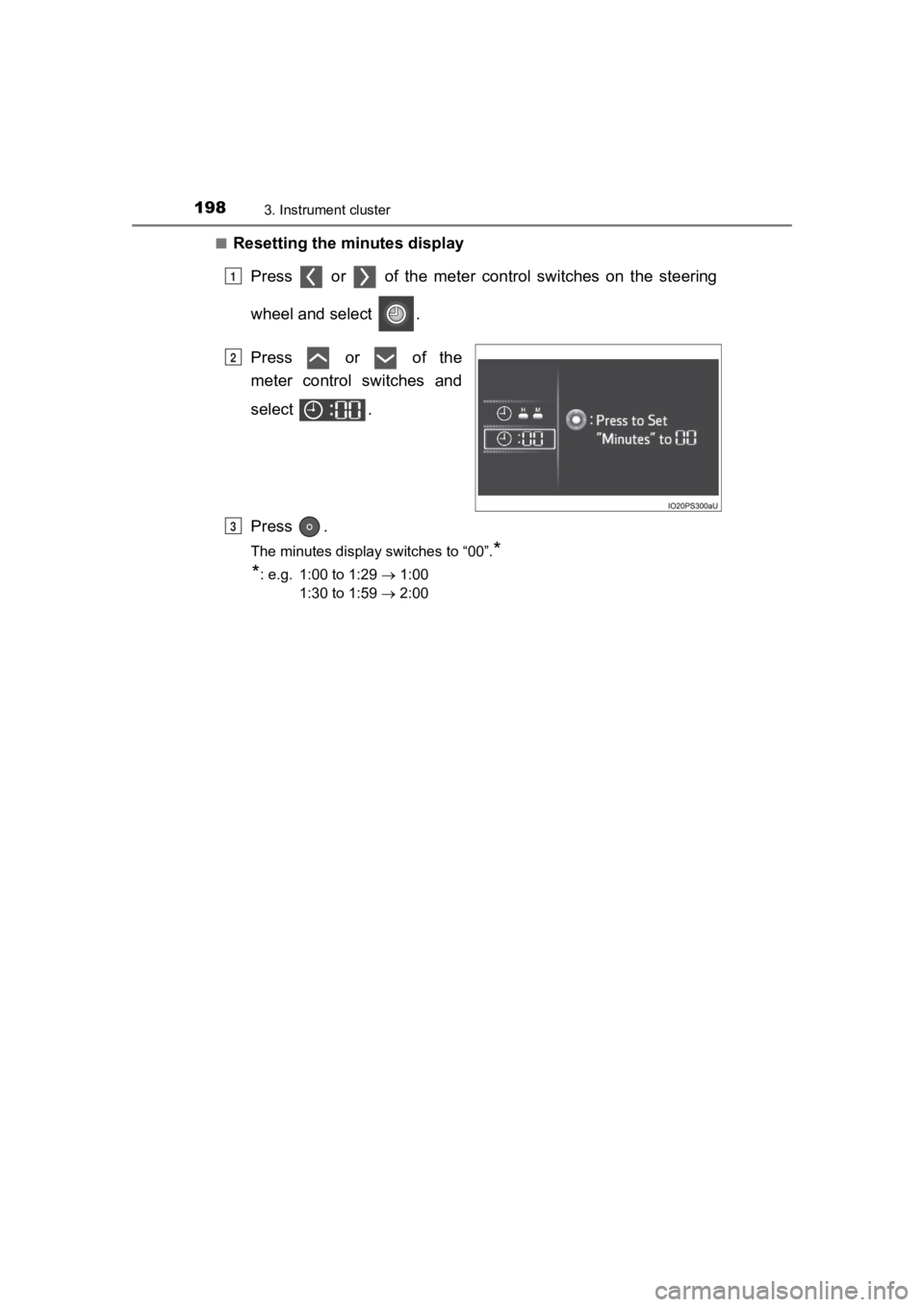
■Resetting the minutes displayPress or of the meter cont rol switches on the steering
wheel and select .
Press or of the
meter control switches and
select .
Press .
The minutes display switches to “00”.*
*
: e.g. 1:00 to 1:29 1:00
1:30 to 1:59 2:00
1
2
3
Page 200 of 792
200
PRIUS PRIME_OM_OM47C77U_(U)
3. Instrument cluster
■When the menu screen on the navigation system is operated (vehicles
with 11.6-inch display)
■ Liquid crystal display
Small spots or light spots may appear on the display. This phen omenon is
characteristic of liquid crystal displays, and there is no prob lem continuing to
use the display.
■ Pop-up display
Some functions, such as the driving mode select switch and air conditioning
system, are operation-linked and display pop-up screens on the multi-infor-
mation display. If the pop-up screens of these functions are not desired, they
can be turned off in the “Meter Customize” settings. ( P. 246)
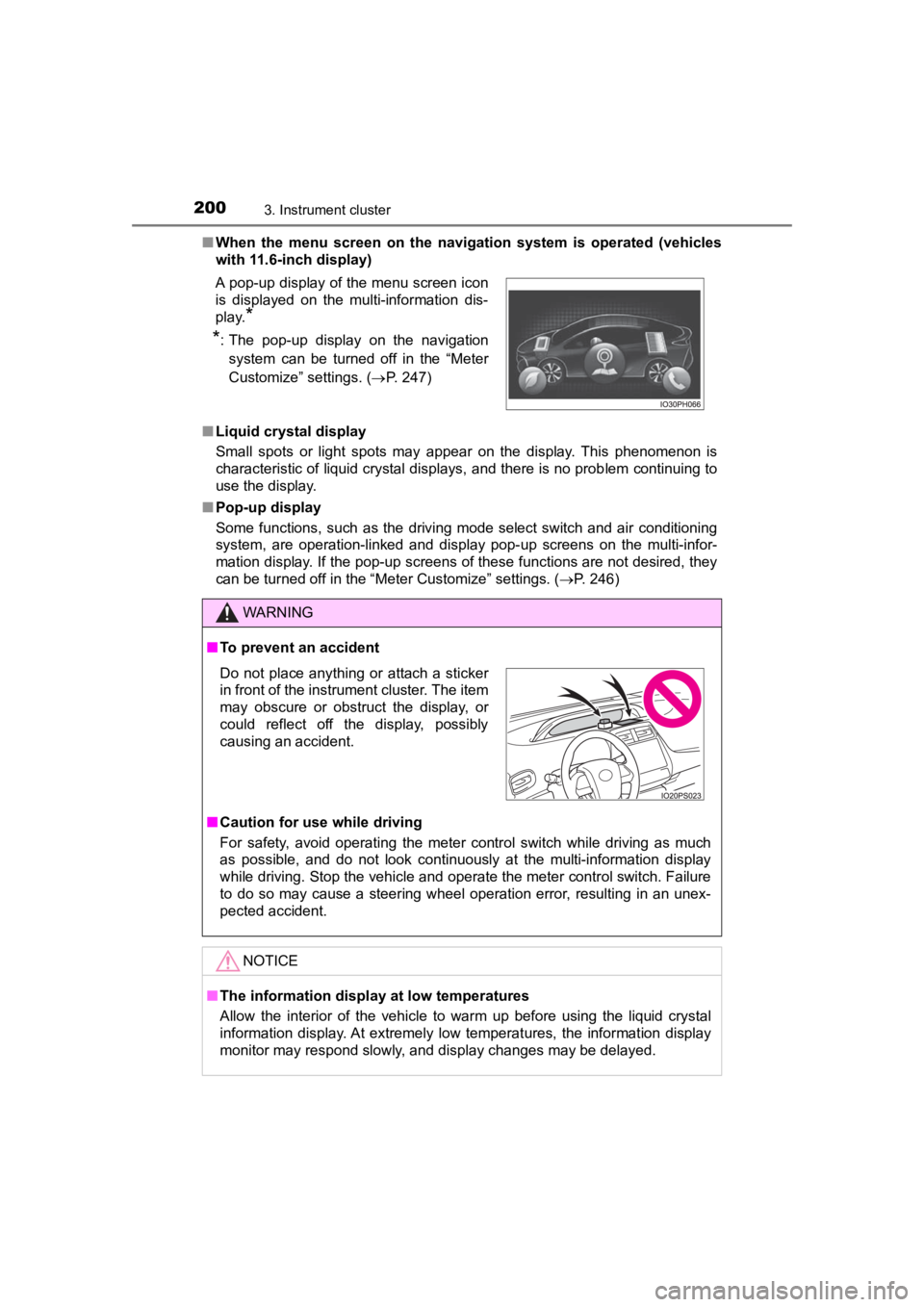
A pop-up display of the menu screen icon
is displayed on the multi-information dis-
play.
*
*
: The pop-up display on the navigation
system can be turned off in the “Meter
Customize” settings. ( P. 247)
WARNING
■To prevent an accident
■ Caution for use while driving
For safety, avoid operating the meter control switch while driv ing as much
as possible, and do not look continuously at the multi-informat ion display
while driving. Stop the vehicle and operate the meter control switch. Failure
to do so may cause a steering wheel operation error, resulting in an unex-
pected accident.
NOTICE
■ The information display at low temperatures
Allow the interior of the vehicle to warm up before using the liquid crystal
information display. At extremely low temperatures, the information display
monitor may respond slowly, and display changes may be delayed.
Do not place anything or attach a sticker
in front of the instrument cluster. The item
may obscure or obstruct the display, or
could reflect off the display, possibly
causing an accident.
Page 205 of 792
PRIUS PRIME_OM_OM47C77U_(U)
2053. Instrument cluster
3
Instrument cluster
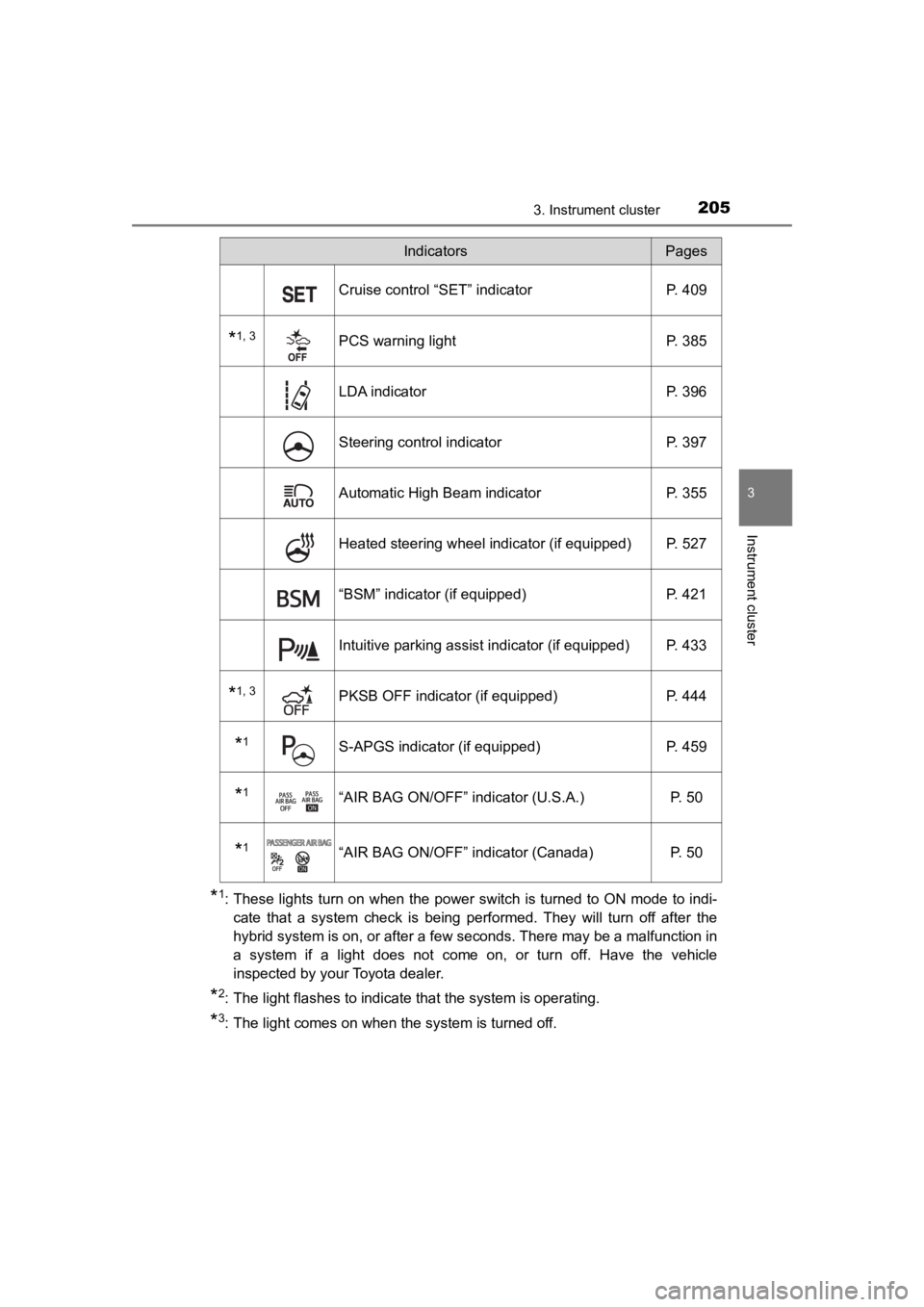
*1: These lights turn on when the power switch is turned to ON mode to indi-
cate that a system check is being performed. They will turn off after the
hybrid system is on, or after a few seconds. There may be a malfunction in
a system if a light does not come on, or turn off. Have the veh icle
inspected by your Toyota dealer.
*2: The light flashes to indicate that the system is operating.
*3: The light comes on when the system is turned off.
Cruise control “SET” indicator P. 409
*1, 3PCS warning light P. 385
LDA indicatorP. 396
Steering control indicatorP. 397
Automatic High Beam indicator P. 355
Heated steering wheel indicator (if equipped) P. 527
“BSM” indicator (if equipped)P. 421
Intuitive parking assist indicator (if equipped) P. 433
*1, 3PKSB OFF indicator (if equipped)P. 444
*1S-APGS indicator (if equipped) P. 459
*1“AIR BAG ON/OFF” indicator (U.S.A.) P. 50
*1“AIR BAG ON/OFF” indicator (Canada)P. 50
IndicatorsPages