wheel TOYOTA PRIUS PRIME 2020 (in English) Service Manual
[x] Cancel search | Manufacturer: TOYOTA, Model Year: 2020, Model line: PRIUS PRIME, Model: TOYOTA PRIUS PRIME 2020Pages: 792, PDF Size: 16.56 MB
Page 393 of 792
393
PRIUS PRIME_OM_OM47C77U_(U)
5-5. Using the driving support systems
5
Driving
LDA (Lane Depar ture Al ert with steering
control)
When driving on highways and freeways with white (yellow) lines , this
function alerts the driver when the vehicle might depart from i ts lane
and provides assistance by opera ting the steering wheel to keep the
vehicle in its lane.
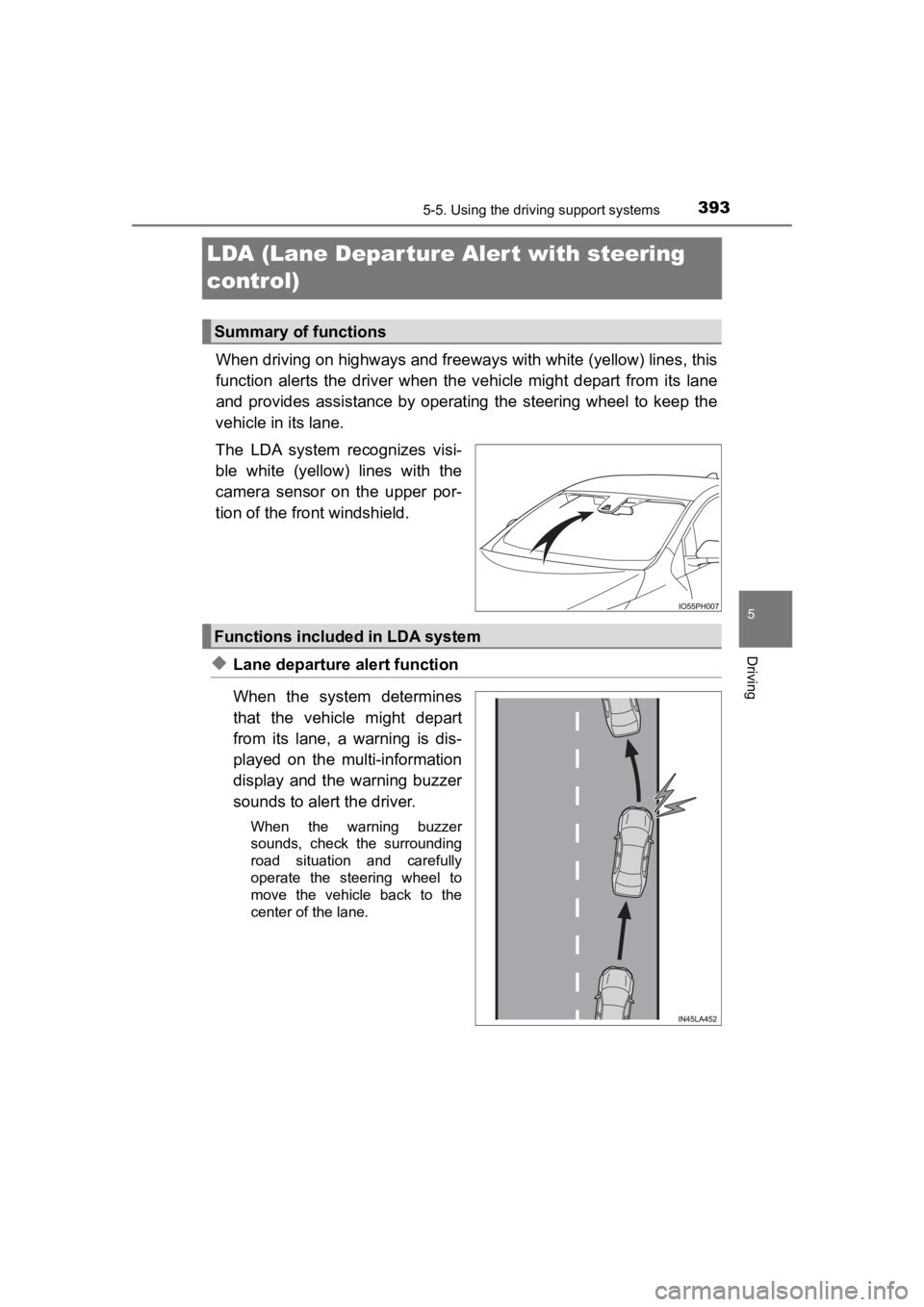
The LDA system recognizes visi-
ble white (yellow) lines with the
camera sensor on the upper por-
tion of the front windshield.
◆Lane departure alert function
When the system determines
that the vehicle might depart
from its lane, a warning is dis-
played on the multi-information
display and the warning buzzer
sounds to alert the driver.
When the warning buzzer
sounds, check the surrounding
road situation and carefully
operate the steering wheel to
move the vehicle back to the
center of the lane.
Summary of functions
Functions included in LDA system
Page 394 of 792
394
PRIUS PRIME_OM_OM47C77U_(U)
5-5. Using the driving support systems
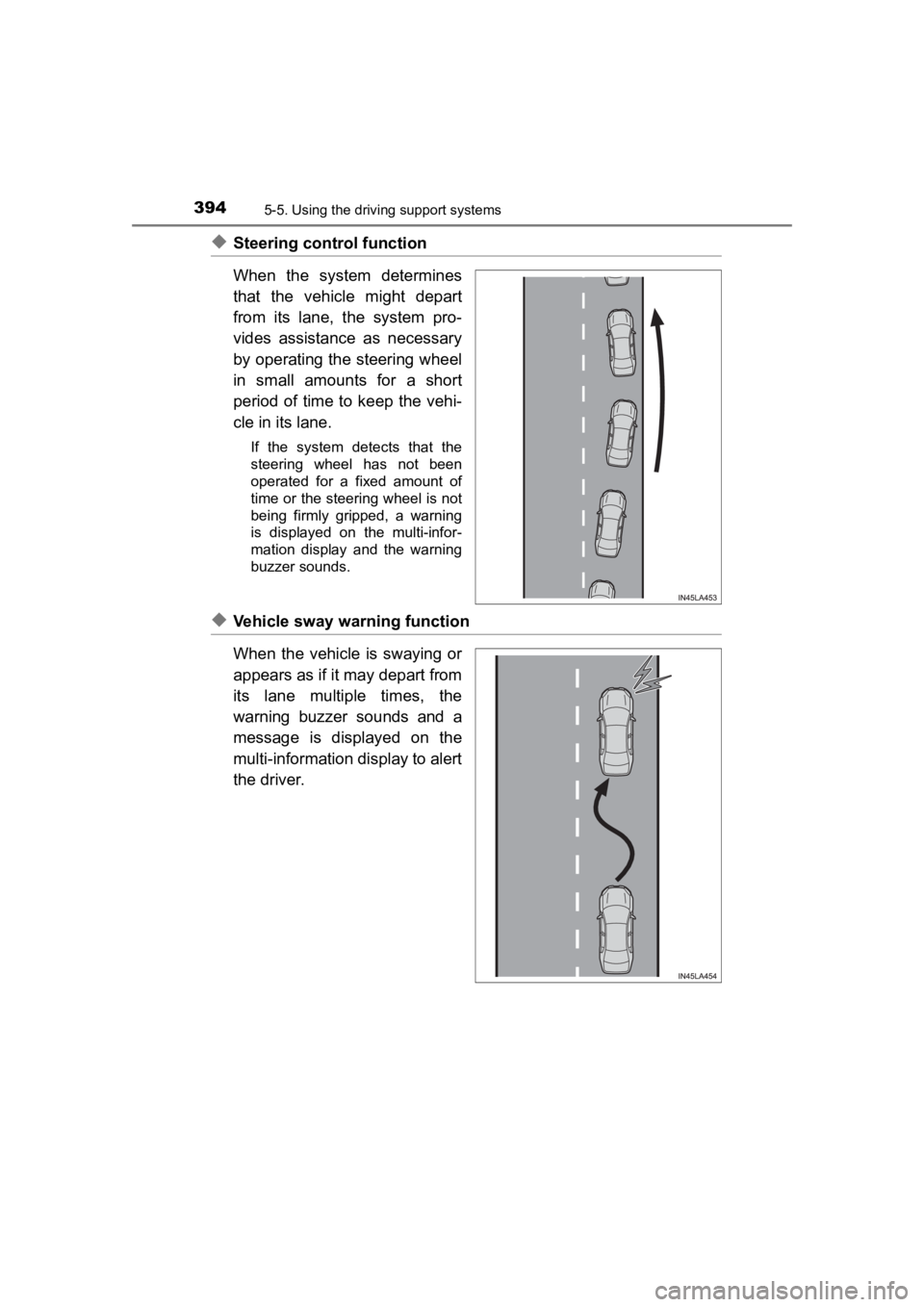
◆Steering control function
When the system determines
that the vehicle might depart
from its lane, the system pro-
vides assistance as necessary
by operating the steering wheel
in small amounts for a short
period of time to keep the vehi-
cle in its lane.
If the system detects that the
steering wheel has not been
operated for a fixed amount of
time or the steering wheel is not
being firmly gripped, a warning
is displayed on the multi-infor-
mation display and the warning
buzzer sounds.
◆Vehicle sway warning function
When the vehicle is swaying or
appears as if it may depart from
its lane multiple times, the
warning buzzer sounds and a
message is displayed on the
multi-information display to alert
the driver.
Page 395 of 792
PRIUS PRIME_OM_OM47C77U_(U)
3955-5. Using the driving support systems
5
Driving
WARNING
■Before using LDA system
Do not rely solely upon the LDA system. The LDA system does not auto-
matically drive the vehicle or reduce the amount of attention that must be
paid to the area in front of the vehicle. The driver must always assume full
responsibility for driving safely by paying careful attention to the surround-
ing conditions and operating the steering wheel to correct the path of the
vehicle. Also, the driver must take adequate breaks when fatigu ed, such as
from driving for a long period of time.
Failure to perform appropriate driving operations and pay careful attention
may lead to an accident, resulting in death or serious injury.
■ To avoid operating LDA system by mistake
When not using the LDA system, use the LDA switch to turn the system off.
■ Situations unsuitable for LDA system
Do not use the LDA system in the following situations.
The system may not operate properly and lead to an accident, re sulting in
death or serious injury.
● A spare tire, tire chains, etc. are equipped.
● When the tires have been excessively worn, or when the tire inf lation pres-
sure is low.
● Tires which differ by structure, manufacturer, brand or tread p attern are
used.
● Objects or patterns that could be mistaken for white (yellow) l ines are
present on the side of the road (guardrails, curbs, reflective poles, etc.).
● Vehicle is driven on a snow-covered road.
● White (yellow) lines are difficult to see due to rain, snow, fog, dust, etc.
● Asphalt repair marks, white (yellow) line marks, etc. are prese nt due to
road repair.
● Vehicle is driven in a temporary lane or restricted lane due to construction
work.
● Vehicle is driven on a road surface which is slippery due to rainy weather,
fallen snow, freezing, etc.
● Vehicle is driven in traffic lanes other than on highways and freeways.
● Vehicle is driven in a construction zone.
Page 397 of 792
PRIUS PRIME_OM_OM47C77U_(U)
3975-5. Using the driving support systems
5
Driving
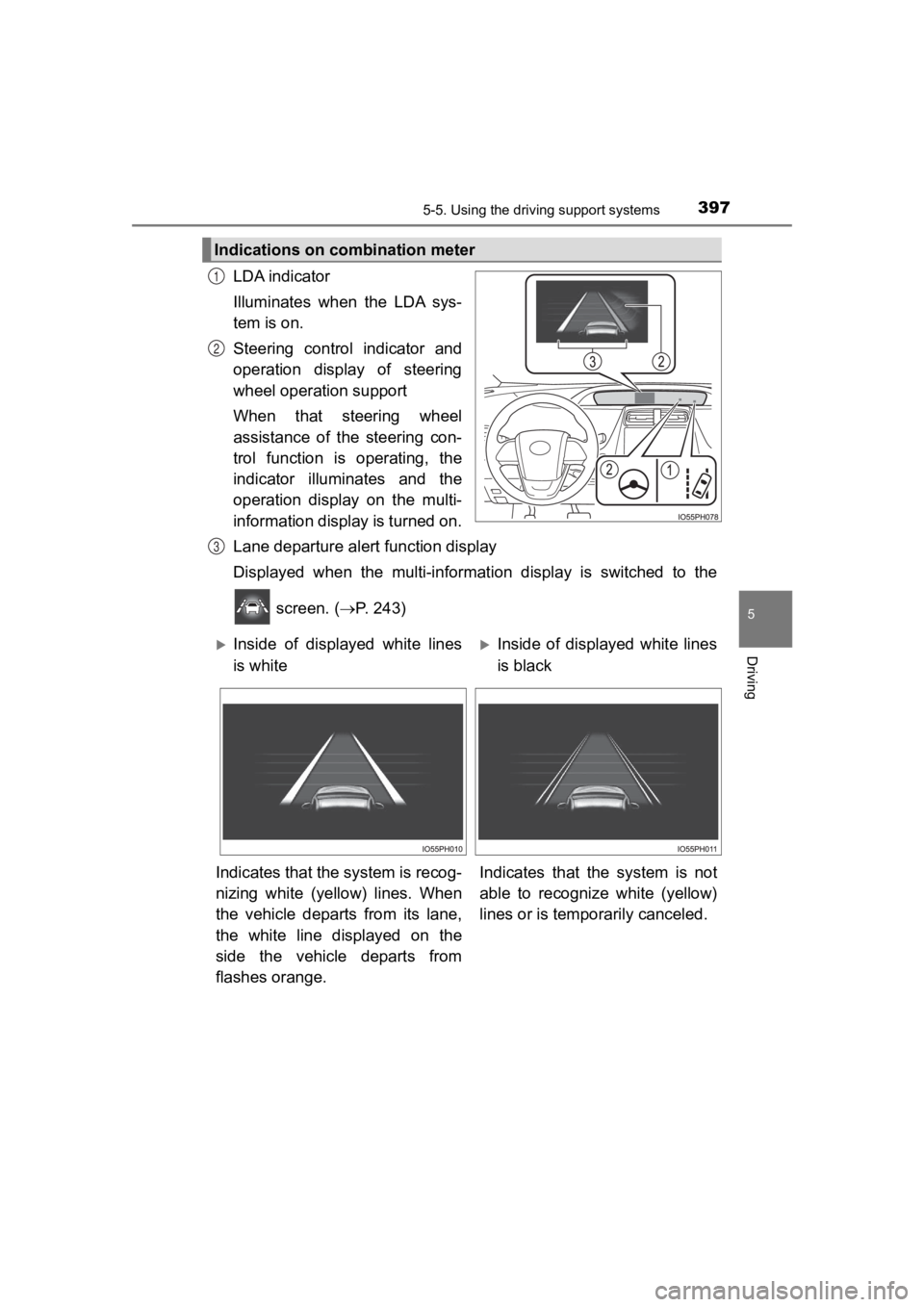
LDA indicator
Illuminates when the LDA sys-
tem is on.
Steering control indicator and
operation display of steering
wheel operation support
When that steering wheel
assistance of the steering con-
trol function is operating, the
indicator illuminates and the
operation display on the multi-
information display is turned on.
Lane departure alert function display
Displayed when the multi-informat ion display is switched to the
screen. ( P. 243)
Indications on combination meter
1
2
3
Inside of displayed white lines
is whiteInside of displayed white lines
is black
Indicates that the system is recog-
nizing white (yellow) lines. When
the vehicle departs from its lane,
the white line displayed on the
side the vehicle departs from
flashes orange. Indicates that the system is not
able to recognize white (yellow)
lines or is tempo
rarily canceled.
Page 398 of 792
398
PRIUS PRIME_OM_OM47C77U_(U)
5-5. Using the driving support systems
■Operation conditions of each function
●Lane departure alert function
This function operates when all of the following conditions are met.
• LDA is turned on.
• Vehicle speed is approximately 32 mph (50 km/h) or more.
• System recognizes white (yellow) lines.
• Width of traffic lane is approximately 9.8 ft. (3 m) or more.
• Turn signal lever is not operated.
• Vehicle is driven on a straight road or around a gentle curve with a radius
of more than approximately 492 ft. (150 m).
• No system malfunctions are detected. ( P. 401)
● Steering control function
This function operates when all of the following conditions are met in addi-
tion to the operation conditions for the lane departure alert function.
• Setting for (“LDA Steering Assist Mode”) in the screen of
the multi-information display is set to “On”. ( P. 218)
• Vehicle is not accelerated or decelerated by a certain amount or more.
• Steering wheel is not operated with a steering force level suitable for changing lanes.
• ABS, VSC, TRAC and PCS are not operating.
• TRAC or VSC is not turned off.
● Vehicle sway warning function
This function operates when all of the following conditions are met.
• Setting for (“Lane Sway Warning Status”) in the screen of the multi-information display is set to “On”. ( P. 218)
• Vehicle speed is approximately 32 mph (50 km/h) or more.
• Width of traffic lane is approximately 9.8 ft. (3 m) or more.
• No system malfunctions are detected. ( P. 401)
■ Temporary cancellation of functions
When the operation conditions are no longer met, a function may be tempo-
rarily canceled. However, when the operation conditions are met again, oper-
ation of the function is automatically restored. ( P. 398)
■ Steering control function
Depending on the vehicle speed, lane departure situation, road conditions,
etc., the driver may not feel the function is operating or the function may not
operate at all.
Page 399 of 792
PRIUS PRIME_OM_OM47C77U_(U)
3995-5. Using the driving support systems
5
Driving
■Lane departure alert function
The warning buzzer may be difficult to hear due to external noi se, audio play-
back, etc.
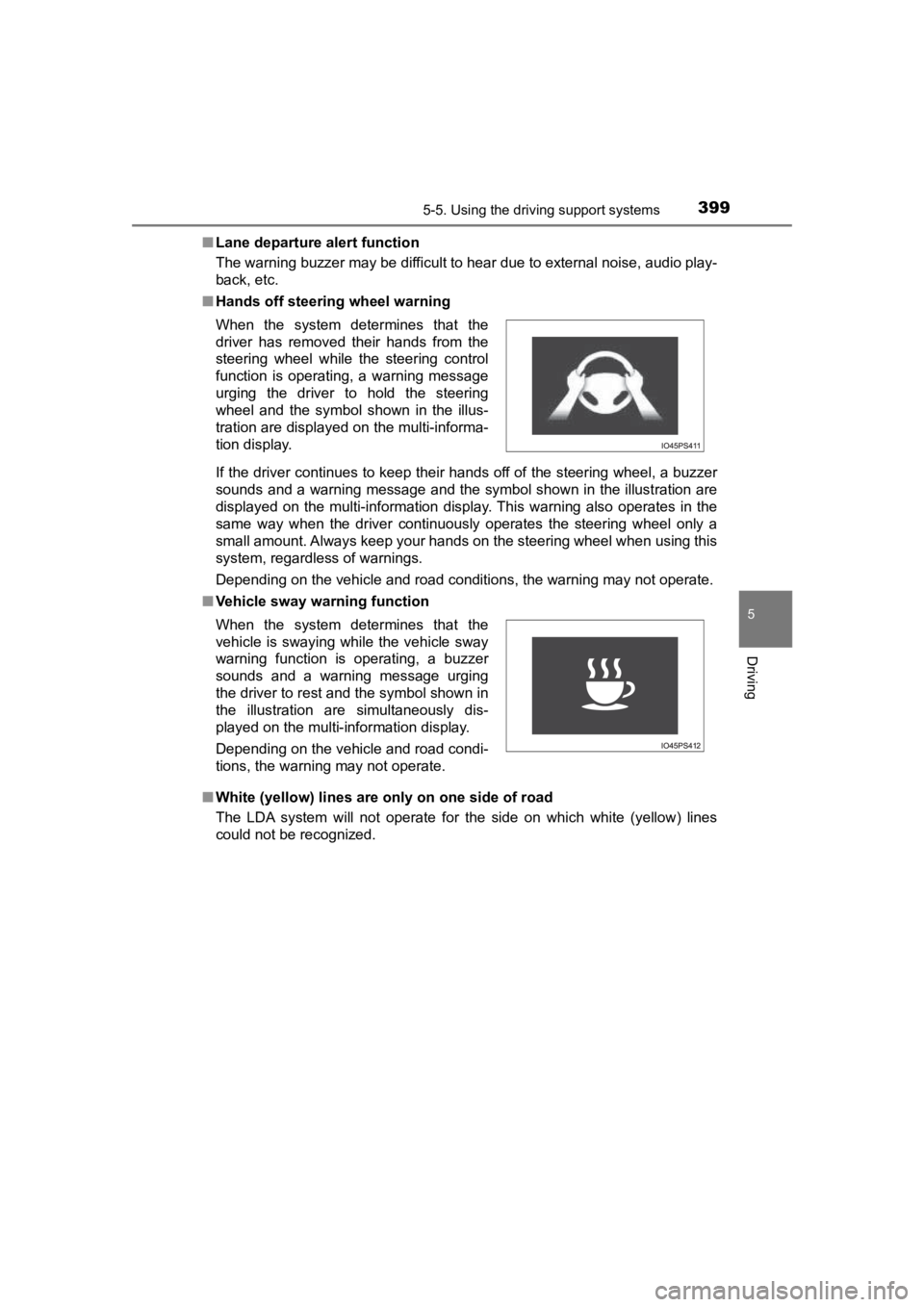
■ Hands off steering wheel warning
If the driver continues to keep their hands off of the steering wheel, a buzzer
sounds and a warning message and the symbol shown in the illust ration are
displayed on the multi-information display. This warning also o perates in the
same way when the driver continuously operates the steering whe el only a
small amount. Always keep your hands on the steering wheel when using this
system, regardless of warnings.
Depending on the vehicle and road conditions, the warning may n ot operate.
■ Vehicle sway warning function
■ White (yellow) lines are only on one side of road
The LDA system will not operate for the side on which white (yellow) lines
could not be recognized. When the system determines that the
driver has removed their hands from the
steering wheel while the steering control
function is operating, a warning message
urging the driver to hold the steering
wheel and the symbol shown in the illus-
tration are displayed on the multi-informa-
tion display.
When the system determines that the
vehicle is swaying while the vehicle sway
warning function is operating, a buzzer
sounds and a warning message urging
the driver to rest and the symbol shown in
the illustration are simultaneously dis-
played on the multi-information display.
Depending on the vehicle and road condi-
tions, the warning may not operate.
Page 402 of 792
402
PRIUS PRIME_OM_OM47C77U_(U)
5-5. Using the driving support systems
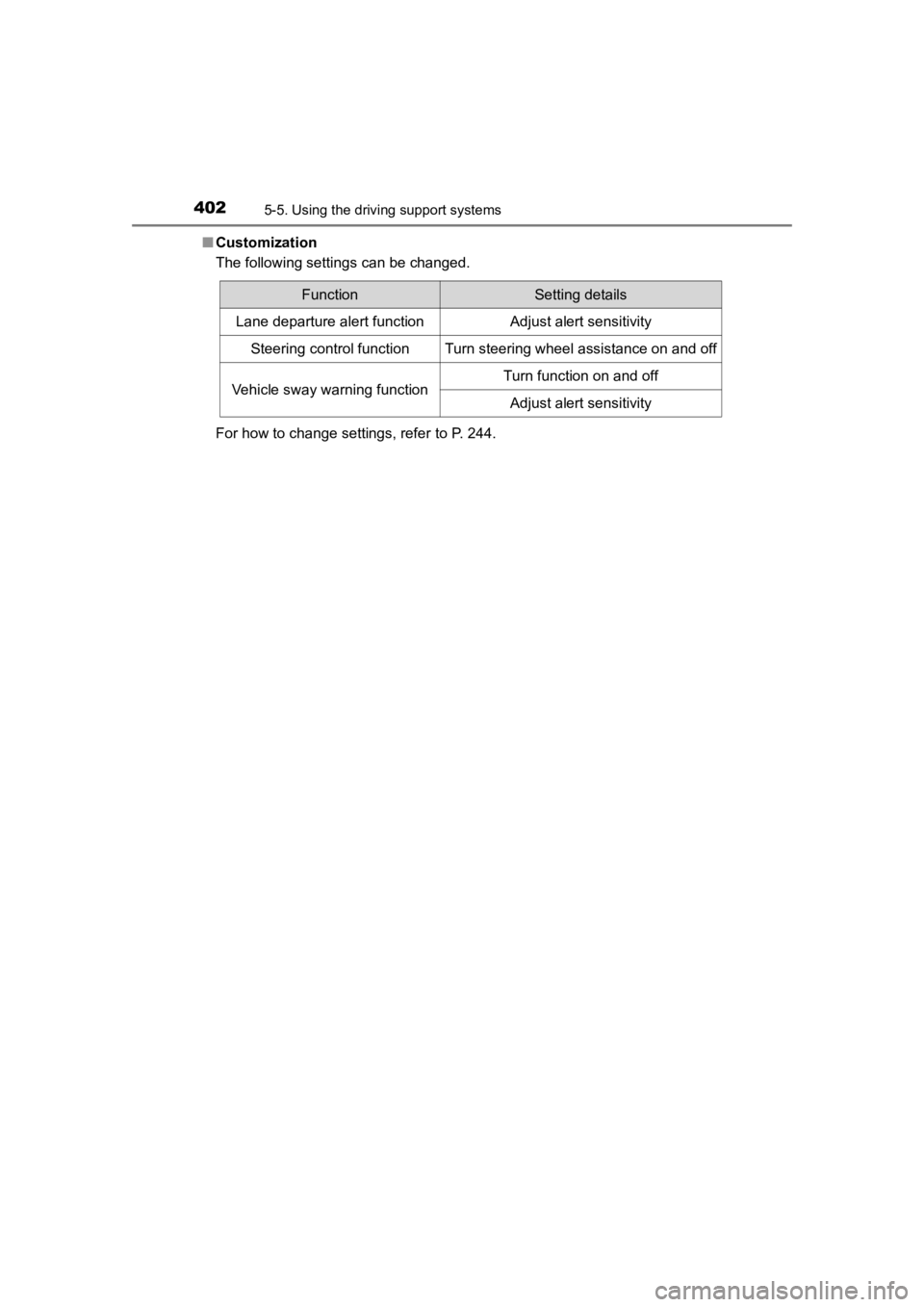
■Customization
The following settings can be changed.
For how to change settings, refer to P. 244.
FunctionSetting details
Lane departure alert functionAdjust alert sensitivity
Steering control functionTurn steering wheel assistance on and off
Vehicle sway warning functionTurn function on and off
Adjust alert sensitivity
Page 418 of 792
418
PRIUS PRIME_OM_OM47C77U_(U)
5-5. Using the driving support systems
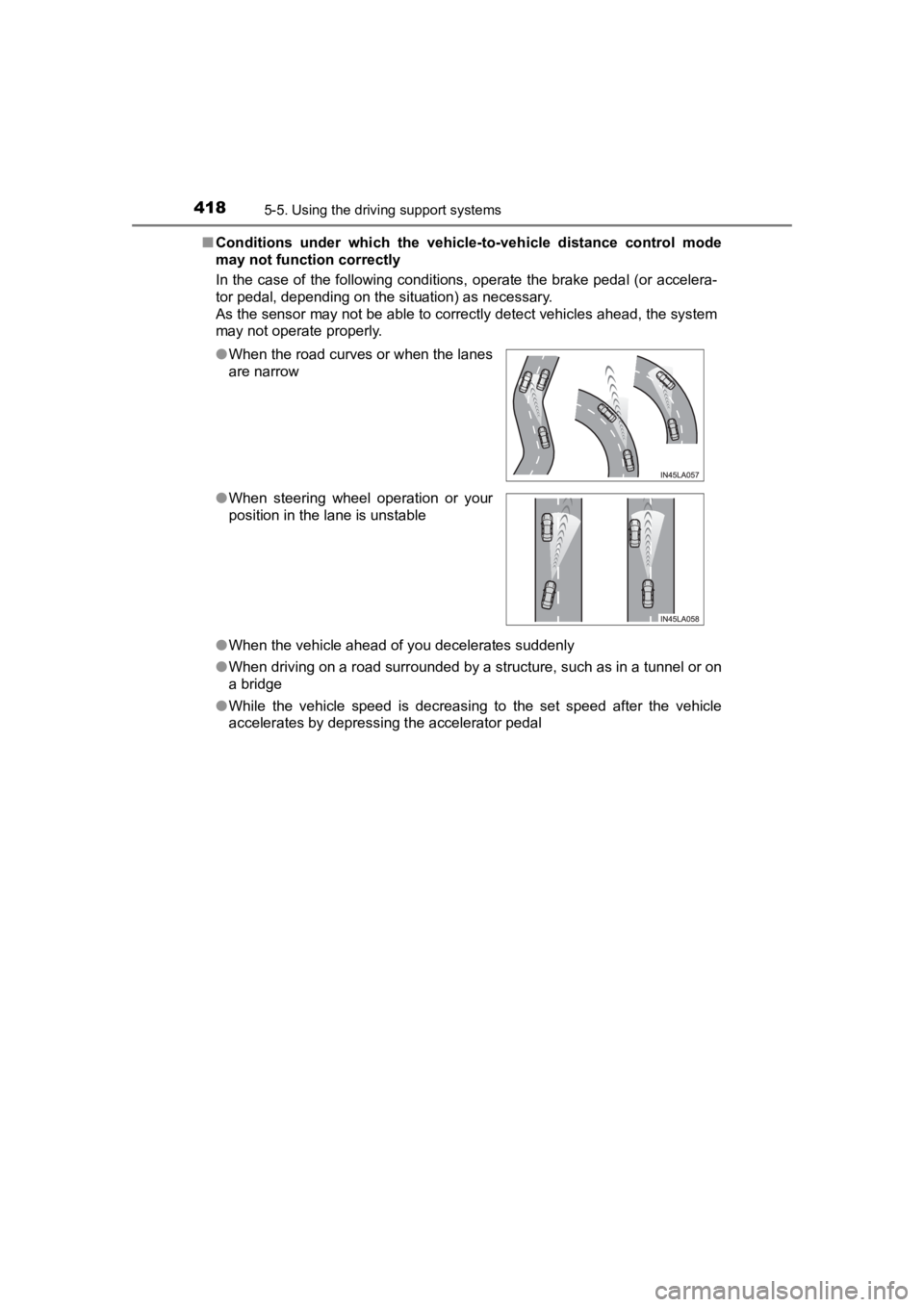
■Conditions under which the vehic le-to-vehicle distance control mode
may not function correctly
In the case of the following conditions, operate the brake peda l (or accelera-
tor pedal, depending on the situation) as necessary.
As the sensor may not be able to correctly detect vehicles ahead, the system
may not operate properly.
● When the vehicle ahead of you decelerates suddenly
● When driving on a road surrounded by a structure, such as in a tunnel or on
a bridge
● While the vehicle speed is decreasing to the set speed after th e vehicle
accelerates by depressing the accelerator pedal
●
When the road curves or when the lanes
are narrow
● When steering wheel operation or your
position in the lane is unstable
Page 437 of 792
PRIUS PRIME_OM_OM47C77U_(U)
4375-5. Using the driving support systems
5
Driving
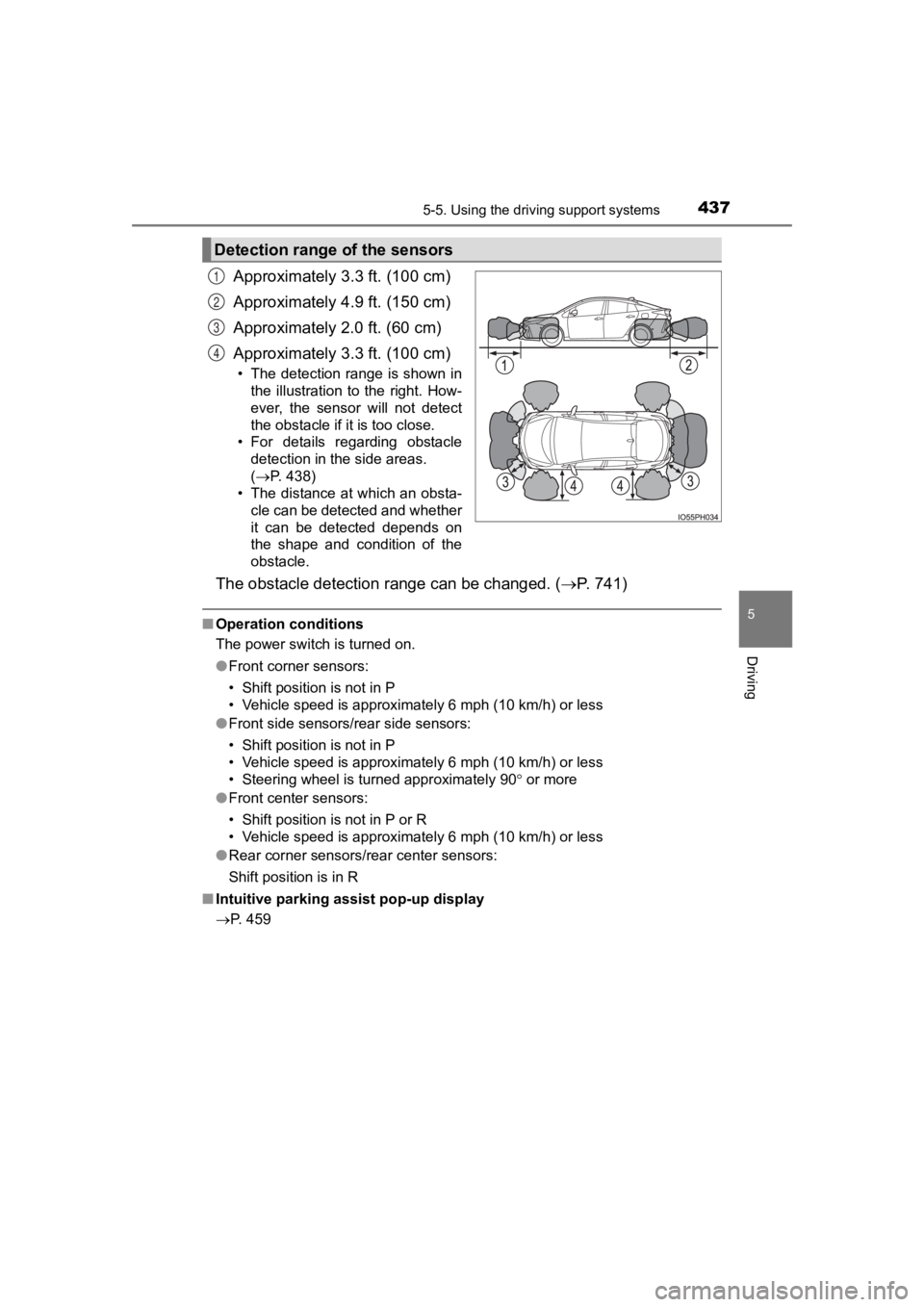
Approximately 3.3 ft. (100 cm)
Approximately 4.9 ft. (150 cm)
Approximately 2.0 ft. (60 cm)
Approximately 3.3 ft. (100 cm)
• The detection range is shown in
the illustration to the right. How-
ever, the sensor will not detect
the obstacle if it is too close.
• For details regarding obstacle detection in the side areas.
(P. 438)
• The distance at which an obsta- cle can be detected and whether
it can be detected depends on
the shape and condition of the
obstacle.
The obstacle detecti on range can be changed. ( P. 7 4 1 )
■Operation conditions
The power switch is turned on.
●Front corner sensors:
• Shift position is not in P
• Vehicle speed is approximately 6 mph (10 km/h) or less
● Front side sensors/rear side sensors:
• Shift position is not in P
• Vehicle speed is approximately 6 mph (10 km/h) or less
• Steering wheel is turned approximately 90 or more
● Front center sensors:
• Shift position is not in P or R
• Vehicle speed is approximately 6 mph (10 km/h) or less
● Rear corner sensors/rear center sensors:
Shift position is in R
■ Intuitive parking assist pop-up display
P. 459
Detection range of the sensors
1
2
3
4
Page 455 of 792
455
PRIUS PRIME_OM_OM47C77U_(U)
5-5. Using the driving support systems
5
Driving
S-APGS (Simple Advanced Parking Guidance
System)
■Function summary
The Simple Advanced Parking Guidance System automatically
operates the steering wheel to provide support when backing into
an area near a target parking spot, and when departing from a par-
allel parking spot. (Changing the shift position and speed adju st-
ment when moving forward or backing up are not performed
automatically.)
● The Simple Advanced Parking Guidance System does not park
the vehicle automatically. It is a system that provides support
when pulling out of a perpendicular or parallel parking spot.
● The Simple Advanced Parking Guidance System provides steer-
ing wheel operation assistance to guide the vehicle toward the
selected intended parking spot. The selected intended parking
spot may not always be reach able, depending on road and vehi-
cle conditions at the time of parking, and the distance to the
intended parking spot.
■Linking with the Parki ng Support Brake function
While the Simple Advanced Parking Guidance System is operating,
if the system detects an obstacl e that could result in a collision, the
emergency brakes operate, regardl ess of whether the Parking Sup-
port Brake function is on or off. ( P. 457)
: If equipped
Simple Advanced Parking Guidance System
WARNING
●When backing up or proceeding forward, be sure to directly conf irm the
safety of the area to the front or rear, and the area around th e vehicle, and
slowly back up or proceed forward while adjusting the vehicle s peed by
depressing the brake pedal.
● If it seems the vehicle may make contact with a pedestrian, ano ther vehi-
cle or any other obstacles, stop the vehicle by depressing the brake pedal,
and then press the S-APGS switch ( P. 458) to turn the system off.