ECO mode TOYOTA PRIUS PRIME 2021 (in English) Owner's Manual
[x] Cancel search | Manufacturer: TOYOTA, Model Year: 2021, Model line: PRIUS PRIME, Model: TOYOTA PRIUS PRIME 2021Pages: 808, PDF Size: 74.05 MB
Page 182 of 808
182
PRIUS PRIME_OM_OM47D71U_(U)
2-2. Charging
*: Refer to P. 114 for details regarding charging indicator illumination and
flashing.
Refer to the following table and carry out the appropriate correction
procedure.
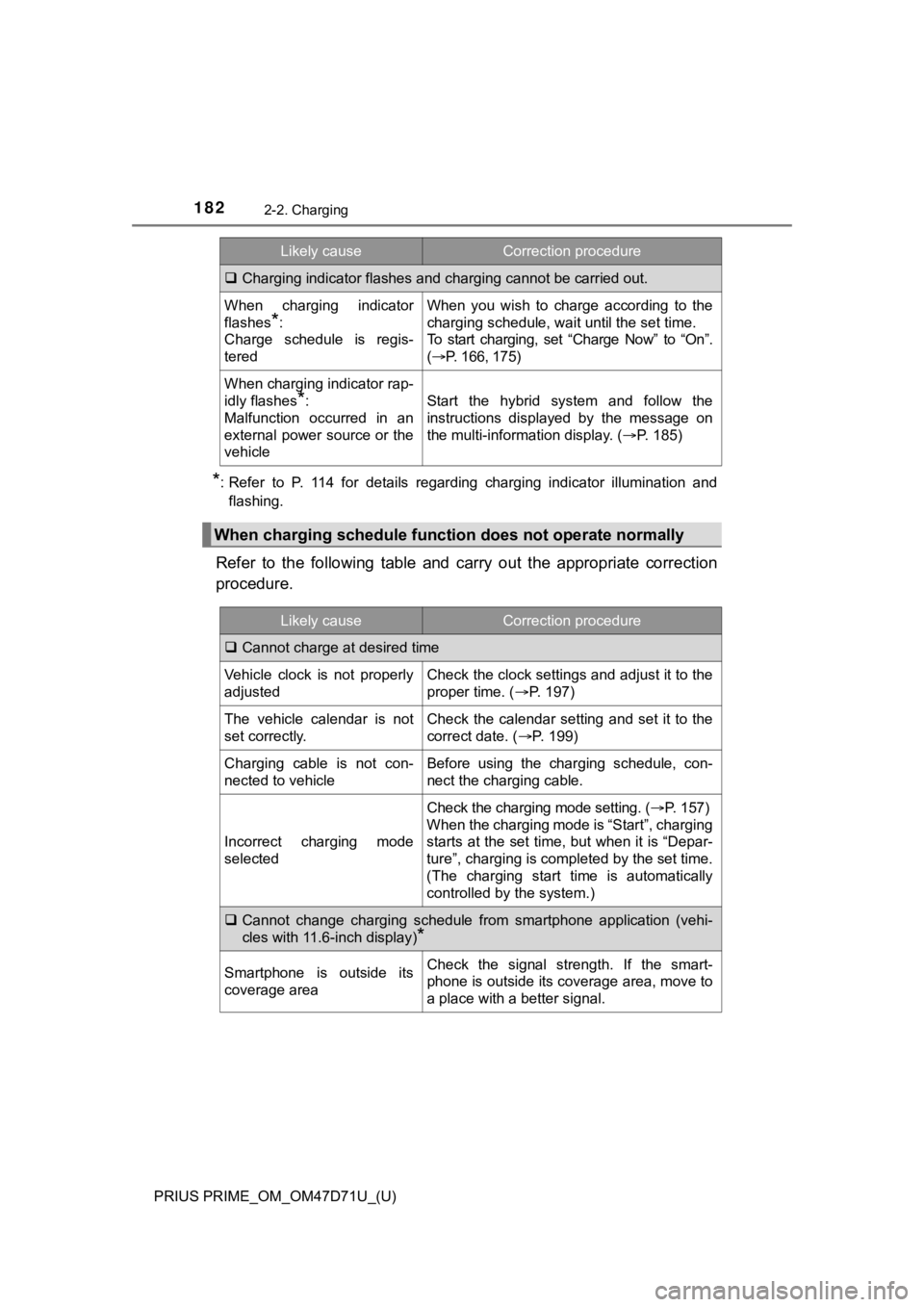
Charging indicator flashes and charging cannot be carried out.
When charging indicator
flashes
*:
Charge schedule is regis-
tered
When you wish to charge according to the
charging schedule, wait until the set time.
To start charging, set “Charge Now” to “On”.
(P. 166, 175)
When charging indicator rap-
idly flashes
*:
Malfunction occurred in an
external power source or the
vehicleStart the hybrid system and follow the
instructions displayed by the message on
the multi-information display. (P. 185)
When charging schedule function does not operate normally
Likely causeCorrection procedure
Cannot charge at desired time
Vehicle clock is not properly
adjustedCheck the clock settings and adjust it to the
proper time. (P. 197)
The vehicle calendar is not
set correctly.Check the calendar setting and set it to the
correct date. (P. 199)
Charging cable is not con-
nected to vehicleBefore using the charging schedule, con-
nect the charging cable.
Incorrect charging mode
selected
Check the charging mode setting. (P. 1 5 7 )
When the charging mode is “Start”, charging
starts at the set time, but when it is “Depar-
ture”, charging is completed by the set time.
(The charging start time is automatically
controlled by the system.)
Cannot change charging schedule from smartphone application (vehi-
cles with 11.6-inch display)
*
Smartphone is outside its
coverage areaCheck the signal strength. If the smart-
phone is outside its coverage area, move to
a place with a better signal.
Likely causeCorrection procedure
Page 183 of 808
PRIUS PRIME_OM_OM47D71U_(U)
1832-2. Charging
2
Plug-in hybrid system
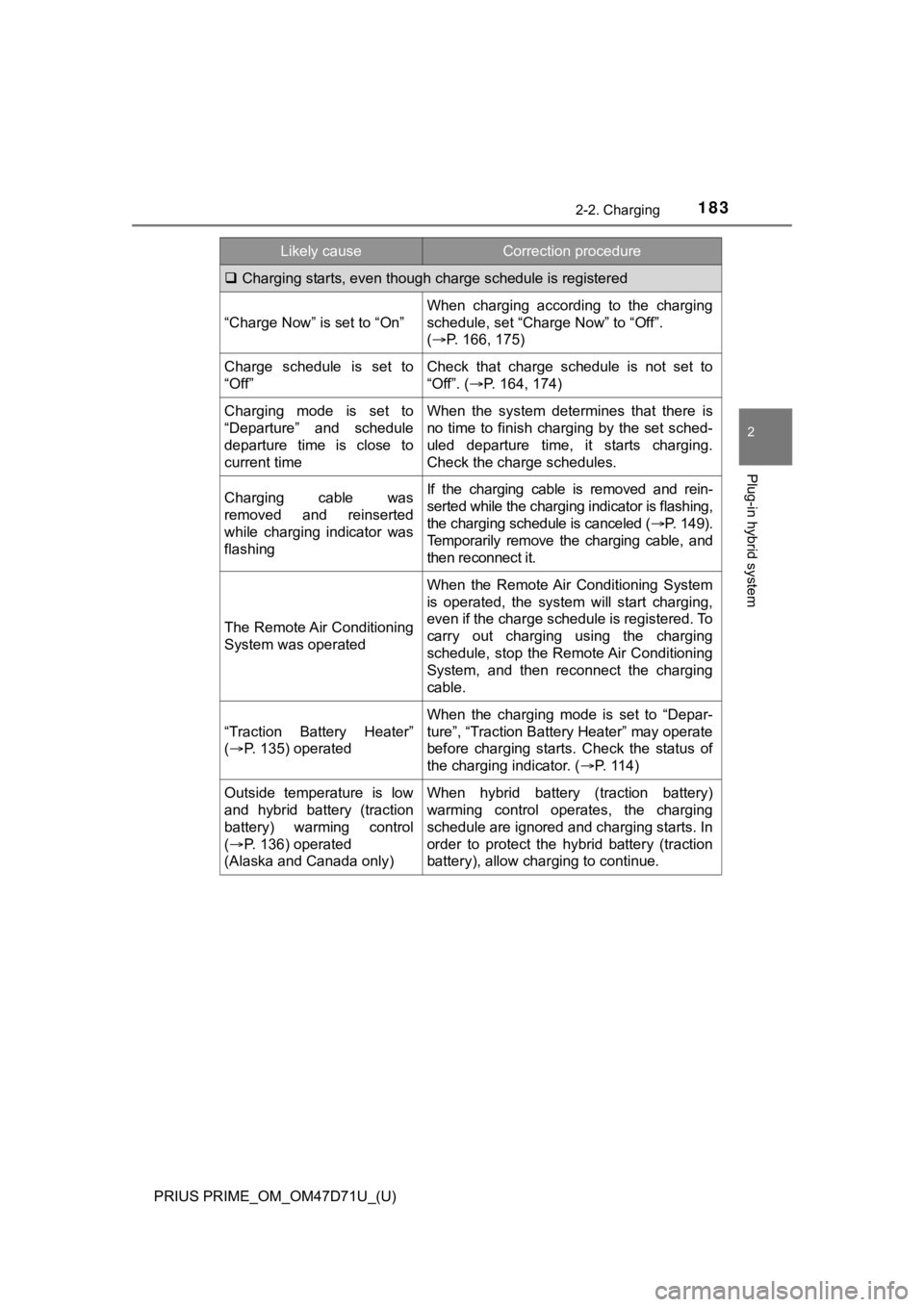
Charging starts, even though charge schedule is registered
“Charge Now” is set to “On”
When charging according to the charging
schedule, set “Charge Now” to “Off”.
(P. 166, 175)
Charge schedule is set to
“Off”Check that charge schedule is not set to
“Off”. (P. 164, 174)
Charging mode is set to
“Departure” and schedule
departure time is close to
current timeWhen the system determines that there is
no time to finish charging by the set sched-
uled departure time, it starts charging.
Check the charge schedules.
Charging cable was
removed and reinserted
while charging indicator was
flashingIf the charging cable is removed and rein-
serted while the charging indicator is flashing,
the charging schedule is canceled (P. 149).
Temporarily remove the charging cable, and
then reconnect it.
The Remote Air Conditioning
System was operated
When the Remote Air Conditioning System
is operated, the system will start charging,
even if the charge schedule is registered. To
carry out charging using the charging
schedule, stop the Remote Air Conditioning
System, and then reconnect the charging
cable.
“Traction Battery Heater”
(P. 135) operated
When the charging mode is set to “Depar-
ture”, “Traction Battery Heater” may operate
before charging starts. Check the status of
the charging indicator. (P. 114)
Outside temperature is low
and hybrid battery (traction
battery) warming control
(P. 136) operated
(Alaska and Canada only)When hybrid battery (traction battery)
warming control operates, the charging
schedule are ignored and charging starts. In
order to protect the hybrid battery (traction
battery), allow charging to continue.
Likely causeCorrection procedure
Page 199 of 808
PRIUS PRIME_OM_OM47D71U_(U)
1993. Instrument cluster
3
Instrument cluster
■The meters and display illuminate when
The power switch is in ON mode.
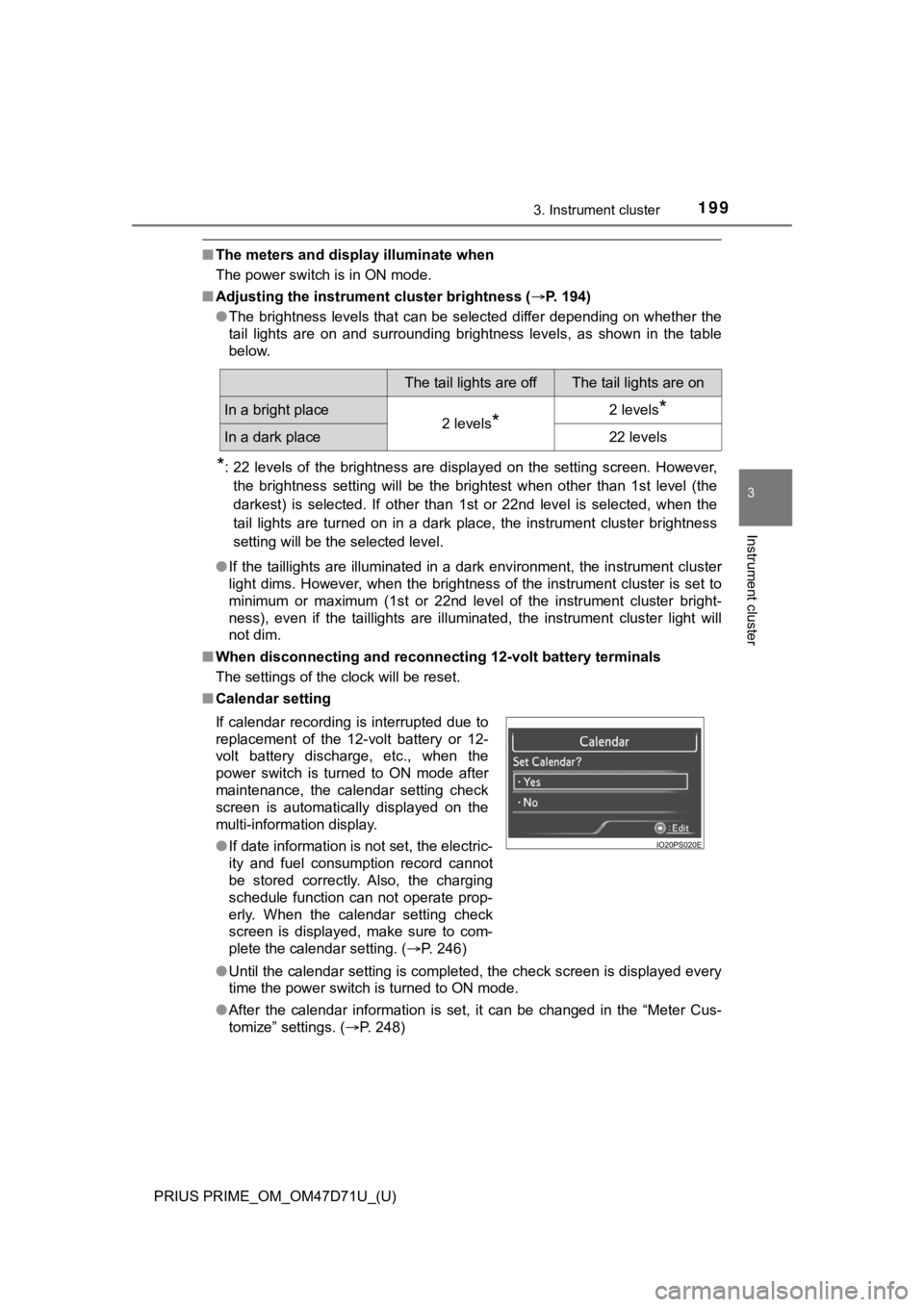
■Adjusting the instrument cluster brightness (P. 194)
●The brightness levels that can be selected differ depending on whether the
tail lights are on and surrounding brightness levels, as shown in the table
below.
*: 22 levels of the brightness are displayed on the setting screen. However,
the brightness setting will be the brightest when other than 1st level (the
darkest) is selected. If other than 1st or 22nd level is selected, when the
tail lights are turned on in a dark place, the instrument cluster brightness
setting will be the selected level.
●If the taillights are illuminated in a dark environment, the instrument cluster
light dims. However, when the brightness of the instrument cluster is set to
minimum or maximum (1st or 22nd level of the instrument cluster bright-
ness), even if the taillights are illuminated, the instrument cluster light will
not dim.
■When disconnecting and reconnecting 12-volt battery terminals
The settings of the clock will be reset.
■Calendar setting
●Until the calendar setting is completed, the check screen is displayed every
time the power switch is turned to ON mode.
●After the calendar information is set, it can be changed in the “Meter Cus-
tomize” settings. (P. 248)
The tail lights are offThe tail lights are on
In a bright place2 levels*2 levels*
In a dark place22 levels
If calendar recording is interrupted due to
replacement of the 12-volt battery or 12-
volt battery discharge, etc., when the
power switch is turned to ON mode after
maintenance, the calendar setting check
screen is automatically displayed on the
multi-information display.
●If date information is not set, the electric-
ity and fuel consumption record cannot
be stored correctly. Also, the charging
schedule function can not operate prop-
erly. When the calendar setting check
screen is displayed, make sure to com-
plete the calendar setting. (P. 246)
Page 203 of 808
PRIUS PRIME_OM_OM47D71U_(U)
2033. Instrument cluster
3
Instrument cluster
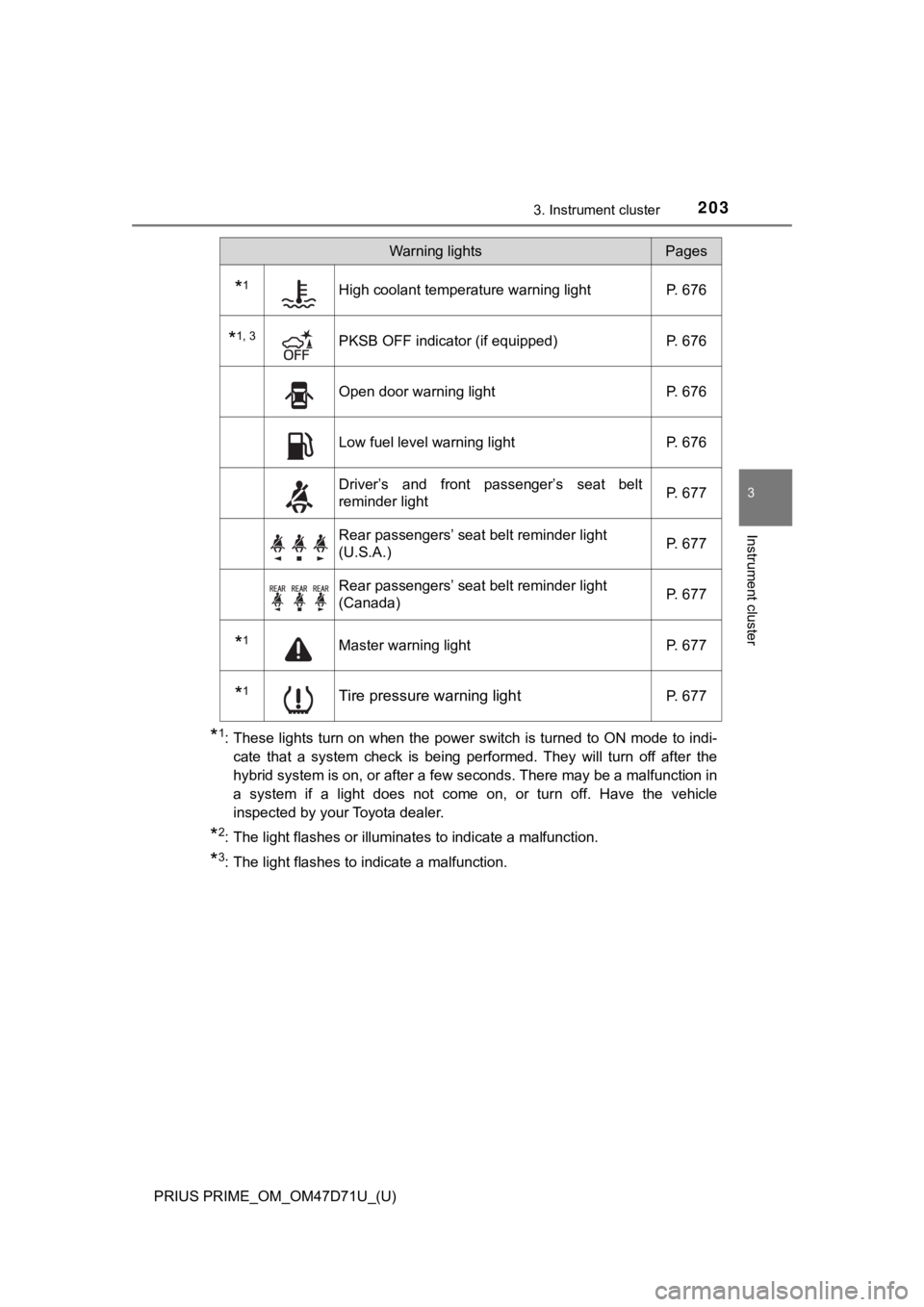
*1: These lights turn on when the power switch is turned to ON mode to indi-
cate that a system check is being performed. They will turn off after the
hybrid system is on, or after a few seconds. There may be a malfunction in
a system if a light does not come on, or turn off. Have the vehicle
inspected by your Toyota dealer.
*2: The light flashes or illuminates to indicate a malfunction.
*3: The light flashes to indicate a malfunction.
*1High coolant temperature warning light P. 676
*1, 3PKSB OFF indicator (if equipped) P. 676
Open door warning light P. 676
Low fuel level warning light P. 676
Driver’s and front passenger’s seat belt
reminder lightP. 677
Rear passengers’ seat belt reminder light
(U.S.A.)P. 677
Rear passengers’ seat belt reminder light
(Canada)P. 677
*1Master warning light P. 677
*1Tire pressure warning lightP. 677
Warning lightsPages
Page 205 of 808
PRIUS PRIME_OM_OM47D71U_(U)
2053. Instrument cluster
3
Instrument cluster
*1: These lights turn on when the power switch is turned to ON mode to indi-
cate that a system check is being performed. They will turn off after the
hybrid system is on, or after a few seconds. There may be a malfunction in
a system if a light does not come on, or turn off. Have the vehicle
inspected by your Toyota dealer.
*2: The light flashes to indicate that the system is operating.
*3: The light comes on when the system is turned off.
*4: Depending on the operating condition, the color and illuminating/flashing
state of the light change.
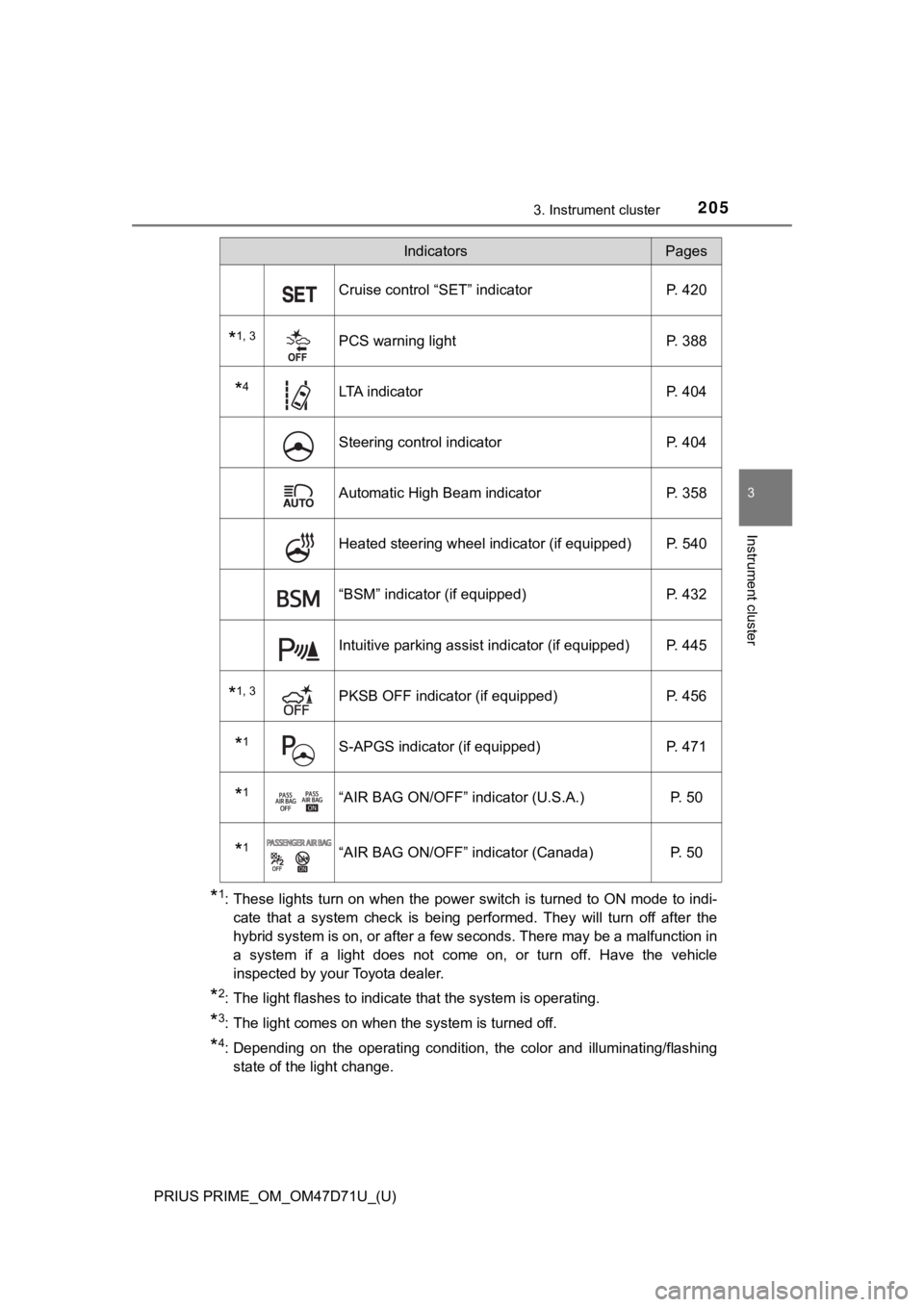
Cruise control “SET” indicator P. 420
*1, 3PCS warning light P. 388
*4LTA indicator P. 404
Steering control indicator P. 404
Automatic High Beam indicator P. 358
Heated steering wheel indicator (if equipped) P. 540
“BSM” indicator (if equipped) P. 432
Intuitive parking assist indicator (if equipped) P. 445
*1, 3PKSB OFF indicator (if equipped) P. 456
*1S-APGS indicator (if equipped) P. 471
*1“AIR BAG ON/OFF” indicator (U.S.A.) P. 50
*1“AIR BAG ON/OFF” indicator (Canada) P. 50
IndicatorsPages
Page 206 of 808
206
PRIUS PRIME_OM_OM47D71U_(U)
3. Instrument cluster
■Main display and multi-information display
*1: The displayed indicator changes according to the current plug-in hybrid
system operation mode.
*2: The displayed indicator changes according to the current driving mode.
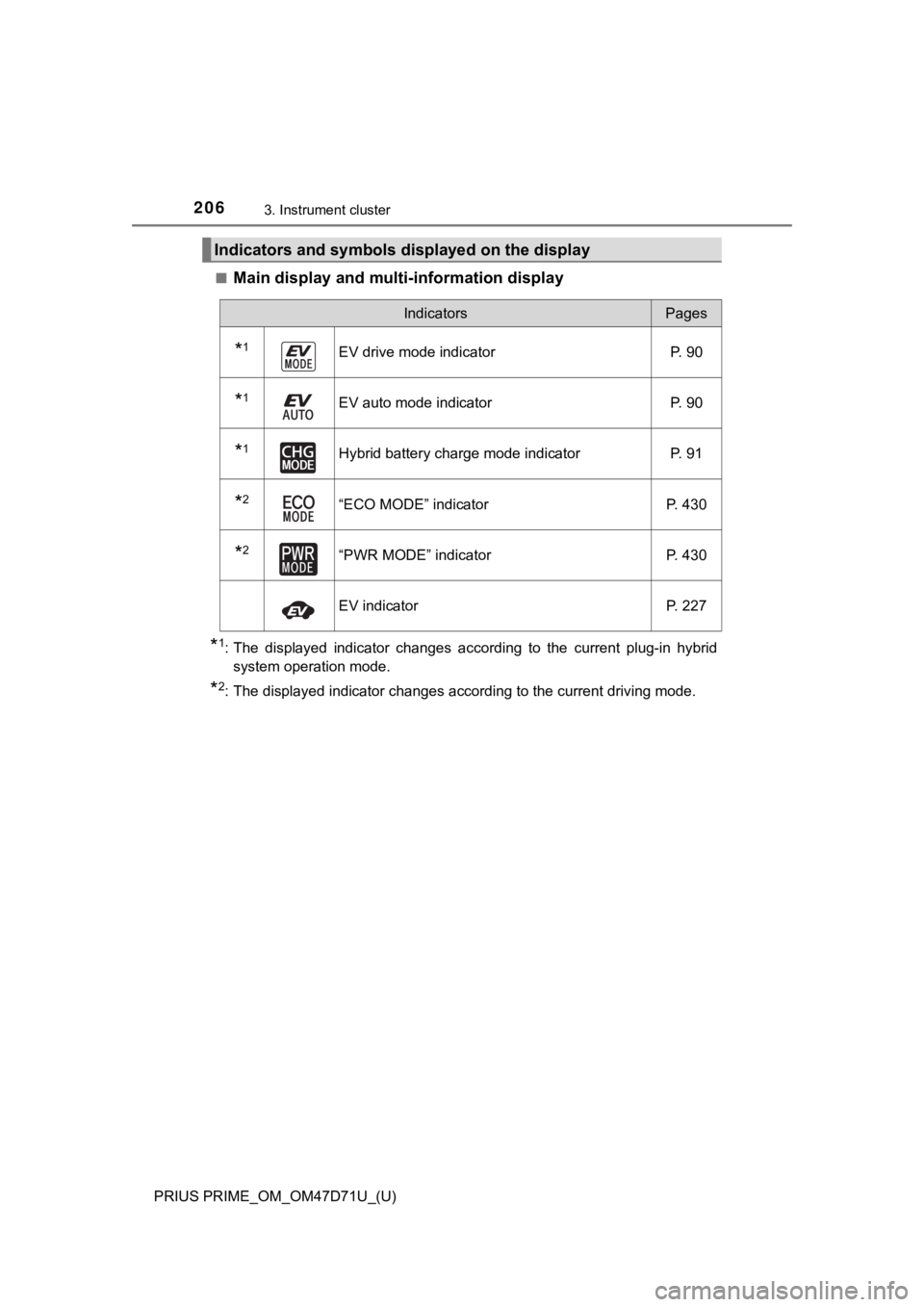
Indicators and symbols displayed on the display
IndicatorsPages
*1EV drive mode indicator P. 90
*1EV auto mode indicator P. 90
*1Hybrid battery charge mode indicator P. 91
*2“ECO MODE” indicator P. 430
*2“PWR MODE” indicator P. 430
EV indicator P. 227
Page 208 of 808
208
PRIUS PRIME_OM_OM47D71U_(U)
3. Instrument cluster
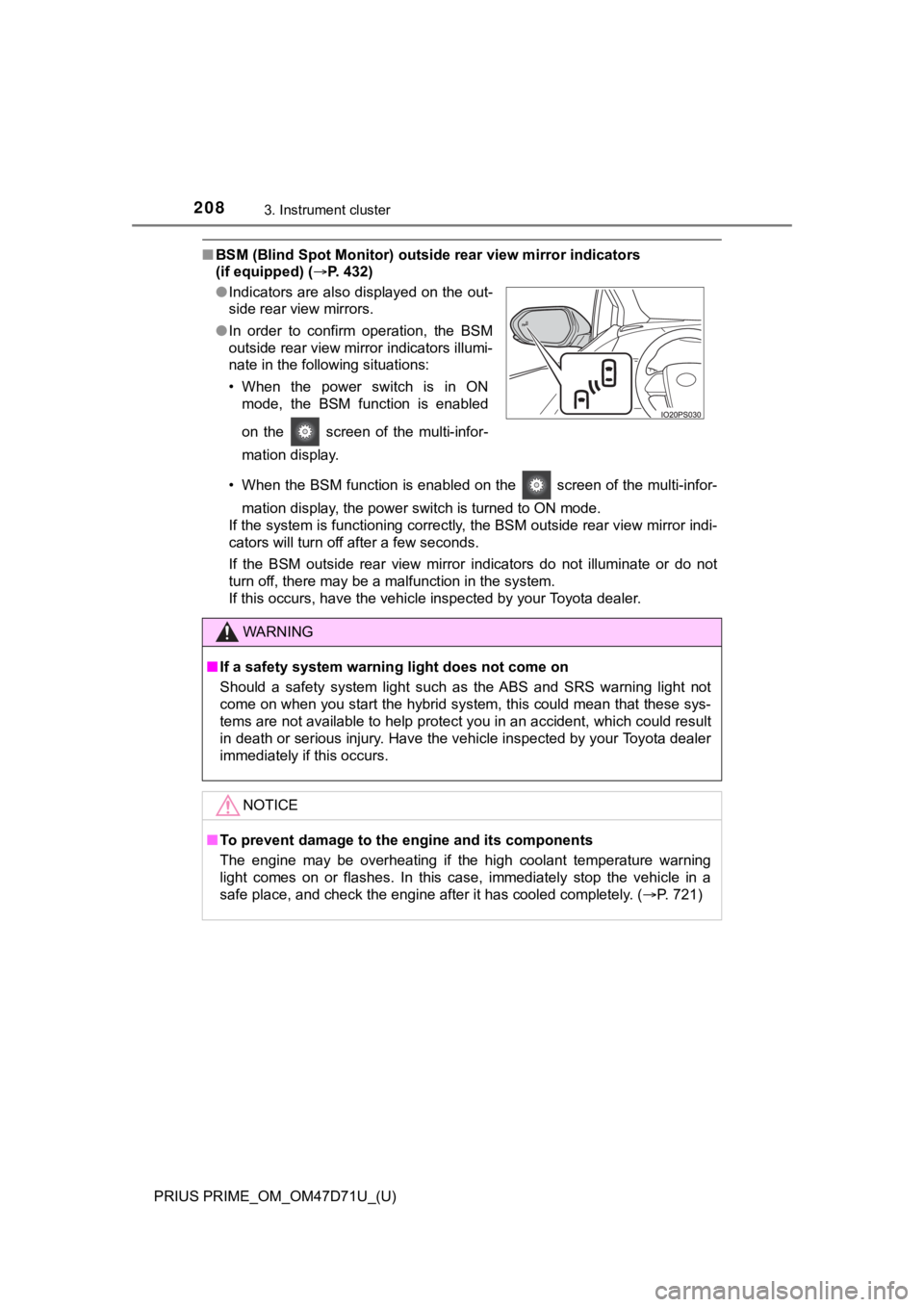
■BSM (Blind Spot Monitor) outside rear view mirror indicators
(if equipped) (P. 432)
• When the BSM function is enabled on the screen of the multi-infor-
mation display, the power switch is turned to ON mode.
If the system is functioning correctly, the BSM outside rear view mirror indi-
cators will turn off after a few seconds.
If the BSM outside rear view mirror indicators do not illuminate or do not
turn off, there may be a malfunction in the system.
If this occurs, have the vehicle inspected by your Toyota dealer. ●Indicators are also displayed on the out-
side rear view mirrors.
●In order to confirm operation, the BSM
outside rear view mirror indicators illumi-
nate in the following situations:
• When the power switch is in ON
mode, the BSM function is enabled
on the screen of the multi-infor-
mation display.
WARNING
■If a safety system warning light does not come on
Should a safety system light such as the ABS and SRS warning light not
come on when you start the hybrid system, this could mean that these sys-
tems are not available to help protect you in an accident, which could result
in death or serious injury. Have the vehicle inspected by your Toyota dealer
immediately if this occurs.
NOTICE
■To prevent damage to the engine and its components
The engine may be overheating if the high coolant temperature warning
light comes on or flashes. In this case, immediately stop the vehicle in a
safe place, and check the engine after it has cooled completely. (P. 721)
Page 219 of 808
PRIUS PRIME_OM_OM47D71U_(U)
2193. Instrument cluster
3
Instrument cluster
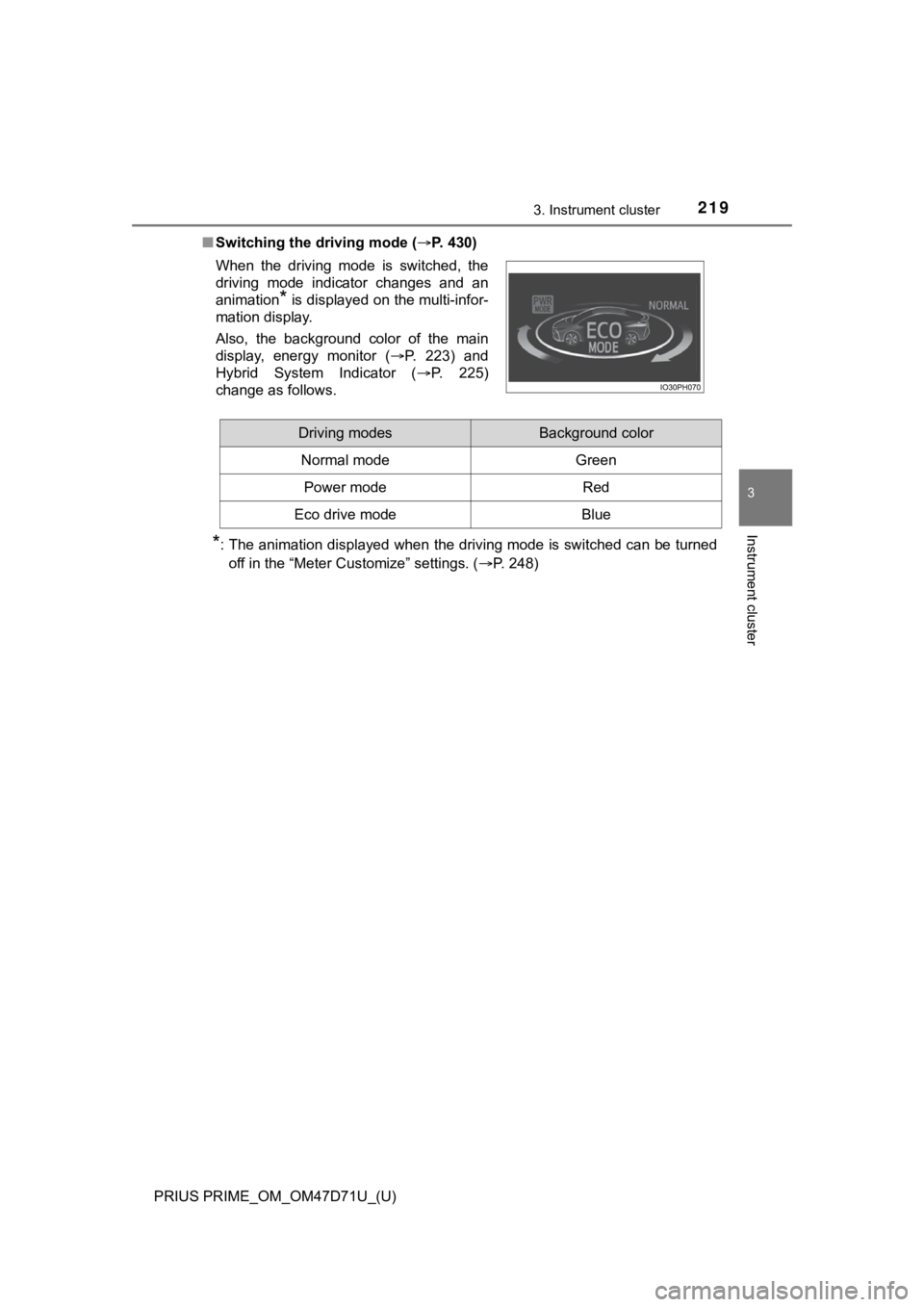
■Switching the driving mode (P. 430)
*: The animation displayed when the driving mode is switched can be turned
off in the “Meter Customize” settings. (P. 248) When the driving mode is switched, the
driving mode indicator changes and an
animation
* is displayed on the multi-infor-
mation display.
Also, the background color of the main
display, energy monitor (P. 223) and
Hybrid System Indicator (P. 225)
change as follows.
Driving modesBackground color
Normal mode Green
Power modeRed
Eco drive modeBlue
Page 225 of 808
PRIUS PRIME_OM_OM47D71U_(U)
2253. Instrument cluster
3
Instrument cluster
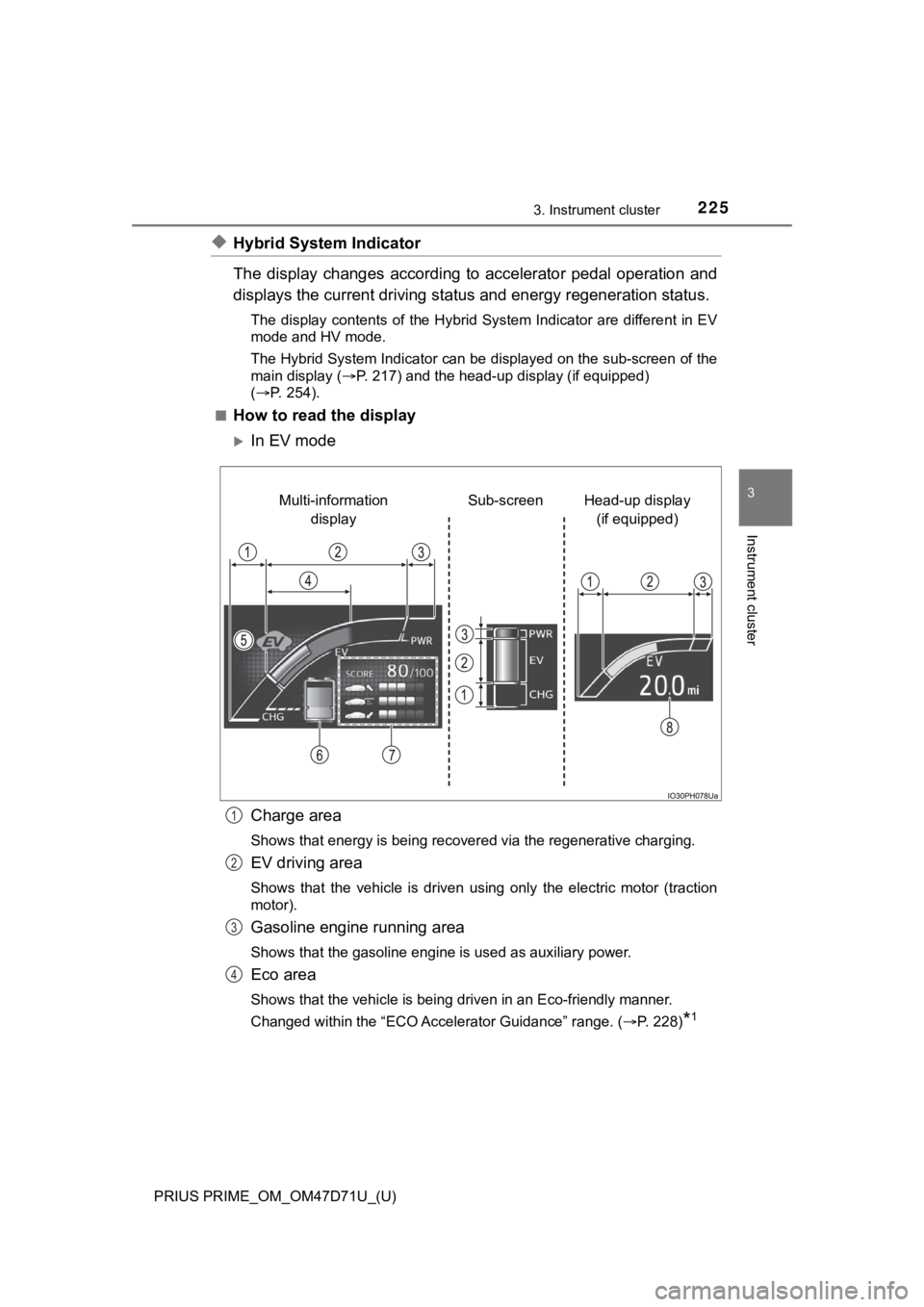
◆Hybrid System Indicator
The display changes according to accelerator pedal operation and
displays the current driving status and energy regeneration status.
The display contents of the Hybrid System Indicator are different in EV
mode and HV mode.
The Hybrid System Indicator can be displayed on the sub-screen of the
main display (P. 217) and the head-up display (if equipped)
(P. 254).
■
How to read the display
In EV mode
Charge area
<0036004b0052005a005600030057004b0044005700030048005100480055004a005c0003004c0056000300450048004c0051004a000300550048004600520059004800550048004700030059004c004400030057004b0048000300550048004a0048005100
48005500440057004c0059004800030046004b00440055004a[ing.
EV driving area
Shows that the vehicle is driven using only the electric motor (traction
motor).
Gasoline engine running area
Shows that the gasoline engine is used as auxiliary power.
Eco area
Shows that the vehicle is being driven in an Eco-friendly manner.
Changed within the “ECO Accelerator Guidance” range. (P. 228)
*1
Head-up display
(if equipped) Sub-screen Multi-information
display
1
2
3
4
Page 227 of 808
PRIUS PRIME_OM_OM47D71U_(U)
2273. Instrument cluster
3
Instrument cluster
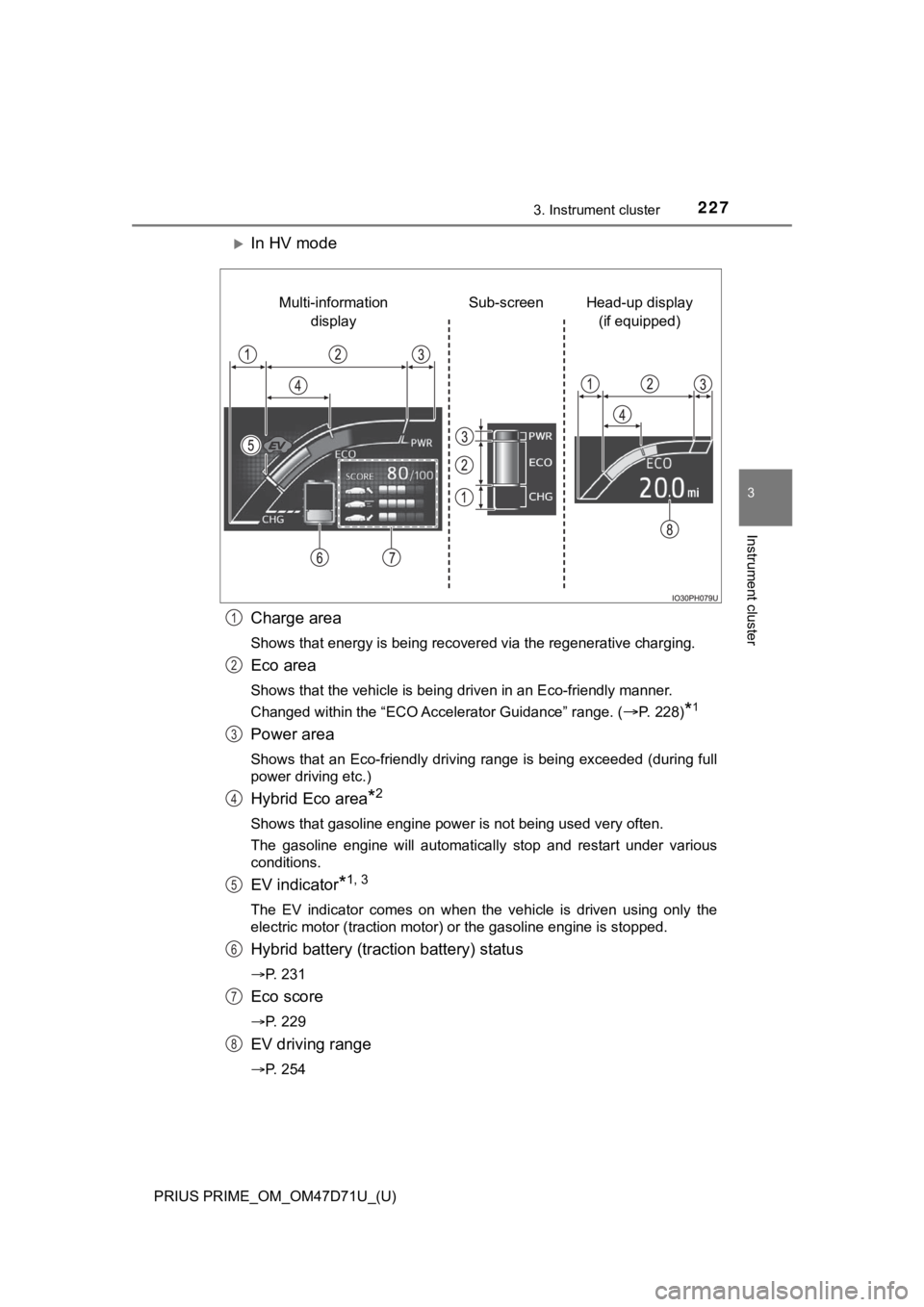
In HV mode
Charge area
<0036004b0052005a005600030057004b0044005700030048005100480055004a005c0003004c0056000300450048004c0051004a000300550048004600520059004800550048004700030059004c004400030057004b0048000300550048004a0048005100
48005500440057004c0059004800030046004b00440055004a[ing.
Eco area
Shows that the vehicle is being driven in an Eco-friendly manner.
Changed within the “ECO Accelerator Guidance” range. (
P. 228)*1
Power area
Shows that an Eco-friendly driving range is being exceeded (during full
power driving etc.)
Hybrid Eco area*2
Shows that gasoline engine power is not being used very often.
The gasoline engine will automatically stop and restart under various
conditions.
EV indicator*1, 3
The EV indicator comes on when the vehicle is driven using only the
electric motor (traction motor) or the gasoline engine is stopped.
Hybrid battery (traction battery) status
P. 231
Eco score
P. 229
EV driving range
P. 254
Head-up display
(if equipped) Sub-screen Multi-information
display
1
2
3
4
5
6
7
8