ECO mode TOYOTA PRIUS PRIME 2021 (in English) Owner's Guide
[x] Cancel search | Manufacturer: TOYOTA, Model Year: 2021, Model line: PRIUS PRIME, Model: TOYOTA PRIUS PRIME 2021Pages: 808, PDF Size: 74.05 MB
Page 228 of 808
228
PRIUS PRIME_OM_OM47D71U_(U)
3. Instrument cluster
●By keeping the indicator within Eco area, more Eco-friendly driv-
ing can be achieved.
●Charge area indicates regeneration
*4 status. Regenerated
energy will be used to charge the hybrid battery (traction battery).
*1: Not displayed on the sub-screen or head-up display.
*2: Not displayed on the sub-screen.
*3: The EV indicator function can be turned off in the “Meter Customize”
settings. (P. 248)
*4: When used in this manual, “regeneration” refers to the conversion of
energy created by the movement of the vehicle into electrical energy.
■
“ECO Accelerator Guidance”
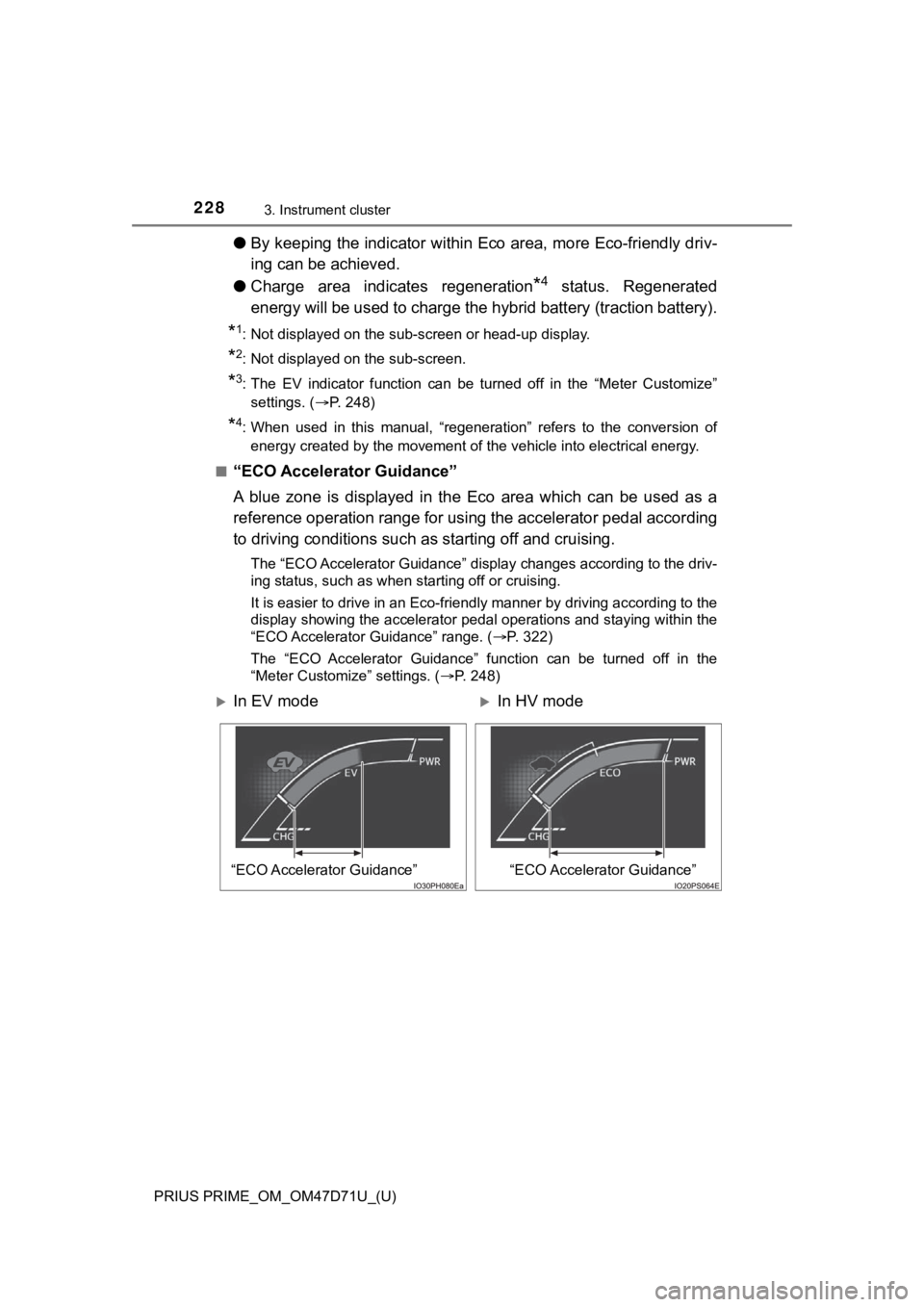
A blue zone is displayed in the Eco area which can be used as a
reference operation range for using the accelerator pedal according
to driving conditions such as starting off and cruising.
The “ECO Accelerator Guidance” display changes according to the driv-
ing status, such as when starting off or cruising.
It is easier to drive in an Eco-friendly manner by driving according to the
display showing the accelerator pedal operations and staying within the
“ECO Accelerator Guidance” range. (P. 322)
The “ECO Accelerator Guidance” function can be turned off in the
“Meter Customize” settings. (P. 248)
In EV modeIn HV mode
“ECO Accelerator Guidance”“ECO Accelerator Guidance”
Page 231 of 808
PRIUS PRIME_OM_OM47D71U_(U)
2313. Instrument cluster
3
Instrument cluster
■When operation of each function stops
●The Hybrid System Indicator stops operating in the following situations.
• The “READY” indicator is not illuminated.
• The shift position is not D or B.
●The Eco score and “ECO Accelerator Guidance” stop operating in the fol-
lowing situations.
• The Hybrid System Indicator is not operating.
• Dynamic radar cruise control with full-speed range is being used.
■Display of the remaining hybrid battery (traction battery)
●The current amount of the remaining hybrid battery (traction battery) is dis-
played in the Hybrid System Indicator or the sub-screen on the main display.
(P. 217)
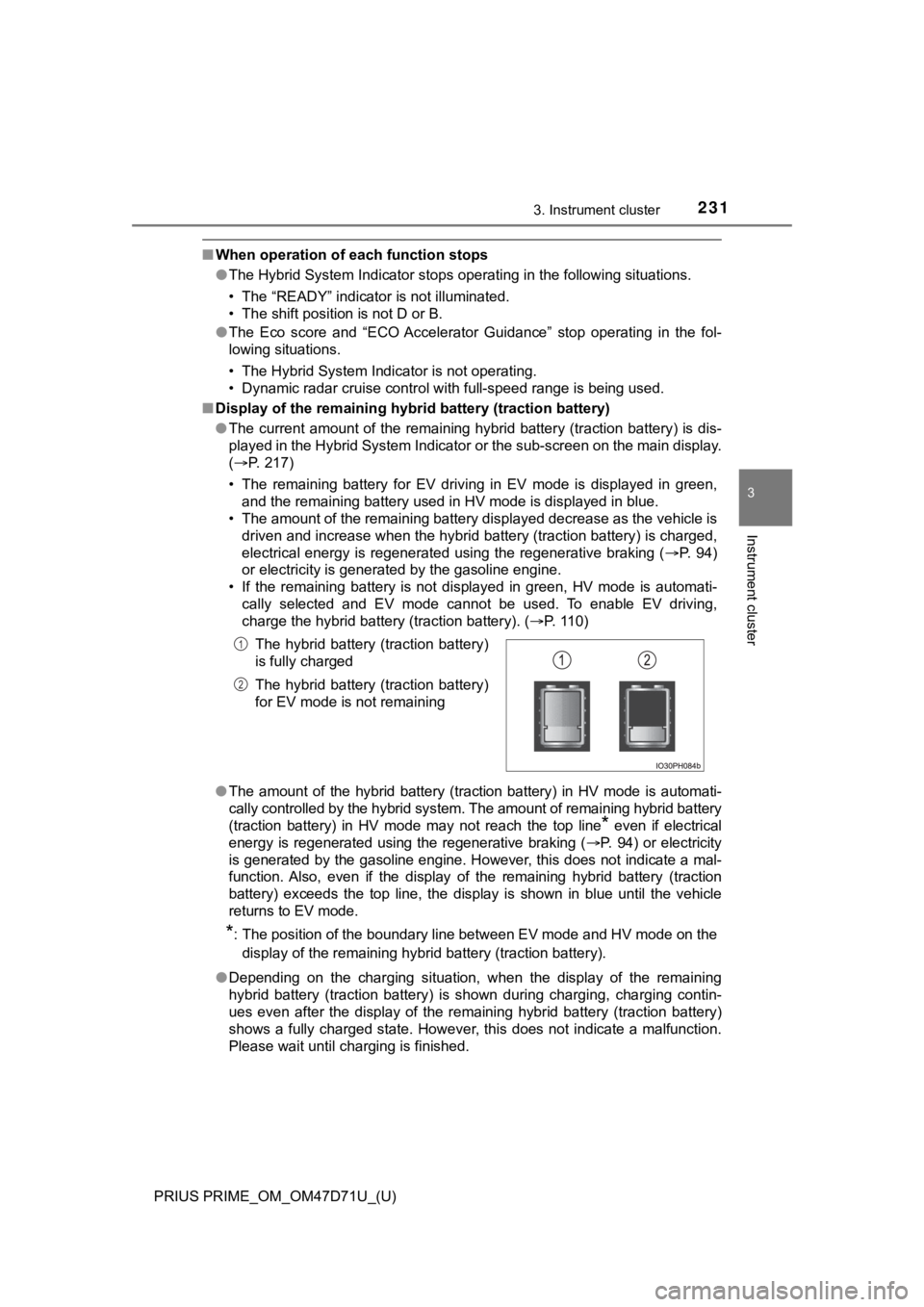
• The remaining battery for EV driving in EV mode is displayed in green,
and the remaining battery used in HV mode is displayed in blue.
• The amount of the remaining battery displayed decrease as the vehicle is
driven and increase when the hybrid battery (traction battery) is charged,
electrical energy is regenerated using the regenerative braking (P. 94)
or electricity is generated by the gasoline engine.
• If the remaining battery is not displayed in green, HV mode is automati-
cally selected and EV mode cannot be used. To enable EV driving,
charge the hybrid battery (traction battery). (P. 110)
●The amount of the hybrid battery (traction battery) in HV mode is automati-
cally controlled by the hybrid system. The amount of remaining hybrid battery
(traction battery) in HV mode may not reach the top line
* even if electrical
energy is regenerated using the regenerative braking (P. 94) or electricity
is generated by the gasoline engine. However, this does not indicate a mal-
function. Also, even if the display of the remaining hybrid battery (traction
battery) exceeds the top line, the display is shown in blue until the vehicle
returns to EV mode.
*: The position of the boundary line between EV mode and HV mode on the
<0047004c00560053004f0044005c00030052004900030057004b004800030055004800500044004c0051004c0051004a0003004b005c00450055004c00470003004500440057005700480055005c0003000b00570055004400460057004c00520051000300
4500440057005700480055005c000c0011[
●Depending on the charging situation, when the display of the remaining
hybrid battery (traction battery) is shown during charging, charging contin-
ues even after the display of the remaining hybrid battery (traction battery)
shows a fully charged state. However, this does not indicate a malfunction.
Please wait until charging is finished.The hybrid battery (traction battery)
is fully charged
The hybrid battery (traction battery)
for EV mode is not remaining
1
2
Page 242 of 808
242
PRIUS PRIME_OM_OM47D71U_(U)
3. Instrument cluster
*1: “LO” is displayed if the temperature is adjusted to the lowest setting, and
<00b3002b002c00b40003004c005600030047004c00560053004f0044005c004800470003004c004900030057004b00480003005700480050005300480055004400570058005500480003004c0056000300440047004d005800560057004800470003005700
5200030057004b00480003004b004c004a004b004800560057[ setting.
*2: The selectable modes differ depending on whether a passenger is present.
(P. 514, 526)
■
Adjusting the settings
Press to display the cursor.
Press or of the meter control switches to select the
desired item to set.
Press or of the meter control switches to select the set-
ting item or setting value.
The air conditioning system cannot be stopped by performing opera-
tions on the air conditioning settings screen. Please use the air condi-
tioning switch or navigation system
* to stop the air conditioning system.
*: Vehicles with 11.6-inch display only
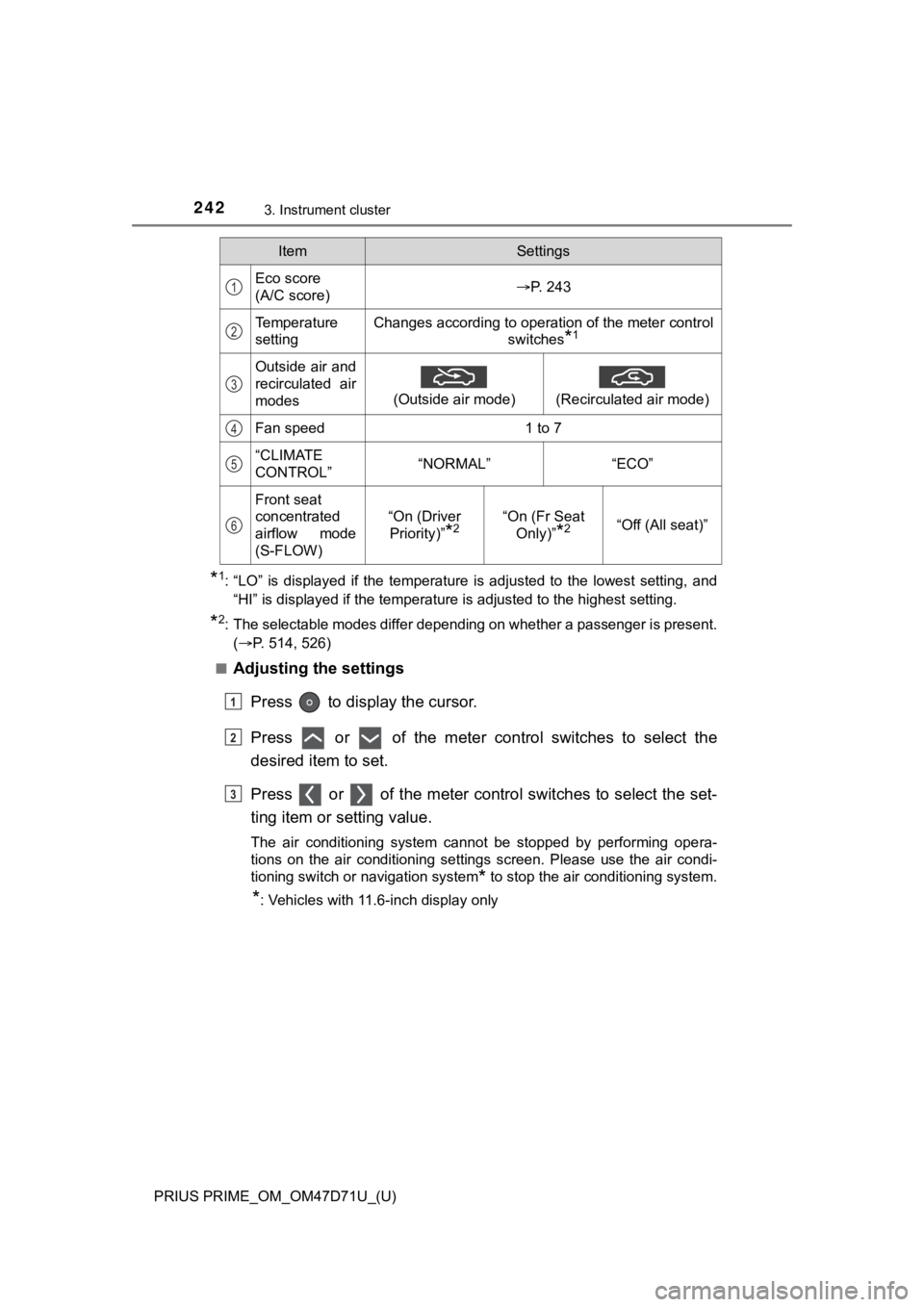
ItemSettings
Eco score
(A/C score)P. 243
Temperature
settingChanges according to operation of the meter control
switches
*1
Outside air and
recirculated air
modes
(Outside air mode)
(Recirculated air mode)
Fan speed1 to 7
“CLIMATE
CONTROL”“NORMAL”“ECO”
Front seat
concentrated
airflow mode
(S-FLOW)
“On (Driver
Priority)”
*2“On (Fr Seat
Only)”
*2“Off (All seat)”
1
2
3
4
5
6
1
2
3
Page 243 of 808
PRIUS PRIME_OM_OM47D71U_(U)
2433. Instrument cluster
3
Instrument cluster
■Eco score (A/C score)
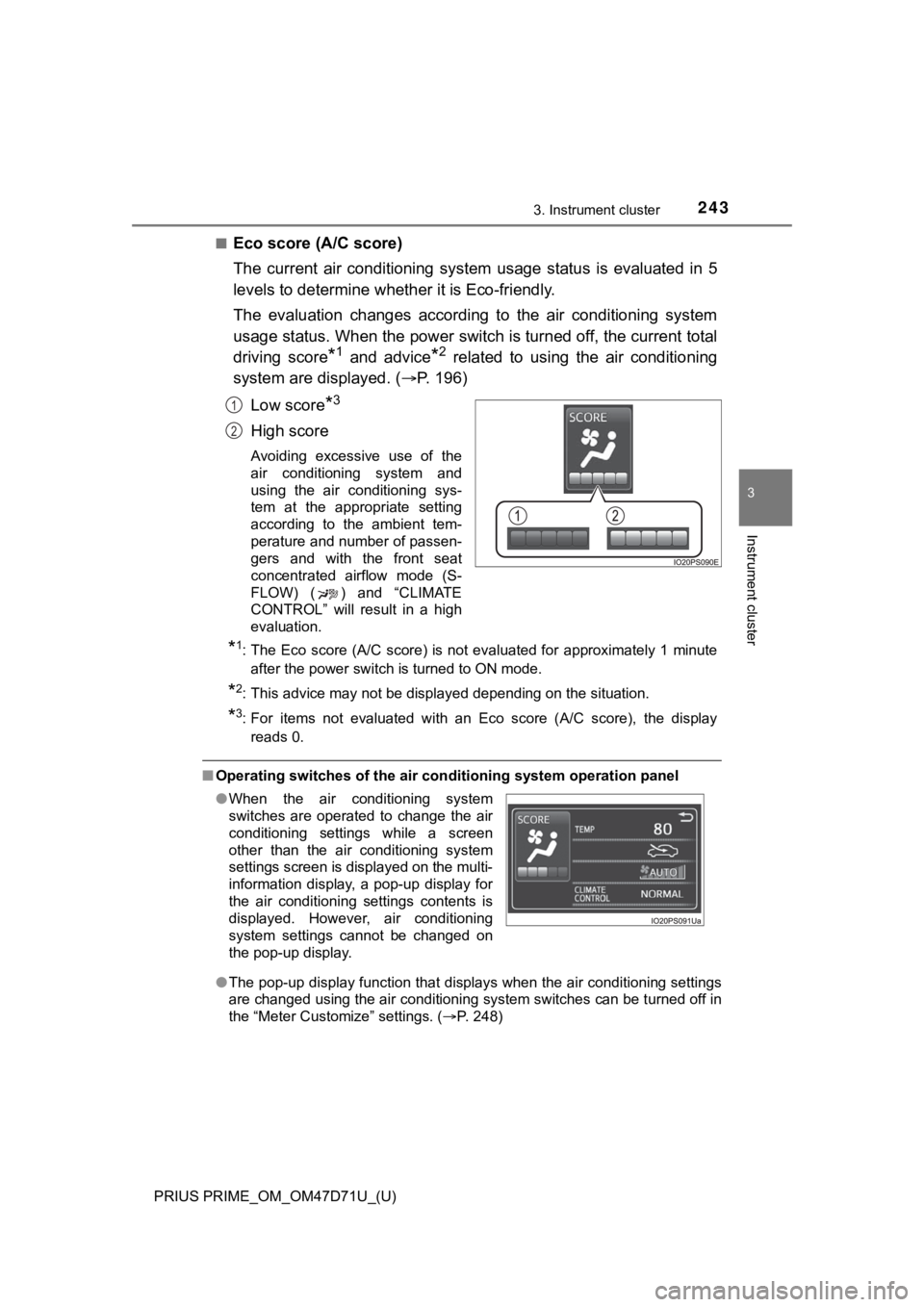
The current air conditioning system usage status is evaluated in 5
levels to determine whether it is Eco-friendly.
The evaluation changes according to the air conditioning system
usage status. When the power switch is turned off, the current total
driving score
*1 and advice*2 related to using the air conditioning
system are displayed. (P. 1 9 6 )
Low score
*3
High score
Avoiding excessive use of the
air conditioning system and
using the air conditioning sys-
tem at the appropriate setting
according to the ambient tem-
perature and number of passen-
gers and with the front seat
concentrated airflow mode (S-
FLOW) ( ) and “CLIMATE
CONTROL” will result in a high
evaluation.
*1: The Eco score (A/C score) is not evaluated for approximately 1 minute
after the power switch is turned to ON mode.
*2: This advice may not be displayed depending on the situation.
*3: For items not evaluated with an Eco score (A/C score), the display
reads 0.
■Operating switches of the air conditioning system operation panel
●The pop-up display function that displays when the air conditioning settings
are changed using the air conditioning system switches can be turned off in
the “Meter Customize” settings. (P. 248)
1
2
●When the air conditioning system
switches are operated to change the air
conditioning settings while a screen
other than the air conditioning system
settings screen is displayed on the multi-
information display, a pop-up display for
the air conditioning settings contents is
displayed. However, air conditioning
system settings cannot be changed on
the pop-up display.
Page 244 of 808

244
PRIUS PRIME_OM_OM47D71U_(U)
3. Instrument cluster
■Eco score (A/C score)
●The setting status of the following air conditioning system functions are
reflected in the score.
• Temperature setting
• Fan speed setting
• Outside air and recirculated air modes
• “A/C” button
• Front seat concentrated airflow mode (S-FLOW)
• “CLIMATE CONTROL”
●The Eco score (A/C score) is evaluated according to the ambient tempera-
ture and cabin temperature. Accordingly, even if the same settings are
always used for the air conditioning system, the evaluation will change
according to such factors as the season and weather.
●When the air conditioning system is not being used or the airflow mode is
set to or , the Eco score (A/C score) is not evaluated. (While the
air conditioning system is not evaluated, its usage status is not reflected in
the total Eco score result.)
●The Eco score (A/C score) is a function that helps select an air conditioning
system setting which reduces electricity and fuel consumption, not a func-
tion that satisfies both comfortability and low fuel consumption.
Page 248 of 808
248
PRIUS PRIME_OM_OM47D71U_(U)
3. Instrument cluster
*: If equipped
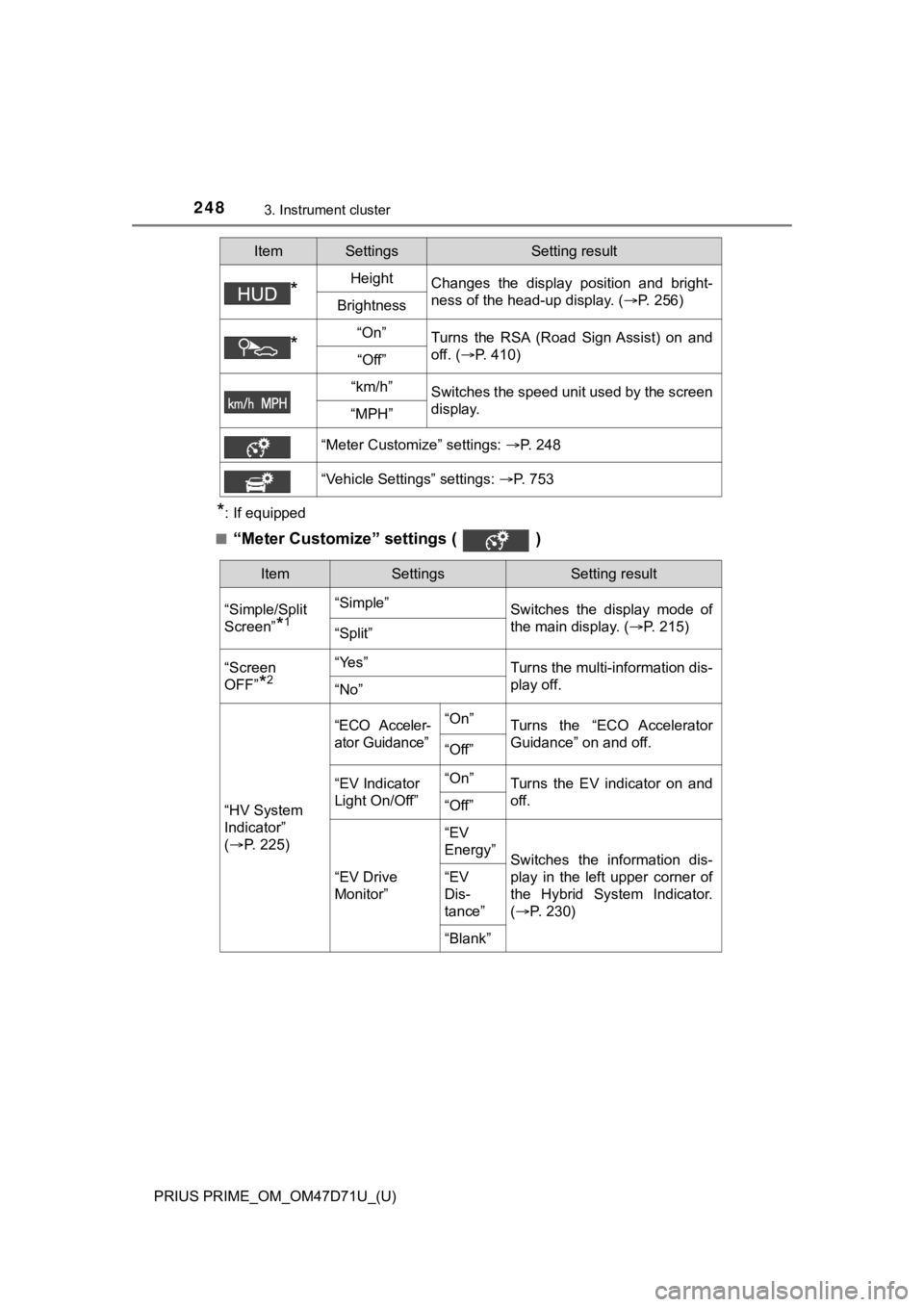
■
“Meter Customize” settings ( )
*HeightChanges the display position and bright-
ness of the head-up display. (P. 256)
Brightness
*“On”Turns the RSA (Road Sign Assist) on and
off. (P. 410)
“Off”
“km/h”Switches the speed unit used by the screen
display.
“MPH”
“Meter Customize” settings: P. 248
“Vehicle Settings” settings: P. 753
ItemSettingsSetting result
ItemSettingsSetting result
“Simple/Split
Screen”
*1
“Simple”
Switches the display mode of
the main display. (P. 215)
“Split”
“Screen
OFF”
*2
“Yes”Turns the multi-information dis-
play off.
“No”
“HV System
Indicator”
(P. 2 2 5 )
“ECO Acceler-
ator Guidance”“On”Turns the “ECO Accelerator
Guidance” on and off.
“Off”
“EV Indicator
Light On/Off”“On”Turns the EV indicator on and
off.
“Off”
“EV Drive
Monitor”“EV
Energy”
Switches the information dis-
play in the left upper corner of
the Hybrid System Indicator.
(P. 2 3 0 )
“EV
Dis-
tance”
“Blank”
Page 249 of 808
PRIUS PRIME_OM_OM47D71U_(U)
2493. Instrument cluster
3
Instrument cluster
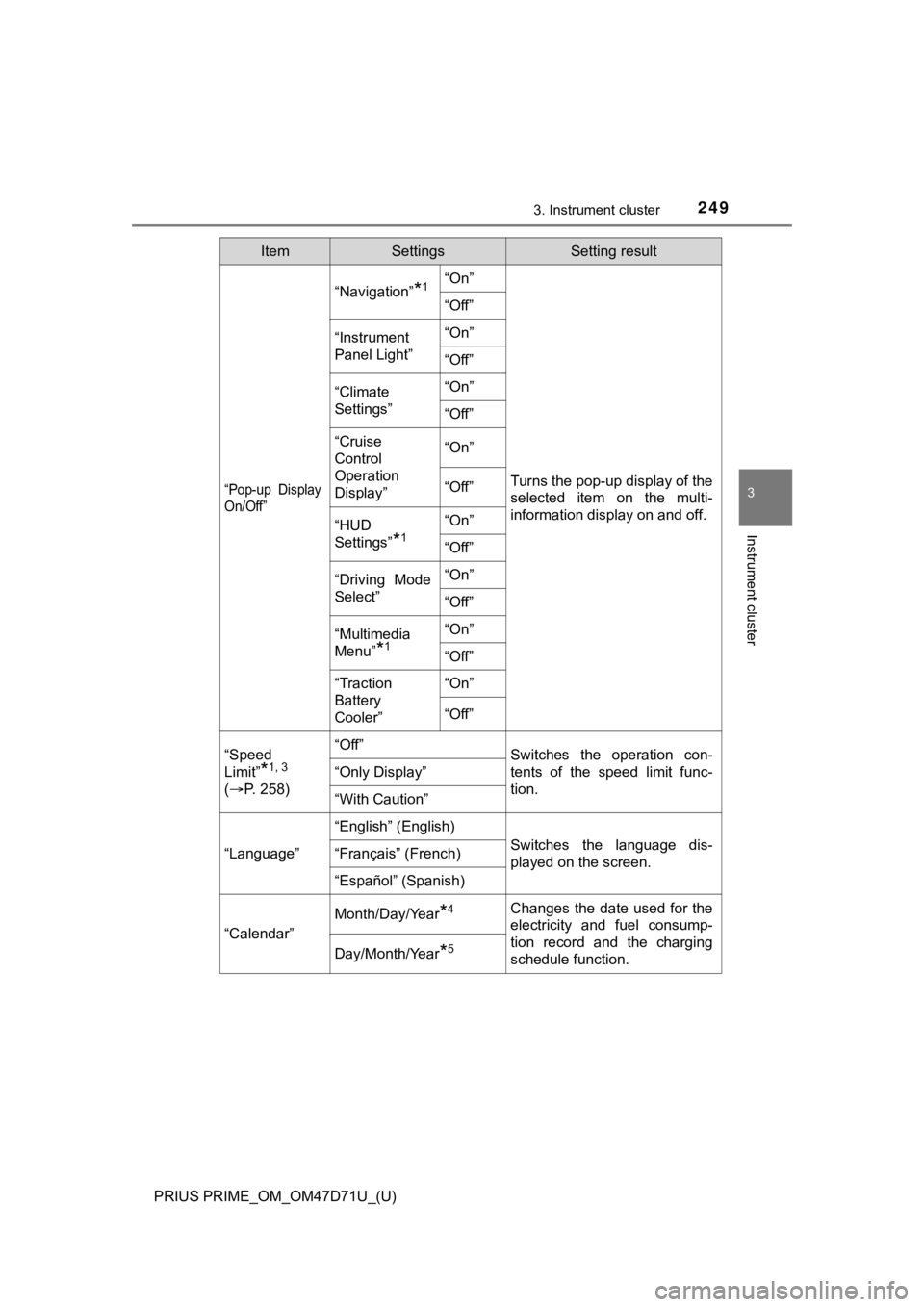
“Pop-up Display
On/Off”
“Navigation”*1“On”
Turns the pop-up display of the
selected item on the multi-
information display on and off.
“Off”
“Instrument
Panel Light”“On”
“Off”
“Climate
Settings”“On”
“Off”
“Cruise
Control
Operation
Display”“On”
“Off”
“HUD
Settings”
*1
“On”
“Off”
“Driving Mode
Select”“On”
“Off”
“Multimedia
Menu”
*1
“On”
“Off”
“Traction
Battery
Cooler”“On”
“Off”
“Speed
Limit”
*1, 3
(P. 2 5 8 )
“Off”Switches the operation con-
tents of the speed limit func-
tion.
“Only Display”
“With Caution”
“Language”
“English” (English)
Switches the language dis-
played on the screen.“Français” (French)
“Español” (Spanish)
“Calendar”
Month/Day/Year*4Changes the date used for the
electricity and fuel consump-
tion record and the charging
schedule function.
Day/Month/Year*5
ItemSettingsSetting result
Page 271 of 808
PRIUS PRIME_OM_OM47D71U_(U)
2713. Instrument cluster
3
Instrument cluster
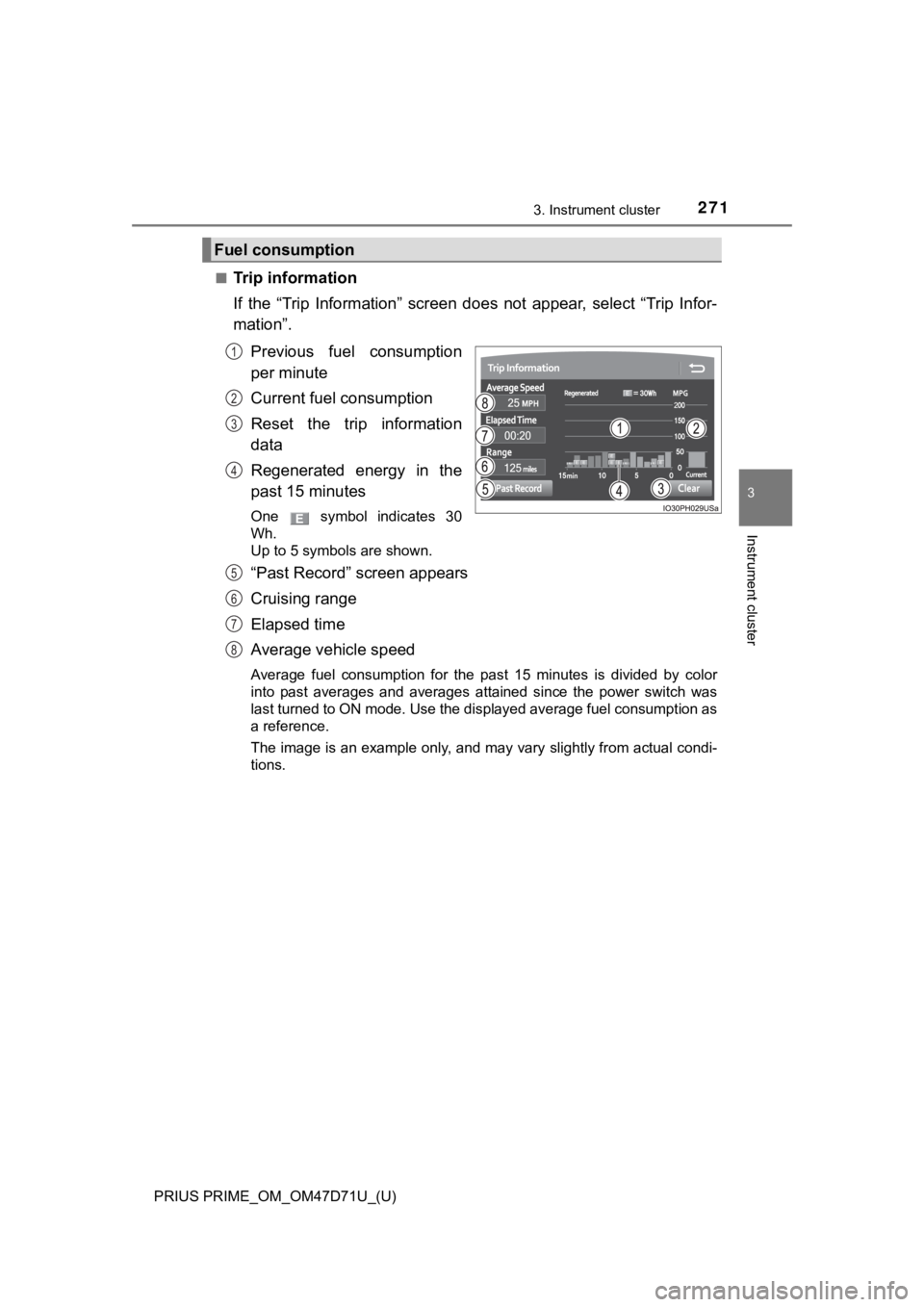
■Trip information
If the “Trip Information” screen does not appear, select “Trip Infor-
mation”.
Previous fuel consumption
per minute
Current fuel consumption
Reset the trip information
data
Regenerated energy in the
past 15 minutes
One symbol indicates 30
Wh.
Up to 5 symbols are shown.
“Past Record” screen appears
Cruising range
Elapsed time
Average vehicle speed
Average fuel consumption for the past 15 minutes is divided by color
into past averages and averages attained since the power switch was
last turned to ON mode. Use the displayed average fuel consumption as
a reference.
The image is an example only, and may vary slightly from actual condi-
tions.
Fuel consumption
1
2
3
4
5
6
7
8
Page 274 of 808
274
PRIUS PRIME_OM_OM47D71U_(U)
3. Instrument cluster
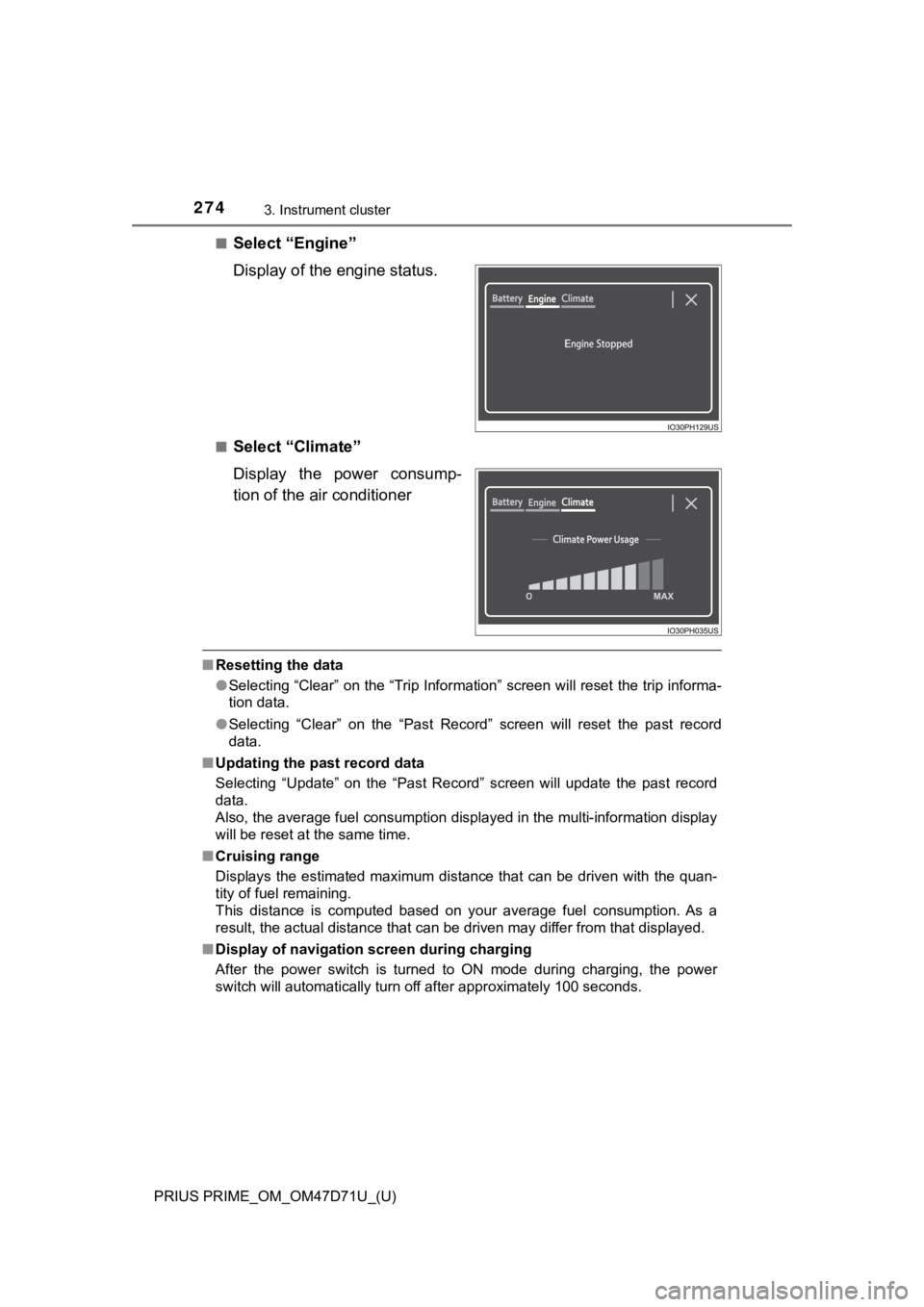
■Select “Engine”
Display of the engine status.
■Select “Climate”
Display the power consump-
tion of the air conditioner
■Resetting the data
●Selecting “Clear” on the “Trip Information” screen will reset the trip informa-
tion data.
●Selecting “Clear” on the “Past Record” screen will reset the past record
data.
■Updating the past record data
Selecting “Update” on the “Past Record” screen will update the past record
data.
Also, the average fuel consumption displayed in the multi-information display
will be reset at the same time.
■Cruising range
Displays the estimated maximum distance that can be driven with the quan-
tity of fuel remaining.
This distance is computed based on your average fuel consumption. As a
result, the actual distance that can be driven may differ from that displayed.
■Display of navigation screen during charging
After the power switch is turned to ON mode during charging, the power
switch will automatically turn off after approximately 100 seconds.
Page 277 of 808
PRIUS PRIME_OM_OM47D71U_(U)
2774-1. Key information
4
Operation of each component
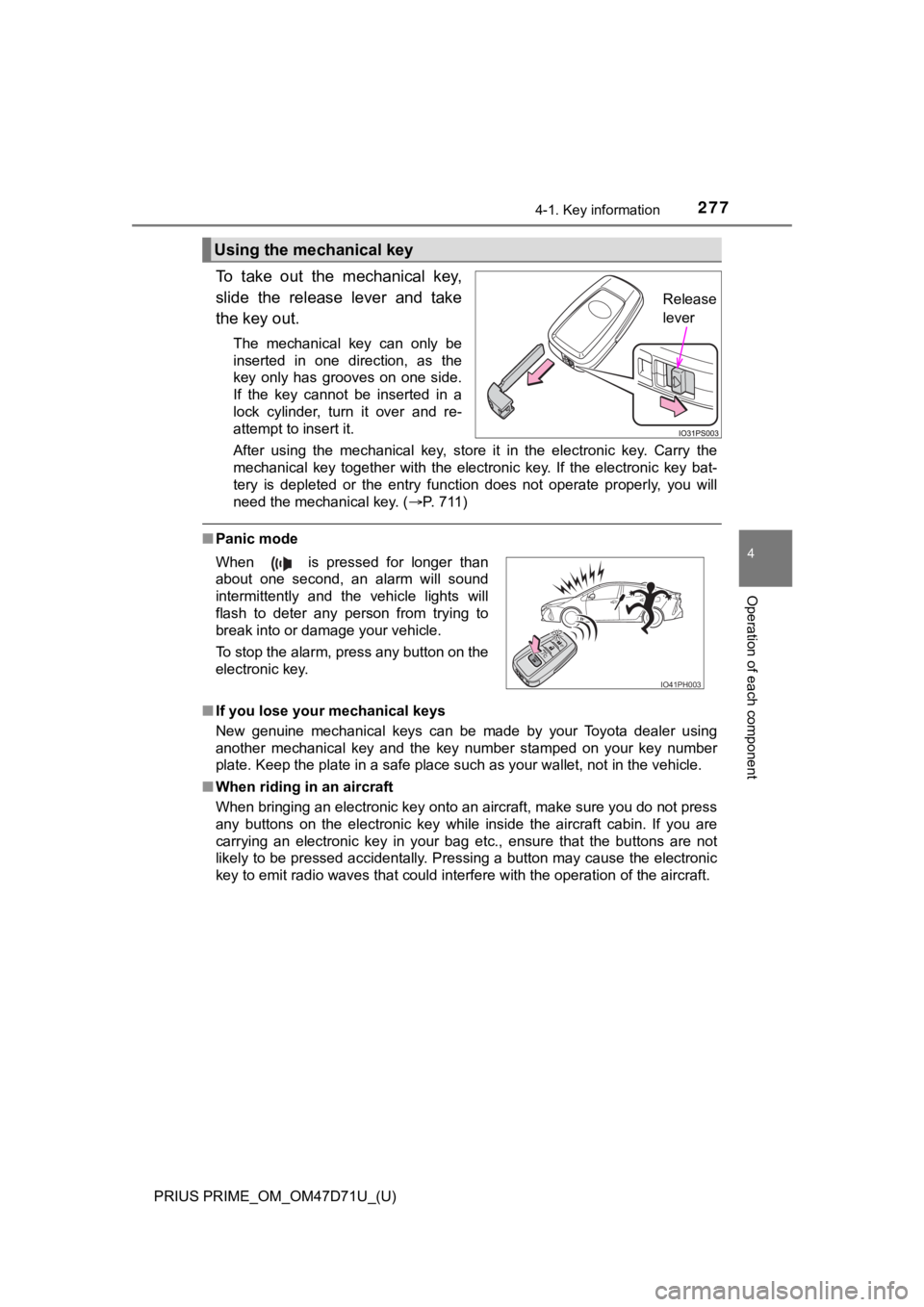
To take out the mechanical key,
slide the release lever and take
the key out.
The mechanical key can only be
inserted in one direction, as the
key only has grooves on one side.
If the key cannot be inserted in a
lock cylinder, turn it over and re-
attempt to insert it.
After using the mechanical key, store it in the electronic key. Carry the
mechanical key together with the electronic key. If the electronic key bat-
tery is depleted or the entry function does not operate properly, you will
need the mechanical key. (P. 7 1 1 )
■Panic mode
■If you lose your mechanical keys
New genuine mechanical keys can be made by your Toyota dealer using
another mechanical key and the key number stamped on your key number
plate. Keep the plate in a safe place such as your wallet, not in the vehicle.
■When riding in an aircraft
When bringing an electronic key onto an aircraft, make sure you do not press
any buttons on the electronic key while inside the aircraft cabin. If you are
carrying an electronic key in your bag etc., ensure that the buttons are not
likely to be pressed accidentally. Pressing a button may cause the electronic
<004e0048005c000300570052000300480050004c00570003005500440047004c00520003005a004400590048005600030057004b004400570003004600520058004f00470003004c005100570048005500490048005500480003005a004c0057004b000300
57004b00480003005200530048005500440057004c00520051[ of the aircraft.
Using the mechanical key
Release
lever
When is pressed for longer than
about one second, an alarm will sound
intermittently and the vehicle lights will
flash to deter any person from trying to
break into or damage your vehicle.
To stop the alarm, press any button on the
electronic key.
IO41PH003