AUX TOYOTA PRIUS PRIME 2021 Owners Manual (in English)
[x] Cancel search | Manufacturer: TOYOTA, Model Year: 2021, Model line: PRIUS PRIME, Model: TOYOTA PRIUS PRIME 2021Pages: 808, PDF Size: 74.05 MB
Page 4 of 808

TABLE OF CONTENTS4
PRIUS PRIME_OM_OM47D71U_(U)5-5. Using the driving support
systems
Toyota Safety Sense 2.0 ... 376
PCS (Pre-Collision
System) ........................... 384
LTA (Lane Tracing
Assist) ............................. 395
RSA (Road Sign
Assist) ............................. 410
Dynamic radar cruise
control with full-speed
range ............................... 414
Driving mode select
switch .............................. 430
BSM
(Blind Spot Monitor) ........ 432
• The Blind Spot Monitor
function ......................... 437
• The Rear Cross Traffic
Alert function ................. 440
Intuitive parking assist ....... 445
Parking Support Brake
function ........................... 455
S-APGS (Simple
Advanced Parking
Guidance System) .......... 467
Driving assist systems....... 501
5-6. Driving tips
Winter driving tips.............. 5076-1. Using the air conditioning
system and defogger
Automatic air conditioning
system (vehicles with
7-inch display) ................. 512
Automatic air conditioning
system (vehicles with
11.6-inch display) ............ 524
Remote Air Conditioning
System ............................ 535
Heated steering wheel/
seat heaters..................... 539
6-2. Using the interior lights
Interior lights list................. 541
• Front interior light .......... 542
• Front personal lights ...... 542
• Rear interior light ........... 543
6-3. Using the storage features
List of storage features ...... 544
• Glove box ...................... 545
• Console box .................. 545
• Cup holders ................... 546
• Bottle holders/
door pockets.................. 547
• Auxiliary boxes .............. 548
• Seat back pockets ......... 548
Luggage compartment
features ........................... 549
6Interior features
Page 189 of 808
PRIUS PRIME_OM_OM47D71U_(U)
1892-2. Charging
2
Plug-in hybrid system
If “Charging Stopped High Energy Use See Owner’s Manual” is shown
Power is being consumed by
electrical components of
vehicle
Check the following items, and then carry
out charging again.
• If the headlights and audio are turned on,
turn them off.
• Turn the power switch off.
If charging cannot be carried out, even after
performing the above, the auxiliary battery
may not be sufficiently charged. Operate
the hybrid system for approximately 15 min-
utes or more to charge the auxiliary battery.
If “Charging System Malfunction See Owner’s Manual” is shown
Malfunction occurred in
charging systemHave the vehicle inspected by your
Toyota dealer.
If “The Traction Battery became low temperature System put priority on
charging to preserve battery condition” is shown (Alaska and Canada
only)
The Hybrid battery (traction
battery) warming control was
operated (P. 136)
When the hybrid battery (traction battery)
warning control operates, the charging
schedule is not used and charging is per-
formed. This is a control to protect the
hybrid battery (traction battery), and not a
malfunction.
Likely causeCorrection procedure
Page 225 of 808
PRIUS PRIME_OM_OM47D71U_(U)
2253. Instrument cluster
3
Instrument cluster
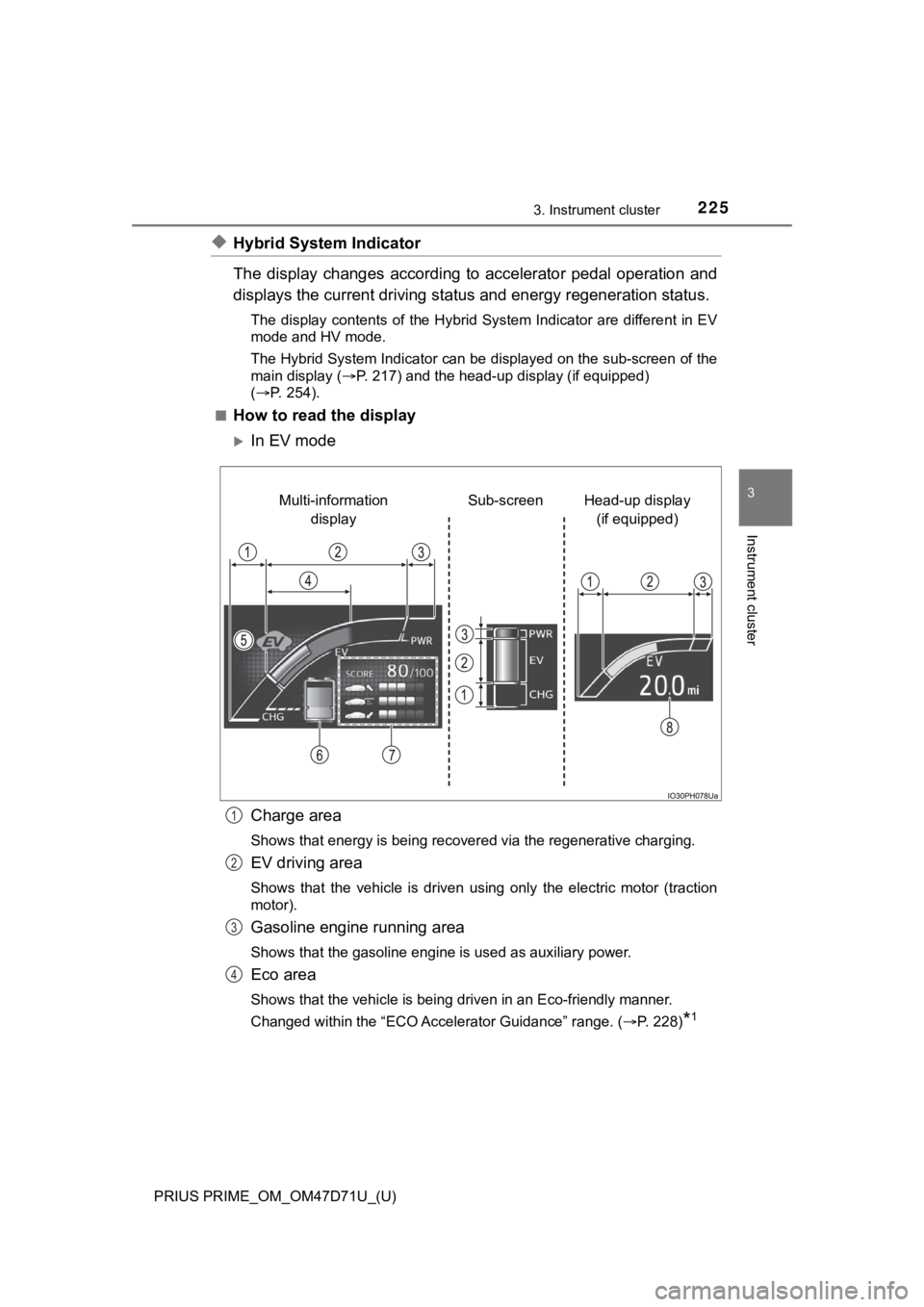
◆Hybrid System Indicator
The display changes according to accelerator pedal operation and
displays the current driving status and energy regeneration status.
The display contents of the Hybrid System Indicator are different in EV
mode and HV mode.
The Hybrid System Indicator can be displayed on the sub-screen of the
main display (P. 217) and the head-up display (if equipped)
(P. 254).
■
How to read the display
In EV mode
Charge area
<0036004b0052005a005600030057004b0044005700030048005100480055004a005c0003004c0056000300450048004c0051004a000300550048004600520059004800550048004700030059004c004400030057004b0048000300550048004a0048005100
48005500440057004c0059004800030046004b00440055004a[ing.
EV driving area
Shows that the vehicle is driven using only the electric motor (traction
motor).
Gasoline engine running area
Shows that the gasoline engine is used as auxiliary power.
Eco area
Shows that the vehicle is being driven in an Eco-friendly manner.
Changed within the “ECO Accelerator Guidance” range. (P. 228)
*1
Head-up display
(if equipped) Sub-screen Multi-information
display
1
2
3
4
Page 511 of 808

511
PRIUS PRIME_OM_OM47D71U_(U)
6Interior features
6-1. Using the air conditioning
system and defogger
Automatic air conditioning
system (vehicles with
7-inch display) ................. 512
Automatic air conditioning
system (vehicles with
11.6-inch display) ............ 524
Remote Air Conditioning
System ............................ 535
Heated steering wheel/
seat heaters .................... 5396-2. Using the interior lights
Interior lights list ................ 541
• Front interior light .......... 542
• Front personal lights ..... 542
• Rear interior light .......... 543
6-3. Using the storage features
List of storage features ..... 544
• Glove box...................... 545
• Console box .................. 545
• Cup holders .................. 546
• Bottle holders/
door pockets ................. 547
• Auxiliary boxes.............. 548
• Seat back pockets ........ 548
Luggage compartment
features ........................... 549
6-4. Using the other interior
features
Other interior features ....... 553
• Sun visors ..................... 553
• Vanity mirrors................ 553
• Power outlets ................ 554
• USB charging ports....... 555
• Wireless charger ........... 557
• Armrest ......................... 566
• Coat hooks.................... 566
• Assist grips ................... 567
Garage door opener.......... 568
Page 544 of 808
544
PRIUS PRIME_OM_OM47D71U_(U)
6-3. Using the storage features
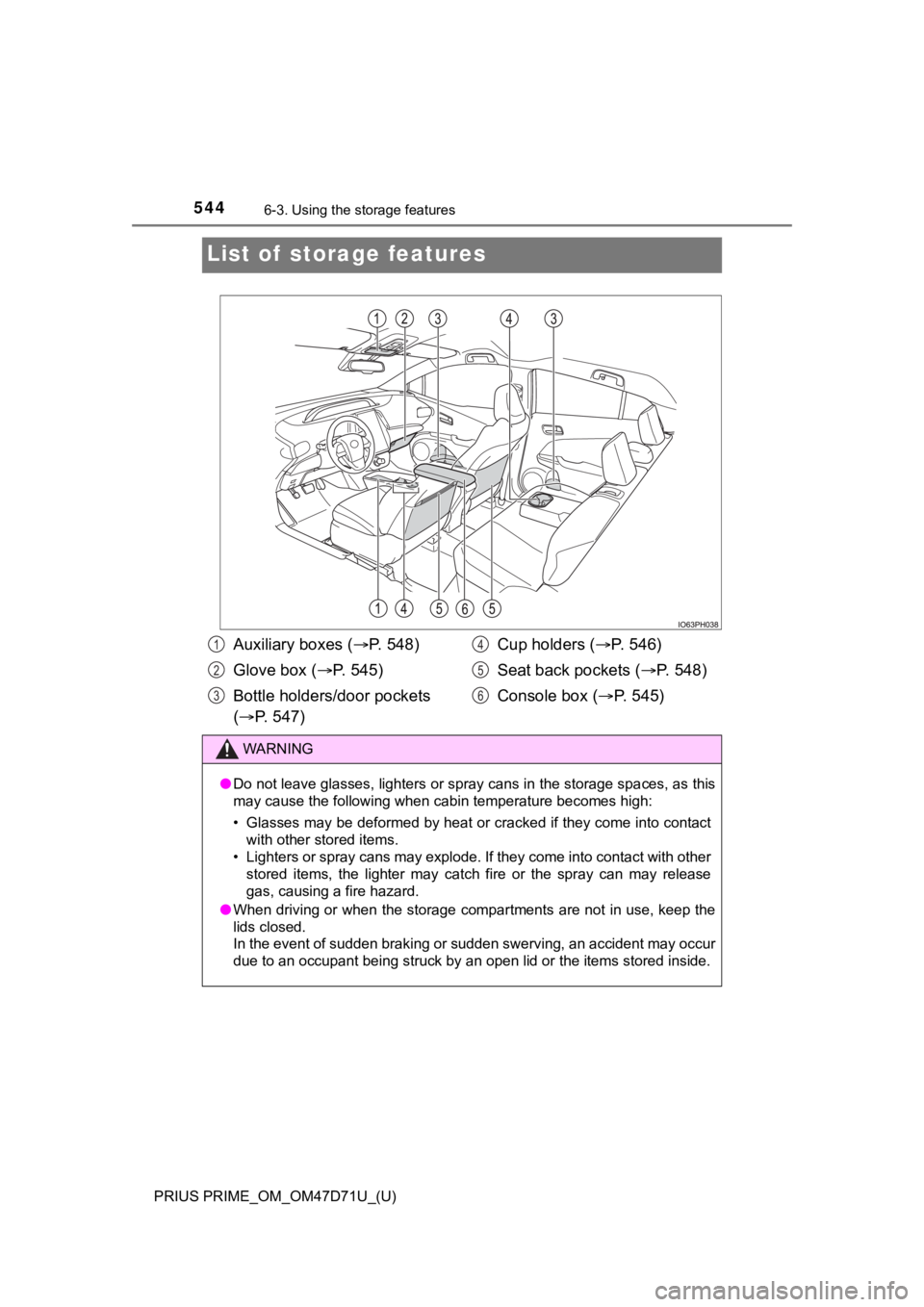
List of storage features
Auxiliary boxes (P. 548)
Glove box (P. 5 4 5 )
Bottle holders/door pockets
(P. 547)Cup holders (P. 546)
Seat back pockets (P. 548)
Console box (P. 545)
WARNING
●Do not leave glasses, lighters or spray cans in the storage spaces, as this
may cause the following when cabin temperature becomes high:
• Glasses may be deformed by heat or cracked if they come into contact
with other stored items.
• Lighters or spray cans may explode. If they come into contact with other
stored items, the lighter may catch fire or the spray can may release
gas, causing a fire hazard.
●When driving or when the storage compartments are not in use, keep the
lids closed.
In the event of sudden braking or sudden swerving, an accident may occur
due to an occupant being struck by an open lid or the items stored inside.
1
2
3
4
5
6
Page 548 of 808
548
PRIUS PRIME_OM_OM47D71U_(U)
6-3. Using the storage features
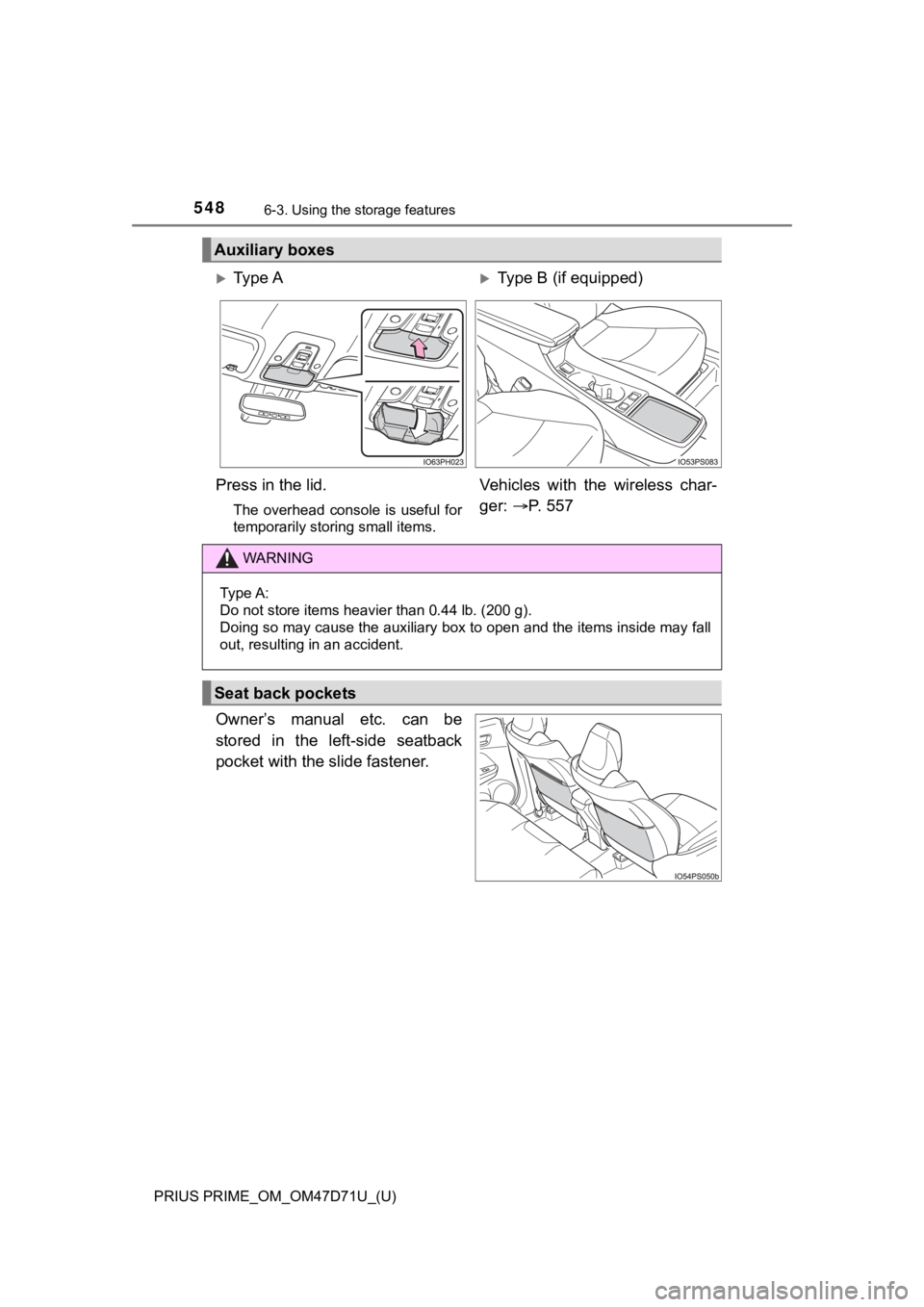
Owner’s manual etc. can be
stored in the left-side seatback
pocket with the slide fastener.
Auxiliary boxes
Ty p e AType B (if equipped)
Press in the lid.
The overhead console is useful for
temporarily storing small items.
Vehicles with the wireless char-
ger: P. 5 5 7
WARNING
Type A:
Do not store items heavier than 0.44 lb. (200 g).
Doing so may cause the auxiliary box to open and the items inside may fall
out, resulting in an accident.
Seat back pockets
Page 549 of 808
549
PRIUS PRIME_OM_OM47D71U_(U)
6-3. Using the storage features
6
Interior features
Luggage compartment features
■When installing the deck board
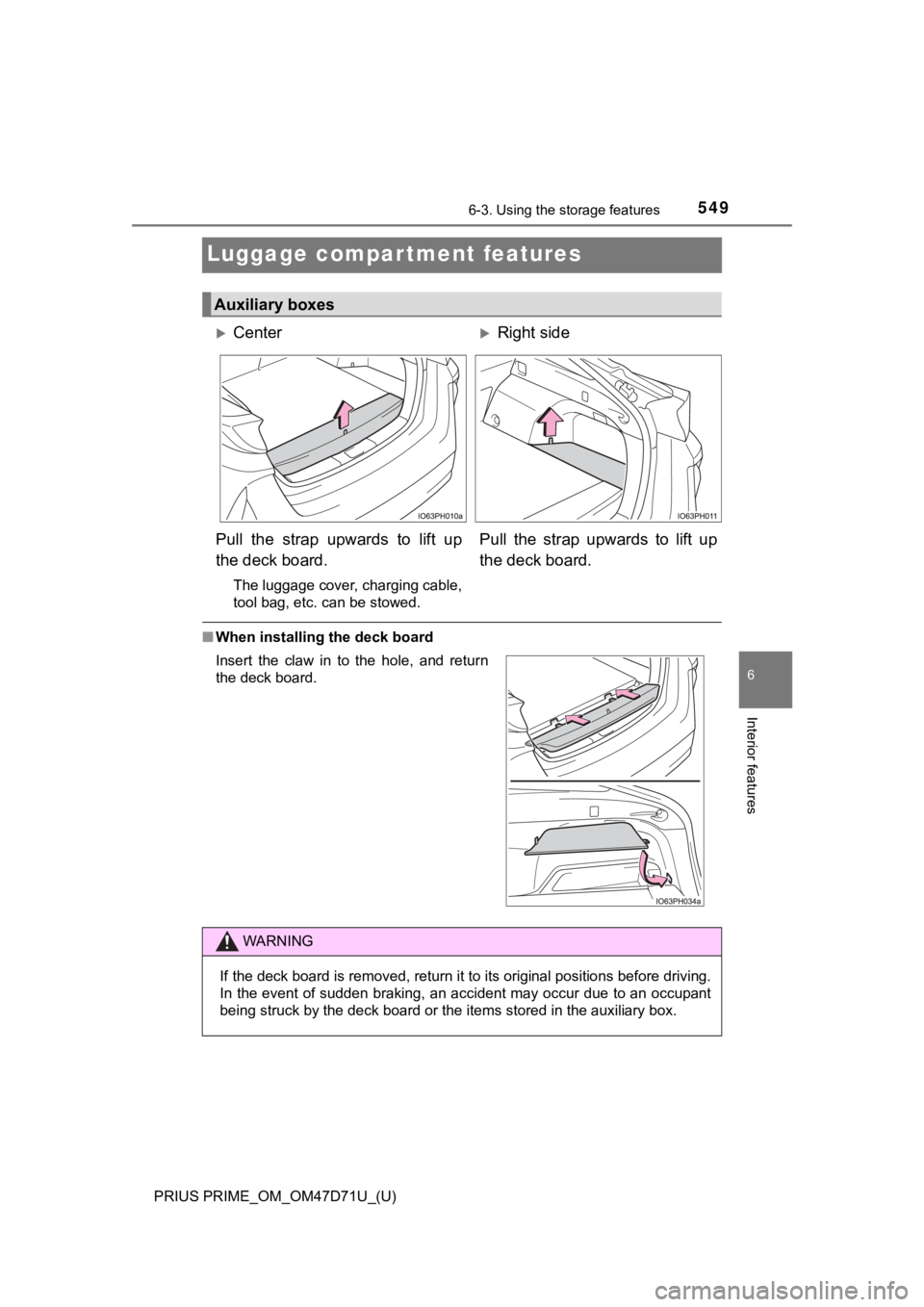
Auxiliary boxes
CenterRight side
Pull the strap upwards to lift up
the deck board.
The luggage cover, charging cable,
tool bag, etc. can be stowed.
Pull the strap upwards to lift up
the deck board.
Insert the claw in to the hole, and return
the deck board.
WARNING
If the deck board is removed, return it to its original positions before driving.
In the event of sudden braking, an accident may occur due to an occupant
being struck by the deck board or the items stored in the auxiliary box.
Page 552 of 808
552
PRIUS PRIME_OM_OM47D71U_(U)
6-3. Using the storage features
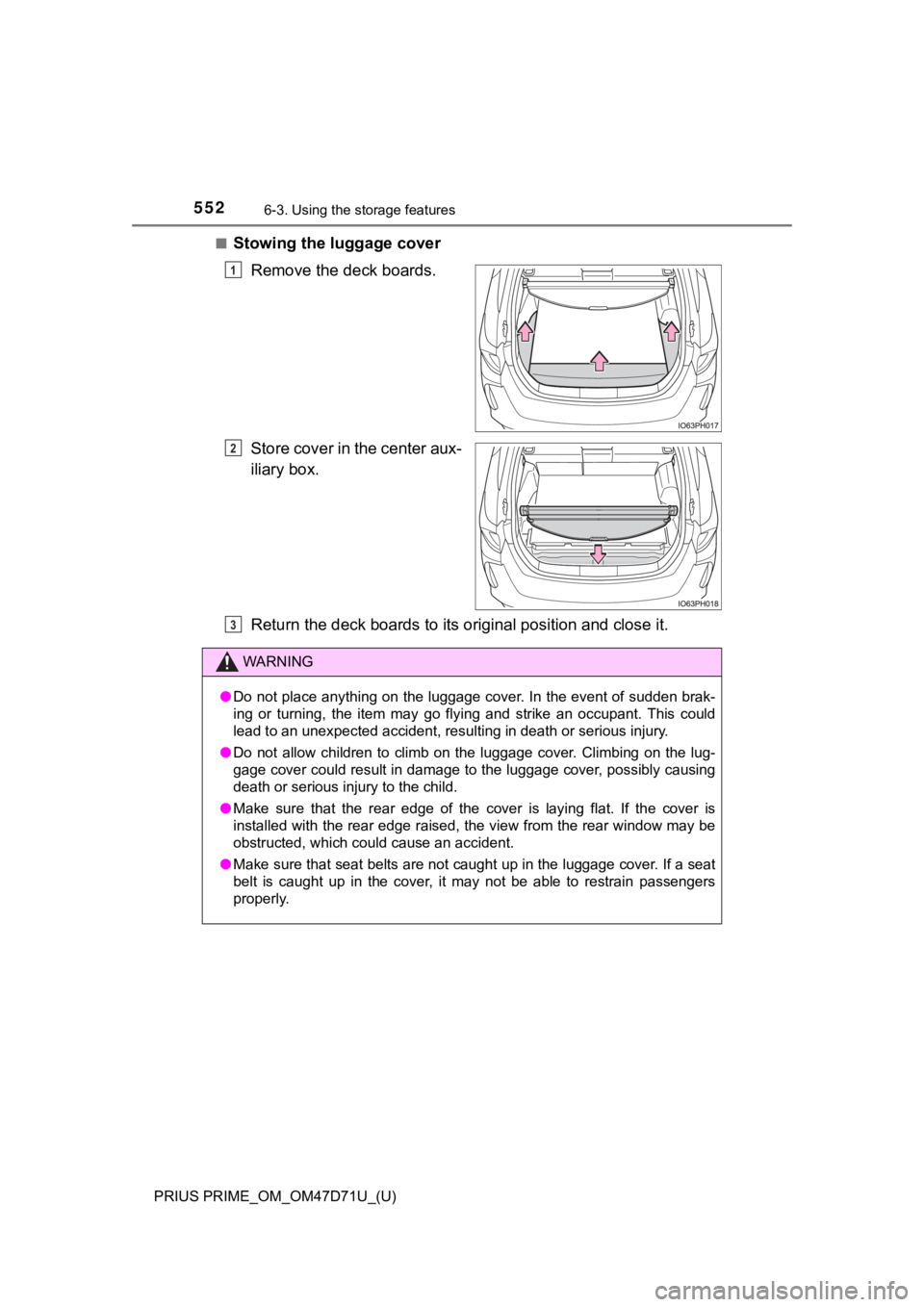
■Stowing the luggage cover
Remove the deck boards.
Store cover in the center aux-
iliary box.
Return the deck boards to its original position and close it.
1
2
WARNING
●Do not place anything on the luggage cover. In the event of sudden brak-
ing or turning, the item may go flying and strike an occupant. This could
lead to an unexpected accident, resulting in death or serious injury.
●Do not allow children to climb on the luggage cover. Climbing on the lug-
gage cover could result in damage to the luggage cover, possibly causing
death or serious injury to the child.
●Make sure that the rear edge of the cover is laying flat. If the cover is
installed with the rear edge raised, the view from the rear window may be
obstructed, which could cause an accident.
●Make sure that seat belts are not caught up in the luggage cover. If a seat
belt is caught up in the cover, it may not be able to restrain passengers
properly.
3
Page 597 of 808
597
PRIUS PRIME_OM_OM47D71U_(U)
7-3. Do-it-yourself maintenance
7
Maintenance and care
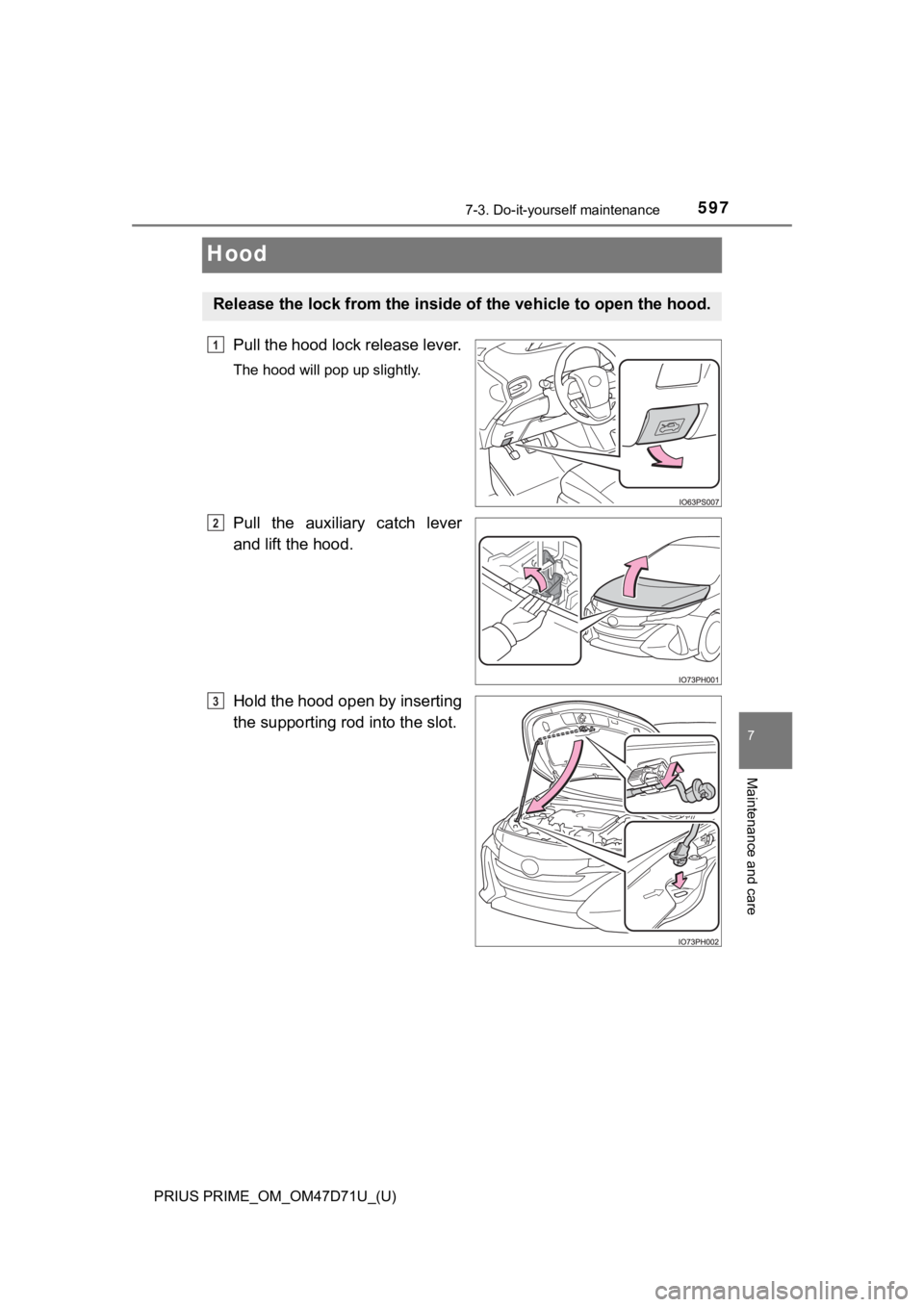
Hood
Pull the hood lock release lever.
The hood will pop up slightly.
Pull the auxiliary catch lever
and lift the hood.
Hold the hood open by inserting
the supporting rod into the slot.
Release the lock from the inside of the vehicle to open the hood.
1
2
3
Page 619 of 808

PRIUS PRIME_OM_OM47D71U_(U)
6197-3. Do-it-yourself maintenance
7
Maintenance and care
■Situations in which the tire pressure warning system may not oper-
ate properly
●In the following cases, the tire pressure warning system may not operate
properly.
• If non-genuine Toyota wheels are used.
• When a replacement tire is used, the system may not operate cor-
rectly due to the structure of the replacement tire.
• A tire has been replaced with a tire that is not of the specified size.
• Tire chains etc. are equipped.
• An auxiliary-supported run-flat tire is equipped.
• If a window tint that affects the radio wave signals is installed.
• If there is a lot of snow or ice on the vehicle, particularly around the
wheels or wheel housings.
• If the tire inflation pressure is extremely higher than the specified
level.
• If wheel without the tire pressure warning valve and transmitter is
used.
• If the ID code on the tire pressure warning valves and transmitters is
not registered in the tire pressure warning computer.
●Performance may be affected in the following situations.
• Near a TV tower, electric power plant, gas station, radio station, large
display, airport or other facility that generates strong radio waves or
electrical noise
• When carrying a portable radio, cellular phone, cordless phone or
other wireless communication device
●When the vehicle is parked, the time taken for the warning to start or go
off could be extended.
●When tire inflation pressure declines rapidly for example when a tire has
burst, the warning may not function.
■The initialization operation
●Make sure to carry out initialization after adjusting the tire inflation pres-
sure.
Also, make sure the tires are cold before carrying out initialization or tire
inflation pressure adjustment.
●If you have accidentally turned the power switch off during initialization,
it is not necessary to press the reset switch again as initialization will
restart automatically when the power switch has been turned to ON
mode for the next time.
●If you accidentally press the reset switch when initialization is not neces-
sary, adjust the tire inflation pressure to the specified level when the
tires are cold, and conduct initialization again.