lights TOYOTA PRIUS PRIME 2022 User Guide
[x] Cancel search | Manufacturer: TOYOTA, Model Year: 2022, Model line: PRIUS PRIME, Model: TOYOTA PRIUS PRIME 2022Pages: 808, PDF Size: 14.72 MB
Page 51 of 808
511-1. For safe use
PRIUS PRIME_OM_OM47E74U_(U)
1
For safety and security
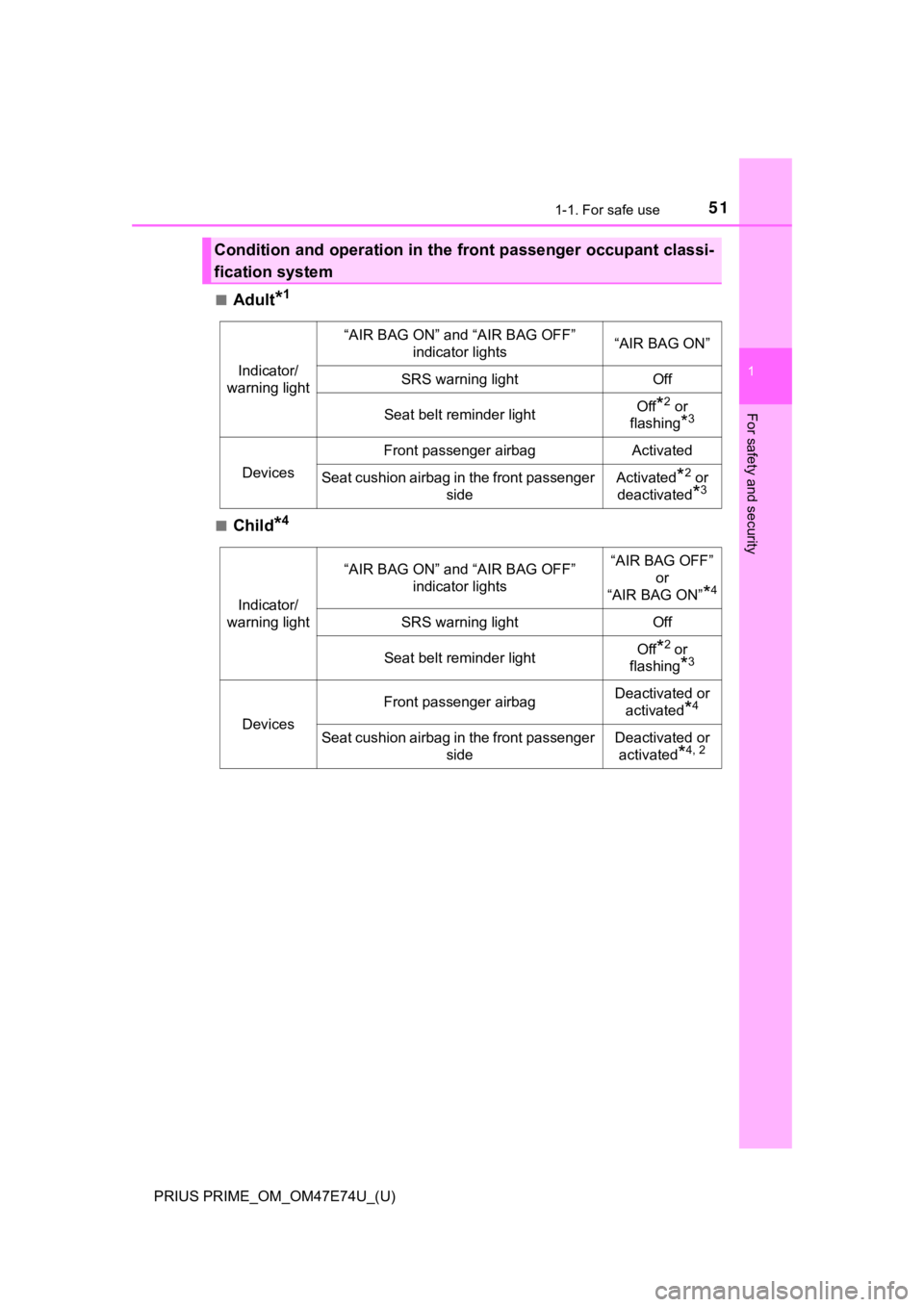
■Adult*1
■Child*4
Condition and operation in the front passenger occupant classi-
fication system
Indicator/
warning light
“AIR BAG ON” and “AIR BAG OFF” indicator lights“AIR BAG ON”
SRS warning lightOff
Seat belt reminder lightOff*2 or
flashing
*3
Devices
Front passenger airbagActivated
Seat cushion airbag in the front passenger
sideActivated*2 or
deactivated
*3
Indicator/
warning light
“AIR BAG ON” and “AIR BAG OFF” indicator lights“AIR BAG OFF” or
“AIR BAG ON”
*4
SRS warning lightOff
Seat belt reminder lightOff*2 or
flashing
*3
Devices
Front passenger airbagDeactivated or
activated
*4
Seat cushion airbag in the front passenger sideDeactivated or activated
*4, 2
Page 52 of 808
521-1. For safe use
PRIUS PRIME_OM_OM47E74U_(U)■
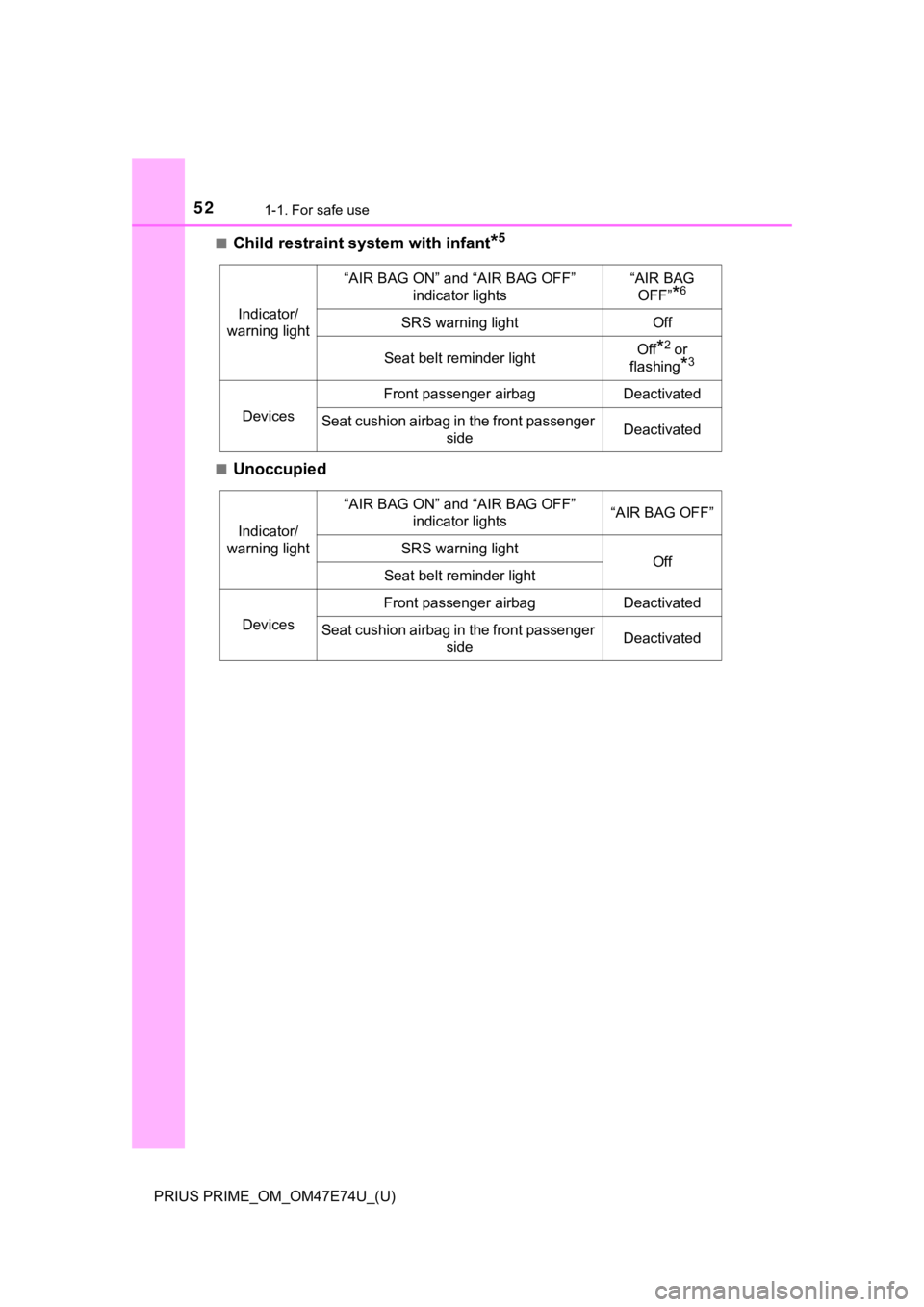
Child restraint system with infant*5
■Unoccupied
Indicator/
warning light
“AIR BAG ON” and “AIR BAG OFF” indicator lights“AIR BAG OFF”
*6
SRS warning lightOff
Seat belt reminder lightOff*2 or
flashing
*3
Devices
Front passenger airbagDeactivated
Seat cushion airbag in the front passenger sideDeactivated
Indicator/
warning light
“AIR BAG ON” and “AIR BAG OFF” indicator lights“AIR BAG OFF”
SRS warning lightOffSeat belt reminder light
Devices
Front passenger airbagDeactivated
Seat cushion airbag in the front passenger sideDeactivated
Page 53 of 808
531-1. For safe use
PRIUS PRIME_OM_OM47E74U_(U)
1
For safety and security
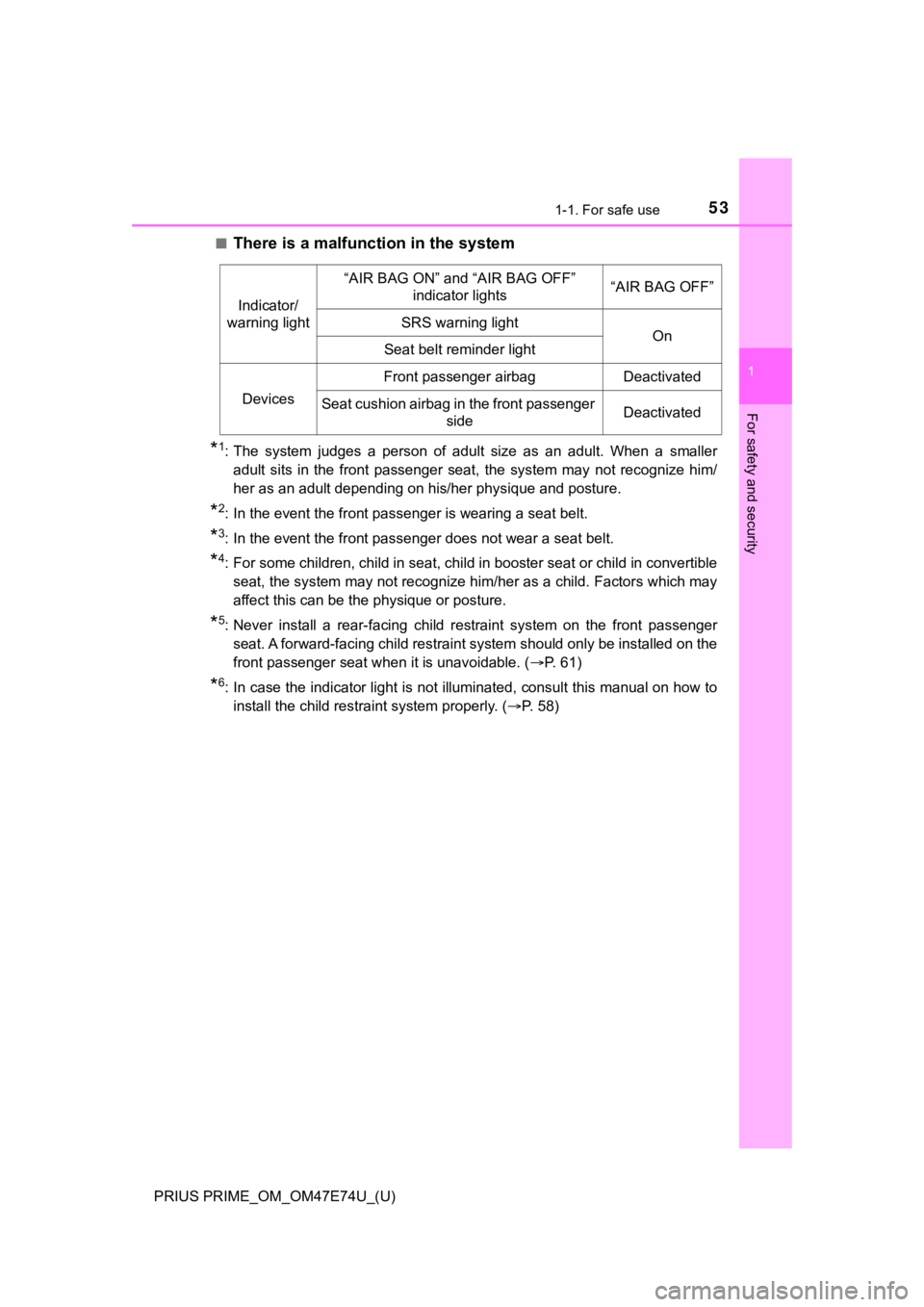
■There is a malfunction in the system
*1: The system judges a person of adult size as an adult. When a smaller
adult sits in the front passenger seat, the system may not recognize him/
her as an adult depending on his/her physique and posture.
*2: In the event the front passenger is wearing a seat belt.
*3: In the event the front passenger does not wear a seat belt.
*4: For some children, child in seat, child in booster seat or chi ld in convertible
seat, the system may not recognize him/her as a child. Factors which may
affect this can be the physique or posture.
*5: Never install a rear-facing child restraint system on the front passenger seat. A forward-facing child restraint system should only be in stalled on the
front passenger seat when it is unavoidable. ( P. 61)
*6: In case the indicator light is not illuminated, consult this m anual on how to
install the child restraint system properly. ( P. 58)
Indicator/
warning light
“AIR BAG ON” and “AIR BAG OFF” indicator lights“AIR BAG OFF”
SRS warning lightOnSeat belt reminder light
Devices
Front passenger airbagDeactivated
Seat cushion airbag in the front passenger sideDeactivated
Page 107 of 808

PRIUS PRIME_OM_OM47E74U_(U)
1072-1. Plug-in hybrid system
2
Plug-in hybrid system
◆Accelerator pedal/brake pedal operation
●Drive your vehicle smoothly. Avoid abrupt acceleration and
deceleration. Gradual accelerat ion and deceleration will make
more effective use of the electric motor (traction motor) witho ut
having to use gaso line engine power.
● Avoid repeated acceleration. Repeated acceleration consumes
hybrid battery (tracti on battery) power, resulting in poor fuel con-
sumption. Battery power can be restored by driving with the
accelerator pedal slightly released.
◆When braking
Make sure to operate the brakes gently and a timely manner. A
greater amount of electrical energy can be regenerated when slow-
ing down.
◆Delays
Repeated acceleration and deceleration, as well as long waits a t
traffic lights, will lead to high fuel and electricity consumption.
Check traffic reports before leav ing and avoid delays as much a s
possible. When driving in a traffic jam, gently release the brake
pedal to allow the vehicle to mov e forward slightly while avoiding
overuse of the accelerator pedal. Doing so can help control exces-
sive electricity and fuel consumption.
◆Highway driving
● Control and maintain the vehicle at a constant speed. Before
stopping at a toll booth or similar, allow plenty of time to re lease
the accelerator and gently apply the brakes. A greater amount o f
electrical energy can be regenerated when slowing down.
● Electricity consumption will in crease significantly when drivin g at
high speeds in EV mode. If there will be a long distance to the
next external charging point after leaving a freeway, it is rec om-
mended to drive in HV mode while on the freeway and change to
EV mode after leaving the freeway.
Page 143 of 808
PRIUS PRIME_OM_OM47E74U_(U)
1432-2. Charging
2
Plug-in hybrid system
Before charging, always check the following items.
● The parking brake is applied. ( P. 346)
● The headlights are switched off or set to AUTO, and lights such as
the emergency flashers and interi or lights etc. are switched off.
If these light switches are turned ON, then these features will consume
electricity, and charging time will increase.
●The power switch is off. ( P. 3 3 2 )
Before charging, make sure that each part of the charging cable is in
good condition. ( P. 121)
■Safety functions
●The hybrid system will not start while the charging cable is at tached to the
vehicle, even if the power switch is operated.
● If the charging cable is connected while the “READY” indicator is illumi-
nated, the hybrid system will stop automatically and driving wi ll not be possi-
ble.
● When the charging cable is connected to the vehicle, the shift position can-
not be changed from P to another position.
■ During charging
The followings occur, however, it does not indicate a malfuncti on.
● The charging starting time may differ depending on the state of the vehicle.
● During charging, the sound of the fan may be heard from the onboard trac-
tion battery charger cooling air intake vents. ( P. 146)
● During and after charging, the rear seat and its surrounding ar ea in which
the onboard traction battery charger is installed may get warm.
Confirm the following before charging
Inspecting the charging cable
Page 190 of 808
190
PRIUS PRIME_OM_OM47E74U_(U)
2-2. Charging
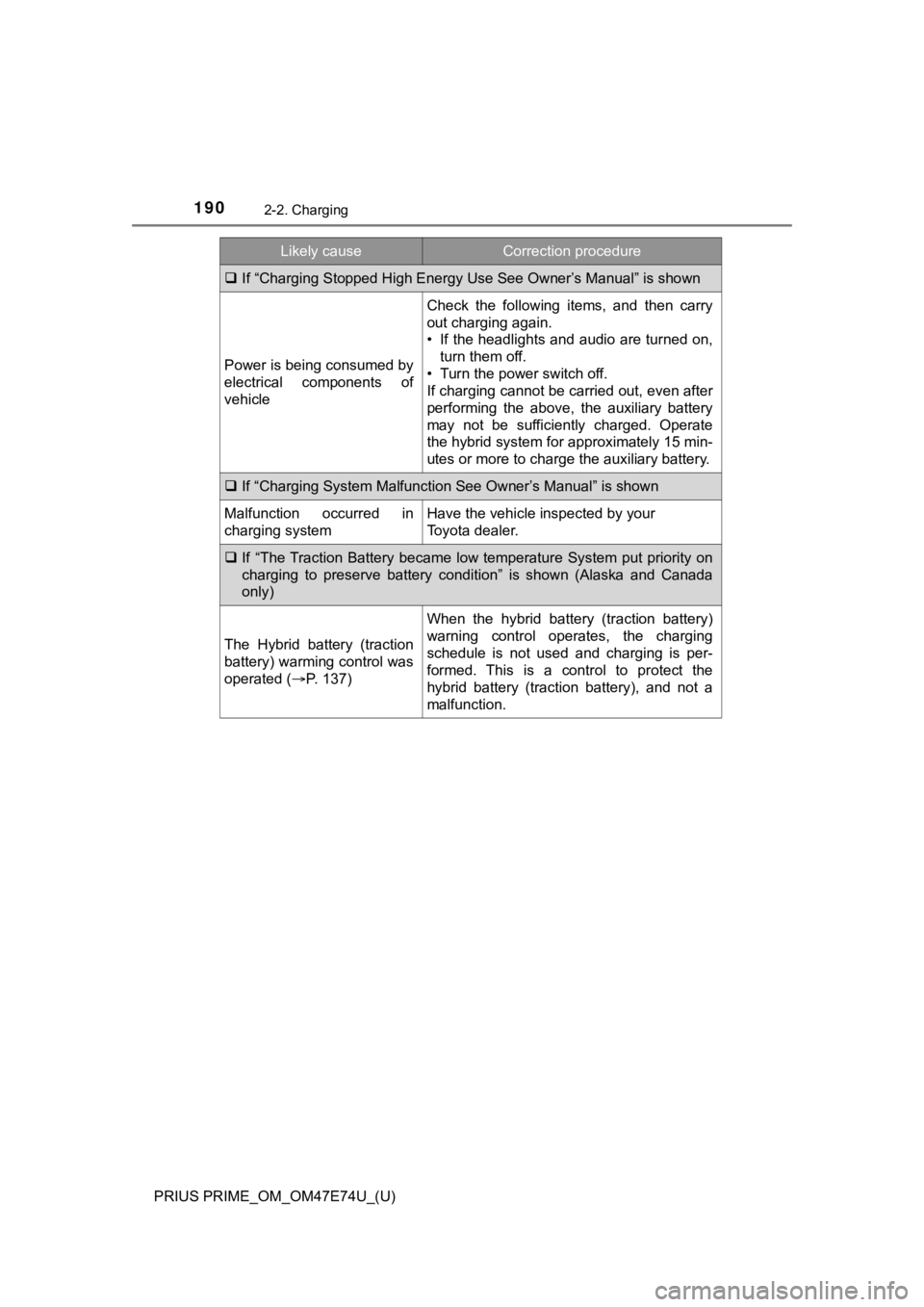
If “Charging Stopped High Energy Use See Owner’s Manual” is sho wn
Power is being consumed by
electrical components of
vehicle
Check the following items, and then carry
out charging again.
• If the headlights and audio are turned on,
turn them off.
• Turn the power switch off.
If charging cannot be carried out, even after
performing the above, the auxiliary battery
may not be sufficiently charged. Operate
the hybrid system for approximately 15 min-
utes or more to charge the auxiliary battery.
If “Charging System Malfunction See Owner’s Manual” is shown
Malfunction occurred in
charging systemHave the vehicle inspected by your
Toyota dealer.
If “The Traction Battery became low temperature System put priority on
charging to preserve battery condition” is shown (Alaska and Canada
only)
The Hybrid battery (traction
battery) warming control was
operated ( P. 137)
When the hybrid battery (traction battery)
warning control operates, the charging
schedule is not used and charging is per-
formed. This is a control to protect the
hybrid battery (traction battery), and not a
malfunction.
Likely causeCorrection procedure
Page 191 of 808
191
PRIUS PRIME_OM_OM47E74U_(U)
Instrument cluster3
3. Instrument clusterCombination meter............ 192
Warning lights and indicators ........................ 201
Main display ...................... 209
Multi-information display............................. 220
Head-up display ................ 253
Energy monitor/ consumption screen
(vehicles with 7-inch
display) ........................... 261
Energy monitor/ consumption screen/
detail screen (vehicles
with 11.6-inch display) .... 266
Page 192 of 808
192
PRIUS PRIME_OM_OM47E74U_(U)
3. Instrument cluster
Combination meter
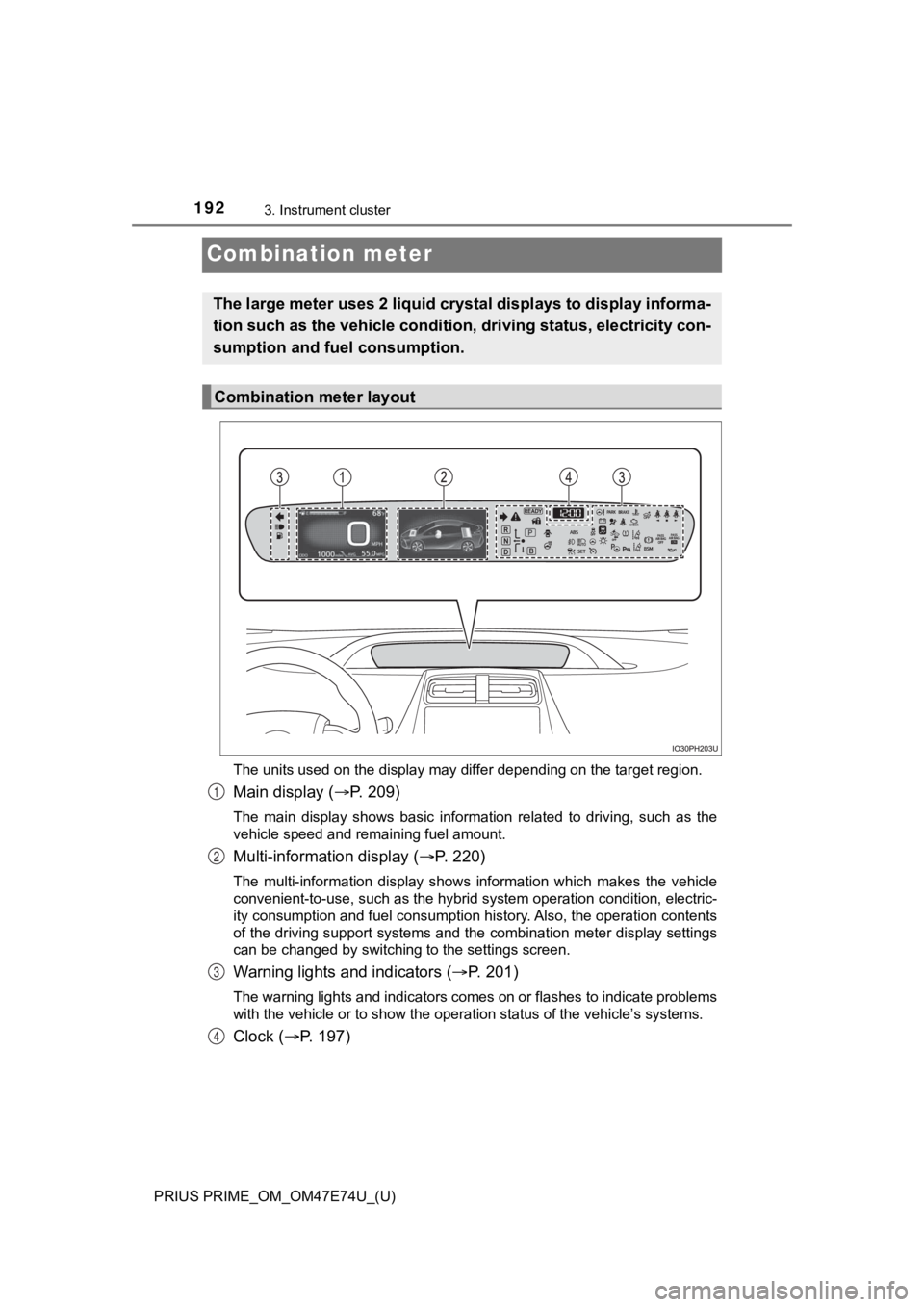
The units used on the display may differ depending on the target region.
Main display (P. 209)
The main display shows basic information related to driving, su ch as the
vehicle speed and remaining fuel amount.
Multi-information display ( P. 220)
The multi-information display shows information which makes the vehicle
convenient-to-use, such as the hybrid system operation condition, electric-
ity consumption and fuel consumption history. Also, the operati on contents
of the driving support systems and the combination meter display settings
can be changed by switching to the settings screen.
Warning lights and indicators ( P. 2 0 1 )
The warning lights and indicators comes on or flashes to indicate problems
with the vehicle or to show the operation status of the vehicle ’s systems.
Clock (P. 197)
The large meter uses 2 liquid crystal displays to display infor ma-
tion such as the vehicle condition , driving status, electricity con-
sumption and fuel consumption.
Combination meter layout
1
2
3
4
Page 194 of 808
194
PRIUS PRIME_OM_OM47E74U_(U)
3. Instrument cluster
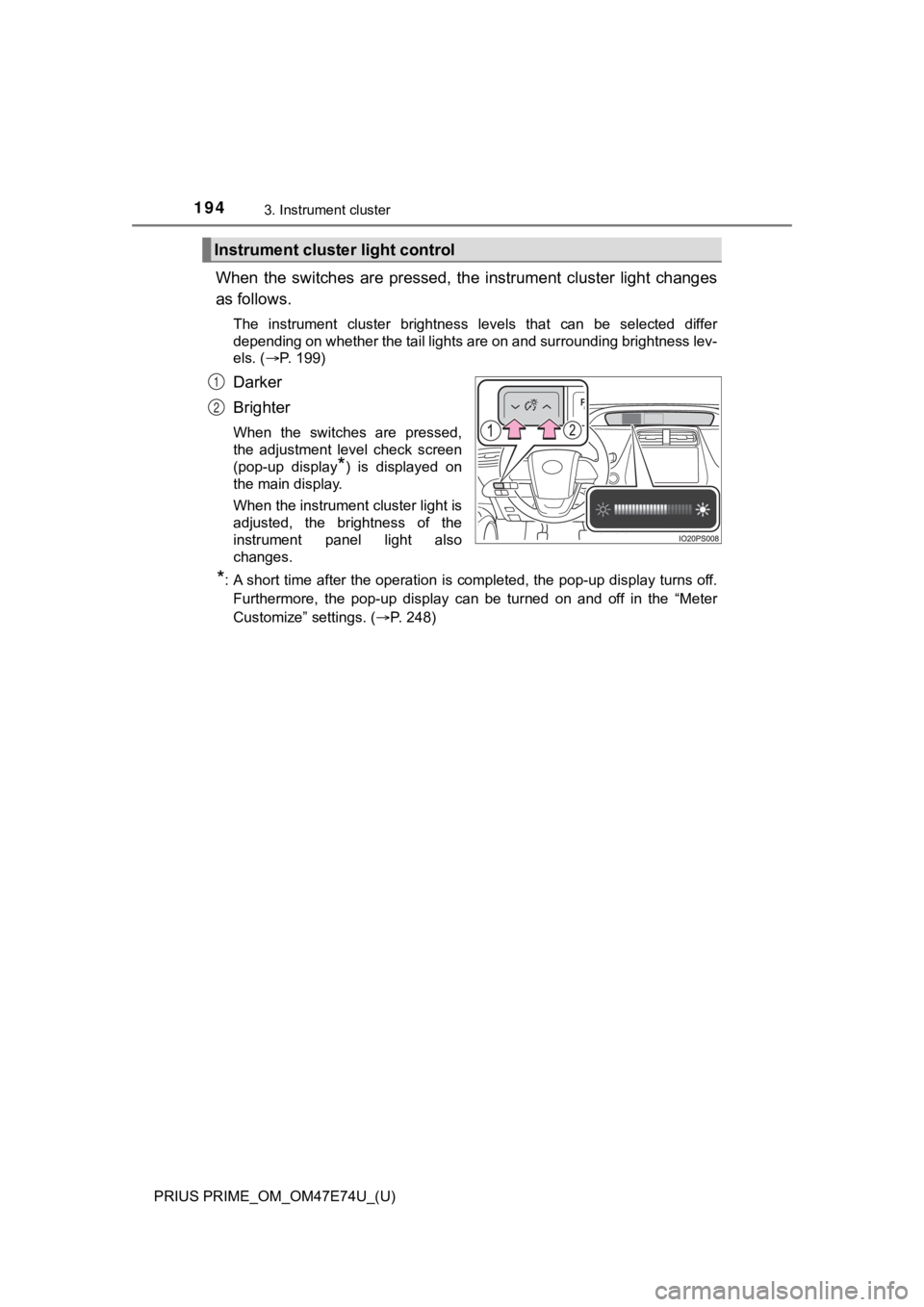
When the switches are pressed, the instrument cluster light changes
as follows.
The instrument cluster brightness levels that can be selected differ
depending on whether the tail lights are on and surrounding bri ghtness lev-
els. ( P. 199)
Darker
Brighter
When the switches are pressed,
the adjustment level check screen
(pop-up display
*) is displayed on
the main display.
When the instrument cluster light is
adjusted, the brightness of the
instrument panel light also
changes.
*: A short time after the operation is completed, the pop-up disp lay turns off.
Furthermore, the pop-up display can be turned on and off in the “Meter
Customize” settings. ( P. 248)
Instrument cluster light control
1
2
Page 199 of 808
PRIUS PRIME_OM_OM47E74U_(U)
1993. Instrument cluster
3
Instrument cluster
■The meters and display illuminate when
The power switch is in ON mode.
■ Adjusting the instrume nt cluster brightness (P. 194)
● The brightness levels that can be selected differ depending on whether the
tail lights are on and surrounding brightness levels, as shown in the table
below.
*: 22 levels of the brightness are displayed on the setting scree n. However,
the brightness setting will be the brightest when other than 1st level (the
darkest) is selected. If other than 1st or 22nd level is select ed, when the
tail lights are turned on in a dark place, the instrument clust er brightness
setting will be the selected level.
● If the taillights are illuminated in a dark environment, the in strument cluster
light dims. However, when the brightness of the instrument clus ter is set to
minimum or maximum (1st or 22nd level of the instrument cluster bright-
ness), even if the taillights are illuminated, the instrument c luster light will
not dim.
■ When disconnecting and reconnecting 12-volt battery terminals
The settings of the clock will be reset.
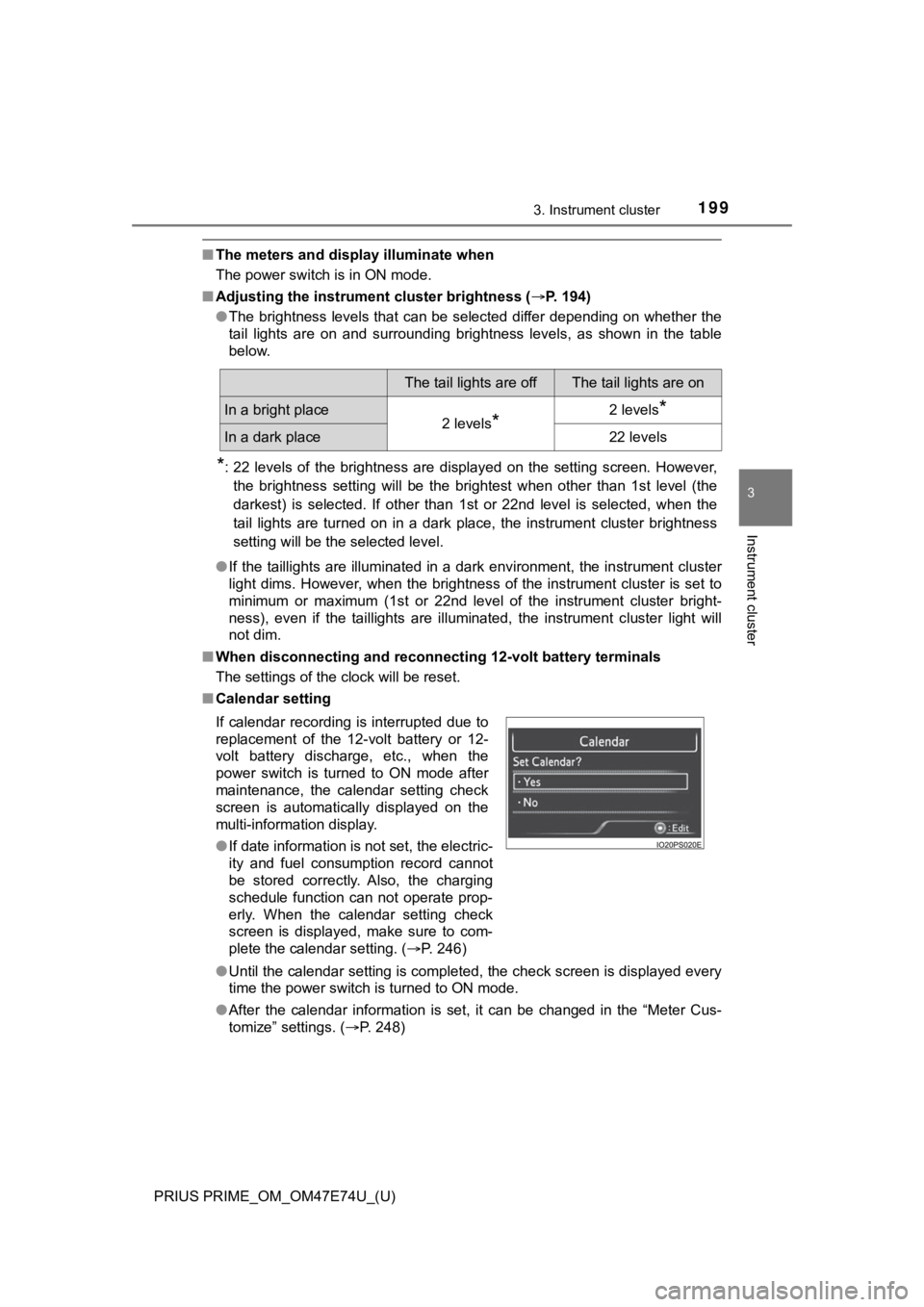
■ Calendar setting
●Until the calendar setting is completed, the check screen is di splayed every
time the power switch is turned to ON mode.
● After the calendar information is set, it can be changed in the “Meter Cus-
tomize” settings. ( P. 248)
The tail lights are offThe tail lights are on
In a bright place2 levels*2 levels*
In a dark place22 levels
If calendar recording is interrupted due to
replacement of the 12-volt battery or 12-
volt battery discharge, etc., when the
power switch is turned to ON mode after
maintenance, the calendar setting check
screen is automatically displayed on the
multi-information display.
● If date information is not set, the electric-
ity and fuel consumption record cannot
be stored correctly. Also, the charging
schedule function can not operate prop-
erly. When the calendar setting check
screen is displayed, make sure to com-
plete the calendar setting. ( P. 246)