lock TOYOTA PRIUS PRIME 2022 Owner's Guide
[x] Cancel search | Manufacturer: TOYOTA, Model Year: 2022, Model line: PRIUS PRIME, Model: TOYOTA PRIUS PRIME 2022Pages: 808, PDF Size: 14.72 MB
Page 130 of 808
130
PRIUS PRIME_OM_OM47E74U_(U)
2-2. Charging
Reinstall the cover to the its original position.
This method is a temporary correction procedure for emergency use only. If
the problem persists, have the vehicle inspected by your Toyota dealer imme-
diately.
Do not operate the emergency release lever when the charging connector
can be unlocked in the normal procedure.
■ When recharging or replacing the 12-volt battery
P. 715
WARNING
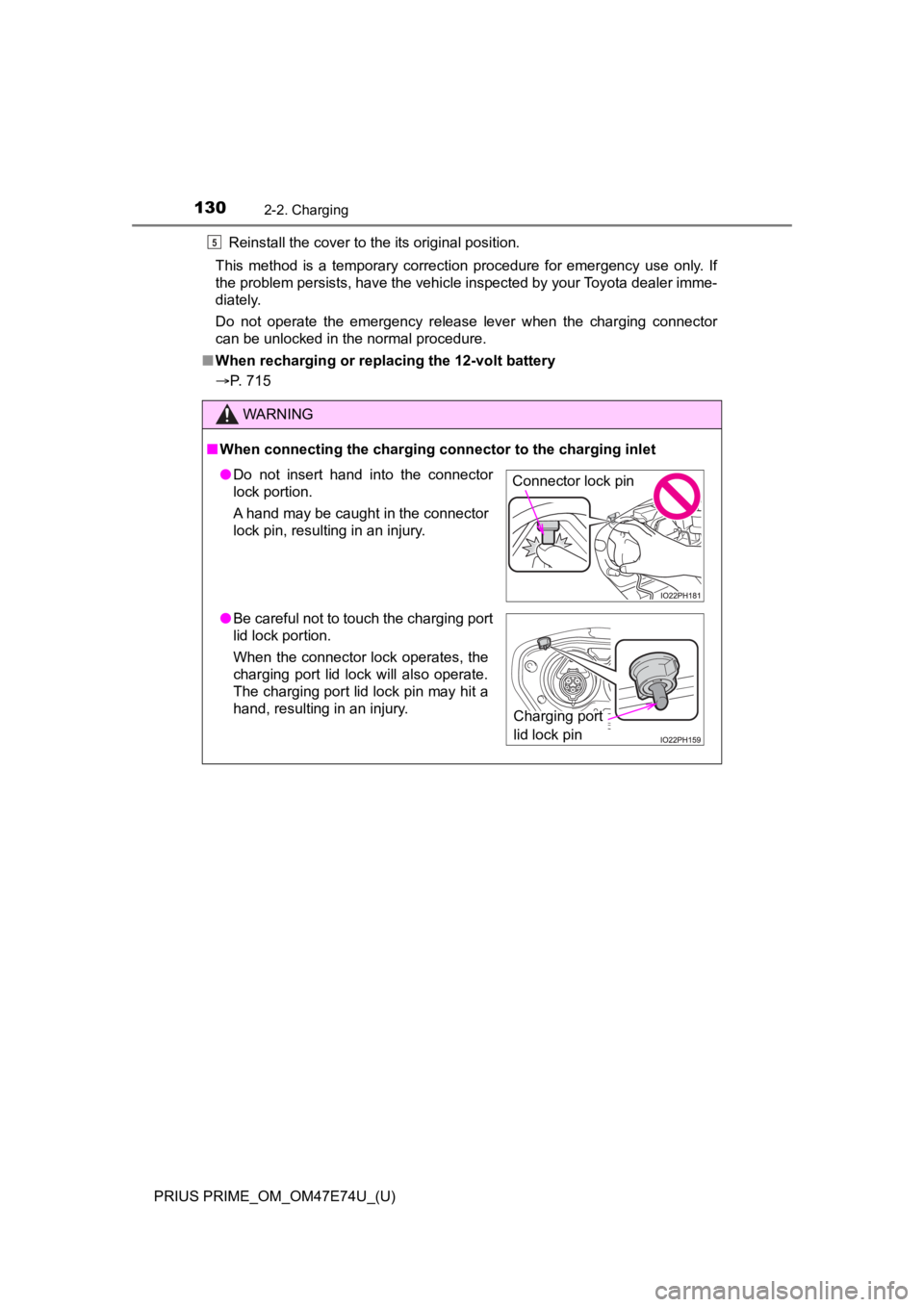
■When connecting the charging c onnector to the charging inlet
5
●Do not insert hand into the connector
lock portion.
A hand may be caught in the connector
lock pin, resulting in an injury.
● Be careful not to touch the charging port
lid lock portion.
When the connector lock operates, the
charging port lid lock will also operate.
The charging port lid lock pin may hit a
hand, resulting in an injury.Connector lock pin
Charging port
lid lock pin
Page 131 of 808
PRIUS PRIME_OM_OM47E74U_(U)
1312-2. Charging
2
Plug-in hybrid system
NOTICE
■When locking the charging connector
Observe the following precautions. Failure to do so may cause a malfunc-
tion in the charging connector locking system.
● Check that the charging connector is compatible with this vehic le
A charging connector of the different type or a charging connec tor with
damaged or deformed insertion part may not be locked.
● Do not operate the charging connector lock switch before the charging
connector is connected
● Operate the charging connector lock switch after firmly inserting the
charging connector into the charging inlet
● Do not apply excessive force to the charging connector when the charging
connector is locked
When removing the charging connector, make sure to unlock the charging
connector.
Page 134 of 808
134
PRIUS PRIME_OM_OM47E74U_(U)
2-2. Charging
WARNING
■Power sources precautions
Observe the following precautions.
If you do not follow them, fire, electrical shock or damage may occur, possi-
bly resulting in death or serious injury.
● Connect to an AC 120 V outlet (NEMA 5-15R) with a Ground-Fault Circuit-
Interrupter (GFCI) and supplied by a circuit breaker per your l ocal code.
Use of a 15A individual circuit is strongly recommended.
● Use of a block heater for charging is prohibited.
● Make sure to connect the charging connector and charging inlet directly.
Do not connect a converting adaptor or extension cord between the
charging connector and charging inlet.
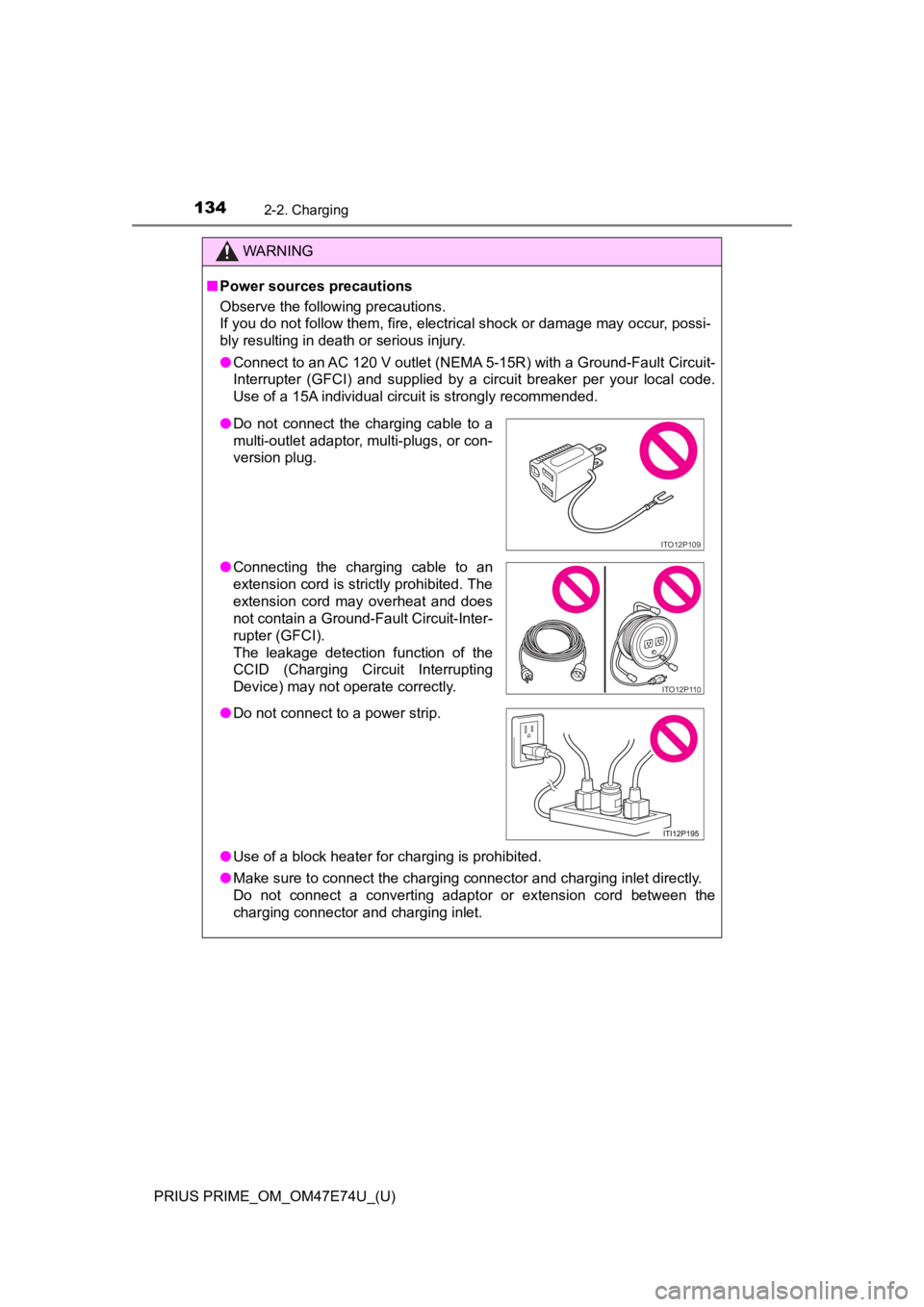
● Do not connect the charging cable to a
multi-outlet adaptor, multi-plugs, or con-
version plug.
● Connecting the charging cable to an
extension cord is strictly prohibited. The
extension cord may overheat and does
not contain a Ground-Fault Circuit-Inter-
rupter (GFCI).
The leakage detection function of the
CCID (Charging Circuit Interrupting
Device) may not operate correctly.
● Do not connect to a power strip.
ITO12P109
ITO12P110
Page 145 of 808
PRIUS PRIME_OM_OM47E74U_(U)
1452-2. Charging
2
Plug-in hybrid system
■Certification
This device complies with Part 15 of the FCC Rules.
Operation is subject to the following two conditions:
(1) this device may not cause harmful interference, and
(2) this device must accept any interference received, including interference
that may cause undesired operation.
WARNING
■Caution when charging
People with implantable cardiac pacemakers or cardiac resynchro nization
therapy-pacemakers should not carry out the charging procedure. Ask
someone else to do it.
● Do not approach the charger and charging cable while charging.
Charging procedure may affect the operation of such devices.
● Do not remain in the vehicle during charging.
Charging procedure may affect the operation of such devices.
● Do not enter the vehicle even to take something out of the lugg age com-
partment.
Charging procedure may affect the operation of such devices.
■ When the charging cable is connected to the vehicle
Do not operate the shift lever.
In the unlikely event that the charging cable has been damaged, the shift
position may change from P to another position and the vehicle could move,
possibly leading to an accident.
NOTICE
■ Precautions when handling charging cable
Make sure to observe the following precautions. Failure to obse rve these
precautions may result in damage to the charging cable and charging inlet.
● Insert the charging connector straight into the charging inlet.
● After inserting the charging connector, do not apply excessive force to or
twist the connector. Also, do not lean on the connector or hang any objects
from it.
● Do not step on or trip over the charging cable.
● Vehicles with smart lid & connector locking system: Before removing the
charging connector, make sure that it is unlocked. ( P. 153)
● After removing the charging cable, promptly return it to its pr oper location.
● After removing the charging connector, securely install the charging inlet
cap.
Page 146 of 808
146
PRIUS PRIME_OM_OM47E74U_(U)
2-2. Charging
NOTICE
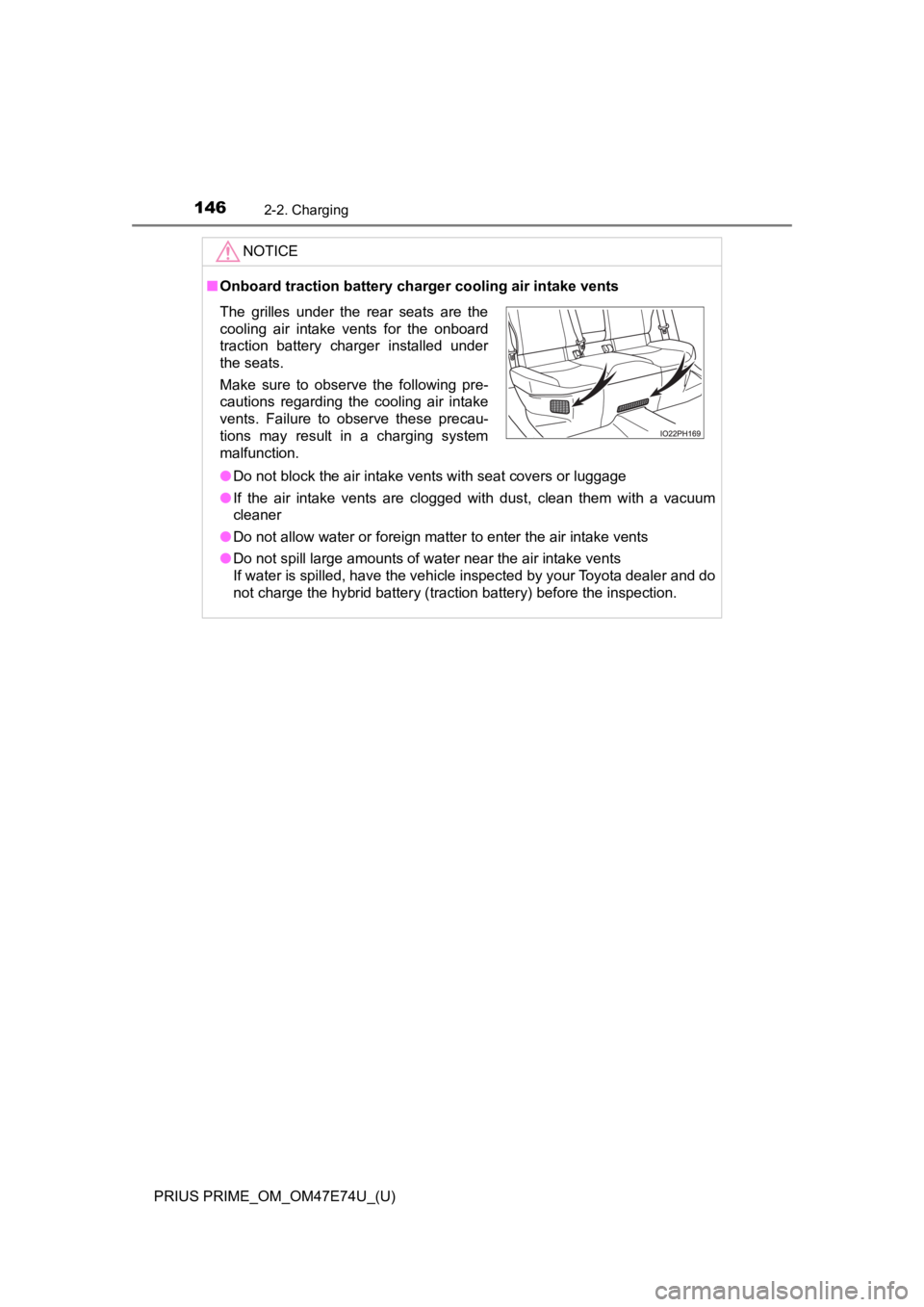
■Onboard traction battery charger cooling air intake vents
● Do not block the air intake vents with seat covers or luggage
● If the air intake vents are clogged with dust, clean them with a vacuum
cleaner
● Do not allow water or foreign matter to enter the air intake vents
● Do not spill large amounts of water near the air intake vents
If water is spilled, have the vehicle inspected by your Toyota dealer and do
not charge the hybrid battery (traction battery) before the ins pection.
The grilles under the rear seats are the
cooling air intake vents for the onboard
traction battery charger installed under
the seats.
Make sure to observe the following pre-
cautions regarding the cooling air intake
vents. Failure to observe these precau-
tions may result in a charging system
malfunction.
Page 148 of 808
148
PRIUS PRIME_OM_OM47E74U_(U)
2-2. Charging
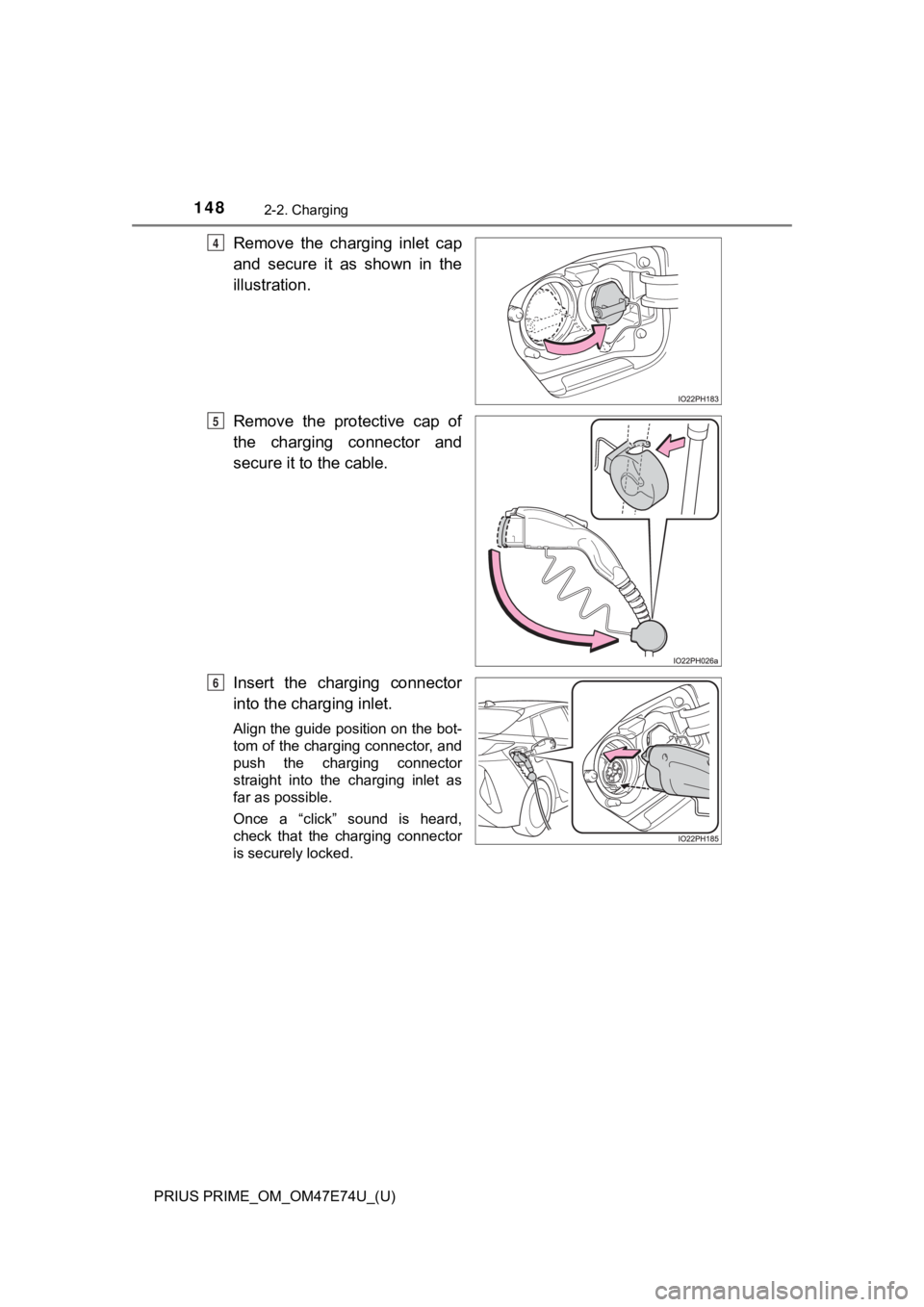
Remove the charging inlet cap
and secure it as shown in the
illustration.
Remove the protective cap of
the charging connector and
secure it to the cable.
Insert the charging connector
into the charging inlet.
Align the guide position on the bot-
tom of the charging connector, and
push the charging connector
straight into the charging inlet as
far as possible.
Once a “click” sound is heard,
check that the charging connector
is securely locked.
4
5
6
Page 149 of 808
PRIUS PRIME_OM_OM47E74U_(U)
1492-2. Charging
2
Plug-in hybrid system
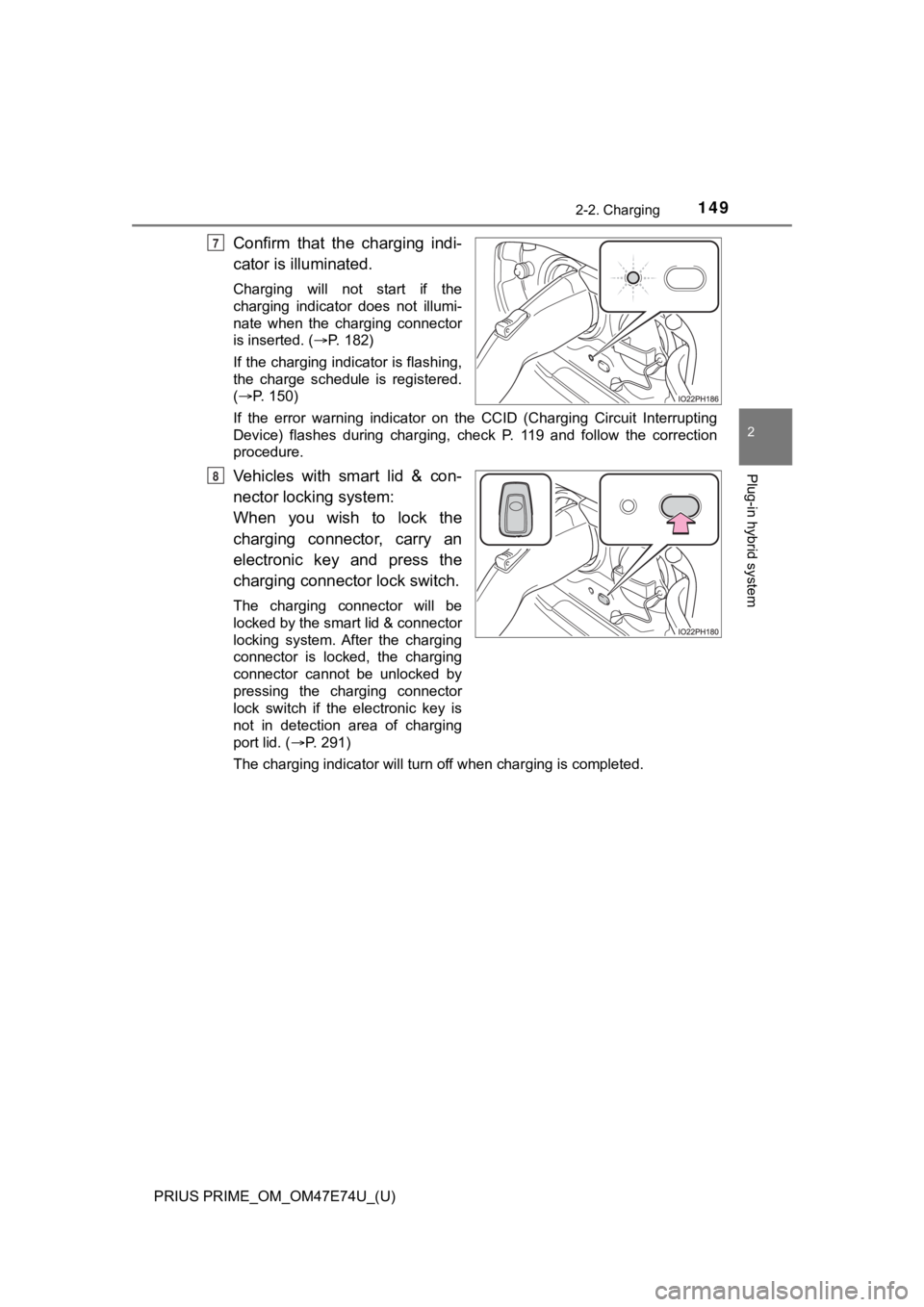
Confirm that the charging indi-
cator is illuminated.
Charging will not start if the
charging indicator does not illumi-
nate when the charging connector
is inserted. (P. 182)
If the charging indicator is flashing,
the charge schedule is registered.
( P. 150)
If the error warning indicator on the CCID (Charging Circuit In terrupting
Device) flashes during charging, check P. 119 and follow the co rrection
procedure.
Vehicles with smart lid & con-
nector locki ng system:
When you wish to lock the
charging connector, carry an
electronic key and press the
charging connector lock switch.
The charging connector will be
locked by the smart lid & connector
locking system. After the charging
connector is locked, the charging
connector cannot be unlocked by
pressing the charging connector
lock switch if the electronic key is
not in detection area of charging
port lid. ( P. 291)
The charging indicator will turn off when charging is completed .
7
8
Page 150 of 808
150
PRIUS PRIME_OM_OM47E74U_(U)
2-2. Charging
■During charging
●The surface of the CCID (Charging Circuit Interrupting Device) may become
hot, but this does not indicate a malfunction.
● Depending on radio wave conditions, interference may be heard o n the
radio.
● The current charging condition and the estimated time until cha rging will
complete can be checked on the multi-information display or 11. 6-inch dis-
play (if equipped). ( P. 141, 271)
● During charging, the hybrid battery (traction battery) status i ndicator illumi-
nates and flashes, and changes according to the charging amount .
( P. 113)
■ If the charging indicator flashes after connecting the charging cable
The charge schedule ( P. 158) is registered and charging cannot be per-
formed. To cancel charging using the charging schedule and start charging,
perform any of the following procedures.
● Turn “Charge Now” on ( P. 167, 176)
● While the charging indicator is flashing, remove and reconnect the charging
connector within 5 seconds
■ When the charging connector cannot be inserted into the chargin g inlet
(vehicles with smart lid & connector locking system)
P. 128
Page 151 of 808
PRIUS PRIME_OM_OM47E74U_(U)
1512-2. Charging
2
Plug-in hybrid system
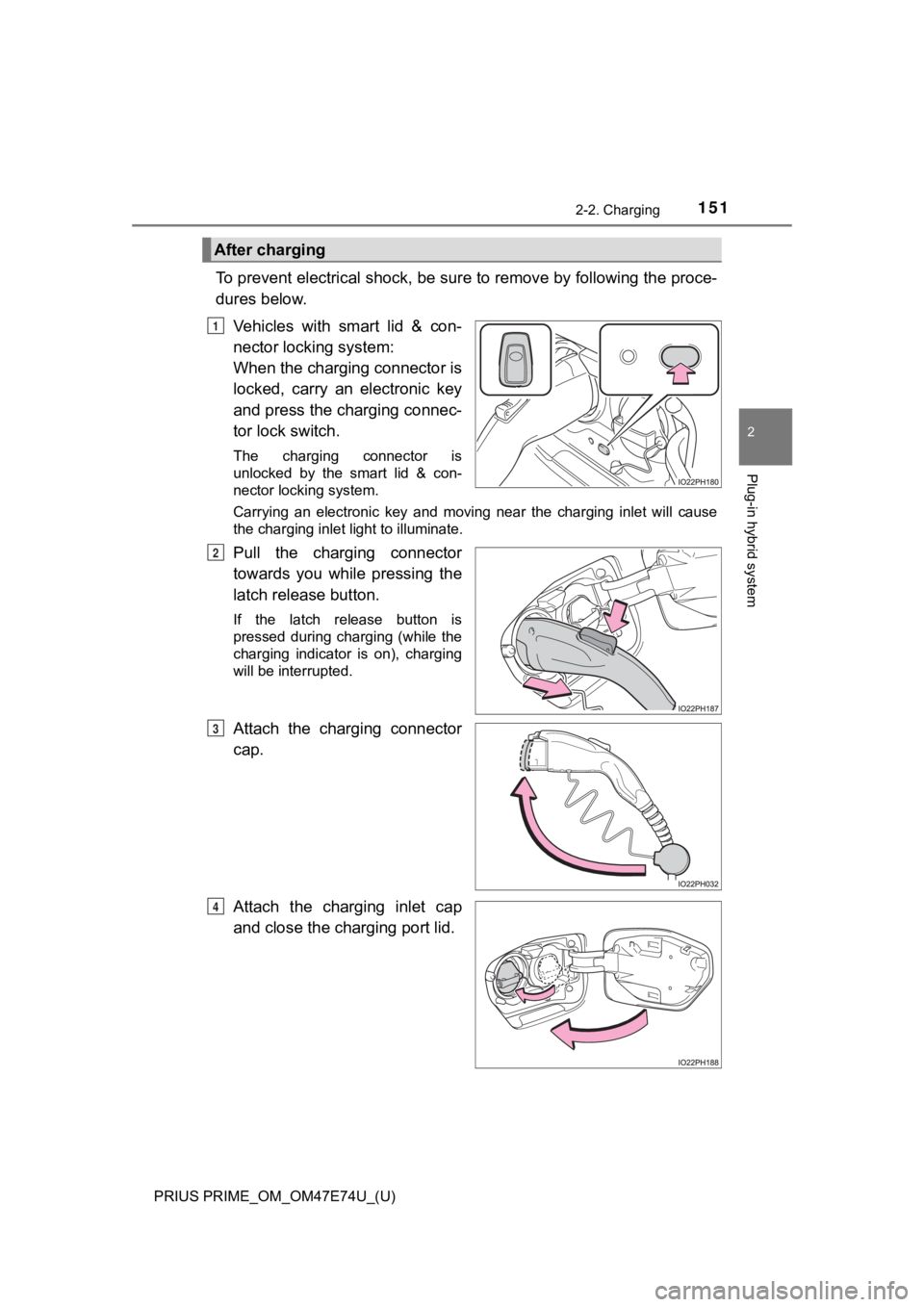
To prevent electrical shock, be sure to remove by following the proce-
dures below.
Vehicles with smart lid & con-
nector locking system:
When the charging connector is
locked, carry an electronic key
and press the charging connec-
tor lock switch.
The charging connector is
unlocked by the smart lid & con-
nector locking system.
Carrying an electronic key and moving near the charging inlet w ill cause
the charging inlet light to illuminate.
Pull the charging connector
towards you while pressing the
latch release button.
If the latch release button is
pressed during charging (while the
charging indicator is on), charging
will be interrupted.
Attach the charging connector
cap.
Attach the charging inlet cap
and close the charging port lid.
After charging
1
2
3
4
Page 152 of 808
152
PRIUS PRIME_OM_OM47E74U_(U)
2-2. Charging
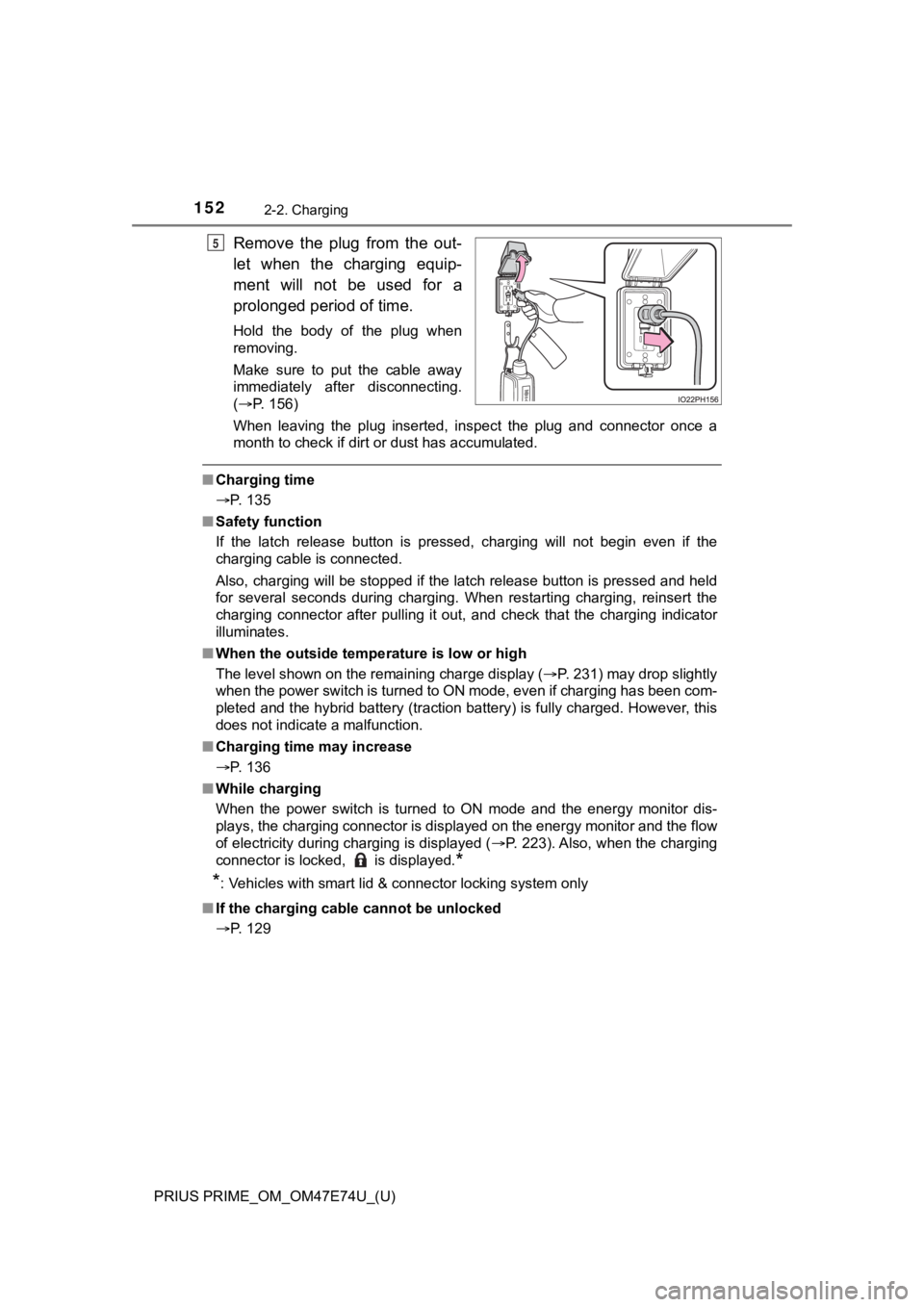
Remove the plug from the out-
let when the charging equip-
ment will not be used for a
prolonged period of time.
Hold the body of the plug when
removing.
Make sure to put the cable away
immediately after disconnecting.
(P. 156)
When leaving the plug inserted, inspect the plug and connector once a
month to check if dirt or dust has accumulated.
■ Charging time
P. 135
■ Safety function
If the latch release button is pressed, charging will not begin even if the
charging cable is connected.
Also, charging will be stopped if the latch release button is pressed and held
for several seconds during charging. When restarting charging, reinsert the
charging connector after pulling it out, and check that the charging indicator
illuminates.
■ When the outside tempe rature is low or high
The level shown on the remaining charge display ( P. 231) may drop slightly
when the power switch is turned to ON mode, even if charging ha s been com-
pleted and the hybrid battery (traction battery) is fully charg ed. However, this
does not indicate a malfunction.
■ Charging time may increase
P. 136
■ While charging
When the power switch is turned to ON mode and the energy monitor dis-
plays, the charging connector is displayed on the energy monito r and the flow
of electricity during charging is displayed ( P. 223). Also, when the charging
connector is locked, is displayed.
*
*
: Vehicles with smart lid & connector locking system only
■ If the charging cable cannot be unlocked
P. 129
5