lock TOYOTA PRIUS PRIME 2022 Service Manual
[x] Cancel search | Manufacturer: TOYOTA, Model Year: 2022, Model line: PRIUS PRIME, Model: TOYOTA PRIUS PRIME 2022Pages: 808, PDF Size: 14.72 MB
Page 153 of 808
PRIUS PRIME_OM_OM47E74U_(U)
1532-2. Charging
2
Plug-in hybrid system
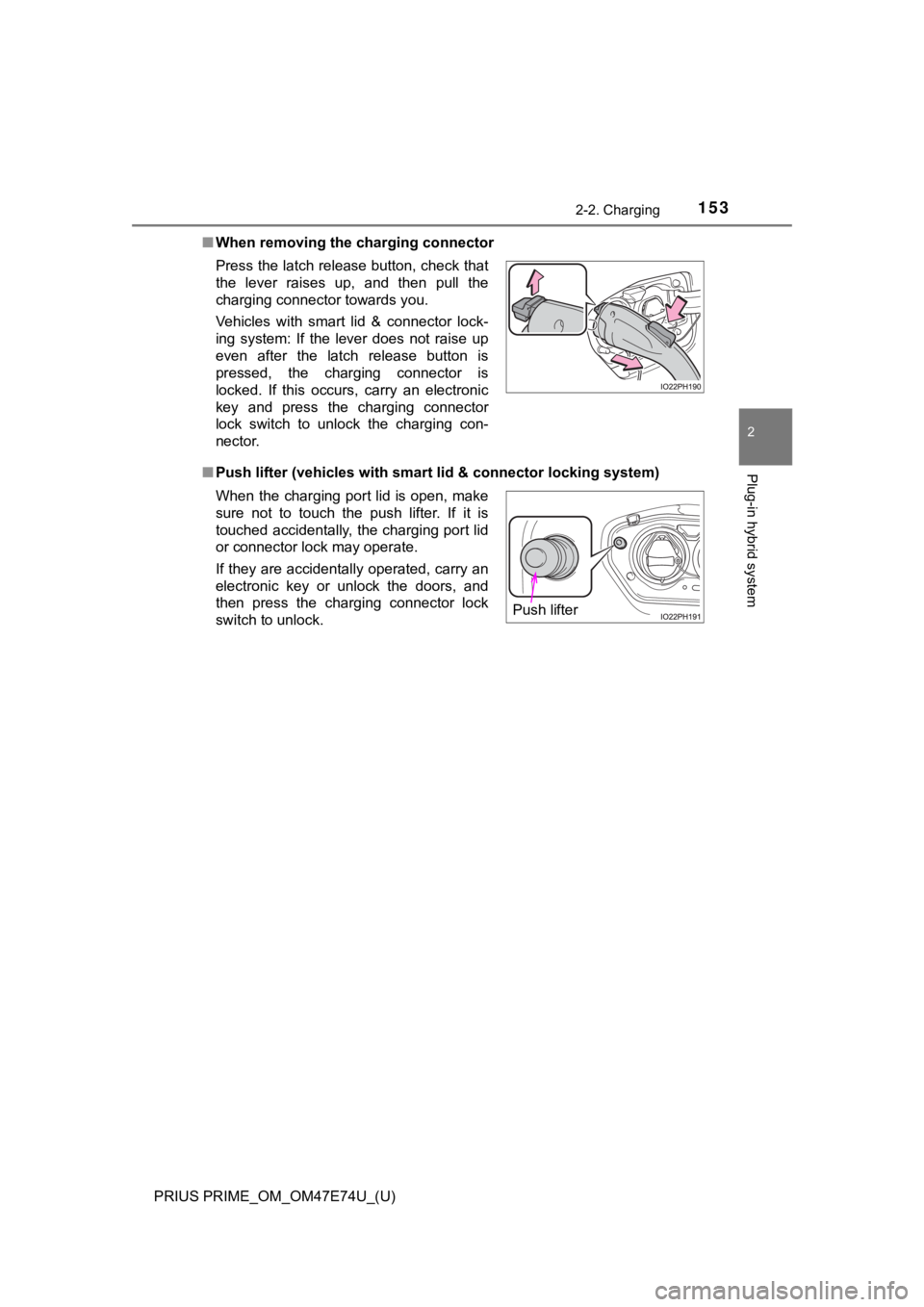
■When removing the charging connector
■ Push lifter (vehicles with smart lid & connector locking system )
Press the latch release button, check that
the lever raises up, and then pull the
charging connector towards you.
Vehicles with smart lid & connector lock-
ing system: If the lever does not raise up
even after the latch release button is
pressed, the charging connector is
locked. If this occurs, carry an electronic
key and press the charging connector
lock switch to unlock the charging con-
nector.
When the charging port lid is open, make
sure not to touch the push lifter. If it is
touched accidentally, the charging port lid
or connector lock may operate.
If they are accidentally operated, carry an
electronic key or unlock the doors, and
then press the charging connector lock
switch to unlock.
Push lifter
Page 156 of 808
156
PRIUS PRIME_OM_OM47E74U_(U)
2-2. Charging
NOTICE
■When use the charging cable and related parts
To prevent damage to the charging cable and related parts, observe the fol-
lowing precautions.
● When interrupting or canceling charging, remove the charging co nnector
before removing the plug.
● Vehicles with smart lid & connector locking system: When removing the
charging cable, check that the charging connector is unlocked.
● Do not forcefully pull the connector cap and charging inlet cap.
● Do not apply a vibration to the charging connector while chargi ng.
Charging may be stopped.
● Do not insert anything but the charging connector.
● When inserting the plug into or removing the plug from the outlet, make
sure to hold the body of the plug.
● Do not damage the charging inlet cap with a sharp object.
● Do not forcefully pull the charging cable that is caught or entangled.
If the cable is entangled, disentangle it before using.
● When charging from the external device, use the charging cable equipped
with the vehicle.
■ When charging
Do not insert the plug into the charging inlet.
The charging inlet may be damaged.
■ After charging
● Store the charging cable out of reach from infants and children.
● After disconnecting the charging connector from the charging in let, make
sure to put on the charging inlet cap and close the charging port lid.
If the charging inlet cap is not put on, water or foreign objects may enter
the charging inlet, which could lead to vehicle damage.
● After removing the plug from the outlet, keep it in a safe place free from
moisture and dust.
The charging cable or plug may be damaged if the cable is stepp ed on or
ridden over by the vehicle.
Page 158 of 808
158
PRIUS PRIME_OM_OM47E74U_(U)
2-2. Charging
Using the charging schedule function
When registering the charge schedule, the following settings ca n be
changed.
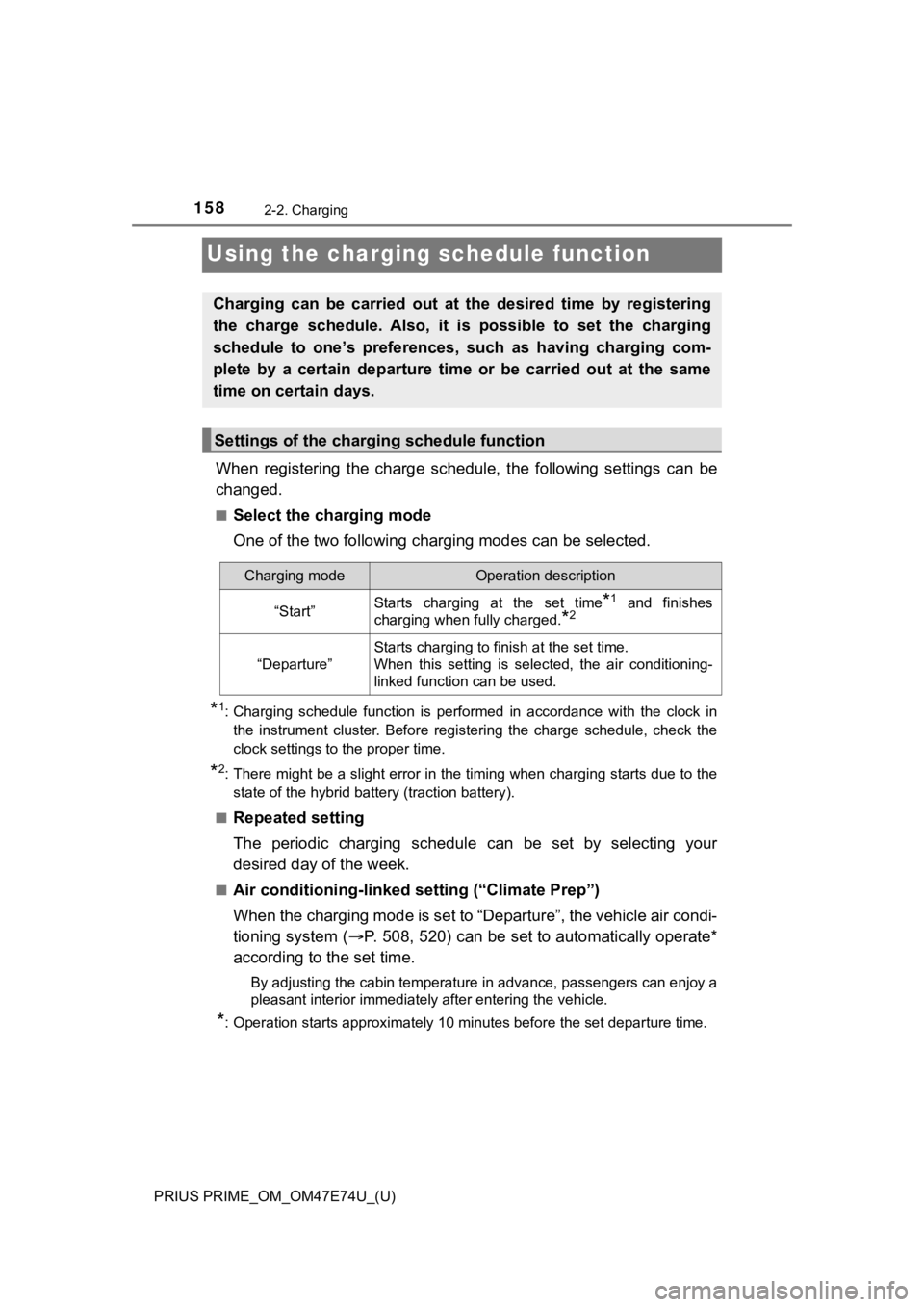
■Select the charging mode
One of the two following c harging modes can be selected.
*1: Charging schedule function is performed in accordance with the clock in
the instrument cluster. Before registering the charge schedule, check the
clock settings to the proper time.
*2: There might be a slight error in the timing when charging star ts due to the
state of the hybrid battery (traction battery).
■
Repeated setting
The periodic charging schedule can be set by selecting your
desired day of the week.
■Air conditioning-linked s etting (“Climate Prep”)
When the charging mode is set to “Departure”, the vehicle air c ondi-
tioning system ( P. 508, 520) can be set to automatically operate*
according to the set time.
By adjusting the cabin temperature in advance, passengers can e njoy a
pleasant interior immediately after entering the vehicle.
*: Operation starts approximately 10 minutes before the set depar ture time.
Charging can be carried out at the desired time by registering
the charge schedule. Also, it is possible to set the charging
schedule to one’s preferences, such as having charging com-
plete by a certain departure time or be carried out at the same
time on certain days.
Settings of the charging schedule function
Charging modeOperation description
“Start”Starts charging at the set time*1 and finishes
charging when fully charged.
*2
“Departure”
Starts charging to finish at the set time.
When this setting is selected, the air conditioning-
linked function can be used.
Page 160 of 808

160
PRIUS PRIME_OM_OM47E74U_(U)
2-2. Charging
■Charging schedule
●The charge schedule cannot be set while driving.
● A maximum of 15 charge schedules can be registered.
■ To make sure that the charging schedule function operates corre ctly
Check the following items.
● Adjust the clock to the correct time ( P. 197)
● The calendar is set to the correct date ( P. 199)
● Check that the power switch is turned off
● After registering the charge schedule, connect the charging cable
The charging start time is determined based on the charge sched ule at the
time that the charging cable was connected.
● After connecting the charging cable, check that the charging indicator
flashes ( P. 115)
● Do not use an outlet that has a power cut off function (including a timer func-
tion)
Use an outlet that constantly supplies electricity. For outlets where the
power is cut off due to a timer function, etc., charging may no t be carried
out according to plan if the power is cut off during the set ti me.
■ When the charging cable remains connected to the vehicle
Even if multiple consecutive charge schedules are registered, t he next
charge will not be carried out according to the charging schedu le until the
charging cable is removed and reconnected after charging comple tes. Also,
when the hybrid battery (traction battery) is fully charged, ch arging according
to the charging schedule will not be carried out.
■ “Climate Prep”
●When the air conditioning-linked setting is turned on, the air conditioning
operates until the set departure time. Therefore, the air condi tioning will con-
sume electricity and charging may not complete by the set depar ture time.
● If the hybrid battery (traction battery) is fully charged, char ging will not be
carried out, even if the charge schedule is set. However, if “Climate Prep” is
turned on, the air conditioning will operate only once when it nears the time
set in “Departure”. If this occurs, the air conditioning will c onsume electricity
and the remaining charge of the hybrid battery (traction batter y) when
departing may be decreased.
● When the doors are unlocked, the air conditioning system does n ot operate.
■ Smartphone-linked operation (vehicles with 11.6-inch display)
After applying to Entune App Suite, it is possible to use the s martphone appli-
cation to change charging schedule settings.
For details about Entune App Suite, refer to http://www.toyota. com/entune/.
Page 163 of 808
PRIUS PRIME_OM_OM47E74U_(U)
1632-2. Charging
2
Plug-in hybrid system
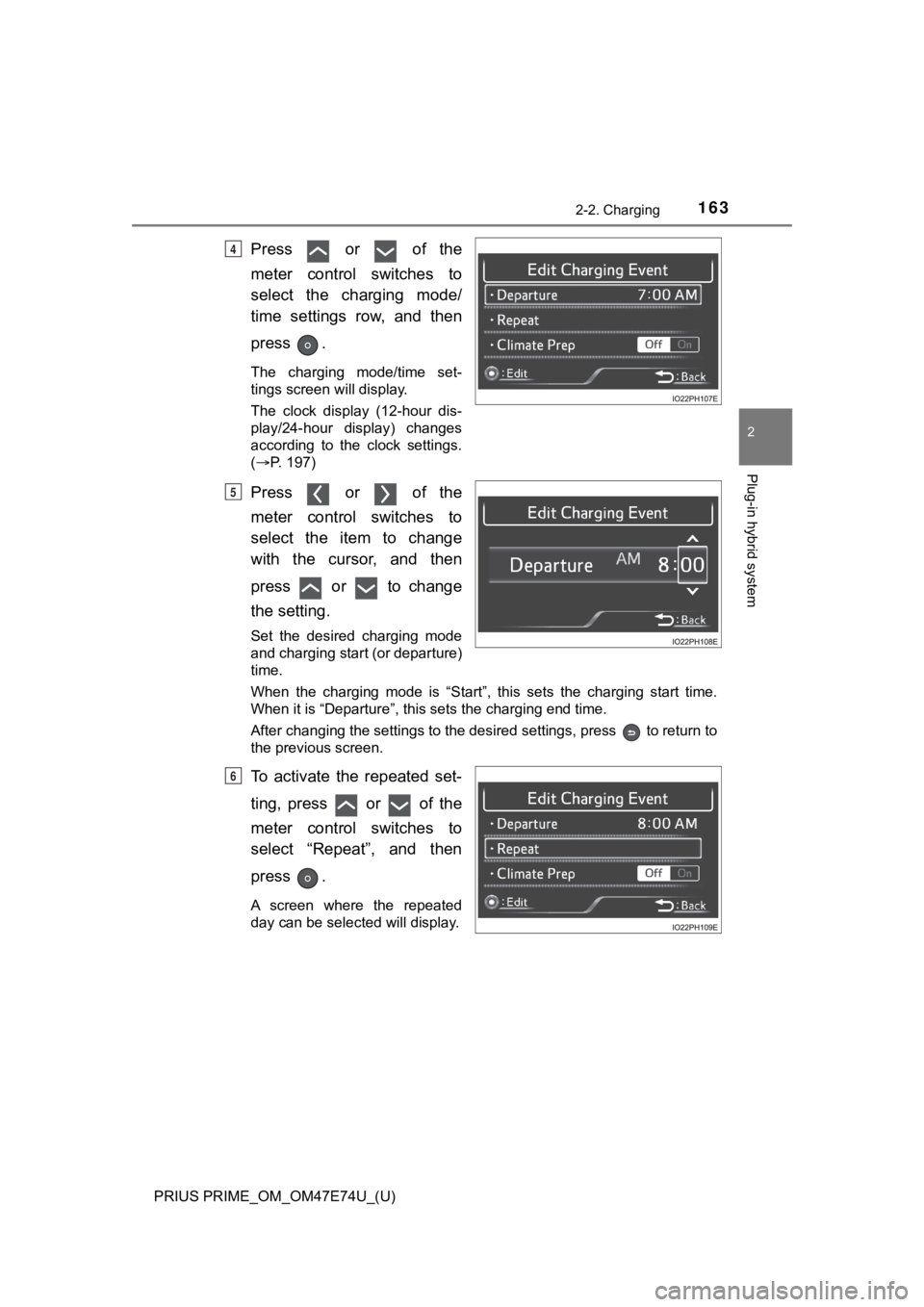
Press or of the
meter control switches to
select the charging mode/
time settings row, and then
press .
The charging mode/time set-
tings screen will display.
The clock display (12-hour dis-
play/24-hour display) changes
according to the clock settings.
(P. 197)
Press or of the
meter control switches to
select the item to change
with the cursor, and then
press or to change
the setting.
Set the desired charging mode
and charging start (or departure)
time.
When the charging mode is “Start” , this sets the charging start time.
When it is “Departure”, this sets the charging end time.
After changing the settings to the desired settings, press to return to
the previous screen.
To activate the repeated set-
ting, press or of the
meter control switches to
select “Repeat”, and then
press .
A screen where the repeated
day can be selected will display.
4
5
6
Page 183 of 808
PRIUS PRIME_OM_OM47E74U_(U)
1832-2. Charging
2
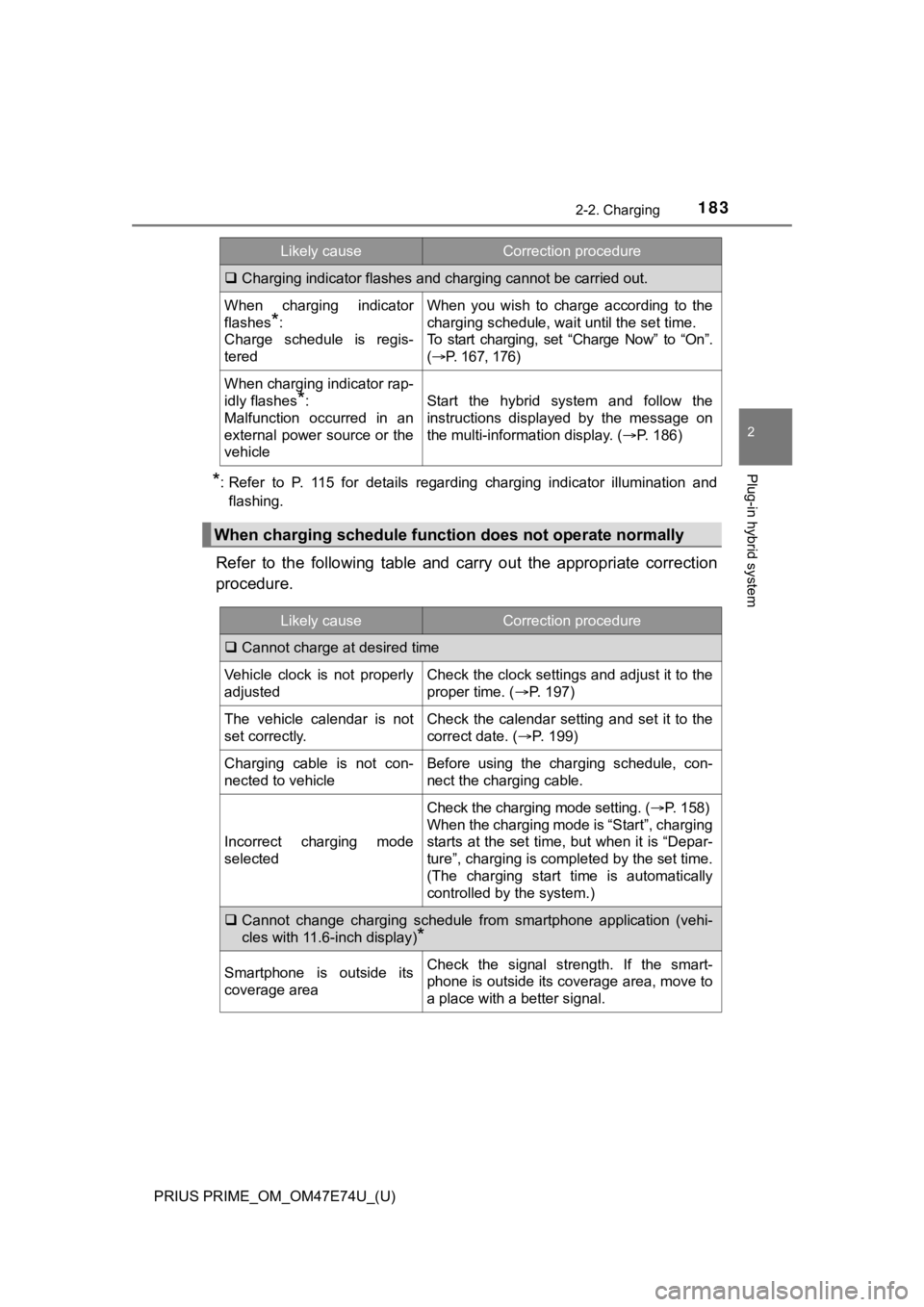
Plug-in hybrid system*: Refer to P. 115 for details regarding charging indicator illumination and
flashing.
Refer to the following table and carry out the appropriate corr ection
procedure.
Charging indicator flashes and charging cannot be carried out.
When charging indicator
flashes
*:
Charge schedule is regis-
tered
When you wish to charge according to the
charging schedule, wait until the set time.
To start charging, set “Charge Now” to “On”.
( P. 167, 176)
When charging indicator rap-
idly flashes
*:
Malfunction occurred in an
external power source or the
vehicleStart the hybrid system and follow the
instructions displayed by the message on
the multi-information display. ( P. 186)
When charging schedule functi on does not operate normally
Likely causeCorrection procedure
Cannot charge at desired time
Vehicle clock is not properly
adjustedCheck the clock settings and adjust it to the
proper time. ( P. 197)
The vehicle calendar is not
set correctly.Check the calendar setting and set it to the
correct date. ( P. 199)
Charging cable is not con-
nected to vehicleBefore using the charging schedule, con-
nect the charging cable.
Incorrect charging mode
selected
Check the charging mode setting. ( P. 1 5 8 )
When the charging mode is “Start”, charging
starts at the set time, but when it is “Depar-
ture”, charging is completed by the set time.
(The charging start time is automatically
controlled by the system.)
Cannot change charging schedule from smartphone application (vehi-
cles with 11.6-inch display)
*
Smartphone is outside its
coverage areaCheck the signal strength. If the smart-
phone is outside its coverage area, move to
a place with a better signal.
Likely causeCorrection procedure
Page 192 of 808
192
PRIUS PRIME_OM_OM47E74U_(U)
3. Instrument cluster
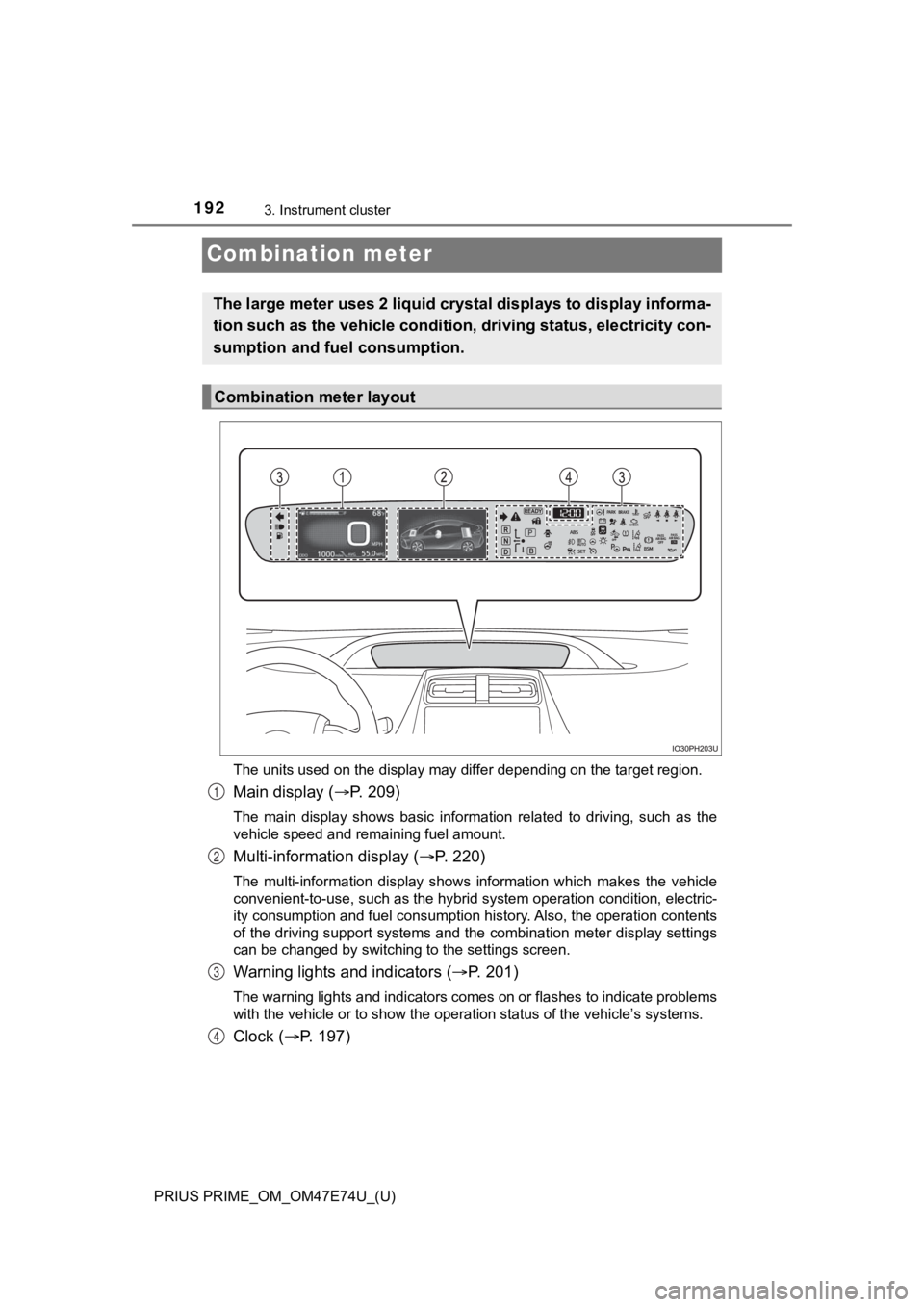
Combination meter
The units used on the display may differ depending on the target region.
Main display (P. 209)
The main display shows basic information related to driving, su ch as the
vehicle speed and remaining fuel amount.
Multi-information display ( P. 220)
The multi-information display shows information which makes the vehicle
convenient-to-use, such as the hybrid system operation condition, electric-
ity consumption and fuel consumption history. Also, the operati on contents
of the driving support systems and the combination meter display settings
can be changed by switching to the settings screen.
Warning lights and indicators ( P. 2 0 1 )
The warning lights and indicators comes on or flashes to indicate problems
with the vehicle or to show the operation status of the vehicle ’s systems.
Clock (P. 197)
The large meter uses 2 liquid crystal displays to display infor ma-
tion such as the vehicle condition , driving status, electricity con-
sumption and fuel consumption.
Combination meter layout
1
2
3
4
Page 197 of 808
PRIUS PRIME_OM_OM47E74U_(U)
1973. Instrument cluster
3
Instrument cluster
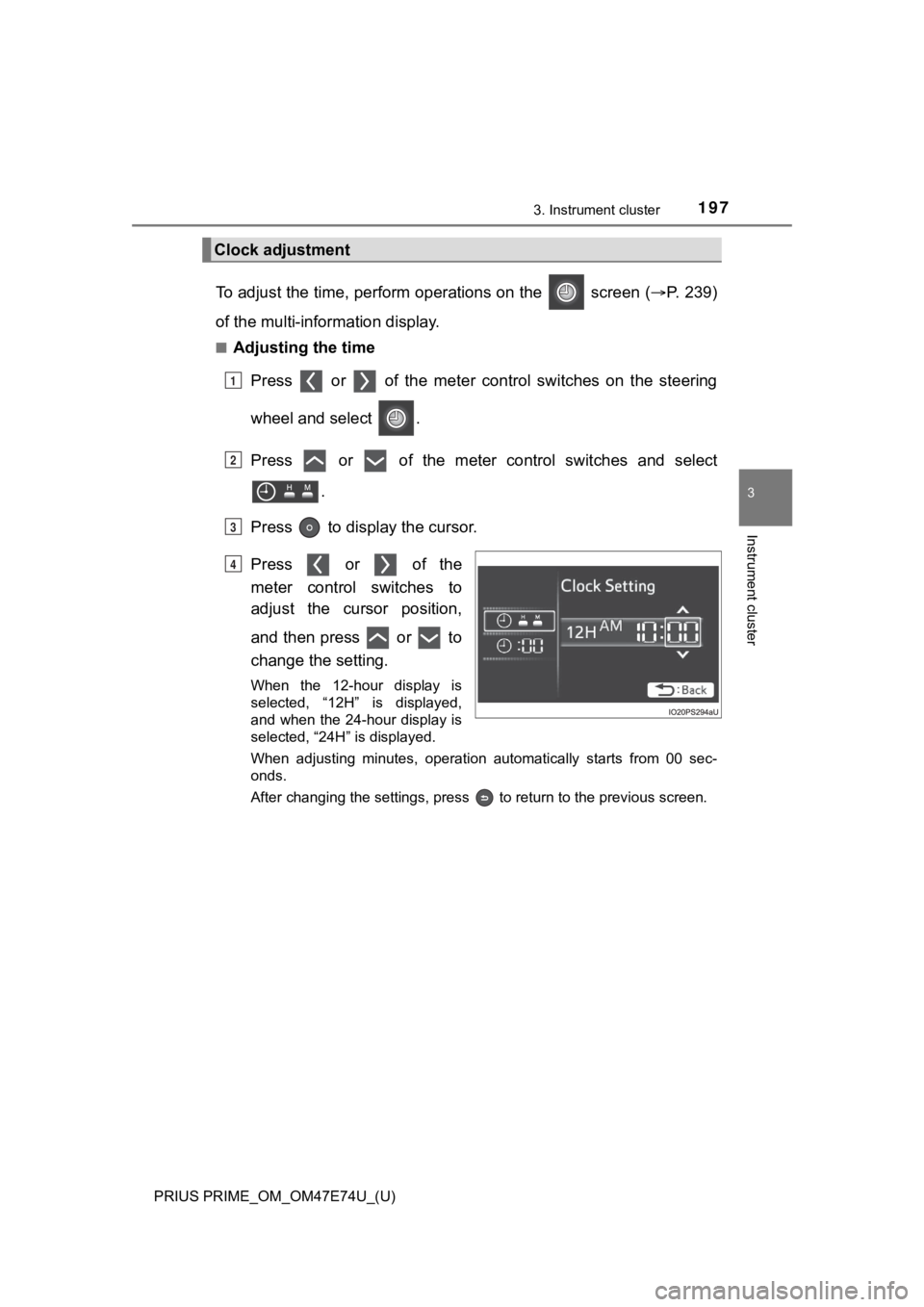
To adjust the time, perform operations on the screen (P. 2 3 9 )
of the multi-information display.
■Adjusting the time
Press or of the meter cont rol switches on the steering
wheel and select .
Press or of the meter control switches and select .
Press to display the cursor.
Press or of the
meter control switches to
adjust the cursor position,
and then press or to
change the setting.
When the 12-hour display is
selected, “12H” is displayed,
and when the 24-hour display is
selected, “24H” is displayed.
When adjusting minutes, operation automatically starts from 00 sec-
onds.
After changing the settings, press to return to the previous s creen.
Clock adjustment
1
2
3
4
Page 199 of 808
PRIUS PRIME_OM_OM47E74U_(U)
1993. Instrument cluster
3
Instrument cluster
■The meters and display illuminate when
The power switch is in ON mode.
■ Adjusting the instrume nt cluster brightness (P. 194)
● The brightness levels that can be selected differ depending on whether the
tail lights are on and surrounding brightness levels, as shown in the table
below.
*: 22 levels of the brightness are displayed on the setting scree n. However,
the brightness setting will be the brightest when other than 1st level (the
darkest) is selected. If other than 1st or 22nd level is select ed, when the
tail lights are turned on in a dark place, the instrument clust er brightness
setting will be the selected level.
● If the taillights are illuminated in a dark environment, the in strument cluster
light dims. However, when the brightness of the instrument clus ter is set to
minimum or maximum (1st or 22nd level of the instrument cluster bright-
ness), even if the taillights are illuminated, the instrument c luster light will
not dim.
■ When disconnecting and reconnecting 12-volt battery terminals
The settings of the clock will be reset.
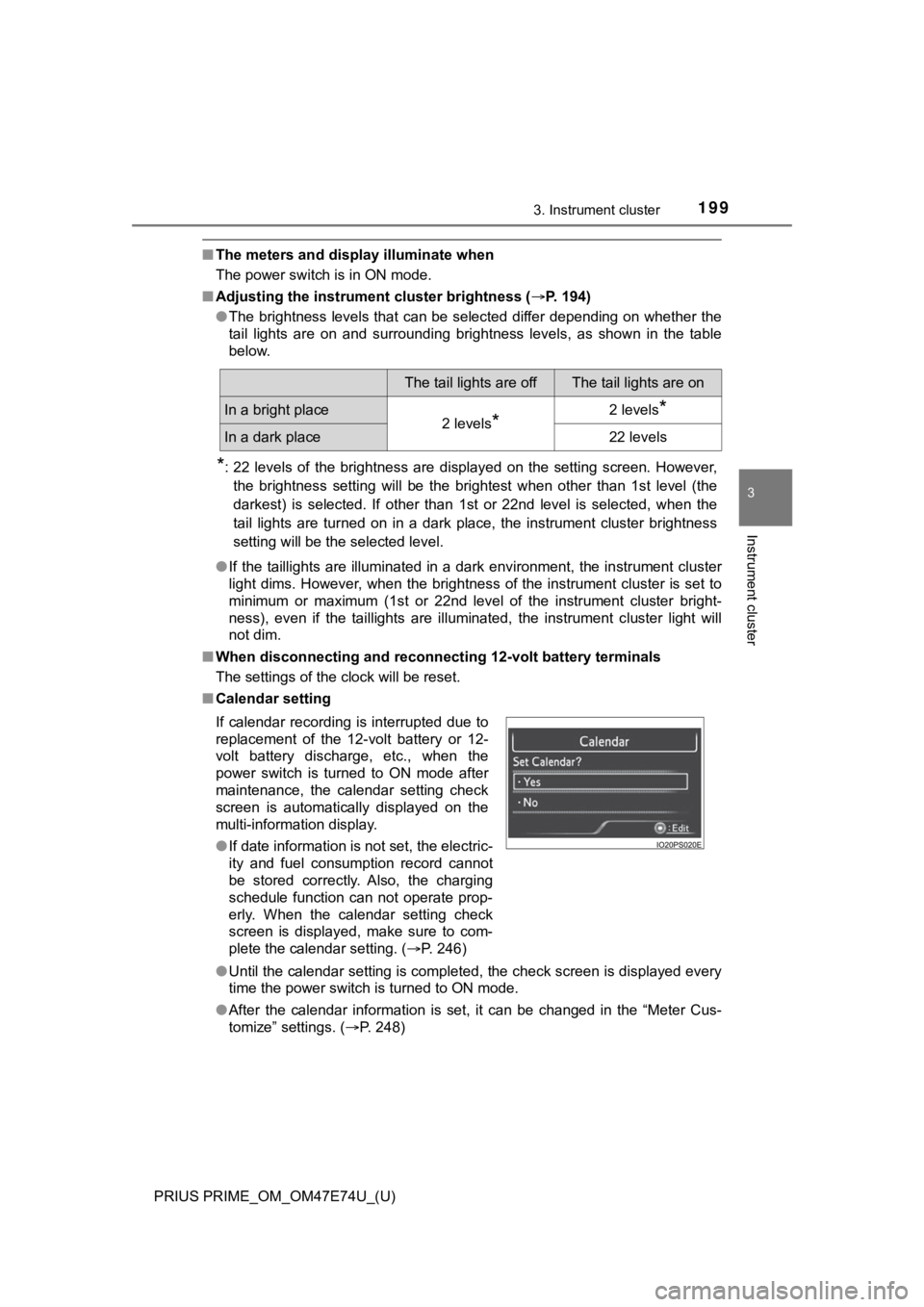
■ Calendar setting
●Until the calendar setting is completed, the check screen is di splayed every
time the power switch is turned to ON mode.
● After the calendar information is set, it can be changed in the “Meter Cus-
tomize” settings. ( P. 248)
The tail lights are offThe tail lights are on
In a bright place2 levels*2 levels*
In a dark place22 levels
If calendar recording is interrupted due to
replacement of the 12-volt battery or 12-
volt battery discharge, etc., when the
power switch is turned to ON mode after
maintenance, the calendar setting check
screen is automatically displayed on the
multi-information display.
● If date information is not set, the electric-
ity and fuel consumption record cannot
be stored correctly. Also, the charging
schedule function can not operate prop-
erly. When the calendar setting check
screen is displayed, make sure to com-
plete the calendar setting. ( P. 246)
Page 221 of 808
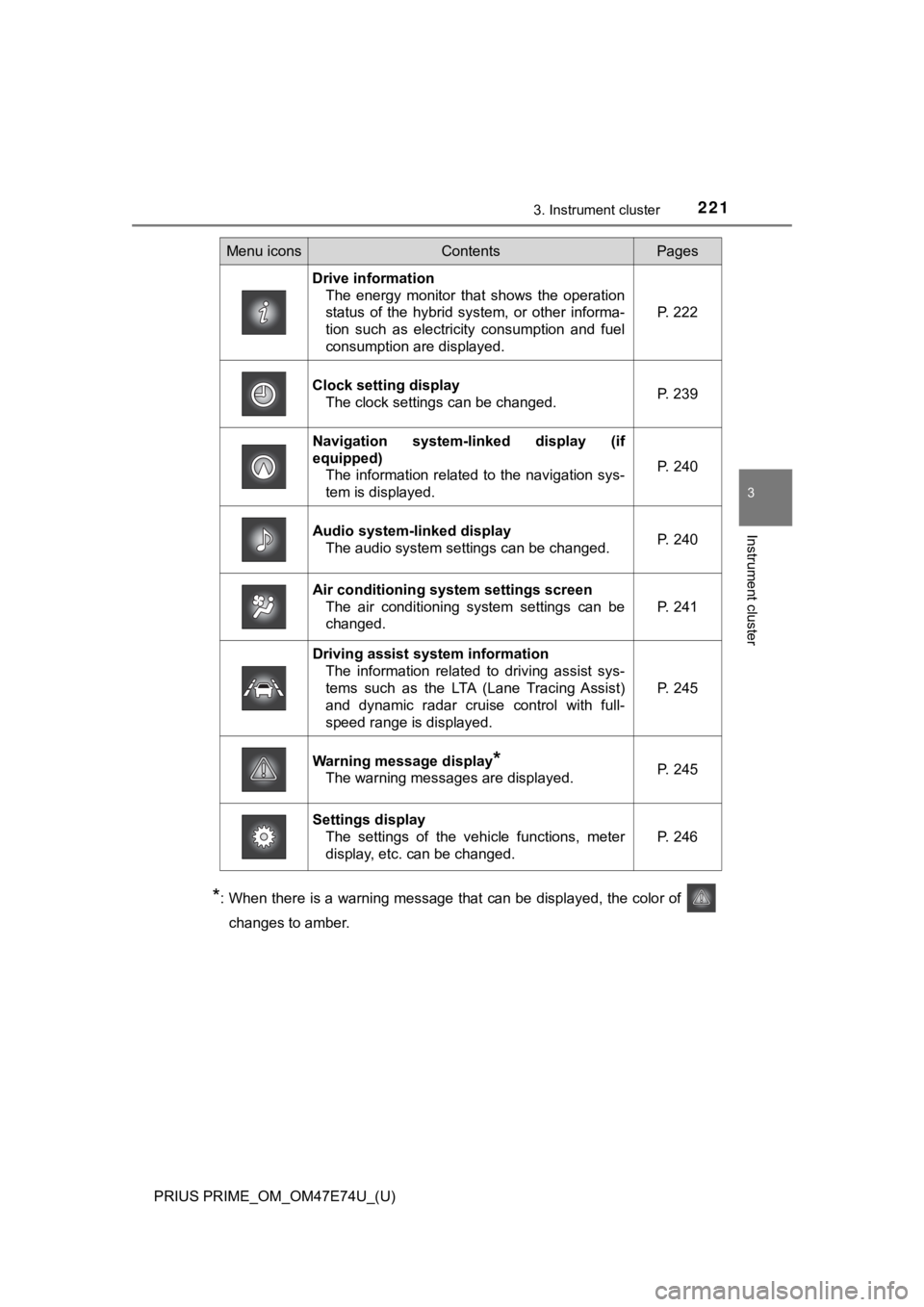
PRIUS PRIME_OM_OM47E74U_(U)
2213. Instrument cluster
3
Instrument cluster
*: When there is a warning message that can be displayed, the color of
changes to amber.
Menu iconsContentsPages
Drive information The energy monitor that shows the operation
status of the hybrid system, or other informa-
tion such as electricity consumption and fuel
consumption are displayed. P. 222
Clock setting display The clock settings can be changed. P. 239
Navigation system-linked display (if
equipped)
The information related to the navigation sys-
tem is displayed.
P. 240
Audio system-linked displayThe audio system settings can be changed.P. 240
Air conditioning system settings screen
The air conditioning system settings can be
changed.
P. 241
Driving assist system informationThe information related to driving assist sys-
tems such as the LTA (Lane Tracing Assist)
and dynamic radar cruise control with full-
speed range is displayed.
P. 245
Warning message display*
The warning messages are displayed.P. 245
Settings display
The settings of the vehicle functions, meter
display, etc. can be changed.
P. 246