lock TOYOTA PRIUS PRIME 2022 Manual PDF
[x] Cancel search | Manufacturer: TOYOTA, Model Year: 2022, Model line: PRIUS PRIME, Model: TOYOTA PRIUS PRIME 2022Pages: 808, PDF Size: 14.72 MB
Page 293 of 808
PRIUS PRIME_OM_OM47E74U_(U)
2934-2. Opening, closing and locking the doors
4
Operation of each component
■Conditions affecting operation
The smart key system, wireless remote control and immobilizer s ystem use
weak radio waves. In the following situations, the communication between
the electronic key and the vehicle may be affected, preventing the smart key
system, wireless remote control and immobilizer system from operating prop-
erly. (Ways of coping: P. 708)
● When the electronic key battery is depleted
● Near a TV tower, electric power plant, gas station, radio stati on, large dis-
play, airport or other facility that generates strong radio wav es or electrical
noise
● When the electronic key is in contact with, or is covered by the following
metallic objects
• Cards to which aluminum foil is attached
• Cigarette boxes that have aluminum foil inside
• Metallic wallets or bags
• Coins
• Hand warmers made of metal
• Media such as CDs and DVDs
● When other wireless key (that emit radio waves) is being used n earby
● When carrying the electronic key together with the following devices that
emit radio waves
• Portable radio, cellular phone, cordless phone or other wirele ss commu-
nication devices
• Another vehicle’s electronic key or a wireless key that emits radio waves
• Personal computers or personal digital assistants (PDAs)
• Digital audio players
• Portable game systems
● If window tint with a metallic content or metallic objects are attached to the
rear window
● When the electronic key is placed near a battery charger or ele ctronic
devices
Page 294 of 808

294
PRIUS PRIME_OM_OM47E74U_(U)
4-2. Opening, closing and locking the doors
■Note for the entry function
●Even when the electronic key is within the effective range (det ection areas),
the system may not operate properly in the following cases:
• The electronic key is too close to the window or outside door handle, near
the ground, or in a high place when the doors are locked or unl ocked.
• The electronic key is on the instrument panel, floor, or in th e door pockets
or glove box when the hybrid system is started or power switch modes
are changed.
● Do not leave the electronic key on top of the instrument panel or near the
door pockets when exiting the vehicle. Depending on the radio w ave recep-
tion conditions, it may be detected by the antenna outside the cabin and the
door will become lockable from the outside, possibly trapping the electronic
key inside the vehicle.
● As long as the electronic key is within the effective range, th e doors may be
unlocked or locked by anyone.
● Even if the electronic key is not inside the vehicle, it may be possible to start
the hybrid system if the electronic key is near the window.
● The doors may unlock if a large amount of water splashes on the door han-
dle, such as in the rain or in a car wash when the electronic k ey is within the
effective range. (The door will automatically be locked after a pproximately
60 seconds if the doors are not opened and closed.)
● If the wireless remote control is used to lock the doors when t he electronic
key is near the vehicle, there is a possibility that the door m ay not be
unlocked by the entry function. (Use the wireless remote contro l to unlock
the doors.)
● Touching the door lock sensor while wearing gloves may delay or prevent
lock operation. Remove the gloves and touch the lock sensor aga in.
● If the door handle becomes wet while the electronic key is with in the effec-
tive range, the door may lock and unlock repeatedly. In this ca se, follow the
following correction procedures to wash the vehicle.
• Place the electronic key in a location 6 ft. (2 m) or more awa y from the
vehicle. (Take care to ensure that the key is not stolen.)
• Set electronic key to battery-saving mode to disable the smart key sys-
tem. ( P. 292)
● If the electronic key is inside the vehicle and a door handle b ecomes wet
during a car wash, a message may be shown on the multi-informat ion dis-
play and a buzzer will sound outside the vehicle. To turn off t he alarm, lock
all the doors.
● The lock sensor may not work properly if it comes into contact with ice,
snow, mud, etc. Clean the lock sensor and attempt to operate it again.
● A sudden approach to the effective range or door handle may prevent the
doors from being unlocked. In this case, return the door handle to the origi-
nal position and check that the doors unlock before pulling the door handle
again.
● If there is another electronic key in the detection area, it ma y take slightly
longer to unlock the doors after the door handle is gripped.
Page 295 of 808
PRIUS PRIME_OM_OM47E74U_(U)
2954-2. Opening, closing and locking the doors
4
Operation of each component
■When the vehicle is not driven for extended periods
●To prevent theft of the vehicle, do not leave the electronic key within 6 ft.
(2 m) of the vehicle.
● The smart key system can be deactivated in advance. ( P. 749)
■ To operate the system properly
Make sure to carry the electronic key when operating the system. Do not get
the electronic key too close to the vehicle when operating the system from the
outside of the vehicle.
Depending on the position and holding condition of the electronic key, the key
may not be detected correctly and the system may not operate properly. (The
alarm may go off accidentally, or the door lock prevention may not operate.)
■ If the smart key system do es not operate properly
● Locking and unlocking the doors: Use the mechanical key. ( P. 708)
● Starting the hybrid system: P. 709
■ Customization
Settings (e.g. smart key system) can be changed.
(Customizable features: P. 749)
■ If the smart key system has been d eactivated in a customized setting
● Unlocking and locking the doors:
Use the wireless remote control or mechanical key. ( P. 280, 708)
● Unlocking the charging port lid: P. 124
● Unlocking and locking the charging connector: P. 128
● Starting the hybrid system and changing power switch modes: P. 709
● Stopping the hybrid system: P. 333
WARNING
■Caution regarding interference with electronic devices
● People with implantable cardiac pacemakers, cardiac resynchroni zation
therapy-pacemakers or implantable cardioverter defibrillators should keep
away from the smart key system antennas. ( P. 290)
The radio waves may affect the operation of such devices. If ne cessary,
the entry function can be disabled. Ask your Toyota dealer for details, such
as the frequency of radio waves and timing of the emitted radio waves.
Then, consult your doctor to see if you should disable the entry function.
● Users of any electrical medical device other than implantable c ardiac
pacemakers, cardiac resynchronization therapy-pacemakers or imp lant-
able cardioverter defibrillators should consult the manufacture r of the
device for information about its operation under the influence of radio
waves.
Radio waves could have unexpected effects on the operation of such
medical devices.
Ask your Toyota dealer for details on disabling the entry function.
Page 297 of 808
PRIUS PRIME_OM_OM47E74U_(U)
2974-3. Adjusting the seats
4
Operation of each component
■When adjusting the seat
Take care when adjusting the seat so that the head restraint does not touch
the ceiling.
WARNING
■When adjusting the seat position
● Take care when adjusting the seat position to ensure that other passen-
gers are not injured by the moving seat.
● Do not put your hands under the seat or near the moving parts to avoid
injury.
Fingers or hands may become jammed in the seat mechanism.
■ Seat adjustment
● To reduce the risk of sliding under the lap belt during a collision, do not
recline the seat more than necessary.
If the seat is too reclined, the lap belt may slide past the hips and apply
restraint forces directly to the abdomen, or your neck may contact the
shoulder belt, increasing the risk of death or serious injury i n the event of
an accident.
Adjustments should not be made while driving as the seat may un expect-
edly move and cause the driver to lose control of the vehicle.
● Manual seats: After adjusting the seat, make sure that the seat is locked in
position.
Page 298 of 808
298
PRIUS PRIME_OM_OM47E74U_(U)
4-3. Adjusting the seats
Rear seats
Park the vehicle in a safe place.
Apply the parking brake firmly ( P. 346) and shift the shift position to P.
( P. 340)
Adjust the position of the front seat and the angle of the seatback.
(
P. 2 9 6 )
Depending on the position of the front seat, if the seatback is folded back-
ward, it may interfere with the operation of the rear seat.
Lift up and push down the head restraints of the rear outboard
seats, and lower the head rest raint of the rear center seat.
(
P. 3 0 0 )
Stow the armrest of the rear seat if it is pulled out. (
P. 562)
This step is not necessary when operating the left side seat on ly.
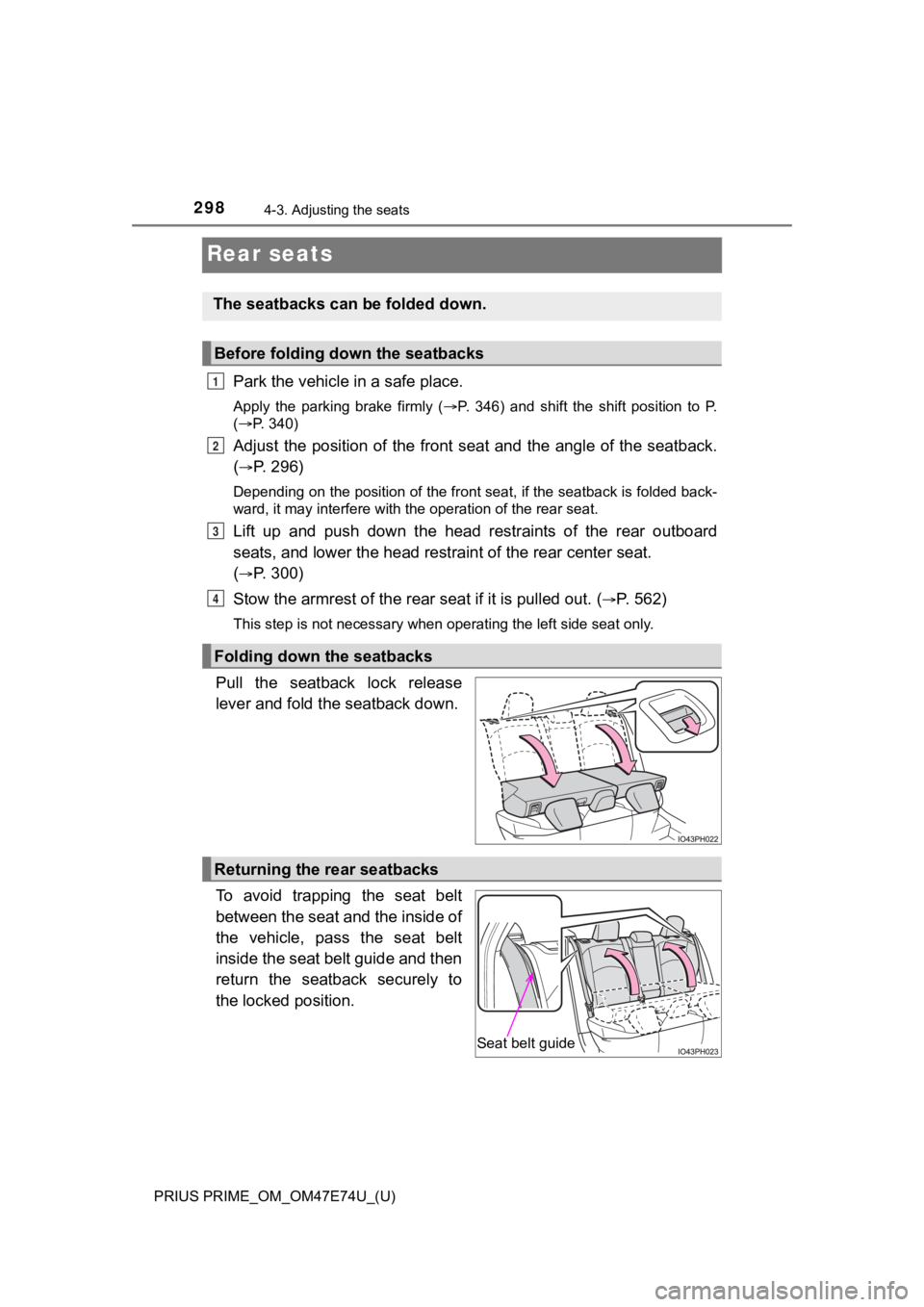
Pull the seatback lock release
lever and fold the seatback down.
To avoid trapping the seat belt
between the seat and the inside of
the vehicle, pass the seat belt
inside the seat belt guide and then
return the seatback securely to
the locked position.
The seatbacks can be folded down.
Before folding down the seatbacks
Folding down the seatbacks
1
2
3
4
Returning the rear seatbacks
Seat belt guide
Page 299 of 808
PRIUS PRIME_OM_OM47E74U_(U)
2994-3. Adjusting the seats
4
Operation of each component
WARNING
■When folding the seatbacks down
Observe the following precautions. Failure to do so may result in death or
serious injury.
● Do not fold the seatbacks down while driving.
● Stop the vehicle on level ground, apply the parking brake firml y and shift
the shift position to P.
● Do not allow anyone to sit on a folded seatback or in the luggage compart-
ment while driving.
● Do not allow children to enter the luggage compartment.
● Do not operate the rear seat if it is occupied.
● Be careful not to get feet or hands caught in the moving parts or joints of
the seats during operation.
● Do not allow children to operate the seat.
■ After returning the seatback to the upright position
Observe the following precautions. Failure to do so may result in death or
serious injury.
● Check that the seat belts are not twisted or caught in the seatback.
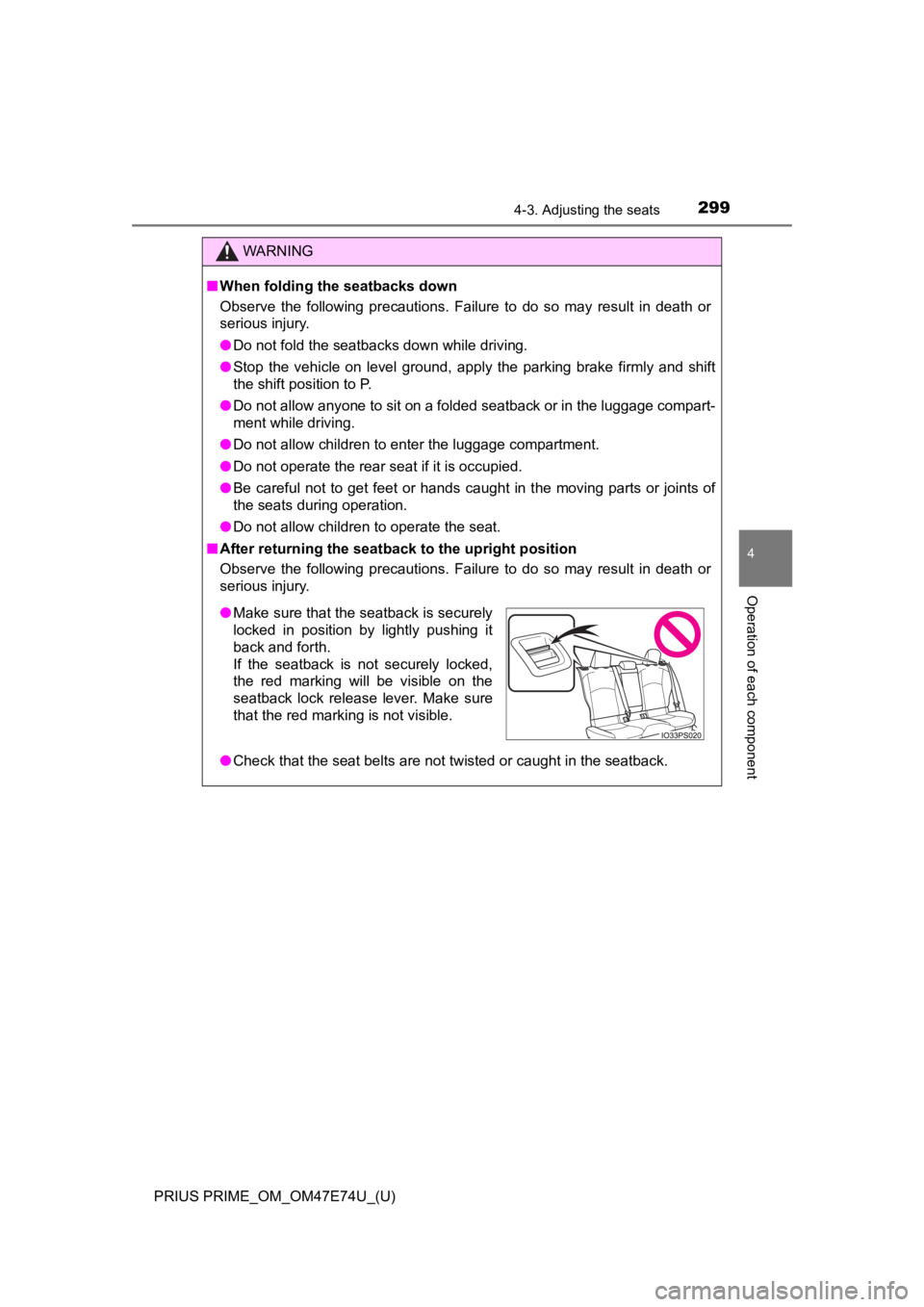
●Make sure that the seatback is securely
locked in position by lightly pushing it
back and forth.
If the seatback is not securely locked,
the red marking will be visible on the
seatback lock release lever. Make sure
that the red marking is not visible.
Page 300 of 808
300
PRIUS PRIME_OM_OM47E74U_(U)
4-3. Adjusting the seats
Head restraints
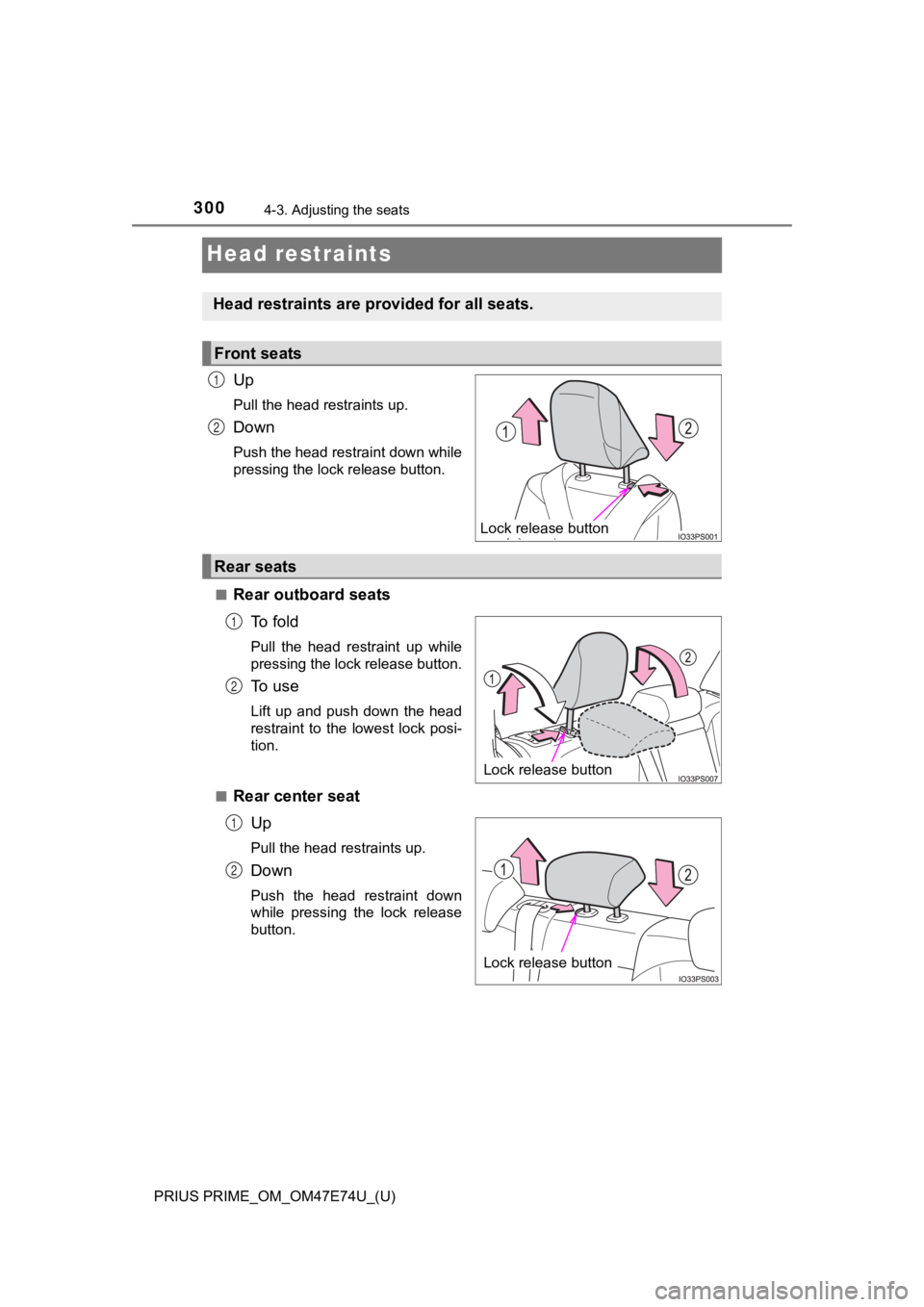
Up
Pull the head restraints up.
Down
Push the head restraint down while
pressing the lock release button.
■
Rear outboard seats To f o l d
Pull the head restraint up while
pressing the lock release button.
To u s e
Lift up and push down the head
restraint to the lowest lock posi-
tion.
■
Rear center seat Up
Pull the head restraints up.
Down
Push the head restraint down
while pressing the lock release
button.
Head restraints are provided for all seats.
Front seats
Lock release button
1
2
Rear seats
Lock release button
1
2
Lock release button
N
O
Page 301 of 808
PRIUS PRIME_OM_OM47E74U_(U)
3014-3. Adjusting the seats
4
Operation of each component
■Removing the head restraints
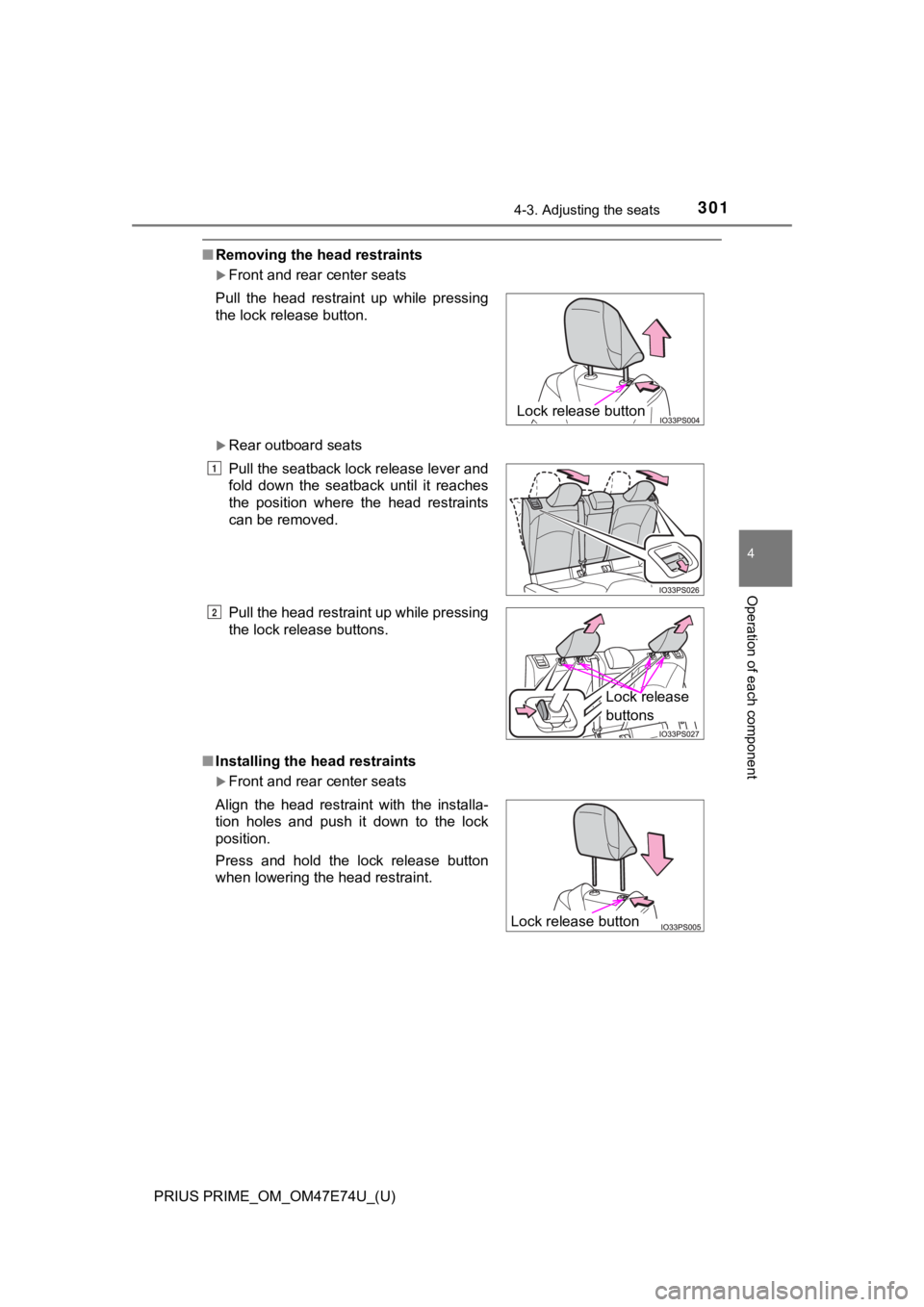
Front and rear center seats
Rear outboard seats
■ Installing the head restraints
Front and rear center seats
Pull the head restraint up while pressing
the lock release button.
Pull the seatback lock release lever and
fold down the seatback until it reaches
the position where the head restraints
can be removed.
Pull the head restraint up while pressing
the lock release buttons.
Align the head restraint with the installa-
tion holes and push it down to the lock
position.
Press and hold the lock release button
when lowering the head restraint.
Lock release button
1
2
Lock release
buttons
Lock release button
Page 302 of 808
302
PRIUS PRIME_OM_OM47E74U_(U)
4-3. Adjusting the seats
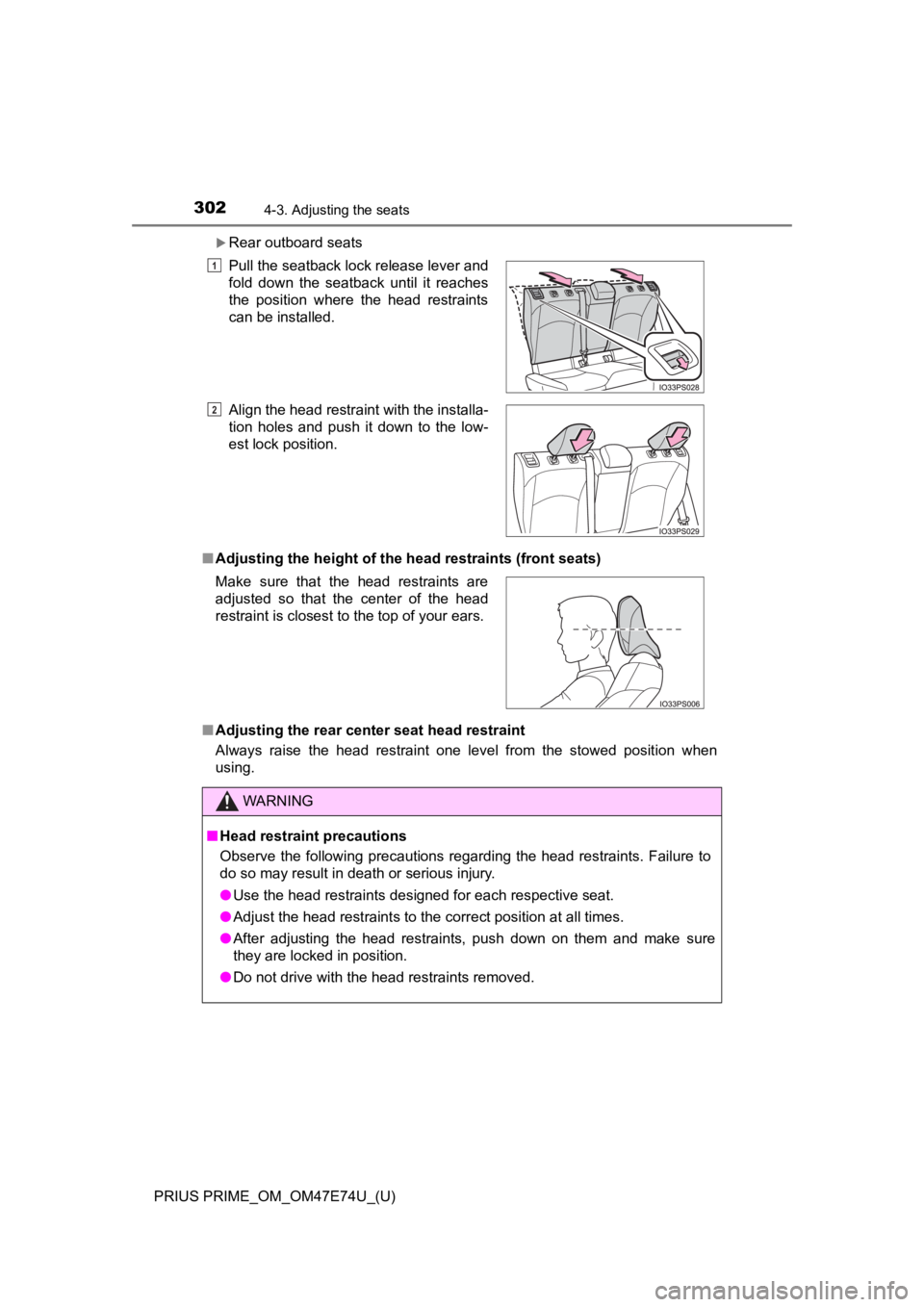
Rear outboard seats
■ Adjusting the height of the head restraints (front seats)
■ Adjusting the rear center seat head restraint
Always raise the head restraint one level from the stowed position when
using.Pull the seatback lock release lever and
fold down the seatback until it reaches
the position where the head restraints
can be installed.
Align the head restraint with the installa-
tion holes and push it down to the low-
est lock position.
Make sure that the head restraints are
adjusted so that the center of the head
restraint is closest to the top of your ears.
WARNING
■ Head restraint precautions
Observe the following precautions regarding the head restraints. Failure to
do so may result in death or serious injury.
● Use the head restraints designed for each respective seat.
● Adjust the head restraints to the correct position at all times.
● After adjusting the head restraints, push down on them and make sure
they are locked in position.
● Do not drive with the head restraints removed.
1
2
Page 304 of 808

3044-4. Adjusting the steering wheel and mirrors
PRIUS PRIME_OM_OM47E74U_(U)
WARNING
■Caution while driving
Do not adjust the steering wheel while driving.
Doing so may cause the driver to mishandle the vehicle and caus e an acci-
dent, resulting in death or serious injury.
■ After adjusting the steering wheel
Make sure that the steering wheel is securely locked.
Otherwise, the steering wheel may move suddenly, possibly causi ng an
accident, and resulting in death or serious injury. Also, the horn may not
sound if the steering wheel is not securely locked.