warning TOYOTA PRIUS PRIME 2022 Workshop Manual
[x] Cancel search | Manufacturer: TOYOTA, Model Year: 2022, Model line: PRIUS PRIME, Model: TOYOTA PRIUS PRIME 2022Pages: 808, PDF Size: 14.72 MB
Page 134 of 808
134
PRIUS PRIME_OM_OM47E74U_(U)
2-2. Charging
WARNING
■Power sources precautions
Observe the following precautions.
If you do not follow them, fire, electrical shock or damage may occur, possi-
bly resulting in death or serious injury.
● Connect to an AC 120 V outlet (NEMA 5-15R) with a Ground-Fault Circuit-
Interrupter (GFCI) and supplied by a circuit breaker per your l ocal code.
Use of a 15A individual circuit is strongly recommended.
● Use of a block heater for charging is prohibited.
● Make sure to connect the charging connector and charging inlet directly.
Do not connect a converting adaptor or extension cord between the
charging connector and charging inlet.
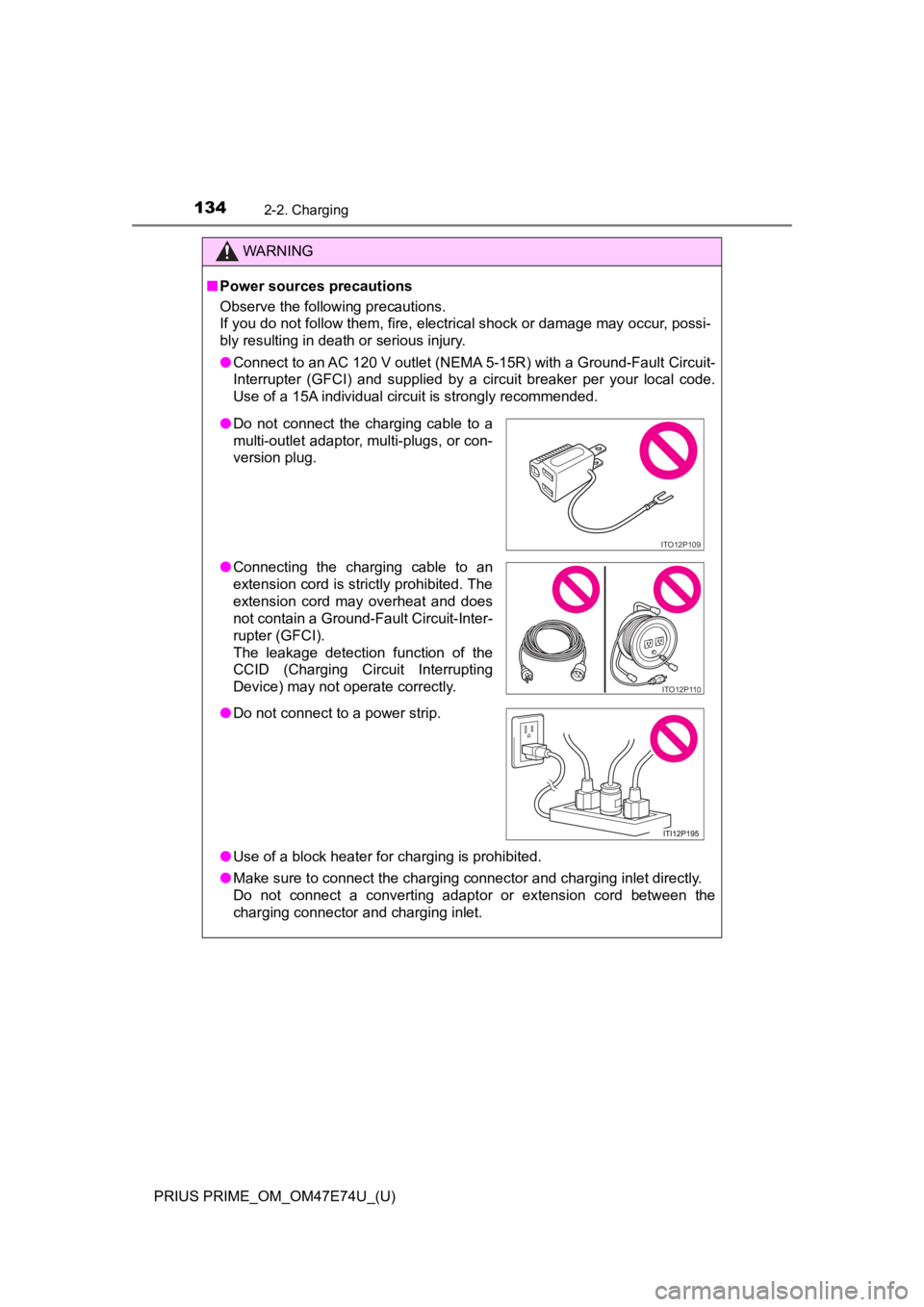
● Do not connect the charging cable to a
multi-outlet adaptor, multi-plugs, or con-
version plug.
● Connecting the charging cable to an
extension cord is strictly prohibited. The
extension cord may overheat and does
not contain a Ground-Fault Circuit-Inter-
rupter (GFCI).
The leakage detection function of the
CCID (Charging Circuit Interrupting
Device) may not operate correctly.
● Do not connect to a power strip.
ITO12P109
ITO12P110
Page 145 of 808
PRIUS PRIME_OM_OM47E74U_(U)
1452-2. Charging
2
Plug-in hybrid system
■Certification
This device complies with Part 15 of the FCC Rules.
Operation is subject to the following two conditions:
(1) this device may not cause harmful interference, and
(2) this device must accept any interference received, including interference
that may cause undesired operation.
WARNING
■Caution when charging
People with implantable cardiac pacemakers or cardiac resynchro nization
therapy-pacemakers should not carry out the charging procedure. Ask
someone else to do it.
● Do not approach the charger and charging cable while charging.
Charging procedure may affect the operation of such devices.
● Do not remain in the vehicle during charging.
Charging procedure may affect the operation of such devices.
● Do not enter the vehicle even to take something out of the lugg age com-
partment.
Charging procedure may affect the operation of such devices.
■ When the charging cable is connected to the vehicle
Do not operate the shift lever.
In the unlikely event that the charging cable has been damaged, the shift
position may change from P to another position and the vehicle could move,
possibly leading to an accident.
NOTICE
■ Precautions when handling charging cable
Make sure to observe the following precautions. Failure to obse rve these
precautions may result in damage to the charging cable and charging inlet.
● Insert the charging connector straight into the charging inlet.
● After inserting the charging connector, do not apply excessive force to or
twist the connector. Also, do not lean on the connector or hang any objects
from it.
● Do not step on or trip over the charging cable.
● Vehicles with smart lid & connector locking system: Before removing the
charging connector, make sure that it is unlocked. ( P. 153)
● After removing the charging cable, promptly return it to its pr oper location.
● After removing the charging connector, securely install the charging inlet
cap.
Page 149 of 808
PRIUS PRIME_OM_OM47E74U_(U)
1492-2. Charging
2
Plug-in hybrid system
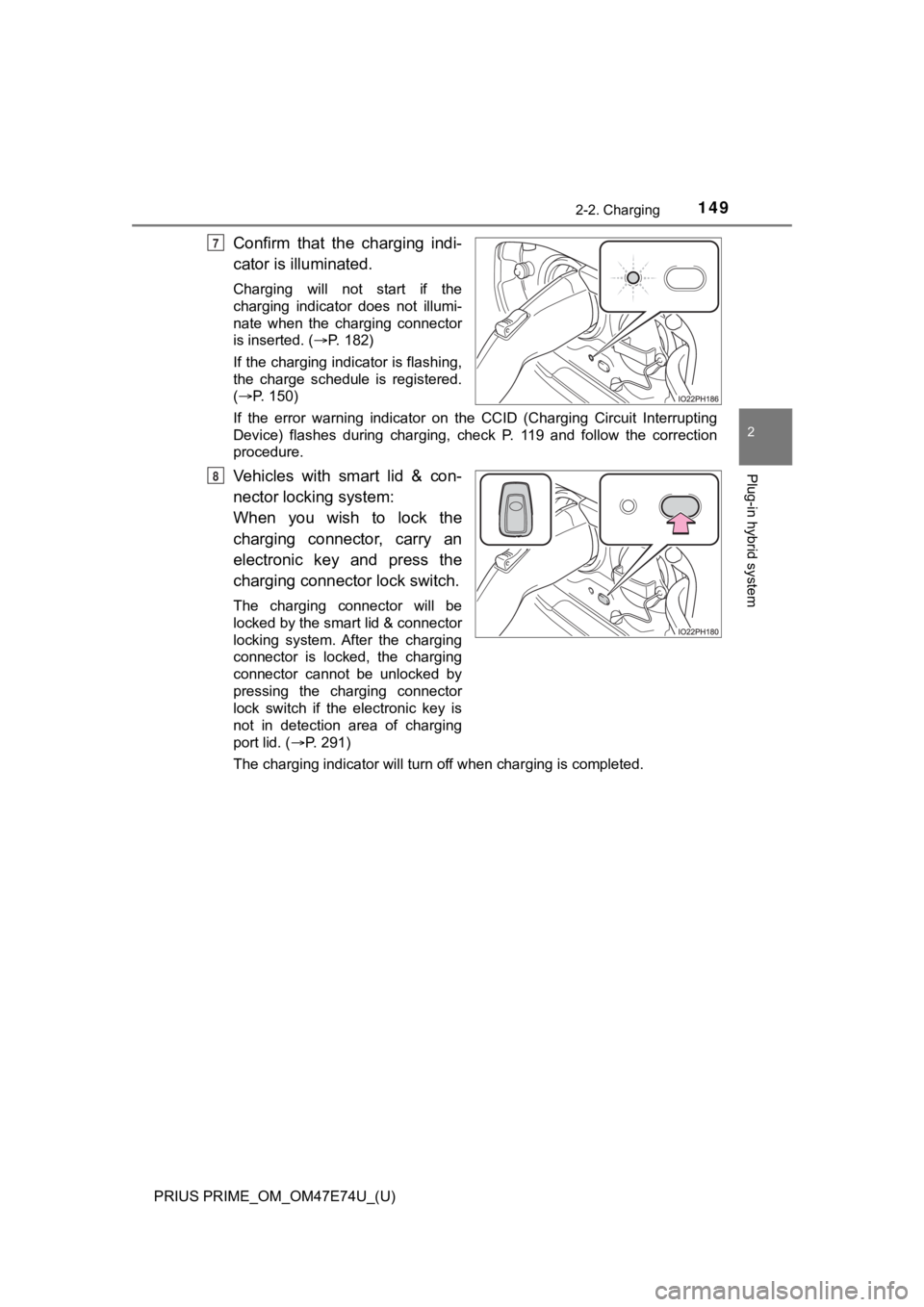
Confirm that the charging indi-
cator is illuminated.
Charging will not start if the
charging indicator does not illumi-
nate when the charging connector
is inserted. (P. 182)
If the charging indicator is flashing,
the charge schedule is registered.
( P. 150)
If the error warning indicator on the CCID (Charging Circuit In terrupting
Device) flashes during charging, check P. 119 and follow the co rrection
procedure.
Vehicles with smart lid & con-
nector locki ng system:
When you wish to lock the
charging connector, carry an
electronic key and press the
charging connector lock switch.
The charging connector will be
locked by the smart lid & connector
locking system. After the charging
connector is locked, the charging
connector cannot be unlocked by
pressing the charging connector
lock switch if the electronic key is
not in detection area of charging
port lid. ( P. 291)
The charging indicator will turn off when charging is completed .
7
8
Page 154 of 808
154
PRIUS PRIME_OM_OM47E74U_(U)
2-2. Charging
WARNING
■When charging
Observe the following precautions.
Failure to do so may cause an unexpected accident, resulting in death or
serious injury.
● Connect to a power source suitable for charging. ( P. 132)
● Before charging, check that the charging inlet does not have deformations,
damage, corrosion, dust or other foreign materials such as snow or ice
adhering to it. If anything is adhering to the inlet, be sure to completely
remove the material before connecting the charging connector.
● Do not let the terminals of the charging inlet get wet.
● Make sure that the charging cable, plug and socket are free of foreign mat-
ter and not deformed or damaged.
● Only use outlets where the plug can be securely inserted.
● Do not charge if the charging cable is coiled or bundled.
● Wrapping 120 V charging cable while in-use is not recommended b ecause
cable may overheat. Failure to rewrap charging cable when not in-use
could result in strangulation or tripping hazard.
● Do not touch the terminals of the charging connector and chargi ng inlet
with a sharp metal objects (needles etc.) or hands, or short th em with for-
eign objects.
● When charging outdoors, make sure to connect to a weatherproof outlet
for outdoor use.
● If any heat, smoke, odors, noise or other abnormalities are noticed during
charging, stop charging immediately.
● Do not insert the plug if the outlet is submerged in water or s no w.
● When charging during rain or snow, do not pull out or insert the plug with
wet hands. Also, do not get the electrical socket and plug wet.
● Do not charge the vehicle during a lightning storm.
● Do not let the wheels on the charging cable, plug, charging connector and
CCID (Charging Circuit Interrupting Device).
● Firmly insert the plug into the outlet.
● Do not use an extension cord and converting adaptor.
● After connecting the charging cable, confirm that it is not wou nd around
anything.
● If the power indicator light does not illuminate after plugging the charging
cable into the socket-outlet, unplug it immediately.
Page 155 of 808
PRIUS PRIME_OM_OM47E74U_(U)
1552-2. Charging
2
Plug-in hybrid system
WARNING
■If the error warning indicator on the CCID (Charging Circuit In terrupt-
ing Device) illuminates or flashes during charging
There may be an electrical leakage in the power source path, or there may
be a malfunction in the charging cable or CCID (Charging Circuit Interrupt-
ing Device). Refer to P. 119 and follow the correction procedure. If the error
warning indicator does not turn off even after performing the correction pro-
cedure, immediately stop charging, remove the charging cable an d contact
your Toyota dealer. Continuing to charge the vehicle in that condition may
lead to unforeseen accidents or serious injury.
■ After charging
Remove the plug if it will not be used for a long time.
Dirt and dust may accumulate plug or outlet, which could cause a malfunc-
tion or fire, possibly leading to death or serious injury.
■ Onboard traction battery charger
The onboard traction battery charger is located under the rear seats. Make
sure to observe the following precautions regarding the onboard traction
battery charger. Failure to observe these precautions may resul t in death or
serious injury such as burns and electric shocks.
● The onboard traction battery charger is hot during charging. Do not touch
the onboard traction battery charger, as doing so may result in burns.
● Do not disassemble, repair or modify the onboard traction battery charger.
When the onboard traction battery charger needs to be repaired, consult
your Toyota dealer.
■ Charging inlet
Do not disassemble, repair or modify the charging inlet. It may lead to
unforeseen accidents or serious injury. When the charging inlet needs to be
repaired, consult your Toyota dealer.
Page 157 of 808
PRIUS PRIME_OM_OM47E74U_(U)
1572-2. Charging
2
Plug-in hybrid system
NOTICE
■Using private power generator
Do not use private power generators as a power source for charg ing.
Doing so may make charging unstable, the voltage may be insuffi cient, and
the error warning indicator on the CCID (Charging Circuit Inter rupting
Device) of the charging cable may flash.
■ Charging station
Due to the environment in which the power equipment is located, charging
may be unstable due to noise, the voltage may be insufficient, and the error
warning indicator on the CCID (Charging Circuit Interrupting Device) of the
charging cable may flash.
Page 170 of 808
170
PRIUS PRIME_OM_OM47E74U_(U)
2-2. Charging
■To return to original setting after changing “Next Charging Eve nt” set-
ting
Turning the setting of “Charge Now” on and then off can return the setting of
“Next Charging Event” to its original setting.
■ When “Next Charging Event” is changed while charging
●When the charging mode is “Departure”, the current charging is interrupted
or continued depending on the remaining time until the charging is com-
pleted.
● When the charging mode is “Start”, the current charging is interrupted, the
next charging will start at the set time.
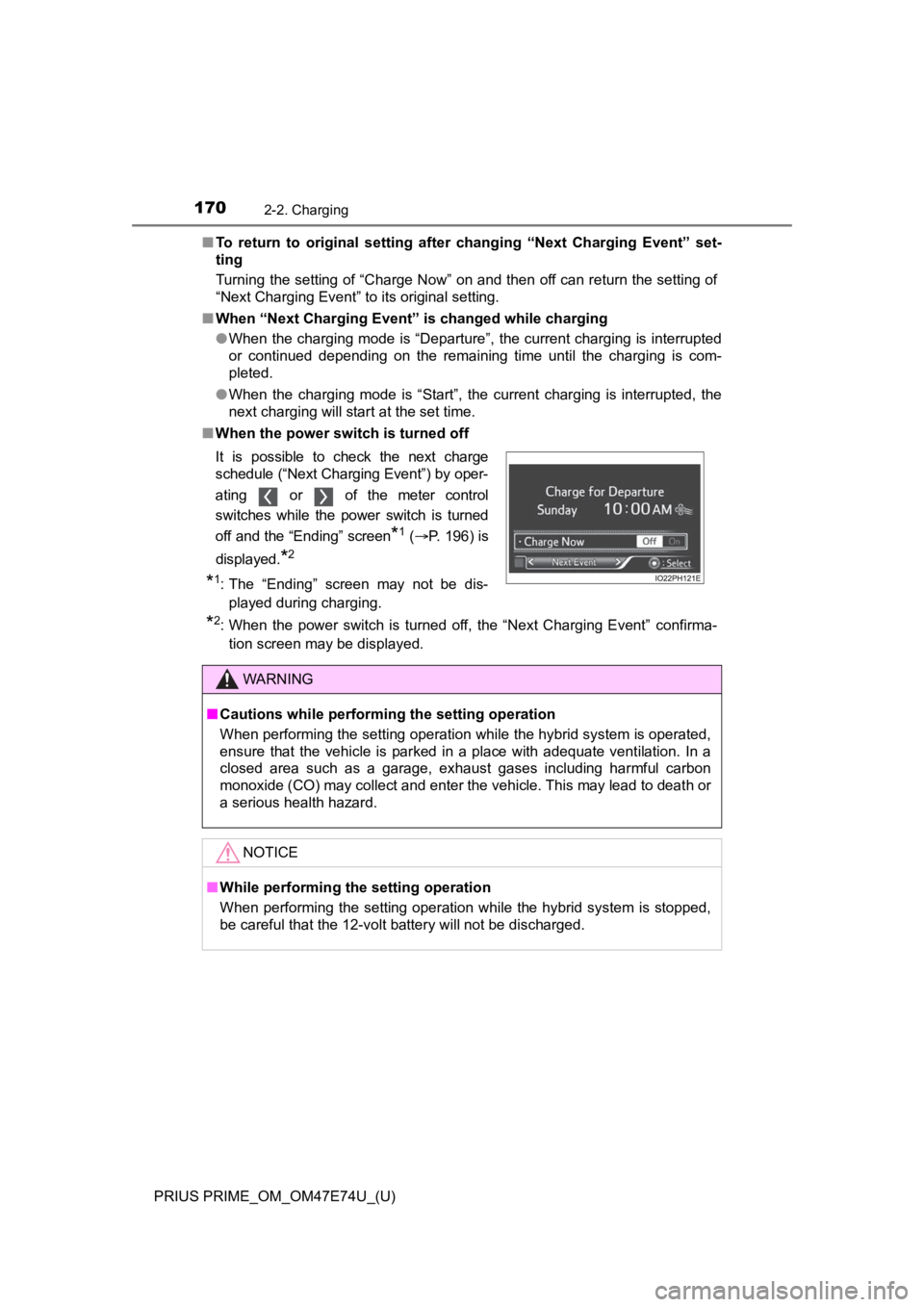
■ When the power switch is turned off
*2: When the power switch is turned off, the “Next Charging Event” confirma-
tion screen may be displayed.
It is possible to check the next charge
schedule (“Next Charging Event”) by oper-
ating or of the meter control
switches while the power switch is turned
off and the “Ending” screen
*1 (
P. 196) is
displayed.
*2
*1: The “Ending” screen may not be dis- played during charging.
WARNING
■ Cautions while performing the setting operation
When performing the setting operation while the hybrid system is operated,
ensure that the vehicle is parked in a place with adequate vent ilation. In a
closed area such as a garage, exhaust gases including harmful c arbon
monoxide (CO) may collect and enter the vehicle. This may lead to death or
a serious health hazard.
NOTICE
■ While performing the setting operation
When performing the setting operation while the hybrid system is stopped,
be careful that the 12-volt battery will not be discharged.
Page 180 of 808
180
PRIUS PRIME_OM_OM47E74U_(U)
2-2. Charging
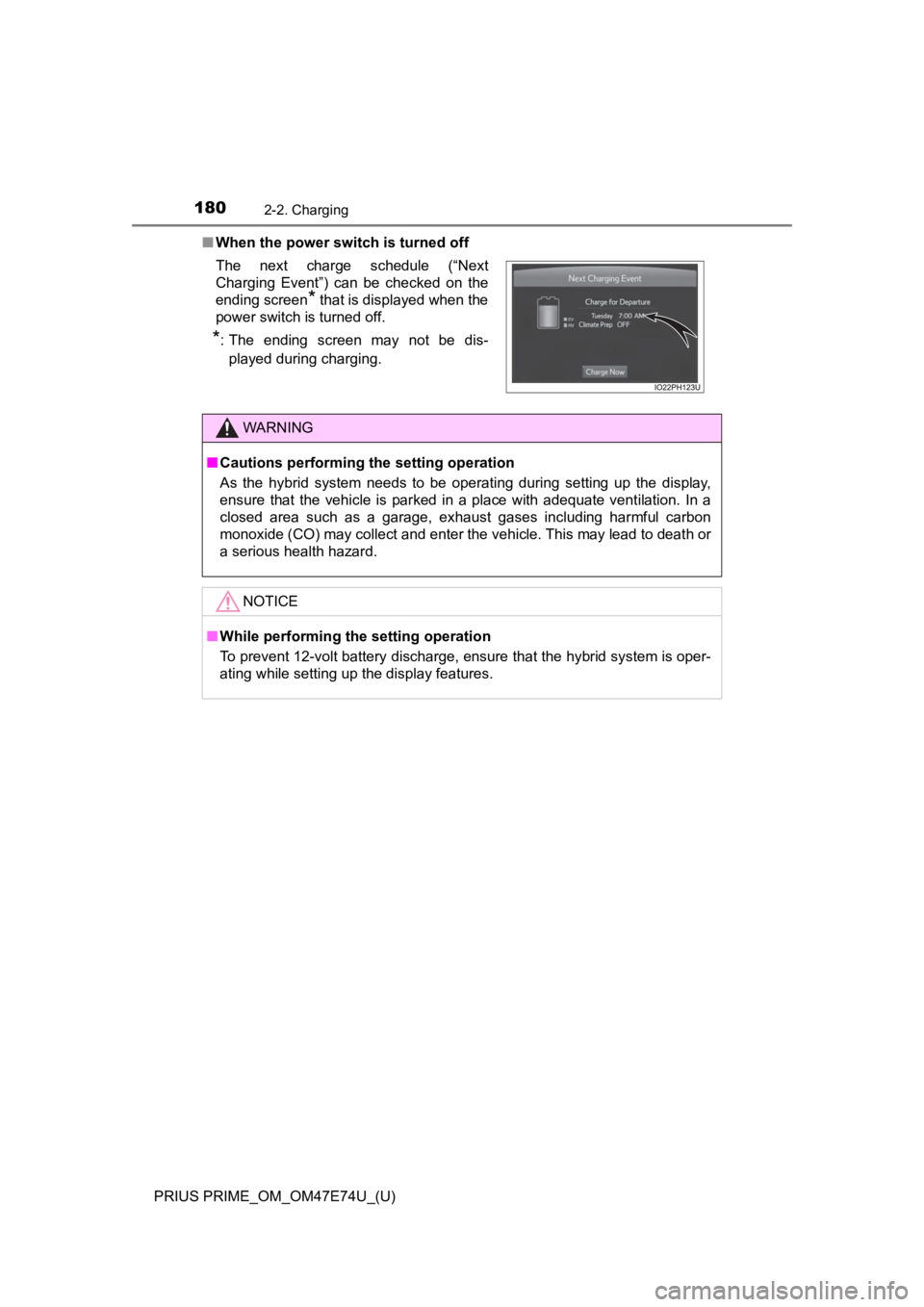
■When the power switch is turned off
The next charge schedule (“Next
Charging Event”) can be checked on the
ending screen
* that is displayed when the
power switch is turned off.
*: The ending screen may not be dis-
played during charging.
WARNING
■ Cautions performing the setting operation
As the hybrid system needs to be operating during setting up the display,
ensure that the vehicle is parked in a place with adequate vent ilation. In a
closed area such as a garage, exhaust gases including harmful c arbon
monoxide (CO) may collect and enter the vehicle. This may lead to death or
a serious health hazard.
NOTICE
■ While performing the setting operation
To prevent 12-volt battery discharge, ensure that the hybrid sy stem is oper-
ating while setting up the display features.
Page 182 of 808
182
PRIUS PRIME_OM_OM47E74U_(U)
2-2. Charging
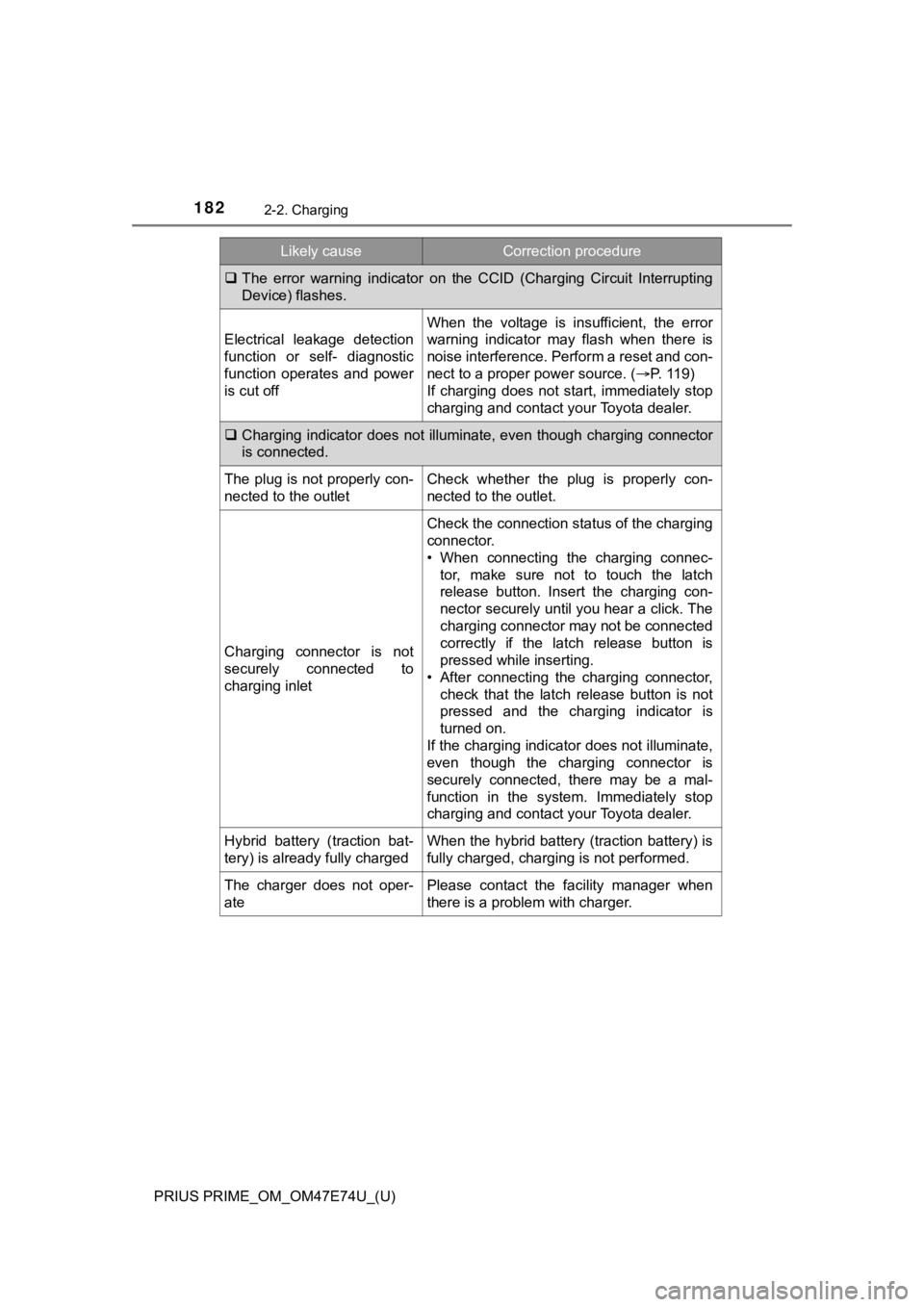
The error warning indicator on the CCID (Charging Circuit Inter rupting
Device) flashes.
Electrical leakage detection
function or self- diagnostic
function operates and power
is cut off
When the voltage is insufficient, the error
warning indicator may flash when there is
noise interference. Perform a reset and con-
nect to a proper power source. ( P. 119)
If charging does not start, immediately stop
charging and contact your Toyota dealer.
Charging indicator does not illuminate, even though charging co nnector
is connected.
The plug is not properly con-
nected to the outletCheck whether the plug is properly con-
nected to the outlet.
Charging connector is not
securely connected to
charging inlet
Check the connection status of the charging
connector.
• When connecting the charging connec- tor, make sure not to touch the latch
release button. Insert the charging con-
nector securely until you hear a click. The
charging connector may not be connected
correctly if the latch release button is
pressed while inserting.
• After connecting the charging connector,
check that the latch release button is not
pressed and the charging indicator is
turned on.
If the charging indicator does not illuminate,
even though the charging connector is
securely connected, there may be a mal-
function in the system. Immediately stop
charging and contact your Toyota dealer.
Hybrid battery (traction bat-
tery) is already fully chargedWhen the hybrid battery (traction battery) is
fully charged, charging is not performed.
The charger does not oper-
atePlease contact the facility manager when
there is a problem with charger.
Likely causeCorrection procedure
Page 188 of 808
188
PRIUS PRIME_OM_OM47E74U_(U)
2-2. Charging
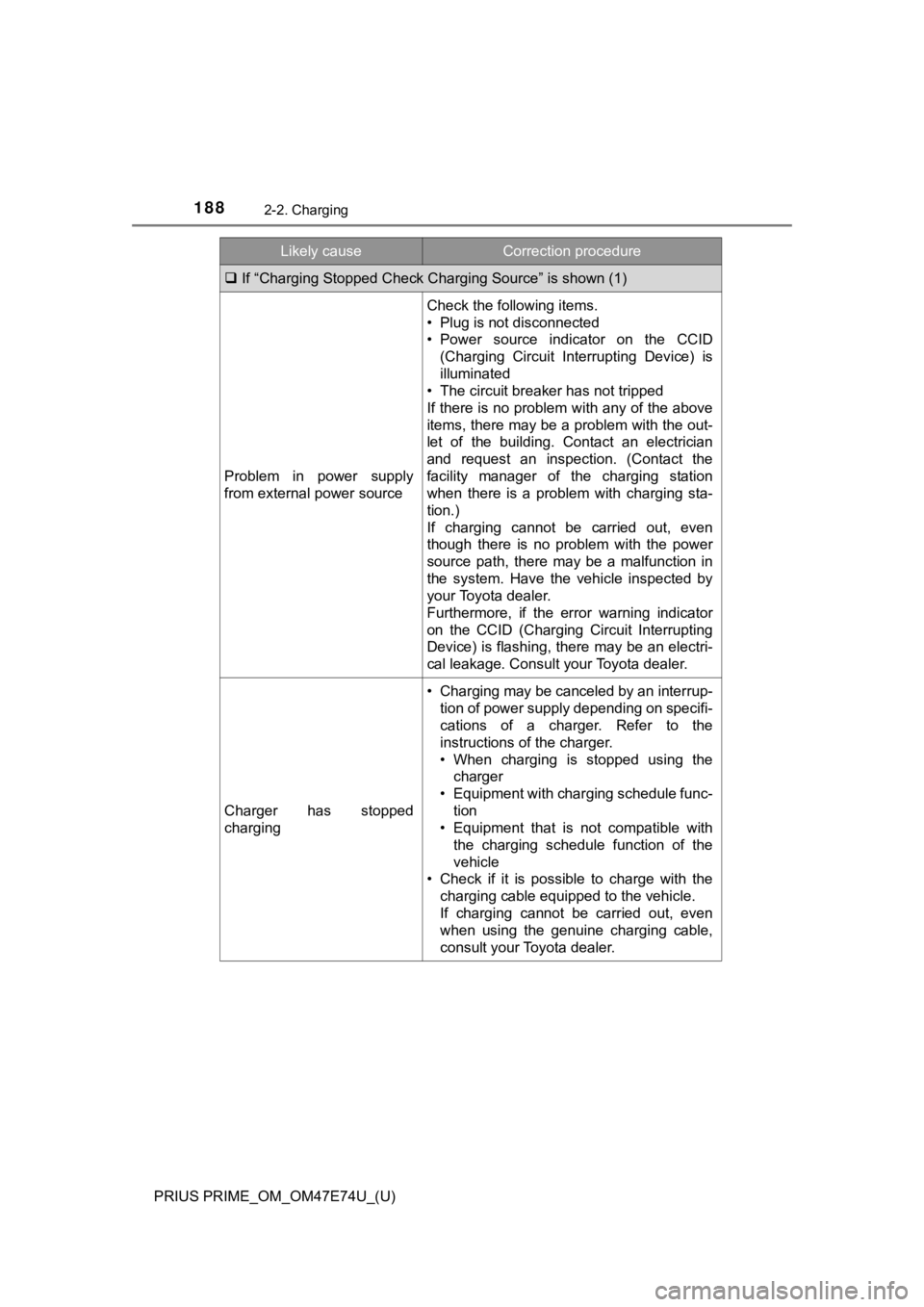
If “Charging Stopped Check Char ging Source” is shown (1)
Problem in power supply
from external power source
Check the following items.
• Plug is not disconnected
• Power source indicator on the CCID
(Charging Circuit Interrupting Device) is
illuminated
• The circuit breaker has not tripped
If there is no problem with any of the above
items, there may be a problem with the out-
let of the building. Contact an electrician
and request an inspection. (Contact the
facility manager of the charging station
when there is a problem with charging sta-
tion.)
If charging cannot be carried out, even
though there is no problem with the power
source path, there may be a malfunction in
the system. Have the vehicle inspected by
your Toyota dealer.
Furthermore, if the error warning indicator
on the CCID (Charging Circuit Interrupting
Device) is flashing, there may be an electri-
cal leakage. Consult your Toyota dealer.
Charger has stopped
charging
• Charging may be canceled by an interrup-
tion of power supply depending on specifi-
cations of a charger. Refer to the
instructions of the charger.
• When charging is stopped using thecharger
• Equipment with charging schedule func-
tion
• Equipment that is not compatible with the charging schedule function of the
vehicle
• Check if it is possible to charge with the charging cable equipped to the vehicle.
If charging cannot be carried out, even
when using the genuine charging cable,
consult your Toyota dealer.
Likely causeCorrection procedure