warning TOYOTA PRIUS PRIME 2022 Manual PDF
[x] Cancel search | Manufacturer: TOYOTA, Model Year: 2022, Model line: PRIUS PRIME, Model: TOYOTA PRIUS PRIME 2022Pages: 808, PDF Size: 14.72 MB
Page 208 of 808
208
PRIUS PRIME_OM_OM47E74U_(U)
3. Instrument cluster
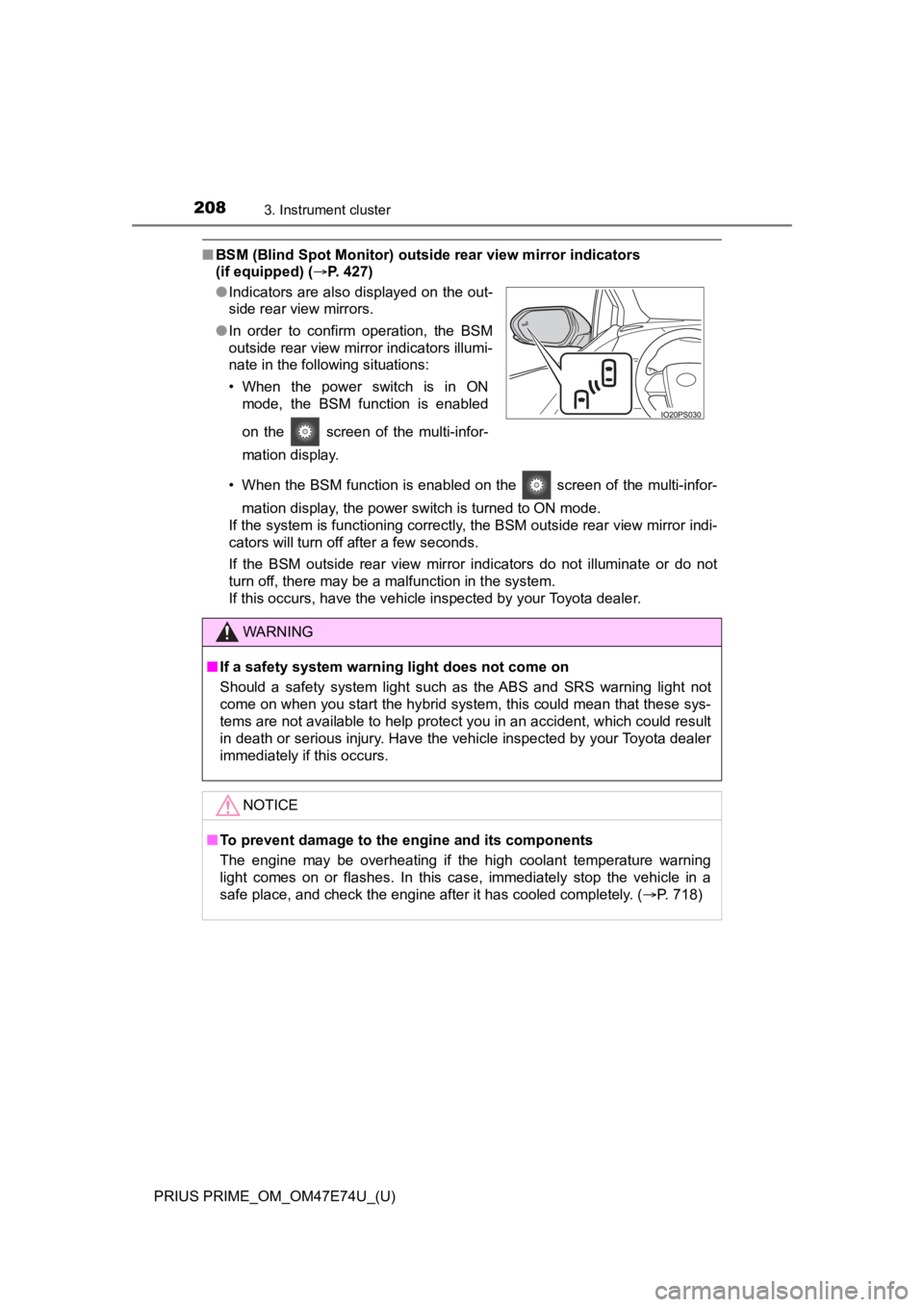
■BSM (Blind Spot Monitor) outsid e rear view mirror indicators
(if equipped) ( P. 427)
• When the BSM function is enabled on the screen of the multi-infor- mation display, the power switch is turned to ON mode.
If the system is functioning correctly, the BSM outside rear vi ew mirror indi-
cators will turn off after a few seconds.
If the BSM outside rear view mirror indicators do not illuminat e or do not
turn off, there may be a malfunction in the system.
If this occurs, have the vehicle inspected by your Toyota deale r.
●
Indicators are also displayed on the out-
side rear view mirrors.
● In order to confirm operation, the BSM
outside rear view mirror indicators illumi-
nate in the following situations:
• When the power switch is in ON
mode, the BSM function is enabled
on the screen of the multi-infor-
mation display.
WARNING
■If a safety system warning light does not come on
Should a safety system light such as the ABS and SRS warning li ght not
come on when you start the hybrid system, this could mean that these sys-
tems are not available to help protect you in an accident, which could result
in death or serious injury. Have the vehicle inspected by your Toyota dealer
immediately if this occurs.
NOTICE
■To prevent damage to the engine and its components
The engine may be overheating if the high coolant temperature warning
light comes on or flashes. In this case, immediately stop the v ehicle in a
safe place, and check the engine after it has cooled completely. (P. 718)
Page 221 of 808
PRIUS PRIME_OM_OM47E74U_(U)
2213. Instrument cluster
3
Instrument cluster
*: When there is a warning message that can be displayed, the color of
changes to amber.
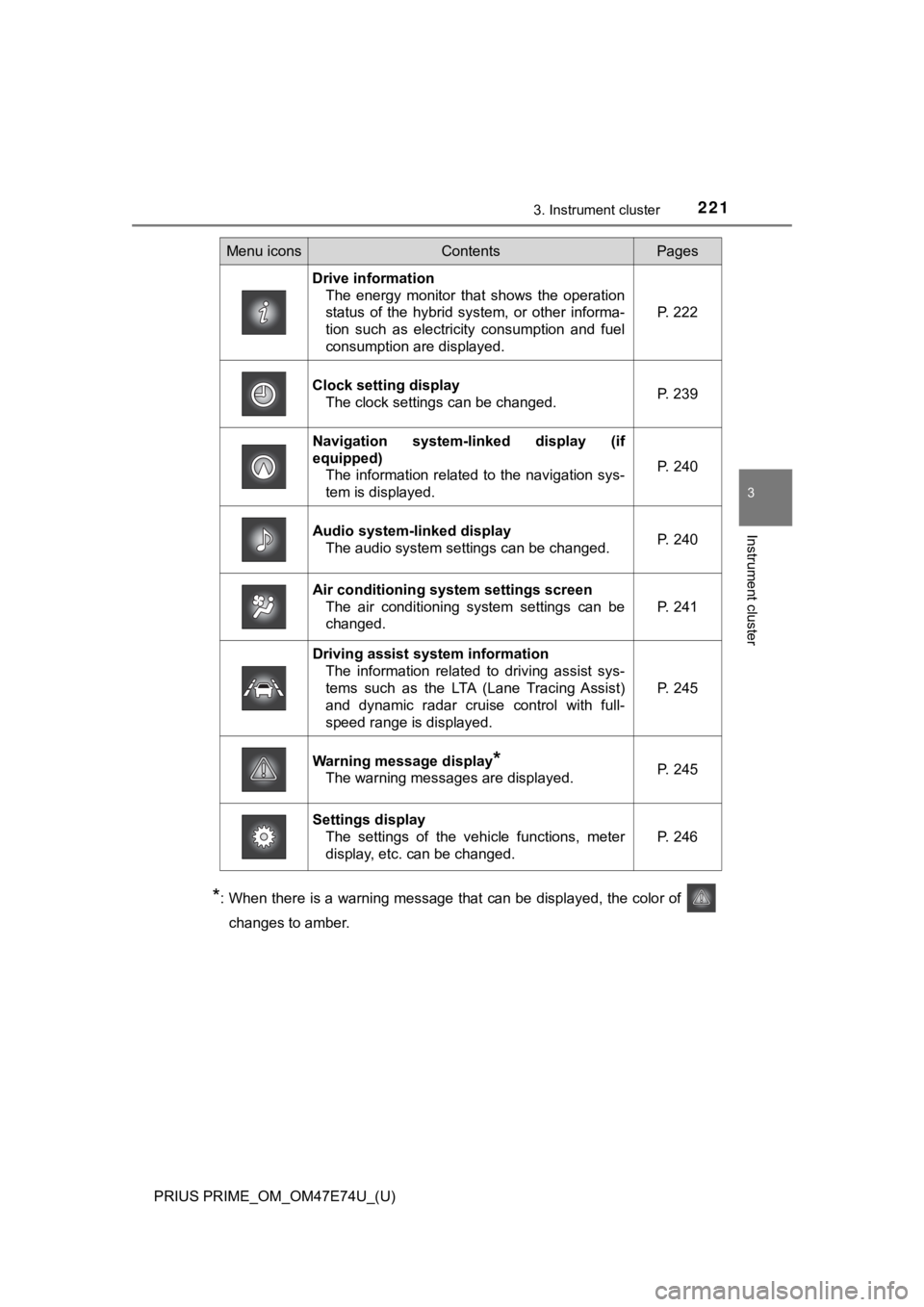
Menu iconsContentsPages
Drive information The energy monitor that shows the operation
status of the hybrid system, or other informa-
tion such as electricity consumption and fuel
consumption are displayed. P. 222
Clock setting display The clock settings can be changed. P. 239
Navigation system-linked display (if
equipped)
The information related to the navigation sys-
tem is displayed.
P. 240
Audio system-linked displayThe audio system settings can be changed.P. 240
Air conditioning system settings screen
The air conditioning system settings can be
changed.
P. 241
Driving assist system informationThe information related to driving assist sys-
tems such as the LTA (Lane Tracing Assist)
and dynamic radar cruise control with full-
speed range is displayed.
P. 245
Warning message display*
The warning messages are displayed.P. 245
Settings display
The settings of the vehicle functions, meter
display, etc. can be changed.
P. 246
Page 232 of 808

232
PRIUS PRIME_OM_OM47E74U_(U)
3. Instrument cluster
■Remaining charge amount warning of hybrid battery (traction battery)
●The buzzer sounds intermittently when the hybrid battery (traction battery)
remains without charging while the shift position is in N, or t he remaining
charge amount drops below a certain level.
If the remaining charge amount drops further, the buzzer sounds continu-
ously.
● When a warning message is shown on the multi-information display and the
buzzer sounds, follow the instructions displayed on the screen to perform
troubleshooting.
■ About the Eco score
●After starting off, Eco score display does not start until the vehicle speed
exceeds approximately 19 mph (30 km/h).
● In addition to the vehicle driving status, the Eco score also e valuates the air
conditioning system usage condition ( P. 243). The score displayed when
the hybrid system stops is the total result of the driving stat us after the
hybrid system starts and the air conditioning usage condition.
■ “EV Energy” and “EV Distance” display
The rate at which the “EV Ener gy” and “EV Distance” remaining a mount
decreases depends on the driving conditions of the vehicle. Also, the “EV
Energy” and “EV Distance” remaining amount may decrease due to system
power consumption even though the vehicle is not being driven.
Page 245 of 808
PRIUS PRIME_OM_OM47E74U_(U)
2453. Instrument cluster
3
Instrument cluster
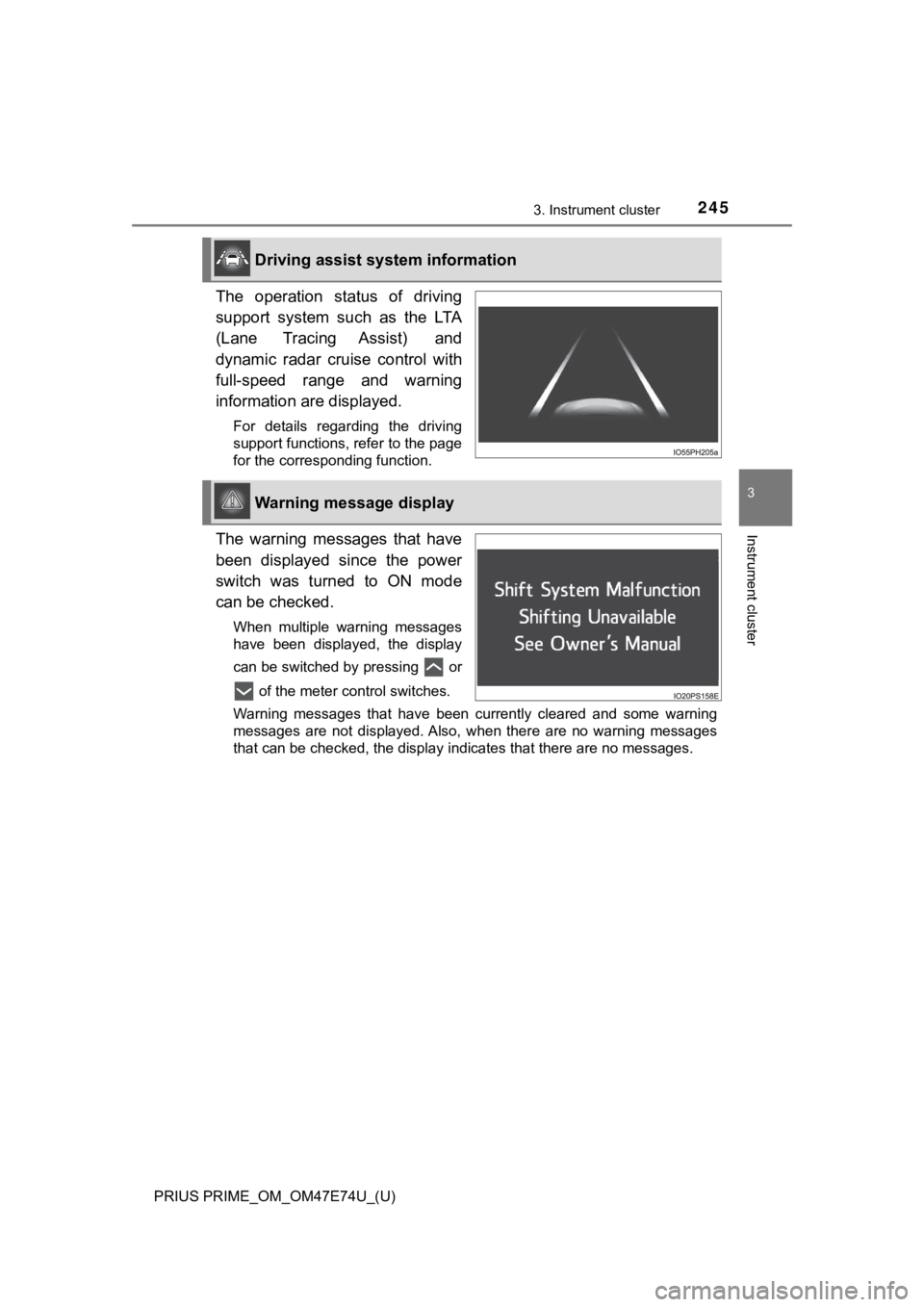
The operation status of driving
support system such as the LTA
(Lane Tracing Assist) and
dynamic radar cruise control with
full-speed range and warning
information are displayed.
For details regarding the driving
support functions, refer to the page
for the corresponding function.
The warning messages that have
been displayed since the power
switch was turned to ON mode
can be checked.
When multiple warning messages
have been displayed, the display
can be switched by pressing or of the meter control switches.
Warning messages that have been currently cleared and some warn ing
messages are not displayed. Also, when there are no warning mes sages
that can be checked, the display indicates that there are no me ssages.
Driving assist system information
Warning message display
Page 247 of 808
PRIUS PRIME_OM_OM47E74U_(U)
2473. Instrument cluster
3
Instrument cluster
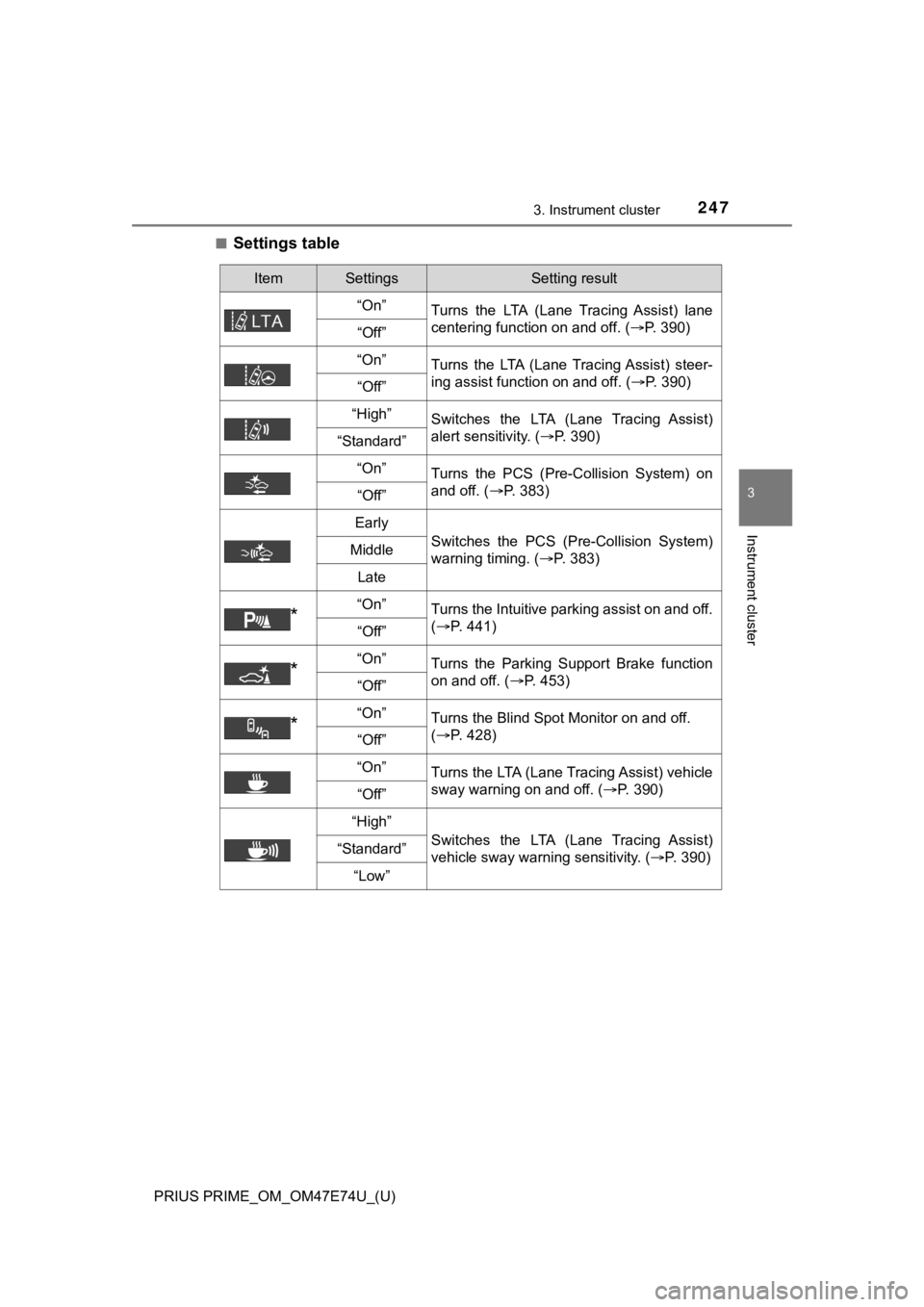
■Settings table
ItemSettingsSetting result
“On” Turns the LTA (Lane Tracing Assist) lane
centering function on and off. ( P. 390)
“Off”
“On” Turns the LTA (Lane Tracing Assist) steer-
ing assist function on and off. ( P. 390)
“Off”
“High”Switches the LTA (Lane Tracing Assist)
alert sensitivity. (P. 390)
“Standard”
“On”
Turns the PCS (Pre-Collision System) on
and off. ( P. 383)
“Off”
Early
Switches the PCS (Pre-Collision System)
warning timing. ( P. 383)Middle
Late
*“On”Turns the Intuitive parking assist on and off.
(P. 441)
“Off”
*“On”Turns the Parking Support Brake function
on and off. ( P. 453)
“Off”
*“On”Turns the Blind Spot Monitor on and off.
(P. 428)
“Off”
“On”
Turns the LTA (Lane Tracing Assist) vehicle
sway warning on and off. ( P. 390)
“Off”
“High”
Switches the LTA (Lane Tracing Assist)
vehicle sway warning sensitivity. ( P. 390)“Standard”
“Low”
Page 251 of 808
PRIUS PRIME_OM_OM47E74U_(U)
2513. Instrument cluster
3
Instrument cluster
■Setting items
●“Meter Customize” and “Vehicle Settings” setting items are not selectable
during driving and cannot be operated.
Also, the settings screen is temporarily canceled in the follow ing situations.
• A warning message is displayed.
• The vehicle starts off.
● Settings for functions not equipped to the vehicle are not disp layed.
● When a function is turned off, the related settings for that fu nction are not
selectable.
■ Calendar setting
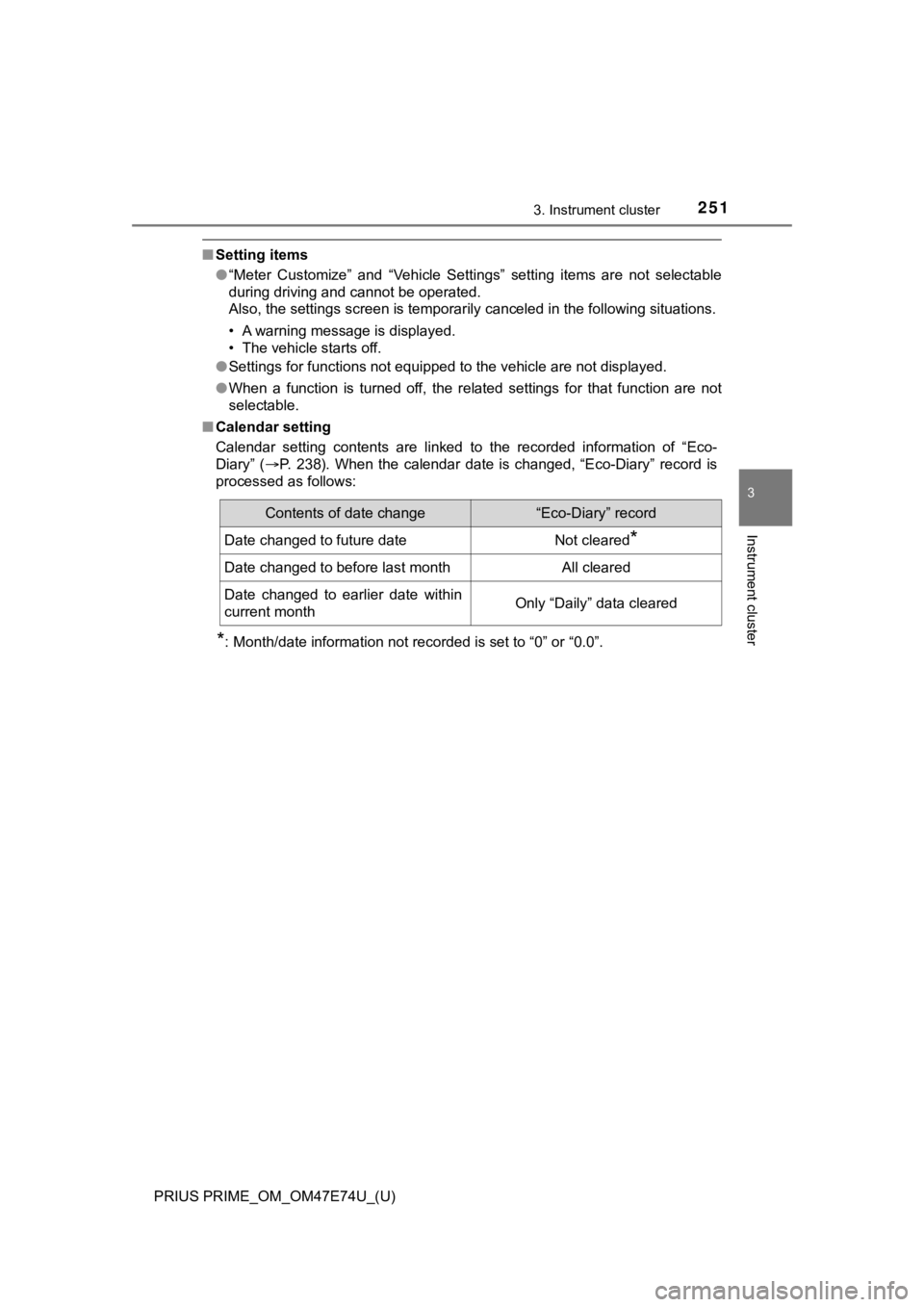
Calendar setting contents are linked to the recorded informatio n of “Eco-
Diary” ( P. 238). When the calendar date is changed, “Eco-Diary” record is
processed as follows:
*: Month/date information not recorded is set to “0” or “0.0”.
Contents of date change“Eco-Diary” record
Date changed to future dateNot cleared*
Date changed to before last monthAll cleared
Date changed to earlier date within
current monthOnly “Daily” data cleared
Page 252 of 808
252
PRIUS PRIME_OM_OM47E74U_(U)
3. Instrument cluster
WARNING
■Cautions while setting up the display
As the hybrid system needs to be operating during setting up the display,
ensure that the vehicle is parked in a place with adequate vent ilation. In a
closed area such as a garage, exhaust gases including harmful c arbon
monoxide (CO) may collect and enter the vehicle. This may lead to death or
a serious health hazard.
NOTICE
■ While setting up the display
To prevent 12-volt battery discharge, ensure that the hybrid sy stem is oper-
ating while setting up the display features.
Page 256 of 808
256
PRIUS PRIME_OM_OM47E74U_(U)
3. Instrument cluster
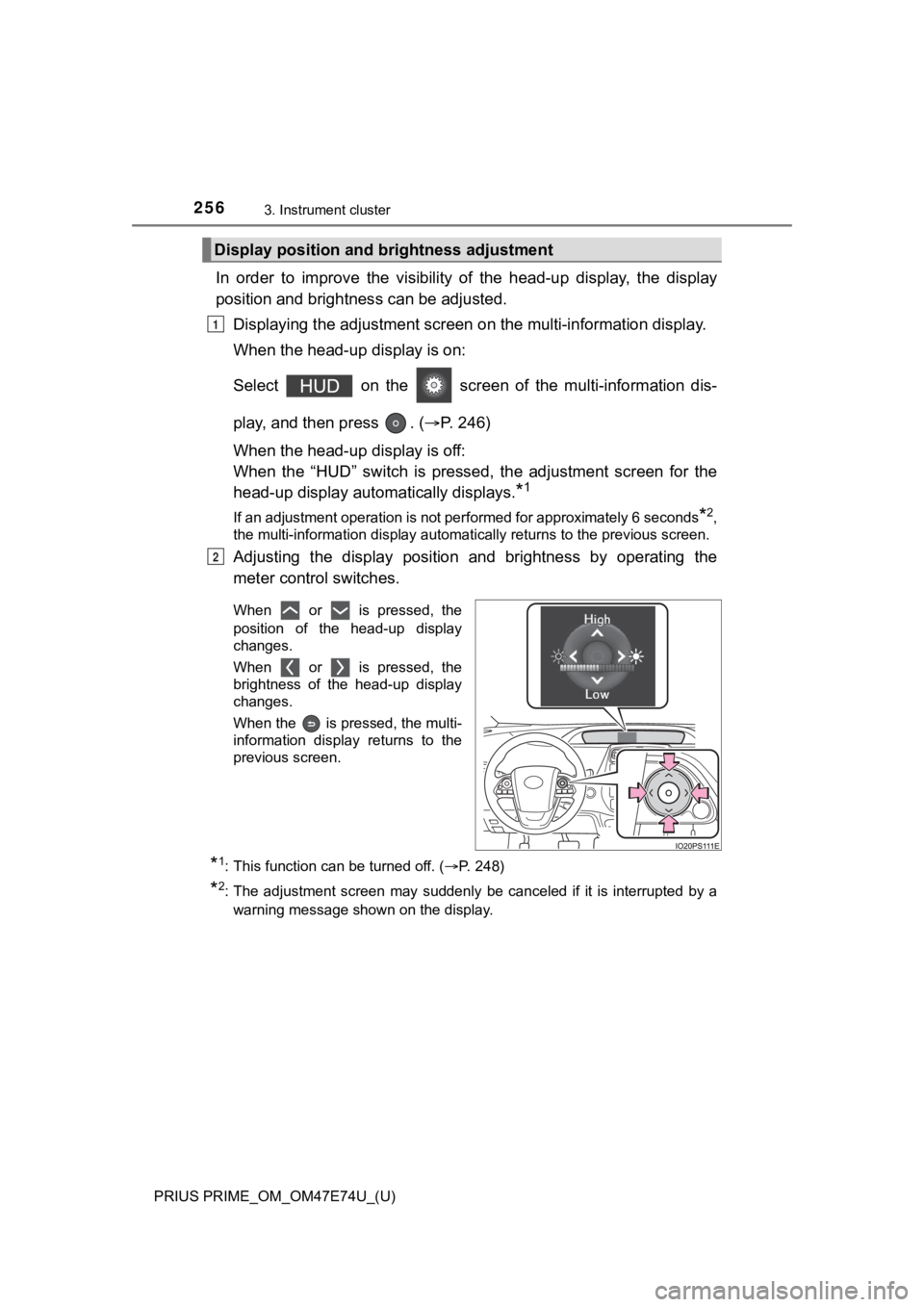
In order to improve the visibility of the head-up display, the display
position and brightness can be adjusted.
Displaying the adjustment screen on the multi-information display.
When the head-up display is on:
Select on the screen of the multi-information dis-
play, and then press . ( P. 246)
When the head-up display is off:
When the “HUD” switch is pressed, the adjustment screen for the
head-up display automatically displays.
*1
If an adjustment operation is not performed for approximately 6 seconds*2,
the multi-information display automatically returns to the previous screen.
Adjusting the display position and brightness by operating the
meter control switches.
When or is pressed, the
position of the head-up display
changes.
When or is pressed, the
brightness of the head-up display
changes.
When the is pressed, the multi-
information display returns to the
previous screen.
*1: This function can be turned off. ( P. 248)
*2: The adjustment screen may suddenly be canceled if it is interrupted by a
warning message shown on the display.
Display positi on and brightness adjustment
1
2
Page 257 of 808
PRIUS PRIME_OM_OM47E74U_(U)
2573. Instrument cluster
3
Instrument cluster
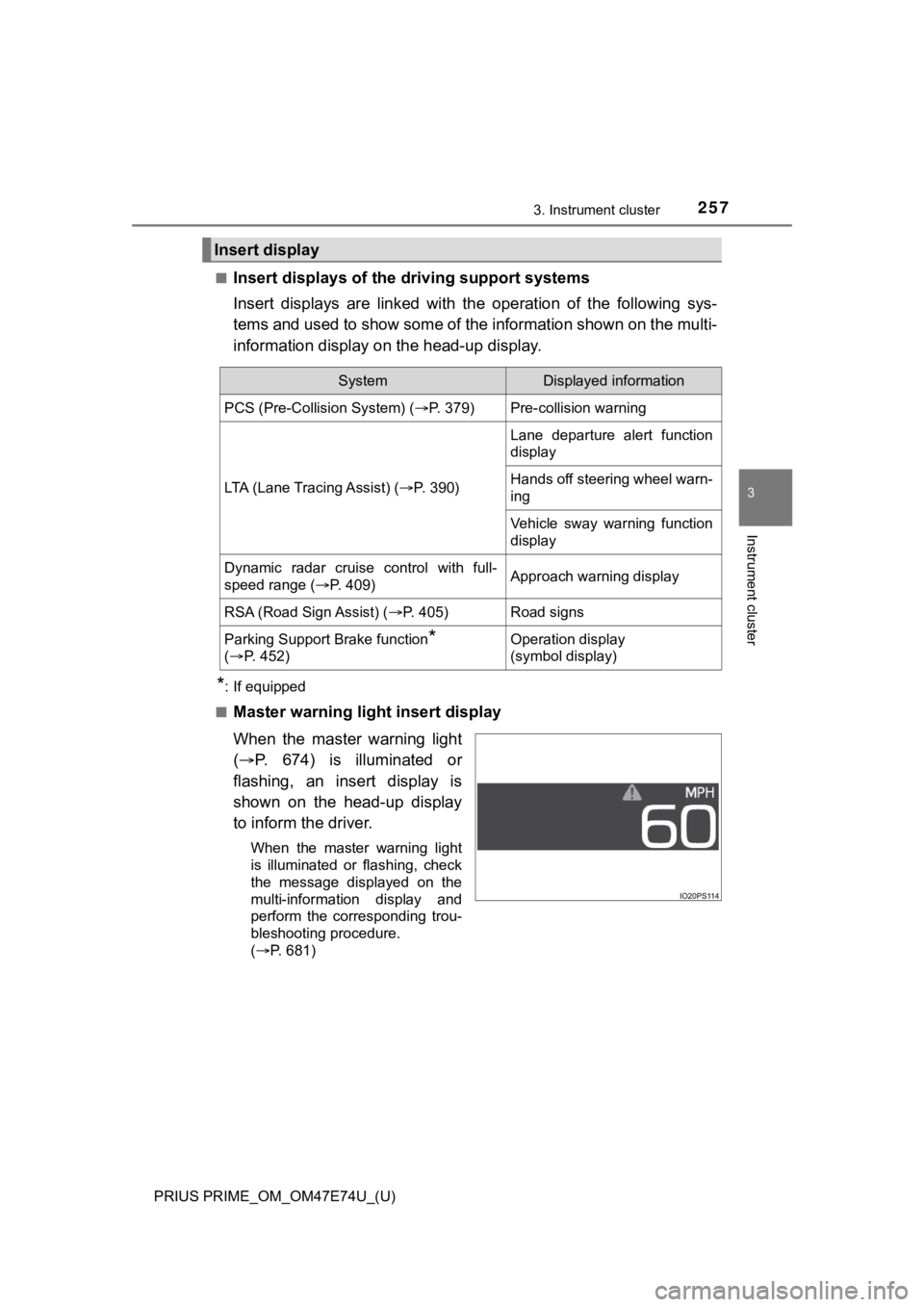
■Insert displays of the driving support systems
Insert displays are linked wit h the operation of the following sys-
tems and used to show some of the information shown on the mult i-
information display on the head-up display.
*: If equipped
■
Master warning light insert display
When the master warning light
( P. 674) is illuminated or
flashing, an insert display is
shown on the head-up display
to inform the driver.
When the master warning light
is illuminated or flashing, check
the message displayed on the
multi-information display and
perform the corresponding trou-
bleshooting procedure.
( P. 681)
Insert display
SystemDisplayed information
PCS (Pre-Collision System) ( P. 379)Pre-collision warning
LTA (Lane Tracing Assist) (P. 3 9 0 )
Lane departure alert function
display
Hands off steering wheel warn-
ing
Vehicle sway warning function
display
Dynamic radar cruise control with full-
speed range ( P. 409)Approach warning display
RSA (Road Sign Assist) ( P. 405)Road signs
Parking Support Brake function*
( P. 4 5 2 )Operation display
(symbol display)
Page 260 of 808
260
PRIUS PRIME_OM_OM47E74U_(U)
3. Instrument cluster
WARNING
■Before using the head-up display
● Check that the position and brightness of the head-up display i mage does
not interfere with safe driving. Incorrect adjustment of the image’s position
or brightness may obstruct the driver’s view and lead to an accident,
resulting in death or serious injury.
● Do not continuously look at the head-up display while driving a s you may
fail to see pedestrians, objects on the road, etc. ahead of the vehicle.
NOTICE
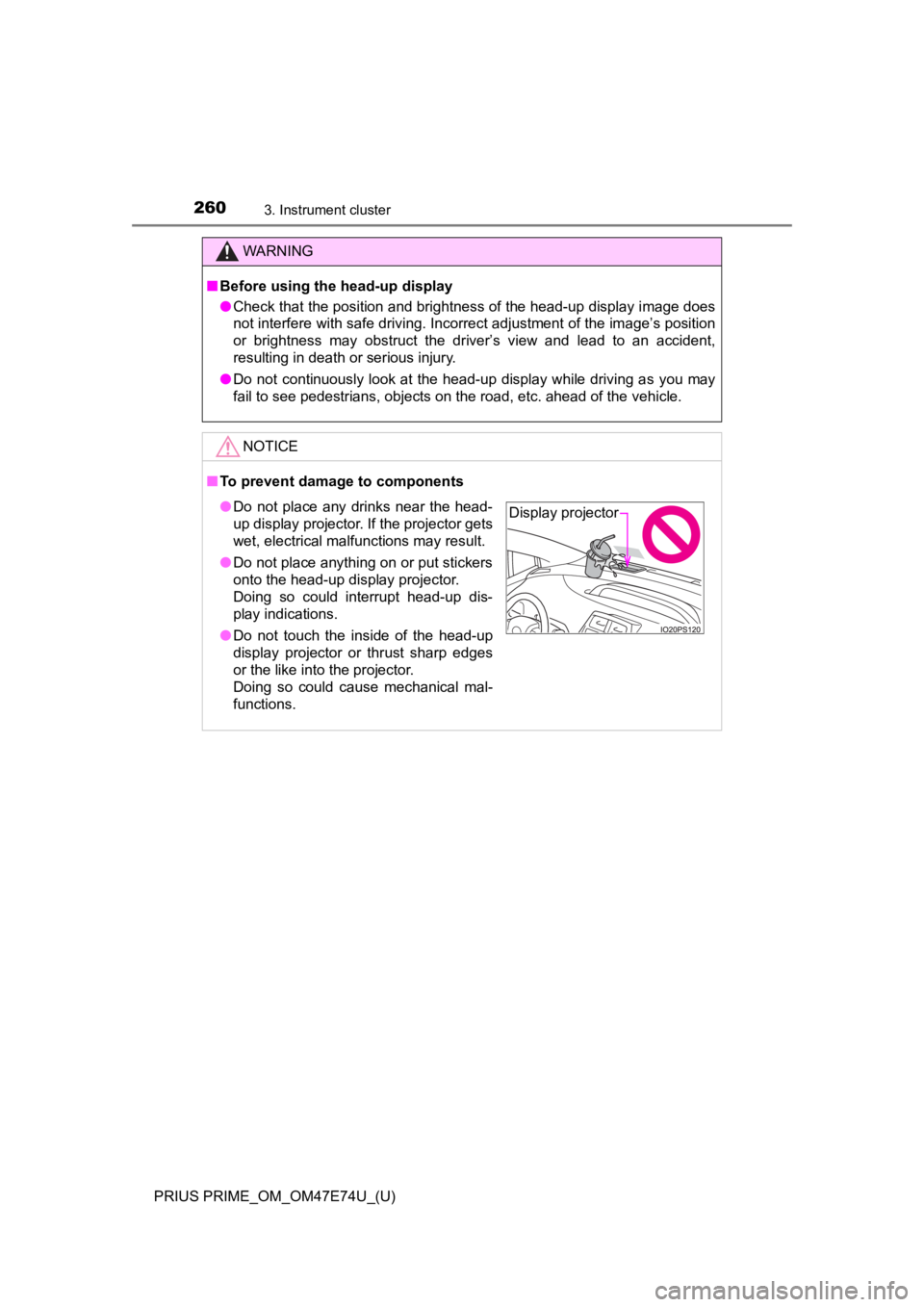
■ To prevent damage to components
● Do not place any drinks near the head-
up display projector. If the projector gets
wet, electrical malfunctions may result.
● Do not place anything on or put stickers
onto the head-up display projector.
Doing so could interrupt head-up dis-
play indications.
● Do not touch the inside of the head-up
display projector or thrust sharp edges
or the like into the projector.
Doing so could cause mechanical mal-
functions.Display projector