lock TOYOTA PRIUS PRIME 2022 Manual Online
[x] Cancel search | Manufacturer: TOYOTA, Model Year: 2022, Model line: PRIUS PRIME, Model: TOYOTA PRIUS PRIME 2022Pages: 808, PDF Size: 14.72 MB
Page 309 of 808
309
PRIUS PRIME_OM_OM47E74U_(U)
4-5. Opening and closing the windows
4
Operation of each component
Power windows
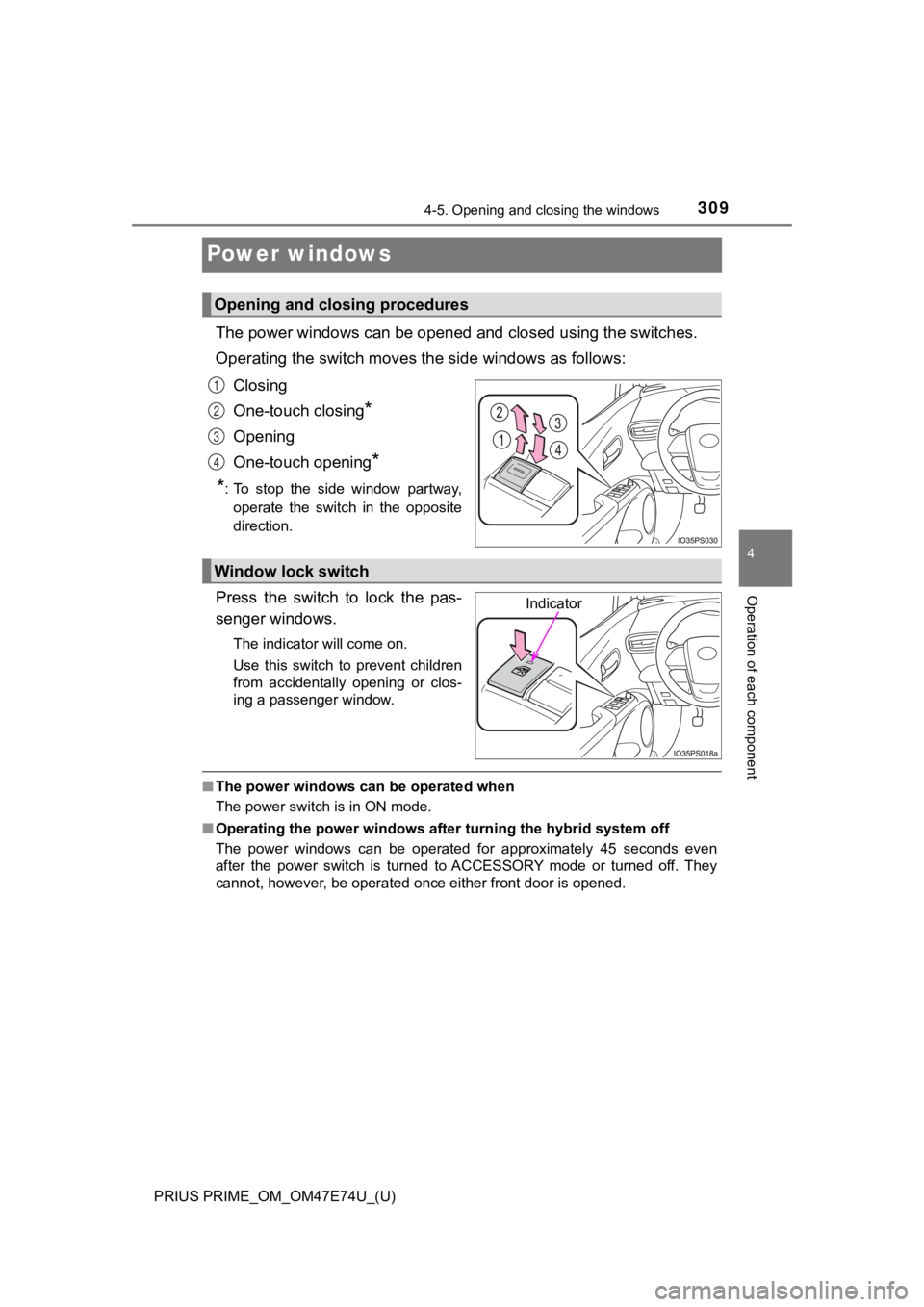
The power windows can be opened and closed using the switches.
Operating the switch moves t he side windows as follows:
Closing
One-touch closing
*
Opening
One-touch opening
*
*
: To stop the side window partway, operate the switch in the opposite
direction.
Press the switch to lock the pas-
senger windows.
The indicator will come on.
Use this switch to prevent children
from accidentally opening or clos-
ing a passenger window.
■ The power windows can be operated when
The power switch is in ON mode.
■ Operating the power windows after turning the hybrid system off
The power windows can be operated for approximately 45 seconds even
after the power switch is turned to ACCESSORY mode or turned of f. They
cannot, however, be operated once either front door is opened.
Opening and closing procedures
1
2
3
4
Window lock switch
Indicator
Page 310 of 808

310
PRIUS PRIME_OM_OM47E74U_(U)
4-5. Opening and closing the windows
■Jam protection function
If an object becomes jammed between the side window and the win dow
frame while the side window is closing, side window movement is stopped
and the side window is opened slightly.
■ Catch protection function
If an object becomes caught between the door and side window wh ile the
side window is opening, side window movement is stopped.
■ When the window cannot be opened or closed
When the jam protection function or catch protection function o perates
unusually and the side window cannot be opened and closed, perf orm the fol-
lowing operations with the power window switch of that door.
● Stop the vehicle. With the power switch in ON mode, within 4 se conds of the
jam protection function or catch protection function activating , continuously
operate the power window switch in the one-touch closing direct ion or one-
touch opening direction so that the side window can be opened a nd closed.
● If the side window cannot be opened and closed even when perfor ming the
above operations, perform the following procedure for function initialization.
Turn the power switch to ON mode.
Pull and hold the power window switch in the one-touch closing direction
and completely close the side window.
Release the power window switch for a moment, resume pulling the
switch in the one-touch closing direction, and hold it there for approxi-
mately 6 seconds or more.
Press and hold the power window switch in the one-touch opening direc-
tion. After the side window is completely opened, continue holding the
switch for an additional 1 second or more.
Release the power window switch for a moment, resume pressing t he
switch in the one-touch opening direction, and hold it there fo r approxi-
mately 4 seconds or more.
Pull and hold the power window switch in the one-touch closing direction
again. After the side window is completely closed, continue hol ding the
switch for a further 1 second or more.
If you release the switch while the side window is moving, star t again from
the beginning.
If the side window reverses and cannot be fully closed or opene d, have the
vehicle inspected by your Toyota dealer.
■ Door lock linked window operation
●The power windows can be opened and closed using the mechanical key.
*
(P. 708)
● The power windows can be opened using the wireless remote control.
*
(P. 280)
*: These settings must be customized at your Toyota dealer.
1
2
3
4
5
6
Page 311 of 808
PRIUS PRIME_OM_OM47E74U_(U)
3114-5. Opening and closing the windows
4
Operation of each component
■When the 12-volt battery is disconnected
The window lock switch is disabled. If necessary, press the win dow lock
switch after reconnecting the 12-volt battery.
■ Power window open reminder function
The buzzer sounds and a message is shown on the multi-informati on display
in the instrument cluster when the power switch is turned off and the driver’s
door is opened with the power windows open.
■ Customization
Settings (e.g. linked door lock operation) can be changed.
(Customizable features: P. 749)
WARNING
Observe the following precautions.
Failing to do so may result in death or serious injury.
■Closing the windows
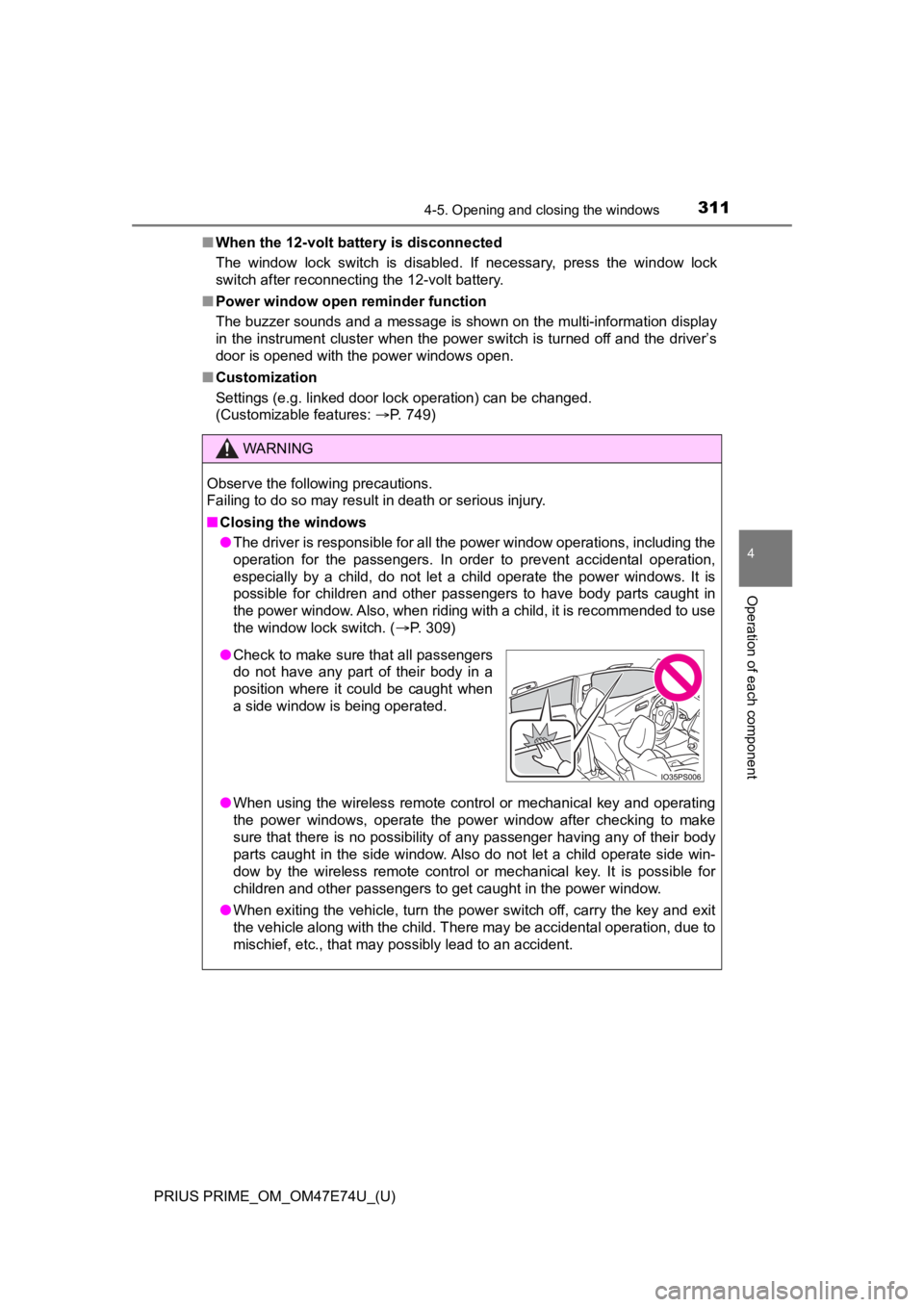
● The driver is responsible for all the power window operations, including the
operation for the passengers. In order to prevent accidental op eration,
especially by a child, do not let a child operate the power windows. It is
possible for children and other passengers to have body parts c aught in
the power window. Also, when riding with a child, it is recommended to use
the window lock switch. ( P. 309)
● When using the wireless remote control or mechanical key and op erating
the power windows, operate the power window after checking to m ake
sure that there is no possibility of any passenger having any o f their body
parts caught in the side window. Also do not let a child operat e side win-
dow by the wireless remote control or mechanical key. It is pos sible for
children and other passengers to get caught in the power window .
● When exiting the vehicle, turn the power switch off, carry the key and exit
the vehicle along with the child. There may be accidental operation, due to
mischief, etc., that may possibly lead to an accident.
● Check to make sure that all passengers
do not have any part of their body in a
position where it could be caught when
a side window is being operated.
Page 315 of 808
PRIUS PRIME_OM_OM47E74U_(U)
3155-1. Before driving
5
Driving
Stop the vehicle completely.
Set the parking brake. ( P. 3 4 6 )
Shift the shift position to P. ( P. 340)
Check that the shift position indicator shows P.
Press the power switch to stop the hybrid system.
Slowly release th e brake pedal.
Lock the door, making sure that you have the electronic key on your
person.
If parking on a hill, block the wheels as needed.
Firmly set the parking brake with the brake pedal depressed, an d
then shift the shift position to D.
Release the brake pedal and gen tly depress the accelerator pedal.
Release the parking brake.
When the following unusual operation is performed with the acce lera-
tor pedal depressed, the hybrid system output may be restrained .
● When the shift position is shifted to R
*.
● When the shift position is shifted from P or R to forward drive shift
position such as D
*.
When the system operates, a me ssage appears on the multi-inform a-
tion display. Read the message and follow the instruction.
*: Depending on the situation, the shift position may not be cha nged.
■When starting off on an uphill
The hill-start assist control will activate. ( P. 497)
■ For electricity-saving and fuel-efficient driving
Understand the system characteristics of the vehicle to use the functions of
the hybrid system. Also, keep in mind that hybrid vehicles are similar to con-
ventional vehicles, and it is necessary to refrain from activit ies such as sud-
den acceleration. Refer to “Plug-in hybrid vehicle driving tips ” (P. 106).
Parking the vehicle
Starting off on a steep uphill
Sudden start restraint control (Drive-Start Control [DSC])
1
2
3
4
5
6
1
2
3
Page 322 of 808

322
PRIUS PRIME_OM_OM47E74U_(U)
5-1. Before driving
WARNING
Observe the following precautions.
Failure to do so may result in death or serious injury.
■When the vehicle is parked
● Do not leave glasses, cigarette lighters, spray cans, or soft drink cans in
the vehicle when it is in the sun.
Doing so may result in the following:
• Gas may leak from a cigarette lighter or spray can, and may le ad to a fire.
• The temperature inside the vehicle may cause the plastic lenses and plastic material of glasses to deform or crack.
• Soft drink cans may fracture, causing the contents to spray ov er the
interior of the vehicle, and may also cause a short circuit in the vehicle’s
electrical components.
● Do not leave cigarette lighters in the vehicle. If a cigarette lighter is in a
place such as the glove box or on the floor, it may be lit accidentally when
luggage is loaded or the seat is adjusted, causing a fire.
● Do not attach adhesive discs to the windshield or windows. Do n ot place con-
tainers such as air fresheners on the instrument panel or dashboard. Adhe-
sive discs or containers may act as lenses, causing a fire in the vehicle.
● Do not leave a door or window open if the curved glass is coated with a
metallized film such as a silver-colored one. Reflected sunligh t may cause
the glass to act as a lens, causing a fire.
● Always apply the parking brake, shift the shift position to P, stop the hybrid
system and lock the vehicle.
Do not leave the vehicle unattended while the “READY” indicator is illumi-
nated.
If the vehicle is parked with the shift position in P but the parking brake is
not set, the vehicle may start to move, possibly leading to an accident.
● Do not touch the exhaust pipe while the “READY” indicator is illuminated
or immediately after turning the hybrid system off.
Doing so may cause burns.
Page 325 of 808

PRIUS PRIME_OM_OM47E74U_(U)
3255-1. Before driving
5
Driving
NOTICE
■When encountering flooded roads
Do not drive on a road that has flooded after heavy rain etc. D oing so may
cause the following serious damage to the vehicle:
● Engine stalling
● Short in electrical components
● Engine damage caused by water immersion
In the event that you drive on a flooded road and the vehicle i s flooded, be
sure to have your Toyota dealer check the following:
● Brake function
● Changes in quantity and quality of oil and fluid used for the engine, hybrid
transmission, etc.
● Lubricant condition for the bearings and suspension joints (where possi-
ble), and the function of all joints, bearings, etc.
If the shift control system is damaged by flooding, it may not be possible to
shift the shift position to P, or from P to other positions. When the shift posi-
tion cannot be changed from P to any other position, the front wheels will
lock, and you will be unable to tow the vehicle with the front wheels on the
ground. In this case, transport the vehicle with both front wheels or all four
wheels lifted. ( P. 664)
Page 328 of 808

328
PRIUS PRIME_OM_OM47E74U_(U)
5-1. Before driving
WARNING
■Things that must not be carried in the luggage compartment
The following things may cause a fire if loaded in the luggage compart-
ment:
●Receptacles containing gasoline
●Aerosol cans
■Storage precautions
Observe the following precautions.
Failure to do so may prevent the pedals from being depressed pr operly,
may block the driver’s vision, or may result in items hitting t he driver or
passengers, possibly causing an accident.
●Stow cargo and luggage in the luggage compartment whenever poss i-
ble.
●Do not stack cargo and luggage in the luggage compartment highe r
than the seatbacks.
●When you fold down the rear seats, long items should not be pla ced
directly behind the front seats.
●Never allow anyone to ride in the luggage compartment. It is no t
designed for passengers. They should ride in their seats with their seat
belts properly fastened.
●Do not place cargo or luggage in or on the following locations.
• At the feet of the driver
• On the front passenger or rea r seats (when stacking items)
• On the luggage cover
• On the instrument panel
• On the dashboard
●Secure all items in the occupant compartment.
■Capacity and distribution
●Do not exceed the maximum axle weight rating or the total vehic le
weight rating.
●Even if the total load of occupant’s weight and the cargo load is less
than the total load capacity, do not apply the load unevenly. I mproper
loading may cause deterioration of steering or braking control which
may cause death or serious injury.
Page 335 of 808
PRIUS PRIME_OM_OM47E74U_(U)
3355-2. Driving procedures
5
Driving
■Conditions affecting operation
P. 293
■ Note for the entry function
P. 294
■ If the hybrid system does not start
●The immobilizer system may not have been deactivated. ( P. 83)
Contact your Toyota dealer.
● The charging cable may be connected to the vehicle. ( P. 1 4 3 )
● If a message related to start-up is shown on the multi-informat ion display,
read the message and follow the instructions.
■ If the “READY” indicator does not come on
In the event that the “READY” indicator does not come on even a fter perform-
ing the proper procedures for starting the vehicle, contact you r Toyota dealer
immediately.
■ If the hybrid system is malfunctioning
P. 100
■ If the electronic key battery is depleted
P. 644
■ Operation of the power switch
●If the switch is not pressed shortly and firmly, the power switch mode may
not change or the hybrid system may not start.
● If attempting to restart the hybrid system immediately after tu rning the power
switch off, the hybrid system may not start in some cases. After turning the
power switch off, please wait a few seconds before restarting t he hybrid sys-
tem.
■ Automatic hybrid system shut off feature
●The vehicle is equipped with a feature that automatically shuts off the hybrid
system when the shift position is in P with the hybrid system operating for an
extended period.
● The hybrid system will automatically shut off after approximately 1 hour if it
has been left running while the shift position is in P.
● The timer for the automatic hybrid system shut off feature will reset if the
brake pedal is depressed or if the shift position is in a posit ion other than P.
● After the vehicle is parked, if the door is locked with the door lock switch
(P. 281) from the inside or the mechanical key ( P. 708) from the outside,
the automatic hybrid system shut off feature will be disabled. The timer for
the automatic hybrid system shut off feature will be re-enabled if the driver’s
door is opened.
Page 336 of 808

336
PRIUS PRIME_OM_OM47E74U_(U)
5-2. Driving procedures
■Automatic P position selection function
P. 342
■ When the shift contr ol system malfunctions
When attempting to turn the power switch off while there is a m alfunction in
the shift control system, the power switch mode may change to A CCES-
SORY mode. In this case, ACCESSORY mode may be turned off by ap plying
the parking brake and pressing the power switch again. If there is a malfunc-
tion in the system, have the vehicle inspected by your Toyota d ealer immedi-
ately.
■ Meter display
When the power switch is turned off, each display will turn off as follows.
● The shift position indicator will turn off after approximately 2 seconds.
● The multi-information display, clock, etc. will turn off after approximately 30
seconds. (Each display will also turn off immediately if a door is locked
before 30 seconds has elapsed.)
■ If the smart key system has been d eactivated in a customized setting
P. 709
Page 350 of 808
350
PRIUS PRIME_OM_OM47E74U_(U)
5-3. Operating the lights and wipers
■Daytime running light system
●The daytime running lights illuminate using the same lights as the head-
lights, and illuminate dimmer than the headlights.
● To make your vehicle more visible to other drivers during dayti me driving,
the daytime running lights turn on automatically when all of the following
conditions are met. (The daytime running lights are not designe d for use at
night.)
• The hybrid system is operating
• The parking brake is released
• The headlight switch is in the , or
* position
*: When the surroundings are bright
The daytime running lights remain on after they illuminate, eve n if the park-
ing brake is set again.
● For the U.S.A.: Daytime running lights can be turned off by ope rating the
switch.
● Compared to turning on the headlights, the daytime running ligh t system
offers greater durability and consumes less electricity, so it can help improve
fuel economy.
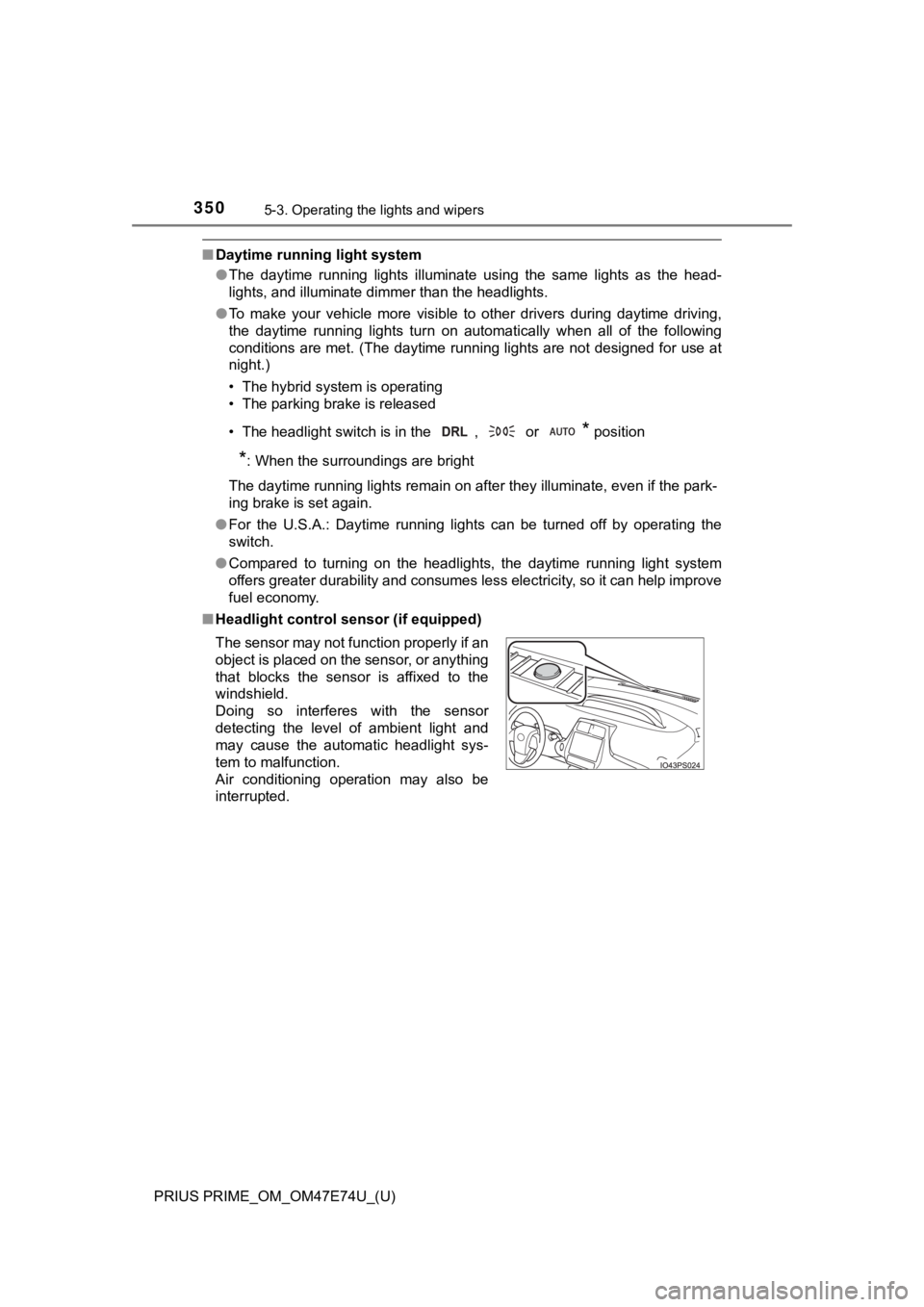
■ Headlight control sensor (if equipped)
The sensor may not function properly if an
object is placed on the sensor, or anything
that blocks the sensor is affixed to the
windshield.
Doing so interferes with the sensor
detecting the level of ambient light and
may cause the automatic headlight sys-
tem to malfunction.
Air conditioning operation may also be
interrupted.