light TOYOTA PRIUS PRIME 2023 Owners Manual
[x] Cancel search | Manufacturer: TOYOTA, Model Year: 2023, Model line: PRIUS PRIME, Model: TOYOTA PRIUS PRIME 2023Pages: 680, PDF Size: 14.97 MB
Page 567 of 680
5678-2. Steps to take in an emergency
8
When trouble arises
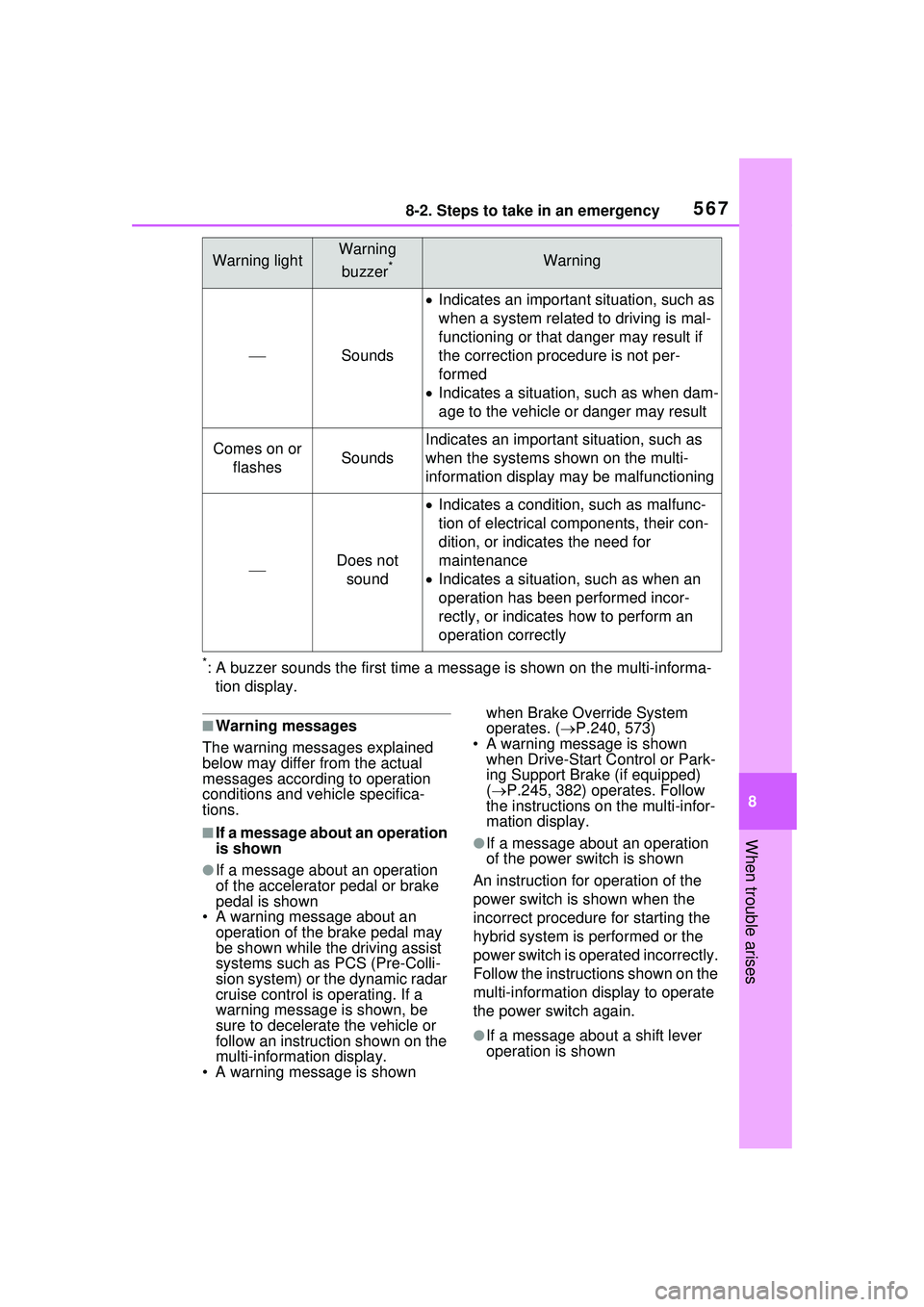
*: A buzzer sounds the first time a message is shown on the multi-informa-tion display.
■Warning messages
The warning messages explained
below may differ from the actual
messages according to operation
conditions and vehicle specifica-
tions.
■If a message about an operation
is shown
●If a message about an operation
of the accelerator pedal or brake
pedal is shown
• A warning message about an
operation of the brake pedal may
be shown while the driving assist
systems such as PCS (Pre-Colli-
sion system) or the dynamic radar
cruise control is operating. If a
warning message is shown, be
sure to decelerate the vehicle or
follow an instruction shown on the
multi-informat ion display.
• A warning message is shown when Brake Override System
operates. (
P.240, 573)
• A warning message is shown when Drive-Start Control or Park-
ing Support Brake (if equipped)
( P.245, 382) operates. Follow
the instructions on the multi-infor-
mation display.
●If a message about an operation
of the power switch is shown
An instruction for operation of the
power switch is shown when the
incorrect procedure for starting the
hybrid system is performed or the
power switch is operated incorrectly.
Follow the instructions shown on the
multi-information display to operate
the power switch again.
●If a message about a shift lever
operation is shown
Warning lightWarning
buzzer
*Warning
Sounds
Indicates an important situation, such as
when a system related to driving is mal-
functioning or that danger may result if
the correction procedure is not per-
formed
Indicates a situation, such as when dam-
age to the vehicle or danger may result
Comes on or
flashesSounds
Indicates an important situation, such as
when the systems shown on the multi-
information display ma y be malfunctioning
Does not
sound
Indicates a condition, such as malfunc-
tion of electrical components, their con-
dition, or indicates the need for
maintenance
Indicates a situation, such as when an
operation has been performed incor-
rectly, or indicates how to perform an
operation correctly
Page 568 of 680

5688-2. Steps to take in an emergency
To prevent the shift lever from being
operated incorrectly or the vehicle
from moving unexpectedly, a mes-
sage that requires shifting the shift
position may be displayed on the
multi-information display.
In that case, follow the instruction of
the message and shift the shift posi-
tion.
●If a message or image about an
open/close state of a part or
replenishment of a consumable is
shown
Confirm the part indicated by the
multi-information di splay or a warn-
ing light, and then perform the cop-
ing method such as closing the
open door or replenishing a con-
sumable.
■If a message that indicates the
need for visiting your Toyota
dealer is displayed
The system or part shown on the
multi-information di splay is malfunc-
tioning. Have the vehicle inspected
by your Toyota dealer immediately.
■If a message that indicates the
need for referring to Owner’s
Manual is displayed
●If “Engine Coolant Temp High” is
shown, follow the instructions,
accordingly. ( P.594)
●If the following messages are
shown, there may be a malfunc-
tion. Immediately have the vehi-
cle inspected by your Toyota
dealer.
• “Plug-in Charging System Mal-
function”
• “Hybrid System Malfunction”
• “Check Engine”
• “Traction battery system malfunc- tion”
• “Accelerator System Malfunction”
• “Smart Key System malfunction”
• “Shift System Malfunction Apply Parking Brake Se curely When
Parking See Owner’s Manual” • “P Switch Malfunction Apply Park-
ing Brake Securely When Parking
See Owner’s Manual”
• “Shift System Unavailable Apply Parking Brake Securely When
Parking See Owner’s Manual”
• “Shift System Malfunction See Owner’s Manual”
• “Shift System Malfunction Stop in
a Safe Place See Owner’s Man-
ual”
• “Battery Low Shifting Unavailable
See Owner’s Manual”
●If the following messages are
shown, there may be a malfunc-
tion. Immediately stop the vehicle
in a safe place and contact your
Toyota dealer. Continuing to drive
the vehicle may be dangerous.
• “Oil pressure low”
• “Braking Power Low”
●If any of the following messages
are shown on the multi-informa-
tion display, the vehicle may have
run out of fuel. Stop the vehicle in
a safe place and, if the fuel level is
low, refuel the vehicle.
• “Hybrid system stopped”
• “Engine stopped No Fuel”
●If “12-Volt Battery Charging Sys-
tem Malfunction Stop in a Safe
Place See Owner’s Manual” is
shown
Indicates a malfunction in the vehi-
cle’s charging system. Pull over and
stop the vehicle as soon as it is safe
to do so.
While the message is displayed, the
functions of the air conditioning, etc.
may be partially lim ited in order to
reduce the power consumption of
the 12-volt battery.
■If “Traction battery needs to be
protected. Refrain from the use
of N position.” is shown
This message may be displayed
when the shift position is in N.
As the hybrid battery (traction bat-
tery) can not be charged when the
Page 571 of 680
5718-2. Steps to take in an emergency
8
When trouble arises
front of the front camera.
■If “System Stopped Front Cam-
era Out of Temperature Range
Wait until Normal Tempera-
ture” is displayed
Indicates one of the following sys-
tems is disabled.
●PCS (Pre-Collision System)
●LDA (Lane Departure Alert)
●LTA (Lane Tracing Assist)
● LCA (Lane Change Assist) (if
equipped)
●AHB (Automatic High Beam)
●Dynamic radar cruise control
● RSA (Road Sign Assist) (if
equipped)
●PDA (Proactive Driving Assist)
Follow the following correction
methods.
• If the front camera is hot, such as
after the vehicle is parked in the
sun, use the air conditioning sys-
tem to decrease the temperature
around the front camera
• If a sunshade was used when the vehicle was parked, depending on
its type, the sunlight reflected from
the surface of the sunshade may
cause the temperature of the front
camera to become excessively
high
• If the front camera is cold, such
after the vehicle is parked in an
extremely cold environment, use
the air conditioning system to
increase the temperature around
the front camera
■If “System Stopped Front Radar
Sensor Blocked Clean Radar
Sensor” is displayed
Indicates one of the following sys-
tems is disabled.
●PCS (Pre-Collision System)
●LDA (Lane Departure Alert)
●LTA (Lane Tracing Assist)
● LCA (Lane Change Assist) (if
equipped)
●AHB (Automatic High Beam)
●Dynamic radar cruise control
●PDA (Proactive Driving Assist)
Follow the following correction
methods.
• Check if there is any foreign mat- ter attached to the radar sensor or
radar sensor cover and clean
them if necessary ( P.286)
• This message may be displayed when driving in an open area with
few nearby vehicles or structures,
such as a desert, grasslands, sub-
urbs, etc.
The message may be cleared by
driving the vehicle in an area with
structures, vehicles, etc. nearby.
■If “System Stopped Front Radar
Sensor Out of Temperature
Range Wait until Normal Tem-
perature” is displayed
Indicates one of the following sys-
tems is disabled.
●PCS (Pre-Collision System)
●LDA (Lane Departure Alert)
●LTA (Lane Tracing Assist)
● LCA (Lane Change Assist) (if
equipped)
●AHB (Automatic High Beam)
●Dynamic radar cruise control
●PDA (Proactive Driving Assist)
The temperature of the radar sensor
is outside of the operating range.
Wait for the temperature to become
appropriate.
■If “System Stopped Front Radar
In Self Calibration See Owner’s
Manual” is displayed
Indicates one of the following sys-
tems is disabled.
●PCS (Pre-Collision System)
Page 573 of 680
5738-2. Steps to take in an emergency
8
When trouble arises
distance on the maintenance sched-
ule*.
Comes on approximately 5000
miles (8000 km) after the message
has been reset. (The indicator will
not work properly unless the mes-
sage has been reset.)
Perform the necessary mainte-
nance. Please reset the message
after the maintenance is performed.
( P.495)
*: Refer to the separate “Scheduled
Maintenance Guide” or “Owner’
Manual Supplement” for the main-
tenance interval applicable to your
vehicle.
■If “Engine Maintenance
Required Visit Your Dealer” is
shown
The engine or an engine component
is malfunctioning. Have the vehicle
inspected by your Toyota dealer
immediately.
■If “Oil Maintenance Required
Soon” is displayed
Indicates that the engine oil should
be scheduled to be changed.
Check the engine oil and change it if
necessary.
After changing the engine oil, make
sure to reset the message.
( P.506)
■If “Oil Maintenance Required
Visit Your Dealer” is displayed
Indicates that the engine oil should
be changed.
Check and change the engine oil,
and oil filter by your Toyota dealer.
After changing the engine oil, make
sure to reset the message.
( P.506)
■If “Accelerator and Brake Ped-
als Pressed Simultaneously” is
shown
The accelerator and brake pedals
are being depressed simultane-
ously. ( P.240) Release the accelerator pedal and
depress the brake pedal.
■Warning buzzer
P.563
WARNING
■If a warning light comes on or
a warning buzzer sounds
when a warning message is
shown on the multi-informa-
tion display
P.564
NOTICE
■If “Maintenance Required For
Traction Battery At Your
Dealer” is shown
The hybrid battery (traction bat-
tery) is scheduled to be inspected
or replaced. Have the vehicle
inspected by your Toyota dealer
immediately.
●Continuing to drive the vehicle
without having the hybrid bat-
tery (traction battery) inspected
will cause the hybrid system not
to start.
●If the hybrid system does not
start, contact your Toyota
dealer immediately.
Page 582 of 680
5828-2. Steps to take in an emergency
dealer.
When having the tire repaired or
replaced, make sure to tell your
Toyota dealer that the sealant is
injected.
■If the tire is inflated to more
than the specified air pressure
1 Disconnect the hose from the
valve.
2 Install the air release cap to the
end of the hose and push the
protrusion on the air release cap
into the tire valve to let some air
out.
3 Disconnect the hose from the
valve, remove the air release cap
from the hose and then recon-
nect the hose.
4 Turn the compressor switch on
and wait for several seconds,
and then turn it off. Check that
the air pressure indicator shows
the specified air pressure.
If the air pressure is under the des-
ignated pressure, turn the compres-
sor switch on again and repeat the
inflation procedure until the speci-
fied air pressure is reached.
■After a tire is repaired with the
emergency tire puncture repair
kit
●The tire pressure warning valve
and transmitter should be
replaced.
●Even if the tire inflation pressure is
at the recommended level, the tire
pressure warning light may come
on/flash.
WARNING
■When fixing the flat tire
●Stop your vehicle in a safe and
flat area.
●Do not touch the wheels or the
area around the brakes immedi-
ately after the vehicle has been
driven.
After the vehicle has been
driven, the wheels and the area
around the brakes may be
extremely hot. Touching these
areas with hands, feet or other
body parts may result in burns.
●Connect the valve and hose
securely with the tire installed
on the vehicle. If the hose is not
properly connected to the valve,
air leakage may occur as seal-
ant may be sprayed out.
●If the hose comes off the valve
while inflating the tire, there is a
risk that the hose will move
abruptly due to air pressure.
●After inflation of the tire has
completed, the sealant may
splatter when the hose is dis-
connected or some air is let out
of the tire.
●Follow the operation procedure
to repair the tire. If the proce-
dures not followed, the sealant
may spray out.
●Keep back from the tire while it
is being repaired, as there is a
chance of it bursting while the
repair operation is being per-
formed. If you notice any cracks
or deformation of the tire, turn
off the compressor switch and
stop the repair operation imme-
diately.
Page 585 of 680
5858-2. Steps to take in an emergency
8
When trouble arises
depending on the type of mal-
function, an interim measure
is available to start the hybrid
system. (P.585)
There is a possibility that the
temperature of the hybrid bat-
tery (traction battery) is
extremely low (approximately
below -22°F [-30°C]). ( P.84,
252)
*: It may not be possible to shift the shift position from P.
One of the following may be the
cause of the problem:
The 12-volt battery may be
discharged. ( P.589)
The 12-volt battery terminal
connections may be loose or
corroded. ( P.512)
One of the following may be the
cause of the problem:
The 12-volt battery may be
discharged. ( P.589)
One or both of the 12-volt bat-
tery terminals may be discon-
nected. ( P.512) Contact your Toyota dealer if
the problem cannot be repaired,
or if repair procedures are
unknown.
When the hybrid system does
not start, the following steps can
be used as an interim measure
to start the hybrid system if the
power switch is functioning nor-
mally.
Do not use this starting proce-
dure except in cases of emer-
gency.
1
Pull the parking brake switch
to check that the parking
brake is set. ( P.263)
Parking brake indicator will come
on.
2 Shift the shift position to P.
3 Turn the power switch to
ACC
*1, 2.
4 Press and hold the power
switch for about 15 seconds
while depressing the brake
pedal firmly.
Even if the hybrid system can be
started using the above steps,
the system may be malfunction-
ing. Have the vehicle inspected
by your Toyota dealer.
*1: ACC mode can be enabled/dis- abled on the customize menu.
*2: When ACC is disabled, turn the power switch to ON then OFF,
The interior lights and
headlights are dim, or the
horn does not sound or
sounds at a low volume
The interior lights and
headlights do not turn on,
or the horn does not
sound
Starting the hybrid sys-
tem in an emergency
Page 590 of 680
5908-2. Steps to take in an emergency
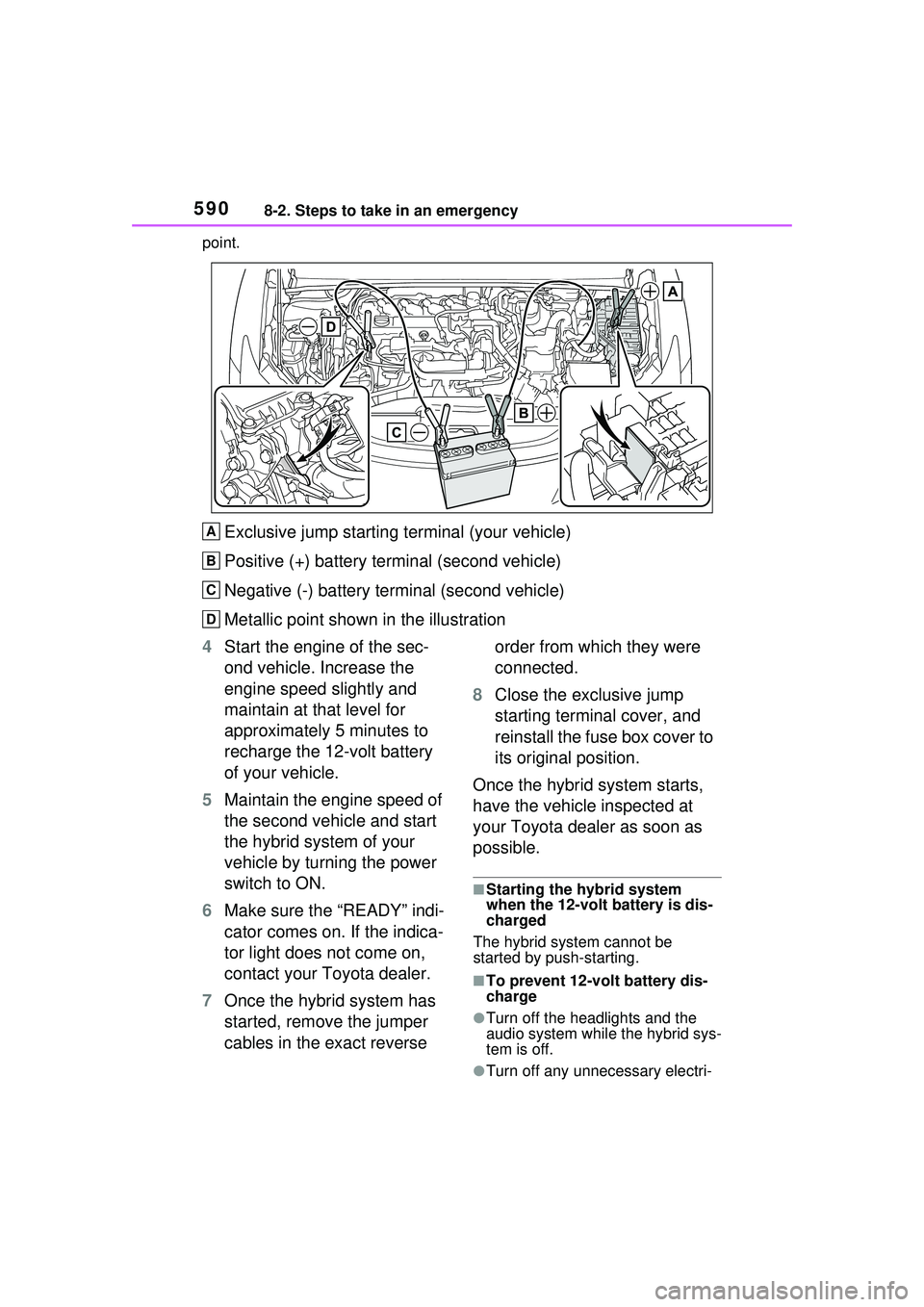
point.
Exclusive jump starting terminal (your vehicle)
Positive (+) battery terminal (second vehicle)
Negative (-) battery terminal (second vehicle)
Metallic point shown in the illustration
4 Start the engine of the sec-
ond vehicle. Increase the
engine speed slightly and
maintain at that level for
approximately 5 minutes to
recharge the 12-volt battery
of your vehicle.
5 Maintain the engine speed of
the second vehicle and start
the hybrid system of your
vehicle by turning the power
switch to ON.
6 Make sure the “READY” indi-
cator comes on. If the indica-
tor light does not come on,
contact your Toyota dealer.
7 Once the hybrid system has
started, remove the jumper
cables in the exact reverse order from which they were
connected.
8 Close the exclusive jump
starting terminal cover, and
reinstall the fuse box cover to
its original position.
Once the hybrid system starts,
have the vehicle inspected at
your Toyota dealer as soon as
possible.
■Starting the hybrid system
when the 12-volt battery is dis-
charged
The hybrid system cannot be
started by push-starting.
■To prevent 12-volt battery dis-
charge
●Turn off the headlights and the
audio system while the hybrid sys-
tem is off.
●Turn off any unnecessary electri-
A
B
C
D
Page 592 of 680
5928-2. Steps to take in an emergency
of the 12-volt battery.
• Use the exhaust hose that was attached to the 12-volt battery
before replacing and confirm that
it is firmly connected to the hole
section of the vehicle.
• Use the exhaust hole plug included with the 12-volt battery
replaced or the one installed on
the battery prior to the replaced.
(Depending on the 12-volt battery
to be replace, the exhaust hole
may be plugged.)
For details, consult your Toyota
dealer.
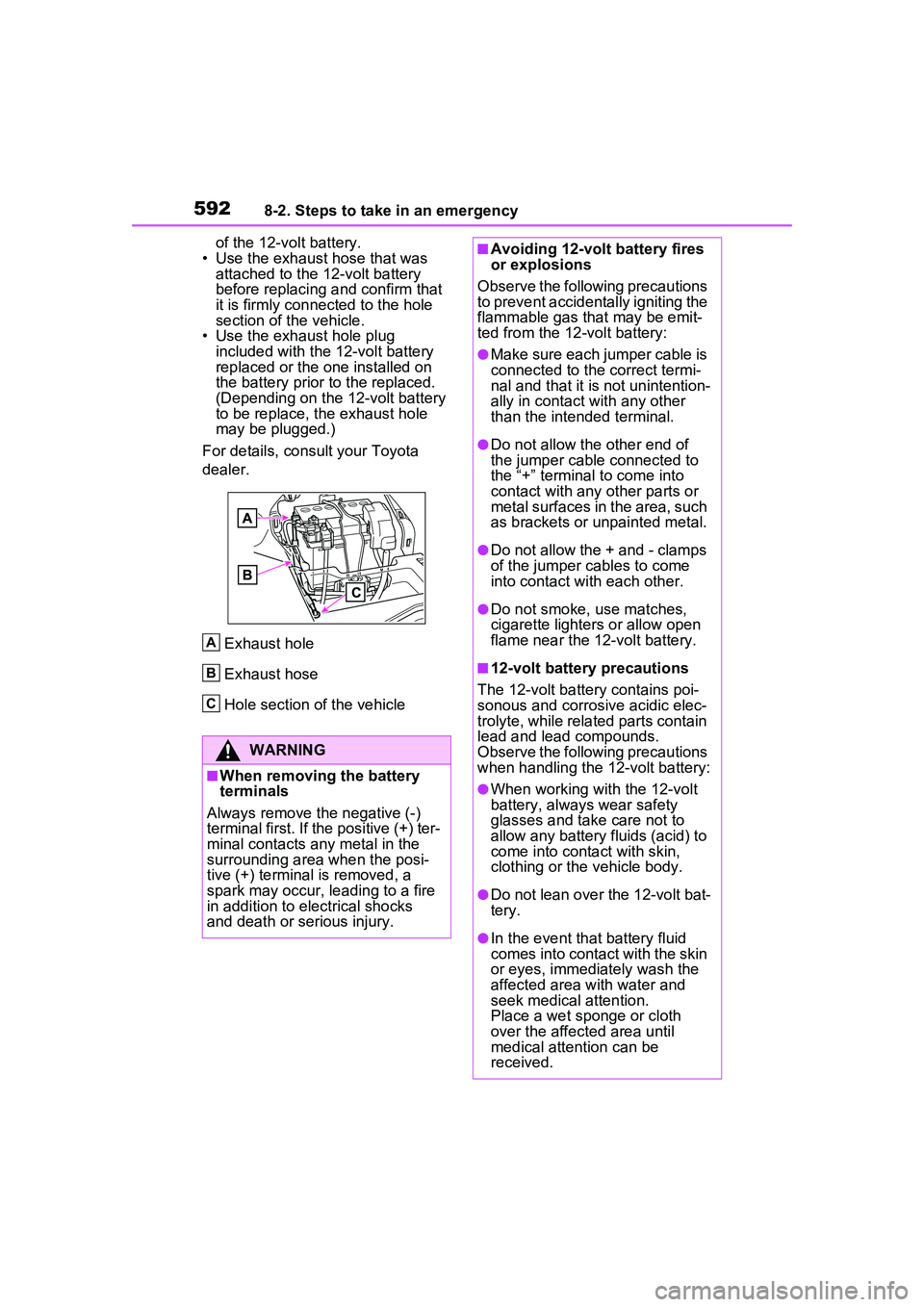
Exhaust hole
Exhaust hose
Hole section of the vehicle
WARNING
■When removing the battery
terminals
Always remove the negative (-)
terminal first. If the positive (+) ter-
minal contacts any metal in the
surrounding area when the posi-
tive (+) terminal is removed, a
spark may occur, le ading to a fire
in addition to electrical shocks
and death or serious injury.
A
B
C
■Avoiding 12-volt battery fires
or explosions
Observe the following precautions
to prevent accidentally igniting the
flammable gas that may be emit-
ted from the 12-volt battery:
●Make sure each jumper cable is
connected to the correct termi-
nal and that it is not unintention-
ally in contact with any other
than the intended terminal.
●Do not allow the other end of
the jumper cable connected to
the “+” terminal to come into
contact with any other parts or
metal surfaces in the area, such
as brackets or unpainted metal.
●Do not allow the + and - clamps
of the jumper cables to come
into contact with each other.
●Do not smoke, use matches,
cigarette lighters or allow open
flame near the 12-volt battery.
■12-volt battery precautions
The 12-volt battery contains poi-
sonous and corrosive acidic elec-
trolyte, while related parts contain
lead and lead compounds.
Observe the following precautions
when handling the 12-volt battery:
●When working with the 12-volt
battery, always wear safety
glasses and take care not to
allow any battery fluids (acid) to
come into cont act with skin,
clothing or the vehicle body.
●Do not lean over the 12-volt bat-
tery.
●In the event that battery fluid
comes into contact with the skin
or eyes, immediately wash the
affected area with water and
seek medical attention.
Place a wet sponge or cloth
over the affected area until
medical attention can be
received.
Page 594 of 680
5948-2. Steps to take in an emergency
■If the high coolant tempera-
ture warning light comes on
or flashes or “Engine Cool-
ant Temp High Stop in a
Safe Place See Owner’s
Manual” is shown on the
multi-information display
1 Stop the vehicle in a safe
place and turn off the air con-
ditioning system, and then
stop the hybrid system.
2 If you see steam:
Carefully lift the hood after the steam subsides.
If you do not see steam:
Carefully lift the hood.
3 After the hybrid system has
cooled down sufficiently,
inspect the hoses and radia-
tor core (radiator) for any
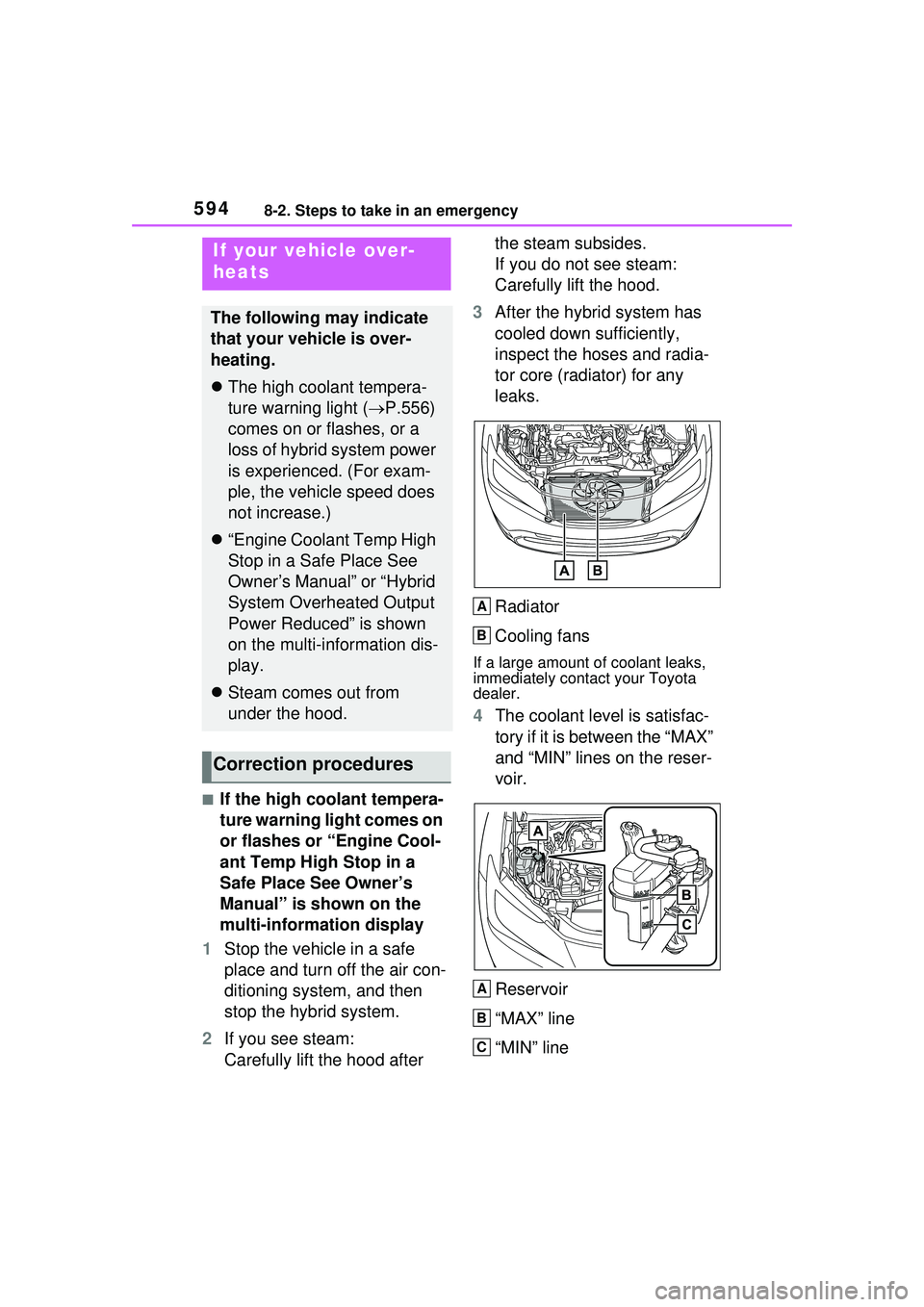
leaks.
Radiator
Cooling fans
If a large amount of coolant leaks,
immediately contact your Toyota
dealer.
4The coolant level is satisfac-
tory if it is between the “MAX”
and “MIN” lines on the reser-
voir.
Reservoir
“MAX” line
“MIN” line
If your vehicle over-
heats
The following may indicate
that your vehicle is over-
heating.
The high coolant tempera-
ture warning light ( P.556)
comes on or flashes, or a
loss of hybrid system power
is experienced. (For exam-
ple, the vehicle speed does
not increase.)
“Engine Coolant Temp High
Stop in a Safe Place See
Owner’s Manual” or “Hybrid
System Overheated Output
Power Reduced” is shown
on the multi-information dis-
play.
Steam comes out from
under the hood.
Correction procedures
A
B
A
B
C
Page 604 of 680

6049-1. Specifications
*: The fluid capacity is the quantity of reference.If replacement is necessary, contact your Toyota dealer.
Ignition system (spark plug)
MakeDENSO FC16HR-Q8
Gap0.031 in. (0.8 mm)
NOTICE
■Iridium-tipped spark plugs
Use only iridium-tipped spark plugs. Do not adjust the spark plug gap.
Electrical system (12-volt Battery)
Open voltage at 68°F (20°C):
12.0 V or higher
(Turn the power switch to OFF and turn on
the high beam headlights for 30 seconds.)
If the voltage is lower than the standard
value, charge the battery.
Charging rates (Slow charge)5 A max.
Hybrid transmission
Fluid capacity*3.9 qt. (3.7 L, 3.2 Imp. qt.)
Fluid typeToyota Genuine e-Transaxle fluid TE
NOTICE
■Hybrid transmission fluid type
Using transmission fluid other than the above type may cause abnormal
noise or vibration, or ultimately da mage the transmission of your vehicle.
Brakes
Pedal clearance*15.2 in. (132 mm) Min.
Pedal free play0.04 0.24 in. (1.0 6.0 mm)