display TOYOTA PRIUS PRIME 2023 Owners Manual
[x] Cancel search | Manufacturer: TOYOTA, Model Year: 2023, Model line: PRIUS PRIME, Model: TOYOTA PRIUS PRIME 2023Pages: 680, PDF Size: 14.97 MB
Page 580 of 680
5808-2. Steps to take in an emergency
14Inflate the tire until the speci-
fied air pressure is reached.
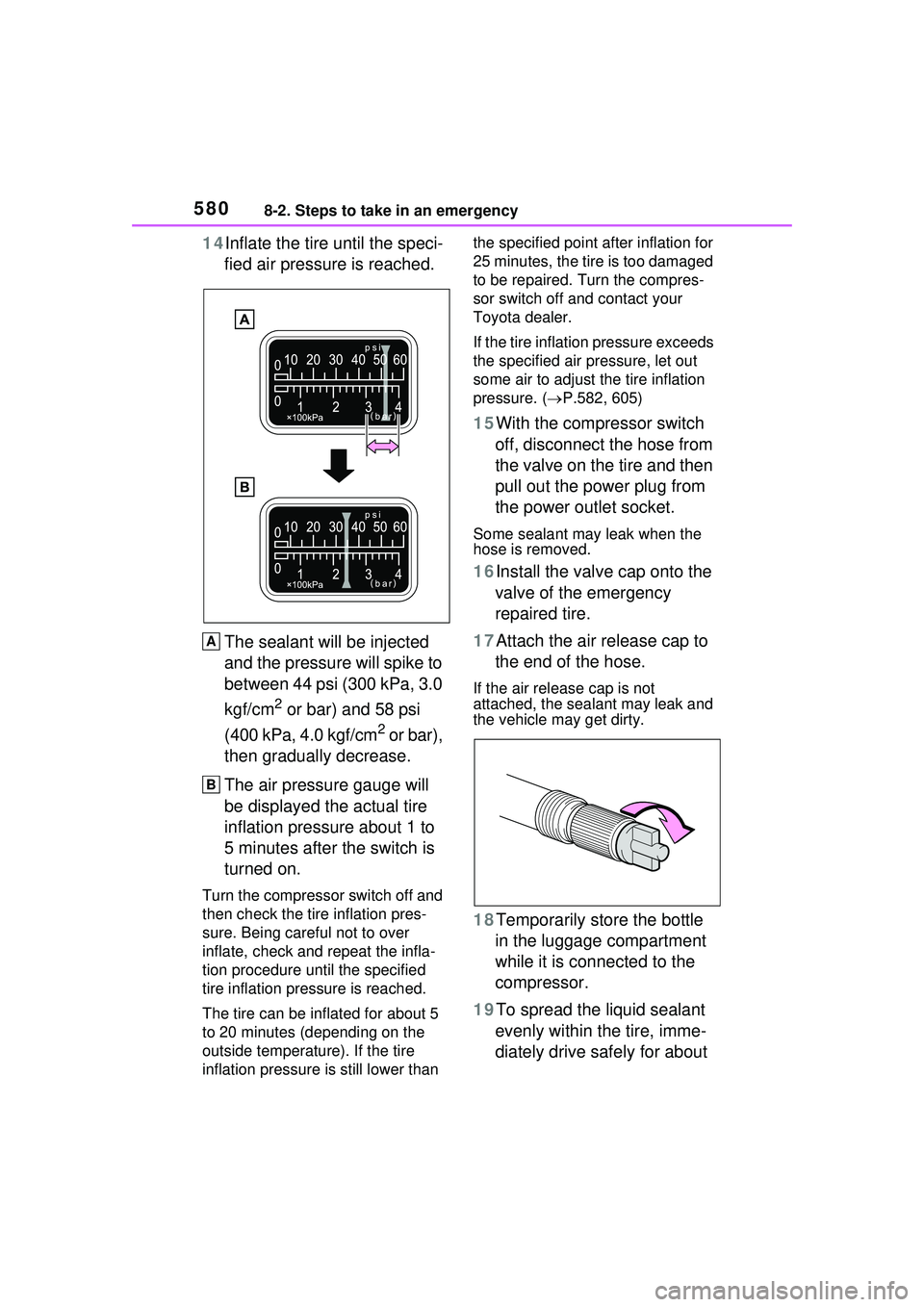
The sealant will be injected
and the pressure will spike to
between 44 psi (300 kPa, 3.0
kgf/cm
2 or bar) and 58 psi
(400 kPa, 4.0 kgf/cm
2 or bar),
then gradually decrease.
The air pressure gauge will
be displayed the actual tire
inflation pressure about 1 to
5 minutes after the switch is
turned on.
Turn the compressor switch off and
then check the tire inflation pres-
sure. Being careful not to over
inflate, check and repeat the infla-
tion procedure until the specified
tire inflation pressure is reached.
The tire can be inflated for about 5
to 20 minutes (depending on the
outside temperature). If the tire
inflation pressure is still lower than the specified point after inflation for
25 minutes, the tire is too damaged
to be repaired. Turn the compres-
sor switch off and contact your
Toyota dealer.
If the tire inflation pressure exceeds
the specified air pressure, let out
some air to adjust the tire inflation
pressure. (
P.582, 605)
15With the compressor switch
off, disconnect the hose from
the valve on the tire and then
pull out the power plug from
the power outlet socket.
Some sealant may leak when the
hose is removed.
16Install the valve cap onto the valve of the emergency
repaired tire.
17Attach the air release cap to the end of the hose.
If the air release cap is not
attached, the sealant may leak and
the vehicle may get dirty.
18Temporarily store the bottle in the luggage compartment
while it is connected to the
compressor.
19To spread the liquid sealant evenly within the tire, imme-
diately drive safely for about
A
B
Page 588 of 680
5888-2. Steps to take in an emergency
1Ensure that the shift position
is in P and depress the brake
pedal.
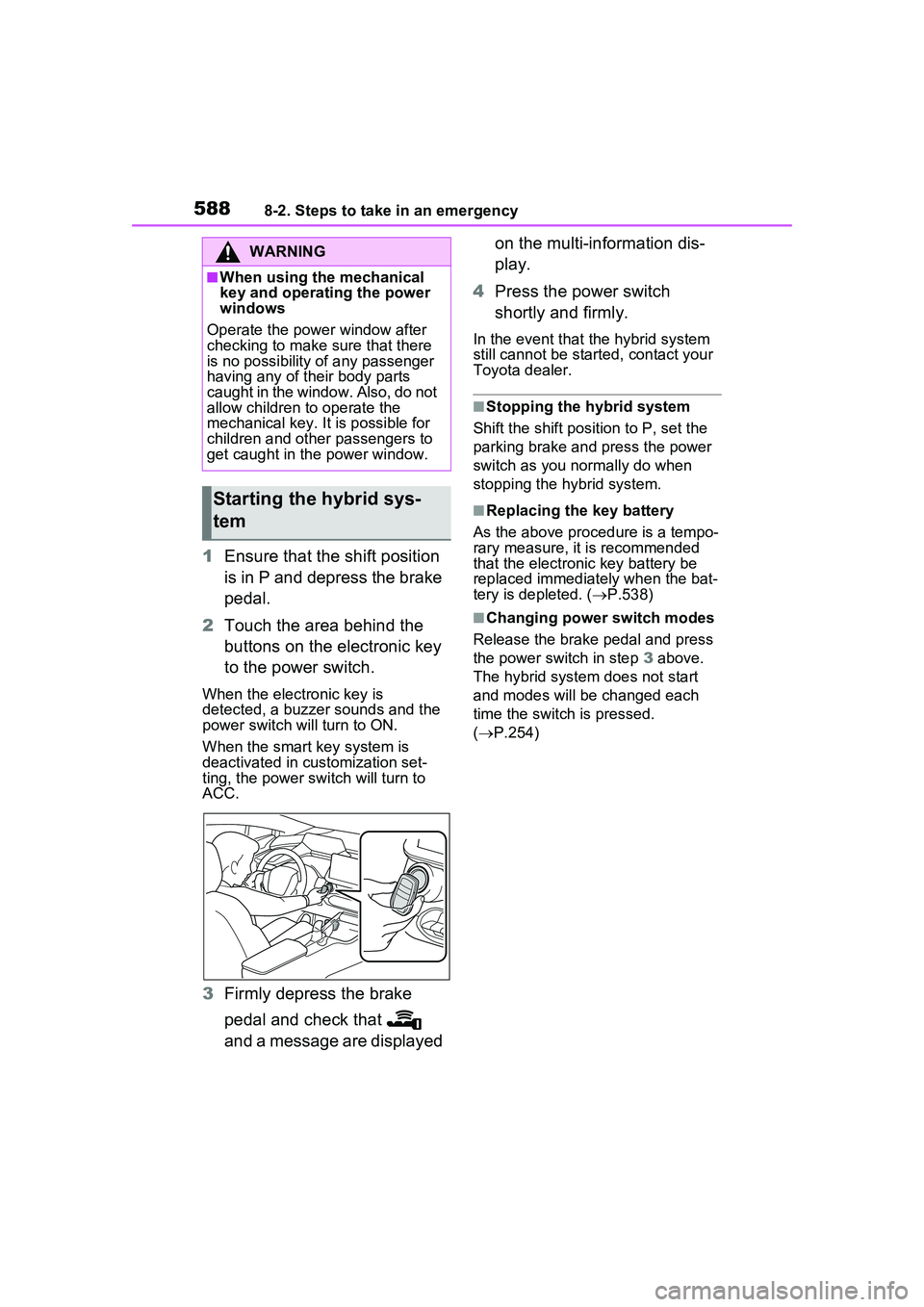
2 Touch the area behind the
buttons on the electronic key
to the power switch.
When the electronic key is
detected, a buzzer sounds and the
power switch will turn to ON.
When the smart key system is
deactivated in customization set-
ting, the power switch will turn to
ACC.
3Firmly depress the brake
pedal and check that
and a message are displayed on the multi-information dis-
play.
4 Press the power switch
shortly and firmly.
In the event that the hybrid system
still cannot be started, contact your
Toyota dealer.
■Stopping the hybrid system
Shift the shift position to P, set the
parking brake and press the power
switch as you normally do when
stopping the hybrid system.
■Replacing the key battery
As the above procedure is a tempo-
rary measure, it is recommended
that the electronic key battery be
replaced immediately when the bat-
tery is depleted. ( P.538)
■Changing power switch modes
Release the brake pedal and press
the power switch in step 3 above.
The hybrid system does not start
and modes will be changed each
time the switch is pressed.
( P.254)
WARNING
■When using the mechanical
key and operating the power
windows
Operate the power window after
checking to make sure that there
is no possibility of any passenger
having any of their body parts
caught in the window. Also, do not
allow children to operate the
mechanical key. It is possible for
children and other passengers to
get caught in th e power window.
Starting the hybrid sys-
tem
Page 594 of 680
5948-2. Steps to take in an emergency
■If the high coolant tempera-
ture warning light comes on
or flashes or “Engine Cool-
ant Temp High Stop in a
Safe Place See Owner’s
Manual” is shown on the
multi-information display
1 Stop the vehicle in a safe
place and turn off the air con-
ditioning system, and then
stop the hybrid system.
2 If you see steam:
Carefully lift the hood after the steam subsides.
If you do not see steam:
Carefully lift the hood.
3 After the hybrid system has
cooled down sufficiently,
inspect the hoses and radia-
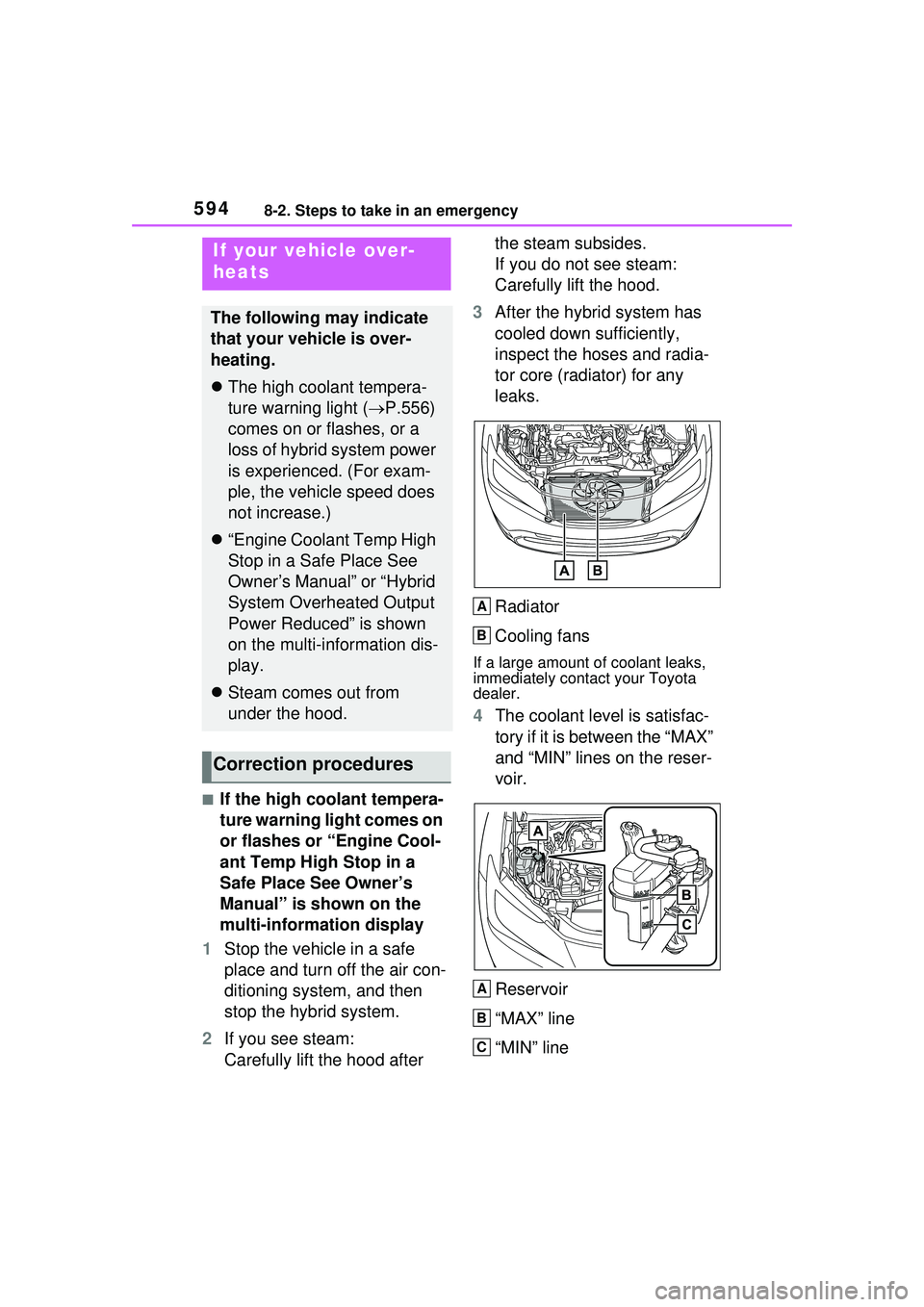
tor core (radiator) for any
leaks.
Radiator
Cooling fans
If a large amount of coolant leaks,
immediately contact your Toyota
dealer.
4The coolant level is satisfac-
tory if it is between the “MAX”
and “MIN” lines on the reser-
voir.
Reservoir
“MAX” line
“MIN” line
If your vehicle over-
heats
The following may indicate
that your vehicle is over-
heating.
The high coolant tempera-
ture warning light ( P.556)
comes on or flashes, or a
loss of hybrid system power
is experienced. (For exam-
ple, the vehicle speed does
not increase.)
“Engine Coolant Temp High
Stop in a Safe Place See
Owner’s Manual” or “Hybrid
System Overheated Output
Power Reduced” is shown
on the multi-information dis-
play.
Steam comes out from
under the hood.
Correction procedures
A
B
A
B
C
Page 595 of 680
5958-2. Steps to take in an emergency
8
When trouble arises
5Add coolant if necessary.
Water can be used in an emer-
gency if engine coolant is unavail-
able.
If water was added in an emer-
gency, have the vehicle inspected
at your Toyota dealer as soon as
possible.
6Start the hybrid system and
turn the air conditioning sys-
tem on to check that the radi-
ator cooling fan operates and
to check for coolant leaks
from the radiator or hoses.
The fan operates when the air con-
ditioning system is turned on imme-
diately after a cold start. Confirm
that the fan is operating by check-
ing the fan sound and air flow. If it is
difficult to check these, turn the air
conditioning system on and off
repeatedly. (The fan may not oper-
ate in freezing temperatures.)
7If the fan is not operating:
Stop the hybrid system
immediately and contact your
Toyota dealer.
If the fan is operating:
Have the vehicle inspected at
the nearest Toyota dealer.
8 Check if “Engine Coolant
Temp High Stop in a Safe
Place See Owner’s Manual” is shown on the multi-infor-
mation display.
If the message does not disappear:
Stop the hybrid system and contact
your Toyota dealer.
If the message is not displayed:
Have the vehicle inspected at the
nearest Toyota dealer.
■If “Hybrid System Over-
heated Output Power
Reduced” is shown on the
multi-information display
1 Stop the vehicle in a safe
place.
2 Stop the hybrid system and
carefully lift the hood.
3 After the hybrid system has
cooled down, inspect the
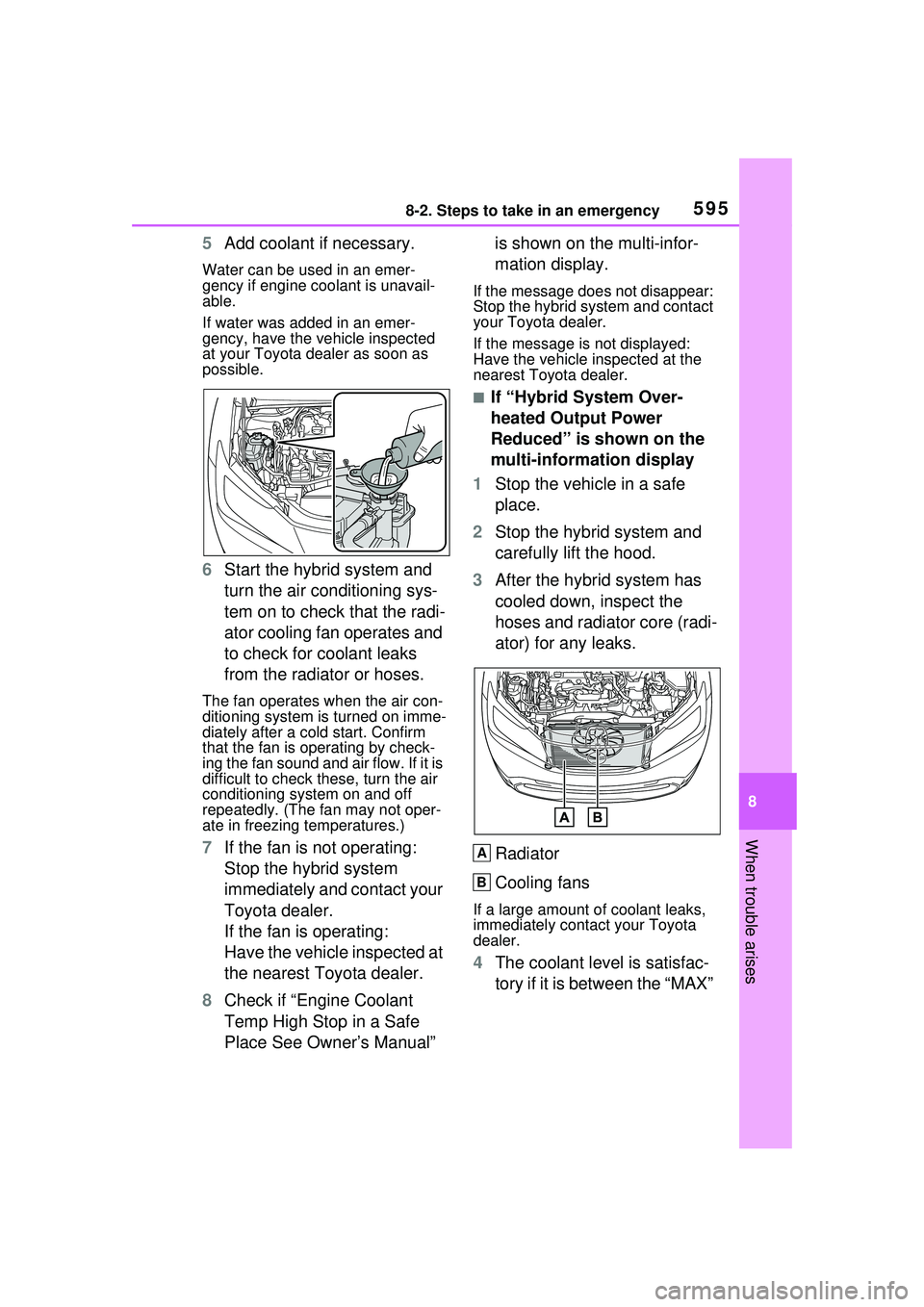
hoses and radiator core (radi-
ator) for any leaks.
Radiator
Cooling fans
If a large amount of coolant leaks,
immediately contact your Toyota
dealer.
4The coolant level is satisfac-
tory if it is between the “MAX”
A
B
Page 596 of 680
5968-2. Steps to take in an emergency
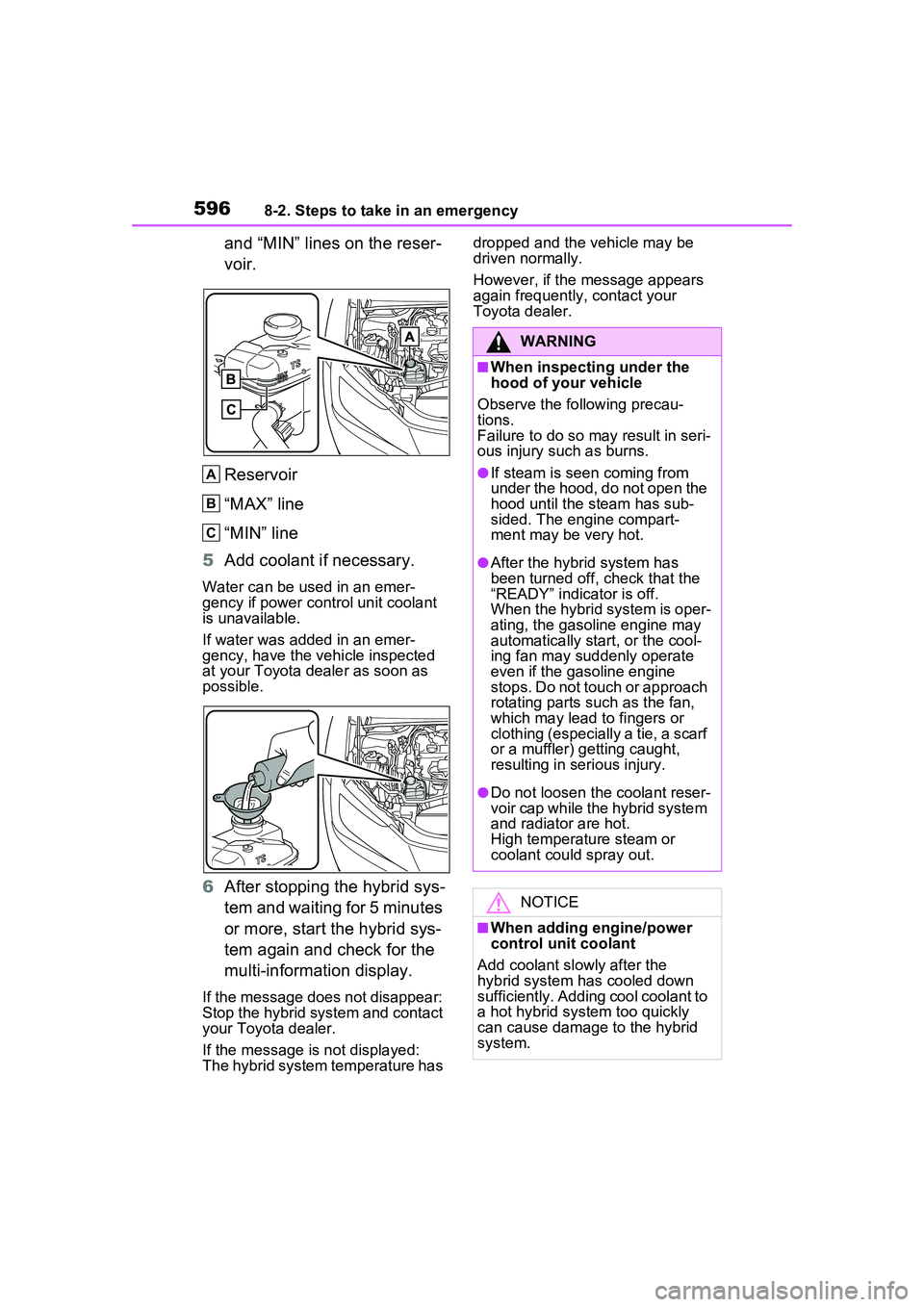
and “MIN” lines on the reser-
voir.
Reservoir
“MAX” line
“MIN” line
5 Add coolant if necessary.
Water can be used in an emer-
gency if power control unit coolant
is unavailable.
If water was added in an emer-
gency, have the vehicle inspected
at your Toyota dealer as soon as
possible.
6After stopping the hybrid sys-
tem and waiting for 5 minutes
or more, start the hybrid sys-
tem again and check for the
multi-information display.
If the message does not disappear:
Stop the hybrid system and contact
your Toyota dealer.
If the message is not displayed:
The hybrid system temperature has dropped and the vehicle may be
driven normally.
However, if the message appears
again frequently, contact your
Toyota dealer.
A
B
C
WARNING
■When inspecting under the
hood of your vehicle
Observe the following precau-
tions.
Failure to do so may result in seri-
ous injury such as burns.
●If steam is seen coming from
under the hood, do not open the
hood until the steam has sub-
sided. The engine compart-
ment may be very hot.
●After the hybrid system has
been turned off, check that the
“READY” indicator is off.
When the hybrid system is oper-
ating, the gasoline engine may
automatically start, or the cool-
ing fan may suddenly operate
even if the gasoline engine
stops. Do not touch or approach
rotating parts such as the fan,
which may lead to fingers or
clothing (especially a tie, a scarf
or a muffler) getting caught,
resulting in serious injury.
●Do not loosen the coolant reser-
voir cap while th e hybrid system
and radiator are hot.
High temperature steam or
coolant could spray out.
NOTICE
■When adding engine/power
control unit coolant
Add coolant slowly after the
hybrid system has cooled down
sufficiently. Adding cool coolant to
a hot hybrid system too quickly
can cause damage to the hybrid
system.
Page 618 of 680
6189-2. Customization
9-2.Customization
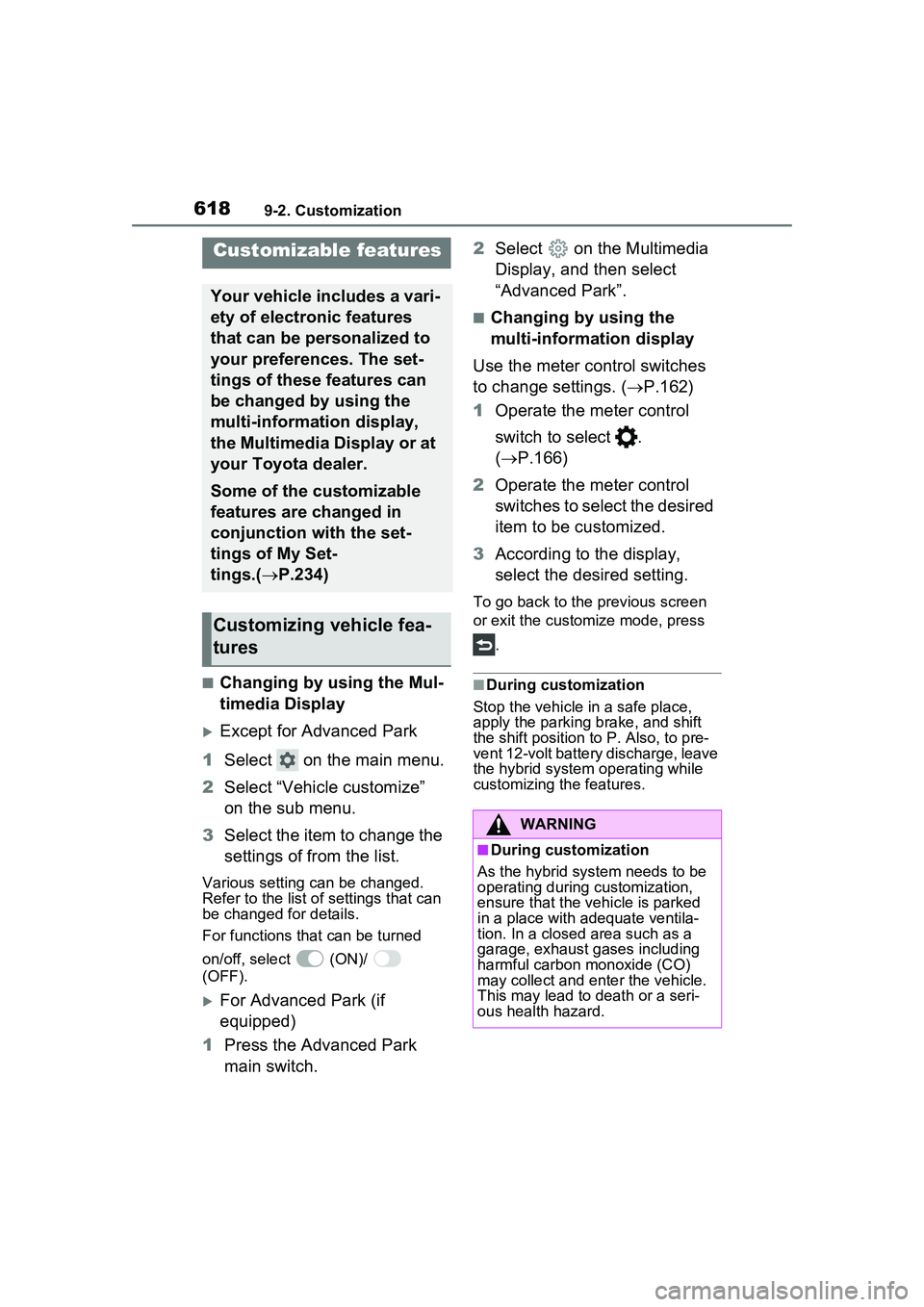
■Changing by using the Mul-
timedia Display
Except for Advanced Park
1 Select on the main menu.
2 Select “Vehicle customize”
on the sub menu.
3 Select the item to change the
settings of from the list.
Various setting can be changed.
Refer to the list of settings that can
be changed for details.
For functions that can be turned
on/off, select (ON)/
(OFF).
For Advanced Park (if
equipped)
1 Press the Advanced Park
main switch. 2
Select on the Multimedia
Display, and then select
“Advanced Park”.
■Changing by using the
multi-information display
Use the meter control switches
to change settings. ( P.162)
1 Operate the meter control
switch to select .
( P.166)
2 Operate the meter control
switches to select the desired
item to be customized.
3 According to the display,
select the desired setting.
To go back to the previous screen
or exit the customize mode, press
.
■During customization
Stop the vehicle in a safe place,
apply the parking brake, and shift
the shift position to P. Also, to pre-
vent 12-volt battery discharge, leave
the hybrid system operating while
customizing the features.
Customizable features
Your vehicle includes a vari-
ety of electronic features
that can be personalized to
your preferences. The set-
tings of these features can
be changed by using the
multi-information display,
the Multimedia Display or at
your Toyota dealer.
Some of the customizable
features are changed in
conjunction with the set-
tings of My Set-
tings.( P.234)
Customizing vehicle fea-
tures
WARNING
■During customization
As the hybrid system needs to be
operating during customization,
ensure that the vehicle is parked
in a place with adequate ventila-
tion. In a closed area such as a
garage, exhaust gases including
harmful carbon monoxide (CO)
may collect and enter the vehicle.
This may lead to death or a seri-
ous health hazard.
Page 619 of 680
6199-2. Customization
9
Vehicle specifications
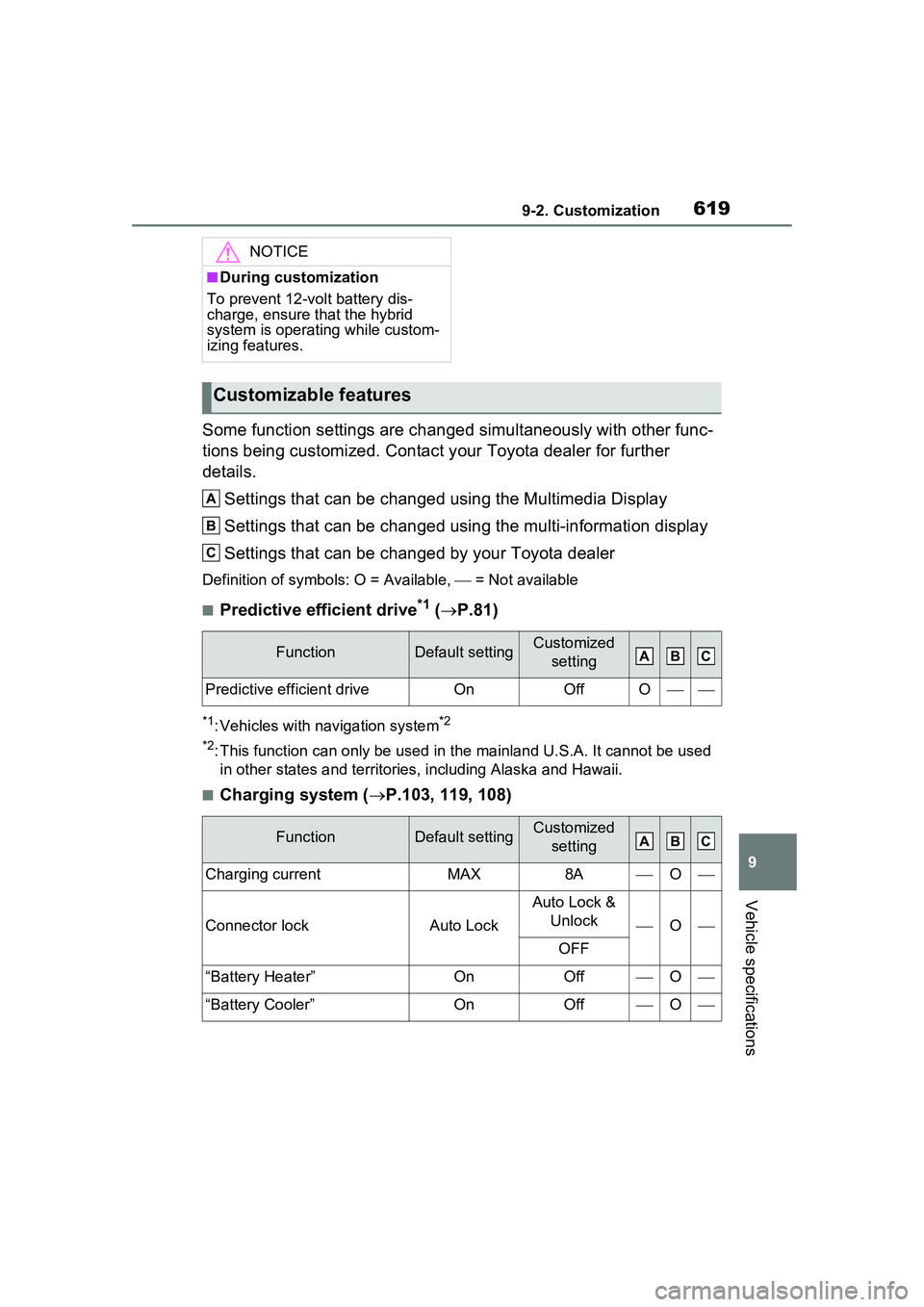
Some function settings are changed simultaneously with other func-
tions being customized. Contact y our Toyota dealer for further
details.
Settings that can be changed using the Multimedia Display
Settings that can be changed using the multi-information display
Settings that can be changed by your Toyota dealer
Definition of symbols: O = Available, = Not available
■Predictive efficient drive*1 (P.81)
*1: Vehicles with navigation system*2
*2
: This function can only be used in th e mainland U.S.A. It cannot be used
in other states and territorie s, including Alaska and Hawaii.
■Charging system (P.103, 119, 108)
NOTICE
■During customization
To prevent 12-volt battery dis-
charge, ensure that the hybrid
system is operating while custom-
izing features.
Customizable features
FunctionDefault settingCustomized setting
Predictive efficient driveOnOffO
FunctionDefault settingCustomized setting
Charging currentMAX8AO
Connector lockAuto Lock
Auto Lock & Unlock
O
OFF
“Battery Heater”OnOffO
“Battery Cooler”OnOffO
A
B
C
ABC
ABC
Page 620 of 680
6209-2. Customization
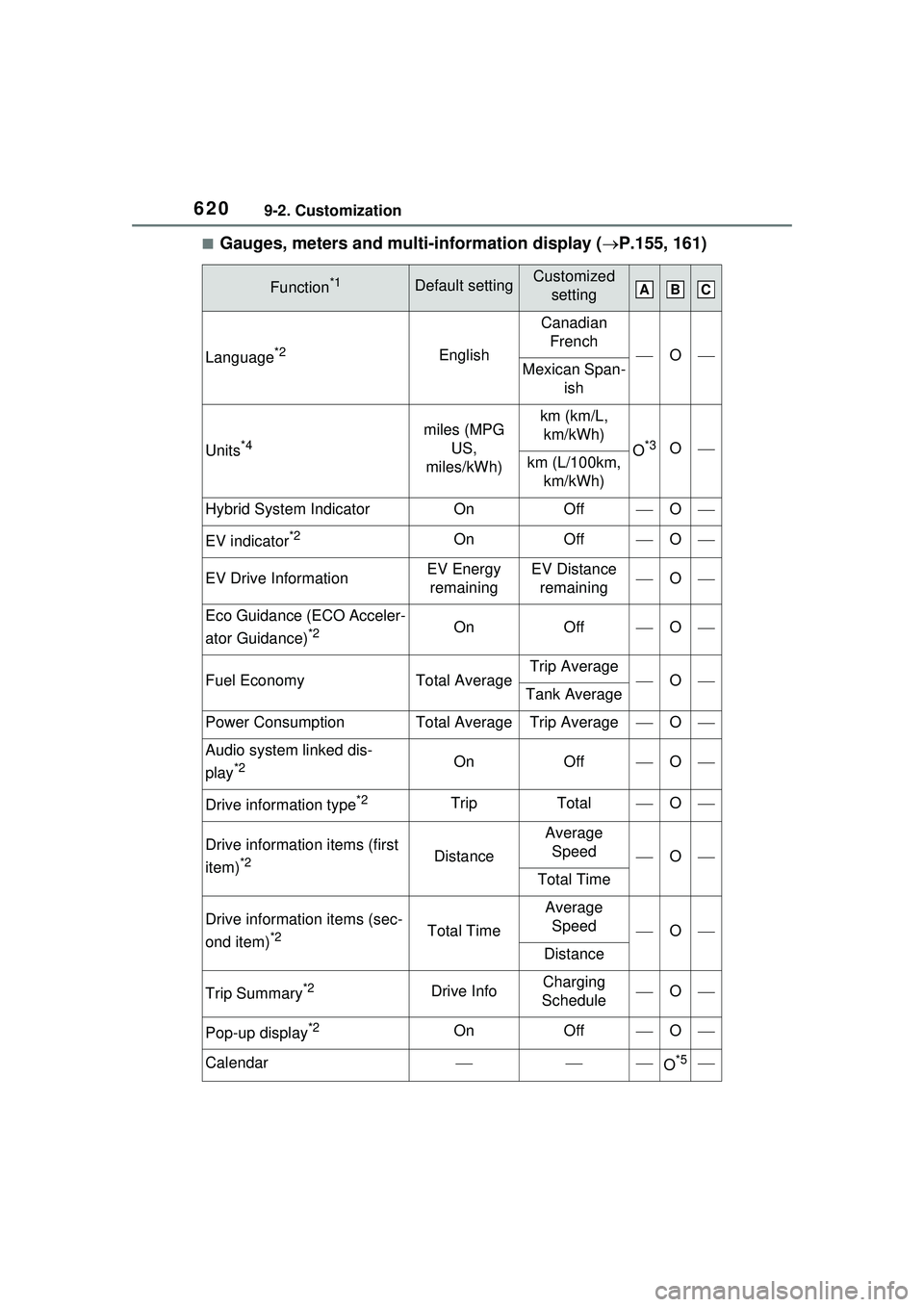
■Gauges, meters and multi-information display (P.155, 161)
Function*1Default settingCustomized
setting
Language*2English
Canadian French
OMexican Span- ish
Units*4miles (MPG US,
miles/kWh)km (km/L, km/kWh)
O*3Okm (L/100km, km/kWh)
Hybrid System IndicatorOnOffO
EV indicator*2OnOffO
EV Drive InformationEV Energy remainingEV Distance remainingO
Eco Guidance (ECO Acceler-
ator Guidance)
*2OnOffO
Fuel EconomyTotal AverageTrip AverageOTank Average
Power ConsumptionTotal AverageTrip AverageO
Audio system linked dis-
play
*2OnOffO
Drive information type*2TripTotalO
Drive information items (first
item)
*2Distance
Average Speed
O
Total Time
Drive information items (sec-
ond item)
*2Total Time
Average Speed
O
Distance
Trip Summary*2Drive InfoCharging
ScheduleO
Pop-up display*2OnOffO
CalendarO*5
ABC
Page 621 of 680
6219-2. Customization
9
Vehicle specifications
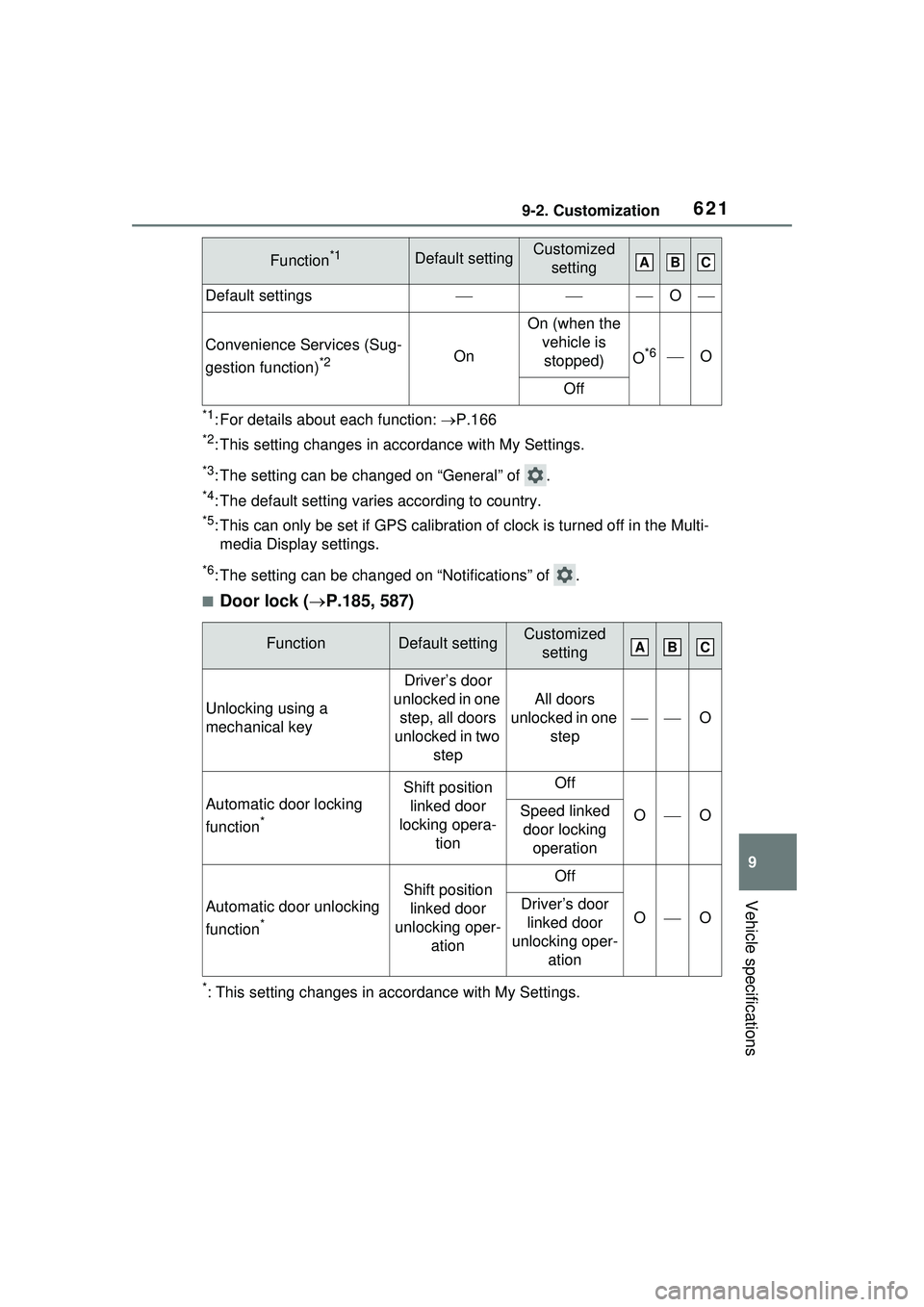
*1: For details about each function: P.166
*2: This setting changes in ac cordance with My Settings.
*3: The setting can be changed on “General” of .
*4: The default setting varies according to country.
*5: This can only be set if GPS calibration of clock is turned off in the Multi-
media Display settings.
*6: The setting can be changed on “Notifications” of .
■Door lock ( P.185, 587)
*: This setting changes in accordance with My Settings.
Default settingsO
Convenience Services (Sug-
gestion function)
*2On
On (when the
vehicle is stopped)
O*6O
Off
FunctionDefault settingCustomized setting
Unlocking using a
mechanical key
Driver’s door
unlocked in one step, all doors
unlocked in two step
All doors
unlocked in one step
O
Automatic door locking
function
*
Shift position linked door
locking opera- tionOff
OOSpeed linked door locking operation
Automatic door unlocking
function
*
Shift position linked door
unlocking oper- ationOff
OODriver’s door linked door
unlocking oper- ation
Function*1Default settingCustomized settingABC
ABC
Page 629 of 680
6299-2. Customization
9
Vehicle specifications
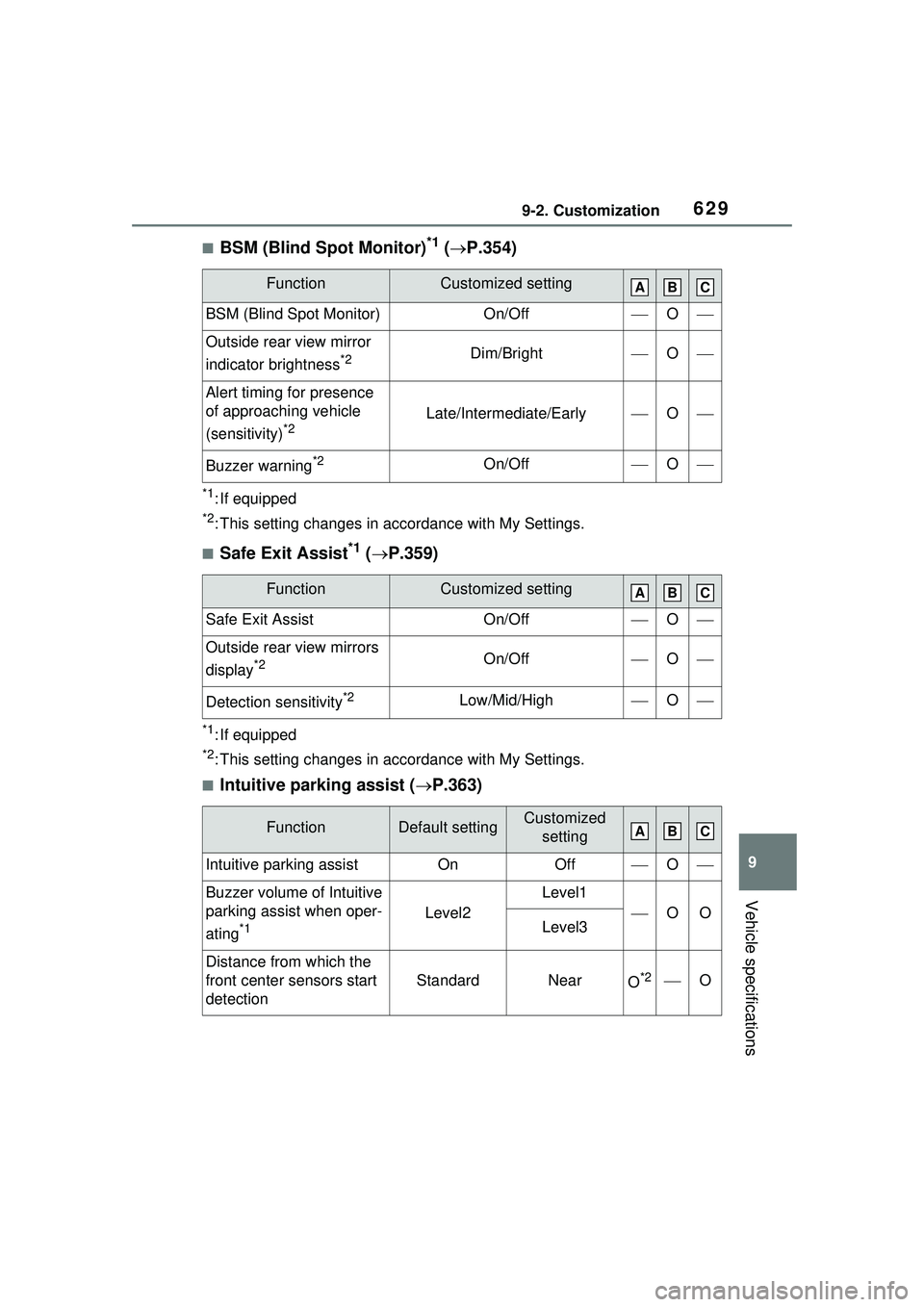
■BSM (Blind Spot Monitor)*1 ( P.354)
*1: If equipped
*2: This setting changes in ac cordance with My Settings.
■Safe Exit Assist*1 ( P.359)
*1: If equipped
*2: This setting changes in ac cordance with My Settings.
■Intuitive parking assist (P.363)
FunctionCustomized setting
BSM (Blind Spot Monitor)On/OffO
Outside rear view mirror
indicator brightness
*2Dim/BrightO
Alert timing for presence
of approaching vehicle
(sensitivity)
*2Late/Intermediate/EarlyO
Buzzer warning*2On/OffO
FunctionCustomized setting
Safe Exit AssistOn/OffO
Outside rear view mirrors
display
*2On/OffO
Detection sensitivity*2Low/Mid/HighO
FunctionDefault settingCustomized
setting
Intuitive parking assistOnOffO
Buzzer volume of Intuitive
parking assist when oper-
ating
*1Level2
Level1
OOLevel3
Distance from which the
front center sensors start
detection
StandardNearO*2O
ABC
ABC
ABC