display TOYOTA PRIUS PRIME 2023 Owners Manual
[x] Cancel search | Manufacturer: TOYOTA, Model Year: 2023, Model line: PRIUS PRIME, Model: TOYOTA PRIUS PRIME 2023Pages: 680, PDF Size: 14.97 MB
Page 560 of 680
5608-2. Steps to take in an emergency
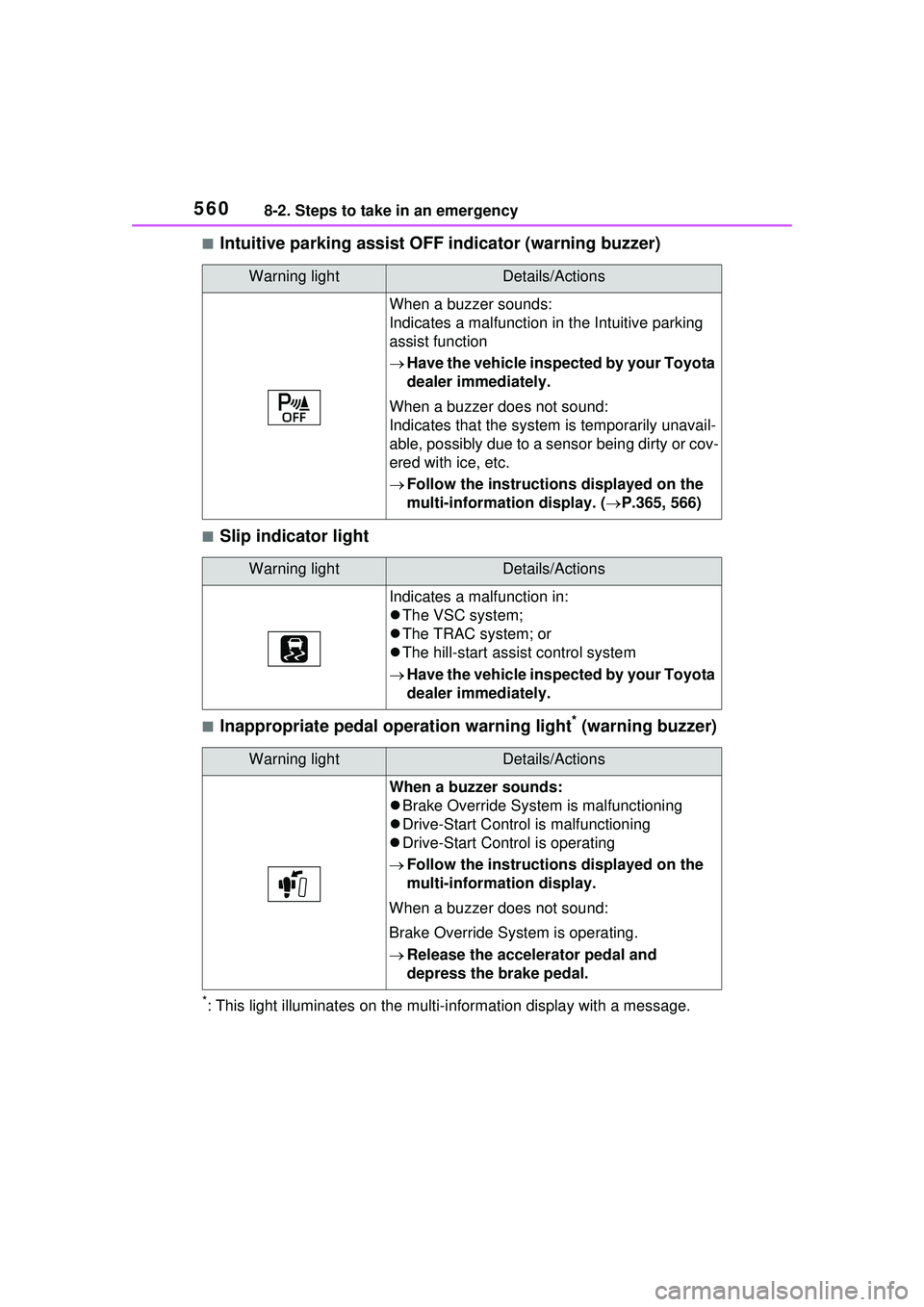
■Intuitive parking assist OFF indicator (warning buzzer)
■Slip indicator light
■Inappropriate pedal operation warning light* (warning buzzer)
*: This light illuminates on the multi-information display with a message.
Warning lightDetails/Actions
When a buzzer sounds:
Indicates a malfunction in the Intuitive parking
assist function
Have the vehicle inspected by your Toyota
dealer immediately.
When a buzzer does not sound:
Indicates that the system is temporarily unavail-
able, possibly due to a sensor being dirty or cov-
ered with ice, etc.
Follow the instructions displayed on the
multi-information display. ( P.365, 566)
Warning lightDetails/Actions
Indicates a malfunction in:
The VSC system;
The TRAC system; or
The hill-start assist control system
Have the vehicle inspected by your Toyota
dealer immediately.
Warning lightDetails/Actions
When a buzzer sounds:
Brake Override System is malfunctioning
Drive-Start Control is malfunctioning
Drive-Start Control is operating
Follow the instructions displayed on the
multi-information display.
When a buzzer does not sound:
Brake Override System is operating.
Release the accelerator pedal and
depress the brake pedal.
Page 564 of 680
5648-2. Steps to take in an emergency
■The tire pressure warning light
may come on due to natural
causes
The tire pressure warning light may
come on due to natural causes such
as natural air leaks and tire inflation
pressure changes caused by tem-
perature. In this case, adjusting the
tire inflation pressure will turn off the
warning light (after a few minutes).
■Conditions that the tire pres-
sure warning system may not
function properly
P.517
WARNING
■If a warning light comes on or
a warning buzzer sounds
when a warning message is
shown on the multi-informa-
tion display
*
Check and follow the message
shown on the multi-information
display.
Failure to do so may result in
death or serious injury.
*: Warning lights illuminate in red
or yellow and the warning
buzzer beeps once or sounds
continuously.
■When the electric power
steering system warning light
comes on
When the light comes on yellow,
the assist to the power steering is
restricted. When the light comes
on red, the assist to the power
steering is lost and handling oper-
ations of the steering wheel
become extremely heavy.
If the steering wheel becomes
heavier than usual when operat-
ing, hold firmly and operate using
more force than usual.
■If the tire pressure warning
light comes on
Be sure to observe the following
precautions. Failure to do so
could cause a loss of vehicle con-
trol and result in death or serious
injury.
●Stop your vehicle in a safe
place as soon as possible.
Adjust the tire inflation pressure
immediately.
●If the tire pressure warning light
comes on even after tire infla-
tion pressure adjustment, it is
probable that you have a flat
tire. Check the tires. If a tire is
flat, repair the flat tire by using
emergency tire puncture repair
kit.
●Avoid abrupt maneuvering and
braking. If the vehicle tires dete-
riorate, you could lose control of
the steering wheel or the
brakes.
■If a blowout or sudden air
leakage should occur
The tire pressure warning system
may not activate immediately.
■Maintenance of the tires
Each tire, includ ing the spare (if
provided), should be checked
monthly when cold and inflated to
the inflation pressure recom-
mended by the vehicle manufac-
turer on the vehicle placard or tire
inflation pressure label (tire and
load information label). (If your
vehicle has tires of a different size
than the size indicated on the
vehicle placard or tire inflation
pressure label [tire and load infor-
mation label], you should deter-
mine the proper tire inflation
pressure for those tires.)
Page 566 of 680
5668-2. Steps to take in an emergency
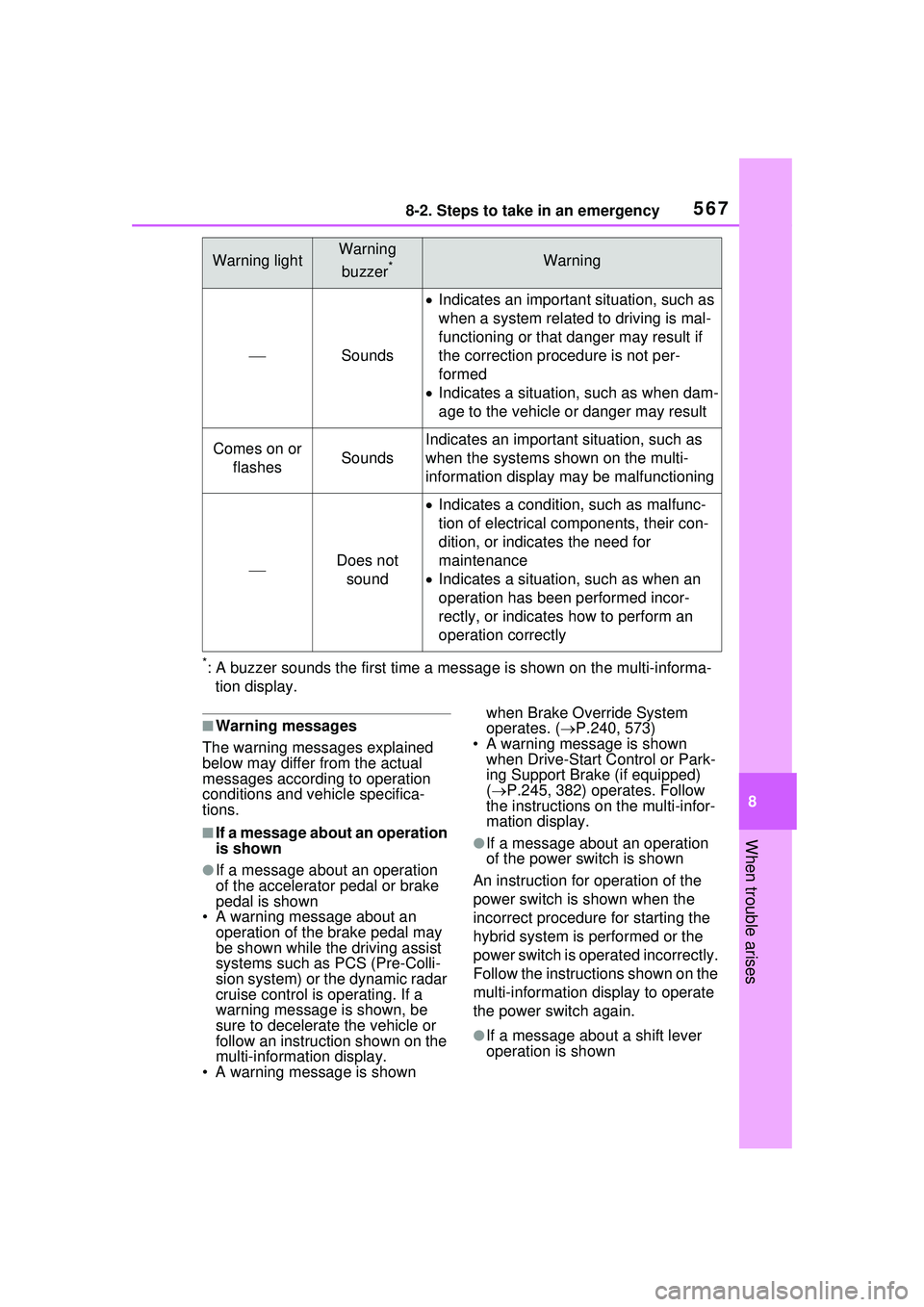
The warning lights and warning buzzers operate as follows depend-
ing on the content of the message. If a message indicates the need
for inspection by a dealer, have the vehicle inspected by your Toyota
dealer immediately.
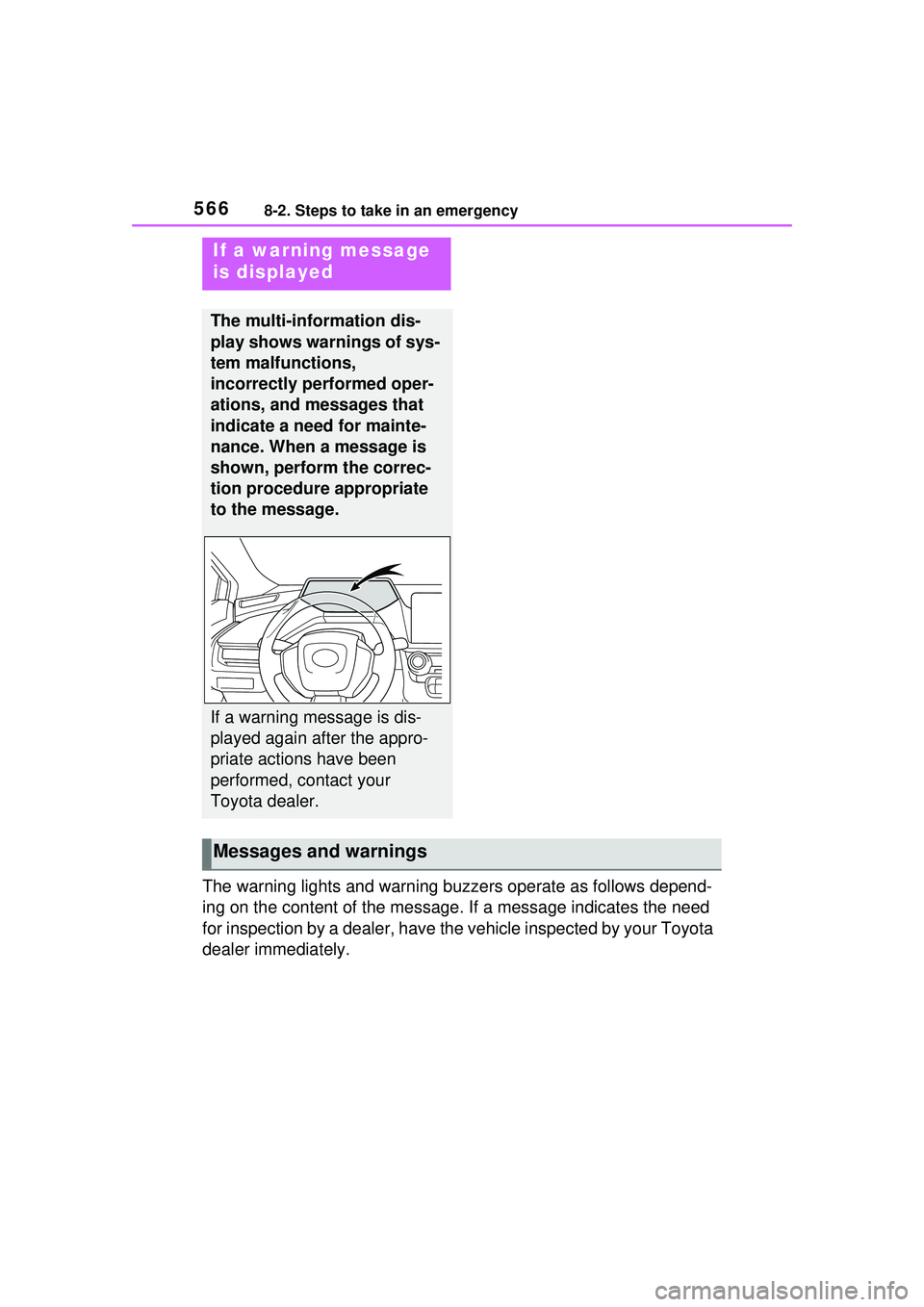
If a warning message
is displayed
The multi-information dis-
play shows warnings of sys-
tem malfunctions,
incorrectly performed oper-
ations, and messages that
indicate a need for mainte-
nance. When a message is
shown, perform the correc-
tion procedure appropriate
to the message.
If a warning message is dis-
played again after the appro-
priate actions have been
performed, contact your
Toyota dealer.
Messages and warnings
Page 567 of 680
5678-2. Steps to take in an emergency
8
When trouble arises
*: A buzzer sounds the first time a message is shown on the multi-informa-tion display.
■Warning messages
The warning messages explained
below may differ from the actual
messages according to operation
conditions and vehicle specifica-
tions.
■If a message about an operation
is shown
●If a message about an operation
of the accelerator pedal or brake
pedal is shown
• A warning message about an
operation of the brake pedal may
be shown while the driving assist
systems such as PCS (Pre-Colli-
sion system) or the dynamic radar
cruise control is operating. If a
warning message is shown, be
sure to decelerate the vehicle or
follow an instruction shown on the
multi-informat ion display.
• A warning message is shown when Brake Override System
operates. (
P.240, 573)
• A warning message is shown when Drive-Start Control or Park-
ing Support Brake (if equipped)
( P.245, 382) operates. Follow
the instructions on the multi-infor-
mation display.
●If a message about an operation
of the power switch is shown
An instruction for operation of the
power switch is shown when the
incorrect procedure for starting the
hybrid system is performed or the
power switch is operated incorrectly.
Follow the instructions shown on the
multi-information display to operate
the power switch again.
●If a message about a shift lever
operation is shown
Warning lightWarning
buzzer
*Warning
Sounds
Indicates an important situation, such as
when a system related to driving is mal-
functioning or that danger may result if
the correction procedure is not per-
formed
Indicates a situation, such as when dam-
age to the vehicle or danger may result
Comes on or
flashesSounds
Indicates an important situation, such as
when the systems shown on the multi-
information display ma y be malfunctioning
Does not
sound
Indicates a condition, such as malfunc-
tion of electrical components, their con-
dition, or indicates the need for
maintenance
Indicates a situation, such as when an
operation has been performed incor-
rectly, or indicates how to perform an
operation correctly
Page 568 of 680

5688-2. Steps to take in an emergency
To prevent the shift lever from being
operated incorrectly or the vehicle
from moving unexpectedly, a mes-
sage that requires shifting the shift
position may be displayed on the
multi-information display.
In that case, follow the instruction of
the message and shift the shift posi-
tion.
●If a message or image about an
open/close state of a part or
replenishment of a consumable is
shown
Confirm the part indicated by the
multi-information di splay or a warn-
ing light, and then perform the cop-
ing method such as closing the
open door or replenishing a con-
sumable.
■If a message that indicates the
need for visiting your Toyota
dealer is displayed
The system or part shown on the
multi-information di splay is malfunc-
tioning. Have the vehicle inspected
by your Toyota dealer immediately.
■If a message that indicates the
need for referring to Owner’s
Manual is displayed
●If “Engine Coolant Temp High” is
shown, follow the instructions,
accordingly. ( P.594)
●If the following messages are
shown, there may be a malfunc-
tion. Immediately have the vehi-
cle inspected by your Toyota
dealer.
• “Plug-in Charging System Mal-
function”
• “Hybrid System Malfunction”
• “Check Engine”
• “Traction battery system malfunc- tion”
• “Accelerator System Malfunction”
• “Smart Key System malfunction”
• “Shift System Malfunction Apply Parking Brake Se curely When
Parking See Owner’s Manual” • “P Switch Malfunction Apply Park-
ing Brake Securely When Parking
See Owner’s Manual”
• “Shift System Unavailable Apply Parking Brake Securely When
Parking See Owner’s Manual”
• “Shift System Malfunction See Owner’s Manual”
• “Shift System Malfunction Stop in
a Safe Place See Owner’s Man-
ual”
• “Battery Low Shifting Unavailable
See Owner’s Manual”
●If the following messages are
shown, there may be a malfunc-
tion. Immediately stop the vehicle
in a safe place and contact your
Toyota dealer. Continuing to drive
the vehicle may be dangerous.
• “Oil pressure low”
• “Braking Power Low”
●If any of the following messages
are shown on the multi-informa-
tion display, the vehicle may have
run out of fuel. Stop the vehicle in
a safe place and, if the fuel level is
low, refuel the vehicle.
• “Hybrid system stopped”
• “Engine stopped No Fuel”
●If “12-Volt Battery Charging Sys-
tem Malfunction Stop in a Safe
Place See Owner’s Manual” is
shown
Indicates a malfunction in the vehi-
cle’s charging system. Pull over and
stop the vehicle as soon as it is safe
to do so.
While the message is displayed, the
functions of the air conditioning, etc.
may be partially lim ited in order to
reduce the power consumption of
the 12-volt battery.
■If “Traction battery needs to be
protected. Refrain from the use
of N position.” is shown
This message may be displayed
when the shift position is in N.
As the hybrid battery (traction bat-
tery) can not be charged when the
Page 569 of 680
5698-2. Steps to take in an emergency
8
When trouble arises
shift position is in N, shift the shift
position to P when the vehicle is
stopped.
■If “Hybrid System Overheated
Output Power Reduced” is
shown
The message may be shown when
driving under severe operating con-
ditions. (For example, when driving
up a long steep hill or driving up a
steep hill in reverse.)
Coping method: P.595
■If “Traction battery needs to be
protected. Shift into P to
restart.” is shown
This message is displayed when the
hybrid battery (traction battery)
charge has become extremely low
because the shift position has been
left in N for a certain amount of time.
When operating the vehicle, shift to
P and restart the hybrid system.
■If “Shift is in N Release Acceler-
ator Before Shifting” is shown
Message is displayed when the
accelerator pedal has been
depressed and the shift position is in
N. Release the accelerator pedal
and shift the shift position to D or R.
■If “Press brake when vehicle is
stopped Hybrid system may
overheat” is shown
Message is displayed when the
accelerator pedal is depressed to
maintain the vehicle position when
stopped on a upward slope, etc.
If this continues, the hybrid system
may overheat.
Release the accelerator pedal and
depress the brake pedal.
■If “Shift System Malfunction
Shifting Unavailable Drive to a
Safe Place and Stop” or “Shift
System Malfunction Driving
Unavailable” is displayed
There is a malfunction in the shift
control system. Have the vehicle
inspected by your Toyota dealer immediately.
■If “Auto Power OFF to Conserve
Battery” is shown
Power was turned off due to the
automatic power off function.
Next time when starting the hybrid
system, operate the hybrid system
for approximately 5 minutes to
recharge the 12-volt battery.
■If “Parking Assist Unavailable
Low Visibility See Owner’s Man-
ual” is displayed
Indicates one of the following sys-
tems is disabled.
● RCD (Rear Camera Detec-
tion) (if equipped)
● PKSB (Parking Support
Brake) (if equipped)
Remove any dirt or foreign matter
from the rear cameras.
■If “System Malfunction Visit
Your Dealer” is displayed
Indicates one of the following sys-
tems is disabled.
●PCS (Pre-Collision System)
●LDA (Lane Departure Alert)
●LTA (Lane Tracing Assist)
● LCA (Lane Change Assist) (if
equipped)
●AHB (Automatic High Beam)
●Dynamic radar cruise control
● RSA (Road Sign Assist) (if
equipped)
●PDA (Proactive Driving Assist)
● BSM (Blind Spot Monitor) (if
equipped)
● RCTA (Rear Cross Traffic
Alert) (if equipped)
●Safe Exit Assist (if equipped)
Page 570 of 680
5708-2. Steps to take in an emergency
●Intuitive Parking Assist
● PKSB (Parking Support
Brake) (if equipped)
● RCD (Rear Camera Detec-
tion) (if equipped)
Have the vehicle inspected by your
Toyota dealer immediately.
■If “System Stopped See
Owner’s Manual” is displayed
Indicates one of the following sys-
tems is disabled.
●PCS (Pre-Collision System)
●LDA (Lane Departure Alert)
●LTA (Lane Tracing Assist)
● LCA (Lane Change Assist) (if
equipped)
●AHB (Automatic High Beam)
●Dynamic radar cruise control
● RSA (Road Sign Assist) (if
equipped)
●PDA (Proactive Driving Assist)
● BSM (Blind Spot Monitor) (if
equipped)
● RCTA (Rear Cross Traffic
Alert) (if equipped)
●Safe Exit Assist (if equipped)
●Intuitive Parking Assist
● PKSB (Parking Support
Brake) (if equipped)
● RCD (Rear Camera Detec-
tion) (if equipped)
Follow the following correction
methods.
• Check the voltage of the 12-volt battery
• Check the sensors that the Toyota Safety Sense 3.0 uses for foreign
matter covering them. Remove them if any. (
P.285)
• Vehicles with RCD (Rear Camera Detection): Check if the back door
is open.
Indicates the sensors may not be
operating properly. ( P.289, 358,
362, 366, 376, 380)
• Check the rear bumper around the sensors used by the BSM (if
equipped), RCTA (if equipped) or
Safe Exit Assist (if equipped) for
foreign matter co vering them.
Remove them if any. ( P.355)
• Check the sensors including cam-
era sensors used by the Intuitive
parking assist, or PKSB (if
equipped), or RCD (if equipped)
for foreign matter covering them.
Remove them if any. ( P.342)
• When problems are solved and
the sensors are operational, this
indication may disappear by itself.
■If “System Stopped Front Cam-
era Low Visibility See Owner’s
Manual” is displayed
Indicates one of the following sys-
tems is disabled.
●PCS (Pre-Collision System)
●LDA (Lane Departure Alert)
●LTA (Lane Tracing Assist)
● LCA (Lane Change Assist) (if
equipped)
●AHB (Automatic High Beam)
●Dynamic radar cruise control
● RSA (Road Sign Assist) (if
equipped)
●PDA (Proactive Driving Assist)
Follow the following correction
methods.
• Using the windshield wipers, remove the dirt or foreign matter
from the windshield.
• Using the air conditioning system,
defog the windshield.
• Close the hood, remove any stick- ers, etc. to clear the obstruction in
Page 571 of 680
5718-2. Steps to take in an emergency
8
When trouble arises
front of the front camera.
■If “System Stopped Front Cam-
era Out of Temperature Range
Wait until Normal Tempera-
ture” is displayed
Indicates one of the following sys-
tems is disabled.
●PCS (Pre-Collision System)
●LDA (Lane Departure Alert)
●LTA (Lane Tracing Assist)
● LCA (Lane Change Assist) (if
equipped)
●AHB (Automatic High Beam)
●Dynamic radar cruise control
● RSA (Road Sign Assist) (if
equipped)
●PDA (Proactive Driving Assist)
Follow the following correction
methods.
• If the front camera is hot, such as
after the vehicle is parked in the
sun, use the air conditioning sys-
tem to decrease the temperature
around the front camera
• If a sunshade was used when the vehicle was parked, depending on
its type, the sunlight reflected from
the surface of the sunshade may
cause the temperature of the front
camera to become excessively
high
• If the front camera is cold, such
after the vehicle is parked in an
extremely cold environment, use
the air conditioning system to
increase the temperature around
the front camera
■If “System Stopped Front Radar
Sensor Blocked Clean Radar
Sensor” is displayed
Indicates one of the following sys-
tems is disabled.
●PCS (Pre-Collision System)
●LDA (Lane Departure Alert)
●LTA (Lane Tracing Assist)
● LCA (Lane Change Assist) (if
equipped)
●AHB (Automatic High Beam)
●Dynamic radar cruise control
●PDA (Proactive Driving Assist)
Follow the following correction
methods.
• Check if there is any foreign mat- ter attached to the radar sensor or
radar sensor cover and clean
them if necessary ( P.286)
• This message may be displayed when driving in an open area with
few nearby vehicles or structures,
such as a desert, grasslands, sub-
urbs, etc.
The message may be cleared by
driving the vehicle in an area with
structures, vehicles, etc. nearby.
■If “System Stopped Front Radar
Sensor Out of Temperature
Range Wait until Normal Tem-
perature” is displayed
Indicates one of the following sys-
tems is disabled.
●PCS (Pre-Collision System)
●LDA (Lane Departure Alert)
●LTA (Lane Tracing Assist)
● LCA (Lane Change Assist) (if
equipped)
●AHB (Automatic High Beam)
●Dynamic radar cruise control
●PDA (Proactive Driving Assist)
The temperature of the radar sensor
is outside of the operating range.
Wait for the temperature to become
appropriate.
■If “System Stopped Front Radar
In Self Calibration See Owner’s
Manual” is displayed
Indicates one of the following sys-
tems is disabled.
●PCS (Pre-Collision System)
Page 572 of 680
5728-2. Steps to take in an emergency
●LDA (Lane Departure Alert)
●LTA (Lane Tracing Assist)
● LCA (Lane Change Assist) (if
equipped)
●AHB (Automatic High Beam)
●Dynamic radar cruise control
●PDA (Proactive Driving Assist)
Follow the following correction
methods.
• Check if there is any foreign mat- ter attached to the radar sensor or
radar sensor cover and clean
them if necessary ( P.286)
• The radar sensor may be mis-
aligned and will be adjusted auto-
matically while driving. Continue
driving for a while.
■If “Unavailable Activation Con-
dition not Satisfied See Owner’s
Manual” is displayed
The LCA function cannot be
used as the operating conditions
have not been met.
Operate the turn signal lever again
after all of the op erating conditions
are met.
■If “Cruise Control Unavailable
See Owner’s Manual” is dis-
played
Indicates one of the following sys-
tems is disabled.
●Dynamic radar cruise control
●Cruise control
A message is displayed when the
driving assist switch is pushed
repeatedly.
Press the driving assist switch
quickly and firmly.
■If “Driver Monitor Out of Tem-
perature Range Wait until Nor-
mal Temperature” is displayed
Indicates one of the following sys-
tems is disabled.
●Driver monitor (if equipped)
●Traffic Jam Assist (if equipped)
The temperature of the driver moni-
tor camera is outside of the operat-
ing range. Wait for the temperature
to become appropriate.
■If “Driver Monitor Unavailable
See Owner’s Manual” is dis-
played
The lens of the driver monitor cam-
era may be dirty.
When there is dirt on the camera
lens, clean it with a dry, soft cloth so
as to not damage it.
■If “Engine Oil Level Low Add or
Replace” is displayed
The engine oil level may be low.
Check the level of the engine oil,
and add engine oil if necessary.
( P.506) This message may be
displayed if the vehicle is stopped
on a slope. Move the vehicle to a
level surface and check if the mes-
sage disappears.
■If “Maintenance Required
Soon” is shown
Indicates that all maintenance
according to the driven distance on
the maintenance schedule
* should
be performed soon.
Comes on approximately 4500
miles (7200 km) after the message
has been reset.
If necessary, perform maintenance.
Please reset the message after the
maintenance is performed.
( P.495)
*: Refer to the separate “Scheduled
Maintenance Guide” or “Owner’
Manual Supplement” for the main-
tenance interval applicable to your
vehicle.
■If “Maintenance Required Visit
Your Dealer” is shown
Indicates that all maintenance is
required to correspond to the driven
Page 573 of 680
5738-2. Steps to take in an emergency
8
When trouble arises
distance on the maintenance sched-
ule*.
Comes on approximately 5000
miles (8000 km) after the message
has been reset. (The indicator will
not work properly unless the mes-
sage has been reset.)
Perform the necessary mainte-
nance. Please reset the message
after the maintenance is performed.
( P.495)
*: Refer to the separate “Scheduled
Maintenance Guide” or “Owner’
Manual Supplement” for the main-
tenance interval applicable to your
vehicle.
■If “Engine Maintenance
Required Visit Your Dealer” is
shown
The engine or an engine component
is malfunctioning. Have the vehicle
inspected by your Toyota dealer
immediately.
■If “Oil Maintenance Required
Soon” is displayed
Indicates that the engine oil should
be scheduled to be changed.
Check the engine oil and change it if
necessary.
After changing the engine oil, make
sure to reset the message.
( P.506)
■If “Oil Maintenance Required
Visit Your Dealer” is displayed
Indicates that the engine oil should
be changed.
Check and change the engine oil,
and oil filter by your Toyota dealer.
After changing the engine oil, make
sure to reset the message.
( P.506)
■If “Accelerator and Brake Ped-
als Pressed Simultaneously” is
shown
The accelerator and brake pedals
are being depressed simultane-
ously. ( P.240) Release the accelerator pedal and
depress the brake pedal.
■Warning buzzer
P.563
WARNING
■If a warning light comes on or
a warning buzzer sounds
when a warning message is
shown on the multi-informa-
tion display
P.564
NOTICE
■If “Maintenance Required For
Traction Battery At Your
Dealer” is shown
The hybrid battery (traction bat-
tery) is scheduled to be inspected
or replaced. Have the vehicle
inspected by your Toyota dealer
immediately.
●Continuing to drive the vehicle
without having the hybrid bat-
tery (traction battery) inspected
will cause the hybrid system not
to start.
●If the hybrid system does not
start, contact your Toyota
dealer immediately.