driver monitor TOYOTA PRIUS PRIME 2023 Owner's Manual
[x] Cancel search | Manufacturer: TOYOTA, Model Year: 2023, Model line: PRIUS PRIME, Model: TOYOTA PRIUS PRIME 2023Pages: 680, PDF Size: 14.97 MB
Page 348 of 680
3485-5. Using the driving support systems
*: If equipped
■Precautions for use
P.289
Sensors which detect the sur-
rounding conditions ( P.286)
Sensors which detect the
driver condition ( P.286)
■Situations in which some or all
of the functions of the system
cannot operate
P.291
■Changes in brake operation
sound and pedal response
P.291
■Situations in which the driver
monitor may not operate prop-
erly
P.291
P.345
P.333
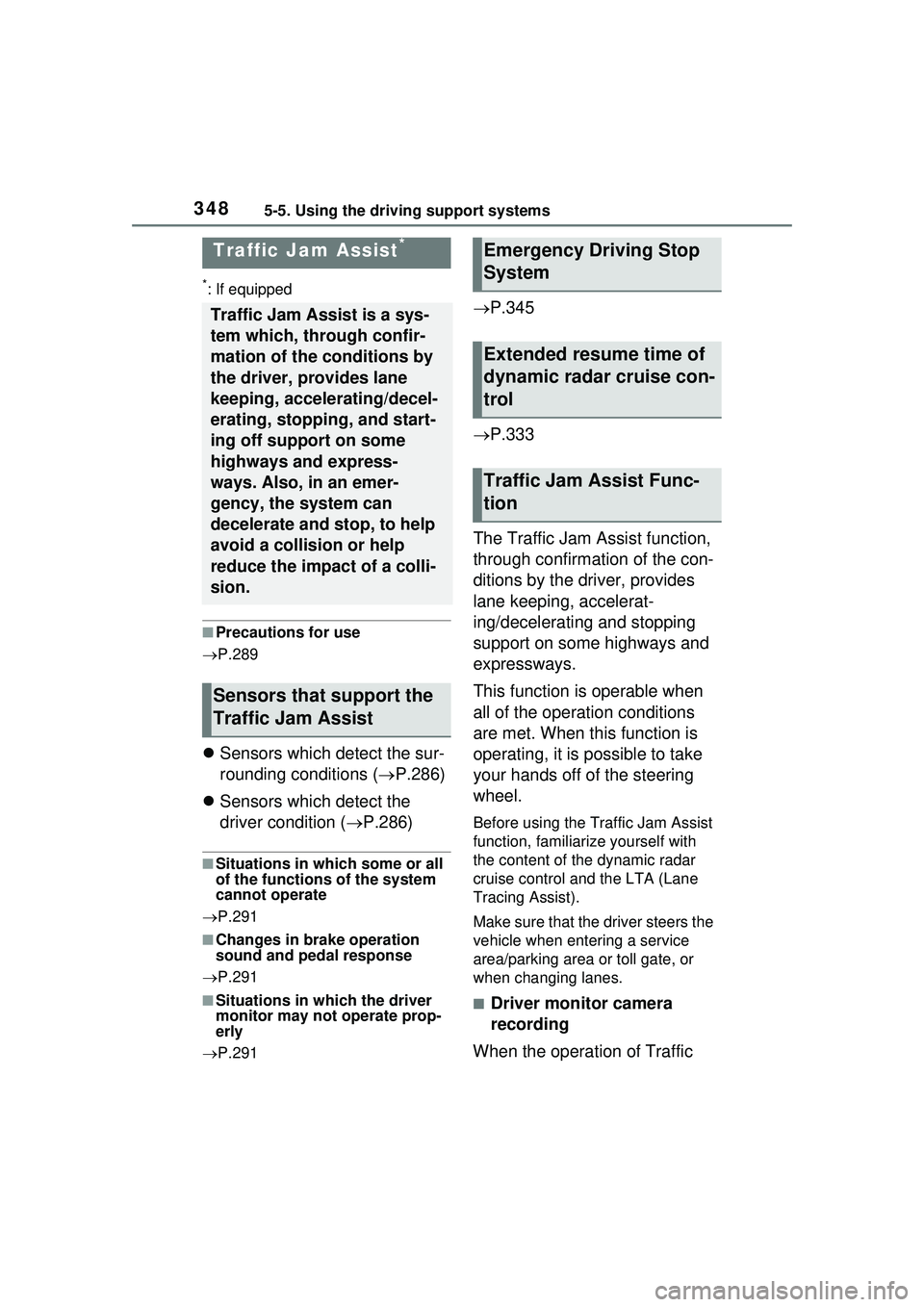
The Traffic Jam Assist function,
through confirmation of the con-
ditions by the driver, provides
lane keeping, accelerat-
ing/decelerating and stopping
support on some highways and
expressways.
This function is operable when
all of the operation conditions
are met. When this function is
operating, it is possible to take
your hands off of the steering
wheel.
Before using the Traffic Jam Assist
function, familiari ze yourself with
the content of the dynamic radar
cruise control and the LTA (Lane
Tracing Assist).
Make sure that the driver steers the
vehicle when entering a service
area/parking area or toll gate, or
when changing lanes.
■Driver monitor camera
recording
When the operation of Traffic
Traffic Jam Assist*
Traffic Jam Assist is a sys-
tem which, through confir-
mation of the conditions by
the driver, provides lane
keeping, accelerating/decel-
erating, stopping, and start-
ing off support on some
highways and express-
ways. Also, in an emer-
gency, the system can
decelerate and stop, to help
avoid a collision or help
reduce the impact of a colli-
sion.
Sensors that support the
Traffic Jam Assist
Emergency Driving Stop
System
Extended resume time of
dynamic radar cruise con-
trol
Traffic Jam Assist Func-
tion
Page 349 of 680
3495-5. Using the driving support systems
5
Driving
Jam Assist is started, the follow-
ing message will be displayed:
“Allow Driver Monitor Camera
Recording?”
When recording is approved, the
system records images of the area
around the driver in certain crash or
near crash-like situations, such as
an SRS airbag being deployed or
the vehicle hitting an object on the
road. ( P.7)
WARNING
■For safe use
●Driving safely is solely the
responsibility of the driver. Do
not overly rely on this system,
and pay careful attention to the
surrounding conditions in order
to ensure safe driving.
●The Traffic Jam Assist function
is not an automated driving sys-
tem. This function provides the
driver with information and driv-
ing assistance a ccording to the
road shape and conditions, traf-
fic conditions, and the condition
of the driver themself. Always
pay careful attention to the sur-
rounding conditions as use of
the system is the responsibility
of the driver.
●Depending on the condition of
the surrounding area, the road,
or the driver, the Traffic Jam
Assist function may not operate
or operation may be sus-
pended. Also, it may not always
be able to achieve the same
level of performance. Read the
operating conditions of the func-
tion carefully. Do not overly rely
on this function and always
drive carefully.
●As the recognition performance
and control performance of the
Traffic Jam Assist function are
limited, driver operation is nec-
essary to ensure safety while
the system is operating. Also,
the steering assist of this sys-
tem is designed to operate only
for slow steering operations
during a traffic jam. While this
function is operating, the lane
deviation control function of the
LDA will not operate. If, for
some reason, the vehicle is
about to deviate the lane, it is
the driver’s responsibility to
drive properly.
●Even if Traffic Jam Assist is
operating properly, the sur-
rounding conditions as recog-
nized by the driver and detected
by the system may differ. There-
fore, it is necessary for the
driver to pay attention, assess
risks, and ensure safety. Over-
reliance on this system to drive
the vehicle safely may lead to
an accident resulting in death or
serious injury.
●While the Traffi c Jam Assist
function is operating, as driver
operation may become neces-
sary, the driver must ensure
they have clear visibility of their
surroundings.
●In certain situations, a message
urging the driver to hold the
steering wheel may be dis-
played by the Traffic Jam Assist
function. In this case, hold the
steering wheel and drive the
vehicle manually to ensure
safety.
Page 351 of 680
3515-5. Using the driving support systems
5
Driving
■Operating conditions of the
function
This function is operable when all of
the following conditions are met:
●The system detects lane lines and
the path of preceding or surround-
ing vehicles.
●The dynamic radar cruise control
and the lane tracing assist are
operating.
●The turn signal lever is not being
operated.
●The vehicle is not being driven
around a sharp curve.
●The vehicle is being driven in the
center of a lane.
●The driver monitor camera is
detecting that the driver is facing
front of the vehicle.
●The vehicle is driving in traffic jam
on a highway or expressway at
approximately 25 mph (40 km/h)
or less. (In some situations, such
as when a traffic jam starts, this
function may be operational at
approximately 20 mph (30 km/h)
or less.)
●It is necessary to enter a con-
nected services contract, provided
by Toyota, to use these functions.
For details, contact your Toyota
dealer.
●The driver’s door is closed.
●The driver’s seat belt is fastened.
●Customized setting of the Traffic
Jam Assist is not set to off.
●Functions and components com-
posing the system are in proper
condition.
●Customized setting of the PCS (Pre-Collision System) is not set
to off.
●Customized setting of the dynamic
radar cruise control (re-start time
extension) is not set to off.
■Temporary cancelation of the
function
●When the operating conditions are
no longer met, a function may be
temporarily canceled. However,
when the operation conditions are
met again, operation of the func-
tion will automatically be restored.
●If the operating conditions of a
function are no longer met while
the function is operating, a buzzer
may sound with a display to indi-
cate that the function has been
temporarily canceled. If no driver’s
responses to the
indication are
detected, the driver emergency
stop assist function may operate.
For types of display and action to
be taken, see the page mentioned
below. ( P.352)
■Driving operations during con-
trolled driving:
●Accelerator pedal
As with normal driving, acceleration
can be performed by depressing the
accelerator pedal. When the accel-
erator pedal is depressed at approx-
imately 10 km/h (6 mph) or more,
this function will be canceled.
●Brake pedal
As with normal driving, deceleration
can be performed by depressing the
brake pedal. However, controlled
driving will be cancelled.
●Steering wheel
As with normal driving, the steering
wheel can be operated. If the steer-
ing wheel is operated more than a
certain amount, controlled driving
will be cancelled.
WARNING
■Front camera installation area
on the windshield
P.288
Page 352 of 680
3525-5. Using the driving support systems
■When a warning message is
displayed
●“Traffic Jam Asst System Malfunc-
tion Visit Your Dealer”
The Traffic Jam Assist function may
not be operating properly.
●“Traffic Jam Asst Unavailable
Stop Assist Activated”
The system temporarily cannot be
used as the driver emergency stop
assist function has operated.
The setting of Traffic Jam
Assist can be enabled/dis-
abled through a customize
setting. ( P.628)
The setting of driver monitor
camera recording can be
enabled/disabled through a
customize setting. ( P.628)
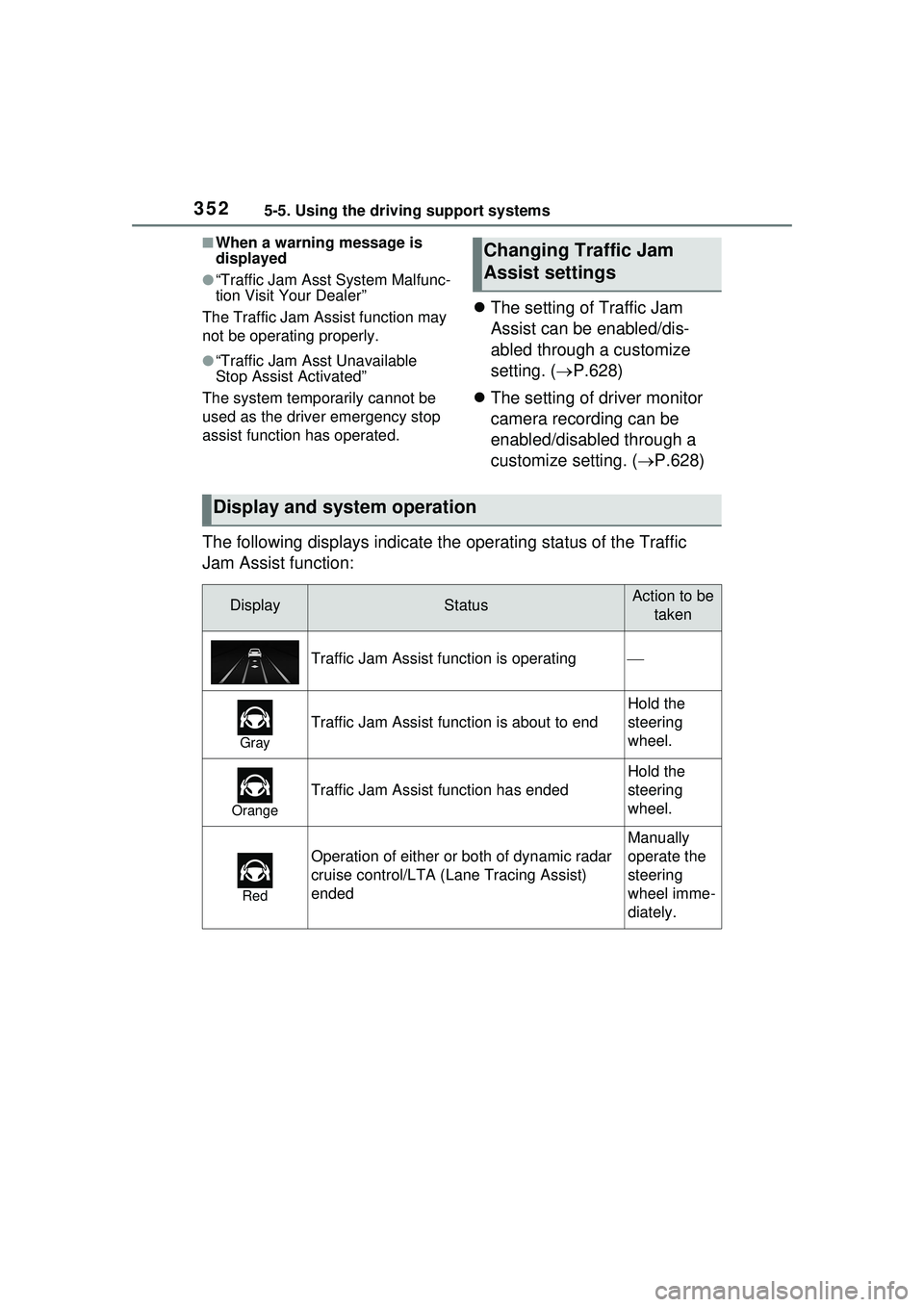
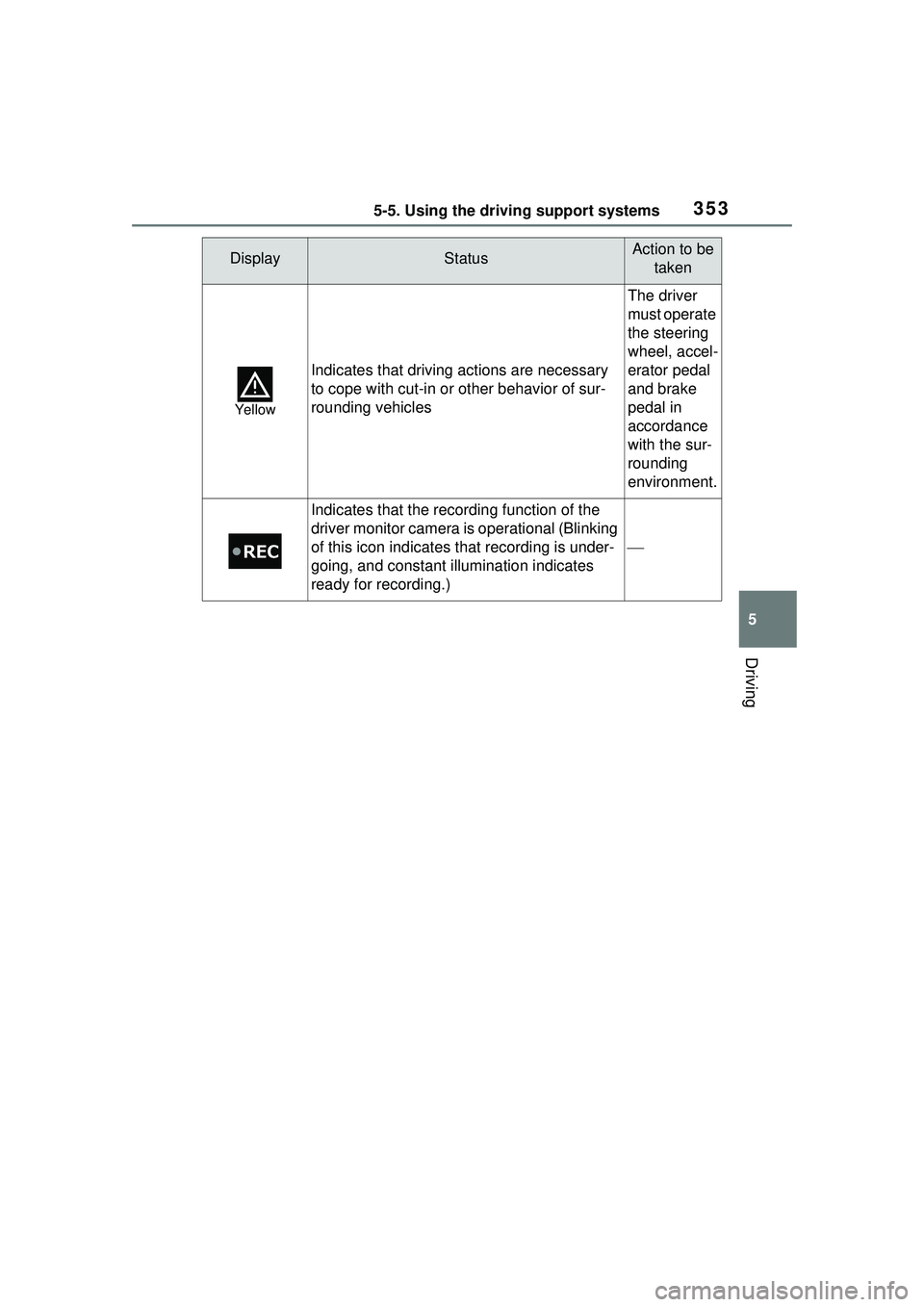
The following displays indicate the operating status of the Traffic
Jam Assist function:
Changing Traffic Jam
Assist settings
Display and system operation
DisplayStatusAction to be taken
Traffic Jam Assist function is operating
Gray
Traffic Jam Assist function is about to end
Hold the
steering
wheel.
Orange
Traffic Jam Assist function has ended
Hold the
steering
wheel.
Red
Operation of either or both of dynamic radar
cruise control/LTA ( Lane Tracing Assist)
ended
Manually
operate the
steering
wheel imme-
diately.
Page 353 of 680
3535-5. Using the driving support systems
5
Driving
Yellow
Indicates that driving actions are necessary
to cope with cut-in or other behavior of sur-
rounding vehicles
The driver
must operate
the steering
wheel, accel-
erator pedal
and brake
pedal in
accordance
with the sur-
rounding
environment.
Indicates that the recording function of the
driver monitor camera is operational (Blinking
of this icon indicates that recording is under-
going, and constant illumination indicates
ready for recording.)
DisplayStatusAction to be taken
Page 354 of 680
3545-5. Using the driving support systems
*: If equipped
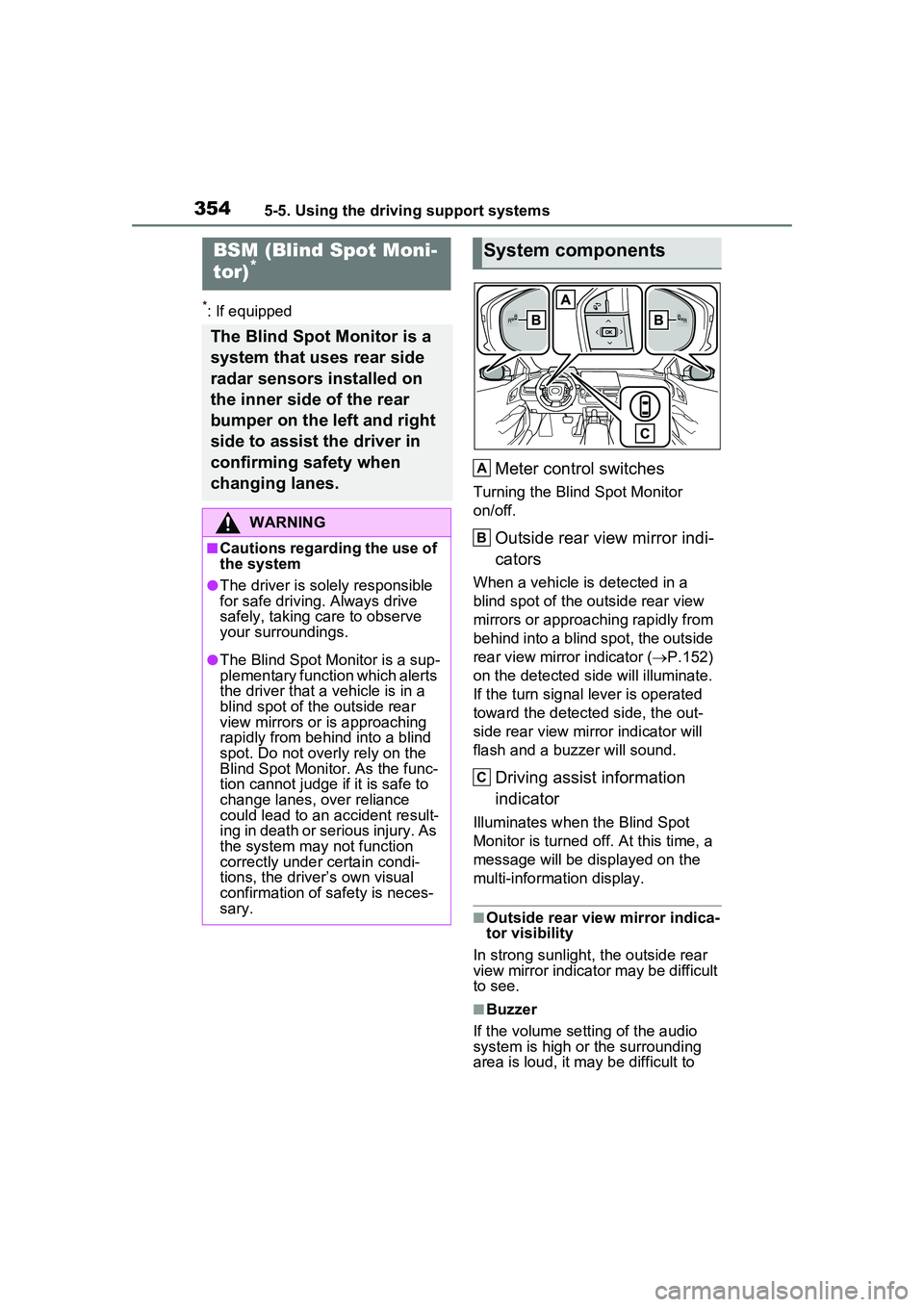
Meter control switches
Turning the Blind Spot Monitor
on/off.
Outside rear view mirror indi-
cators
When a vehicle is detected in a
blind spot of the outside rear view
mirrors or approaching rapidly from
behind into a blind spot, the outside
rear view mirror indicator (P.152)
on the detected side will illuminate.
If the turn signal lever is operated
toward the detected side, the out-
side rear view mirror indicator will
flash and a buzzer will sound.
Driving assist information
indicator
Illuminates when the Blind Spot
Monitor is turned off. At this time, a
message will be displayed on the
multi-informat ion display.
■Outside rear view mirror indica-
tor visibility
In strong sunlight, the outside rear
view mirror indicator may be difficult
to see.
■Buzzer
If the volume setting of the audio
system is high or the surrounding
area is loud, it may be difficult to
BSM (Blind Spot Moni-
tor)*
The Blind Spot Monitor is a
system that uses rear side
radar sensors installed on
the inner side of the rear
bumper on the left and right
side to assist the driver in
confirming safety when
changing lanes.
WARNING
■Cautions regarding the use of
the system
●The driver is solely responsible
for safe driving. Always drive
safely, taking care to observe
your surroundings.
●The Blind Spot Monitor is a sup-
plementary function which alerts
the driver that a vehicle is in a
blind spot of the outside rear
view mirrors or is approaching
rapidly from behind into a blind
spot. Do not overly rely on the
Blind Spot Monitor. As the func-
tion cannot judge if it is safe to
change lanes, over reliance
could lead to an accident result-
ing in death or serious injury. As
the system may not function
correctly under certain condi-
tions, the driver’s own visual
confirmation of safety is neces-
sary.
System components
A
B
C
Page 356 of 680
3565-5. Using the driving support systems
display.
Each time the power switch is turned to ON, the Blind Spot
Monitor is enabled.
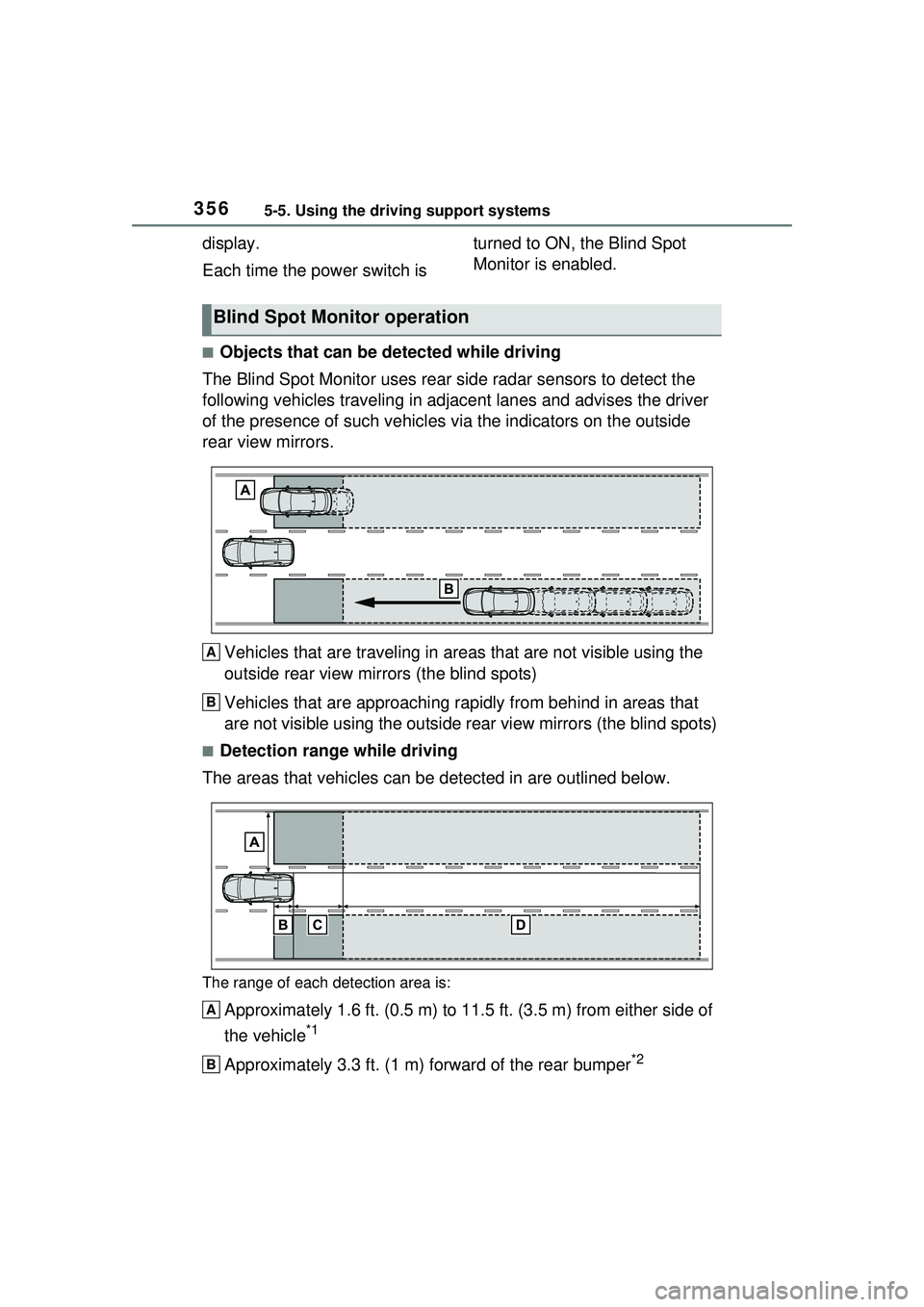
■Objects that can be detected while driving
The Blind Spot Monitor uses rear side radar sensors to detect the
following vehicles trav eling in adjacent lanes and advises the driver
of the presence of such vehicles via the indicators on the outside
rear view mirrors.
Vehicles that are traveling in areas that are not visible using the
outside rear view mirrors (the blind spots)
Vehicles that are approaching r apidly from behind in areas that
are not visible using the outside rear view mirrors (the blind spots)
■Detection range while driving
The areas that vehicles can be detected in are outlined below.
The range of each detection area is:
Approximately 1.6 ft. (0.5 m) to 11.5 ft. (3.5 m) from either side of
the vehicle
*1
Approximately 3.3 ft. (1 m) forward of the rear bumper*2
Blind Spot Monitor operation
A
B
A
B
Page 374 of 680
3745-5. Using the driving support systems
will be displayed on the multi-infor-
mation display.
The RCTA can be enabled/dis-
abled through a customize set-
ting. (P.618)
When the RCTA function is off,
the driving assist information
indicator ( P.152) will illumi-
nate and a message will be dis-
played on the multi-information
display. Each time the power
switch is turned to ON, the
RCTA function is enabled.
■Outside rear view mirror indica-
tor visibility
In strong sunlight, the outside rear
view mirror indicator may be difficult
to see.
■Hearing the RCTA buzzer
The RCTA buzzer may be difficult to
hear over loud noises, such as if the
audio system volume is high.
■Rear side radar sensors
P.355
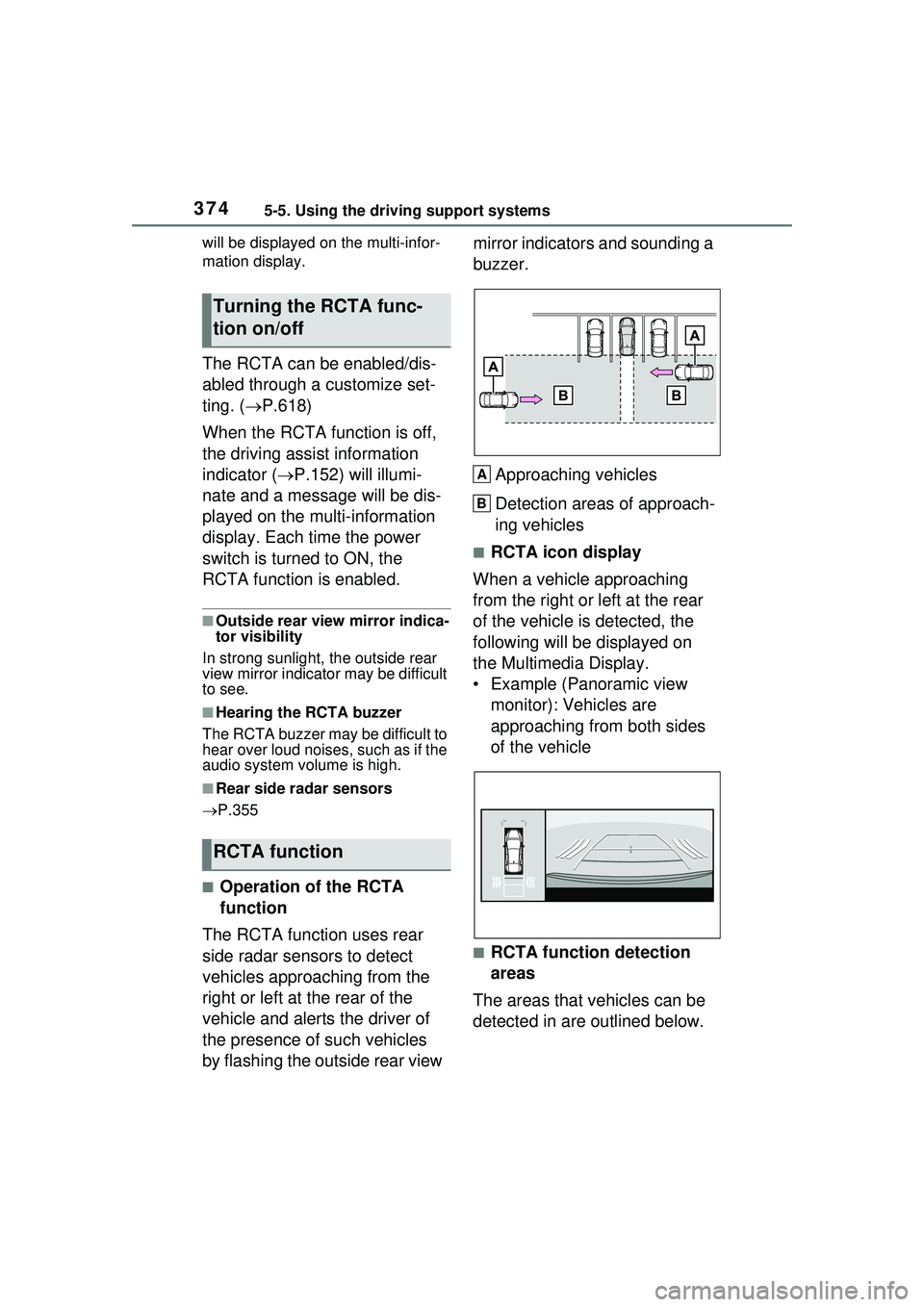
■Operation of the RCTA
function
The RCTA function uses rear
side radar sensors to detect
vehicles approaching from the
right or left at the rear of the
vehicle and alerts the driver of
the presence of such vehicles
by flashing the outside rear view mirror indicators and sounding a
buzzer.
Approaching vehicles
Detection areas of approach-
ing vehicles
■RCTA icon display
When a vehicle approaching
from the right or left at the rear
of the vehicle is detected, the
following will be displayed on
the Multimedia Display.
• Example (Panoramic view monitor): Vehicles are
approaching from both sides
of the vehicle
■RCTA function detection
areas
The areas that vehicles can be
detected in are outlined below.
Turning the RCTA func-
tion on/off
RCTA function
A
B
Page 385 of 680
3855-5. Using the driving support systems
5
Driving
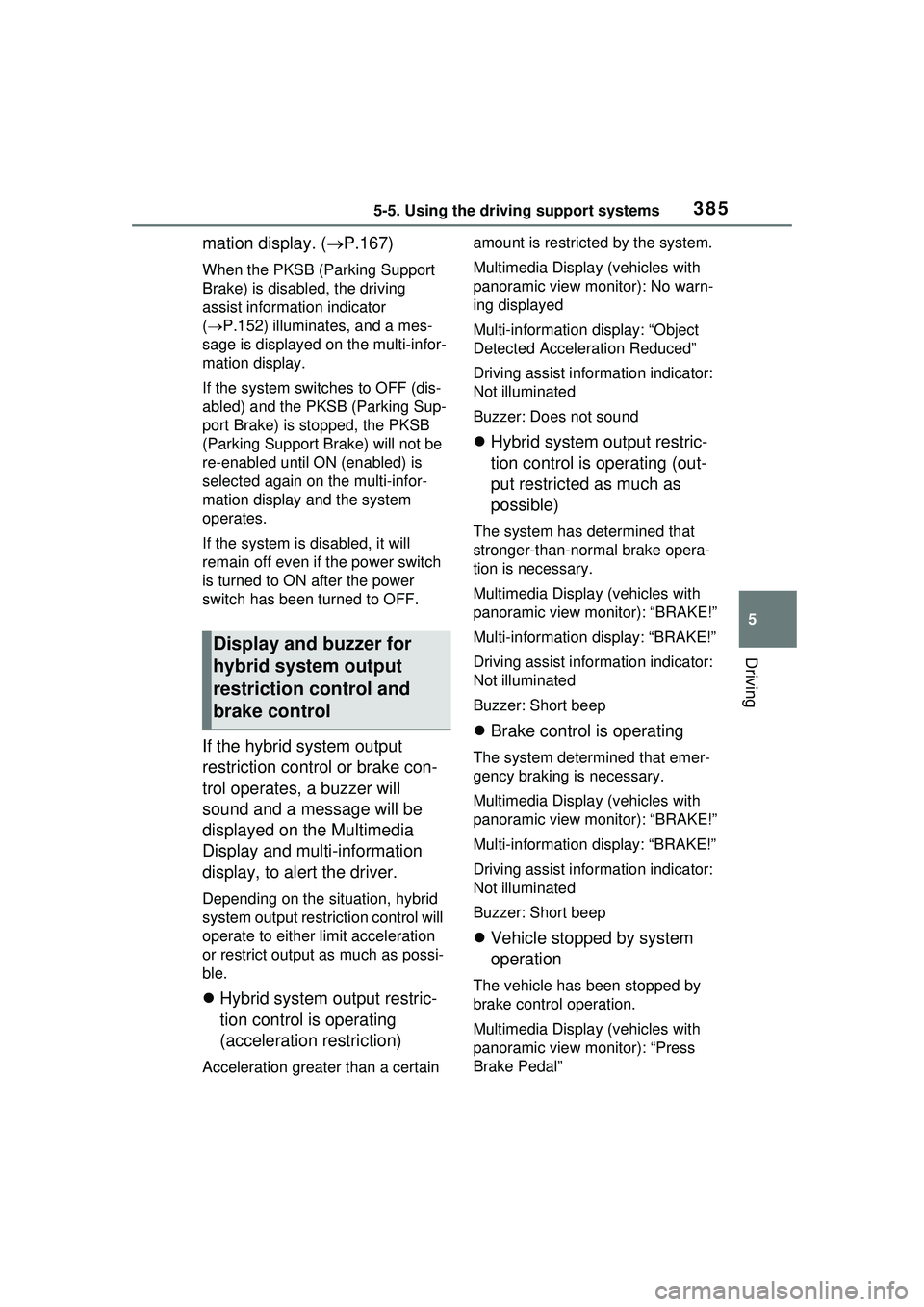
mation display. (P.167)
When the PKSB (Parking Support
Brake) is disabled, the driving
assist information indicator
( P.152) illuminates, and a mes-
sage is displayed on the multi-infor-
mation display.
If the system switches to OFF (dis-
abled) and the PKSB (Parking Sup-
port Brake) is st opped, the PKSB
(Parking Support Br ake) will not be
re-enabled until ON (enabled) is
selected again on the multi-infor-
mation display and the system
operates.
If the system is disabled, it will
remain off even if the power switch
is turned to ON after the power
switch has been turned to OFF.
If the hybrid system output
restriction control or brake con-
trol operates, a buzzer will
sound and a message will be
displayed on the Multimedia
Display and multi-information
display, to alert the driver.
Depending on the situation, hybrid
system output rest riction control will
operate to either limit acceleration
or restrict output as much as possi-
ble.
Hybrid system output restric-
tion control is operating
(acceleration restriction)
Acceleration greater than a certain amount is restricted by the system.
Multimedia Display (vehicles with
panoramic view monitor): No warn-
ing displayed
Multi-information
display: “Object
Detected Acceleration Reduced”
Driving assist info rmation indicator:
Not illuminated
Buzzer: Does not sound
Hybrid system output restric-
tion control is operating (out-
put restricted as much as
possible)
The system has determined that
stronger-than-normal brake opera-
tion is necessary.
Multimedia Display (vehicles with
panoramic view monitor): “BRAKE!”
Multi-information display: “BRAKE!”
Driving assist info rmation indicator:
Not illuminated
Buzzer: Short beep
Brake control is operating
The system determined that emer-
gency braking is necessary.
Multimedia Display (vehicles with
panoramic view monitor): “BRAKE!”
Multi-information display: “BRAKE!”
Driving assist info rmation indicator:
Not illuminated
Buzzer: Short beep
Vehicle stopped by system
operation
The vehicle has been stopped by
brake control operation.
Multimedia Display (vehicles with
panoramic view monitor): “Press
Brake Pedal”
Display and buzzer for
hybrid system output
restriction control and
brake control
Page 396 of 680
3965-5. Using the driving support systems
*: For details on the panoramic view monitor refer to “MULTIMEDIA
OWNER’S MANUAL”.
■Perpendicular parking (for-
ward/reverse) function
Assistance is provided from the
position the vehicle is stopped
near the target parking space
until the vehicle is in the parking
space. ( P.403)
■Perpendicular exiting (for-
ward/reverse) function
Assistance is provided from the
parked position until the vehicle
is in a position where you can
easily exit from the parking
space. ( P.406)
■Parallel parking function
Assistance is provided from the
position the vehicle is stopped
near the target parking space
until the vehicle is in the parking
space. ( P.408)
■Parallel exiting function
Assistance is provided from the
parked position until the vehicle
is in a position where you can
easily exit from the parking
space. ( P.412)
■Memory function
Assistance is provided until the
vehicle is guided into a previ-
ously registered parking space.
( P.414)
Functions
WARNING
■Cautions regarding the use of
the system
The recognition and control capa-
bilities for this system are limited.
The driver should always drive
safety by always being responsi-
ble without over relying on the
system and have a understanding
of the surrounding situations.
●As with a normal vehicle, take
care to observe your surround-
ings while the vehicle is moving.
●Always pay attention to the
vehicle’s surroundings while the
system is operating and
depress the brake pedal as nec-
essary to slow or stop the vehi-
cle.
●When parking, make sure that
the vehicle can be parked in the
target parking space before
beginning operation.
●Depending on the condition of
the road surface or the vehicle,
the distance between the vehi-
cle and a parking space, etc., it
may not be possible to detect a
parking space or the system
may not be able to provide
assistance to the point the vehi-
cle is fully parked.
●This system will guide the vehi-
cle to appropriate positions for
changing the direction of travel,
however, if you feel that the
vehicle is approaching too close
to an adjacent parked vehicle at
any time, depress the brake
pedal and change the shift posi-
tion. However, if this is per-
formed, the number of times the
vehicle changes direction may
increase, and the vehicle may
be parked at an angle.