mirror TOYOTA PRIUS PRIME 2023 Owner's Manual
[x] Cancel search | Manufacturer: TOYOTA, Model Year: 2023, Model line: PRIUS PRIME, Model: TOYOTA PRIUS PRIME 2023Pages: 680, PDF Size: 14.97 MB
Page 222 of 680
2224-4. Adjusting the steering wheel and mirrors
If you notice any of the following symptoms, refer to the following
table for the likely cause and the solution.
If the symptom is not resolved by the solution, have the vehicle
inspected by your Toyota dealer.
NOTICE
• When washing the camera, rinse it with a large quantity of
water and then wipe it clean
with a soft cloth dampened with
water. Do not strongly rub the
camera lens, as it may be
scratched and will not be able to
transmit a clear image.
• Do not allow organic solvent, car wax, window cleaner or
glass coat to adhere to the cam-
era cover. If this happens, wipe
it off as soon as possible.
• Do not apply hot water to the camera in cold weather, as the
sudden change of temperature
may cause the camera to not
operate properly.
• When using a high pressure washer to wash the vehicle, do
not directly spray the camera
and its surrounding area, as
doing so may cause the camera
to not operate properly.
●Do not subject the camera to a
strong impact as this could
cause a malfunction.
If this happens, have the vehicle
inspected by your Toyota dealer
as soon as possible.
If you notice any symptoms
Page 223 of 680
2234-4. Adjusting the steering wheel and mirrors
4
Before driving
SymptomLikely causeSolution
The image is difficult to
see.
The mirror surface is
dirty.Clean the mirror surface
gently, using a soft dry
cloth.
Sunlight or headlights
are shining directly into
the Digital Rear-view
Mirror.Change to optical mirror
mode.
(If the light is coming
through, close the sun-
shade [if equipped].)
The image is difficult to
see.
• The vehicle is in a dark area.
• The vehicle is near a TV tower, broadcast-
ing station, electric
power plant, or other
location where strong
radio waves or electri-
cal noise may be pres-
ent.
• The temperature around the camera is
extremely high/low.
• The ambient tempera- ture is extremely low.
• It is raining or humid.
• Sunlight or headlights are shining directly into
the camera lens.
• The vehicle is under fluorescent lights,
sodium lights, mer-
cury lights, etc.
• Exhaust gas is obstructing the cam-
era.
Change to optical mirror
mode.
(Change back to digital
mirror mode when the
conditions have
improved.)
Foreign matters such as
water droplets or dust is
on the camera lens.
• Operate the dedicated camera cleaning
washer and clean the
camera lens.
( P.275)
• Change to optical mir- ror mode.
Page 224 of 680
2244-4. Adjusting the steering wheel and mirrors
The image is out of
alignment.
The back door is not fully
closed.Fully close the back
door.
The camera or its sur-
rounding area has
received a strong
impact.Change to optical mirror
mode and have the vehi-
cle inspected by your
Toyota dealer.
The display is dim and is displayed.
The system may be mal-
functioning.
Change to optical mirror
mode and have the vehi-
cle inspected by your
Toyota dealer.
goes off.
is displayed.
The Digital Rear-view
Mirror is extremely hot.
(The display will gradu-
ally become more dim. If
the temperature contin-
ues to increase, the Digi-
tal Rear-view Mirror will
turn off.)
Reducing the cabin tem-
perature is recom-
mended to reduce the
temperature of the mir-
ror.
( will disappear when
the mirror becomes
cool.)
If does not disap-
pear even though the
mirror is cool, have the
vehicle inspected by
your Toyota dealer.
The lever cannot be
operated properly.The lever may be mal-
functioning.
Change to optical mirror
mode and have the vehi-
cle inspected by your
Toyota dealer.
(To change to optical
mirror mode, press and
hold the menu button for
approximately 10 sec-
onds.)
SymptomLikely causeSolution
Page 225 of 680
2254-4. Adjusting the steering wheel and mirrors
4
Before driving
■When using the outside rear
view mirrors in a cold weather
When it is cold and the outside rear
view mirrors are frozen, it may not
be possible to fold /extend them or
adjust the mirror surface. Remove
the ice, snow, etc. covering the out-
side rear view mirrors.
■Defogging the mirrors (if
equipped)
The outside rear view mirrors can
be cleared using the mirror defog-
gers. Turn on the rear window
defogger to turn on the outside rear
view mirror defoggers.
( P.436)
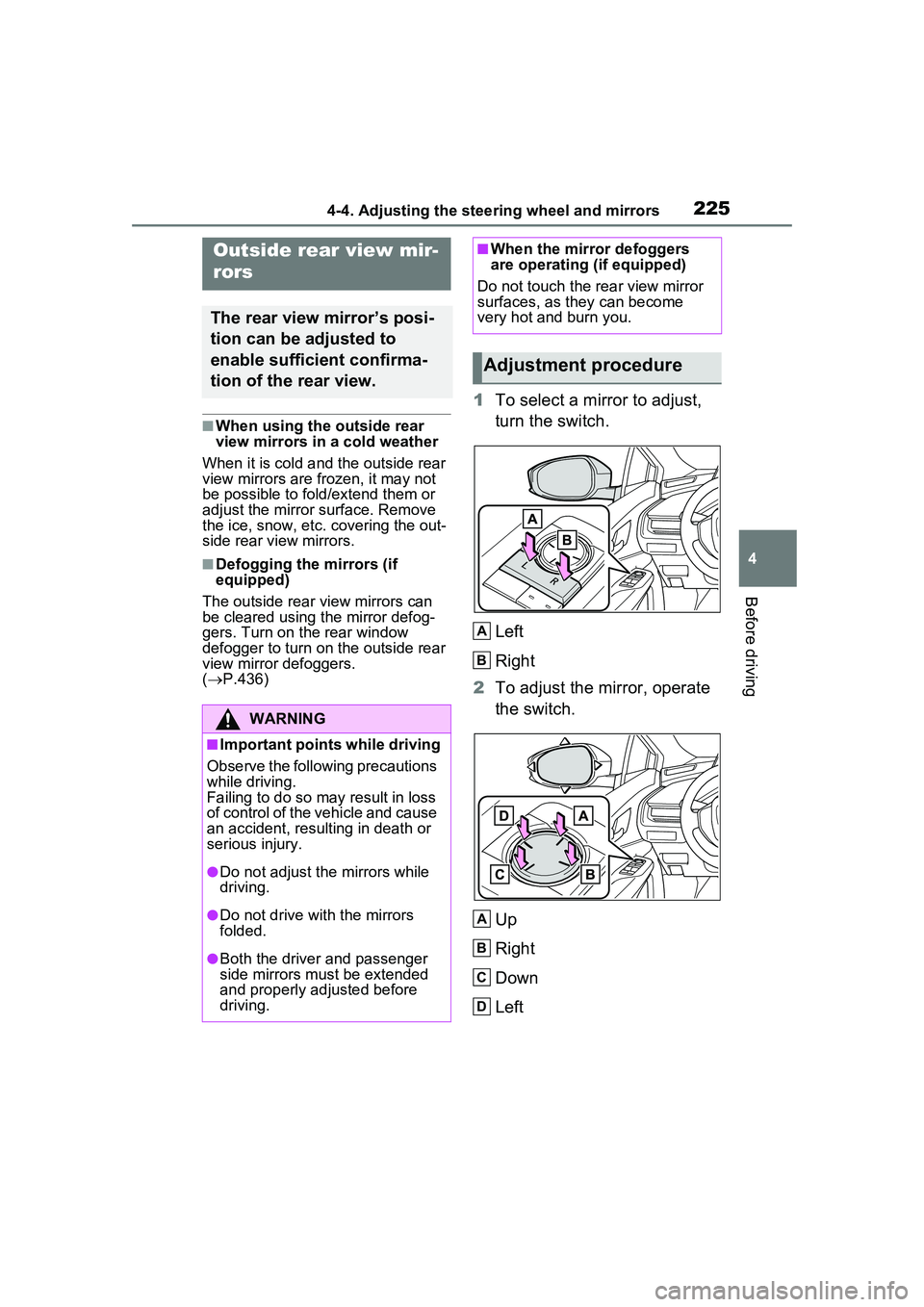
1 To select a mirror to adjust,
turn the switch.
Left
Right
2 To adjust the mirror, operate
the switch.
Up
Right
Down
Left
Outside rear view mir-
rors
The rear view mirror’s posi-
tion can be adjusted to
enable sufficient confirma-
tion of the rear view.
WARNING
■Important points while driving
Observe the following precautions
while driving.
Failing to do so may result in loss
of control of the vehicle and cause
an accident, resulting in death or
serious injury.
●Do not adjust the mirrors while
driving.
●Do not drive with the mirrors
folded.
●Both the driver and passenger
side mirrors must be extended
and properly adjusted before
driving.
■When the mirror defoggers
are operating (if equipped)
Do not touch the rear view mirror
surfaces, as they can become
very hot and burn you.
Adjustment procedure
A
B
A
B
C
D
Page 226 of 680
2264-4. Adjusting the steering wheel and mirrors
■Mirror angle can be adjusted
when
The power switch is in ACC or ON.
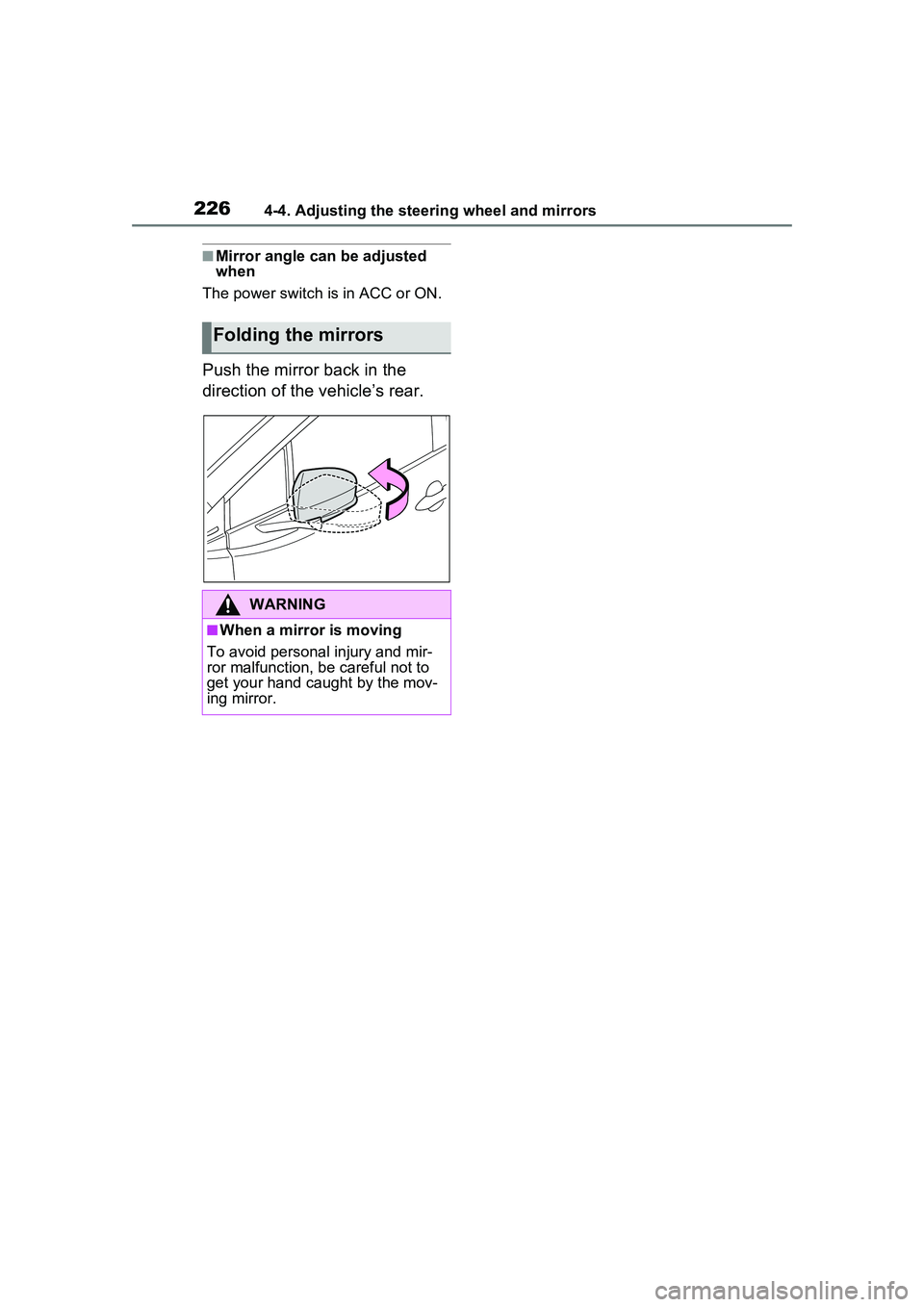
Push the mirror back in the
direction of the vehicle’s rear.
Folding the mirrors
WARNING
■When a mirror is moving
To avoid personal injury and mir-
ror malfunction, be careful not to
get your hand caught by the mov-
ing mirror.
Page 241 of 680
2415-1. Before driving
5
Driving
WARNING
■When driving the vehicle
●Do not drive if you are unfamil-
iar with the location of the brake
and accelerator pedals to avoid
depressing the wrong pedal.
• Accidentally depressing the accelerator pedal instead of the
brake pedal will result in sudden
acceleration that may lead to an
accident.
• When backing up, you may twist your body around, leading to a
difficulty in operating the pedals.
Make sure to operate the pedals
properly.
• Make sure to keep a correct driving posture even when mov-
ing the vehicle only slightly. This
allows you to depress the brake
and accelerator pedals properly.
• Depress the brake pedal using your right foot. Depressing the
brake pedal using your left foot
may delay response in an emer-
gency, resulting in an accident.
●The driver should pay extra
attention to pedestrians when
the vehicle is powered only by
the electric motor (traction
motor). As there is no engine
noise, the pedestrians may mis-
judge the vehicle’s movement.
Even if the Acoustic Vehicle
Alerting System is operating,
drive with care as pedestrians in
the vicinity may still not notice
the vehicle if the surrounding
area is noisy.
●Do not drive the vehicle over or
stop the vehicle near flammable
materials such as leaves, paper
or rags.
The exhaust system and
exhaust gases can be
extremely hot. These hot parts
may cause a fire if there is any
flammable material nearby.
●During normal driving, do not
turn off the hybrid system. Turn-
ing the hybrid s ystem off while
driving will not cause loss of
steering or braking control.
However, power assist for the
steering wheel may be lost mak-
ing it difficult to steer smoothly
before stopping the vehicle
depending on the remaining
charge in the 12-volt battery or
usage conditions. In this situa-
tion, you should pull over and
stop the vehicle as soon as it is
safe to do so.
In the event of an emergency,
such as if it be comes impossible
to stop the vehicle in the normal
way: P.547
●Use engine braking (downshift)
to maintain a safe speed when
driving down a steep hill.
Using the brakes continuously
may cause the brakes to over-
heat and lose effectiveness.
( P.256)
●Do not adjust the position of the
steering wheel, the seat, inside
rear view mirror (if equipped),
Digital Rear-view Mirror (if
equipped) or outside rear view
mirrors while driving.
Doing so may resu lt in a loss of
vehicle control.
●Always check that all passen-
gers’ arms, head or other parts
of their body are not outside the
vehicle.
Page 276 of 680
2765-3. Operating the lights and wipers
5*1 or *2
Temporary operation
*1:For the U.S.A.
*2: For Canada
When is selected, the
wipers will operate automatically
when the sensor detects falling
rain. The system automatically
adjusts wiper timing in accor-
dance with rain volume and
vehicle speed.
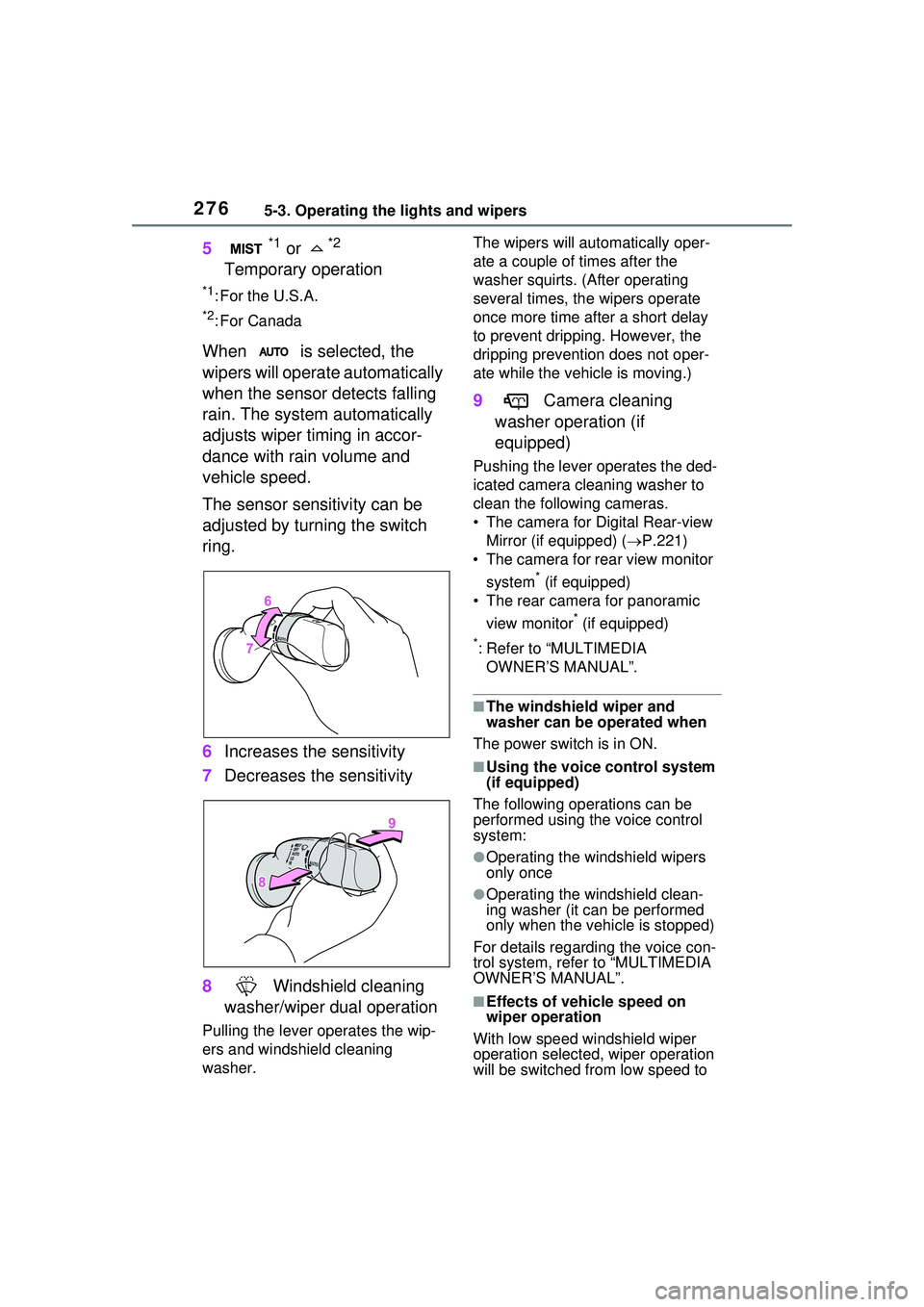
The sensor sensitivity can be
adjusted by turning the switch
ring.
6 Increases the sensitivity
7 Decreases the sensitivity
8 Windshield cleaning
washer/wiper dual operation
Pulling the lever operates the wip-
ers and windshield cleaning
washer. The wipers will automatically oper-
ate a couple of times after the
washer squirts. (After operating
several times, th
e wipers operate
once more time after a short delay
to prevent dripping. However, the
dripping prevention does not oper-
ate while the vehicle is moving.)
9 Camera cleaning
washer operation (if
equipped)
Pushing the lever operates the ded-
icated camera cleaning washer to
clean the following cameras.
• The camera for Digital Rear-view Mirror (if equipped) ( P.221)
• The camera for rear view monitor
system
* (if equipped)
• The rear camera for panoramic
view monitor
* (if equipped)
*: Refer to “MULTIMEDIA OWNER’S MANUAL”.
■The windshield wiper and
washer can be operated when
The power switch is in ON.
■Using the voice control system
(if equipped)
The following operations can be
performed using the voice control
system:
●Operating the windshield wipers
only once
●Operating the windshield clean-
ing washer (it can be performed
only when the vehicle is stopped)
For details regarding the voice con-
trol system, refe r to “MULTIMEDIA
OWNER’S MANUAL”.
■Effects of vehicle speed on
wiper operation
With low speed windshield wiper
operation selected, wiper operation
will be switched from low speed to
Page 288 of 680
2885-5. Using the driving support systems
WARNING
●If the part of the windshield in
front of the front camera is
fogged up or covered with con-
densation or ice, use the wind-
shield defogger to remove the
fog, condensation, or ice.
●If water droplets cannot be
properly removed from the area
of the windshield in front of the
front camera by the windshield
wipers, replace the wiper insert
or wiper blade.
●Do not attach window tint to the
windshield.
●Replace the windshield if it is
damaged or cracked.
If the windshield has been
replaced, recalibration of the front
camera will be necessary. For
details, contact your Toyota
dealer.
●Do not allow liqui ds to contact
the front camera.
●Do not allow bright lights to
shine into the front camera.
●Do not damage the lens of the
front camera or allow it to
become dirty.
When cleaning the inside of the
windshield, do not allow glass
cleaner to contact the lens of the
front camera. Do not touch the
lens of the front camera.
If the lens of the front camera is
dirty or damaged, contact your
Toyota dealer.
●Do not subject the front camera
to a strong impact.
●Do not change the position or
orientation of the front camera
or remove it.
●Do not disassemble the front
camera.
●Do not modify any parts around
the front camera, such as the
inside rear view mirror or ceil-
ing.
●Do not attach accessories
which may obstruct the front
camera to the hood, front grille,
or front bumper. For details,
contact your Toyota dealer.
●If a surfboard or other long
object is to be mounted on the
roof, make sure that it will not
obstruct the front camera.
●Do not modify or change the
headlights and other lights.
■Front camera installation area
on the windshield
If the system determines that the
windshield may be fogged up, it
will automatically operate the
heater to defog the part of the
windshield around the front cam-
era. When cleaning, etc., be care-
ful not to touch the area around
the front camera until the wind-
shield has cooled sufficiently, as
touching it may cause burns.
■Precautions for the driver
monitor camera (if equipped)
Observe the following precau-
tions.
Failure to do so may lead to mal-
function of the driver monitor cam-
era and the systems not operating
properly, possibly leading to an
accident resulting in death or seri-
ous injury.
Page 354 of 680
3545-5. Using the driving support systems
*: If equipped
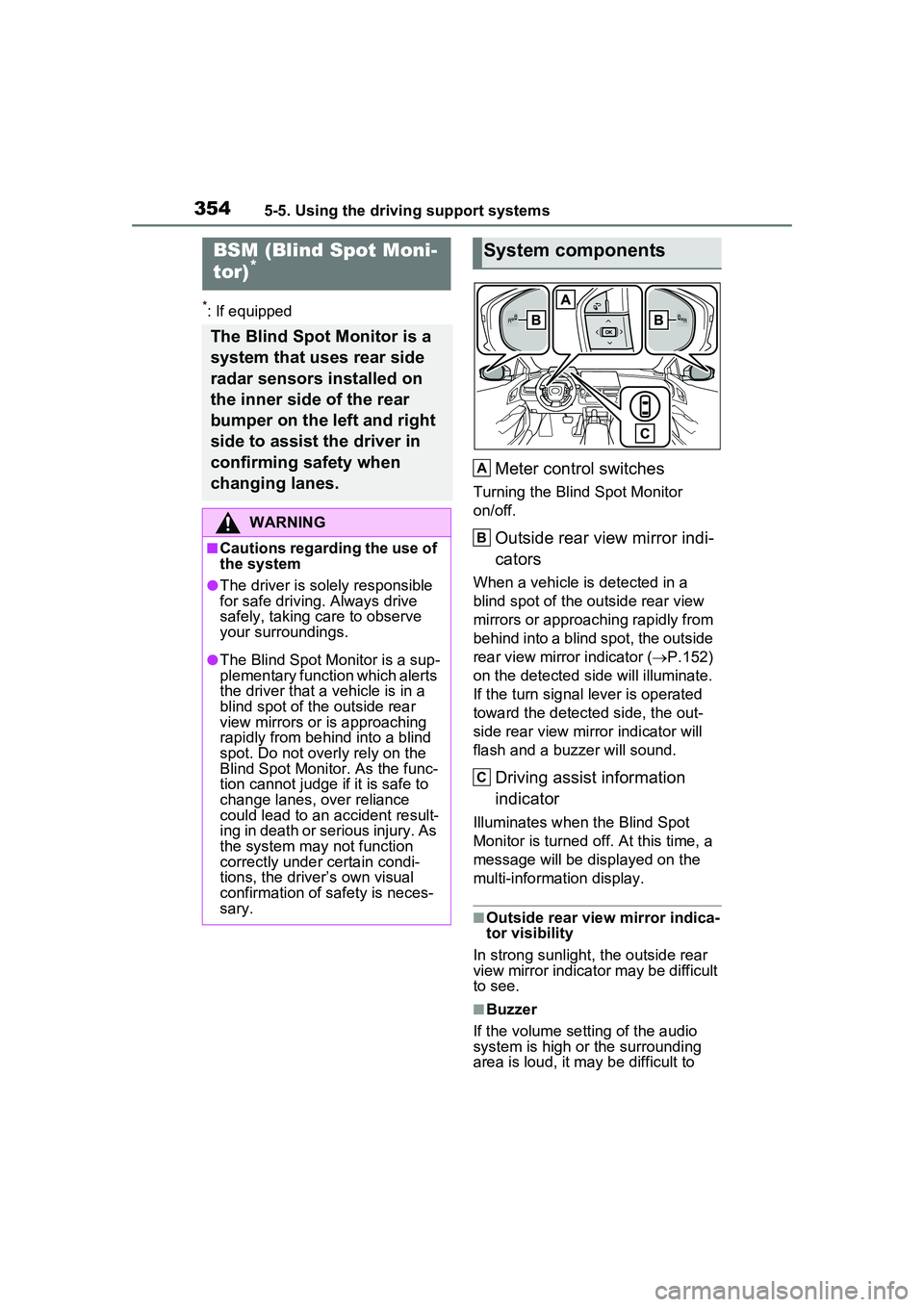
Meter control switches
Turning the Blind Spot Monitor
on/off.
Outside rear view mirror indi-
cators
When a vehicle is detected in a
blind spot of the outside rear view
mirrors or approaching rapidly from
behind into a blind spot, the outside
rear view mirror indicator (P.152)
on the detected side will illuminate.
If the turn signal lever is operated
toward the detected side, the out-
side rear view mirror indicator will
flash and a buzzer will sound.
Driving assist information
indicator
Illuminates when the Blind Spot
Monitor is turned off. At this time, a
message will be displayed on the
multi-informat ion display.
■Outside rear view mirror indica-
tor visibility
In strong sunlight, the outside rear
view mirror indicator may be difficult
to see.
■Buzzer
If the volume setting of the audio
system is high or the surrounding
area is loud, it may be difficult to
BSM (Blind Spot Moni-
tor)*
The Blind Spot Monitor is a
system that uses rear side
radar sensors installed on
the inner side of the rear
bumper on the left and right
side to assist the driver in
confirming safety when
changing lanes.
WARNING
■Cautions regarding the use of
the system
●The driver is solely responsible
for safe driving. Always drive
safely, taking care to observe
your surroundings.
●The Blind Spot Monitor is a sup-
plementary function which alerts
the driver that a vehicle is in a
blind spot of the outside rear
view mirrors or is approaching
rapidly from behind into a blind
spot. Do not overly rely on the
Blind Spot Monitor. As the func-
tion cannot judge if it is safe to
change lanes, over reliance
could lead to an accident result-
ing in death or serious injury. As
the system may not function
correctly under certain condi-
tions, the driver’s own visual
confirmation of safety is neces-
sary.
System components
A
B
C
Page 356 of 680
3565-5. Using the driving support systems
display.
Each time the power switch is turned to ON, the Blind Spot
Monitor is enabled.
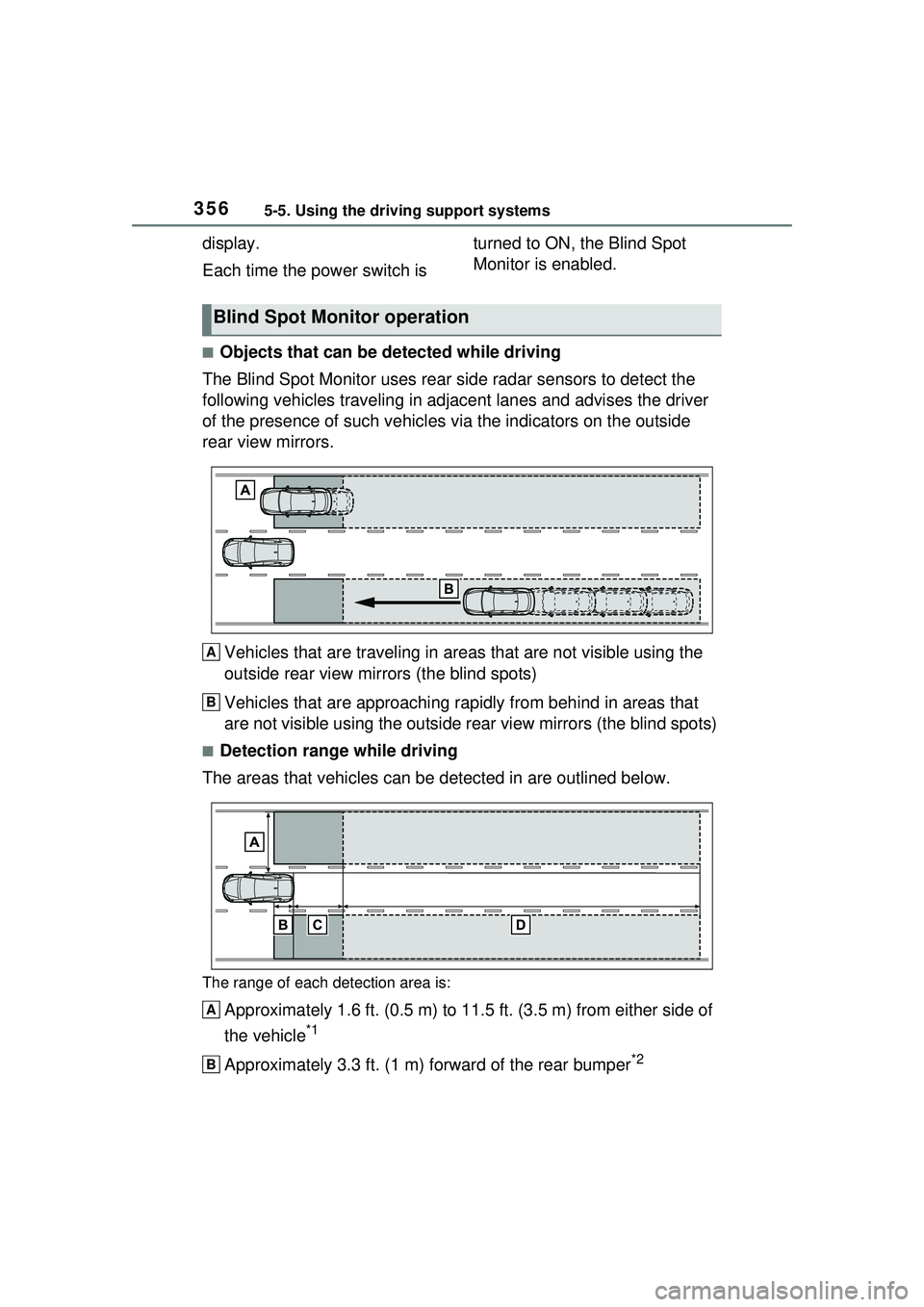
■Objects that can be detected while driving
The Blind Spot Monitor uses rear side radar sensors to detect the
following vehicles trav eling in adjacent lanes and advises the driver
of the presence of such vehicles via the indicators on the outside
rear view mirrors.
Vehicles that are traveling in areas that are not visible using the
outside rear view mirrors (the blind spots)
Vehicles that are approaching r apidly from behind in areas that
are not visible using the outside rear view mirrors (the blind spots)
■Detection range while driving
The areas that vehicles can be detected in are outlined below.
The range of each detection area is:
Approximately 1.6 ft. (0.5 m) to 11.5 ft. (3.5 m) from either side of
the vehicle
*1
Approximately 3.3 ft. (1 m) forward of the rear bumper*2
Blind Spot Monitor operation
A
B
A
B