rear view mirror TOYOTA PRIUS PRIME 2023 Owner's Manual
[x] Cancel search | Manufacturer: TOYOTA, Model Year: 2023, Model line: PRIUS PRIME, Model: TOYOTA PRIUS PRIME 2023Pages: 680, PDF Size: 14.97 MB
Page 241 of 680
2415-1. Before driving
5
Driving
WARNING
■When driving the vehicle
●Do not drive if you are unfamil-
iar with the location of the brake
and accelerator pedals to avoid
depressing the wrong pedal.
• Accidentally depressing the accelerator pedal instead of the
brake pedal will result in sudden
acceleration that may lead to an
accident.
• When backing up, you may twist your body around, leading to a
difficulty in operating the pedals.
Make sure to operate the pedals
properly.
• Make sure to keep a correct driving posture even when mov-
ing the vehicle only slightly. This
allows you to depress the brake
and accelerator pedals properly.
• Depress the brake pedal using your right foot. Depressing the
brake pedal using your left foot
may delay response in an emer-
gency, resulting in an accident.
●The driver should pay extra
attention to pedestrians when
the vehicle is powered only by
the electric motor (traction
motor). As there is no engine
noise, the pedestrians may mis-
judge the vehicle’s movement.
Even if the Acoustic Vehicle
Alerting System is operating,
drive with care as pedestrians in
the vicinity may still not notice
the vehicle if the surrounding
area is noisy.
●Do not drive the vehicle over or
stop the vehicle near flammable
materials such as leaves, paper
or rags.
The exhaust system and
exhaust gases can be
extremely hot. These hot parts
may cause a fire if there is any
flammable material nearby.
●During normal driving, do not
turn off the hybrid system. Turn-
ing the hybrid s ystem off while
driving will not cause loss of
steering or braking control.
However, power assist for the
steering wheel may be lost mak-
ing it difficult to steer smoothly
before stopping the vehicle
depending on the remaining
charge in the 12-volt battery or
usage conditions. In this situa-
tion, you should pull over and
stop the vehicle as soon as it is
safe to do so.
In the event of an emergency,
such as if it be comes impossible
to stop the vehicle in the normal
way: P.547
●Use engine braking (downshift)
to maintain a safe speed when
driving down a steep hill.
Using the brakes continuously
may cause the brakes to over-
heat and lose effectiveness.
( P.256)
●Do not adjust the position of the
steering wheel, the seat, inside
rear view mirror (if equipped),
Digital Rear-view Mirror (if
equipped) or outside rear view
mirrors while driving.
Doing so may resu lt in a loss of
vehicle control.
●Always check that all passen-
gers’ arms, head or other parts
of their body are not outside the
vehicle.
Page 276 of 680
2765-3. Operating the lights and wipers
5*1 or *2
Temporary operation
*1:For the U.S.A.
*2: For Canada
When is selected, the
wipers will operate automatically
when the sensor detects falling
rain. The system automatically
adjusts wiper timing in accor-
dance with rain volume and
vehicle speed.
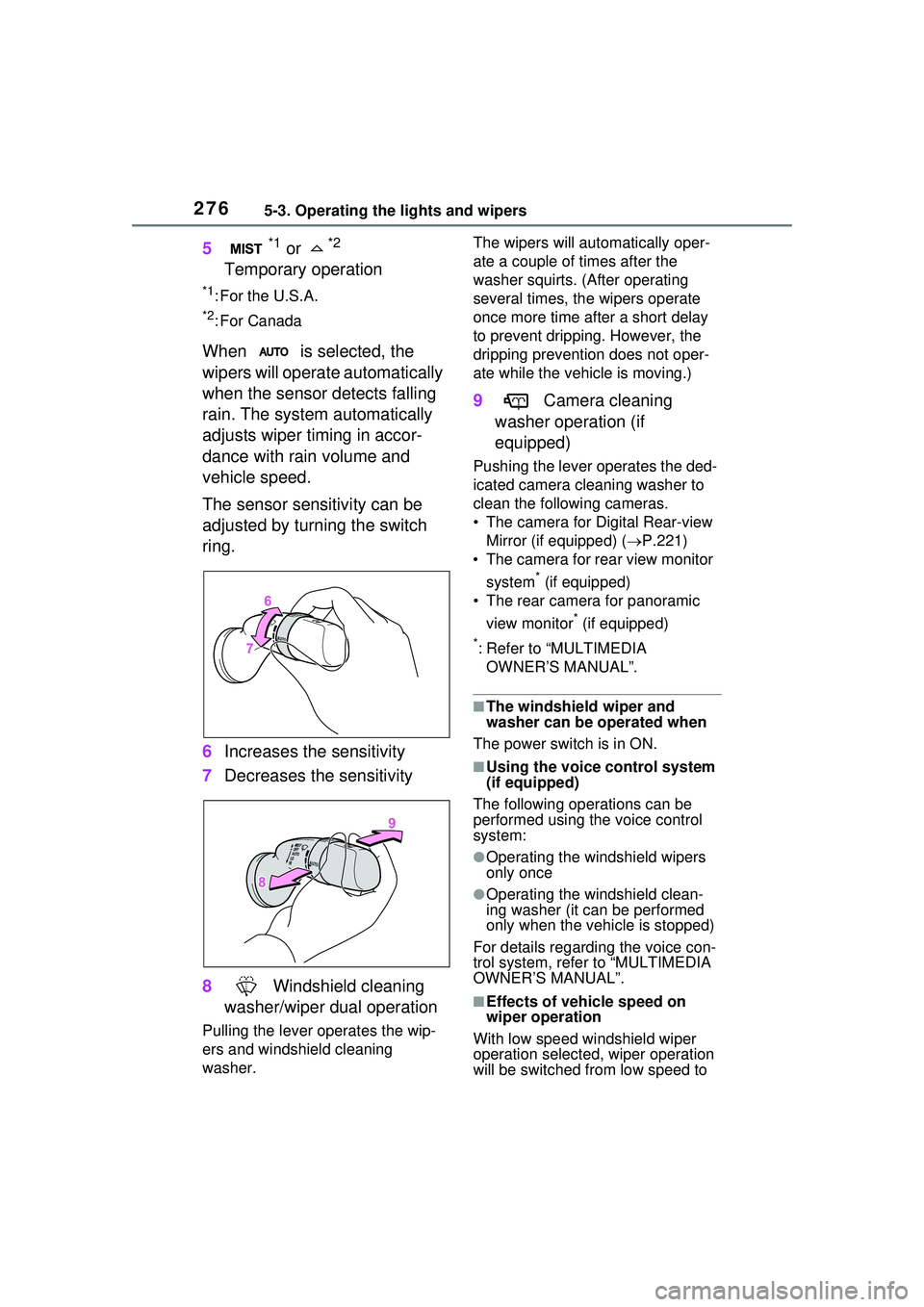
The sensor sensitivity can be
adjusted by turning the switch
ring.
6 Increases the sensitivity
7 Decreases the sensitivity
8 Windshield cleaning
washer/wiper dual operation
Pulling the lever operates the wip-
ers and windshield cleaning
washer. The wipers will automatically oper-
ate a couple of times after the
washer squirts. (After operating
several times, th
e wipers operate
once more time after a short delay
to prevent dripping. However, the
dripping prevention does not oper-
ate while the vehicle is moving.)
9 Camera cleaning
washer operation (if
equipped)
Pushing the lever operates the ded-
icated camera cleaning washer to
clean the following cameras.
• The camera for Digital Rear-view Mirror (if equipped) ( P.221)
• The camera for rear view monitor
system
* (if equipped)
• The rear camera for panoramic
view monitor
* (if equipped)
*: Refer to “MULTIMEDIA OWNER’S MANUAL”.
■The windshield wiper and
washer can be operated when
The power switch is in ON.
■Using the voice control system
(if equipped)
The following operations can be
performed using the voice control
system:
●Operating the windshield wipers
only once
●Operating the windshield clean-
ing washer (it can be performed
only when the vehicle is stopped)
For details regarding the voice con-
trol system, refe r to “MULTIMEDIA
OWNER’S MANUAL”.
■Effects of vehicle speed on
wiper operation
With low speed windshield wiper
operation selected, wiper operation
will be switched from low speed to
Page 288 of 680
2885-5. Using the driving support systems
WARNING
●If the part of the windshield in
front of the front camera is
fogged up or covered with con-
densation or ice, use the wind-
shield defogger to remove the
fog, condensation, or ice.
●If water droplets cannot be
properly removed from the area
of the windshield in front of the
front camera by the windshield
wipers, replace the wiper insert
or wiper blade.
●Do not attach window tint to the
windshield.
●Replace the windshield if it is
damaged or cracked.
If the windshield has been
replaced, recalibration of the front
camera will be necessary. For
details, contact your Toyota
dealer.
●Do not allow liqui ds to contact
the front camera.
●Do not allow bright lights to
shine into the front camera.
●Do not damage the lens of the
front camera or allow it to
become dirty.
When cleaning the inside of the
windshield, do not allow glass
cleaner to contact the lens of the
front camera. Do not touch the
lens of the front camera.
If the lens of the front camera is
dirty or damaged, contact your
Toyota dealer.
●Do not subject the front camera
to a strong impact.
●Do not change the position or
orientation of the front camera
or remove it.
●Do not disassemble the front
camera.
●Do not modify any parts around
the front camera, such as the
inside rear view mirror or ceil-
ing.
●Do not attach accessories
which may obstruct the front
camera to the hood, front grille,
or front bumper. For details,
contact your Toyota dealer.
●If a surfboard or other long
object is to be mounted on the
roof, make sure that it will not
obstruct the front camera.
●Do not modify or change the
headlights and other lights.
■Front camera installation area
on the windshield
If the system determines that the
windshield may be fogged up, it
will automatically operate the
heater to defog the part of the
windshield around the front cam-
era. When cleaning, etc., be care-
ful not to touch the area around
the front camera until the wind-
shield has cooled sufficiently, as
touching it may cause burns.
■Precautions for the driver
monitor camera (if equipped)
Observe the following precau-
tions.
Failure to do so may lead to mal-
function of the driver monitor cam-
era and the systems not operating
properly, possibly leading to an
accident resulting in death or seri-
ous injury.
Page 354 of 680
3545-5. Using the driving support systems
*: If equipped
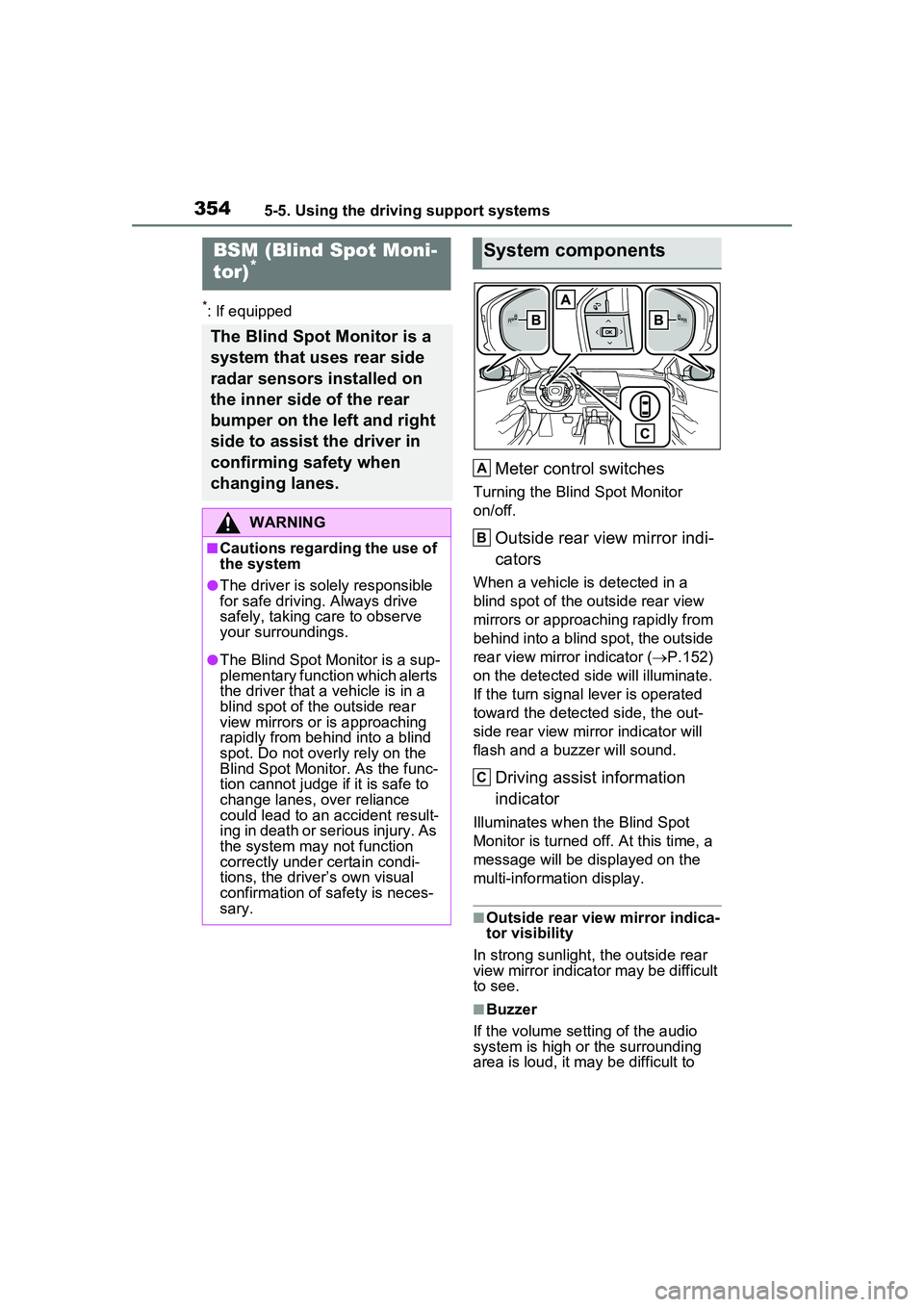
Meter control switches
Turning the Blind Spot Monitor
on/off.
Outside rear view mirror indi-
cators
When a vehicle is detected in a
blind spot of the outside rear view
mirrors or approaching rapidly from
behind into a blind spot, the outside
rear view mirror indicator (P.152)
on the detected side will illuminate.
If the turn signal lever is operated
toward the detected side, the out-
side rear view mirror indicator will
flash and a buzzer will sound.
Driving assist information
indicator
Illuminates when the Blind Spot
Monitor is turned off. At this time, a
message will be displayed on the
multi-informat ion display.
■Outside rear view mirror indica-
tor visibility
In strong sunlight, the outside rear
view mirror indicator may be difficult
to see.
■Buzzer
If the volume setting of the audio
system is high or the surrounding
area is loud, it may be difficult to
BSM (Blind Spot Moni-
tor)*
The Blind Spot Monitor is a
system that uses rear side
radar sensors installed on
the inner side of the rear
bumper on the left and right
side to assist the driver in
confirming safety when
changing lanes.
WARNING
■Cautions regarding the use of
the system
●The driver is solely responsible
for safe driving. Always drive
safely, taking care to observe
your surroundings.
●The Blind Spot Monitor is a sup-
plementary function which alerts
the driver that a vehicle is in a
blind spot of the outside rear
view mirrors or is approaching
rapidly from behind into a blind
spot. Do not overly rely on the
Blind Spot Monitor. As the func-
tion cannot judge if it is safe to
change lanes, over reliance
could lead to an accident result-
ing in death or serious injury. As
the system may not function
correctly under certain condi-
tions, the driver’s own visual
confirmation of safety is neces-
sary.
System components
A
B
C
Page 356 of 680
3565-5. Using the driving support systems
display.
Each time the power switch is turned to ON, the Blind Spot
Monitor is enabled.
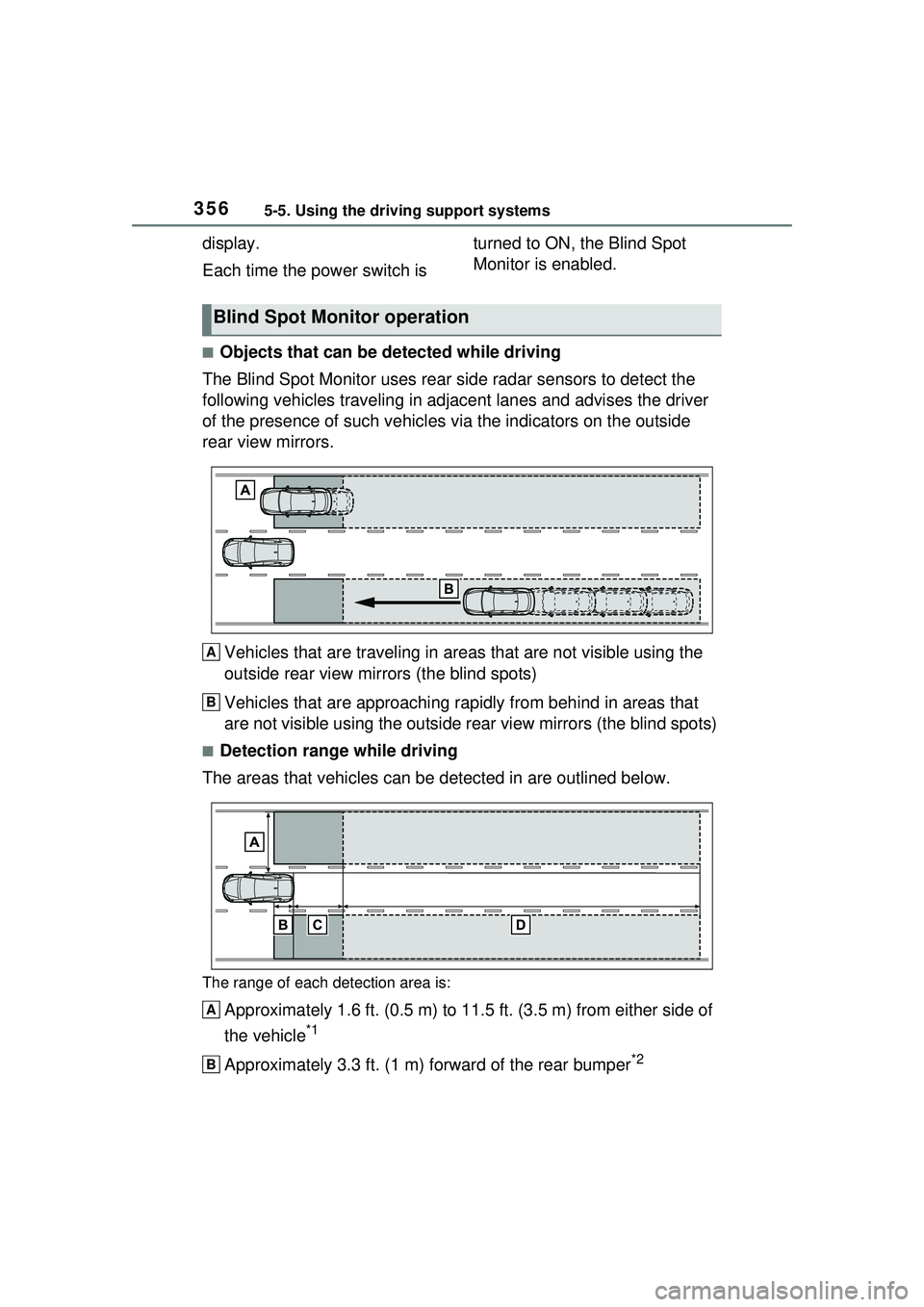
■Objects that can be detected while driving
The Blind Spot Monitor uses rear side radar sensors to detect the
following vehicles trav eling in adjacent lanes and advises the driver
of the presence of such vehicles via the indicators on the outside
rear view mirrors.
Vehicles that are traveling in areas that are not visible using the
outside rear view mirrors (the blind spots)
Vehicles that are approaching r apidly from behind in areas that
are not visible using the outside rear view mirrors (the blind spots)
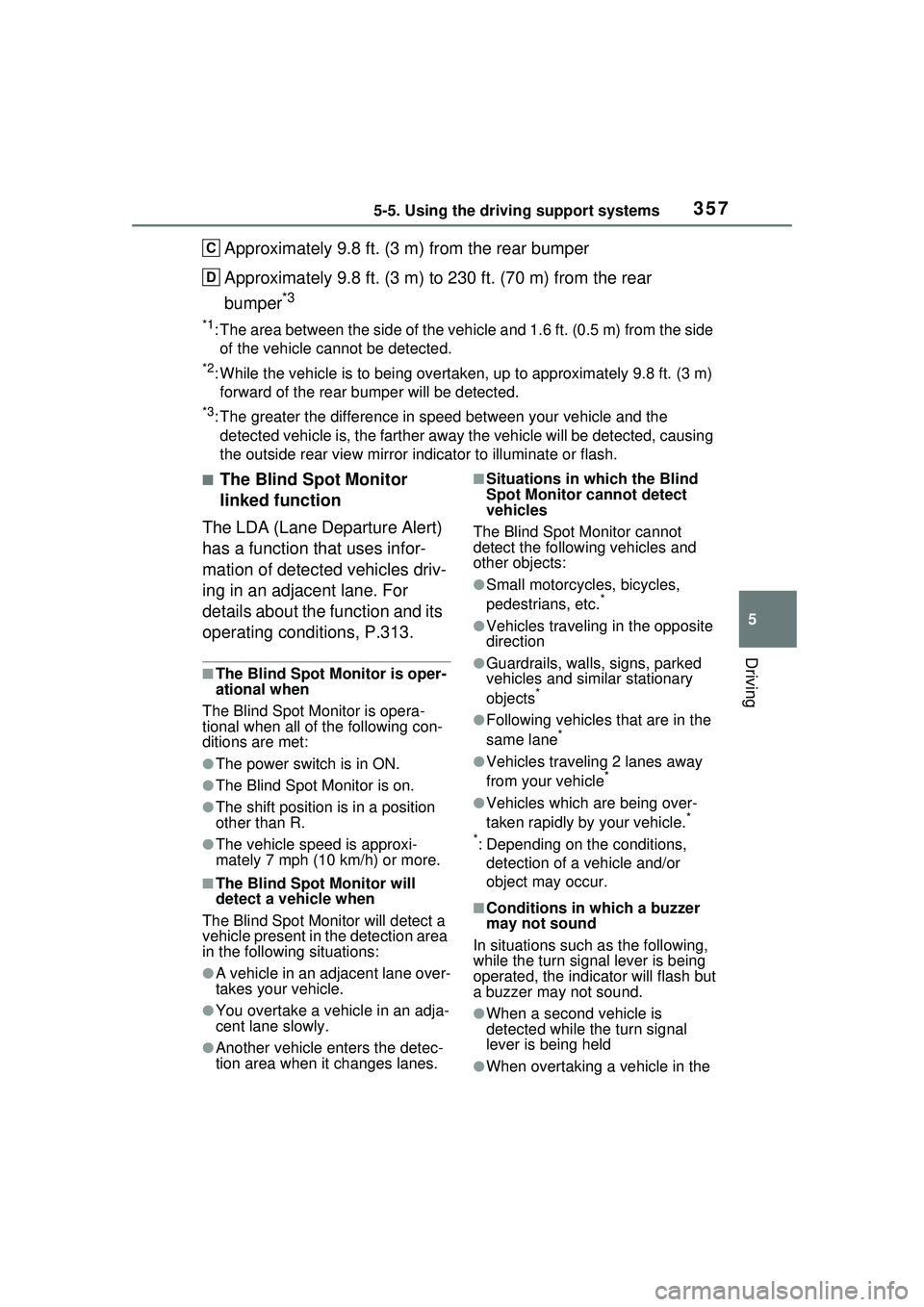
■Detection range while driving
The areas that vehicles can be detected in are outlined below.
The range of each detection area is:
Approximately 1.6 ft. (0.5 m) to 11.5 ft. (3.5 m) from either side of
the vehicle
*1
Approximately 3.3 ft. (1 m) forward of the rear bumper*2
Blind Spot Monitor operation
A
B
A
B
Page 357 of 680
3575-5. Using the driving support systems
5
Driving
Approximately 9.8 ft. (3 m) from the rear bumper
Approximately 9.8 ft. (3 m) to 230 ft. (70 m) from the rear
bumper
*3
*1: The area between the side of the vehicle and 1.6 ft. (0.5 m) from the side
of the vehicle cannot be detected.
*2: While the vehicle is to being overtake n, up to approximately 9.8 ft. (3 m)
forward of the rear bumper will be detected.
*3: The greater the difference in speed between your vehicle and the
detected vehicle is, the fa rther away the vehicle will be detected, causing
the outside rear view mirror indicator to illuminate or flash.
■The Blind Spot Monitor
linked function
The LDA (Lane Departure Alert)
has a function that uses infor-
mation of detected vehicles driv-
ing in an adjacent lane. For
details about the function and its
operating conditions, P.313.
■The Blind Spot Monitor is oper-
ational when
The Blind Spot Monitor is opera-
tional when all of the following con-
ditions are met:
●The power switch is in ON.
●The Blind Spot Monitor is on.
●The shift position is in a position
other than R.
●The vehicle speed is approxi-
mately 7 mph (10 km/h) or more.
■The Blind Spot Monitor will
detect a vehicle when
The Blind Spot Monitor will detect a
vehicle present in the detection area
in the following situations:
●A vehicle in an adjacent lane over-
takes your vehicle.
●You overtake a vehicle in an adja-
cent lane slowly.
●Another vehicle enters the detec-
tion area when it changes lanes.
■Situations in which the Blind
Spot Monitor cannot detect
vehicles
The Blind Spot Monitor cannot
detect the following vehicles and
other objects:
●Small motorcycles, bicycles,
pedestrians, etc.*
●Vehicles traveling in the opposite
direction
●Guardrails, walls, signs, parked
vehicles and similar stationary
objects
*
●Following vehicles that are in the
same lane*
●Vehicles traveling 2 lanes away
from your vehicle*
●Vehicles which are being over-
taken rapidly by your vehicle.*
*
: Depending on the conditions, detection of a vehicle and/or
object may occur.
■Conditions in which a buzzer
may not sound
In situations such as the following,
while the turn signa l lever is being
operated, the indicator will flash but
a buzzer may not sound.
●When a second vehicle is
detected while the turn signal
lever is being held
●When overtaking a vehicle in the
C
D
Page 359 of 680
3595-5. Using the driving support systems
5
Driving
*: If equipped
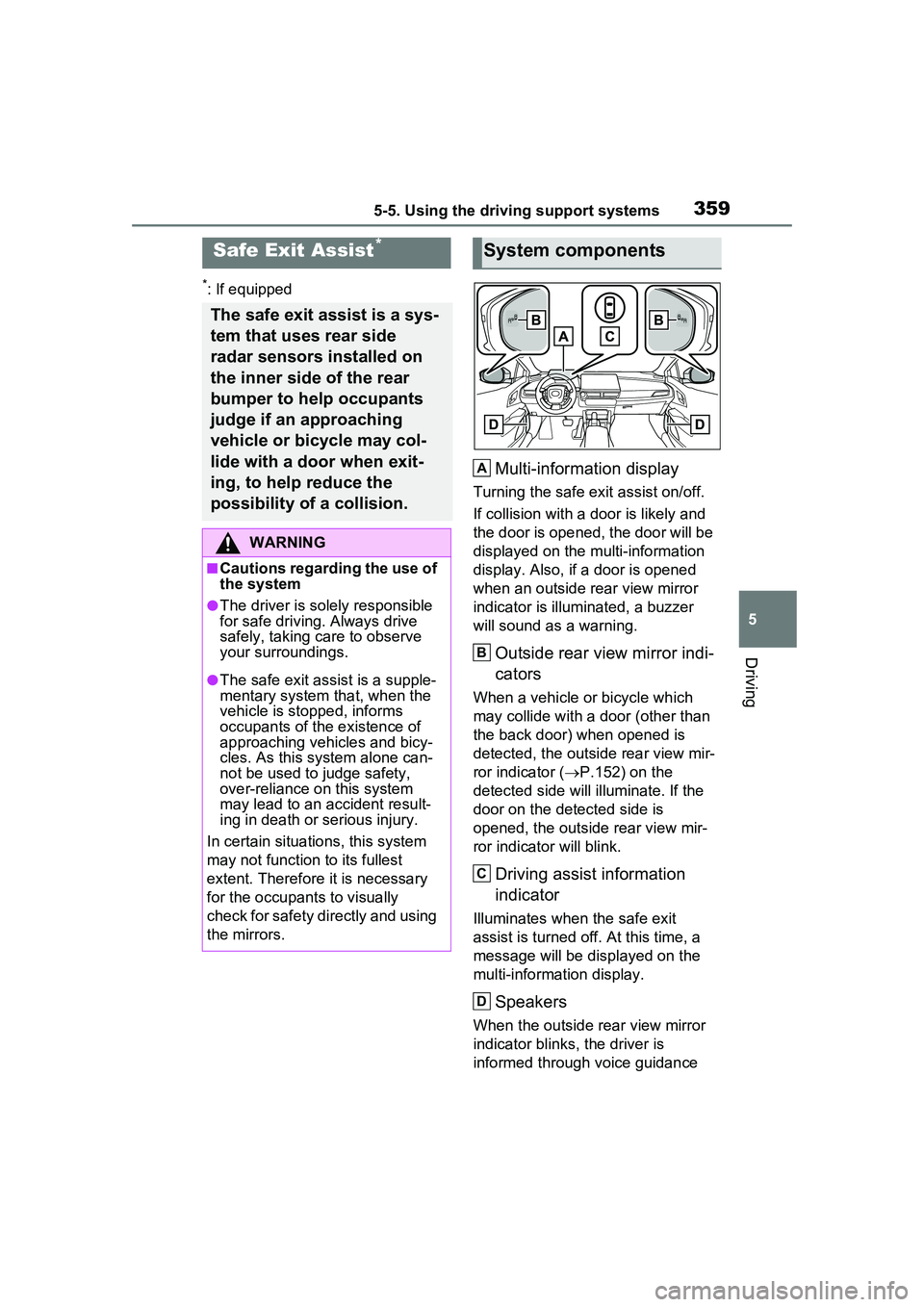
Multi-information display
Turning the safe exit assist on/off.
If collision with a door is likely and
the door is opened, the door will be
displayed on the multi-information
display. Also, if a door is opened
when an outside rear view mirror
indicator is illuminated, a buzzer
will sound as a warning.
Outside rear view mirror indi-
cators
When a vehicle or bicycle which
may collide with a door (other than
the back door) when opened is
detected, the outside rear view mir-
ror indicator ( P.152) on the
detected side will illuminate. If the
door on the detected side is
opened, the outside rear view mir-
ror indicator will blink.
Driving assist information
indicator
Illuminates when the safe exit
assist is turned of f. At this time, a
message will be displayed on the
multi-informat ion display.
Speakers
When the outside rear view mirror
indicator blinks, the driver is
informed through voice guidance
Safe Exit Assist*
The safe exit assist is a sys-
tem that uses rear side
radar sensors installed on
the inner side of the rear
bumper to help occupants
judge if an approaching
vehicle or bicycle may col-
lide with a door when exit-
ing, to help reduce the
possibility of a collision.
WARNING
■Cautions regarding the use of
the system
●The driver is solely responsible
for safe driving. Always drive
safely, taking care to observe
your surroundings.
●The safe exit assist is a supple-
mentary system that, when the
vehicle is stopped, informs
occupants of th e existence of
approaching vehicles and bicy-
cles. As this system alone can-
not be used to judge safety,
over-reliance on this system
may lead to an accident result-
ing in death or serious injury.
In certain situations, this system
may not function to its fullest
extent. Therefore it is necessary
for the occupants to visually
check for safety directly and using
the mirrors.
System components
A
B
C
D
Page 360 of 680
3605-5. Using the driving support systems
that the system has operated. After
the notification through voice guid-
ance is made, no more voice guid-
ance notifications will be made
again until the door is fully closed.
■Outside rear view mirror indica-
tor visibility
In strong sunlight, the outside rear
view mirror indicator may be difficult
to see.
■Buzzer
If the volume setting of the audio
system is high or the surrounding
area is loud, it may be difficult to
hear the buzzer.
■Voice notifications
In the following situations, voice
notifications will not be output:
●When it is estimated that no occu-
pants are on board*
●After opening a door and entering
the vehicle, until the hybrid system
is started
●When 3 minutes or more have
elapsed since the hybrid system
was stopped
●When the language setting of the
Multimedia Display has been set
to a language that does not sup-
port voice notifications
●When all of the doors have been
locked from outside the vehicle
●When a door remains open for 1
minute or more after the hybrid
system is stopped
●When the ACC mode ( P.618)
has been enabled through a cus- tomize setting on the Multimedia
Display and the hybrid system has
been stopped
●When the parking assist volume
setting on the Multimedia Display
has been set to off
*: For each seating position, judg-
ment is made based on the open-
ing and closing of a door, before
driving for ingress and after driv-
ing for egress.
■Customization
Some functions can be customized.
( P.618)
The safe exit assist system can
be enabled/disabled through a
customize setting. ( P.618)
When the safe exit assist is off,
the driving assist information
indicator will illuminate and a
message will be displayed on
the multi-information display.
Each time the power switch is
turned to ON, the safe exit
assist is enabled.
■Objects that can be detected by the safe exit assist
When the safe exit assist detects the following vehicles or bicycles
behind your vehicle using a rear si de radar sensor, the occupants of
the vehicle are informed through an outside rear view mirror indica-
WARNING
■To ensure the system can
operate properly
P.355
Turning the safe exit
assist system ON/OFF
Safe exit assist operation
Page 361 of 680
3615-5. Using the driving support systems
5
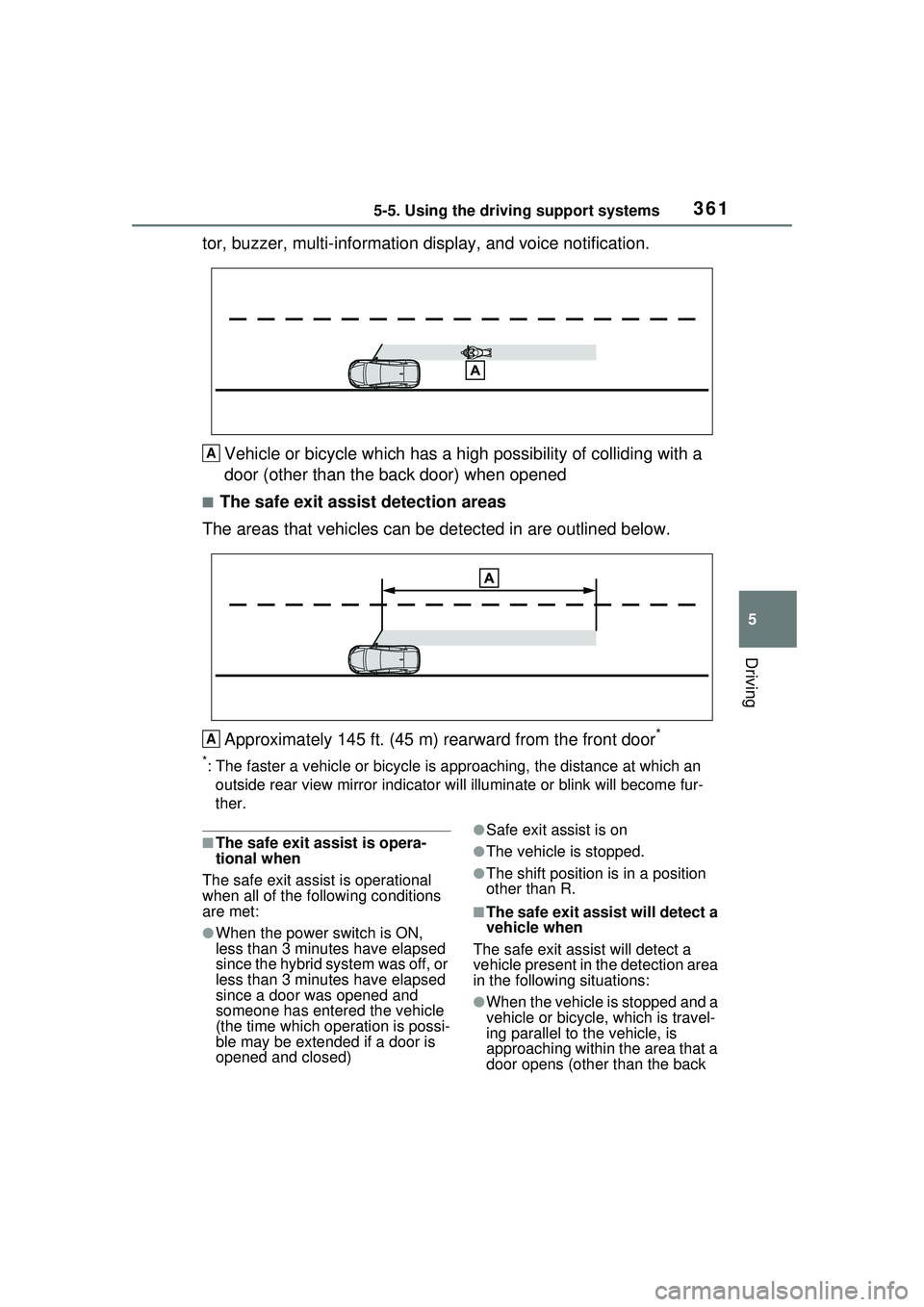
Driving
tor, buzzer, multi-information display, and voice notification.Vehicle or bicycle which has a high possibility of colliding with a
door (other than the back door) when opened
■The safe exit assist detection areas
The areas that vehicles can be detected in are outlined below.
Approximately 145 ft. (45 m) rearward from the front door
*
*: The faster a vehicle or bicycle is approaching, the distance at which an
outside rear view mirror indicato r will illuminate or blink will become fur-
ther.
■The safe exit assist is opera-
tional when
The safe exit assist is operational
when all of the following conditions
are met:
●When the power switch is ON,
less than 3 minutes have elapsed
since the hybrid system was off, or
less than 3 minutes have elapsed
since a door was opened and
someone has entered the vehicle
(the time which operation is possi-
ble may be extended if a door is
opened and closed)
●Safe exit assist is on
●The vehicle is stopped.
●The shift position is in a position
other than R.
■The safe exit assist will detect a
vehicle when
The safe exit assist will detect a
vehicle present in the detection area
in the following situations:
●When the vehicle is stopped and a
vehicle or bicycle, which is travel-
ing parallel to the vehicle, is
approaching within the area that a
door opens (other than the back
A
A
Page 372 of 680
3725-5. Using the driving support systems
■Detection of objects along the
sides of the vehicle
●Objects along the sides of the
vehicle are not instantaneously
detected. The location of objects
in relation to the vehicle is esti-
mated after they are first detected
by the front or rear side sensors,
or side cameras. Therefore, after
the power switch is changed to
ON, even if an object is along the
side of the vehicle, it may not be
detected until the vehicle has
been driven a small amount and
the side sensors or side cameras
completely scan the areas along
the sides of the vehicle.
●If a vehicle, person, animal, etc., is
detected by a side sensors or side
cameras, but then leaves the
detection area of the side sensors
or side cameras, the system will
assume the object has not moved.
WARNING
■Side sensors and side cam-
eras
In situations such as the following,
the function may not operate cor-
rectly, possibly leading to an acci-
dent. Proceed carefully.
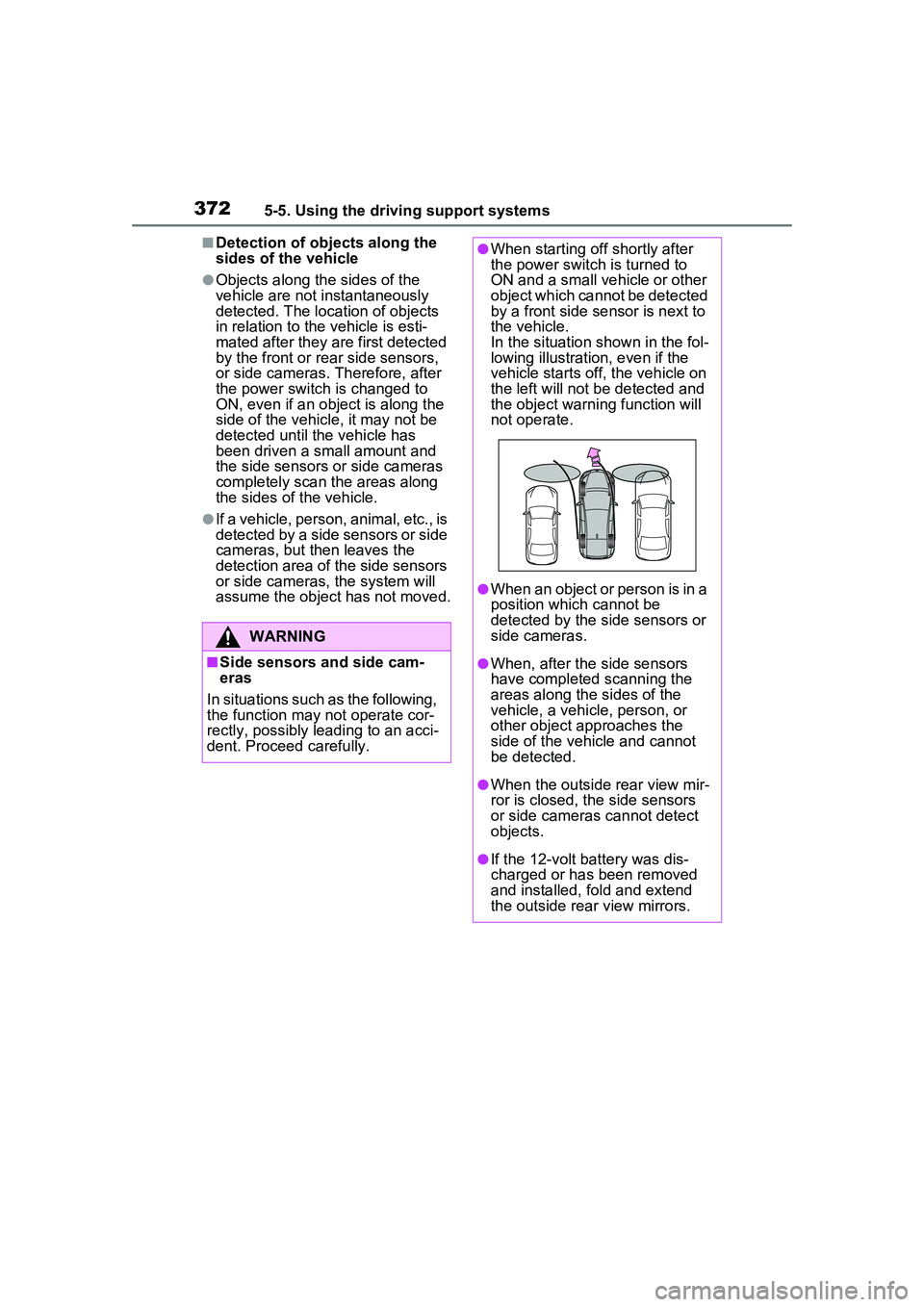
●When starting off shortly after
the power switch is turned to
ON and a small vehicle or other
object which cannot be detected
by a front side sensor is next to
the vehicle.
In the situation shown in the fol-
lowing illustration, even if the
vehicle starts off, the vehicle on
the left will not be detected and
the object warning function will
not operate.
●When an object or person is in a
position which cannot be
detected by the side sensors or
side cameras.
●When, after the side sensors
have completed scanning the
areas along the sides of the
vehicle, a vehicle, person, or
other object approaches the
side of the vehicle and cannot
be detected.
●When the outside rear view mir-
ror is closed, the side sensors
or side cameras cannot detect
objects.
●If the 12-volt battery was dis-
charged or has been removed
and installed, fold and extend
the outside rear view mirrors.