ECU TOYOTA PRIUS PRIME 2023 Service Manual
[x] Cancel search | Manufacturer: TOYOTA, Model Year: 2023, Model line: PRIUS PRIME, Model: TOYOTA PRIUS PRIME 2023Pages: 680, PDF Size: 14.97 MB
Page 137 of 680
1372-2. Charging
2
Plug-in hybrid system
driving.
The electrical consumption of
the hybrid battery (traction
battery) is suppressed
increasing EV driving dis-
tance by supplementing
power consumption for the
auxiliary systems using solar
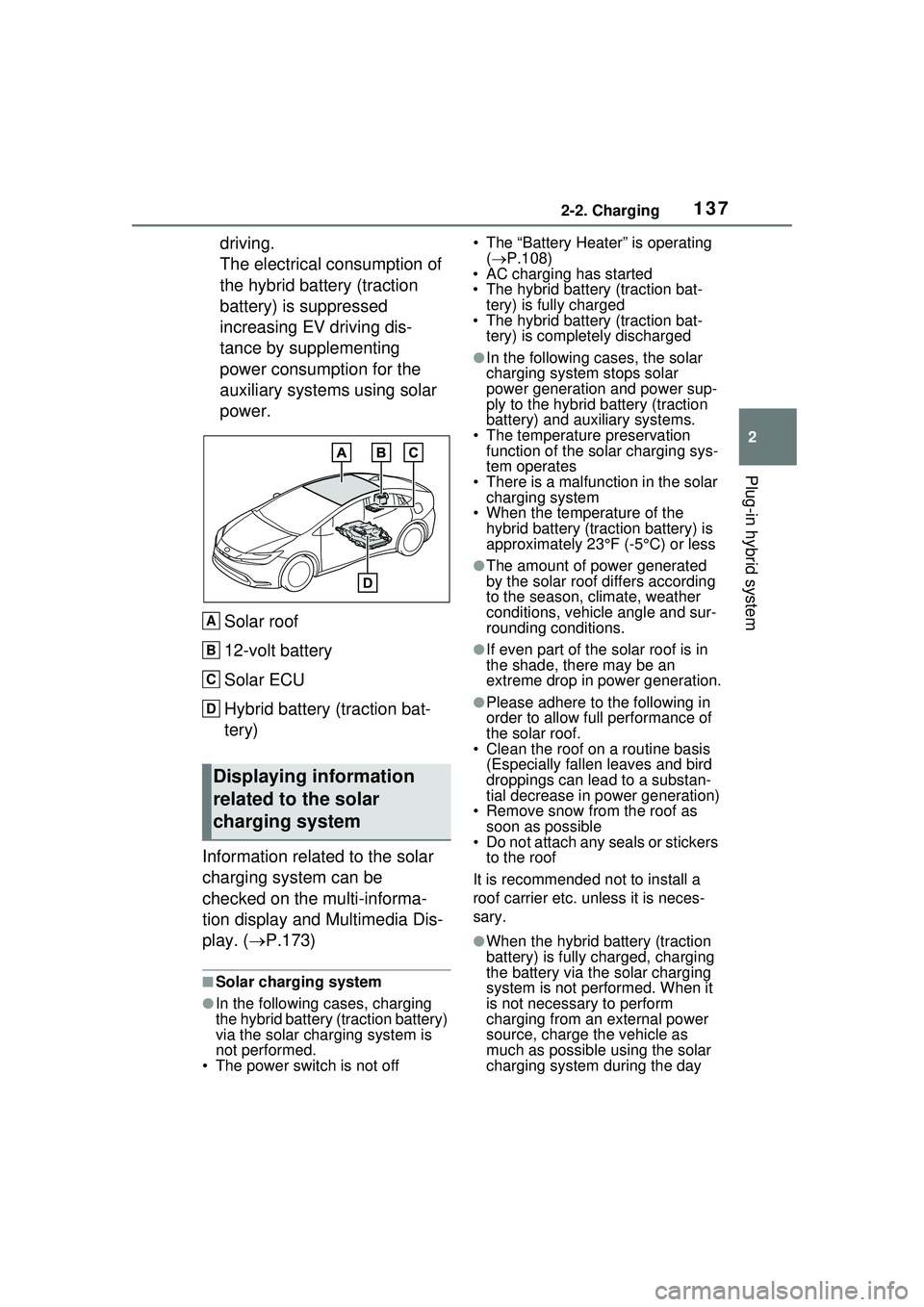
power.Solar roof
12-volt battery
Solar ECU
Hybrid battery (traction bat-
tery)
Information related to the solar
charging system can be
checked on the multi-informa-
tion display and Multimedia Dis-
play. ( P.173)
■Solar charging system
●In the following cases, charging
the hybrid battery (traction battery)
via the solar charging system is
not performed.
• The power switch is not off • The “Battery Heater” is operating
( P.108)
• AC charging has started
• The hybrid battery (traction bat-
tery) is fully charged
• The hybrid battery (traction bat-
tery) is completely discharged
●In the following cases, the solar
charging system stops solar
power generation and power sup-
ply to the hybrid battery (traction
battery) and auxiliary systems.
• The temperature preservation function of the solar charging sys-
tem operates
• There is a malfun ction in the solar
charging system
• When the temperature of the hybrid battery (traction battery) is
approximately 23°F (-5°C) or less
●The amount of power generated
by the solar roof differs according
to the season, climate, weather
conditions, vehicle angle and sur-
rounding conditions.
●If even part of the solar roof is in
the shade, there may be an
extreme drop in power generation.
●Please adhere to the following in
order to allow full performance of
the solar roof.
• Clean the roof on a routine basis
(Especially fallen leaves and bird
droppings can lead to a substan-
tial decrease in power generation)
• Remove snow from the roof as soon as possible
• Do not attach any seals or stickers
to the roof
It is recommended not to install a
roof carrier etc. unless it is neces-
sary.
●When the hybrid battery (traction
battery) is fully charged, charging
the battery via the solar charging
system is not performed. When it
is not necessary to perform
charging from an external power
source, charge the vehicle as
much as possible using the solar
charging system during the day
Displaying information
related to the solar
charging system
A
B
C
D
Page 140 of 680
1402-2. Charging
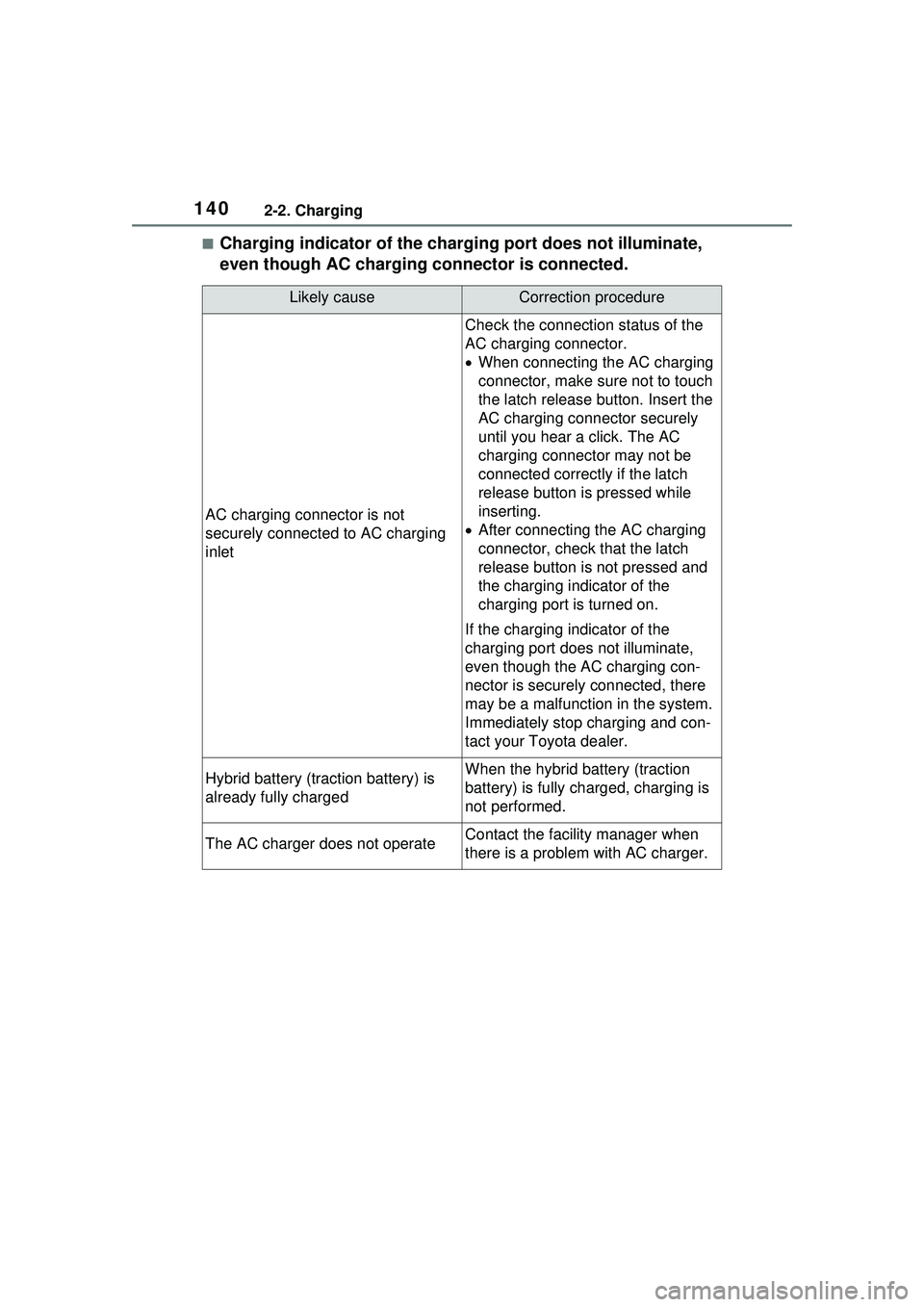
■Charging indicator of the charging port does not illuminate,
even though AC charging connector is connected.
Likely causeCorrection procedure
AC charging connector is not
securely connected to AC charging
inlet
Check the connection status of the
AC charging connector.
When connecting the AC charging
connector, make su re not to touch
the latch release button. Insert the
AC charging connector securely
until you hear a click. The AC
charging connector may not be
connected correctly if the latch
release button is pressed while
inserting.
After connecting the AC charging
connector, check that the latch
release button is not pressed and
the charging indicator of the
charging port is turned on.
If the charging indicator of the
charging port do es not illuminate,
even though the AC charging con-
nector is securely connected, there
may be a malfunction in the system.
Immediately stop charging and con-
tact your Toyota dealer.
Hybrid battery (traction battery) is
already fully chargedWhen the hybrid battery (traction
battery) is fully charged, charging is
not performed.
The AC charger does not operateContact the facility manager when
there is a problem with AC charger.
Page 144 of 680
1442-2. Charging
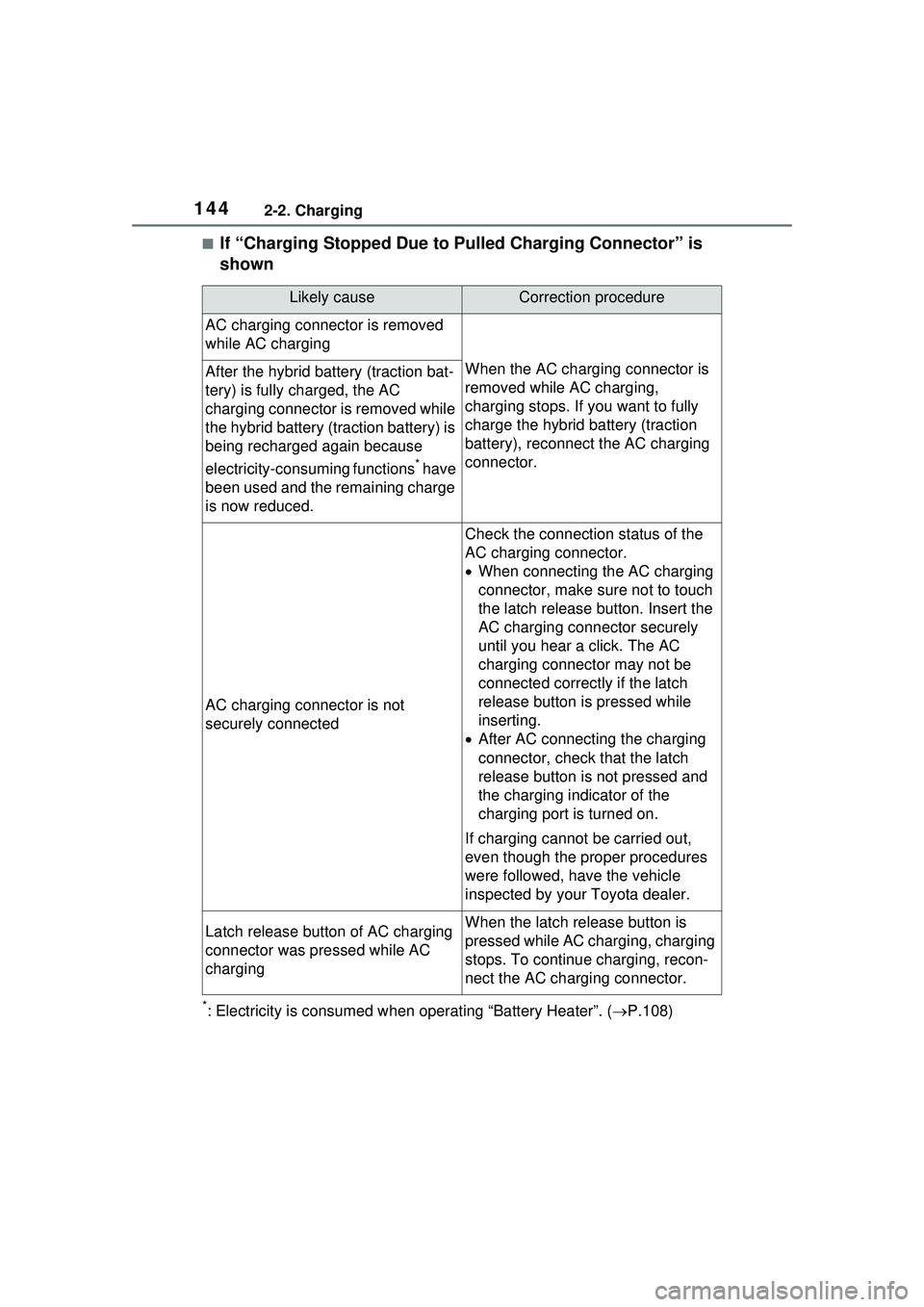
■If “Charging Stopped Due to Pulled Charging Connector” is
shown
*: Electricity is consumed when operating “Battery Heater”. (P.108)
Likely causeCorrection procedure
AC charging connector is removed
while AC charging
When the AC charging connector is
removed while AC charging,
charging stops. If you want to fully
charge the hybrid battery (traction
battery), reconnect the AC charging
connector.After the hybrid battery (traction bat-
tery) is fully charged, the AC
charging connector is removed while
the hybrid battery (traction battery) is
being recharged again because
electricity-consuming functions
* have
been used and the remaining charge
is now reduced.
AC charging connector is not
securely connected
Check the connection status of the
AC charging connector.
When connecting the AC charging
connector, make su re not to touch
the latch release button. Insert the
AC charging connector securely
until you hear a click. The AC
charging connector may not be
connected correctly if the latch
release button is pressed while
inserting.
After AC connecting the charging
connector, check that the latch
release button is not pressed and
the charging indicator of the
charging port is turned on.
If charging cannot be carried out,
even though the proper procedures
were followed, have the vehicle
inspected by your Toyota dealer.
Latch release button of AC charging
connector was pressed while AC
chargingWhen the latch release button is
pressed while AC charging, charging
stops. To continue charging, recon-
nect the AC charging connector.
Page 145 of 680
1452-2. Charging
2
Plug-in hybrid system
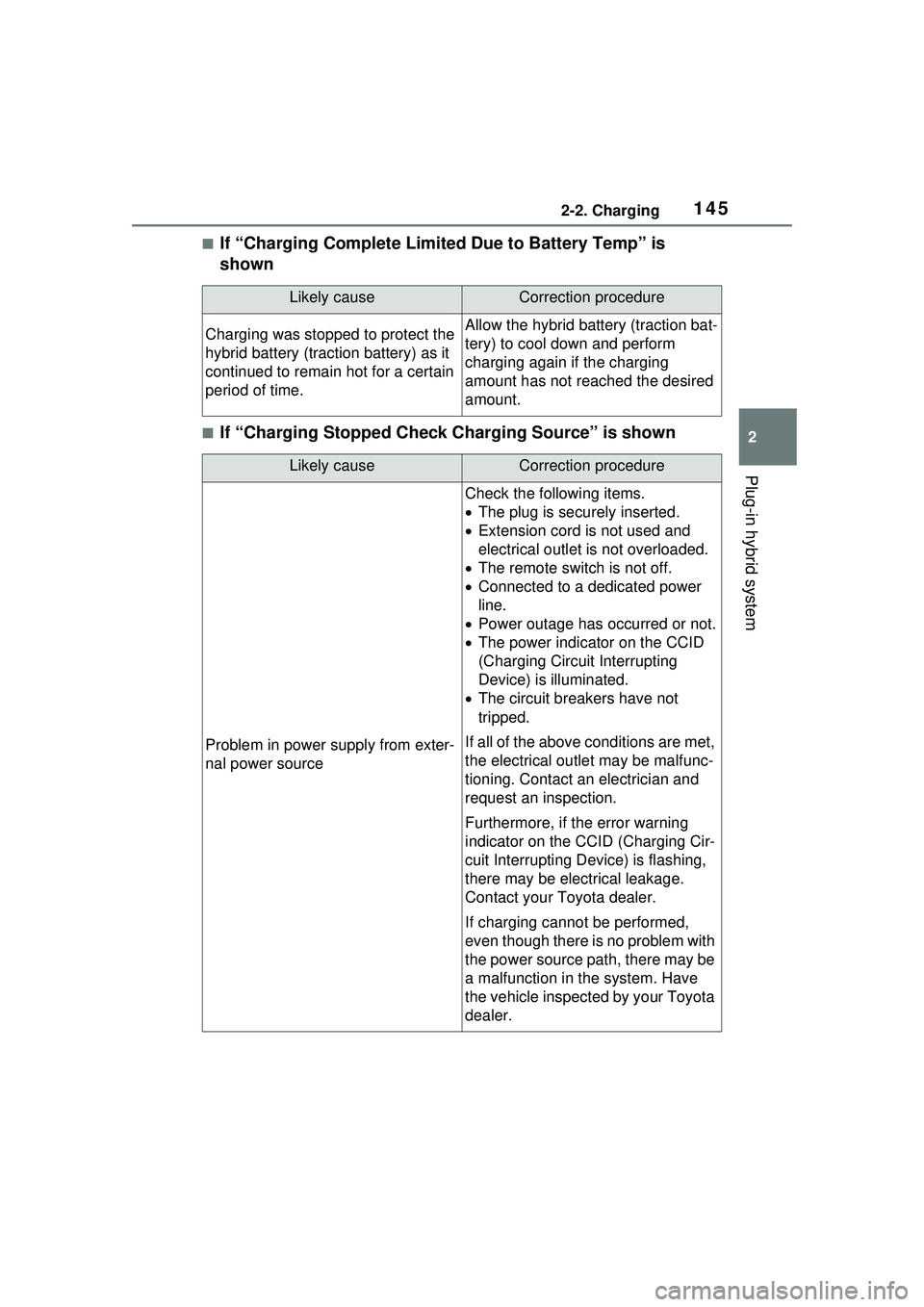
■If “Charging Complete Limited Due to Battery Temp” is
shown
■If “Charging Stopped Check Charging Source” is shown
Likely causeCorrection procedure
Charging was stopped to protect the
hybrid battery (traction battery) as it
continued to remain hot for a certain
period of time.Allow the hybrid battery (traction bat-
tery) to cool down and perform
charging again if the charging
amount has not reached the desired
amount.
Likely causeCorrection procedure
Problem in power supply from exter-
nal power source
Check the following items.
The plug is secu rely inserted.
Extension cord is not used and
electrical outlet is not overloaded.
The remote switch is not off.
Connected to a dedicated power
line.
Power outage has occurred or not.
The power indicator on the CCID
(Charging Circuit Interrupting
Device) is illuminated.
The circuit breakers have not
tripped.
If all of the above conditions are met,
the electrical outlet may be malfunc-
tioning. Contact an electrician and
request an inspection.
Furthermore, if the error warning
indicator on the CCID (Charging Cir-
cuit Interrupting Device) is flashing,
there may be electrical leakage.
Contact your Toyota dealer.
If charging cannot be performed,
even though there is no problem with
the power source path, there may be
a malfunction in the system. Have
the vehicle inspected by your Toyota
dealer.
Page 153 of 680
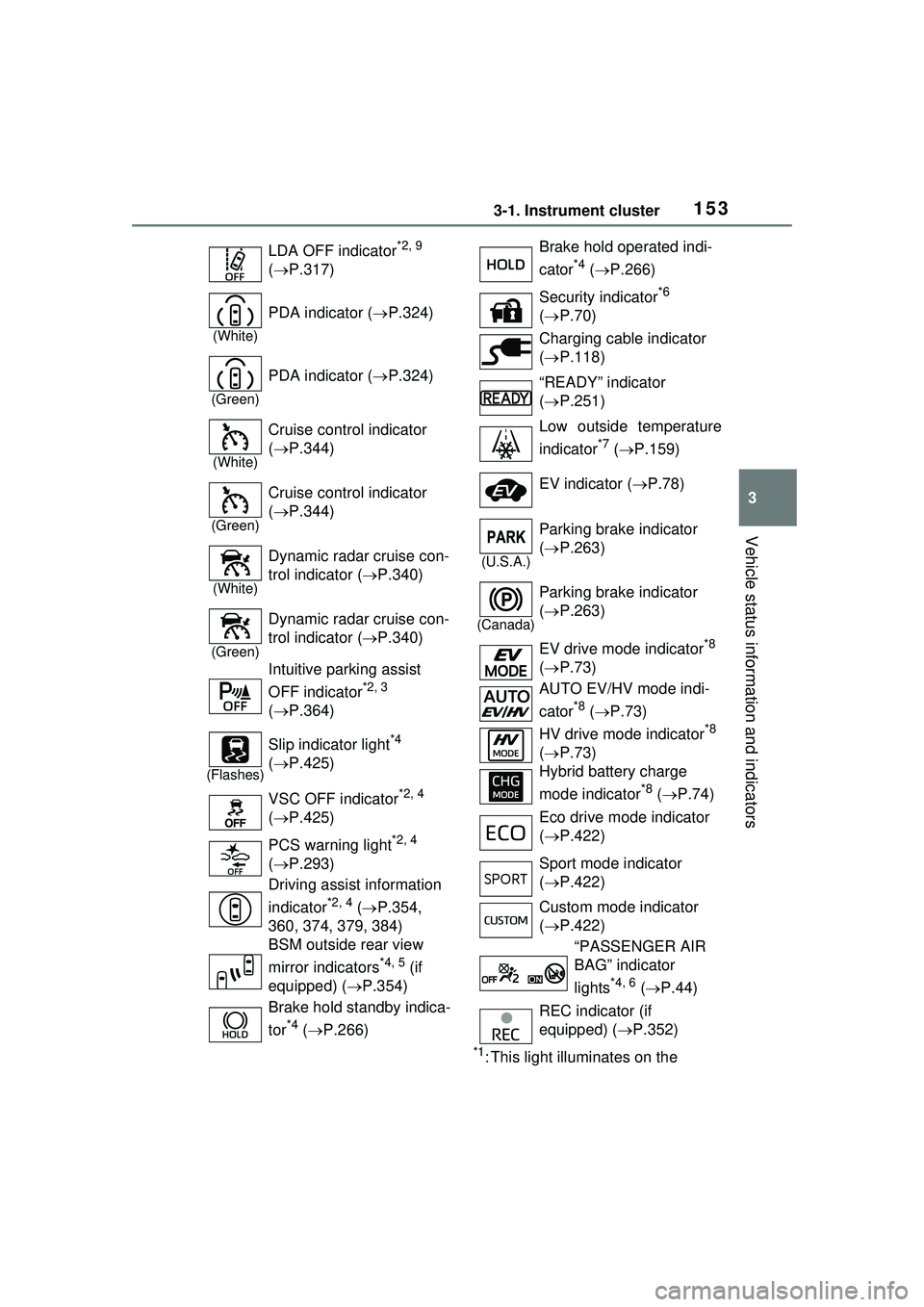
1533-1. Instrument cluster
3
Vehicle status information and indicators
*1: This light illuminates on the
LDA OFF indicator
*2, 9
( P.317)
(White)
PDA indicator ( P.324)
(Green)
PDA indicator ( P.324)
(White)
Cruise control indicator
( P.344)
(Green)
Cruise control indicator
( P.344)
(White)
Dynamic radar cruise con-
trol indicator ( P.340)
(Green)
Dynamic radar cruise con-
trol indicator ( P.340)
Intuitive parking assist
OFF indicator
*2, 3
( P.364)
(Flashes)
Slip indicator light*4
( P.425)
VSC OFF indicator
*2, 4
( P.425)
PCS warning light
*2, 4
( P.293)
Driving assist information
indicator
*2, 4 ( P.354,
360, 374, 379, 384)
BSM outside rear view
mirror indicators
*4, 5 (if
equipped) ( P.354)
Brake hold standby indica-
tor
*4 ( P.266)
Brake hold operated indi-
cator
*4 ( P.266)
Security indicator
*6
( P.70)
Charging cable indicator
( P.118)
“READY” indicator
( P.251)
Low outside temperature
indicator
*7 ( P.159)
EV indicator ( P.78)
(U.S.A.)
Parking brake indicator
( P.263)
(Canada)
Parking brake indicator
( P.263)
EV drive mode indicator
*8
( P.73)
AUTO EV/HV mode indi-
cator
*8 ( P.73)
HV drive mode indicator
*8
( P.73)
Hybrid battery charge
mode indicator
*8 ( P.74)
Eco drive mode indicator
( P.422)
Sport mode indicator
( P.422)
Custom mode indicator
( P.422)
“PASSENGER AIR
BAG” indicator
lights
*4, 6 ( P.44)
REC indicator (if
equipped) ( P.352)
Page 185 of 680
1854-2. Opening, closing and locking the doors
4
Before driving
4-2.Opening, closing and locking the doors
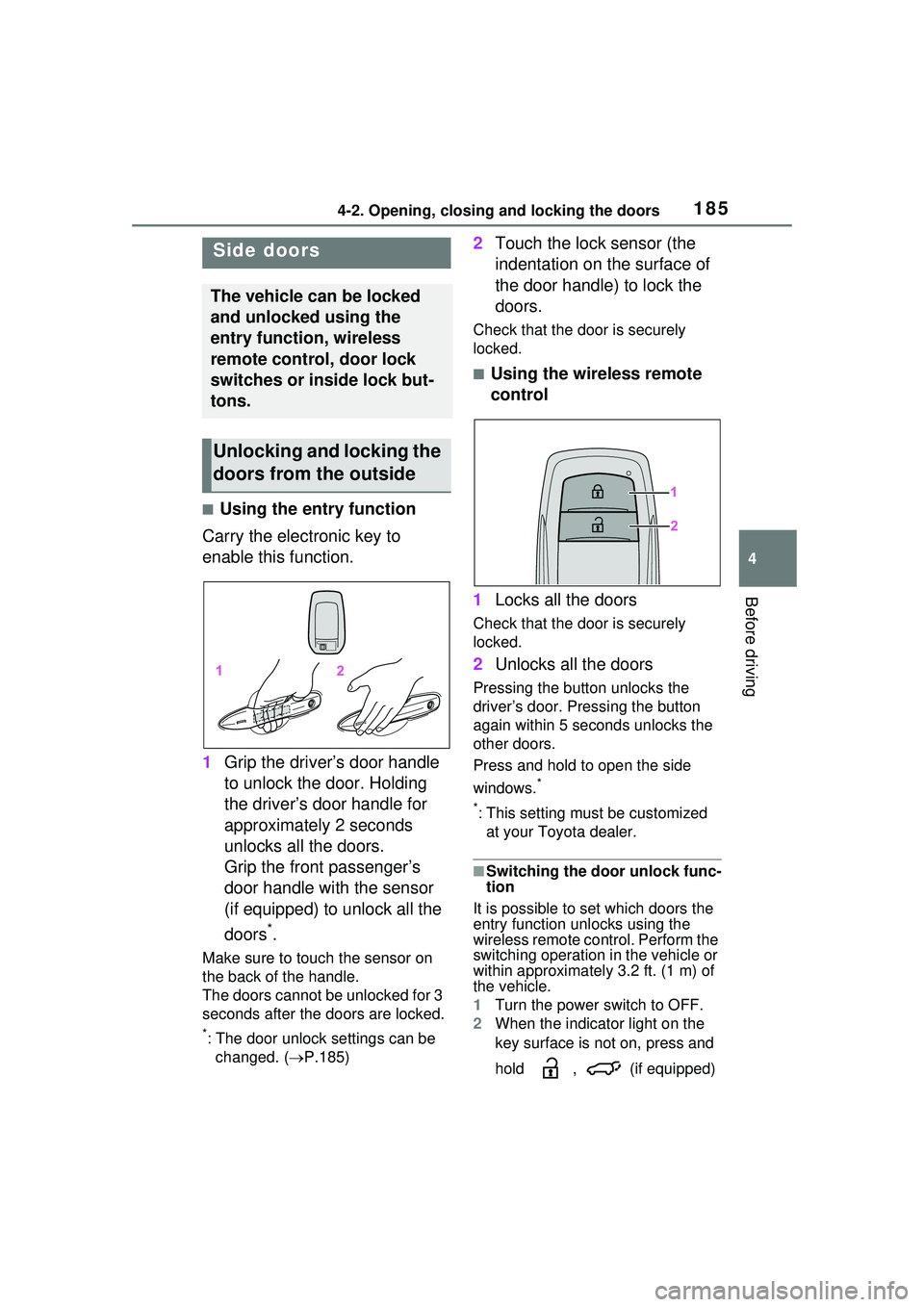
■Using the entry function
Carry the electronic key to
enable this function.
1 Grip the driver’s door handle
to unlock the door. Holding
the driver’s door handle for
approximately 2 seconds
unlocks all the doors.
Grip the front passenger’s
door handle with the sensor
(if equipped) to unlock all the
doors
*.
Make sure to touch the sensor on
the back of the handle.
The doors cannot be unlocked for 3
seconds after the doors are locked.
*: The door unlock settings can be
changed. ( P.185)
2 Touch the lock sensor (the
indentation on the surface of
the door handle) to lock the
doors.
Check that the do or is securely
locked.
■Using the wireless remote
control
1 Locks all the doors
Check that the do or is securely
locked.
2 Unlocks all the doors
Pressing the button unlocks the
driver’s door. Pressing the button
again within 5 seconds unlocks the
other doors.
Press and hold to open the side
windows.
*
*
: This setting must be customized at your Toyota dealer.
■Switching the door unlock func-
tion
It is possible to set which doors the
entry function unlocks using the
wireless remote control. Perform the
switching operation in the vehicle or
within approximately 3.2 ft. (1 m) of
the vehicle.
1 Turn the power switch to OFF.
2 When the indicator light on the
key surface is not on, press and
hold , (if equipped)
Side doors
The vehicle can be locked
and unlocked using the
entry function, wireless
remote control, door lock
switches or inside lock but-
tons.
Unlocking and locking the
doors from the outside
Page 186 of 680
1864-2. Opening, closing and locking the doors
or for approximately 5
seconds while pressing and
holding .
The setting changes each time an
operation is performed, as shown
below. (When changing the setting
continuously, release the buttons,
wait for at least 5 seconds, and
repeat step 2 .)
■Operation signals
Doors: A buzzer sounds and the
emergency flashers flash to indicate
that the doors have been
locked/unlocked. (Locked: Once;
Unlocked: Twice)
Side windows: A buzzer sounds to
indicate that the side windows are
operating.
■Security feature
If a door is not opened within
approximately 60 seconds after the
vehicle is unlocked, the security fea-
ture automatically locks the vehicle
again. (However, depending on the
location of the electronic key, the
key may be detected as being in the
vehicle. In this case, vehicle may be
unlocked.)
■When the door cannot be
locked by the lock sensor on
the surface of the door handle
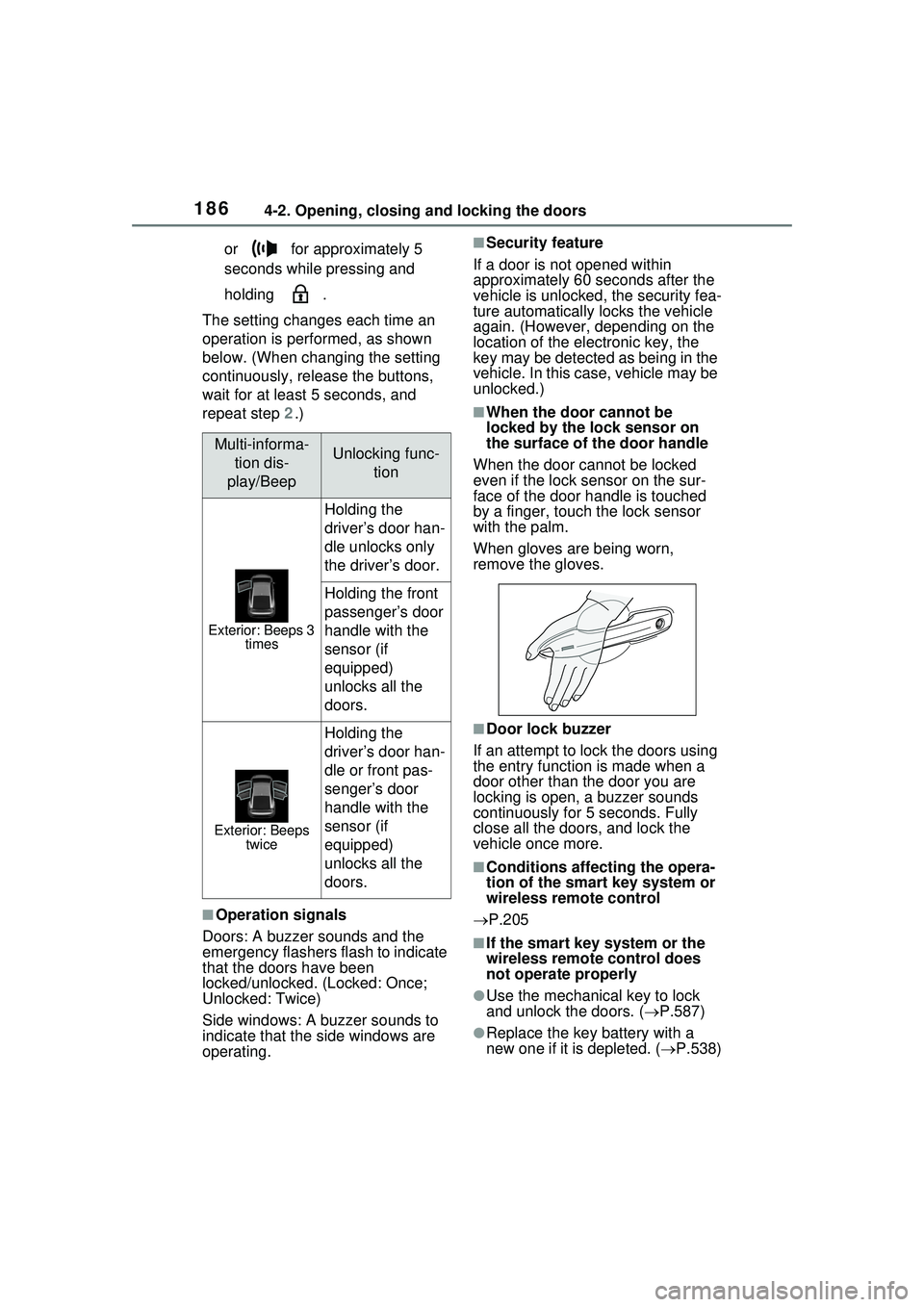
When the door cannot be locked
even if the lock sensor on the sur-
face of the door handle is touched
by a finger, touch the lock sensor
with the palm.
When gloves are being worn,
remove the gloves.
■Door lock buzzer
If an attempt to lock the doors using
the entry function is made when a
door other than the door you are
locking is open, a buzzer sounds
continuously for 5 seconds. Fully
close all the doors, and lock the
vehicle once more.
■Conditions affecting the opera-
tion of the smart key system or
wireless remote control
P.205
■If the smart key system or the
wireless remote control does
not operate properly
●Use the mechanical key to lock
and unlock the doors. ( P.587)
●Replace the key battery with a
new one if it is depleted. ( P.538)
Multi-informa-
tion dis-
play/BeepUnlocking func- tion
Exterior: Beeps 3 times
Holding the
driver’s door han-
dle unlocks only
the driver’s door.
Holding the front
passenger’s door
handle with the
sensor (if
equipped)
unlocks all the
doors.
Exterior: Beeps twice
Holding the
driver’s door han-
dle or front pas-
senger’s door
handle with the
sensor (if
equipped)
unlocks all the
doors.
Page 192 of 680
1924-2. Opening, closing and locking the doors
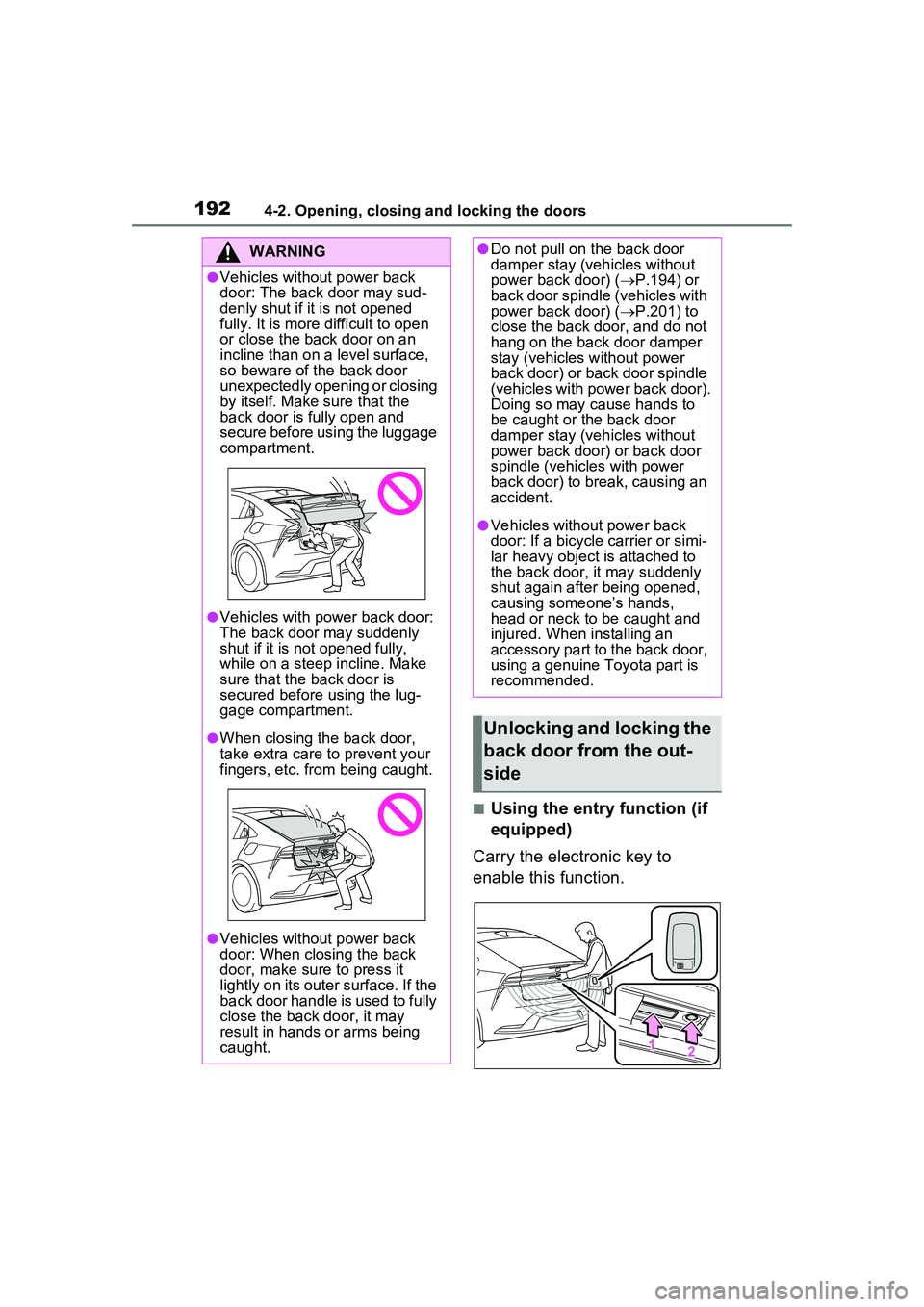
■Using the entry function (if
equipped)
Carry the electronic key to
enable this function.
WARNING
●Vehicles without power back
door: The back door may sud-
denly shut if it is not opened
fully. It is more difficult to open
or close the back door on an
incline than on a level surface,
so beware of the back door
unexpectedly opening or closing
by itself. Make sure that the
back door is fully open and
secure before using the luggage
compartment.
●Vehicles with power back door:
The back door may suddenly
shut if it is not opened fully,
while on a steep incline. Make
sure that the back door is
secured before using the lug-
gage compartment.
●When closing the back door,
take extra care to prevent your
fingers, etc. from being caught.
●Vehicles without power back
door: When closing the back
door, make sure to press it
lightly on its outer surface. If the
back door handle is used to fully
close the back door, it may
result in hands or arms being
caught.
●Do not pull on the back door
damper stay (vehicles without
power back door) ( P.194) or
back door spindle (vehicles with
power back door) ( P.201) to
close the back door, and do not
hang on the back door damper
stay (vehicles without power
back door) or back door spindle
(vehicles with power back door).
Doing so may cause hands to
be caught or the back door
damper stay (vehicles without
power back door) or back door
spindle (vehicles with power
back door) to break, causing an
accident.
●Vehicles without power back
door: If a bicycle carrier or simi-
lar heavy object is attached to
the back door, it may suddenly
shut again after being opened,
causing someone’s hands,
head or neck to be caught and
injured. When installing an
accessory part to the back door,
using a genuine Toyota part is
recommended.
Unlocking and locking the
back door from the out-
side
Page 193 of 680
1934-2. Opening, closing and locking the doors
4
Before driving
1Unlocks all the doors
The doors cannot be unlocked for 3
seconds after the doors are locked.
2Locks all the doors
Check that the door is securely
locked.
■Using the wireless remote
control
P.185
■Operation signals
P.186
■Security feature
P.186
■Using the door lock
switches
P.187
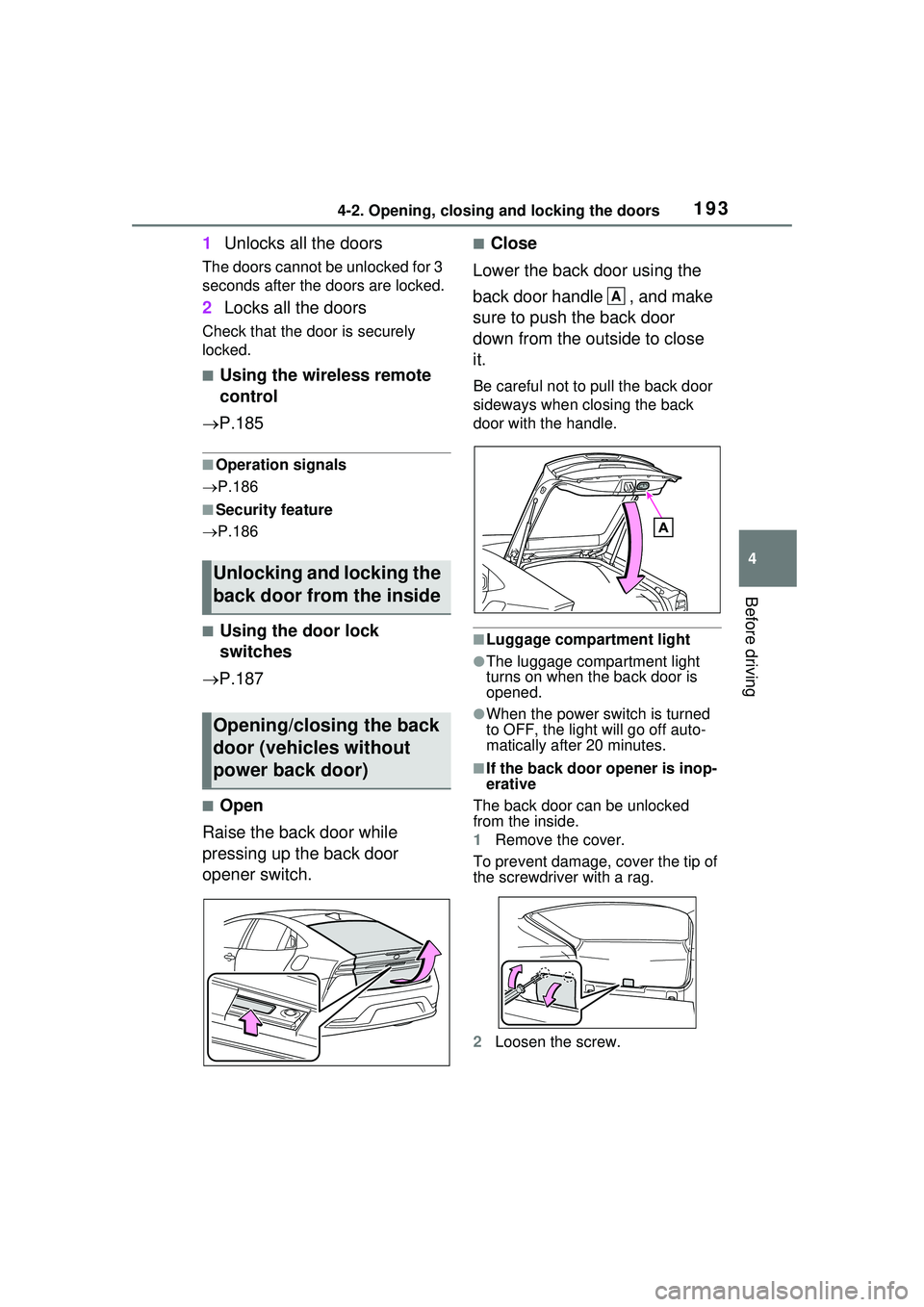
■Open
Raise the back door while
pressing up the back door
opener switch.
■Close
Lower the back door using the
back door handle , and make
sure to push the back door
down from the outside to close
it.
Be careful not to pull the back door
sideways when closing the back
door with the handle.
■Luggage compartment light
●The luggage compartment light
turns on when the back door is
opened.
●When the power switch is turned
to OFF, the light will go off auto-
matically after 20 minutes.
■If the back door opener is inop-
erative
The back door can be unlocked
from the inside.
1 Remove the cover.
To prevent damage, cover the tip of
the screwdriver with a rag.
2 Loosen the screw.
Unlocking and locking the
back door from the inside
Opening/closing the back
door (vehicles without
power back door)
A
Page 200 of 680
2004-2. Opening, closing and locking the doors
WARNING
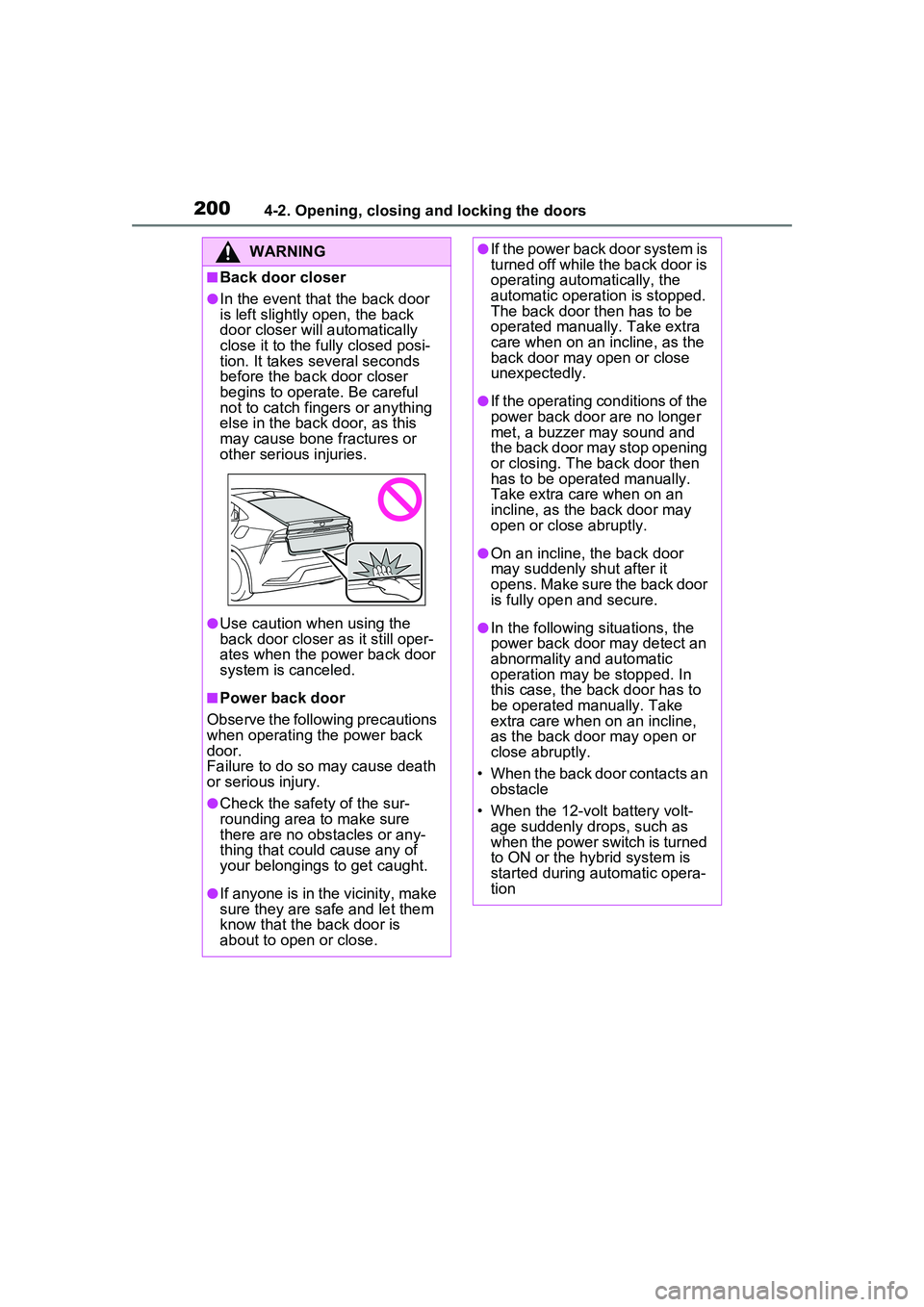
■Back door closer
●In the event that the back door
is left slightly open, the back
door closer will automatically
close it to the fully closed posi-
tion. It takes several seconds
before the back door closer
begins to operate. Be careful
not to catch fingers or anything
else in the back door, as this
may cause bone fractures or
other serious injuries.
●Use caution when using the
back door closer as it still oper-
ates when the power back door
system is canceled.
■Power back door
Observe the following precautions
when operating the power back
door.
Failure to do so may cause death
or serious injury.
●Check the safety of the sur-
rounding area to make sure
there are no obstacles or any-
thing that could cause any of
your belongings to get caught.
●If anyone is in the vicinity, make
sure they are safe and let them
know that the back door is
about to open or close.
●If the power back door system is
turned off while the back door is
operating automatically, the
automatic operation is stopped.
The back door then has to be
operated manually. Take extra
care when on an incline, as the
back door may open or close
unexpectedly.
●If the operating conditions of the
power back door are no longer
met, a buzzer may sound and
the back door may stop opening
or closing. The back door then
has to be operated manually.
Take extra care when on an
incline, as the back door may
open or close abruptly.
●On an incline, the back door
may suddenly shut after it
opens. Make sure the back door
is fully open and secure.
●In the following situations, the
power back door may detect an
abnormality and automatic
operation may be stopped. In
this case, the back door has to
be operated manually. Take
extra care when on an incline,
as the back door may open or
close abruptly.
• When the back door contacts an obstacle
• When the 12-volt battery volt- age suddenly drops, such as
when the power switch is turned
to ON or the hybrid system is
started during automatic opera-
tion