ECU TOYOTA PRIUS PRIME 2023 Repair Manual
[x] Cancel search | Manufacturer: TOYOTA, Model Year: 2023, Model line: PRIUS PRIME, Model: TOYOTA PRIUS PRIME 2023Pages: 680, PDF Size: 14.97 MB
Page 358 of 680
3585-5. Using the driving support systems
adjacent lane at a much higher
speed than it*
*
: Depending on the situations, a buzzer may sound.
■Conditions under which the
system may not function cor-
rectly
●The Blind Spot Monitor may not
detect vehicles correctly in the fol-
lowing situations:
• When the sensor is misaligned
due to a strong impact to the sen-
sor or its surrounding area
• When mud, snow, ice, a sticker,
etc. is covering the sensor or sur-
rounding area on the rear bumper
• When driving on a road surface
that is wet with standing water
during bad weather, such as
heavy rain, snow, or fog
• When multiple vehicles are approaching with only a small gap
between each vehicle
• When the distance between your vehicle and a following vehicle is
short
• When there is a significant differ- ence in speed between your vehi-
cle and the vehicle that enters the
detection area
• When the difference in speed between your vehicle and another
vehicle is changing
• When a vehicle enters a detection area traveling at about the same
speed as your vehicle
• As your vehicle starts from a stop, a vehicle remains in the detection
area
• When driving up and down con- secutive steep inclines, such as
hills, dips in the road, etc.
• When driving on roads with sharp bends, consecutive curves, or
uneven surfaces
• When vehicle lanes are wide, or when driving on the edge of a
lane, and the vehicle in an adja-
cent lane is far away from your
vehicle
• When an accessory (such as a
bicycle carrier) is installed to the rear of the vehicle
• When there is a significant differ- ence in height between your vehi-
cle and the vehicle that enters the
detection area
• Immediately after the Blind Spot
Monitor is turned on
• When towing with the vehicle●Instances of the Blind Spot Moni-
tor unnecessarily detecting a vehi-
cle and/or object may increase in
the following situations:
• When the sensor is misaligned due to a strong impact to the sen-
sor or its surrounding area
• When the distance between your vehicle and a guardrail, wall, etc.
that enters the detection area is
short
• When driving up and down con-
secutive steep inclines, such as
hills, dips in the road, etc.
• When vehicle lanes are narrow, or
when driving on the edge of a
lane, and a vehicle traveling in a
lane other than the adjacent lanes
enters the detection area
• When driving on roads with sharp bends, consecutive curves, or
uneven surfaces
• When the tires are slipping or spinning
• When the distance between your vehicle and a following vehicle is
short
• When an accessory (such as a bicycle carrier) is installed to the
rear of the vehicle
• When towing with the vehicle
Page 418 of 680
4185-5. Using the driving support systems
NOTICE
●In situations such as the follow-
ing, it may not be possible for
the system to provide assis-
tance to a registered parking
spot:
• When the appearance of the parking space is affected by the
shadow of the vehicle or trees
• When an object is detected in the registered parking space
• When a pedestrian or passing vehicle is detected during assis-
tance
• When the position the vehicle is stopped when assistance is
started differs from the position
when registration was per-
formed
• When the registered parking space cannot be reached due to
the existence of parking blocks,
etc.
• When the road surface around the parking space has changed
(road surface has degraded or
been resurfaced)
• When the sunlight conditions differ from when registration
was performed (due to weather
or time of day)
• When the sun is shining directly into a camera, such as in the
early morning or evening
• When the color or brightness of the road surface is uneven
• When a light is temporarily shined on the parking space
(lights of another vehicle, secu-
rity light, etc.)
• When the road surface around the parking space has the same
repeating pattern
• When there is a low protrusion on the road surface near the
parking space
• When the parking space is on a slope
• When a camera has been splashed by hot or cold water
and the lens has fogged up
• When a camera lens is dirty or covered with water droplets
• When accessories which obstruct the view of the camera
are installed
If assistance is ended during
registration, perform registration
again.
●When registering a parking
space to the memory function, if
the road surface cannot be
detected “No available parking
space to register” will be dis-
played.
●When using the memory func-
tion, make sure to stop immedi-
ately in front of the stop
position. Otherwise the parking
space may not be able to be
detected correctly or assis-
tance may not be provided to
the point that the vehicle is fully
parked.
●Do not use the memory function
if a camera has been subjected
to a strong impact or images of
the panoramic view monitor are
misaligned.
●If a camera has been replaced,
as the installation angle of the
camera will have c hanged, it will
be necessary to reregister park-
ing spaces of the memory func-
tion.
Page 454 of 680
4546-3. Using the storage features
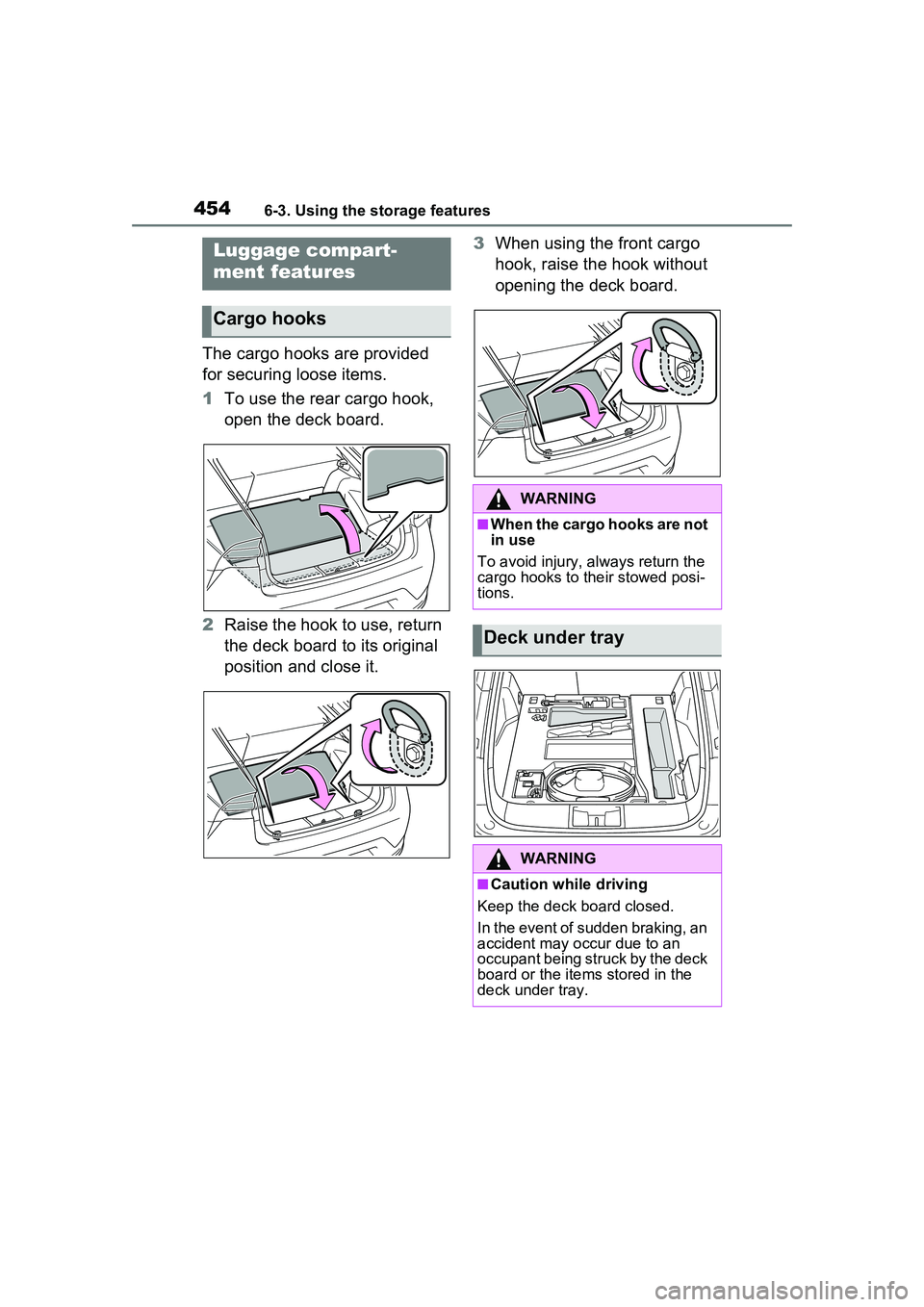
The cargo hooks are provided
for securing loose items.
1To use the rear cargo hook,
open the deck board.
2 Raise the hook to use, return
the deck board to its original
position and close it. 3
When using the front cargo
hook, raise the hook without
opening the deck board.
Luggage compart-
ment features
Cargo hooks
WARNING
■When the cargo hooks are not
in use
To avoid injury, always return the
cargo hooks to their stowed posi-
tions.
Deck under tray
WARNING
■Caution while driving
Keep the deck board closed.
In the event of sudden braking, an
accident may occur due to an
occupant being struck by the deck
board or the items stored in the
deck under tray.
Page 470 of 680
4706-4. Using the other interior features
WARNING
●If the plug of a device fits
loosely in a power outlet, even
though it is fully inserted,
replace the power outlet. For
information on replacement,
contact your Toyota dealer.
■Devices to be connected
●Make sure to read any instruc-
tion manual which came with a
device and observe any warn-
ings on the device.
●Do not connect a device to a
power outlet if the device is mal-
functioning or its plug is dam-
aged.
●Otherwise, the device may be
further malfunctioning, espe-
cially when the outside tem-
perature is high or low.
●Devices requiring to be installed
on a level place may not oper-
ate properly.
●Do not use devices, other than
waterproof devices, in a place
where water, such as rain, is
splashed over or where it is
humid.
●Do not use a device that has
been or likely to have been
merged in water or absorbed
water within.
●Do not connect a medical
device, as depending on the
vehicle condition, the power
supply function may be tempo-
rarily stopped.
■When the power outlets are
used while the vehicle is
parked or stopped
●The power outlets are designed
to be connected to electric
devices, such as lighting
devices. Do not use them as a
generator that supplies power to
a house, etc. Also, when they
are to be used on an emer-
gency power supply device for
homes, such as an exclusive
device having connection to an
external power source, or a
device whose power supply cir-
cuit for external power source is
separate from electric wiring of
power companies, consult with
the manufacturer or a retailer of
the device.
●When using a power outlet,
make sure to securely engage
the parking brake and shift the
shift position to P. Otherwise,
the vehicle may move, possibly
leading to an accident.
●When using a power outlet, do
not move away from the vehicle.
●Do not perform power supply
during weather when lightning
may occur. Stop supplying
power if lightning is observed
during power supply.
●Do not use the power outlets if
the vehicle has a vehicle cover
installed.
●Do not use a power outlet when
the vehicle is parked on a
slanted place or a slope. When
a power outlet is being used, do
not move the vehicle or cause it
to be inclined.
●Observe the following precau-
tions when a connected cord is
to be brought outside the vehi-
cle:
Page 471 of 680
4716-4. Using the other interior features
6
Interior features
WARNING
• Take due care for not allowing rain to enter. If the power outlet
is wet with raindrops, dry it
before use.
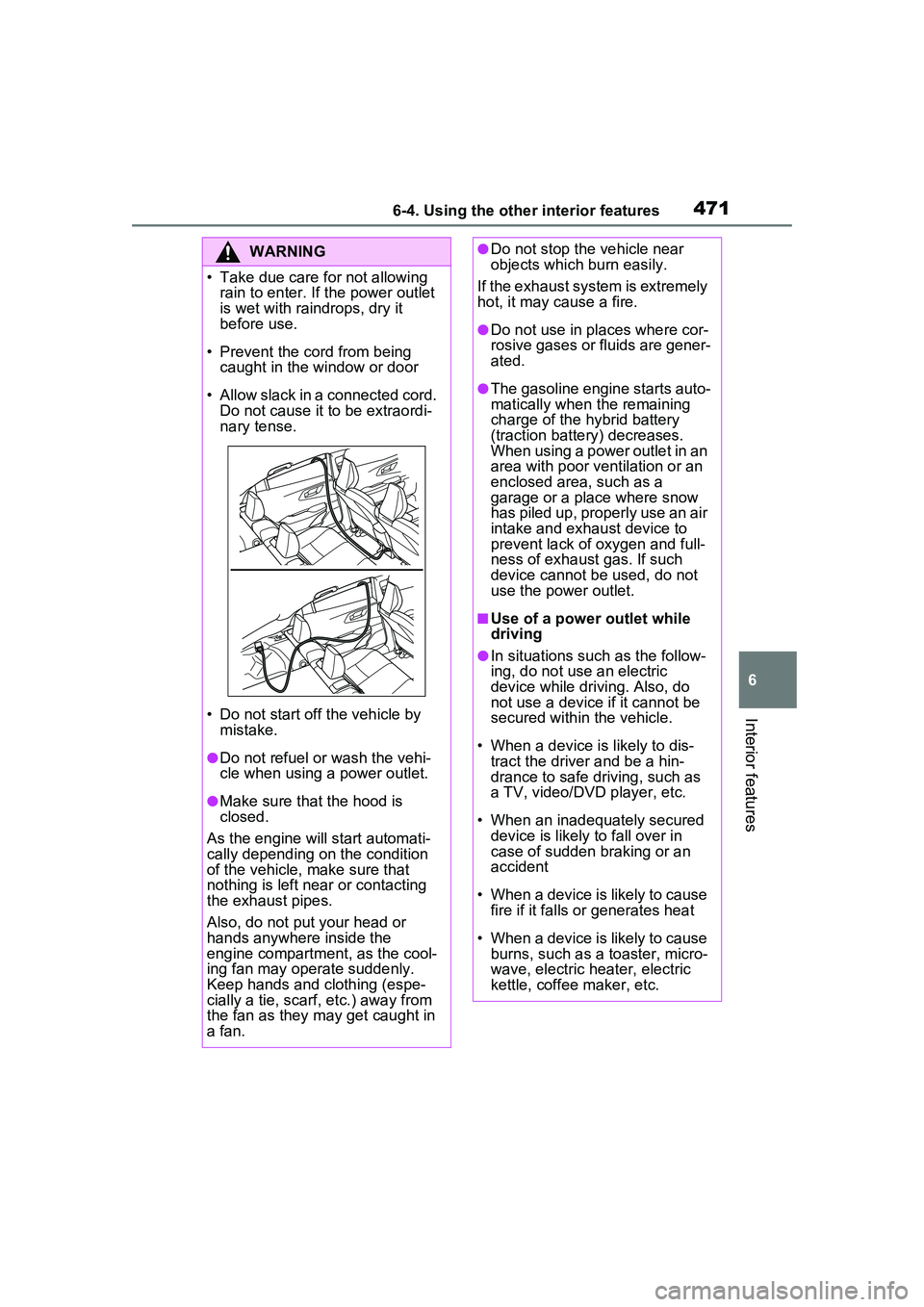
• Prevent the cord from being caught in the window or door
• Allow slack in a connected cord. Do not cause it to be extraordi-
nary tense.
• Do not start off the vehicle by mistake.
●Do not refuel or wash the vehi-
cle when using a power outlet.
●Make sure that the hood is
closed.
As the engine will start automati-
cally depending on the condition
of the vehicle, make sure that
nothing is left near or contacting
the exhaust pipes.
Also, do not put your head or
hands anywhere inside the
engine compartment, as the cool-
ing fan may operate suddenly.
Keep hands and clothing (espe-
cially a tie, scarf, etc.) away from
the fan as they may get caught in
a fan.
●Do not stop the vehicle near
objects which burn easily.
If the exhaust system is extremely
hot, it may cause a fire.
●Do not use in places where cor-
rosive gases or fluids are gener-
ated.
●The gasoline engine starts auto-
matically when the remaining
charge of the hybrid battery
(traction battery) decreases.
When using a power outlet in an
area with poor ventilation or an
enclosed area, such as a
garage or a place where snow
has piled up, properly use an air
intake and exhaust device to
prevent lack of oxygen and full-
ness of exhaust gas. If such
device cannot be used, do not
use the power outlet.
■Use of a power outlet while
driving
●In situations such as the follow-
ing, do not use an electric
device while driving. Also, do
not use a device if it cannot be
secured within the vehicle.
• When a device is likely to dis- tract the driver and be a hin-
drance to safe driving, such as
a TV, video/DVD player, etc.
• When an inadequately secured device is likely to fall over in
case of sudden braking or an
accident
• When a device is likely to cause fire if it falls or generates heat
• When a device is likely to cause burns, such as a toaster, micro-
wave, electric heater, electric
kettle, coffee maker, etc.
Page 473 of 680
4736-4. Using the other interior features
6
Interior features
cannot be enabled during the
power supply. For theft pre-
vention, do not leave valuable
items, etc. in the cabin or lug-gage compartment.
Check that AC charging is not
performed.
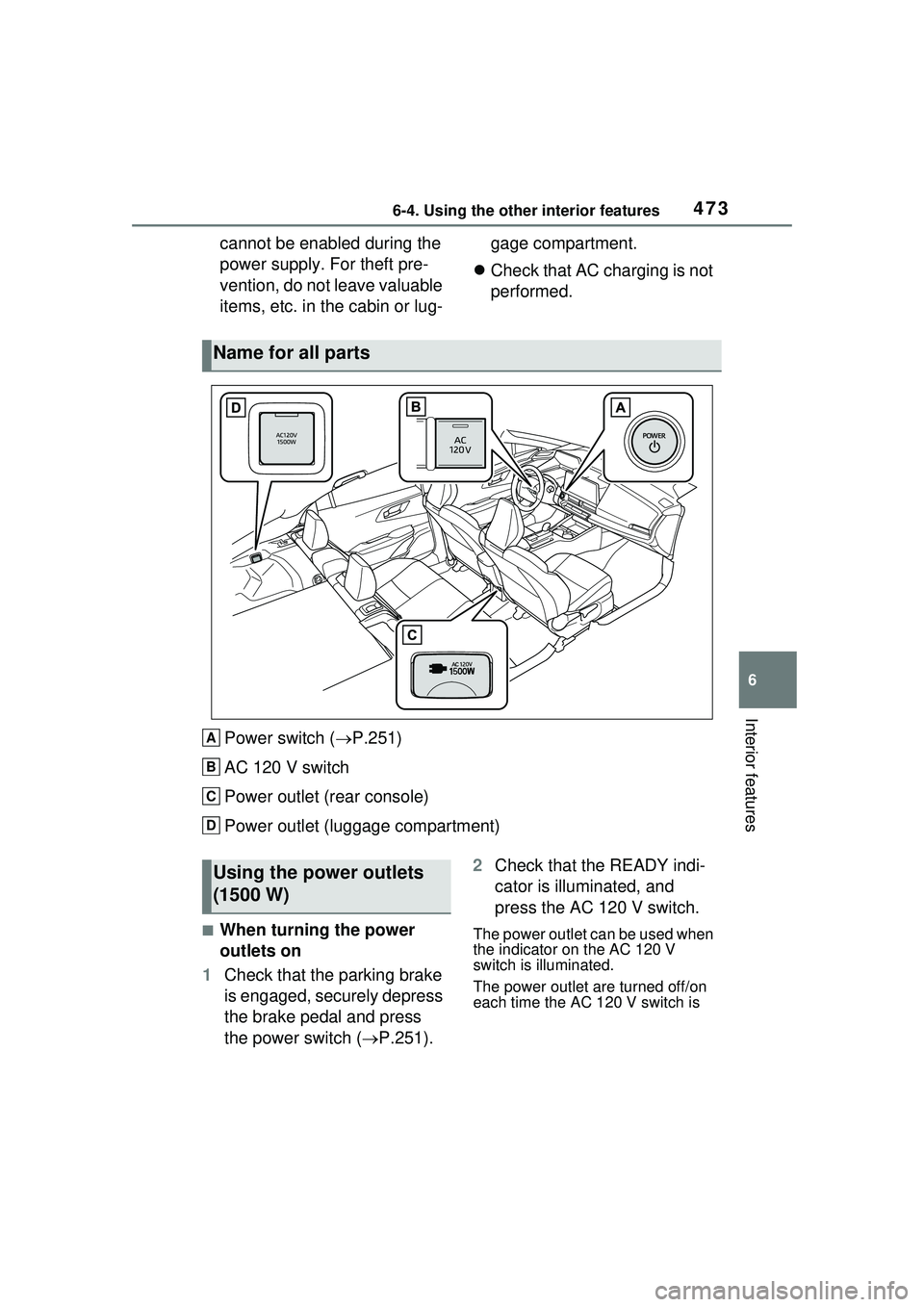
Power switch ( P.251)
AC 120 V switch
Power outlet (rear console)
Power outlet (luggage compartment)
■When turning the power
outlets on
1 Check that the parking brake
is engaged, securely depress
the brake pedal and press
the power switch ( P.251). 2
Check that the READY indi-
cator is illuminated, and
press the AC 120 V switch.The power outlet can be used when
the indicator on the AC 120 V
switch is illuminated.
The power outlet are turned off/on
each time the AC 120 V switch is
Name for all parts
A
B
C
D
Using the power outlets
(1500 W)
Page 474 of 680
4746-4. Using the other interior features
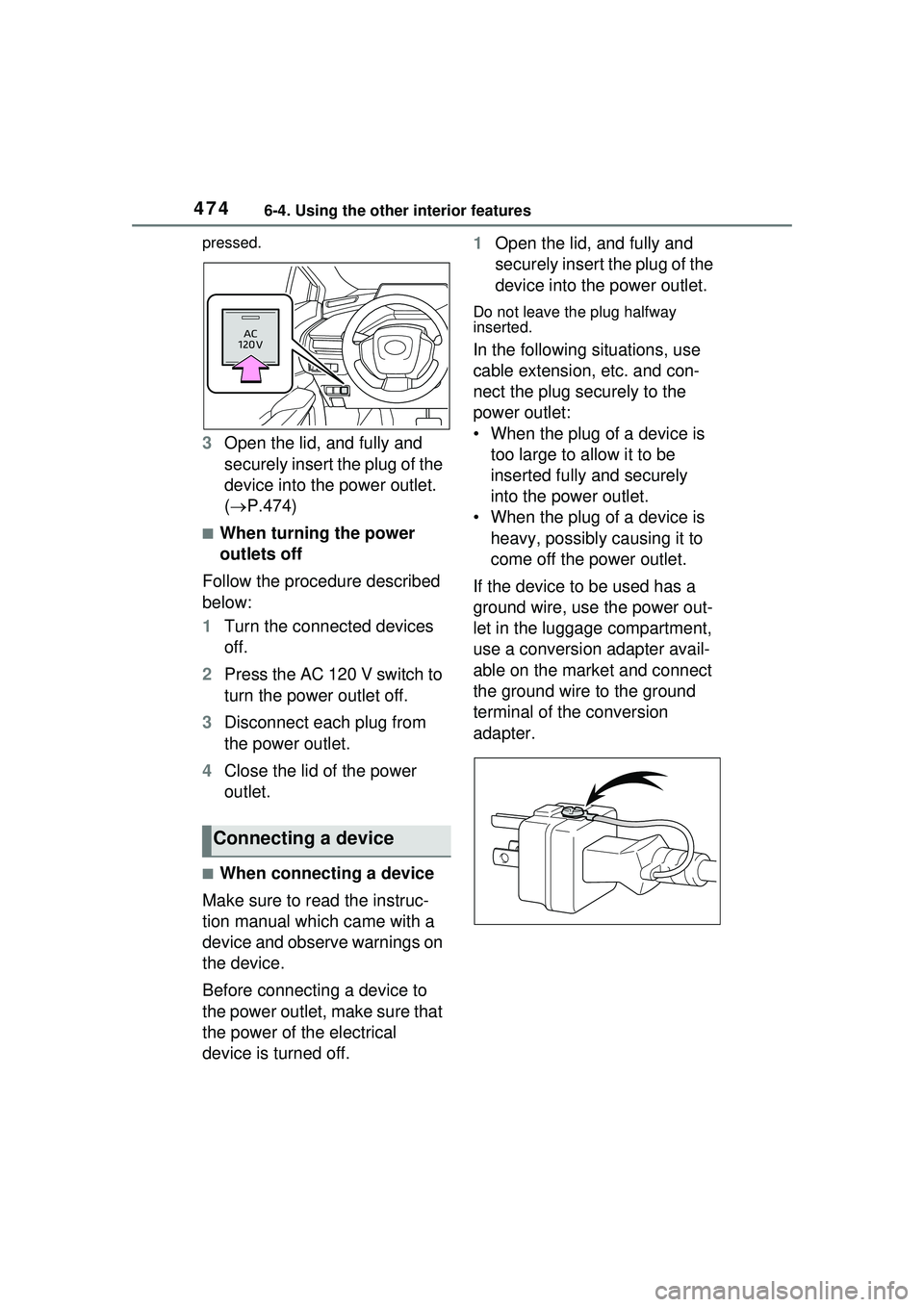
pressed.
3Open the lid, and fully and
securely insert the plug of the
device into the power outlet.
( P.474)
■When turning the power
outlets off
Follow the procedure described
below:
1 Turn the connected devices
off.
2 Press the AC 120 V switch to
turn the power outlet off.
3 Disconnect each plug from
the power outlet.
4 Close the lid of the power
outlet.
■When connecting a device
Make sure to read the instruc-
tion manual which came with a
device and observe warnings on
the device.
Before connecting a device to
the power outlet, make sure that
the power of the electrical
device is turned off. 1
Open the lid, and fully and
securely insert the plug of the
device into the power outlet.
Do not leave the plug halfway
inserted.
In the following situations, use
cable extension, etc. and con-
nect the plug securely to the
power outlet:
• When the plug of a device is
too large to allow it to be
inserted fully and securely
into the power outlet.
• When the plug of a device is heavy, possibly causing it to
come off the power outlet.
If the device to be used has a
ground wire, use the power out-
let in the luggage compartment,
use a conversion adapter avail-
able on the market and connect
the ground wire to the ground
terminal of the conversion
adapter.
Connecting a device
Page 477 of 680
4776-4. Using the other interior features
6
Interior features
*: If equipped
■HomeLink® programming pro-
cedure
The programming procedures can
also be found at the following URL.
Website: www.hom elink.com/toyota
For support, contact customer sup-
port at the following.
Help Line: 1-800-355-3515
The HomeLink® wireless control
system in your vehicle has 3
buttons which can be pro-
grammed to operate 3 different
devices. Refer to the program-
ming methods on the following
pages to determine the method
which is appropriate for the device.
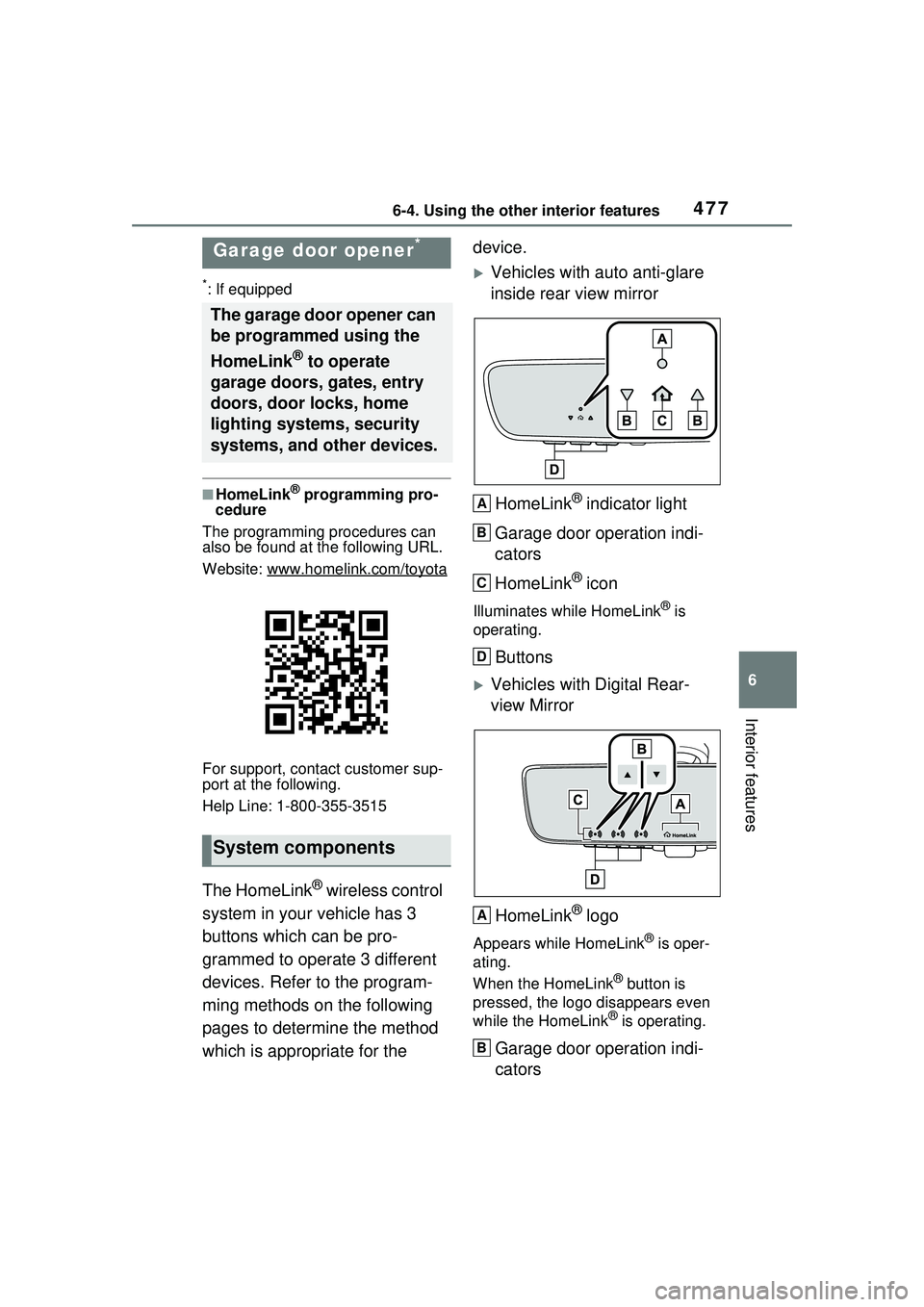
Vehicles with auto anti-glare
inside rear view mirror
HomeLink
® indicator light
Garage door operation indi-
cators
HomeLink
® icon
Illuminates while HomeLink® is
operating.
Buttons
Vehicles with Digital Rear-
view Mirror
HomeLink
® logo
Appears while HomeLink® is oper-
ating.
When the HomeLink
® button is
pressed, the logo disappears even
while the HomeLink
® is operating.
Garage door operation indi-
cators
Garage door opener*
The garage door opener can
be programmed using the
HomeLink
® to operate
garage doors, gates, entry
doors, door locks, home
lighting systems, security
systems, and other devices.
System components
A
B
C
D
A
B
Page 496 of 680
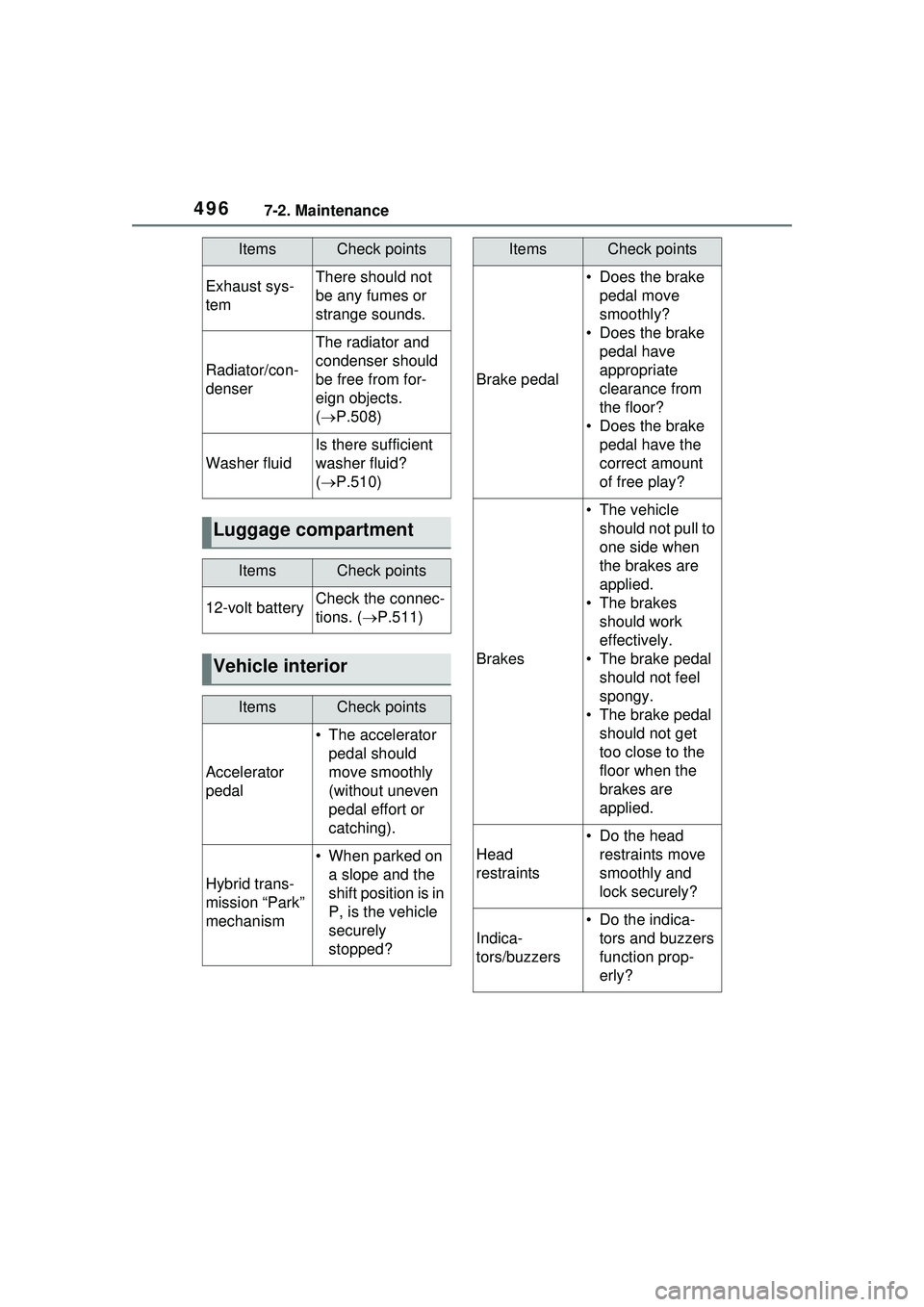
4967-2. Maintenance
Exhaust sys-
temThere should not
be any fumes or
strange sounds.
Radiator/con-
denser
The radiator and
condenser should
be free from for-
eign objects.
( P.508)
Washer fluid
Is there sufficient
washer fluid?
( P.510)
Luggage compartment
ItemsCheck points
12-volt batteryCheck the connec-
tions. ( P.511)
Vehicle interior
ItemsCheck points
Accelerator
pedal
• The accelerator
pedal should
move smoothly
(without uneven
pedal effort or
catching).
Hybrid trans-
mission “Park”
mechanism
• When parked on a slope and the
shift position is in
P, is the vehicle
securely
stopped?
ItemsCheck points
Brake pedal
• Does the brake pedal move
smoothly?
• Does the brake pedal have
appropriate
clearance from
the floor?
• Does the brake pedal have the
correct amount
of free play?
Brakes
• The vehicle should not pull to
one side when
the brakes are
applied.
• The brakes should work
effectively.
• The brake pedal should not feel
spongy.
• The brake pedal should not get
too close to the
floor when the
brakes are
applied.
Head
restraints
• Do the head restraints move
smoothly and
lock securely?
Indica-
tors/buzzers
• Do the indica-tors and buzzers
function prop-
erly?
ItemsCheck points
Page 497 of 680
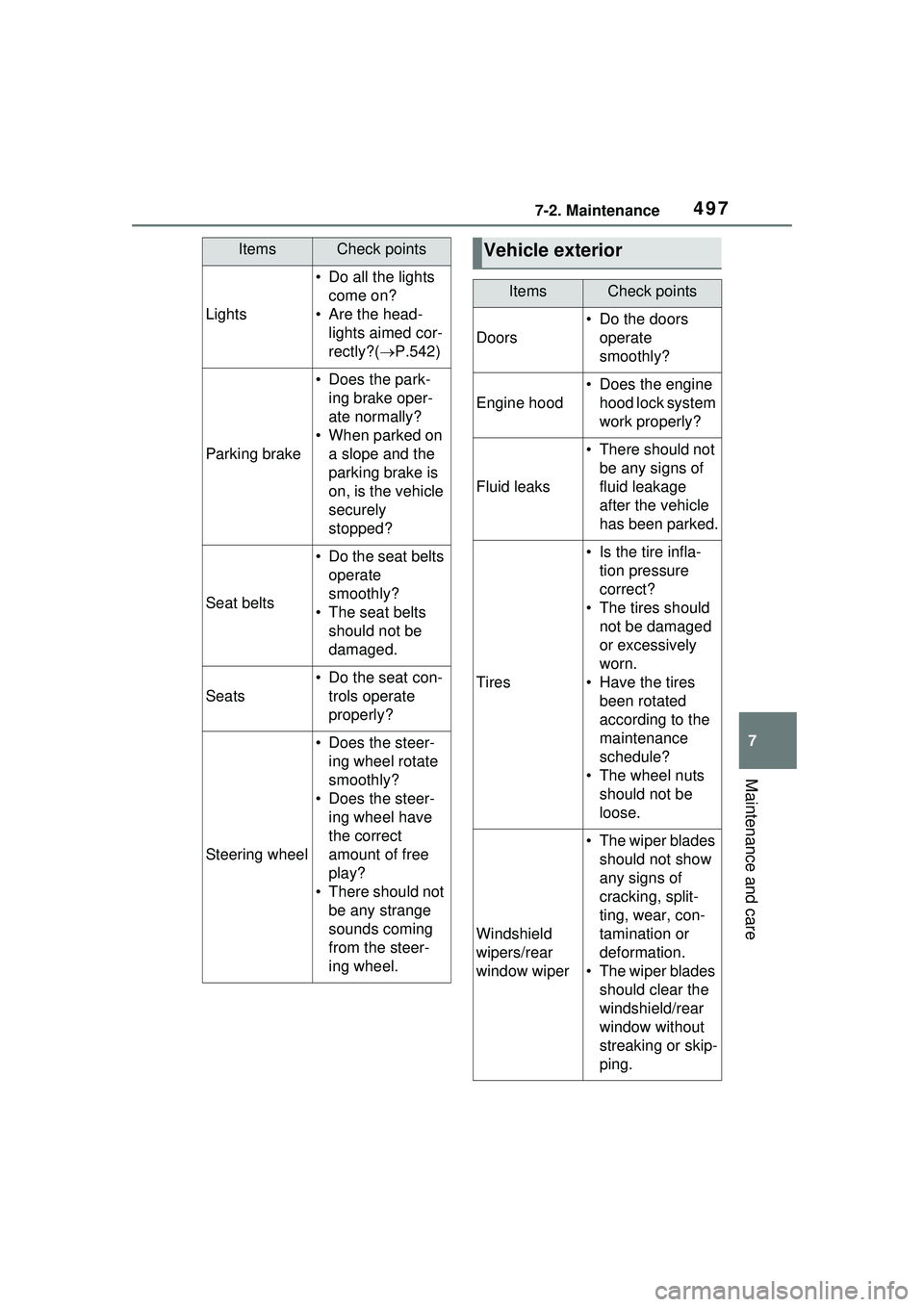
4977-2. Maintenance
7
Maintenance and care
Lights
• Do all the lights come on?
• Are the head- lights aimed cor-
rectly?( P.542)
Parking brake
• Does the park-
ing brake oper-
ate normally?
• When parked on a slope and the
parking brake is
on, is the vehicle
securely
stopped?
Seat belts
• Do the seat belts operate
smoothly?
• The seat belts should not be
damaged.
Seats
• Do the seat con-trols operate
properly?
Steering wheel
• Does the steer-ing wheel rotate
smoothly?
• Does the steer- ing wheel have
the correct
amount of free
play?
• There should not be any strange
sounds coming
from the steer-
ing wheel.
ItemsCheck pointsVehicle exterior
ItemsCheck points
Doors
• Do the doors operate
smoothly?
Engine hood
• Does the engine hood lock system
work properly?
Fluid leaks
• There should not be any signs of
fluid leakage
after the vehicle
has been parked.
Tires
• Is the tire infla-tion pressure
correct?
• The tires should not be damaged
or excessively
worn.
• Have the tires been rotated
according to the
maintenance
schedule?
• The wheel nuts should not be
loose.
Windshield
wipers/rear
window wiper
• The wiper blades should not show
any signs of
cracking, split-
ting, wear, con-
tamination or
deformation.
• The wiper blades should clear the
windshield/rear
window without
streaking or skip-
ping.