belt TOYOTA PRIUS PRIME 2023 Service Manual
[x] Cancel search | Manufacturer: TOYOTA, Model Year: 2023, Model line: PRIUS PRIME, Model: TOYOTA PRIUS PRIME 2023Pages: 680, PDF Size: 14.97 MB
Page 233 of 680
2334-6. Favorite settings
4
Before driving
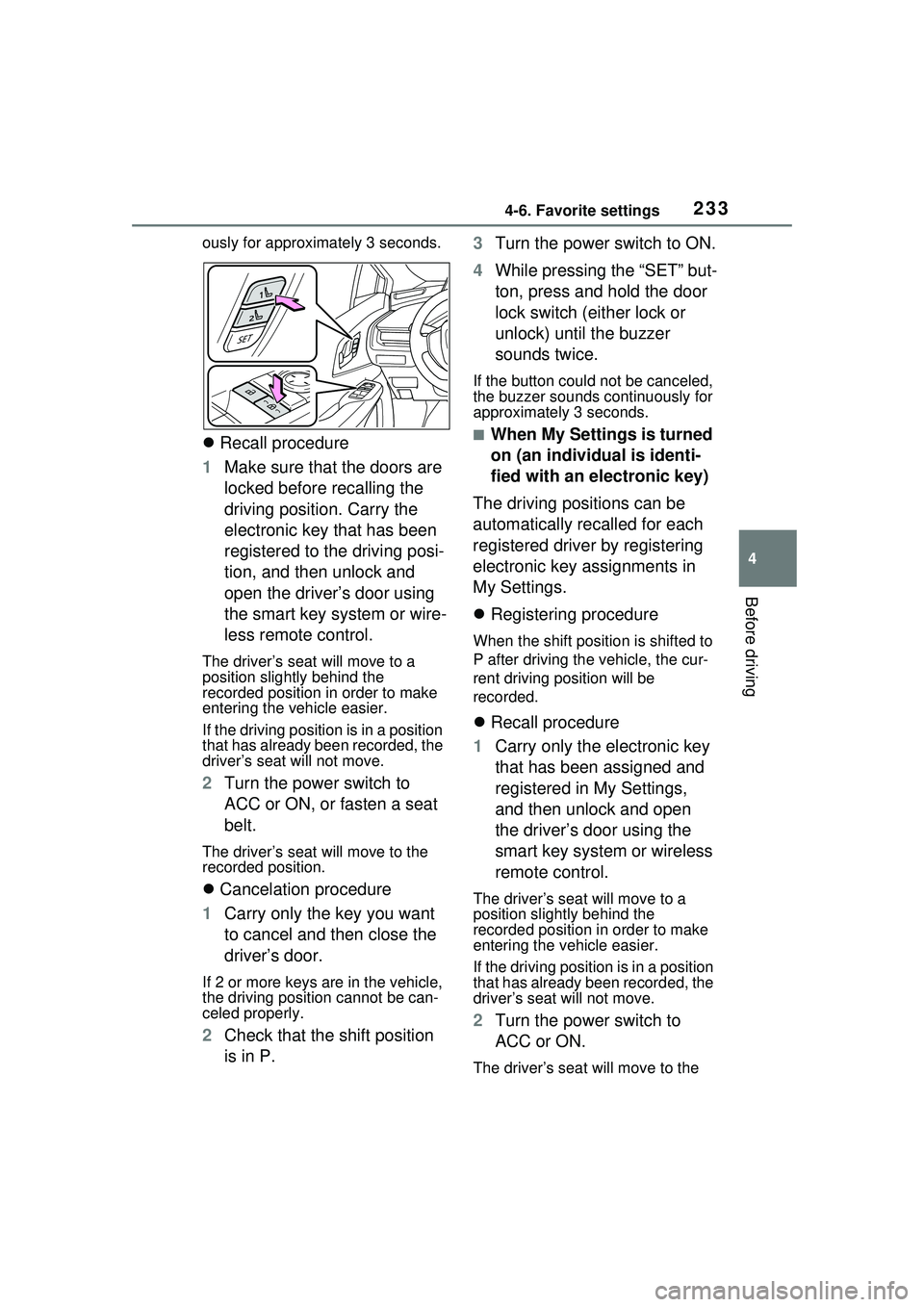
ously for approximately 3 seconds.
Recall procedure
1 Make sure that the doors are
locked before recalling the
driving position. Carry the
electronic key that has been
registered to the driving posi-
tion, and then unlock and
open the driver’s door using
the smart key system or wire-
less remote control.
The driver’s seat will move to a
position slightly behind the
recorded position in order to make
entering the vehicle easier.
If the driving position is in a position
that has already been recorded, the
driver’s seat will not move.
2 Turn the power switch to
ACC or ON, or fasten a seat
belt.
The driver’s seat will move to the
recorded position.
Cancelation procedure
1 Carry only the key you want
to cancel and then close the
driver’s door.
If 2 or more keys are in the vehicle,
the driving position cannot be can-
celed properly.
2Check that the shift position
is in P. 3
Turn the power switch to ON.
4 While pressing the “SET” but-
ton, press and hold the door
lock switch (either lock or
unlock) until the buzzer
sounds twice.
If the button could not be canceled,
the buzzer sounds continuously for
approximately 3 seconds.
■When My Settings is turned
on (an individual is identi-
fied with an electronic key)
The driving positions can be
automatically recalled for each
registered driver by registering
electronic key assignments in
My Settings.
Registering procedure
When the shift position is shifted to
P after driving the vehicle, the cur-
rent driving position will be
recorded.
Recall procedure
1 Carry only the electronic key
that has been assigned and
registered in My Settings,
and then unlock and open
the driver’s door using the
smart key system or wireless
remote control.
The driver’s seat will move to a
position slightly behind the
recorded position in order to make
entering the vehicle easier.
If the driving position is in a position
that has already been recorded, the
driver’s seat will not move.
2Turn the power switch to
ACC or ON.
The driver’s seat will move to the
Page 246 of 680
2465-1. Before driving
due to sudden start restraint con-
trol operation, deactivate TRAC
( P.425) so that the vehicle may
become able to escape from the
mud or fresh snow.Cargo and luggage
Take notice of the following
information about storage
precautions, cargo capacity
and load:
WARNING
■Things that must not be car-
ried in the luggage compart-
ment
The following things may cause a
fire if loaded in the luggage com-
partment:
●Receptacles containing gaso-
line
●Aerosol cans
■Storage precautions
Observe the following precau-
tions.
Failure to do so may prevent the
pedals from being depressed
properly, may block the driver’s
vision, or may result in items hit-
ting the driver or passengers, pos-
sibly causing an accident.
●Stow cargo and luggage in the
luggage compartment when-
ever possible.
●Do not stack cargo and luggage
in the luggage compartment
higher than the seatbacks.
●When you fold down the rear
seats, long items should not be
placed directly behind the front
seats.
●Never allow anyone to ride in
the luggage compartment. It is
not designed for passengers.
They should ride in their seats
with their seat belts properly
fastened.
Page 259 of 680
2595-2. Driving procedures
5
Driving
met, while the shift position is in a
position other than P
• The power switch is in ON.
• The driver is not wearing the seat
belt.
• The brake pedal is not depressed.
To start off the vehi cle after the shift
position is changed to P, operate
the shift lever again.
●When the vehicle is stopped after
the hybrid system has been
stopped in an emergency while
driving.
●When voltage of the 12-volt bat-
tery drops while the shift position
is in a position other than P.
*: When the power switch is pressed while driving at extremely slow
speeds, such as immediately
before stopping the vehicle, the
shift position may automatically
change to P. Make sure that the
vehicle is completely stopped
before pressing the power switch.
■If the shift position cannot be
shifted from P
There is a possibility that the 12-volt
battery is discharged. Check the 12-
volt battery in this situation.
( P.589)
■Customization
Some functions can be customized.
( P.618)
By performing the following
operation, the shift position
can be held in N until the shift
position switches to P without
activating the automatic P
position selection function.
WARNING
■For the shift lever
●Do not remove the shift lever
knob or use anything but a gen-
uine Toyota shift lever knob.
Also, do not hang anything on
the shift lever. Doing so could
prevent the shift lever from
returning to position, causing
unexpected accidents to occur
when the vehicle is in motion.
●In order to prevent the shift
position from accidentally being
changed, do not touch the shift
lever when not using them.
■P position switch
●Do not press the P position
switch while the vehicle is mov-
ing.
If the P position switch is pressed
when driving at very low speeds
(for example, directly before stop-
ping the vehicle), the vehicle may
stop suddenly when the shift posi-
tion switches to P, which could
lead to an accident.
●In order to prevent the shift
position from accidentally being
changed, do not touch the P
position switch when not using
them.
NOTICE
■When exiting the vehicle
(driver’s seat only)
Check that the shift position indi-
cator shows P and that the park-
ing brake indicator is illuminated
before opening the door and exit-
ing the vehicle.
Keeping the shift position
in N without activating the
automatic P position
selection function
Page 264 of 680
2645-2. Driving procedures
shifted from P, the parking
brake will be released, and
the parking brake indicator
light will turn off.
When the shift position is
shifted to P, the parking brake
will be set, and the parking
brake indicator light will turn
on.
Operate the shift position and P
position switch with the vehicle
stopped and the brake pedal
depressed.
The auto function may not operate
if the shift lever is moved extremely
quickly or the brake pedal is not
firmly depressed. In this situation,
apply the parking brake manually.
( P.263)
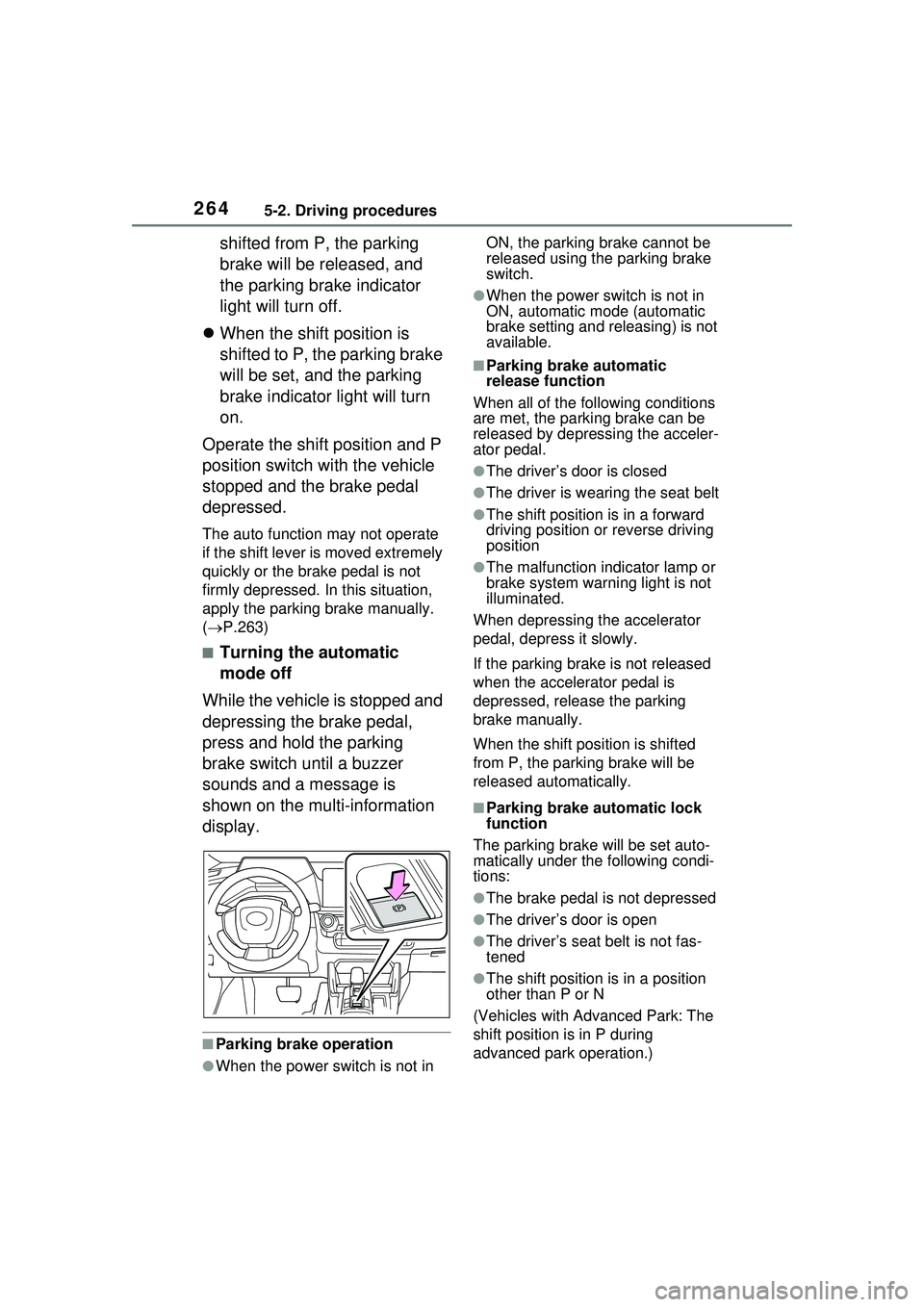
■Turning the automatic
mode off
While the vehicle is stopped and
depressing the brake pedal,
press and hold the parking
brake switch until a buzzer
sounds and a message is
shown on the multi-information
display.
■Parking brake operation
●When the power switch is not in ON, the parking brake cannot be
released using the parking brake
switch.
●When the power switch is not in
ON, automatic mode (automatic
brake setting and releasing) is not
available.
■Parking brake automatic
release function
When all of the following conditions
are met, the parking brake can be
released by depressing the acceler-
ator pedal.
●The driver’s door is closed
●The driver is wearing the seat belt
●The shift position is in a forward
driving position or reverse driving
position
●The malfunction indicator lamp or
brake system warning light is not
illuminated.
When depressing the accelerator
pedal, depress it slowly.
If the parking brake is not released
when the accelerator pedal is
depressed, release the parking
brake manually.
When the shift position is shifted
from P, the parking brake will be
released automatically.
■Parking brake automatic lock
function
The parking brake will be set auto-
matically under the following condi-
tions:
●The brake pedal is not depressed
●The driver’s door is open
●The driver’s seat belt is not fas-
tened
●The shift position is in a position
other than P or N
(Vehicles with Advanced Park: The
shift position is in P during
advanced park operation.)
Page 266 of 680
2665-2. Driving procedures
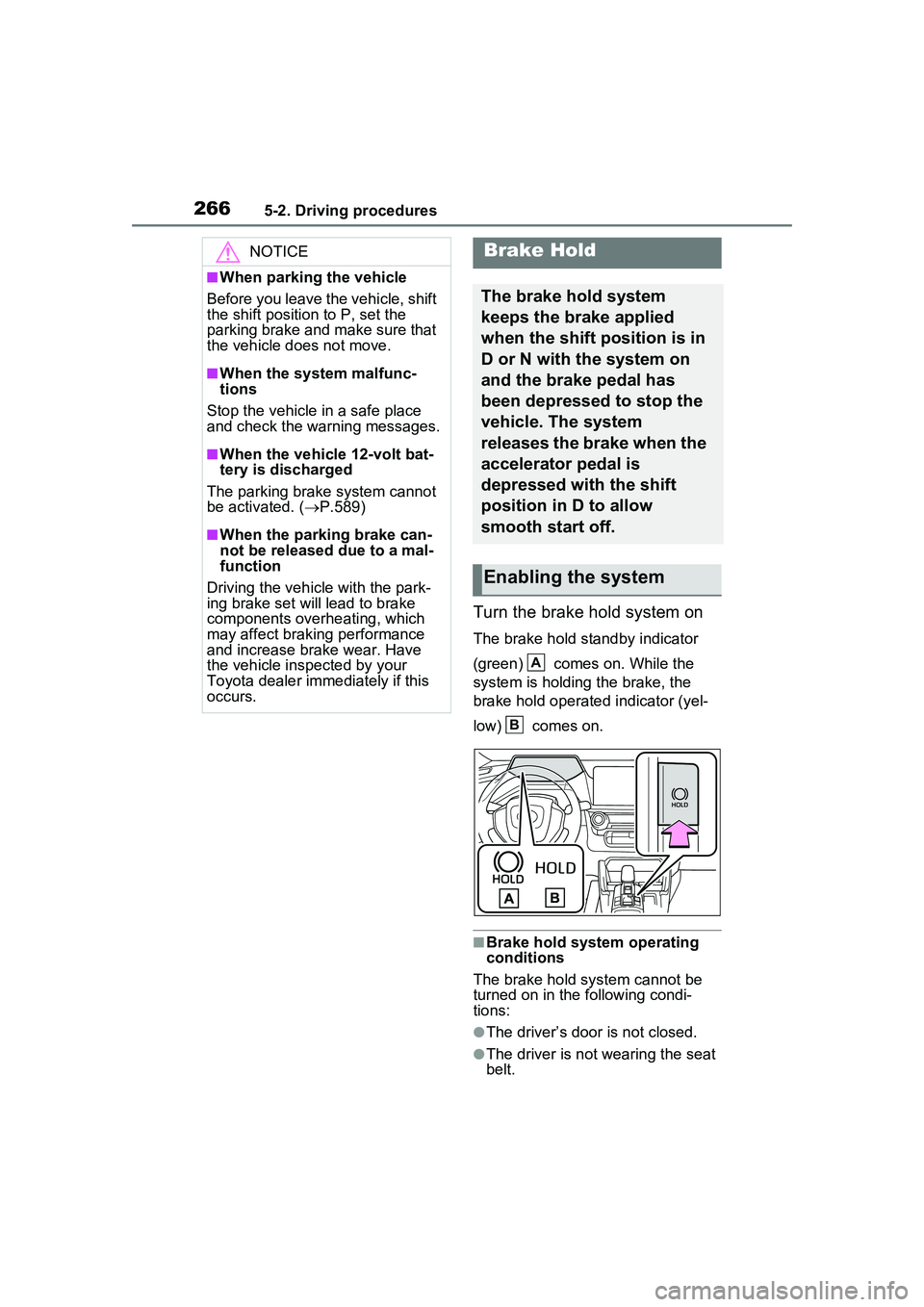
Turn the brake hold system on
The brake hold standby indicator
(green) comes on. While the
system is holding the brake, the
brake hold operated indicator (yel-
low) comes on.
■Brake hold system operating
conditions
The brake hold system cannot be
turned on in the following condi-
tions:
●The driver’s door is not closed.
●The driver is not wearing the seat
belt.
NOTICE
■When parking the vehicle
Before you leave the vehicle, shift
the shift position to P, set the
parking brake and make sure that
the vehicle does not move.
■When the system malfunc-
tions
Stop the vehicle in a safe place
and check the warning messages.
■When the vehicle 12-volt bat-
tery is discharged
The parking brake system cannot
be activated. ( P.589)
■When the parking brake can-
not be released due to a mal-
function
Driving the vehicle with the park-
ing brake set will lead to brake
components overheating, which
may affect braking performance
and increase brake wear. Have
the vehicle inspected by your
Toyota dealer immediately if this
occurs.
Brake Hold
The brake hold system
keeps the brake applied
when the shift position is in
D or N with the system on
and the brake pedal has
been depressed to stop the
vehicle. The system
releases the brake when the
accelerator pedal is
depressed with the shift
position in D to allow
smooth start off.
Enabling the system
A
B
Page 267 of 680
2675-2. Driving procedures
5
Driving
●“Parking Brake Unavailable” or
“Parking Brake Malfunction Visit
Your Dealer” is displayed on the
multi-information display.
If any of the conditions above are
detected when the brake hold sys-
tem is enabled, the system will turn
off and the brake hold standby indi-
cator light will go off. In addition, if
any of the conditions are detected
while the system is holding the
brake, a warning buzzer will sound
and a message will be shown on the
multi-information display. The park-
ing brake will then be set automati-
cally.
■Brake hold function
●If the brake pedal is left released
for a period of about 3 minutes
after the system has started hold-
ing the brake, the parking brake
will be set automatically. In this
case, a warning buzzer sounds
and a message is shown on the
multi-informat ion display.
●To turn the system off while the
system is holding the brake, firmly
depress the brake pedal and
press the button again.
●The brake hold function may not
hold the vehicle when the vehicle
is on a steep incline. In this situa-
tion, it may be necessary for the
driver to apply the brakes. A warn-
ing buzzer will sound and the
multi-informatio n display will
inform the driver of this situation. If
a warning message is shown on
the multi-information display, read
the message and follow the
instructions.
●When do not wish for the parking
brake to operate automatically,
press and hold the brake hold
switch until the standby indicator
(green) turns off, and then turn the
power switch off.
■When the parking brake is set
automatically while the system
is holding the brakes
Perform any of the following opera- tions to release the parking brake.
●Depress the accelerator pedal.
(The parking brake will not be
released automatically if the seat
belt is not fastened.)
●Operate the parking brake switch
with the brake pedal depressed.
Make sure that the parking brake
indicator light goes off. ( P.263)
■When an inspection at your
Toyota dealer is necessary
When the brake hold standby indi-
cator (green) does not illuminate
even when the brake hold switch is
pressed with the brake hold system
operating conditions met, the sys-
tem may be malfunctioning. Have
the vehicle inspected at your Toyota
dealer.
■If “Brake Hold Malfunction
Press Brake to Deactivate Visit
Your Dealer” or “Brake Hold
Malfunction Visit Your Dealer”
is displayed on the multi-infor-
mation display
The system may be malfunctioning.
Have the vehicle inspected by your
Toyota dealer.
■Warning messages and buzzers
Warning messages and buzzers are
used to indicate a system malfunc-
tion or to inform the driver of the
need for caution. If a warning mes-
sage is shown on the multi-informa-
tion display, read the message and
follow the instructions.
■If the brake hold operated indi-
cator flashes
P.561
Page 337 of 680
3375-5. Using the driving support systems
5
Driving
• If the vehicle speed is set while driving at a speed that exceeds
the system’s upper limit, the set
vehicle speed will be the system’s
upper limit.
■Accelerating after setting the
vehicle speed
As with normal driving, acceleration
can be performed by depressing the
accelerator pedal. After accelerat-
ing, the vehicle will return to the set
vehicle speed. However, while in
vehicle-to-vehicle distance control
mode, the vehicle speed may
decrease to below the set vehicle
speed in order to maintain the dis-
tance from the preceding vehicle.
■When the vehicle is stopped by
system control during follow-up
cruising
●When the “RES” switch is pressed
while the vehicle is stopped by
system control, if the preceding
vehicle starts off within approxi-
mately 3 seconds, follow-up cruis-
ing will resume.
●If the preceding vehicle starts off
within approximately 3 seconds of
the vehicle being stopped by sys-
tem control, follo w-up cruising will
resume.
■Automatic cancellation of vehi-
cle-to-vehicle distance control
mode
In the following situations, vehicle-
to-vehicle distance control mode will
be canceled automatically:
●When the brake control or output
restriction control of a driving sup-
port system operates
(For example: Pre-Collision Sys-
tem, drive-start control)
●When the parking brake has been
operated
●When the vehicle is stopped by
system control on a steep incline
●When any of the following are
detected while the vehicle is
stopped by system control: • The driver’s seat belt is unfas-
tened
• The driver’s door is opened
• Approximately 3 minutes have
elapsed since the vehicle was
stopped
The parking brake may be actived
automatically.
●Situations in which some or all of
the functions of the system cannot
operate: P.291
■Dynamic radar cruise control
system warning messages and
buzzers
For safe use: P.284
■Preceding vehicles that the sen-
sor may not detect correctly
In the following situations, depend-
ing on the conditions, if the system
cannot provide sufficient decelera-
tion or acceleration is necessary,
operate the brake pedal or accelera-
tor pedal.
As the sensor may not be able to
correctly detect these types of vehi-
cles, the approach warning
( P.338) may not operate.
●When a vehicle cuts in front of
your vehicle or changes lanes
away from your vehicle extremely
slowly or quickly
●When changing lanes
●When a preceding vehicle is driv-
ing at a low speed
●When a vehicle is stopped in the
same lane as the vehicle
●When a motorcycle is traveling in
the same lane as the vehicle
■Conditions under which the
system may not operate cor-
rectly
In the following situations, operate
the brake pedal (or accelerator
pedal, depending on the situation)
as necessary.
As the sensor may not be able to
correctly detect a vehicle, the sys-
tem may not operate properly.
Page 351 of 680
3515-5. Using the driving support systems
5
Driving
■Operating conditions of the
function
This function is operable when all of
the following conditions are met:
●The system detects lane lines and
the path of preceding or surround-
ing vehicles.
●The dynamic radar cruise control
and the lane tracing assist are
operating.
●The turn signal lever is not being
operated.
●The vehicle is not being driven
around a sharp curve.
●The vehicle is being driven in the
center of a lane.
●The driver monitor camera is
detecting that the driver is facing
front of the vehicle.
●The vehicle is driving in traffic jam
on a highway or expressway at
approximately 25 mph (40 km/h)
or less. (In some situations, such
as when a traffic jam starts, this
function may be operational at
approximately 20 mph (30 km/h)
or less.)
●It is necessary to enter a con-
nected services contract, provided
by Toyota, to use these functions.
For details, contact your Toyota
dealer.
●The driver’s door is closed.
●The driver’s seat belt is fastened.
●Customized setting of the Traffic
Jam Assist is not set to off.
●Functions and components com-
posing the system are in proper
condition.
●Customized setting of the PCS (Pre-Collision System) is not set
to off.
●Customized setting of the dynamic
radar cruise control (re-start time
extension) is not set to off.
■Temporary cancelation of the
function
●When the operating conditions are
no longer met, a function may be
temporarily canceled. However,
when the operation conditions are
met again, operation of the func-
tion will automatically be restored.
●If the operating conditions of a
function are no longer met while
the function is operating, a buzzer
may sound with a display to indi-
cate that the function has been
temporarily canceled. If no driver’s
responses to the
indication are
detected, the driver emergency
stop assist function may operate.
For types of display and action to
be taken, see the page mentioned
below. ( P.352)
■Driving operations during con-
trolled driving:
●Accelerator pedal
As with normal driving, acceleration
can be performed by depressing the
accelerator pedal. When the accel-
erator pedal is depressed at approx-
imately 10 km/h (6 mph) or more,
this function will be canceled.
●Brake pedal
As with normal driving, deceleration
can be performed by depressing the
brake pedal. However, controlled
driving will be cancelled.
●Steering wheel
As with normal driving, the steering
wheel can be operated. If the steer-
ing wheel is operated more than a
certain amount, controlled driving
will be cancelled.
WARNING
■Front camera installation area
on the windshield
P.288
Page 401 of 680
4015-5. Using the driving support systems
5
Driving
unclear
• When the appearance of the park- ing space is affected by the
shadow of the vehicle or trees
■Sensor detection information
P.365
■Objects which the sensor may
not be properly detected
P.366
■Situations in which the sensor
may not operate properly
P.366
■Situations in which parking
assistance may not operate
even if there is no possibility of
a collision
P.367
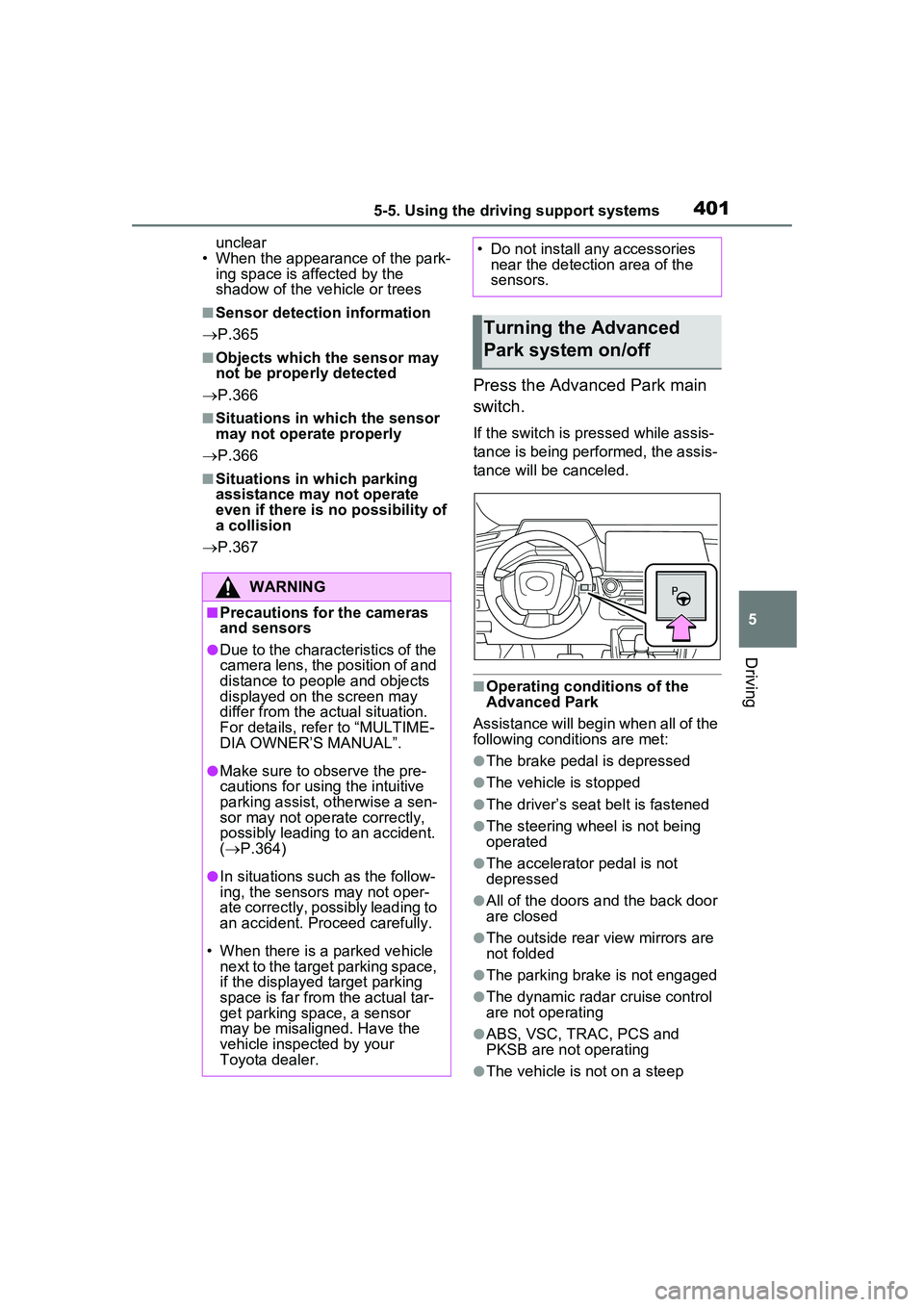
Press the Advanced Park main
switch.
If the switch is pressed while assis-
tance is being performed, the assis-
tance will be canceled.
■Operating conditions of the
Advanced Park
Assistance will begin when all of the
following conditions are met:
●The brake pedal is depressed
●The vehicle is stopped
●The driver’s seat belt is fastened
●The steering wheel is not being
operated
●The accelerator pedal is not
depressed
●All of the doors and the back door
are closed
●The outside rear view mirrors are
not folded
●The parking brake is not engaged
●The dynamic radar cruise control
are not operating
●ABS, VSC, TRAC, PCS and
PKSB are not operating
●The vehicle is not on a steep
WARNING
■Precautions for the cameras
and sensors
●Due to the characteristics of the
camera lens, the position of and
distance to people and objects
displayed on the screen may
differ from the actual situation.
For details, refer to “MULTIME-
DIA OWNER’S MANUAL”.
●Make sure to observe the pre-
cautions for using the intuitive
parking assist, otherwise a sen-
sor may not operate correctly,
possibly leading to an accident.
( P.364)
●In situations such as the follow-
ing, the sensors may not oper-
ate correctly, possibly leading to
an accident. Proceed carefully.
• When there is a parked vehicle next to the target parking space,
if the displayed target parking
space is far from the actual tar-
get parking space, a sensor
may be misaligned. Have the
vehicle inspected by your
Toyota dealer.
• Do not install any accessories near the detection area of the
sensors.
Turning the Advanced
Park system on/off
Page 419 of 680
4195-5. Using the driving support systems
5
Driving
■Assistance will be can-
celed when
In situations such as the follow-
ing, Advanced Park operation
will be canceled. Firmly hold the
steering wheel and depress the
brake pedal to stop the vehicle.
As system operation has been
canceled, begin the operation
again or continue parking manu-
ally, using the steering wheel.
The Advanced Park main
switch is pushed
The shift position has been
changed to P
The parking brake is engaged
A door or the back door is
opened
The driver’s seat belt is unfas-
tened
The outside rear view mirrors
are folded
The TRAC or VSC is turned
off
The TRAC, VSC or ABS oper-
ates
The power switch is pressed
The system determines assis-
tance cannot be continued in
the current parking environ-
ment
The system malfunctions
While the vehicle was stopped, “Cancel” was
selected on the Multimedia
Display■Assistance will be sus-
pended when
In situations such as the follow-
ing, Advanced Park operation
will be suspended.
Assistance can be started again
by following the directions dis-
played on the Multimedia Dis-
play.
Also, when assistance is sus-
pended, if the shift position is
changed twice with the brake
pedal depressed, assistance will
be canceled in that shift posi-
tion. However, if assistance is
suspended by changing the shift
position, assistance will be can-
celed if the shift position is
changed once.
The steering wheel is oper-
ated
The accelerator pedal is
depressed
The shift position has been
changed
A moving object or stationary
object that may collide with
your vehicle has been
detected, resulting in the
operation of the hybrid system
output control/braking control.
Camera switch is pressed
Advanced Park cancel-
ation/suspension