park assist TOYOTA PRIUS PRIME 2023 Repair Manual
[x] Cancel search | Manufacturer: TOYOTA, Model Year: 2023, Model line: PRIUS PRIME, Model: TOYOTA PRIUS PRIME 2023Pages: 680, PDF Size: 14.97 MB
Page 422 of 680
4225-5. Using the driving support systems
around your vehicle and exit from
the parking space manually.
■If “Cannot control speed” is
displayed
The system judged that it cannot
adjust the speed of the vehicle when
using the system in an area with a
slope or step and assistance was
canceled.
Use the system in a level location.
■If “Obstacle detected” is dis-
played
As a moving object or stationary
object that may collide with your
vehicle has been detected, the
hybrid system output control/braking
control operates to suspend
Advanced Park assistance.
Check the condition of the surround-
ing area. To resume assistance,
select the “Start” button on the Multi-
media Display.
■If “No available parking space
to register” is displayed
This message is displayed when
is selected at a parking space that
cannot be detected.
Operate the system at a parking
space where differences in the road
surface can be recognized.
( P.414)
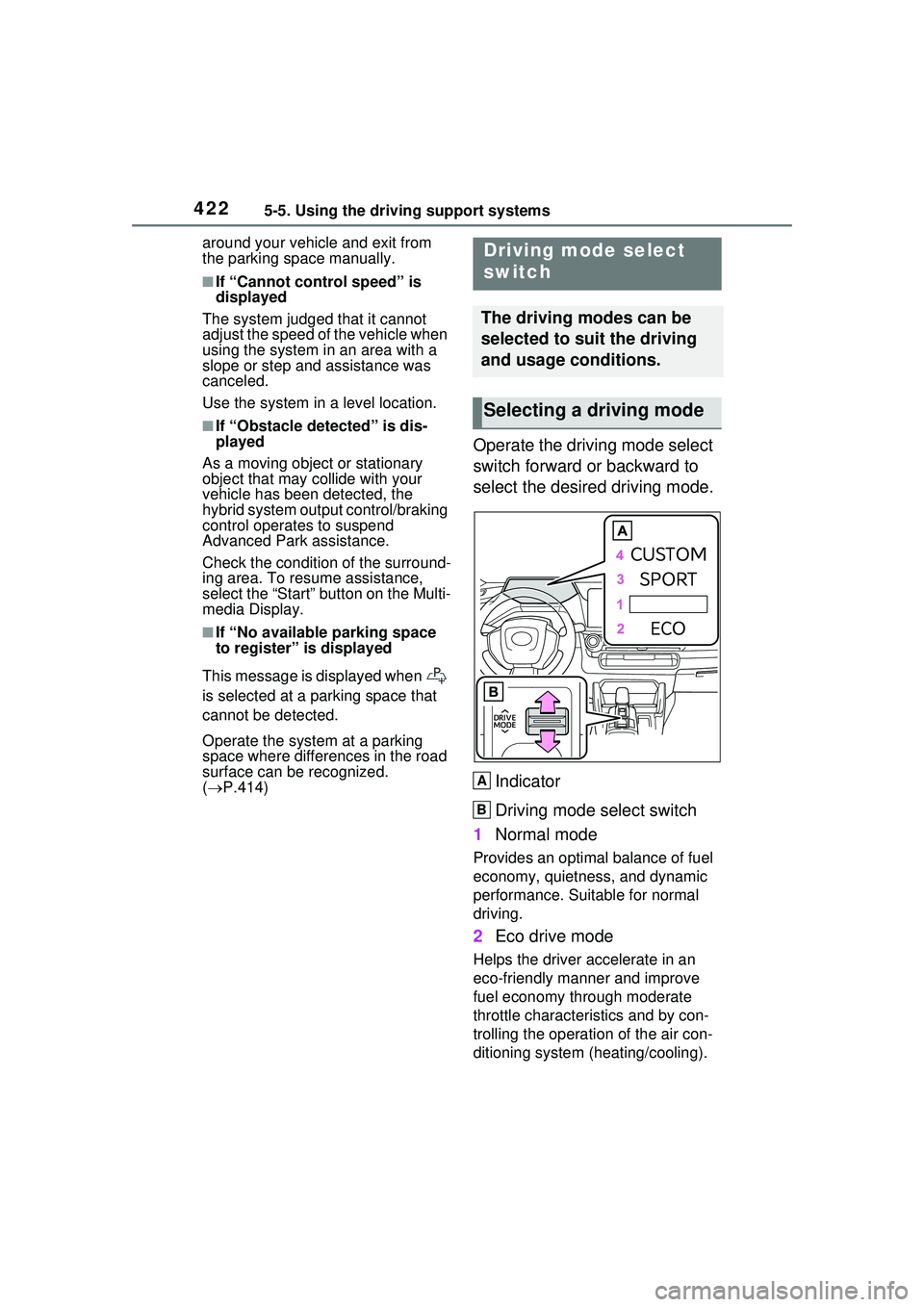
Operate the driving mode select
switch forward or backward to
select the desired driving mode.
Indicator
Driving mode select switch
1 Normal mode
Provides an optimal balance of fuel
economy, quietness, and dynamic
performance. Suitable for normal
driving.
2Eco drive mode
Helps the driver accelerate in an
eco-friendly manner and improve
fuel economy through moderate
throttle characteristics and by con-
trolling the operation of the air con-
ditioning system (heating/cooling).
Driving mode select
switch
The driving modes can be
selected to suit the driving
and usage conditions.
Selecting a driving mode
A
B
Page 426 of 680
4265-5. Using the driving support systems
●The accelerator pedal is not
depressed
●The parking brake is not engaged
●The power switch is in ON
■Automatic system cancelation
of hill-start assist control
The hill-start assist control will turn
off in any of the following situations:
●Shift the shift position to P or N.
●The accelerator pedal is
depressed
●The brake pedal is depressed and
the parking brake is engaged
●A maximum of 2 seconds have
elapsed after the brake pedal is
released
●The power switch is turned to OFF
■Sounds and vibrations caused
by the ABS, brake assist, VSC,
TRAC and hill-start assist con-
trol systems
●A sound may be heard from the
engine compartment when the
brake pedal is depressed repeat-
edly, when the hybrid system is
started or just after the vehicle
begins to move. This sound does
not indicate that a malfunction has
occurred in any of these systems.
●Any of the following conditions
may occur when the above sys-
tems are operating. None of these
indicates that a malfunction has
occurred.
• Vibrations may be felt through the vehicle body and steering.
• A motor sound may be heard also
after the vehicle comes to a stop.
■ECB operating sound
ECB operating sound may be heard
in the following cases, but it does
not indicate that a malfunction has
occurred.
●Operating sound heard from the
engine compartment when the
brake pedal is operated.
●Operating sound heard from the engine compartment when one or
two minutes passed after the stop
of the hybrid system.
■Active Cornering Assist opera-
tion sounds and vibrations
When the Active Cornering Assist is
operated, operation sounds and
vibrations may be generated from
the brake system, but this is not a
malfunction.
■Automatic reactivation of TRAC
and VSC systems
After turning the TRAC and VSC
systems off, the systems will be
automatically re-enabled in the fol-
lowing situations:
●When the power switch is turned
off
●If only the TRAC system is turned
off, the TRAC will turn on when
vehicle speed increases
If both the TRAC and VSC sys-
tems are turned off, automatic re-
enabling will not occur when vehi-
cle speed increases.
■Operating conditions of Active
Cornering Assist
The system operates when the fol-
lowing occurs.
●TRAC/VSC can operate
●The driver is attempting to accel-
erate while turning
●The system detects that the vehi-
cle is drifting to the outer side
●The brake pedal is released
■Reduced effectiveness of the
EPS system
The effectivenes s of the EPS sys-
tem is reduced to prevent the sys-
tem from overheating when there is
frequent steering input over an
extended period of time. The steer-
ing wheel may feel heavy as a
result. Should this occur, refrain
from excessive steering input or
stop the vehicle and turn the hybrid
system off. The EPS system should
return to normal within 10 minutes.
Page 427 of 680
4275-5. Using the driving support systems
5
Driving
■Secondary Collision Brake
operating conditions
The system operates when the SRS
airbag sensor detects a collision
while the vehicle is in motion.
However, the system does not oper-
ate when the components are dam-
aged.
■Secondary Collision Brake
automatic cancellation
The system is automatically can-
celed in any of the following situa-
tions.
●The vehicle speed drops to
approximately 0 mph (0 km/h).
●A certain amount of time elapses
during operation
●The accelerator pedal is
depressed a large amount
WARNING
■The ABS does not operate
effectively when
●The limits of tire gripping perfor-
mance have been exceeded
(such as excessively worn tires
on a snow-covered road).
●The vehicle hydroplanes while
driving at high speed on wet or
slick roads.
■Stopping distance when the
ABS is operating may exceed
that of normal conditions
The ABS is not designed to
shorten the vehicle’s stopping dis-
tance. Always maintain a safe dis-
tance from the vehicle in front of
you, especially in the following sit-
uations:
●When driving on dirt, gravel or
snow-covered roads
●When driving with tire chains
●When driving over bumps in the
road
●When driving over roads with
potholes or uneven surfaces
■TRAC/VSC may not operate
effectively when
Directional control and power may
not be achievable while driving on
slippery road surfaces, even if the
TRAC/VSC system is operating.
Drive the vehicle carefully in con-
ditions where stability and power
may be lost.
■Active Cornering Assist does
not operate effectively when
●Do not overly rely on Active
Cornering Assist. Active Corner-
ing Assist may not operate
effectively when accelerating
down slopes or driving on slip-
pery road surfaces.
●When Active Cornering Assist
frequently operates, Active Cor-
nering Assist may temporarily
stop operating to ensure proper
operation of the brakes, TRAC
and VSC.
■Hill-start assist control does
not operate effectively when
●Do not overly rely on hill-start
assist control. Hill-start assist
control may not operate effec-
tively on steep inclines and
roads covered with ice.
●Unlike the parking brake, hill-
start assist control is not
intended to hold the vehicle sta-
tionary for an extended period
of time. Do not attempt to use
hill-start assist control to hold
the vehicle on an incline, as
doing so may lead to an acci-
dent.
Page 488 of 680
4887-1. Maintenance and care
WARNING
■While charging
Do not wash the vehicle.
Doing so may cause the electrical
components to malfunction or
catch fire and also you may get an
electric shock that may result in
death or serious injury.
■When cleaning the windshield
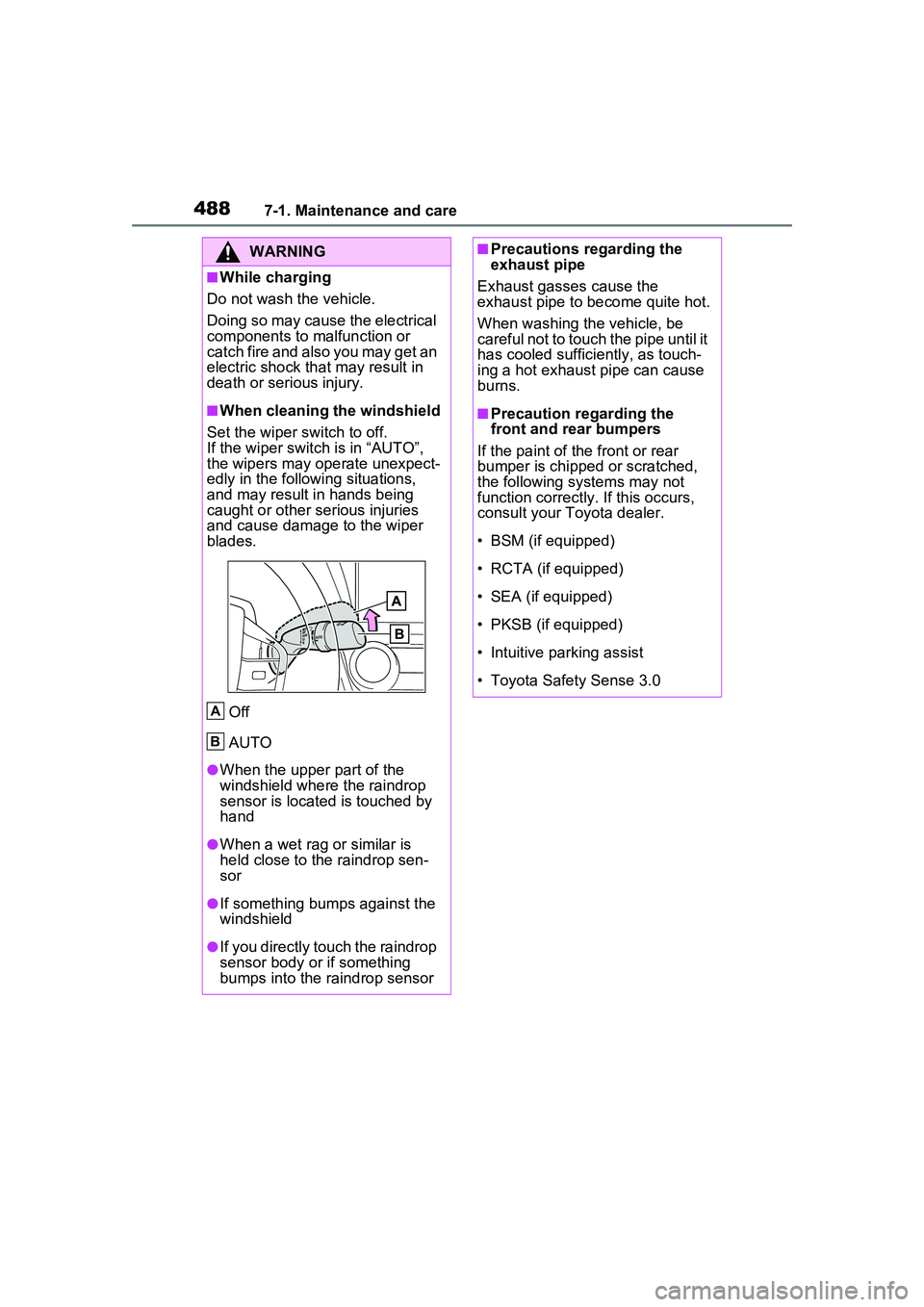
Set the wiper switch to off.
If the wiper switch is in “AUTO”,
the wipers may operate unexpect-
edly in the following situations,
and may result in hands being
caught or other serious injuries
and cause damage to the wiper
blades.
Off
AUTO
●When the upper part of the
windshield where the raindrop
sensor is located is touched by
hand
●When a wet rag or similar is
held close to the raindrop sen-
sor
●If something bumps against the
windshield
●If you directly touch the raindrop
sensor body or if something
bumps into the raindrop sensor
A
B
■Precautions regarding the
exhaust pipe
Exhaust gasses cause the
exhaust pipe to become quite hot.
When washing the vehicle, be
careful not to touch the pipe until it
has cooled sufficiently, as touch-
ing a hot exhaust pipe can cause
burns.
■Precaution regarding the
front and rear bumpers
If the paint of the front or rear
bumper is chipped or scratched,
the following systems may not
function correctly. If this occurs,
consult your Toyota dealer.
• BSM (if equipped)
• RCTA (if equipped)
• SEA (if equipped)
• PKSB (if equipped)
• Intuitive parking assist
• Toyota Safety Sense 3.0
Page 553 of 680
5538-2. Steps to take in an emergency
8
When trouble arises
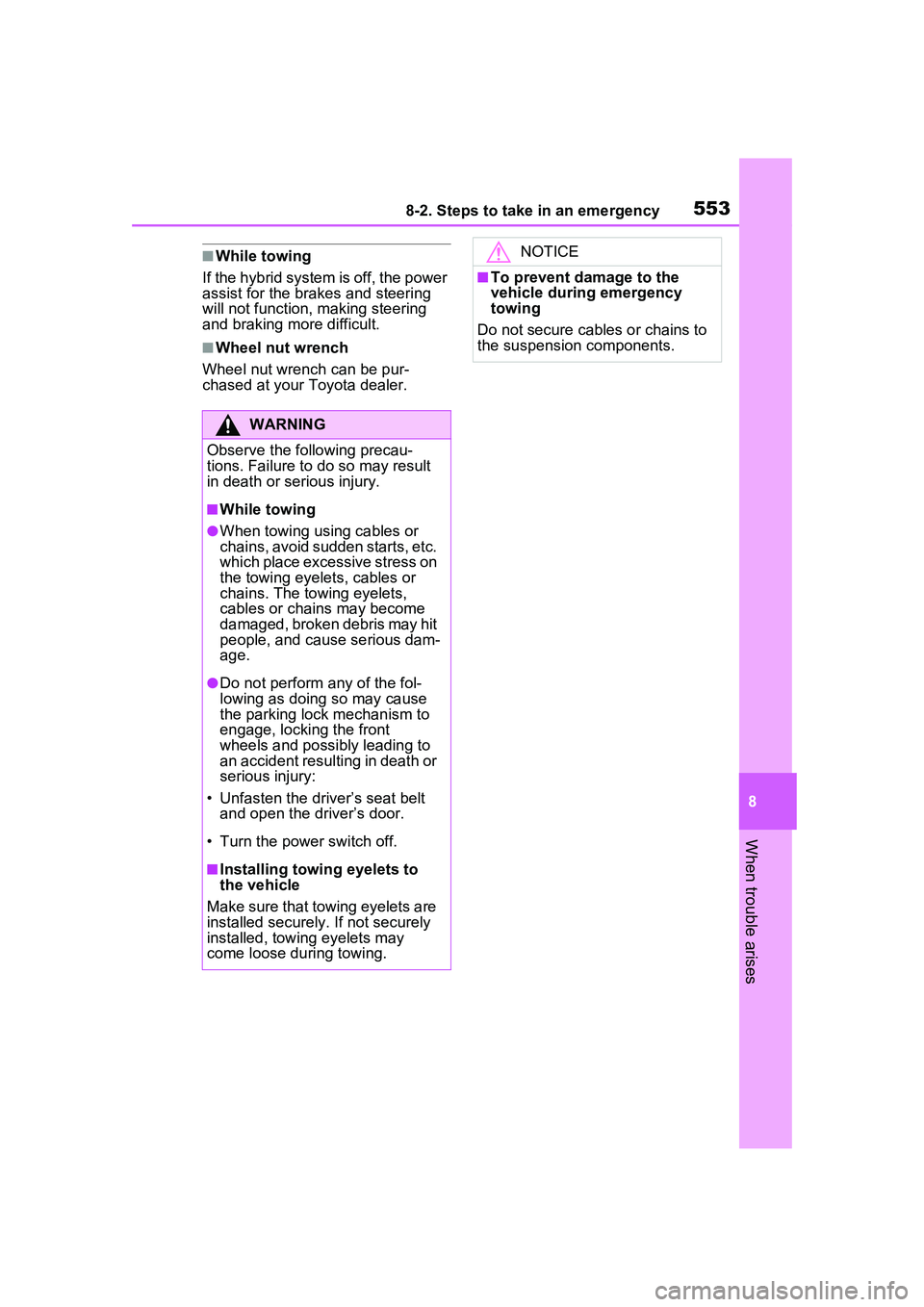
■While towing
If the hybrid system is off, the power
assist for the brakes and steering
will not function, making steering
and braking more difficult.
■Wheel nut wrench
Wheel nut wrench can be pur-
chased at your Toyota dealer.
WARNING
Observe the following precau-
tions. Failure to do so may result
in death or serious injury.
■While towing
●When towing using cables or
chains, avoid sudden starts, etc.
which place excessive stress on
the towing eyelets, cables or
chains. The towing eyelets,
cables or chains may become
damaged, broken debris may hit
people, and cause serious dam-
age.
●Do not perform any of the fol-
lowing as doing so may cause
the parking lock mechanism to
engage, locking the front
wheels and possibly leading to
an accident resulting in death or
serious injury:
• Unfasten the driver’s seat belt and open the driver’s door.
• Turn the power switch off.
■Installing towing eyelets to
the vehicle
Make sure that towing eyelets are
installed securely. If not securely
installed, towing eyelets may
come loose during towing.
NOTICE
■To prevent damage to the
vehicle during emergency
towing
Do not secure cables or chains to
the suspension components.
Page 559 of 680
5598-2. Steps to take in an emergency
8
When trouble arises
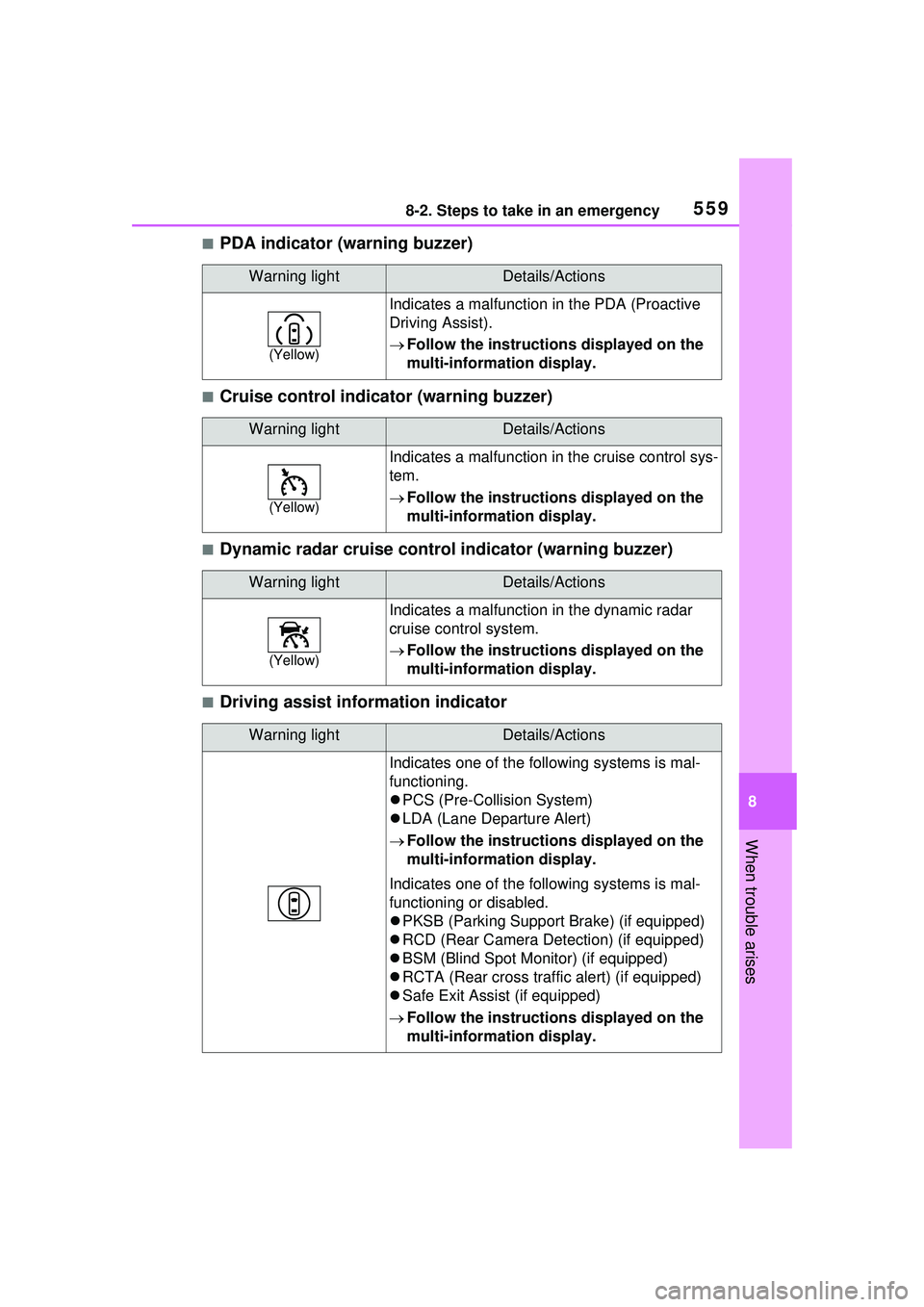
■PDA indicator (warning buzzer)
■Cruise control indicator (warning buzzer)
■Dynamic radar cruise control indicator (warning buzzer)
■Driving assist information indicator
Warning lightDetails/Actions
(Yellow)
Indicates a malfunction in the PDA (Proactive
Driving Assist).
Follow the instructions displayed on the
multi-information display.
Warning lightDetails/Actions
(Yellow)
Indicates a malfunction in the cruise control sys-
tem.
Follow the instructions displayed on the
multi-information display.
Warning lightDetails/Actions
(Yellow)
Indicates a malfunction in the dynamic radar
cruise control system.
Follow the instructions displayed on the
multi-information display.
Warning lightDetails/Actions
Indicates one of the following systems is mal-
functioning.
PCS (Pre-Collision System)
LDA (Lane Departure Alert)
Follow the instructions displayed on the
multi-information display.
Indicates one of the following systems is mal-
functioning or disabled.
PKSB (Parking Support Br ake) (if equipped)
RCD (Rear Camera Detection) (if equipped)
BSM (Blind Spot Monitor) (if equipped)
RCTA (Rear cross traffic alert) (if equipped)
Safe Exit Assist (if equipped)
Follow the instructions displayed on the
multi-information display.
Page 560 of 680
5608-2. Steps to take in an emergency
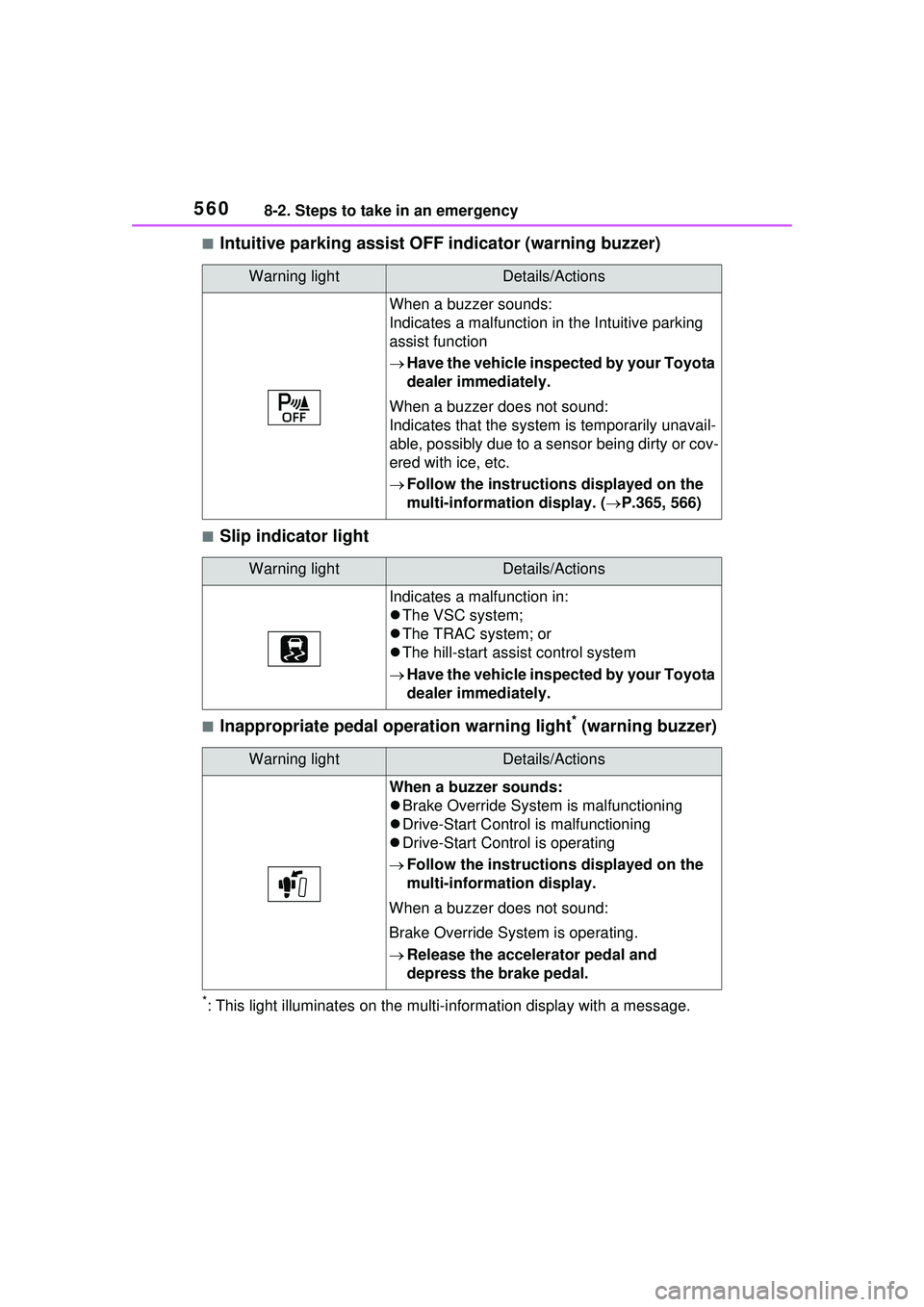
■Intuitive parking assist OFF indicator (warning buzzer)
■Slip indicator light
■Inappropriate pedal operation warning light* (warning buzzer)
*: This light illuminates on the multi-information display with a message.
Warning lightDetails/Actions
When a buzzer sounds:
Indicates a malfunction in the Intuitive parking
assist function
Have the vehicle inspected by your Toyota
dealer immediately.
When a buzzer does not sound:
Indicates that the system is temporarily unavail-
able, possibly due to a sensor being dirty or cov-
ered with ice, etc.
Follow the instructions displayed on the
multi-information display. ( P.365, 566)
Warning lightDetails/Actions
Indicates a malfunction in:
The VSC system;
The TRAC system; or
The hill-start assist control system
Have the vehicle inspected by your Toyota
dealer immediately.
Warning lightDetails/Actions
When a buzzer sounds:
Brake Override System is malfunctioning
Drive-Start Control is malfunctioning
Drive-Start Control is operating
Follow the instructions displayed on the
multi-information display.
When a buzzer does not sound:
Brake Override System is operating.
Release the accelerator pedal and
depress the brake pedal.
Page 567 of 680
5678-2. Steps to take in an emergency
8
When trouble arises
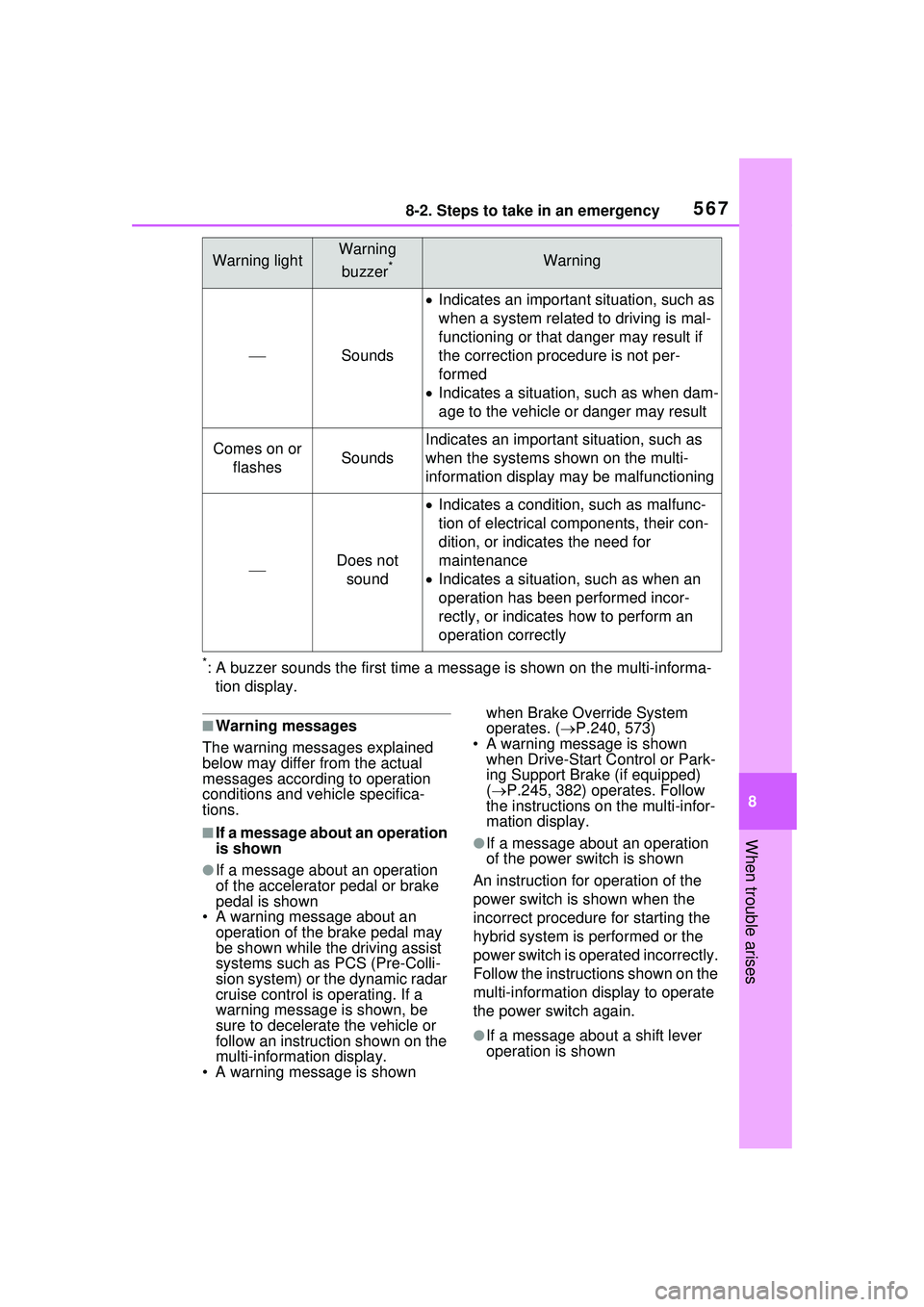
*: A buzzer sounds the first time a message is shown on the multi-informa-tion display.
■Warning messages
The warning messages explained
below may differ from the actual
messages according to operation
conditions and vehicle specifica-
tions.
■If a message about an operation
is shown
●If a message about an operation
of the accelerator pedal or brake
pedal is shown
• A warning message about an
operation of the brake pedal may
be shown while the driving assist
systems such as PCS (Pre-Colli-
sion system) or the dynamic radar
cruise control is operating. If a
warning message is shown, be
sure to decelerate the vehicle or
follow an instruction shown on the
multi-informat ion display.
• A warning message is shown when Brake Override System
operates. (
P.240, 573)
• A warning message is shown when Drive-Start Control or Park-
ing Support Brake (if equipped)
( P.245, 382) operates. Follow
the instructions on the multi-infor-
mation display.
●If a message about an operation
of the power switch is shown
An instruction for operation of the
power switch is shown when the
incorrect procedure for starting the
hybrid system is performed or the
power switch is operated incorrectly.
Follow the instructions shown on the
multi-information display to operate
the power switch again.
●If a message about a shift lever
operation is shown
Warning lightWarning
buzzer
*Warning
Sounds
Indicates an important situation, such as
when a system related to driving is mal-
functioning or that danger may result if
the correction procedure is not per-
formed
Indicates a situation, such as when dam-
age to the vehicle or danger may result
Comes on or
flashesSounds
Indicates an important situation, such as
when the systems shown on the multi-
information display ma y be malfunctioning
Does not
sound
Indicates a condition, such as malfunc-
tion of electrical components, their con-
dition, or indicates the need for
maintenance
Indicates a situation, such as when an
operation has been performed incor-
rectly, or indicates how to perform an
operation correctly
Page 569 of 680
5698-2. Steps to take in an emergency
8
When trouble arises
shift position is in N, shift the shift
position to P when the vehicle is
stopped.
■If “Hybrid System Overheated
Output Power Reduced” is
shown
The message may be shown when
driving under severe operating con-
ditions. (For example, when driving
up a long steep hill or driving up a
steep hill in reverse.)
Coping method: P.595
■If “Traction battery needs to be
protected. Shift into P to
restart.” is shown
This message is displayed when the
hybrid battery (traction battery)
charge has become extremely low
because the shift position has been
left in N for a certain amount of time.
When operating the vehicle, shift to
P and restart the hybrid system.
■If “Shift is in N Release Acceler-
ator Before Shifting” is shown
Message is displayed when the
accelerator pedal has been
depressed and the shift position is in
N. Release the accelerator pedal
and shift the shift position to D or R.
■If “Press brake when vehicle is
stopped Hybrid system may
overheat” is shown
Message is displayed when the
accelerator pedal is depressed to
maintain the vehicle position when
stopped on a upward slope, etc.
If this continues, the hybrid system
may overheat.
Release the accelerator pedal and
depress the brake pedal.
■If “Shift System Malfunction
Shifting Unavailable Drive to a
Safe Place and Stop” or “Shift
System Malfunction Driving
Unavailable” is displayed
There is a malfunction in the shift
control system. Have the vehicle
inspected by your Toyota dealer immediately.
■If “Auto Power OFF to Conserve
Battery” is shown
Power was turned off due to the
automatic power off function.
Next time when starting the hybrid
system, operate the hybrid system
for approximately 5 minutes to
recharge the 12-volt battery.
■If “Parking Assist Unavailable
Low Visibility See Owner’s Man-
ual” is displayed
Indicates one of the following sys-
tems is disabled.
● RCD (Rear Camera Detec-
tion) (if equipped)
● PKSB (Parking Support
Brake) (if equipped)
Remove any dirt or foreign matter
from the rear cameras.
■If “System Malfunction Visit
Your Dealer” is displayed
Indicates one of the following sys-
tems is disabled.
●PCS (Pre-Collision System)
●LDA (Lane Departure Alert)
●LTA (Lane Tracing Assist)
● LCA (Lane Change Assist) (if
equipped)
●AHB (Automatic High Beam)
●Dynamic radar cruise control
● RSA (Road Sign Assist) (if
equipped)
●PDA (Proactive Driving Assist)
● BSM (Blind Spot Monitor) (if
equipped)
● RCTA (Rear Cross Traffic
Alert) (if equipped)
●Safe Exit Assist (if equipped)
Page 570 of 680
5708-2. Steps to take in an emergency
●Intuitive Parking Assist
● PKSB (Parking Support
Brake) (if equipped)
● RCD (Rear Camera Detec-
tion) (if equipped)
Have the vehicle inspected by your
Toyota dealer immediately.
■If “System Stopped See
Owner’s Manual” is displayed
Indicates one of the following sys-
tems is disabled.
●PCS (Pre-Collision System)
●LDA (Lane Departure Alert)
●LTA (Lane Tracing Assist)
● LCA (Lane Change Assist) (if
equipped)
●AHB (Automatic High Beam)
●Dynamic radar cruise control
● RSA (Road Sign Assist) (if
equipped)
●PDA (Proactive Driving Assist)
● BSM (Blind Spot Monitor) (if
equipped)
● RCTA (Rear Cross Traffic
Alert) (if equipped)
●Safe Exit Assist (if equipped)
●Intuitive Parking Assist
● PKSB (Parking Support
Brake) (if equipped)
● RCD (Rear Camera Detec-
tion) (if equipped)
Follow the following correction
methods.
• Check the voltage of the 12-volt battery
• Check the sensors that the Toyota Safety Sense 3.0 uses for foreign
matter covering them. Remove them if any. (
P.285)
• Vehicles with RCD (Rear Camera Detection): Check if the back door
is open.
Indicates the sensors may not be
operating properly. ( P.289, 358,
362, 366, 376, 380)
• Check the rear bumper around the sensors used by the BSM (if
equipped), RCTA (if equipped) or
Safe Exit Assist (if equipped) for
foreign matter co vering them.
Remove them if any. ( P.355)
• Check the sensors including cam-
era sensors used by the Intuitive
parking assist, or PKSB (if
equipped), or RCD (if equipped)
for foreign matter covering them.
Remove them if any. ( P.342)
• When problems are solved and
the sensors are operational, this
indication may disappear by itself.
■If “System Stopped Front Cam-
era Low Visibility See Owner’s
Manual” is displayed
Indicates one of the following sys-
tems is disabled.
●PCS (Pre-Collision System)
●LDA (Lane Departure Alert)
●LTA (Lane Tracing Assist)
● LCA (Lane Change Assist) (if
equipped)
●AHB (Automatic High Beam)
●Dynamic radar cruise control
● RSA (Road Sign Assist) (if
equipped)
●PDA (Proactive Driving Assist)
Follow the following correction
methods.
• Using the windshield wipers, remove the dirt or foreign matter
from the windshield.
• Using the air conditioning system,
defog the windshield.
• Close the hood, remove any stick- ers, etc. to clear the obstruction in